Uninstalling some Store apps!


atinfo

Well-known member
Power User
VIP
Local time
7:42 PM
Posts
1,171
OS
Win 11 Enterprise
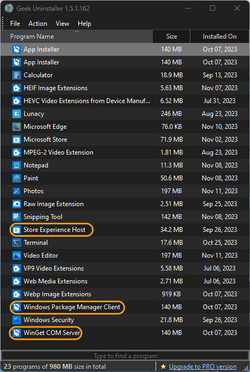
Is it safe to uninstall these (Store) apps?
s1.png

I think WinGet and WPMC were added after installing the 23H2 update.
 

My Computer My Computer

At a glance

Win 11 Enterprisei7
OS
Win 11 Enterprise
Computer type
Laptop
CPU
i7
Hard Drives
SSD
The best answer is to make a full backup with Macrium Reflect and then try removing all those apps. If Windows does not function, just restore from the backup.
 

My Computers My Computers

  • At a glance

    Windows 11 Pro 25H2 26200.8655AMD Ryzen 7 5825U with Radeon Graphics16GB
    OS
    Windows 11 Pro 25H2 26200.8655
    Computer type
    Laptop
    Manufacturer/Model
    Acemagic LX15PRO
    CPU
    AMD Ryzen 7 5825U with Radeon Graphics
    Memory
    16GB
    Screen Resolution
    1920 x 1080
    Hard Drives
    SSD 2TB
    Internet Speed
    30 Mbps
    Browser
    Brave
    Antivirus
    Webroot Secure Anywhere
    Other Info
    System 3

    Acer Swift SF114-34 laptop
    OS Windows 11 Pro 26200.8524
    CPU Pentium Silver N6000
    RAM 4GB
    SSD Samsung 970 EVO Plus SSD 2TB (an upgrade)
  • At a glance

    Windows 11 Pro 23H2 22631.2506Atom N450 1.66GHz2GB
    Operating System
    Windows 11 Pro 23H2 22631.2506
    Computer type
    Laptop
    Manufacturer/Model
    HP Mini 210-1090NR PC (bought in late 2009!)
    CPU
    Atom N450 1.66GHz
    Memory
    2GB
    Browser
    Brave
    Antivirus
    Webroot
This version of Geek Uninstaller is reporting Desktop AppInstaller 4x:
- App Installer (2x)
- Windows Package Manager
- Winget COM Server

It's the same single App package.

Do you need AppInstaller or Store Experience Host to install or run Store apps from the Store? No. But you can't reinstall Store Experience Host from the Store, it's not a downloadable package.
 

My Computer My Computer

At a glance

Windows 7
OS
Windows 7
I didn't have WinGet (before 23H2 update). I had those "App Installers" (2x) always. Also, I had "Store Experience Host", I thought it was something about Store ads and telemetry. I can't recall anything about "Windows Package Manager".

Do you mean WinGet and Windows Package Manager are safe to uninstall?
 

My Computer My Computer

At a glance

Win 11 Enterprisei7
OS
Win 11 Enterprise
Computer type
Laptop
CPU
i7
Hard Drives
SSD
I don't know. If you have a backup why not just try? Or use Revo Uninstaller Pro. It can uninstall most Windows apps.
 

My Computers My Computers

  • At a glance

    Windows 11 Pro 25H2 26200.8655AMD Ryzen 7 5825U with Radeon Graphics16GB
    OS
    Windows 11 Pro 25H2 26200.8655
    Computer type
    Laptop
    Manufacturer/Model
    Acemagic LX15PRO
    CPU
    AMD Ryzen 7 5825U with Radeon Graphics
    Memory
    16GB
    Screen Resolution
    1920 x 1080
    Hard Drives
    SSD 2TB
    Internet Speed
    30 Mbps
    Browser
    Brave
    Antivirus
    Webroot Secure Anywhere
    Other Info
    System 3

    Acer Swift SF114-34 laptop
    OS Windows 11 Pro 26200.8524
    CPU Pentium Silver N6000
    RAM 4GB
    SSD Samsung 970 EVO Plus SSD 2TB (an upgrade)
  • At a glance

    Windows 11 Pro 23H2 22631.2506Atom N450 1.66GHz2GB
    Operating System
    Windows 11 Pro 23H2 22631.2506
    Computer type
    Laptop
    Manufacturer/Model
    HP Mini 210-1090NR PC (bought in late 2009!)
    CPU
    Atom N450 1.66GHz
    Memory
    2GB
    Browser
    Brave
    Antivirus
    Webroot
I didn't have WinGet (before 23H2 update). I had those "App Installers" (2x) always. Also, I had "Store Experience Host", I thought it was something about Store ads and telemetry. I can't recall anything about "Windows Package Manager".

Do you mean WinGet and Windows Package Manager are safe to uninstall?
Do not uninstall "Windows Pocket Manager"

Because Install itself again. İ think Store needs it
 

My Computer My Computer

At a glance

Windows 11 Home - 26200.8246 - 25H2Ryzen 5500U
OS
Windows 11 Home - 26200.8246 - 25H2
Computer type
Laptop
Manufacturer/Model
Huawei Matebook D15 Ryzen 5500U 8GB / 512 SSD, Windows 11 Home Single Language
CPU
Ryzen 5500U
Keyboard
Logitech K380, G15
Mouse
Logi m350, Everest SM-620, Logitech G9, Lecoo WS210
Browser
Chrome (Desktop), Vivaldi (Mobile)
Antivirus
Windows Security, (Alternative Eset)
By the way, I don't have Winget COM Server and Store Experience Host.
 

My Computer My Computer

At a glance

Windows 11 Home - 26200.8246 - 25H2Ryzen 5500U
OS
Windows 11 Home - 26200.8246 - 25H2
Computer type
Laptop
Manufacturer/Model
Huawei Matebook D15 Ryzen 5500U 8GB / 512 SSD, Windows 11 Home Single Language
CPU
Ryzen 5500U
Keyboard
Logitech K380, G15
Mouse
Logi m350, Everest SM-620, Logitech G9, Lecoo WS210
Browser
Chrome (Desktop), Vivaldi (Mobile)
Antivirus
Windows Security, (Alternative Eset)
Revo Uninstaller Pro
Geek does the same (it removes all Registry footprints). I had a bad experience with Revo (a couple of years ago)! It digs (scans and deletes) the grave (Registry) deeply, many times!

Do not uninstall "Windows Pocket Manager"
Are you sure?
 

My Computer My Computer

At a glance

Win 11 Enterprisei7
OS
Win 11 Enterprise
Computer type
Laptop
CPU
i7
Hard Drives
SSD
I uninstalled everything, including the Store, I don't have problems!
I only have 4 things left that I can't/shouldn't get rid of...

0005597.png
 

My Computers My Computers

  • At a glance

    Windows 11 Pro
    OS
    Windows 11 Pro
    Computer type
    PC/Desktop
    Manufacturer/Model
    ASUS ROG Strix
  • At a glance

    Windows 11 Pro
    Operating System
    Windows 11 Pro
    Computer type
    Laptop
    Manufacturer/Model
    ASUS VivoBook

My Computer My Computer

At a glance

Win 11 Enterprisei7
OS
Win 11 Enterprise
Computer type
Laptop
CPU
i7
Hard Drives
SSD
Geek does the same (it removes all Registry footprints). I had a bad experience with Revo (a couple of years ago)! It digs (scans and deletes) the grave (Registry) deeply, many times!


Are you sure?

Try it, it will reinstall itself after a while.
 

My Computer My Computer

At a glance

Windows 11 Home - 26200.8246 - 25H2Ryzen 5500U
OS
Windows 11 Home - 26200.8246 - 25H2
Computer type
Laptop
Manufacturer/Model
Huawei Matebook D15 Ryzen 5500U 8GB / 512 SSD, Windows 11 Home Single Language
CPU
Ryzen 5500U
Keyboard
Logitech K380, G15
Mouse
Logi m350, Everest SM-620, Logitech G9, Lecoo WS210
Browser
Chrome (Desktop), Vivaldi (Mobile)
Antivirus
Windows Security, (Alternative Eset)
AppInstaller is the parent name of the package which includes WinGet. AppInstaller is what allows you to click on a downloaded (or provided) Appx package file in File Explorer and have it auto-install. WinGet command is bundled inside AppInstaller, it doesn't exist outside of it. Where Geek Uninstaller is getting confused, it's reporting it more than once.

Store Experience Host is an add-on to allow auto-play videos, for like when you're browsing Call of Duty and they want to show gameplay clips so you're more likely to buy the game.
 

My Computer My Computer

At a glance

Windows 7
OS
Windows 7
I know "Store" is the cancerous tumour. But I need it.
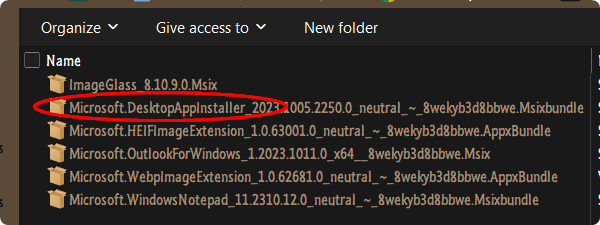
If I want to try a Store app, I get it from the MS Store Generator site, but you have to keep the AppInstaller package...

0005605.png
 

My Computers My Computers

  • At a glance

    Windows 11 Pro
    OS
    Windows 11 Pro
    Computer type
    PC/Desktop
    Manufacturer/Model
    ASUS ROG Strix
  • At a glance

    Windows 11 Pro
    Operating System
    Windows 11 Pro
    Computer type
    Laptop
    Manufacturer/Model
    ASUS VivoBook
That's only if you want to use Explorer to install Appx packages. You can sideload using PowerShell commands, but AppInstaller is very handy because it will find any missing package dependencies while it's installing.

Normal users should keep AppInstaller, expert users can learn the PS syntax.
 

My Computer My Computer

At a glance

Windows 7
OS
Windows 7
I don't have Winget COM Server and Store Experience Host.
:think:...

I tried to uninstall WinGet (with Geek). It doesn't do anything.

If I want to try a Store app, I get it from the MS Store Generator site
Same here (almost always). I need the Store for some pre-installed app' updates. I rarely use PowerShell to install the appx installer. Always from Explorer.

Store Experience Host is an add-on to allow auto-play videos
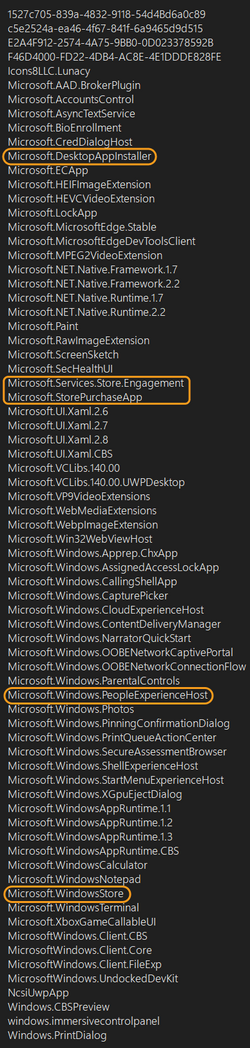
I doubt it (to be just for auto-play). It has to have something with ads. I have three "Store" names in my "System Apps" list. The "People" app is uninstalled, but the "PeopleExperimentHost" app is on the list. AFAIK, all "Experiment" tags (in the apps' name) are about telemetry/ads/debugging!

s1.png
 

My Computer My Computer

At a glance

Win 11 Enterprisei7
OS
Win 11 Enterprise
Computer type
Laptop
CPU
i7
Hard Drives
SSD
Back
Top Bottom