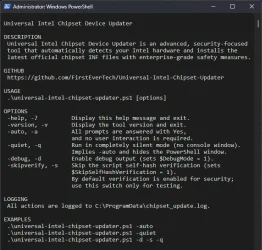
Universal Intel Chipset Device Updater


Looks like a useful utility. :-)
 

My Computers My Computers

  • At a glance

    Win 11 Pro 25H2, Build 26200.8894Intel Core i5 1450064GB DDR4GeForce RTX 4060
    OS
    Win 11 Pro 25H2, Build 26200.8894
    Computer type
    PC/Desktop
    Manufacturer/Model
    Home Brew
    CPU
    Intel Core i5 14500
    Motherboard
    Gigabyte B760M G P WIFI
    Memory
    64GB DDR4
    Graphics Card(s)
    GeForce RTX 4060
    Sound Card
    Chipset Realtek
    Monitor(s) Displays
    LG 45" Ultragear, Acer 24" 1080p
    Screen Resolution
    5120x1440, 1920x1080
    Hard Drives
    Crucial P310 2TB 2280 PCIe Gen4 3D NAND NVMe M.2 SSD (O/S)
    Silicon Power 2TB US75 NVMe PCIe Gen4 M.2 2280 SSD (backup)
    Crucial BX500 2TB 3D NAND (2nd backup)
    Seagate 4TB Ironwolf, rotating HDD archive files
    External off-line backup Drives: 2 NVMe 4TB drives in external enclosures
    PSU
    Thermaltake Toughpower GF3 750W
    Case
    LIAN LI LANCOOL 216 E-ATX PC Case
    Cooling
    Lots of fans!
    Keyboard
    Microsoft Comfort Curve 2000
    Mouse
    Logitech G305
    Internet Speed
    Verizon FiOS 1GB
    Browser
    Firefox
    Antivirus
    Malware Bytes & Windows Defender Security
  • At a glance

    Win 11 Pro 25H2, Build 26200.8894Intel Core i5 1440032GB DDR5Intel 700 Embedded GPU
    Operating System
    Win 11 Pro 25H2, Build 26200.8894
    Computer type
    PC/Desktop
    Manufacturer/Model
    Home Brew
    CPU
    Intel Core i5 14400
    Motherboard
    Gigabyte B760M DS3H AX
    Memory
    32GB DDR5
    Graphics card(s)
    Intel 700 Embedded GPU
    Sound Card
    Realtek Embedded
    Monitor(s) Displays
    27" HP 1080p
    Screen Resolution
    1920x1080
    Hard Drives
    Crucial P310 2TB 2280 PCIe Gen4 eD NAND PCIe SSD
    Samsung EVO 990 2TB NVMe Gen4 SSD
    Samsung 2TB SATA SSD
    PSU
    Thermaltake Smart BM3 650W
    Case
    Okinos Micro ATX Case
    Cooling
    Fans
    Keyboard
    Microsoft Comfort Curve 2000
    Mouse
    Logitech G305
    Internet Speed
    Verizon FiOS 1GB
    Browser
    Firefox
    Antivirus
    Malware Bytes & Windows Defender Security
  • Nimo N171 17" Laptop, (Intel i3-1215U, 16GB RAM, 2TB NVMe, Win11 Pro)
    Acemagic Vista Mini PC V1 (Intel N150, 16GB RAM, 1TB NVMe, Win11 Pro)
    HP ENVY h8-1540t, (24GB RAM, 2TB SSD, 2TB HDD, Win11 Pro)
Hi everyone! 😊

Just a quick update on the Universal Intel Chipset Updater.

The tool has been running absolutely flawlessly for quite some time now — no new bug reports, no issues, despite being used by thousands of people. Most questions I get turn out to be related to the users' own systems, not the updater itself.


Error 1603 during MSI installation

Since everything has been stable, I recently took some time to help a user who was struggling with a corrupted previous installation of the Intel Chipset Device Software. Because of that corruption, they couldn't install any newer versions — even those offered by my updater — and kept running into Error 1603.

I helped them clean up the broken installation manually, and in the end, they were finally able to use the updater successfully. 🎯

This issue isn't limited to Intel Chipset Device Software — Error 1603 can affect any MSI package when the old installation is damaged. So I documented the entire solution, hoping it might help others in the future.

Full case and solution here:
github.com/FirstEverTech/Universal-Intel-Chipset-Updater/issues/14#issuecomment-4010882232

Hope this helps someone!
 

My Computer My Computer

At a glance

Windows 11 Pro Insider PreviewIntel Xeon E5-1680 v2 OC @ 4.4GHzCorsair Quad DDR3-2400MHz CL10ASUS TUF Gaming GeForce RTX 4070 Ti OC
OS
Windows 11 Pro Insider Preview
Computer type
PC/Desktop
Manufacturer/Model
ASUS-ish Build
CPU
Intel Xeon E5-1680 v2 OC @ 4.4GHz
Motherboard
ASUS P9X79 Pro (Modded Bios)
Memory
Corsair Quad DDR3-2400MHz CL10
Graphics Card(s)
ASUS TUF Gaming GeForce RTX 4070 Ti OC
Sound Card
Realtek ALC898
Monitor(s) Displays
ASUS ROG Swift OLED PG48UQ OC @ 138Hz
Screen Resolution
3840 x 2160 (4K)
Hard Drives
Samsung SSD 990 Pro 4TB (NVMe)
Samsung SSD 870 QVO 8TB (SATA)
PSU
Cooler Master Silent Pro M2 1500W
Case
Cooler Master MasterCase SL600M Black
Cooling
ARCTIC Liquid Freezer II 240
Keyboard
Logitech G915 LIGHTSPEED
Mouse
Logitech G900 Chaos Spectrum
Internet Speed
Download: 930 Mbps / Upload: 105 Mbps
Other Info
Added PCIe cards: Intel WiFi 7 BE200 (with BT 5.4) and USB 3.2 Gen 2 10Gbps

Heads-up for Admins: Upcoming Update with Admin-Friendly Features​

I’m happy to announce that tomorrow I’ll be releasing a new version of the Universal Intel Chipset Device Updater with several enhancements specifically designed for administrators and automated deployments.

What’s new?

The script will now include dedicated command-line options. These allow for fully unattended execution, silent operation, and fine-grained control – perfect for integrating into MDM solutions like Microsoft Intune, SCCM, Workspace ONE, or PDQ Deploy.

Key improvement:

The PowerShell script (.ps1) can now be used completely independently – no more need for the batch wrapper (Run.bat). Of course, if you’re already using the .bat file, it will continue to work without any issues; the script is fully backward compatible.

Why this matters for admins:

By using the .ps1 directly, you avoid the common pitfalls associated with self-extracting executables (SFX) – no more concerns about unsigned code, local certificate warnings, or antivirus false positives. The script is just plain text, easily reviewable, and can be executed with your preferred execution policy settings.

Once the new version is live, you’ll be able to grab it from the usual place (GitHub) and soon also from the PowerShell Gallery.

Stay tuned!

1773112462874.webp
 

My Computer My Computer

At a glance

Windows 11 Pro Insider PreviewIntel Xeon E5-1680 v2 OC @ 4.4GHzCorsair Quad DDR3-2400MHz CL10ASUS TUF Gaming GeForce RTX 4070 Ti OC
OS
Windows 11 Pro Insider Preview
Computer type
PC/Desktop
Manufacturer/Model
ASUS-ish Build
CPU
Intel Xeon E5-1680 v2 OC @ 4.4GHz
Motherboard
ASUS P9X79 Pro (Modded Bios)
Memory
Corsair Quad DDR3-2400MHz CL10
Graphics Card(s)
ASUS TUF Gaming GeForce RTX 4070 Ti OC
Sound Card
Realtek ALC898
Monitor(s) Displays
ASUS ROG Swift OLED PG48UQ OC @ 138Hz
Screen Resolution
3840 x 2160 (4K)
Hard Drives
Samsung SSD 990 Pro 4TB (NVMe)
Samsung SSD 870 QVO 8TB (SATA)
PSU
Cooler Master Silent Pro M2 1500W
Case
Cooler Master MasterCase SL600M Black
Cooling
ARCTIC Liquid Freezer II 240
Keyboard
Logitech G915 LIGHTSPEED
Mouse
Logitech G900 Chaos Spectrum
Internet Speed
Download: 930 Mbps / Upload: 105 Mbps
Other Info
Added PCIe cards: Intel WiFi 7 BE200 (with BT 5.4) and USB 3.2 Gen 2 10Gbps

New versions = lots of improvements!​

Bonus - completely rebuilt Universal Intel Wi-Fi and Bluetooth Drivers Updater

Now you can install it from PowerShell Gallery (Run PowerShell as Administrator):
Code:
Install-Script universal-intel-chipset-device-updater

Manual update from PowerShell Gallery for v2026.03.0012 or older (Run PowerShell as Administrator):
Code:
Update-Script -Name universal-intel-chipset-device-updater

Run from PowerShell Gallery (Run PowerShell as Administrator):
Code:
universal-intel-chipset-device-updater

Options:​

Code:
| Option | Description |
|--------|-------------|
| `-help`, `-?` | Display help and exit. |
| `-version`, `-v` | Display the tool version and exit. |
| `-auto`, `-a` | Automatically answer all prompts with Yes — no user interaction required. |
| `-quiet`, `-q` | Run in completely silent mode (no console window). Implies `-auto` and hides the PowerShell window. |
| `-beta` | Use beta database for new hardware testing (available from version 2026.03.0013). |
| `-debug`, `-d` | Enable debug output. |
| `-skipverify`, `-s` | Skip the script self-hash verification. **Use only for testing!** |

Changelog:​

v2026.03.0013

Improvements​

  • Added multi-database support with -beta and -developer flags for early testing of new Intel hardware platforms
  • Implemented automatic script update via PowerShell Gallery when new version is detected
  • Improved console exit behavior: screen clears after credits, showing clean thank you message before returning to prompt
  • Removed unnecessary 5-second wait at the end of -auto / -quiet runs for faster execution

Technical​

  • Added warning banner when running in non-default database modes
  • Updated update detection logic to leverage native PowerShell Gallery commands
  • Console output refinements for better user experience in different launch modes
  • Internal cleanup of auto-mode exit routine

v2026.03.0012

Improvements​

  • Improved internal version handling and update detection logic
  • Minor refinements in console output formatting
  • General stability improvements

Technical​

  • Internal script cleanup
  • Minor workflow optimizations

v2026.03.0011

Improvements​

  • Improved platform detection reliability
  • Refined progress and status messages

Technical​

  • Code refactoring for maintainability
  • Minor performance improvements in detection routines

v2026.03.0010

Improvements​

  • Improved INF database processing reliability
  • Better handling of edge cases during chipset platform detection

Technical​

  • Script logic refinements for chipset platform mapping
  • Minor logging improvements
 

My Computer My Computer

At a glance

Windows 11 Pro Insider PreviewIntel Xeon E5-1680 v2 OC @ 4.4GHzCorsair Quad DDR3-2400MHz CL10ASUS TUF Gaming GeForce RTX 4070 Ti OC
OS
Windows 11 Pro Insider Preview
Computer type
PC/Desktop
Manufacturer/Model
ASUS-ish Build
CPU
Intel Xeon E5-1680 v2 OC @ 4.4GHz
Motherboard
ASUS P9X79 Pro (Modded Bios)
Memory
Corsair Quad DDR3-2400MHz CL10
Graphics Card(s)
ASUS TUF Gaming GeForce RTX 4070 Ti OC
Sound Card
Realtek ALC898
Monitor(s) Displays
ASUS ROG Swift OLED PG48UQ OC @ 138Hz
Screen Resolution
3840 x 2160 (4K)
Hard Drives
Samsung SSD 990 Pro 4TB (NVMe)
Samsung SSD 870 QVO 8TB (SATA)
PSU
Cooler Master Silent Pro M2 1500W
Case
Cooler Master MasterCase SL600M Black
Cooling
ARCTIC Liquid Freezer II 240
Keyboard
Logitech G915 LIGHTSPEED
Mouse
Logitech G900 Chaos Spectrum
Internet Speed
Download: 930 Mbps / Upload: 105 Mbps
Other Info
Added PCIe cards: Intel WiFi 7 BE200 (with BT 5.4) and USB 3.2 Gen 2 10Gbps
What a mess... unfortunately, you can't edit the main post on this forum :-(
The original Intel Wi-Fi & Bluetooth Driver Updater post has been renamed to Universal Intel Chipset Device Updater, but the content still refers to the old post.

Currently, my two projects have been updated, and I don’t know where to post the updates...

I think the best solution would be to delete this post and create two separate ones:
  • Universal Intel Chipset Device Updater
  • Universal Intel Wi-Fi & Bluetooth Drivers Updater
In the main post, I would only include information about the project and links, and the latest versions would appear in newly added replies.

Other forums allow editing, so it’s easy to update the version in the main post :/

Just in case, I'm posting the links...

Universal Intel Chipset Device Updater: GitHub | v2026.03.0013 | Download: Direct Download
Universal Intel Wi-Fi & Bluetooth Drivers Updater: GitHub | v2026.03.0002 | Download: Direct Download
 

My Computer My Computer

At a glance

Windows 11 Pro Insider PreviewIntel Xeon E5-1680 v2 OC @ 4.4GHzCorsair Quad DDR3-2400MHz CL10ASUS TUF Gaming GeForce RTX 4070 Ti OC
OS
Windows 11 Pro Insider Preview
Computer type
PC/Desktop
Manufacturer/Model
ASUS-ish Build
CPU
Intel Xeon E5-1680 v2 OC @ 4.4GHz
Motherboard
ASUS P9X79 Pro (Modded Bios)
Memory
Corsair Quad DDR3-2400MHz CL10
Graphics Card(s)
ASUS TUF Gaming GeForce RTX 4070 Ti OC
Sound Card
Realtek ALC898
Monitor(s) Displays
ASUS ROG Swift OLED PG48UQ OC @ 138Hz
Screen Resolution
3840 x 2160 (4K)
Hard Drives
Samsung SSD 990 Pro 4TB (NVMe)
Samsung SSD 870 QVO 8TB (SATA)
PSU
Cooler Master Silent Pro M2 1500W
Case
Cooler Master MasterCase SL600M Black
Cooling
ARCTIC Liquid Freezer II 240
Keyboard
Logitech G915 LIGHTSPEED
Mouse
Logitech G900 Chaos Spectrum
Internet Speed
Download: 930 Mbps / Upload: 105 Mbps
Other Info
Added PCIe cards: Intel WiFi 7 BE200 (with BT 5.4) and USB 3.2 Gen 2 10Gbps
Caution:
v2026.03.0002 users: If you encounter a hash verification error when updating, please download v2026.03.0003 manually.
This was caused by an incorrect filename in the auto-update URL — fixed in v2026.03.0003.
All notable changes to the Universal Intel Wi-Fi and Bluetooth Drivers Updater project will be documented in this file.
The format is based on Keep a Changelog, and this project adheres to Semantic Versioning.


Release Notes: Release v2026.03.0003 - Release Notes · FirstEverTech/Universal-Intel-WiFi-BT-Updater
Direct Download: WiFi-BT-Updater-2026.03.0003-Win10-Win11.exe
  • Microsoft WHCP Digital Signature Verification: All downloaded CAB driver packages are now verified against the Microsoft Windows Hardware Compatibility Publisher certificate before installation — after SHA-256 hash check and before expand.exe extraction; installation is aborted on any failure; security architecture is now fully symmetric with Universal Intel Chipset Device Updater
  • Legacy Device Support: Database files (intel-bt-driver-latest.md, intel-wifi-driver-latest.md) now support optional per-device Latest Version and Release Date columns; a dedicated ## Legacy Devices section tracks EOL devices with their last available driver version; script displays [LEGACY] indicator and installs the correct last-available CAB automatically — no script update required when Intel discontinues a device
  • First Legacy Entry: Intel AX200 Bluetooth (PID 0029) — dropped by Intel in 24.10.0.4 (11/10/2025); Wi-Fi for AX200 remains fully supported
  • Per-DEV Wi-Fi Download Blocks: intel-wifi-drivers-download.txt rebuilt to support per-device CAB blocks, mirroring the existing BT parser structure; global header ensures full backward compatibility with v2026.03.0002
  • Auto-Launch After Update Download: After downloading a newer version, the updater now prompts to exit and launch the new version automatically (Start-Process + exit 100) — consistent with Universal Intel Chipset Device Updater behavior
  • Expanded Wi-Fi Hardware Coverage: Added 5 previously missing adapter DEV IDs — AX203 (2030), AX101 (1010), Wireless-AC 9260 (9260), Wireless-AC 9461 (9461), Wireless-AC 9462 (31DC)
  • .ICONURI in PSScriptInfo: PowerShell Gallery listing now displays the project icon
  • pnputil Exit Code Handling: Both pnputil /add-driver and pnputil /update-device calls now correctly handle all real-world exit codes — 259 (driver already staged), 1 (device already on best driver, relevant for force reinstall), 3010 (success, reboot required); force reinstall now works correctly in all scenarios
  • Auto-Update Filename: Download URL corrected from WiFiBT-Updater-* to WiFi-BT-Updater-* to match actual release filenames; v2026.03.0002 users who encounter a hash error during auto-update should download v2026.03.0003 manually
  • $isSFX Detection Pattern: Pattern corrected to match actual script filename universal-intel-wifi-bt-driver-updater*
  • WHCP Digital Signature Verification: See Added section above
 

My Computer My Computer

At a glance

Windows 11 Pro Insider PreviewIntel Xeon E5-1680 v2 OC @ 4.4GHzCorsair Quad DDR3-2400MHz CL10ASUS TUF Gaming GeForce RTX 4070 Ti OC
OS
Windows 11 Pro Insider Preview
Computer type
PC/Desktop
Manufacturer/Model
ASUS-ish Build
CPU
Intel Xeon E5-1680 v2 OC @ 4.4GHz
Motherboard
ASUS P9X79 Pro (Modded Bios)
Memory
Corsair Quad DDR3-2400MHz CL10
Graphics Card(s)
ASUS TUF Gaming GeForce RTX 4070 Ti OC
Sound Card
Realtek ALC898
Monitor(s) Displays
ASUS ROG Swift OLED PG48UQ OC @ 138Hz
Screen Resolution
3840 x 2160 (4K)
Hard Drives
Samsung SSD 990 Pro 4TB (NVMe)
Samsung SSD 870 QVO 8TB (SATA)
PSU
Cooler Master Silent Pro M2 1500W
Case
Cooler Master MasterCase SL600M Black
Cooling
ARCTIC Liquid Freezer II 240
Keyboard
Logitech G915 LIGHTSPEED
Mouse
Logitech G900 Chaos Spectrum
Internet Speed
Download: 930 Mbps / Upload: 105 Mbps
Other Info
Added PCIe cards: Intel WiFi 7 BE200 (with BT 5.4) and USB 3.2 Gen 2 10Gbps
Update: 21/04/2026
  • Added new Intel Chipset Device Software installer 10.1.20490.8818 (06/02/2026)
  • Reduced EXE installer size from 107MB to 11MB - MSI file (or 5MB - ZIP version used by the updater)
  • Updated Intel Chipset INF Files database: intel-chipset-infs-latest.md
  • No need to change the updater code
 

My Computer My Computer

At a glance

Windows 11 Pro Insider PreviewIntel Xeon E5-1680 v2 OC @ 4.4GHzCorsair Quad DDR3-2400MHz CL10ASUS TUF Gaming GeForce RTX 4070 Ti OC
OS
Windows 11 Pro Insider Preview
Computer type
PC/Desktop
Manufacturer/Model
ASUS-ish Build
CPU
Intel Xeon E5-1680 v2 OC @ 4.4GHz
Motherboard
ASUS P9X79 Pro (Modded Bios)
Memory
Corsair Quad DDR3-2400MHz CL10
Graphics Card(s)
ASUS TUF Gaming GeForce RTX 4070 Ti OC
Sound Card
Realtek ALC898
Monitor(s) Displays
ASUS ROG Swift OLED PG48UQ OC @ 138Hz
Screen Resolution
3840 x 2160 (4K)
Hard Drives
Samsung SSD 990 Pro 4TB (NVMe)
Samsung SSD 870 QVO 8TB (SATA)
PSU
Cooler Master Silent Pro M2 1500W
Case
Cooler Master MasterCase SL600M Black
Cooling
ARCTIC Liquid Freezer II 240
Keyboard
Logitech G915 LIGHTSPEED
Mouse
Logitech G900 Chaos Spectrum
Internet Speed
Download: 930 Mbps / Upload: 105 Mbps
Other Info
Added PCIe cards: Intel WiFi 7 BE200 (with BT 5.4) and USB 3.2 Gen 2 10Gbps

🚀 Release: v2026.05.0014​

🆕 What's New​

Intel Platform Scanner 7.1 (Database Generation)​

The scanner script (Intel-Platform-Scanner.ps1) has been significantly improved to produce a cleaner, more accurate intel-chipset-infs-latest.md database:

  • Fixed ArrowLake generation – now correctly shows 15th Gen Core/Core Ultra 200 (was 14th Gen)
  • Added missing generic platforms – ArrowLake, RaptorLake, AlderLake, TigerLake, CometLake, IceLake, Lakefield, CoffeeLake, KabyLake, Skylake, Crystalwell now have proper Order values and appear in correct chronological order
  • PCH Family sorting – all PCH entries (including LynxPoint, PantherPoint, CougarPoint, Wellsburg, Patsburg, Lewisburg, Emmitsburg, etc.) now follow a consistent newest-to-oldest order
  • MeteorLake PCH moved – MeteorLake PCH-N/H/S relocated from CLIENT - Core to PCH Family (correct logical category)
  • DmaSec extensions – six *_Extension-Dmasec entries moved to PCH Family with proper generation descriptions
  • IceLakeX reclassified – moved from XEON / SERVER to WORKSTATION / HEDT
  • Legend cleanup – platforms without dedicated INF files (e.g., Emerald Rapids, Ice Lake-SP, Cascade Lake-X) now have a * and an explanatory note in the footer
  • New notes in MD footer:
    • Wildcat Lake shares HWIDs with Panther Lake
    • Panther Lake H/U are merged into a single entry (same INF)
    • 16th generation (Lunar Lake) is classified under ATOM / LOW POWER
    • Platforms marked with * have no dedicated INF (handled by adjacent INF or inbox drivers)
  • Fixed duplicate type suffix – Generation field no longer ends with redundant - Desktop/Mobile

Universal Intel Chipset Device Updater (Display Improvements)​

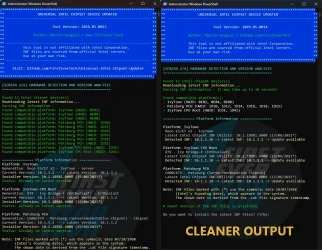
The console output in [SCREEN 2/4] is now much cleaner and more readable:

  • Grouped HWID display – instead of one line per device, platforms are shown with their HWID list (e.g., - IvyTown (HWID: 0E02, 0E04, 0E08))
  • Compact platform information– each platform uses only 3 lines:
    • Platform name (white)
    • Generation text (gray) – without the word Generation: (prevents long names from wrapping)
    • Latest Intel Chipset INF Utility (gray)
    • Detected → Latest → Status (colored: green/yellow/magenta)
  • Parsing hint – Parsing INF information - it may take up to 30 seconds! (replaces the old ambiguous ...)
  • Simplified header banner – removed redundant separator lines and the Visit: row; author line now includes GitHub link
  • Better Windows Inbox handling – inbox platforms are shown in a compact grouped list, not interleaved with regular updates
  • Extra blank lines removed – no more double empty lines before the platform information section
image

📋 Release Files​

  • universal-intel-chipset-device-updater.ps1 – Main updater script (v2026.05.0014)
  • ChipsetUpdater-2026.05.0014-Win10-Win11.exe – Self-extracting package (includes updated script)
 

Attachments

  • 1778849635374.webp
    1778849635374.webp
    213.5 KB · Views: 2

My Computer My Computer

At a glance

Windows 11 Pro Insider PreviewIntel Xeon E5-1680 v2 OC @ 4.4GHzCorsair Quad DDR3-2400MHz CL10ASUS TUF Gaming GeForce RTX 4070 Ti OC
OS
Windows 11 Pro Insider Preview
Computer type
PC/Desktop
Manufacturer/Model
ASUS-ish Build
CPU
Intel Xeon E5-1680 v2 OC @ 4.4GHz
Motherboard
ASUS P9X79 Pro (Modded Bios)
Memory
Corsair Quad DDR3-2400MHz CL10
Graphics Card(s)
ASUS TUF Gaming GeForce RTX 4070 Ti OC
Sound Card
Realtek ALC898
Monitor(s) Displays
ASUS ROG Swift OLED PG48UQ OC @ 138Hz
Screen Resolution
3840 x 2160 (4K)
Hard Drives
Samsung SSD 990 Pro 4TB (NVMe)
Samsung SSD 870 QVO 8TB (SATA)
PSU
Cooler Master Silent Pro M2 1500W
Case
Cooler Master MasterCase SL600M Black
Cooling
ARCTIC Liquid Freezer II 240
Keyboard
Logitech G915 LIGHTSPEED
Mouse
Logitech G900 Chaos Spectrum
Internet Speed
Download: 930 Mbps / Upload: 105 Mbps
Other Info
Added PCIe cards: Intel WiFi 7 BE200 (with BT 5.4) and USB 3.2 Gen 2 10Gbps

My Computer My Computer

At a glance

Windows 11 Pro Insider PreviewIntel Xeon E5-1680 v2 OC @ 4.4GHzCorsair Quad DDR3-2400MHz CL10ASUS TUF Gaming GeForce RTX 4070 Ti OC
OS
Windows 11 Pro Insider Preview
Computer type
PC/Desktop
Manufacturer/Model
ASUS-ish Build
CPU
Intel Xeon E5-1680 v2 OC @ 4.4GHz
Motherboard
ASUS P9X79 Pro (Modded Bios)
Memory
Corsair Quad DDR3-2400MHz CL10
Graphics Card(s)
ASUS TUF Gaming GeForce RTX 4070 Ti OC
Sound Card
Realtek ALC898
Monitor(s) Displays
ASUS ROG Swift OLED PG48UQ OC @ 138Hz
Screen Resolution
3840 x 2160 (4K)
Hard Drives
Samsung SSD 990 Pro 4TB (NVMe)
Samsung SSD 870 QVO 8TB (SATA)
PSU
Cooler Master Silent Pro M2 1500W
Case
Cooler Master MasterCase SL600M Black
Cooling
ARCTIC Liquid Freezer II 240
Keyboard
Logitech G915 LIGHTSPEED
Mouse
Logitech G900 Chaos Spectrum
Internet Speed
Download: 930 Mbps / Upload: 105 Mbps
Other Info
Added PCIe cards: Intel WiFi 7 BE200 (with BT 5.4) and USB 3.2 Gen 2 10Gbps
DATABASE UPDATE

Universal Intel Chipset Device Updater now supports Intel Chipset Device Software v10.1.20551.8850 installer.

You can find the latest INF version for your system in the intel-chipset-infs-latest.md file or just run the updater and it will do it for you. The update uses a debloated msi version of the Intel installer without .NET Framework 4.7.2 (which cannot be installed on Windows 11 or new Windows 10 builds anyway).

Debloated MSI version: 11.4 MB (10.5%) vs. the 108 MB EXE version.
The total size of the required files for all supported platforms is just 2.8 MB, which compresses down to 0.5 MB. Of course, Intel also bundles their branded installer and an unnecessary .NET Framework installer, bringing the total size to 108 MB.

Screenshot2026-07-17111150.png
 

My Computer My Computer

At a glance

Windows 11 Pro Insider PreviewIntel Xeon E5-1680 v2 OC @ 4.4GHzCorsair Quad DDR3-2400MHz CL10ASUS TUF Gaming GeForce RTX 4070 Ti OC
OS
Windows 11 Pro Insider Preview
Computer type
PC/Desktop
Manufacturer/Model
ASUS-ish Build
CPU
Intel Xeon E5-1680 v2 OC @ 4.4GHz
Motherboard
ASUS P9X79 Pro (Modded Bios)
Memory
Corsair Quad DDR3-2400MHz CL10
Graphics Card(s)
ASUS TUF Gaming GeForce RTX 4070 Ti OC
Sound Card
Realtek ALC898
Monitor(s) Displays
ASUS ROG Swift OLED PG48UQ OC @ 138Hz
Screen Resolution
3840 x 2160 (4K)
Hard Drives
Samsung SSD 990 Pro 4TB (NVMe)
Samsung SSD 870 QVO 8TB (SATA)
PSU
Cooler Master Silent Pro M2 1500W
Case
Cooler Master MasterCase SL600M Black
Cooling
ARCTIC Liquid Freezer II 240
Keyboard
Logitech G915 LIGHTSPEED
Mouse
Logitech G900 Chaos Spectrum
Internet Speed
Download: 930 Mbps / Upload: 105 Mbps
Other Info
Added PCIe cards: Intel WiFi 7 BE200 (with BT 5.4) and USB 3.2 Gen 2 10Gbps
Future Updates

I'd like to share a preview of what I'm currently working on for Universal Intel Chipset Device Updater , along with another open-source project currently under development.

Universal Intel Chipset Device Updater.
The next major release will introduce two new features:
  • -download (-dl)
  • -offline (-o)
-download (-dl)
The -download option is intended for users who simply want to obtain the latest official Intel Chipset Device Software installer without performing an installation.

The updater will:
  • Detect your Intel platform.
  • Identify the correct chipset package.
  • Download the latest official Intel installer available for your platform.
  • Save it directly to your Downloads folder.
This will be especially useful for owners of legacy Intel platforms, where Intel no longer releases new chipset packages. You'll always be able to download the final official installer available for your platform, compatible with Windows 10, Windows 11 and, most likely, future Windows versions as well. No installation is performed. The updater simply downloads the correct official package.

-offline (-o)
The -offline feature is a much more ambitious project. Its goal is to build a complete offline Intel chipset INF installer entirely on your own PC, similar in concept to how UUP Dump creates the latest Windows installation media. The process is considerably more complex than downloading a single installer. Each Intel chipset package contains INF files for dozens of Intel platforms, but no single installer contains the newest INF files for every supported Intel device. To solve this, my database generation scripts analyse every Intel chipset release and determine the minimum set of installer packages required to reconstruct the latest complete INF repository. At the time of writing, this requires 19 different Intel chipset installer versions.

The updater will then:
  • Download every required official Intel installer.
  • Extract only the INF and CAT files.
  • Process every package from the oldest release to the newest.
  • Automatically replace older INF files with newer revisions whenever they exist.
  • Download the latest platform-specific INF packages from the Microsoft Update Catalog when Intel distributes them only as MSI installers.
  • Merge everything into a single offline repository.
  • Generate an installation script.
  • Package everything into a standalone archive saved in your Downloads folder.
The end result is a single offline installer containing the newest available INF files for every supported Intel hardware ID across all chipset generations. Everything is generated locally on your own computer when you run the command. I have no plans to distribute pre-built offline packages. Every file is downloaded directly from Intel or Microsoft, making this the cleanest, most transparent and legally sound solution while ensuring that every offline package is built from the latest officially available files. I also recommend rebuilding the offline package periodically (for example once per month) so it always contains the newest chipset INF releases.

Another Open-Source Project

I'm also testing another open-source project, this time focused on Windows 11.
The goal is to perform a direct in-place upgrade from Windows 7 x64 (build 7600) to the latest Windows 11 26H1 (build 28000) release.

Key features include:
  • Direct in-place upgrade from Windows 7.
  • No TPM 2.0 requirement.
  • No Secure Boot requirement.
  • Support for otherwise unsupported hardware.
  • Upgrade directly to the latest Windows 11 26H1 release.
Testing has already been successful, including upgrades starting from the original Windows 7 RTM (Build 7600).

Out of curiosity, I also experimented with something much more extreme:
  • Windows Vista (64-bit) → Windows 11 (26H1)
  • Windows XP (64-bit) → Windows 11 (26H1)
Surprisingly, I managed to get both operating systems through the first phase of Windows Setup. Unfortunately, after the first reboot the installation fails due to compatibility issues. While it's an interesting technical challenge, that's probably a little too hardcore even for me.

For now, the project's official target remains Windows 7 x64 and newer. I don't think even Microsoft expected that it would one day be possible to upgrade Windows 7 from 2009 directly to the latest Windows 11 from 2026.

 
Last edited:

My Computer My Computer

At a glance

Windows 11 Pro Insider PreviewIntel Xeon E5-1680 v2 OC @ 4.4GHzCorsair Quad DDR3-2400MHz CL10ASUS TUF Gaming GeForce RTX 4070 Ti OC
OS
Windows 11 Pro Insider Preview
Computer type
PC/Desktop
Manufacturer/Model
ASUS-ish Build
CPU
Intel Xeon E5-1680 v2 OC @ 4.4GHz
Motherboard
ASUS P9X79 Pro (Modded Bios)
Memory
Corsair Quad DDR3-2400MHz CL10
Graphics Card(s)
ASUS TUF Gaming GeForce RTX 4070 Ti OC
Sound Card
Realtek ALC898
Monitor(s) Displays
ASUS ROG Swift OLED PG48UQ OC @ 138Hz
Screen Resolution
3840 x 2160 (4K)
Hard Drives
Samsung SSD 990 Pro 4TB (NVMe)
Samsung SSD 870 QVO 8TB (SATA)
PSU
Cooler Master Silent Pro M2 1500W
Case
Cooler Master MasterCase SL600M Black
Cooling
ARCTIC Liquid Freezer II 240
Keyboard
Logitech G915 LIGHTSPEED
Mouse
Logitech G900 Chaos Spectrum
Internet Speed
Download: 930 Mbps / Upload: 105 Mbps
Other Info
Added PCIe cards: Intel WiFi 7 BE200 (with BT 5.4) and USB 3.2 Gen 2 10Gbps
The updater will then:
  • Download every required official Intel installer.
  • Extract only the INF and CAT files.
  • Process every package from the oldest release to the newest.
  • Automatically replace older INF files with newer revisions whenever they exist.
  • Download the latest platform-specific INF packages from the Microsoft Update Catalog when Intel distributes them only as MSI installers.
  • Merge everything into a single offline repository.
  • Generate an installation script.
  • Package everything into a standalone archive saved in your Downloads folder.
The end result is a single offline installer containing the newest available INF files for every supported Intel hardware ID across all chipset generations. Everything is generated locally on your own computer when you run the command. I have no plans to distribute pre-built offline packages. Every file is downloaded directly from Intel or Microsoft, making this the cleanest, most transparent and legally sound solution while ensuring that every offline package is built from the latest officially available files. I also recommend rebuilding the offline package periodically (for example once per month) so it always contains the newest chipset INF releases.
Do you have a rough estimate of how much disk space will be consumed by the staged files? Since you don't intend to redistribute any copyrighted files (which is the proper move), users need to know how much space to reserve for this process.
 

My Computer My Computer

At a glance

Windows 7
OS
Windows 7
I'm also testing another open-source project, this time focused on Windows 11.
The goal is to perform a direct in-place upgrade from Windows 7 x64 (build 7600) to the latest Windows 11 26H1 (build 28000) release.

Key features include:
  • Direct in-place upgrade from Windows 7.
  • No TPM 2.0 requirement.
  • No Secure Boot requirement.
  • Support for otherwise unsupported hardware.
  • Upgrade directly to the latest Windows 11 26H1 release.
Testing has already been successful, including upgrades starting from the original Windows 7 RTM (Build 7600).

For now, the project's official target remains Windows 7 x64 and newer. I don't think even Microsoft expected that it would one day be possible to upgrade Windows 7 from 2009 directly to the latest Windows 11 from 2026.
My question is, why would a vast majority of the computing audience actually want to do this? A major release is a really great time to do a clean install and leave behind all the baggage of a build that has been running for years. I actually very rarely consider even a single version jump by upgrade for the same reasons.
 

My Computers My Computers

  • At a glance

    Win 11 Pro 25H2, Build 26200.8894Intel Core i5 1450064GB DDR4GeForce RTX 4060
    OS
    Win 11 Pro 25H2, Build 26200.8894
    Computer type
    PC/Desktop
    Manufacturer/Model
    Home Brew
    CPU
    Intel Core i5 14500
    Motherboard
    Gigabyte B760M G P WIFI
    Memory
    64GB DDR4
    Graphics Card(s)
    GeForce RTX 4060
    Sound Card
    Chipset Realtek
    Monitor(s) Displays
    LG 45" Ultragear, Acer 24" 1080p
    Screen Resolution
    5120x1440, 1920x1080
    Hard Drives
    Crucial P310 2TB 2280 PCIe Gen4 3D NAND NVMe M.2 SSD (O/S)
    Silicon Power 2TB US75 NVMe PCIe Gen4 M.2 2280 SSD (backup)
    Crucial BX500 2TB 3D NAND (2nd backup)
    Seagate 4TB Ironwolf, rotating HDD archive files
    External off-line backup Drives: 2 NVMe 4TB drives in external enclosures
    PSU
    Thermaltake Toughpower GF3 750W
    Case
    LIAN LI LANCOOL 216 E-ATX PC Case
    Cooling
    Lots of fans!
    Keyboard
    Microsoft Comfort Curve 2000
    Mouse
    Logitech G305
    Internet Speed
    Verizon FiOS 1GB
    Browser
    Firefox
    Antivirus
    Malware Bytes & Windows Defender Security
  • At a glance

    Win 11 Pro 25H2, Build 26200.8894Intel Core i5 1440032GB DDR5Intel 700 Embedded GPU
    Operating System
    Win 11 Pro 25H2, Build 26200.8894
    Computer type
    PC/Desktop
    Manufacturer/Model
    Home Brew
    CPU
    Intel Core i5 14400
    Motherboard
    Gigabyte B760M DS3H AX
    Memory
    32GB DDR5
    Graphics card(s)
    Intel 700 Embedded GPU
    Sound Card
    Realtek Embedded
    Monitor(s) Displays
    27" HP 1080p
    Screen Resolution
    1920x1080
    Hard Drives
    Crucial P310 2TB 2280 PCIe Gen4 eD NAND PCIe SSD
    Samsung EVO 990 2TB NVMe Gen4 SSD
    Samsung 2TB SATA SSD
    PSU
    Thermaltake Smart BM3 650W
    Case
    Okinos Micro ATX Case
    Cooling
    Fans
    Keyboard
    Microsoft Comfort Curve 2000
    Mouse
    Logitech G305
    Internet Speed
    Verizon FiOS 1GB
    Browser
    Firefox
    Antivirus
    Malware Bytes & Windows Defender Security
  • Nimo N171 17" Laptop, (Intel i3-1215U, 16GB RAM, 2TB NVMe, Win11 Pro)
    Acemagic Vista Mini PC V1 (Intel N150, 16GB RAM, 1TB NVMe, Win11 Pro)
    HP ENVY h8-1540t, (24GB RAM, 2TB SSD, 2TB HDD, Win11 Pro)
Do you have a rough estimate of how much disk space will be consumed by the staged files? Since you don't intend to redistribute any copyrighted files (which is the proper move), users need to know how much space to reserve for this process.

Currently, this would require using 19 installers, of which 15 are old EXE installers and 4 are new MSI installers.

The average size of the old installers is 3 MB. The new MSI installers cannot be unpacked directly, so the files from the Microsoft Update Catalog CAB packages have to be used instead. After extraction, these files are around 1.5 MB each (the CAB files themselves will be smaller).

The total download size would therefore be:
19 × 3 MB + 4 × 1.5 MB = 63 MB

The final offline installer would be 5.79 MB in size (containing only the required INF and CAT files)
When compressed into a single ZIP archive, it should be 1.9 MB.

This would cover all existing HWIDs since the Sandy Bridge generation (for all 82 platforms).
The current Intel INF installer 10.1.20551.8850 covers only 57% (47 platforms) of these INF files and has a size of 108 MB.
 
Last edited:

My Computer My Computer

At a glance

Windows 11 Pro Insider PreviewIntel Xeon E5-1680 v2 OC @ 4.4GHzCorsair Quad DDR3-2400MHz CL10ASUS TUF Gaming GeForce RTX 4070 Ti OC
OS
Windows 11 Pro Insider Preview
Computer type
PC/Desktop
Manufacturer/Model
ASUS-ish Build
CPU
Intel Xeon E5-1680 v2 OC @ 4.4GHz
Motherboard
ASUS P9X79 Pro (Modded Bios)
Memory
Corsair Quad DDR3-2400MHz CL10
Graphics Card(s)
ASUS TUF Gaming GeForce RTX 4070 Ti OC
Sound Card
Realtek ALC898
Monitor(s) Displays
ASUS ROG Swift OLED PG48UQ OC @ 138Hz
Screen Resolution
3840 x 2160 (4K)
Hard Drives
Samsung SSD 990 Pro 4TB (NVMe)
Samsung SSD 870 QVO 8TB (SATA)
PSU
Cooler Master Silent Pro M2 1500W
Case
Cooler Master MasterCase SL600M Black
Cooling
ARCTIC Liquid Freezer II 240
Keyboard
Logitech G915 LIGHTSPEED
Mouse
Logitech G900 Chaos Spectrum
Internet Speed
Download: 930 Mbps / Upload: 105 Mbps
Other Info
Added PCIe cards: Intel WiFi 7 BE200 (with BT 5.4) and USB 3.2 Gen 2 10Gbps
My question is, why would a vast majority of the computing audience actually want to do this? A major release is a really great time to do a clean install and leave behind all the baggage of a build that has been running for years. I actually very rarely consider even a single version jump by upgrade for the same reasons.

Of course, I am referring to the possibility of upgrading to the latest Windows 11 while keeping only the user files. All programs and settings would not be migrated to the new system. Additionally, the old system would be stored in the Windows.old directory and would need to be removed using the Disk Clean-up tool launched with administrator privileges.

So, on one hand, it is true that a bootable ISO can be used to achieve the same result.
However, nobody has previously done this on an already running legacy system.
 

My Computer My Computer

At a glance

Windows 11 Pro Insider PreviewIntel Xeon E5-1680 v2 OC @ 4.4GHzCorsair Quad DDR3-2400MHz CL10ASUS TUF Gaming GeForce RTX 4070 Ti OC
OS
Windows 11 Pro Insider Preview
Computer type
PC/Desktop
Manufacturer/Model
ASUS-ish Build
CPU
Intel Xeon E5-1680 v2 OC @ 4.4GHz
Motherboard
ASUS P9X79 Pro (Modded Bios)
Memory
Corsair Quad DDR3-2400MHz CL10
Graphics Card(s)
ASUS TUF Gaming GeForce RTX 4070 Ti OC
Sound Card
Realtek ALC898
Monitor(s) Displays
ASUS ROG Swift OLED PG48UQ OC @ 138Hz
Screen Resolution
3840 x 2160 (4K)
Hard Drives
Samsung SSD 990 Pro 4TB (NVMe)
Samsung SSD 870 QVO 8TB (SATA)
PSU
Cooler Master Silent Pro M2 1500W
Case
Cooler Master MasterCase SL600M Black
Cooling
ARCTIC Liquid Freezer II 240
Keyboard
Logitech G915 LIGHTSPEED
Mouse
Logitech G900 Chaos Spectrum
Internet Speed
Download: 930 Mbps / Upload: 105 Mbps
Other Info
Added PCIe cards: Intel WiFi 7 BE200 (with BT 5.4) and USB 3.2 Gen 2 10Gbps
Of course, I am referring to the possibility of upgrading to the latest Windows 11 while keeping only the user files. All programs and settings would not be migrated to the new system. Additionally, the old system would be stored in the Windows.old directory and would need to be removed using the Disk Clean-up tool launched with administrator privileges.

So, on one hand, it is true that a bootable ISO can be used to achieve the same result.
However, nobody has previously done this on an already running legacy system.
Keeping the old programs and settings is precisely the reason many upgrades go wrong, that was kinda' my whole point. I'm not sure what the comment "However, nobody has previously done this on an already running legacy system." is meant to indicate. It's very common for people to do an upgrade from Windows 10 to Windows 11, for instance.
 

My Computers My Computers

  • At a glance

    Win 11 Pro 25H2, Build 26200.8894Intel Core i5 1450064GB DDR4GeForce RTX 4060
    OS
    Win 11 Pro 25H2, Build 26200.8894
    Computer type
    PC/Desktop
    Manufacturer/Model
    Home Brew
    CPU
    Intel Core i5 14500
    Motherboard
    Gigabyte B760M G P WIFI
    Memory
    64GB DDR4
    Graphics Card(s)
    GeForce RTX 4060
    Sound Card
    Chipset Realtek
    Monitor(s) Displays
    LG 45" Ultragear, Acer 24" 1080p
    Screen Resolution
    5120x1440, 1920x1080
    Hard Drives
    Crucial P310 2TB 2280 PCIe Gen4 3D NAND NVMe M.2 SSD (O/S)
    Silicon Power 2TB US75 NVMe PCIe Gen4 M.2 2280 SSD (backup)
    Crucial BX500 2TB 3D NAND (2nd backup)
    Seagate 4TB Ironwolf, rotating HDD archive files
    External off-line backup Drives: 2 NVMe 4TB drives in external enclosures
    PSU
    Thermaltake Toughpower GF3 750W
    Case
    LIAN LI LANCOOL 216 E-ATX PC Case
    Cooling
    Lots of fans!
    Keyboard
    Microsoft Comfort Curve 2000
    Mouse
    Logitech G305
    Internet Speed
    Verizon FiOS 1GB
    Browser
    Firefox
    Antivirus
    Malware Bytes & Windows Defender Security
  • At a glance

    Win 11 Pro 25H2, Build 26200.8894Intel Core i5 1440032GB DDR5Intel 700 Embedded GPU
    Operating System
    Win 11 Pro 25H2, Build 26200.8894
    Computer type
    PC/Desktop
    Manufacturer/Model
    Home Brew
    CPU
    Intel Core i5 14400
    Motherboard
    Gigabyte B760M DS3H AX
    Memory
    32GB DDR5
    Graphics card(s)
    Intel 700 Embedded GPU
    Sound Card
    Realtek Embedded
    Monitor(s) Displays
    27" HP 1080p
    Screen Resolution
    1920x1080
    Hard Drives
    Crucial P310 2TB 2280 PCIe Gen4 eD NAND PCIe SSD
    Samsung EVO 990 2TB NVMe Gen4 SSD
    Samsung 2TB SATA SSD
    PSU
    Thermaltake Smart BM3 650W
    Case
    Okinos Micro ATX Case
    Cooling
    Fans
    Keyboard
    Microsoft Comfort Curve 2000
    Mouse
    Logitech G305
    Internet Speed
    Verizon FiOS 1GB
    Browser
    Firefox
    Antivirus
    Malware Bytes & Windows Defender Security
  • Nimo N171 17" Laptop, (Intel i3-1215U, 16GB RAM, 2TB NVMe, Win11 Pro)
    Acemagic Vista Mini PC V1 (Intel N150, 16GB RAM, 1TB NVMe, Win11 Pro)
    HP ENVY h8-1540t, (24GB RAM, 2TB SSD, 2TB HDD, Win11 Pro)
Keeping the old programs and settings is precisely the reason many upgrades go wrong, that was kinda' my whole point. I'm not sure what the comment "However, nobody has previously done this on an already running legacy system." is meant to indicate. It's very common for people to do an upgrade from Windows 10 to Windows 11, for instance.

It's obvious, but no one updates Windows XP directly to the latest Windows 11 build.

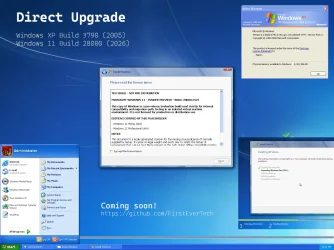
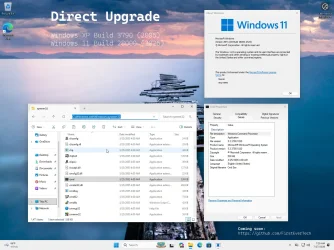
I guess I'm too stubborn and managed to update Windows XP 5.2 Build 3790 directly to the latest Windows 11 26H2 Build 28000 (21-year gap)!

WinXP-Win11-Upgrade.webp

WinXP-Win11-Upgrade-Done.webp
 

My Computer My Computer

At a glance

Windows 11 Pro Insider PreviewIntel Xeon E5-1680 v2 OC @ 4.4GHzCorsair Quad DDR3-2400MHz CL10ASUS TUF Gaming GeForce RTX 4070 Ti OC
OS
Windows 11 Pro Insider Preview
Computer type
PC/Desktop
Manufacturer/Model
ASUS-ish Build
CPU
Intel Xeon E5-1680 v2 OC @ 4.4GHz
Motherboard
ASUS P9X79 Pro (Modded Bios)
Memory
Corsair Quad DDR3-2400MHz CL10
Graphics Card(s)
ASUS TUF Gaming GeForce RTX 4070 Ti OC
Sound Card
Realtek ALC898
Monitor(s) Displays
ASUS ROG Swift OLED PG48UQ OC @ 138Hz
Screen Resolution
3840 x 2160 (4K)
Hard Drives
Samsung SSD 990 Pro 4TB (NVMe)
Samsung SSD 870 QVO 8TB (SATA)
PSU
Cooler Master Silent Pro M2 1500W
Case
Cooler Master MasterCase SL600M Black
Cooling
ARCTIC Liquid Freezer II 240
Keyboard
Logitech G915 LIGHTSPEED
Mouse
Logitech G900 Chaos Spectrum
Internet Speed
Download: 930 Mbps / Upload: 105 Mbps
Other Info
Added PCIe cards: Intel WiFi 7 BE200 (with BT 5.4) and USB 3.2 Gen 2 10Gbps
  • Helpful
Reactions: OAT
It's obvious, but no one updates Windows XP directly to the latest Windows 11 build.

I guess I'm too stubborn and managed to update Windows XP 5.2 Build 3790 directly to the latest Windows 11 26H2 Build 28000 (21-year gap)!
Whatever blows your hair back. I obviously don't mean to rain on your parade, just trying to understand the practicality of the process. You're right, nobody updates from XP to Windows 11, probably for a host of good reasons. 🤣
 

My Computers My Computers

  • At a glance

    Win 11 Pro 25H2, Build 26200.8894Intel Core i5 1450064GB DDR4GeForce RTX 4060
    OS
    Win 11 Pro 25H2, Build 26200.8894
    Computer type
    PC/Desktop
    Manufacturer/Model
    Home Brew
    CPU
    Intel Core i5 14500
    Motherboard
    Gigabyte B760M G P WIFI
    Memory
    64GB DDR4
    Graphics Card(s)
    GeForce RTX 4060
    Sound Card
    Chipset Realtek
    Monitor(s) Displays
    LG 45" Ultragear, Acer 24" 1080p
    Screen Resolution
    5120x1440, 1920x1080
    Hard Drives
    Crucial P310 2TB 2280 PCIe Gen4 3D NAND NVMe M.2 SSD (O/S)
    Silicon Power 2TB US75 NVMe PCIe Gen4 M.2 2280 SSD (backup)
    Crucial BX500 2TB 3D NAND (2nd backup)
    Seagate 4TB Ironwolf, rotating HDD archive files
    External off-line backup Drives: 2 NVMe 4TB drives in external enclosures
    PSU
    Thermaltake Toughpower GF3 750W
    Case
    LIAN LI LANCOOL 216 E-ATX PC Case
    Cooling
    Lots of fans!
    Keyboard
    Microsoft Comfort Curve 2000
    Mouse
    Logitech G305
    Internet Speed
    Verizon FiOS 1GB
    Browser
    Firefox
    Antivirus
    Malware Bytes & Windows Defender Security
  • At a glance

    Win 11 Pro 25H2, Build 26200.8894Intel Core i5 1440032GB DDR5Intel 700 Embedded GPU
    Operating System
    Win 11 Pro 25H2, Build 26200.8894
    Computer type
    PC/Desktop
    Manufacturer/Model
    Home Brew
    CPU
    Intel Core i5 14400
    Motherboard
    Gigabyte B760M DS3H AX
    Memory
    32GB DDR5
    Graphics card(s)
    Intel 700 Embedded GPU
    Sound Card
    Realtek Embedded
    Monitor(s) Displays
    27" HP 1080p
    Screen Resolution
    1920x1080
    Hard Drives
    Crucial P310 2TB 2280 PCIe Gen4 eD NAND PCIe SSD
    Samsung EVO 990 2TB NVMe Gen4 SSD
    Samsung 2TB SATA SSD
    PSU
    Thermaltake Smart BM3 650W
    Case
    Okinos Micro ATX Case
    Cooling
    Fans
    Keyboard
    Microsoft Comfort Curve 2000
    Mouse
    Logitech G305
    Internet Speed
    Verizon FiOS 1GB
    Browser
    Firefox
    Antivirus
    Malware Bytes & Windows Defender Security
  • Nimo N171 17" Laptop, (Intel i3-1215U, 16GB RAM, 2TB NVMe, Win11 Pro)
    Acemagic Vista Mini PC V1 (Intel N150, 16GB RAM, 1TB NVMe, Win11 Pro)
    HP ENVY h8-1540t, (24GB RAM, 2TB SSD, 2TB HDD, Win11 Pro)
Whatever blows your hair back. I obviously don't mean to rain on your parade, just trying to understand the practicality of the process. You're right, nobody updates from XP to Windows 11, probably for a host of good reasons. 🤣

The only practical solution I see will be to be able to update any Windows system from XP, Vista, 7, 8, 8.1 and 10 to the latest build of Windows 11 without needing a bootable installer. The funny thing is that I encountered several major problems during the update and even Claude came up with some theories that it couldn't be done... and in the end I solved it anyway... 🤖<🧠
 

My Computer My Computer

At a glance

Windows 11 Pro Insider PreviewIntel Xeon E5-1680 v2 OC @ 4.4GHzCorsair Quad DDR3-2400MHz CL10ASUS TUF Gaming GeForce RTX 4070 Ti OC
OS
Windows 11 Pro Insider Preview
Computer type
PC/Desktop
Manufacturer/Model
ASUS-ish Build
CPU
Intel Xeon E5-1680 v2 OC @ 4.4GHz
Motherboard
ASUS P9X79 Pro (Modded Bios)
Memory
Corsair Quad DDR3-2400MHz CL10
Graphics Card(s)
ASUS TUF Gaming GeForce RTX 4070 Ti OC
Sound Card
Realtek ALC898
Monitor(s) Displays
ASUS ROG Swift OLED PG48UQ OC @ 138Hz
Screen Resolution
3840 x 2160 (4K)
Hard Drives
Samsung SSD 990 Pro 4TB (NVMe)
Samsung SSD 870 QVO 8TB (SATA)
PSU
Cooler Master Silent Pro M2 1500W
Case
Cooler Master MasterCase SL600M Black
Cooling
ARCTIC Liquid Freezer II 240
Keyboard
Logitech G915 LIGHTSPEED
Mouse
Logitech G900 Chaos Spectrum
Internet Speed
Download: 930 Mbps / Upload: 105 Mbps
Other Info
Added PCIe cards: Intel WiFi 7 BE200 (with BT 5.4) and USB 3.2 Gen 2 10Gbps

Latest Support Threads

Back
Top Bottom