Unknown Apps?


HowdyDo

Well-known member
Member
Local time
1:20 AM
Posts
177
Location
Ontario Canada
OS
Win 11 Pro 25H2 O/S Build 22631.2861
I have some strange installed apps on my Win 11 machine. Hopefully someone can advise me if I need them/what they do?
I've googled them all, and the results of my search were confusing to me.
CIL Disabler
oneAPI Level zero
TempoAPI Viewer
Ultimate Photo Editor I don't edit photos BTW
 

My Computer

System One

  • OS
    Win 11 Pro 25H2 O/S Build 22631.2861
    Computer type
    PC/Desktop
    Manufacturer/Model
    Clone
    CPU
    12th Gen Intel Core i5-12400 2.5 GHZ
    Memory
    16.0 GB
    Monitor(s) Displays
    1 Asus 24"
    Screen Resolution
    1920x1080
    Hard Drives
    2x SSD
    PSU
    600 Watt
    Internet Speed
    300 mb/sec Download
    Browser
    Chrome
  • The Intel oneAPI component is safe and driver-related.
  • The photo editor is optional — you can uninstall it if unused.
  • The other two (CIL Disabler, TempoAPI Viewer) are unusual; they may have come bundled with another program or driver. If you’re unsure, you can check their publisher in Settings → Apps → Installed apps to see who made them.
 

My Computers

System One System Two

  • OS
    Windows 11 Pro 25H2 26200.8655
    Computer type
    PC/Desktop
    Manufacturer/Model
    Dell Optiplex 7080
    CPU
    i9-10900 10 core 20 threads
    Motherboard
    DELL 0J37VM
    Memory
    32 gb
    Graphics Card(s)
    none-Intel UHD Graphics 630
    Sound Card
    Integrated Realtek
    Monitor(s) Displays
    Benq 27
    Screen Resolution
    2560x1440
    Hard Drives
    2x1tb Solidigm m.2 nvme /External drives 512gb Samsung m.2 sata+2tb Kingston m2.nvme
    PSU
    500w
    Case
    MT
    Cooling
    Dell Premium
    Keyboard
    Logitech wired
    Mouse
    Logitech wireless
    Internet Speed
    so slow I'm too embarrassed to tell
    Browser
    #1 Edge #2 Firefox
    Antivirus
    Defender+MWB Premium
  • Operating System
    Windows 11 Pro 24H2 26200.8457
    Computer type
    PC/Desktop
    Manufacturer/Model
    Beelink Mini PC SER5
    CPU
    AMD Ryzen 7 6800U
    Memory
    32 gb
    Graphics card(s)
    integrated
    Sound Card
    integrated
    Monitor(s) Displays
    Benq 27
    Screen Resolution
    2560x1440
    Hard Drives
    1TB Crucial nvme
    Keyboard
    Logitech wired
    Mouse
    Logitech wireless
    Internet Speed
    still too embarrassed to tell
    Browser
    Firefox
    Antivirus
    Defender
    Other Info
    System 3 is non compliant Dell 9020 i7-4770/24gb ram Win11 PRO 26200.8457
  • The Intel oneAPI component is safe and driver-related.
  • The photo editor is optional — you can uninstall it if unused.
  • The other two (CIL Disabler, TempoAPI Viewer) are unusual; they may have come bundled with another program or driver. If you’re unsure, you can check their publisher in Settings → Apps → Installed apps to see who made them.
I suspected the same thing you mentioned, must have snuck in with another program install?
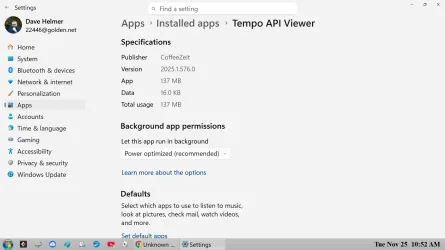
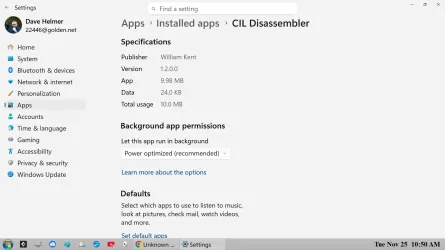
Please see attached Tempo API.webpscreen shots.
 

Attachments

  • Cil Disabler.webp
    Cil Disabler.webp
    75.6 KB · Views: 1

My Computer

System One

  • OS
    Win 11 Pro 25H2 O/S Build 22631.2861
    Computer type
    PC/Desktop
    Manufacturer/Model
    Clone
    CPU
    12th Gen Intel Core i5-12400 2.5 GHZ
    Memory
    16.0 GB
    Monitor(s) Displays
    1 Asus 24"
    Screen Resolution
    1920x1080
    Hard Drives
    2x SSD
    PSU
    600 Watt
    Internet Speed
    300 mb/sec Download
    Browser
    Chrome
I can't remember the last time I encountered an actual virus, but I've never gone wrong with removing apps and processes that didn't ask my permission before installing themselves and are difficult to kill, regardless of their source or publisher.
 

My Computer

System One

  • OS
    Windows 11 22H2 Pro (X-lite Micro 11 version)
    Computer type
    Laptop
    Manufacturer/Model
    Dell/ Precision 7680
    CPU
    i7 13850HX (20 cores, 28 threads)
    Motherboard
    Dell
    Memory
    32GB DDR5
    Graphics Card(s)
    Intel UHD/ RTX 1000 ADA
    Sound Card
    Realtek
    Monitor(s) Displays
    4K UHD Touchscreen
    Screen Resolution
    3840 x 2400
    Hard Drives
    Samsung 512GB system drive
    WD Blue 1TB game drive
    PSU
    240W AC adapter, 1800W when docked
    Internet Speed
    1 gigabit symmetrical
    Browser
    Firefox, Librewolf
    Antivirus
    None. Manully configured so nobody except me can change any critical system files. (Don't ask how, it's probably against some rule somewhere)
I can't remember the last time I encountered an actual virus, but I've never gone wrong with removing apps and processes that didn't ask my permission before installing themselves and are difficult to kill, regardless of their source or publisher.
See, that's my problem. I'm not sure if I granted permission, because I have no idea what these apps are related to. 😊
 

My Computer

System One

  • OS
    Win 11 Pro 25H2 O/S Build 22631.2861
    Computer type
    PC/Desktop
    Manufacturer/Model
    Clone
    CPU
    12th Gen Intel Core i5-12400 2.5 GHZ
    Memory
    16.0 GB
    Monitor(s) Displays
    1 Asus 24"
    Screen Resolution
    1920x1080
    Hard Drives
    2x SSD
    PSU
    600 Watt
    Internet Speed
    300 mb/sec Download
    Browser
    Chrome
See, that's my problem. I'm not sure if I granted permission, because I have no idea what these apps are related to. 😊
In that case, if your system was working fine before the app installed itself, it's probably okay to get rid of it.
 

My Computer

System One

  • OS
    Windows 11 22H2 Pro (X-lite Micro 11 version)
    Computer type
    Laptop
    Manufacturer/Model
    Dell/ Precision 7680
    CPU
    i7 13850HX (20 cores, 28 threads)
    Motherboard
    Dell
    Memory
    32GB DDR5
    Graphics Card(s)
    Intel UHD/ RTX 1000 ADA
    Sound Card
    Realtek
    Monitor(s) Displays
    4K UHD Touchscreen
    Screen Resolution
    3840 x 2400
    Hard Drives
    Samsung 512GB system drive
    WD Blue 1TB game drive
    PSU
    240W AC adapter, 1800W when docked
    Internet Speed
    1 gigabit symmetrical
    Browser
    Firefox, Librewolf
    Antivirus
    None. Manully configured so nobody except me can change any critical system files. (Don't ask how, it's probably against some rule somewhere)
In that case, if your system was working fine before the app installed itself, it's probably okay to get rid of it.
I have no idea when these strange apps were D/L? I check my apps and programs regularly and I've seen these apps for some time. You know how it goes, time and such, but today I decided to check the validity of these apps. My PC has been working fine in the past and presently. I also have a multitude of anti-malware tools that I run on a regular basis. Because nothing has ever been detected, has been partly the reason I haven't been concerned, until now. 😊
 

My Computer

System One

  • OS
    Win 11 Pro 25H2 O/S Build 22631.2861
    Computer type
    PC/Desktop
    Manufacturer/Model
    Clone
    CPU
    12th Gen Intel Core i5-12400 2.5 GHZ
    Memory
    16.0 GB
    Monitor(s) Displays
    1 Asus 24"
    Screen Resolution
    1920x1080
    Hard Drives
    2x SSD
    PSU
    600 Watt
    Internet Speed
    300 mb/sec Download
    Browser
    Chrome


Highlight the offending program, and click on uninstall.
Then a "scan" button will be available, click that to find and then remove all the leftovers.


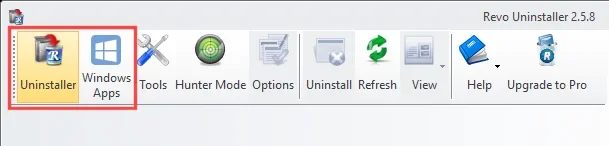
Anything REVO can remove, will be under one of these two tabs...

Image1.webp


The benefit of using REVO, is that "scan" for leftovers button I mentioned.
 
Last edited:

My Computers

System One System Two

  • OS
    Win 11 Home ♦♦♦26200.8655 ♦♦♦♦♦♦♦25H2
    Computer type
    PC/Desktop
    Manufacturer/Model
    Built by Ghot® [May 2020]
    CPU
    AMD Ryzen 7 3700X
    Motherboard
    Asus Pro WS X570-ACE (BIOS 5302)
    Memory
    G.Skill (F4-3200C14D-16GTZKW)
    Graphics Card(s)
    EVGA RTX 2070 (08G-P4-2171-KR)
    Sound Card
    Realtek ALC1220P / ALC S1220A
    Monitor(s) Displays
    Dell U3011 30"
    Screen Resolution
    2560 x 1600
    Hard Drives
    2x Samsung 860 EVO 500GB,
    WD 4TB Black FZBX - SATA III,
    WD 8TB Black FZBX - SATA III,
    DRW-24B1ST CD/DVD Burner
    PSU
    PC Power & Cooling 750W Quad EPS12V
    Case
    Cooler Master ATCS 840 Tower
    Cooling
    CM Hyper 212 EVO (push/pull)
    Keyboard
    Ducky DK9008 Shine II Blue LED
    Mouse
    Logitech Optical M-100
    Internet Speed
    300/300
    Browser
    Firefox (latest)
    Antivirus
    Bitdefender Total Security
    Other Info
    Speakers: Klipsch Pro Media 2.1
  • Operating System
    Windows XP Pro 32bit w/SP3
    Computer type
    PC/Desktop
    Manufacturer/Model
    Built by Ghot® (not in use)
    CPU
    AMD Athlon 64 X2 5000+ (OC'd @ 3.2Ghz)
    Motherboard
    ASUS M2N32-SLI Deluxe Wireless Edition
    Memory
    TWIN2X2048-6400C4DHX (2 x 1GB, DDR2 800)
    Graphics card(s)
    EVGA 256-P2-N758-TR GeForce 8600GT SSC
    Sound Card
    Onboard
    Monitor(s) Displays
    ViewSonic G90FB Black 19" Professional (CRT)
    Screen Resolution
    up to 2048 x 1536
    Hard Drives
    WD 36GB 10,000rpm Raptor SATA
    Seagate 80GB 7200rpm SATA
    Lite-On LTR-52246S CD/RW
    Lite-On LH-18A1P CD/DVD Burner
    PSU
    PC Power & Cooling Silencer 750 Quad EPS12V
    Case
    Generic Beige case, 80mm fans
    Cooling
    ZALMAN 9500A 92mm CPU Cooler
    Keyboard
    Logitech Classic Keybooard 200
    Mouse
    Logitech Optical M-BT96a
    Internet Speed
    300/300
    Browser
    Firefox 3.x ??
    Antivirus
    Symantec (Norton)
    Other Info
    Still assembled, still runs. Haven't turned it on for 15 years?
IMO the notion that an OS and hardware drivers need constant updating in order to continue to run a static software setup is ridiculous at best. My level of trust for any app that wants to add itself to the process list goes out the window when its purpose is obscure and it wants root access to something. That goes for every commercial software developer, because they all seem to have lost their minds in the pursuit of personal data to which they have no legal right.
 

My Computer

System One

  • OS
    Windows 11 22H2 Pro (X-lite Micro 11 version)
    Computer type
    Laptop
    Manufacturer/Model
    Dell/ Precision 7680
    CPU
    i7 13850HX (20 cores, 28 threads)
    Motherboard
    Dell
    Memory
    32GB DDR5
    Graphics Card(s)
    Intel UHD/ RTX 1000 ADA
    Sound Card
    Realtek
    Monitor(s) Displays
    4K UHD Touchscreen
    Screen Resolution
    3840 x 2400
    Hard Drives
    Samsung 512GB system drive
    WD Blue 1TB game drive
    PSU
    240W AC adapter, 1800W when docked
    Internet Speed
    1 gigabit symmetrical
    Browser
    Firefox, Librewolf
    Antivirus
    None. Manully configured so nobody except me can change any critical system files. (Don't ask how, it's probably against some rule somewhere)


Highlight the offending program, and click on uninstall.
Then a "scan" button will be available, click that to find and then remove all the leftovers.


Anything REVO can remove, will be under one of these two tabs...

View attachment 154268
So have we decided that oneAPI Level Zero is needed?, and the remaing ones can be deleted with no negative effects? 😊
 

My Computer

System One

  • OS
    Win 11 Pro 25H2 O/S Build 22631.2861
    Computer type
    PC/Desktop
    Manufacturer/Model
    Clone
    CPU
    12th Gen Intel Core i5-12400 2.5 GHZ
    Memory
    16.0 GB
    Monitor(s) Displays
    1 Asus 24"
    Screen Resolution
    1920x1080
    Hard Drives
    2x SSD
    PSU
    600 Watt
    Internet Speed
    300 mb/sec Download
    Browser
    Chrome
So have we decided that oneAPI Level Zero is needed?, and the remaing ones can be deleted with no negative effects? 😊


"We" haven't decided anything. I have just provided a link to the tool that can best accomplish removal of whatever you want removed.
Assuming ofc, that it isn't virus related.

Google is probably the best tool for discovering what those Apps actually are.
I've not seen any of them on my system, so I can't be much help there.


I'd imagine that @glasskuter has researched those items. I doubt I could do better.
 

My Computers

System One System Two

  • OS
    Win 11 Home ♦♦♦26200.8655 ♦♦♦♦♦♦♦25H2
    Computer type
    PC/Desktop
    Manufacturer/Model
    Built by Ghot® [May 2020]
    CPU
    AMD Ryzen 7 3700X
    Motherboard
    Asus Pro WS X570-ACE (BIOS 5302)
    Memory
    G.Skill (F4-3200C14D-16GTZKW)
    Graphics Card(s)
    EVGA RTX 2070 (08G-P4-2171-KR)
    Sound Card
    Realtek ALC1220P / ALC S1220A
    Monitor(s) Displays
    Dell U3011 30"
    Screen Resolution
    2560 x 1600
    Hard Drives
    2x Samsung 860 EVO 500GB,
    WD 4TB Black FZBX - SATA III,
    WD 8TB Black FZBX - SATA III,
    DRW-24B1ST CD/DVD Burner
    PSU
    PC Power & Cooling 750W Quad EPS12V
    Case
    Cooler Master ATCS 840 Tower
    Cooling
    CM Hyper 212 EVO (push/pull)
    Keyboard
    Ducky DK9008 Shine II Blue LED
    Mouse
    Logitech Optical M-100
    Internet Speed
    300/300
    Browser
    Firefox (latest)
    Antivirus
    Bitdefender Total Security
    Other Info
    Speakers: Klipsch Pro Media 2.1
  • Operating System
    Windows XP Pro 32bit w/SP3
    Computer type
    PC/Desktop
    Manufacturer/Model
    Built by Ghot® (not in use)
    CPU
    AMD Athlon 64 X2 5000+ (OC'd @ 3.2Ghz)
    Motherboard
    ASUS M2N32-SLI Deluxe Wireless Edition
    Memory
    TWIN2X2048-6400C4DHX (2 x 1GB, DDR2 800)
    Graphics card(s)
    EVGA 256-P2-N758-TR GeForce 8600GT SSC
    Sound Card
    Onboard
    Monitor(s) Displays
    ViewSonic G90FB Black 19" Professional (CRT)
    Screen Resolution
    up to 2048 x 1536
    Hard Drives
    WD 36GB 10,000rpm Raptor SATA
    Seagate 80GB 7200rpm SATA
    Lite-On LTR-52246S CD/RW
    Lite-On LH-18A1P CD/DVD Burner
    PSU
    PC Power & Cooling Silencer 750 Quad EPS12V
    Case
    Generic Beige case, 80mm fans
    Cooling
    ZALMAN 9500A 92mm CPU Cooler
    Keyboard
    Logitech Classic Keybooard 200
    Mouse
    Logitech Optical M-BT96a
    Internet Speed
    300/300
    Browser
    Firefox 3.x ??
    Antivirus
    Symantec (Norton)
    Other Info
    Still assembled, still runs. Haven't turned it on for 15 years?
"We" haven't decided anything. I have just provided a link to the tool that can best accomplish removal of whatever you want removed.
Assuming ofc, that it isn't virus related.

Google is probably the best tool for discovering what those Apps actually are.
I already have that tool in my tool box, but thank you very much. 😊
 

My Computer

System One

  • OS
    Win 11 Pro 25H2 O/S Build 22631.2861
    Computer type
    PC/Desktop
    Manufacturer/Model
    Clone
    CPU
    12th Gen Intel Core i5-12400 2.5 GHZ
    Memory
    16.0 GB
    Monitor(s) Displays
    1 Asus 24"
    Screen Resolution
    1920x1080
    Hard Drives
    2x SSD
    PSU
    600 Watt
    Internet Speed
    300 mb/sec Download
    Browser
    Chrome
Back
Top Bottom