Unknown event occurs at exactly 10 minute intervals


kiwiaz

Well-known member
Local time
10:23 AM
Posts
88
OS
Win11
An unknown event occurs at exactly the 10 minute interval (i.e 7:00, 7:10, 7:20 etc). It is expressed as a black pop-up in the left corner of my primary screen - about the size of a CMD window. It occurs for only a brief portion of a second, way too quick to even tell if there is anything in the box. It is however, long enough to prevent the computer from going to sleep normally. It's been going on for a few weeks, but I can't correlate it to any particular change in my system which has only been running 11 for a couple of months. ("Upgraded" from 7.)

Application Event viewer says the Restart Manager (Event ID 10001 and 10000) starts and ends a session at these intervals.

Malwarebytes says I have no malware. CHKDSK says all files are normal.
 
Windows Build/Version
22H2 22621.2715

My Computer My Computer

At a glance

Win11Ryzen 7 7700X32GB DDR5 G.SkillRTX 4060
OS
Win11
Computer type
PC/Desktop
Manufacturer/Model
Custom
CPU
Ryzen 7 7700X
Motherboard
Gigabyte B-650 Aorus Elite AX
Memory
32GB DDR5 G.Skill
Graphics Card(s)
RTX 4060
Sound Card
On-board
Monitor(s) Displays
Dell U2518 Dell U3223
Screen Resolution
3840x2160
Hard Drives
1TB M.2 AData, Samsung 860 EVO, WD 5000AADS, WD10EZEX
PSU
EVGA 850
Cooling
AK400
Keyboard
Logi MXKeys
Mouse
Logi MX Master 3
Internet Speed
200 Mbps
Browser
Firefox, Vivaldi, Brave

Welcome to the forum. The restart manager is used by windows update and application updates, Explained here. About Restart Manager - Win32 apps


I suggest you start by performing a clean boot to eliminate software conflict causing the issue. If it doesn't happen in a clean boot, you have some software conflicting with Windows or even a software that is corrupted.. You have to narrow it down using the process of elimination. Brink's procedure will help you weed out which one. Perform a Clean Boot in Windows 11 to Troubleshoot Software Conflicts Tutorial
 
Last edited:

My Computers My Computers

  • At a glance

    Windows 11 Pro 25H2 26200.9457i9-10900 10 core 20 threads32 gbnone-Intel UHD Graphics 630
    OS
    Windows 11 Pro 25H2 26200.9457
    Computer type
    PC/Desktop
    Manufacturer/Model
    Dell Optiplex 7080
    CPU
    i9-10900 10 core 20 threads
    Motherboard
    DELL 0J37VM
    Memory
    32 gb
    Graphics Card(s)
    none-Intel UHD Graphics 630
    Sound Card
    Integrated Realtek
    Monitor(s) Displays
    Benq 27
    Screen Resolution
    2560x1440
    Hard Drives
    2x1tb Solidigm m.2 nvme /External drives 512gb Samsung m.2 sata+2tb Kingston m2.nvme
    PSU
    500w
    Case
    MT
    Cooling
    Dell Premium
    Keyboard
    Logitech wired
    Mouse
    Logitech wireless
    Internet Speed
    so slow I'm too embarrassed to tell
    Browser
    #1 Edge #2 Firefox
    Antivirus
    Defender+MWB Premium
  • At a glance

    Windows 11 Pro 24H2 26200.9457AMD Ryzen 7 6800U32 gbintegrated
    Operating System
    Windows 11 Pro 24H2 26200.9457
    Computer type
    PC/Desktop
    Manufacturer/Model
    Beelink Mini PC SER5
    CPU
    AMD Ryzen 7 6800U
    Memory
    32 gb
    Graphics card(s)
    integrated
    Sound Card
    integrated
    Monitor(s) Displays
    Benq 27
    Screen Resolution
    2560x1440
    Hard Drives
    1TB Crucial nvme
    Keyboard
    Logitech wired
    Mouse
    Logitech wireless
    Internet Speed
    still too embarrassed to tell
    Browser
    Firefox
    Antivirus
    Defender
  • System 3 is non compliant Dell 9020 i7-4770/24gb ram Win11 PRO 26200.9457

My Computer My Computer

At a glance

Win11Ryzen 7 7700X32GB DDR5 G.SkillRTX 4060
OS
Win11
Computer type
PC/Desktop
Manufacturer/Model
Custom
CPU
Ryzen 7 7700X
Motherboard
Gigabyte B-650 Aorus Elite AX
Memory
32GB DDR5 G.Skill
Graphics Card(s)
RTX 4060
Sound Card
On-board
Monitor(s) Displays
Dell U2518 Dell U3223
Screen Resolution
3840x2160
Hard Drives
1TB M.2 AData, Samsung 860 EVO, WD 5000AADS, WD10EZEX
PSU
EVGA 850
Cooling
AK400
Keyboard
Logi MXKeys
Mouse
Logi MX Master 3
Internet Speed
200 Mbps
Browser
Firefox, Vivaldi, Brave

You might want to get a Process Monitor trace too and check which processes it is terminating in order to release the files being held by them.
 

My Computer My Computer

At a glance

Windows 11, Windows 10, Linux Fedora Cinnamon
OS
Windows 11, Windows 10, Linux Fedora Cinnamon
You might want to get a Process Monitor trace too and check which processes it is terminating in order to release the files being held by them.
So, getting back to this. The event is still occurring at 10 min intervals and is indeed a terminal window that flashes open and closed.
SFC says no integrity violations. Malware scanners don't detect any threats.
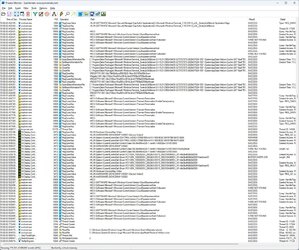
Process Monitor provides waaaay too much information but I have driven my eyes red trying to identify meaningful data. I'm wondering if it isn't related to NVidia...Clipboard03.jpg
A bunch of terminal operations occur soon after which seem to refer to every language extension;Clipboard04.jpg
 

My Computer My Computer

At a glance

Win11Ryzen 7 7700X32GB DDR5 G.SkillRTX 4060
OS
Win11
Computer type
PC/Desktop
Manufacturer/Model
Custom
CPU
Ryzen 7 7700X
Motherboard
Gigabyte B-650 Aorus Elite AX
Memory
32GB DDR5 G.Skill
Graphics Card(s)
RTX 4060
Sound Card
On-board
Monitor(s) Displays
Dell U2518 Dell U3223
Screen Resolution
3840x2160
Hard Drives
1TB M.2 AData, Samsung 860 EVO, WD 5000AADS, WD10EZEX
PSU
EVGA 850
Cooling
AK400
Keyboard
Logi MXKeys
Mouse
Logi MX Master 3
Internet Speed
200 Mbps
Browser
Firefox, Vivaldi, Brave
You need to filter the log down to process termination, check which processes are being terminated or at least look at which files are being closed.
 

My Computer My Computer

At a glance

Windows 11, Windows 10, Linux Fedora Cinnamon
OS
Windows 11, Windows 10, Linux Fedora Cinnamon
ProcMon is not exactly intuitive and the GitHub just says learn by doing ...
What terms would I use to filter?
 

My Computer My Computer

At a glance

Win11Ryzen 7 7700X32GB DDR5 G.SkillRTX 4060
OS
Win11
Computer type
PC/Desktop
Manufacturer/Model
Custom
CPU
Ryzen 7 7700X
Motherboard
Gigabyte B-650 Aorus Elite AX
Memory
32GB DDR5 G.Skill
Graphics Card(s)
RTX 4060
Sound Card
On-board
Monitor(s) Displays
Dell U2518 Dell U3223
Screen Resolution
3840x2160
Hard Drives
1TB M.2 AData, Samsung 860 EVO, WD 5000AADS, WD10EZEX
PSU
EVGA 850
Cooling
AK400
Keyboard
Logi MXKeys
Mouse
Logi MX Master 3
Internet Speed
200 Mbps
Browser
Firefox, Vivaldi, Brave
I've attached a zip file for a ProcMon filter. Download the attached zip and extract it. In Process Monitor, go to the Filter menu, then Organize Filters. Click the Import button and import the attached file. Click OK to save this filter. On the Filter menu again, choose Load Filter, and then the Process Start and Stop filter.

Clear the ProcMon log and start capturing again.
 

My Computer My Computer

At a glance

Windows 11 Enterprise 25H2
OS
Windows 11 Enterprise 25H2
I've attached a zip file for a ProcMon filter. Download the attached zip and extract it. In Process Monitor, go to the Filter menu, then Organize Filters. Click the Import button and import the attached file. Click OK to save this filter. On the Filter menu again, choose Load Filter, and then the Process Start and Stop filter.

Clear the ProcMon log and start capturing again.
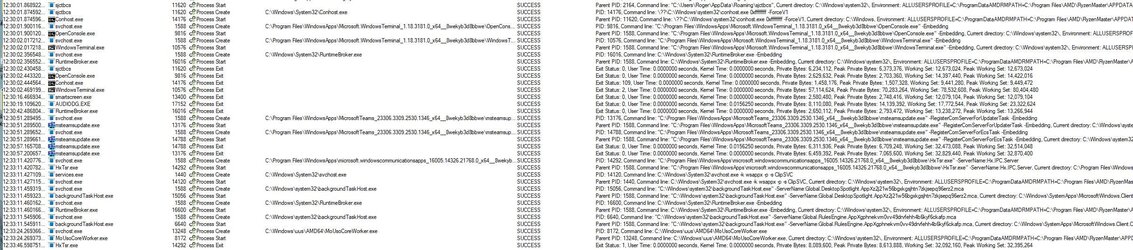
How cool is that - certainly cut down the clutter!
Clipboard05.jpg

If it is relevant, I don't use Teams.
 

My Computer My Computer

At a glance

Win11Ryzen 7 7700X32GB DDR5 G.SkillRTX 4060
OS
Win11
Computer type
PC/Desktop
Manufacturer/Model
Custom
CPU
Ryzen 7 7700X
Motherboard
Gigabyte B-650 Aorus Elite AX
Memory
32GB DDR5 G.Skill
Graphics Card(s)
RTX 4060
Sound Card
On-board
Monitor(s) Displays
Dell U2518 Dell U3223
Screen Resolution
3840x2160
Hard Drives
1TB M.2 AData, Samsung 860 EVO, WD 5000AADS, WD10EZEX
PSU
EVGA 850
Cooling
AK400
Keyboard
Logi MXKeys
Mouse
Logi MX Master 3
Internet Speed
200 Mbps
Browser
Firefox, Vivaldi, Brave
1704052343803.png

I'm wondering what the process " sjctbcs " is?
 

My Computer My Computer

At a glance

Win11Ryzen 7 7700X32GB DDR5 G.SkillRTX 4060
OS
Win11
Computer type
PC/Desktop
Manufacturer/Model
Custom
CPU
Ryzen 7 7700X
Motherboard
Gigabyte B-650 Aorus Elite AX
Memory
32GB DDR5 G.Skill
Graphics Card(s)
RTX 4060
Sound Card
On-board
Monitor(s) Displays
Dell U2518 Dell U3223
Screen Resolution
3840x2160
Hard Drives
1TB M.2 AData, Samsung 860 EVO, WD 5000AADS, WD10EZEX
PSU
EVGA 850
Cooling
AK400
Keyboard
Logi MXKeys
Mouse
Logi MX Master 3
Internet Speed
200 Mbps
Browser
Firefox, Vivaldi, Brave
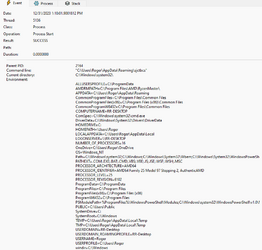
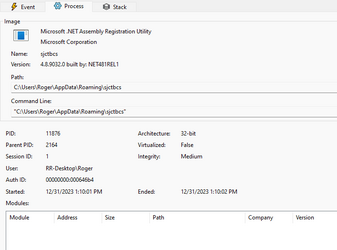
Double click that entry, and take screenshots of the three tabs, so we can see what's up.
 

My Computer My Computer

At a glance

Windows 11 Enterprise 25H2
OS
Windows 11 Enterprise 25H2

My Computer My Computer

At a glance

Win11Ryzen 7 7700X32GB DDR5 G.SkillRTX 4060
OS
Win11
Computer type
PC/Desktop
Manufacturer/Model
Custom
CPU
Ryzen 7 7700X
Motherboard
Gigabyte B-650 Aorus Elite AX
Memory
32GB DDR5 G.Skill
Graphics Card(s)
RTX 4060
Sound Card
On-board
Monitor(s) Displays
Dell U2518 Dell U3223
Screen Resolution
3840x2160
Hard Drives
1TB M.2 AData, Samsung 860 EVO, WD 5000AADS, WD10EZEX
PSU
EVGA 850
Cooling
AK400
Keyboard
Logi MXKeys
Mouse
Logi MX Master 3
Internet Speed
200 Mbps
Browser
Firefox, Vivaldi, Brave
On the premise that it is easier to take out the archers than intercept the arrows, maybe I could just delete the roaming profile?
 

My Computer My Computer

At a glance

Win11Ryzen 7 7700X32GB DDR5 G.SkillRTX 4060
OS
Win11
Computer type
PC/Desktop
Manufacturer/Model
Custom
CPU
Ryzen 7 7700X
Motherboard
Gigabyte B-650 Aorus Elite AX
Memory
32GB DDR5 G.Skill
Graphics Card(s)
RTX 4060
Sound Card
On-board
Monitor(s) Displays
Dell U2518 Dell U3223
Screen Resolution
3840x2160
Hard Drives
1TB M.2 AData, Samsung 860 EVO, WD 5000AADS, WD10EZEX
PSU
EVGA 850
Cooling
AK400
Keyboard
Logi MXKeys
Mouse
Logi MX Master 3
Internet Speed
200 Mbps
Browser
Firefox, Vivaldi, Brave
No, don't delete the Roaming folder. Not sure Windows will even let you do that, but it's a necessary folder anyway.

This is some randomly-named .NET application in your user folder, which raises my suspicion. Have you submitted it to VirusTotal to see what it says?

Edit: I say it's suspicious because I'm a .NET developer myself. That program says it's the .NET Assembly Registration Utility. That actual utility is named RegAsm.exe, not some crazy random string.

Also, not sure what the comment about OneDrive was about.
 

My Computer My Computer

At a glance

Windows 11 Enterprise 25H2
OS
Windows 11 Enterprise 25H2
Additionally, you can grab a copy of AutoRuns, and search for that "sjctbcs" thing. There's a filter box at the top of AutoRuns. I'd be willing to bet you have a scheduled task or something running this thing periodically.

Autoruns for Windows - Sysinternals
 

My Computer My Computer

At a glance

Windows 11 Enterprise 25H2
OS
Windows 11 Enterprise 25H2
No, don't delete the Roaming folder. Not sure Windows will even let you do that, but it's a necessary folder anyway.

This is some randomly-named .NET application in your user folder, which raises my suspicion. Have you submitted it to VirusTotal to see what it says?

Edit: I say it's suspicious because I'm a .NET developer myself. That program says it's the .NET Assembly Registration Utility. That actual utility is named RegAsm.exe, not some crazy random string.

Also, not sure what the comment about OneDrive was about.
What file would I submit to VirusTotal? I don't see any of those names in the Roaming folder.
 

My Computer My Computer

At a glance

Win11Ryzen 7 7700X32GB DDR5 G.SkillRTX 4060
OS
Win11
Computer type
PC/Desktop
Manufacturer/Model
Custom
CPU
Ryzen 7 7700X
Motherboard
Gigabyte B-650 Aorus Elite AX
Memory
32GB DDR5 G.Skill
Graphics Card(s)
RTX 4060
Sound Card
On-board
Monitor(s) Displays
Dell U2518 Dell U3223
Screen Resolution
3840x2160
Hard Drives
1TB M.2 AData, Samsung 860 EVO, WD 5000AADS, WD10EZEX
PSU
EVGA 850
Cooling
AK400
Keyboard
Logi MXKeys
Mouse
Logi MX Master 3
Internet Speed
200 Mbps
Browser
Firefox, Vivaldi, Brave
I searched for "sjctbcs" with AutoRun. It only flagged (Roaming ...\Startup) DDM2.0.lnk which applies to Dell Display Manager Autolaunch but gives a 'file not found' error.

CCleaner found nothing.
 

My Computer My Computer

At a glance

Win11Ryzen 7 7700X32GB DDR5 G.SkillRTX 4060
OS
Win11
Computer type
PC/Desktop
Manufacturer/Model
Custom
CPU
Ryzen 7 7700X
Motherboard
Gigabyte B-650 Aorus Elite AX
Memory
32GB DDR5 G.Skill
Graphics Card(s)
RTX 4060
Sound Card
On-board
Monitor(s) Displays
Dell U2518 Dell U3223
Screen Resolution
3840x2160
Hard Drives
1TB M.2 AData, Samsung 860 EVO, WD 5000AADS, WD10EZEX
PSU
EVGA 850
Cooling
AK400
Keyboard
Logi MXKeys
Mouse
Logi MX Master 3
Internet Speed
200 Mbps
Browser
Firefox, Vivaldi, Brave
Just wondering. Did you even try a clean boot?
 

My Computers My Computers

  • At a glance

    Windows 11 Pro 25H2 26200.9457i9-10900 10 core 20 threads32 gbnone-Intel UHD Graphics 630
    OS
    Windows 11 Pro 25H2 26200.9457
    Computer type
    PC/Desktop
    Manufacturer/Model
    Dell Optiplex 7080
    CPU
    i9-10900 10 core 20 threads
    Motherboard
    DELL 0J37VM
    Memory
    32 gb
    Graphics Card(s)
    none-Intel UHD Graphics 630
    Sound Card
    Integrated Realtek
    Monitor(s) Displays
    Benq 27
    Screen Resolution
    2560x1440
    Hard Drives
    2x1tb Solidigm m.2 nvme /External drives 512gb Samsung m.2 sata+2tb Kingston m2.nvme
    PSU
    500w
    Case
    MT
    Cooling
    Dell Premium
    Keyboard
    Logitech wired
    Mouse
    Logitech wireless
    Internet Speed
    so slow I'm too embarrassed to tell
    Browser
    #1 Edge #2 Firefox
    Antivirus
    Defender+MWB Premium
  • At a glance

    Windows 11 Pro 24H2 26200.9457AMD Ryzen 7 6800U32 gbintegrated
    Operating System
    Windows 11 Pro 24H2 26200.9457
    Computer type
    PC/Desktop
    Manufacturer/Model
    Beelink Mini PC SER5
    CPU
    AMD Ryzen 7 6800U
    Memory
    32 gb
    Graphics card(s)
    integrated
    Sound Card
    integrated
    Monitor(s) Displays
    Benq 27
    Screen Resolution
    2560x1440
    Hard Drives
    1TB Crucial nvme
    Keyboard
    Logitech wired
    Mouse
    Logitech wireless
    Internet Speed
    still too embarrassed to tell
    Browser
    Firefox
    Antivirus
    Defender
  • System 3 is non compliant Dell 9020 i7-4770/24gb ram Win11 PRO 26200.9457
Just wondering. Did you even try a clean boot?
Yes. I performed a clean boot and then, without opening any programs, just waited for the ten minute interval. The terminal window popped up just the same.
 

My Computer My Computer

At a glance

Win11Ryzen 7 7700X32GB DDR5 G.SkillRTX 4060
OS
Win11
Computer type
PC/Desktop
Manufacturer/Model
Custom
CPU
Ryzen 7 7700X
Motherboard
Gigabyte B-650 Aorus Elite AX
Memory
32GB DDR5 G.Skill
Graphics Card(s)
RTX 4060
Sound Card
On-board
Monitor(s) Displays
Dell U2518 Dell U3223
Screen Resolution
3840x2160
Hard Drives
1TB M.2 AData, Samsung 860 EVO, WD 5000AADS, WD10EZEX
PSU
EVGA 850
Cooling
AK400
Keyboard
Logi MXKeys
Mouse
Logi MX Master 3
Internet Speed
200 Mbps
Browser
Firefox, Vivaldi, Brave

Latest Support Threads

Back
Top Bottom