Unknown USB Device


igHtymBa

Active member
Local time
1:43 AM
Posts
8
OS
Windows 11 Enterprise 24H2 26100.3037
Edition Windows 11 Enterprise
Version 24H2
Installed on ‎12/‎5/‎2024
OS build 26100.2894
Experience Windows Feature Experience Pack 1000.26100.36.0
Motherboard GIGABYTE Z690 AORUS ELITE AX

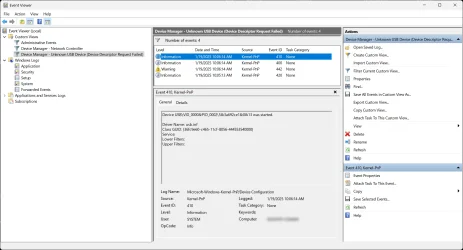
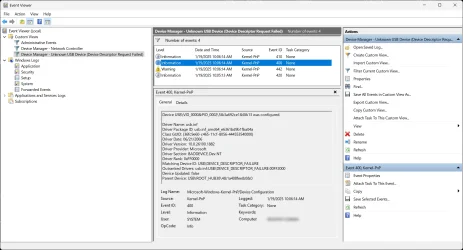
As seen in my attached screen captures, within my Device Manager listing, under Universal Serial Bus controllers, I have an issue.

Have done an extensive amount of research on this issue, and tried solutions that have worked for others with the identical error. However, they did not work for me.

This issue was not there after installation of the OS some months ago, it is recent, as in, perhaps a recent OS update did this?

To boot, I only have two things plugged into any of my USB ports, my Mouse, and my Keyboard, ...that's it.

Any suggestions?

2025-01-19_11-07-10.webp2025-01-19_11-03-51.webp2025-01-19_11-04-05.webp2025-01-19_11-04-24.webp2025-01-19_11-04-37.webp
 
Windows Build/Version
Windows 11 24H2 26100.2894

My Computer My Computer

At a glance

Windows 11 Enterprise 24H2 26100.3037Intel i9-12900K32GBNvidia GeForce RTX 3060 Ti
OS
Windows 11 Enterprise 24H2 26100.3037
Computer type
PC/Desktop
CPU
Intel i9-12900K
Motherboard
Gigabyte Z690 AORUS ELITE AX
Memory
32GB
Graphics Card(s)
Nvidia GeForce RTX 3060 Ti
Monitor(s) Displays
Samsung QN55Q80TAFXZA
Screen Resolution
4096x2160 @ 120Hz
Install chipset driver and if available USB driver.


My Computer My Computer

At a glance

Windows 11AMD Ryzen 7 5700GMicron Technology DDR4-3200 16GBNVIDIA GeForce RTX 3060
OS
Windows 11
Computer type
PC/Desktop
Manufacturer/Model
HP Pavilion
CPU
AMD Ryzen 7 5700G
Motherboard
Erica6
Memory
Micron Technology DDR4-3200 16GB
Graphics Card(s)
NVIDIA GeForce RTX 3060
Sound Card
Realtek ALC671
Monitor(s) Displays
Samsung SyncMaster U28E590
Screen Resolution
3840 x 2160
Hard Drives
SAMSUNG MZVLQ1T0HALB-000H1
Mine did that now and again until i discovered i have a flaky USB stick, just delete it and the scan for hardware changes, if it was an internal device it will attempt to re-install.
 

My Computers My Computers

  • At a glance

    Windows 11 Enterprise 25H2 26200 7462Intel XEON E5-2699 v364GB Teamgroup UD4-3600NVIDIA GeForce GTX 1080 Ti
    OS
    Windows 11 Enterprise 25H2 26200 7462
    Computer type
    PC/Desktop
    Manufacturer/Model
    Custom Build
    CPU
    Intel XEON E5-2699 v3
    Motherboard
    ASUS X99-A
    Memory
    64GB Teamgroup UD4-3600
    Graphics Card(s)
    NVIDIA GeForce GTX 1080 Ti
    Sound Card
    Integrated
    Monitor(s) Displays
    ACER X34 Predator
    Screen Resolution
    3440 x 1440
    Hard Drives
    Crucial CT1000P 3P SSD8 1TB
    Crucial CT1000 BX500 SSD 1TB
    PSU
    GameMax Pro
    Case
    Fractal Design
    Cooling
    Corsair H110iGT + 6 140mm Fans
    Keyboard
    Corsair K4
    Mouse
    G-Skill G502
    Internet Speed
    300MBs
    Browser
    Chrome
    Antivirus
    OEM
    Other Info
    ASUS RT-AC87U Router
  • At a glance

    25H2 26200.50748GB
    Operating System
    25H2 26200.5074
    Computer type
    Laptop
    Manufacturer/Model
    ASUS X555LA
    Memory
    8GB
    Browser
    Chrome
    Antivirus
    OEM
This happened on my Lenovo ThinkPad X1 Carbon Gen 12. I didn't have any USBs plugged in and it still said the same error you posted.

I tried reinstalling the Lenovo's SCCM Driver package which includes any and all drivers for the X1C Gen 12 but still had the error message.

I gave up and reinstalled Windows again, issue went away.
 

My Computers My Computers

  • At a glance

    Windows 11 Enterprise 26H1Intel Core Ultra 7 (Liquid Metal)32GB DDR5Intel Graphics (Integrated)
    OS
    Windows 11 Enterprise 26H1
    Computer type
    Laptop
    Manufacturer/Model
    Lenovo ThinkPad X1 Carbon Gen 12
    CPU
    Intel Core Ultra 7 (Liquid Metal)
    Motherboard
    OEM
    Memory
    32GB DDR5
    Graphics Card(s)
    Intel Graphics (Integrated)
    Sound Card
    Realtek
    Monitor(s) Displays
    Lenovo OLED
    Screen Resolution
    2880x1800
    Hard Drives
    2TB Samsung 990 Pro
    PSU
    OEM
    Case
    OEM
    Cooling
    OEM
    Keyboard
    ru-RU
    Mouse
    Lenovo Haptic Touchpad
    Internet Speed
    2Gbps (Xfinity ISP)
    Browser
    Chromium, Firefox
    Antivirus
    Windows Security
  • At a glance

    Windows 11 Enterprise 26H1Intel Core i9-13900 (Delidded, Liquid Metal)64GB DDR5EVGA GeForce RTX 3090 FTW3 Ultra
    Operating System
    Windows 11 Enterprise 26H1
    Computer type
    PC/Desktop
    Manufacturer/Model
    Lenovo P3 Ultra
    CPU
    Intel Core i9-13900 (Delidded, Liquid Metal)
    Motherboard
    OEM
    Memory
    64GB DDR5
    Graphics card(s)
    EVGA GeForce RTX 3090 FTW3 Ultra
    Sound Card
    Reaktek
    Monitor(s) Displays
    49" Odyssey OLED G9 (G95SC)
    Screen Resolution
    5120x1440
    Hard Drives
    512GB NVMe (OS), 4TB NVMe (Folders, Games)
    PSU
    Thermaltake Smart M 650W Bronze
    Case
    OEM
    Cooling
    OEM
    Keyboard
    Razer Huntsman V3 Pro 8KHz
    Mouse
    Razer Basilisk V3 Pro 35K
    Internet Speed
    2Gbps (Xfinity ISP)
    Browser
    Chromium, Firefox
    Antivirus
    Windows Security
On rare occasions, this happens to me. On my computer, it's caused by my Logitech BRIO webcam.
I simply unplug it, then re-plug it back in, and it fixes it.

So, if you don't have a Logitech BRIO webcam, then think of another USB device that may be causing it and try unplugging and re-plugging it back in. If you only have a mouse and keyboard plugged into a USB port, then try each one of them.
 

My Computers My Computers

  • At a glance

    Windows 11 ProIntel Core i9-10900XCorsair 64 GB (4 x 16 GB) CMW64GX4M4C3000C15 ...GIGABYTE GeForce GTX 1660 Super Mini ITX 6 GB OC
    OS
    Windows 11 Pro
    Computer type
    PC/Desktop
    Manufacturer/Model
    Stigg's Build
    CPU
    Intel Core i9-10900X
    Motherboard
    GIGABYTE X299X DESIGNARE 10G
    Memory
    Corsair 64 GB (4 x 16 GB) CMW64GX4M4C3000C15 Vengeance RGB Pro 3000Mhz DDR4
    Graphics Card(s)
    GIGABYTE GeForce GTX 1660 Super Mini ITX 6 GB OC
    Sound Card
    Realtek ALC1220
    Monitor(s) Displays
    Samsung 27" FHD LED FreeSync Gaming Monitor (LS27F350FHEXXY)
    Screen Resolution
    1920 x 1080
    Hard Drives
    Samsung 970 Pro Series 1TB M.2 2280 NVMe SSD
    Western Digital Red Pro WD8003FFBX-68B9AN0 8 TB, 7200 RPM, SATA-III
    Western Digital Red Pro WD8003FFBX-68B9AN0 8 TB, 7200 RPM, SATA-III
    PSU
    Corsair HX1200 1200W 80 Plus Platinum
    Case
    Fractal Design Define 7 Black Solid Case
    Cooling
    Noctua NH-D15 Chromax Black
    Keyboard
    Razer Ornata V2
    Mouse
    Razer DeathAdder Essential
    Internet Speed
    FTTN 100Mbps / 40Mbps
    Browser
    Mozilla Firefox
    Antivirus
    N/A
    Other Info
    Logitech BRIO 4k Ultra HD USB-C Webcam
  • At a glance

    Windows 10 ProCore i7-8750HSK Hynix 32 GB (2 x 16 GB) HMA82GS6CJR8N-VK 1...NVIDIA GeForce GTX 1070
    Operating System
    Windows 10 Pro
    Computer type
    Laptop
    Manufacturer/Model
    ASUS ROG Zephyrus M GM501GS
    CPU
    Core i7-8750H
    Motherboard
    Zephyrus M GM501GS
    Memory
    SK Hynix 32 GB (2 x 16 GB) HMA82GS6CJR8N-VK 16 GB DDR4-2666 DDR4 SDRAM
    Graphics card(s)
    NVIDIA GeForce GTX 1070
    Sound Card
    Realtek ALC294
    Monitor(s) Displays
    AU Optronics B156HAN07.1 [15.6" LCD]
    Screen Resolution
    1920 x 1080
    Hard Drives
    Samsung MZVKW512HMJP-00000 512 GB, PCI-E 3.0 x4
    Samsung SSD 860 QVO 4TB 4 TB, SATA-III
    PSU
    N/A
    Case
    N/A
    Cooling
    N/A
    Keyboard
    PC/AT Enhanced PS2 Keyboard (101/102-Key)
    Mouse
    Razer DeathAdder Essential
    Internet Speed
    FTTN 100Mbps / 40Mbps
    Browser
    Mozilla Firefox
    Antivirus
    N/A
    Other Info
    USB2.0 HD UVC Webcam
First off, I’d like to apologize for taking a while to return here. I just wanted to do the most amount of research in the background on this issue, and found a couple surprising facts.

To begin, the issue I am experiencing, "Unknown USB Device" is not just me. Apparently, a number of folks have also experienced this. As stated, I had never experienced that issue until just recently. And when I look back, the word, "recently" starts to fit, as this problem didn't start to affect me until I took the big 24H2 update, but I didn't realize that was what would end up being the issue.

Let me explain.

So not only did I try everything that everyone here suggested to do, but also fixes from my research on this issue, as nothing fixed this problem. So, being the perfectionist I am, I decided to bite the bullet, and do a complete low-level wipe of the hard drive, and start brand new, virgin, fresh.

Installed latest, (Windows 11 26100.2033.241004-2336), once installed grabbed every conceivable update to get as current as possible, and two interesting facts were noted.

First, brand new fresh virgin install, and right off the bat, my "Unknown USB Device" is back again. The rest of my Device Manager is perfect, has no issues, no errors, but the, "Unknown USB Device" is rearing its head once again as the only error in my Device Manager, and again, I only have a mouse and keyboard plugged in, which did not present itself as a problem PRIOR to my taking the big 24H2 update.

So, apparently, this issue is somehow related to anything above the 24H2 update, because I never had the, "Unknown USB Device" issue prior to the 24H2 update, and any research shows I am not the only one.

So, for me, I am just going to have to ignore, and live with it being there.

And the second odd notice, was that, even with a fresh virgin install, on a completely wiped hard drive, when opening "File Explorer", I notice a folder, in the root of my C: drive, entitled, "windows.old". That shouldn't be there on a virgin wiped install. Granted, the folder was empty, but that still shouldn't have been there on a virgin wiped install.

So after even more research on the, "windows.old" issue, I find that EVEN THAT, is a known issue:
 

My Computer My Computer

At a glance

Windows 11 Enterprise 24H2 26100.3037Intel i9-12900K32GBNvidia GeForce RTX 3060 Ti
OS
Windows 11 Enterprise 24H2 26100.3037
Computer type
PC/Desktop
CPU
Intel i9-12900K
Motherboard
Gigabyte Z690 AORUS ELITE AX
Memory
32GB
Graphics Card(s)
Nvidia GeForce RTX 3060 Ti
Monitor(s) Displays
Samsung QN55Q80TAFXZA
Screen Resolution
4096x2160 @ 120Hz
First off, I’d like to apologize for taking a while to return here. I just wanted to do the most amount of research in the background on this issue, and found a couple surprising facts.

To begin, the issue I am experiencing, "Unknown USB Device" is not just me. Apparently, a number of folks have also experienced this. As stated, I had never experienced that issue until just recently. And when I look back, the word, "recently" starts to fit, as this problem didn't start to affect me until I took the big 24H2 update, but I didn't realize that was what would end up being the issue.

Let me explain.

So not only did I try everything that everyone here suggested to do, but also fixes from my research on this issue, as nothing fixed this problem. So, being the perfectionist I am, I decided to bite the bullet, and do a complete low-level wipe of the hard drive, and start brand new, virgin, fresh.

Installed latest, (Windows 11 26100.2033.241004-2336), once installed grabbed every conceivable update to get as current as possible, and two interesting facts were noted.

First, brand new fresh virgin install, and right off the bat, my "Unknown USB Device" is back again. The rest of my Device Manager is perfect, has no issues, no errors, but the, "Unknown USB Device" is rearing its head once again as the only error in my Device Manager, and again, I only have a mouse and keyboard plugged in, which did not present itself as a problem PRIOR to my taking the big 24H2 update.

So, apparently, this issue is somehow related to anything above the 24H2 update, because I never had the, "Unknown USB Device" issue prior to the 24H2 update, and any research shows I am not the only one.

So, for me, I am just going to have to ignore, and live with it being there.

And the second odd notice, was that, even with a fresh virgin install, on a completely wiped hard drive, when opening "File Explorer", I notice a folder, in the root of my C: drive, entitled, "windows.old". That shouldn't be there on a virgin wiped install. Granted, the folder was empty, but that still shouldn't have been there on a virgin wiped install.

So after even more research on the, "windows.old" issue, I find that EVEN THAT, is a known issue:
I get that windows.old folder every time I install a fresh copy of Windows 11 24H2 off of uupdump.

I delete it every time too, probably just a temp folder it creates while doing the fresh install
 

My Computers My Computers

  • At a glance

    Windows 11 Enterprise 26H1Intel Core Ultra 7 (Liquid Metal)32GB DDR5Intel Graphics (Integrated)
    OS
    Windows 11 Enterprise 26H1
    Computer type
    Laptop
    Manufacturer/Model
    Lenovo ThinkPad X1 Carbon Gen 12
    CPU
    Intel Core Ultra 7 (Liquid Metal)
    Motherboard
    OEM
    Memory
    32GB DDR5
    Graphics Card(s)
    Intel Graphics (Integrated)
    Sound Card
    Realtek
    Monitor(s) Displays
    Lenovo OLED
    Screen Resolution
    2880x1800
    Hard Drives
    2TB Samsung 990 Pro
    PSU
    OEM
    Case
    OEM
    Cooling
    OEM
    Keyboard
    ru-RU
    Mouse
    Lenovo Haptic Touchpad
    Internet Speed
    2Gbps (Xfinity ISP)
    Browser
    Chromium, Firefox
    Antivirus
    Windows Security
  • At a glance

    Windows 11 Enterprise 26H1Intel Core i9-13900 (Delidded, Liquid Metal)64GB DDR5EVGA GeForce RTX 3090 FTW3 Ultra
    Operating System
    Windows 11 Enterprise 26H1
    Computer type
    PC/Desktop
    Manufacturer/Model
    Lenovo P3 Ultra
    CPU
    Intel Core i9-13900 (Delidded, Liquid Metal)
    Motherboard
    OEM
    Memory
    64GB DDR5
    Graphics card(s)
    EVGA GeForce RTX 3090 FTW3 Ultra
    Sound Card
    Reaktek
    Monitor(s) Displays
    49" Odyssey OLED G9 (G95SC)
    Screen Resolution
    5120x1440
    Hard Drives
    512GB NVMe (OS), 4TB NVMe (Folders, Games)
    PSU
    Thermaltake Smart M 650W Bronze
    Case
    OEM
    Cooling
    OEM
    Keyboard
    Razer Huntsman V3 Pro 8KHz
    Mouse
    Razer Basilisk V3 Pro 35K
    Internet Speed
    2Gbps (Xfinity ISP)
    Browser
    Chromium, Firefox
    Antivirus
    Windows Security
I get that windows.old folder every time I install a fresh copy of Windows 11 24H2 off of uupdump.

I delete it every time too, probably just a temp folder it creates while doing the fresh install
This condition happens on any clean install of 24H2, regardless of where you downloaded the ISO from. 24H2's Setup treats a clean install as an "upgrade", so it creates an empty Windows.old in the process. This is "normal" for 24H2.
 

My Computer My Computer

At a glance

Windows 7
OS
Windows 7
Back
Top Bottom