Updates KB 5094156,KB 5095149, KB 5095971


mrmatt

Member
Local time
3:19 PM
Posts
79
Location
UK
OS
Windows 11 Home 25H2 26200.8246
Hello all :)


This is probably the wrong place to post this, but I was alerted to the following this morning:


It relates to updates KB5094149, KB5095971, KB5094156.


I don't know whether these are already installed on my system. Is there any way I can find out, and if I do need to install them, how would I go about it please ?


(I am assuming they were because of Patch Tuesday, I have tried searching already. I'm not 100% sure whether they apply in my case (Windows 11 Home).


Many thanks.
 
Windows Build/Version
Windows 11 Home 25H2 26200.8655

My Computer

System One

  • OS
    Windows 11 Home 25H2 26200.8246
    Computer type
    PC/Desktop
    Manufacturer/Model
    HP
Did you look at Windows update history.

To check installed packages via command prompt:
  1. Open the Start menu, type Command Prompt, right-click it, and select Run as Administrator.
  2. Run the following command:
  3. Code:
    dism /online /get-packages /format:table
  4. A table will display all packages, including their exact package names (e.g., updates for specific KBs, features, and servicing stack updates) and their installation states.
 

My Computer

System One

  • OS
    Windows 11
    Computer type
    PC/Desktop
    Manufacturer/Model
    HP Pavilion
    CPU
    AMD Ryzen 7 5700G
    Motherboard
    Erica6
    Memory
    Micron Technology DDR4-3200 16GB
    Graphics Card(s)
    NVIDIA GeForce RTX 3060
    Sound Card
    Realtek ALC671
    Monitor(s) Displays
    Samsung SyncMaster U28E590
    Screen Resolution
    3840 x 2160
    Hard Drives
    SAMSUNG MZVLQ1T0HALB-000H1
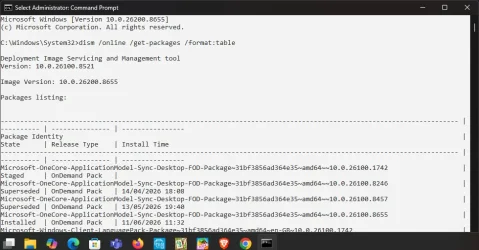
Did as you asked, here is the result:


1781433046692.webp
 

My Computer

System One

  • OS
    Windows 11 Home 25H2 26200.8246
    Computer type
    PC/Desktop
    Manufacturer/Model
    HP
I did not ask for anything.
 

My Computer

System One

  • OS
    Windows 11
    Computer type
    PC/Desktop
    Manufacturer/Model
    HP Pavilion
    CPU
    AMD Ryzen 7 5700G
    Motherboard
    Erica6
    Memory
    Micron Technology DDR4-3200 16GB
    Graphics Card(s)
    NVIDIA GeForce RTX 3060
    Sound Card
    Realtek ALC671
    Monitor(s) Displays
    Samsung SyncMaster U28E590
    Screen Resolution
    3840 x 2160
    Hard Drives
    SAMSUNG MZVLQ1T0HALB-000H1
Ok then, correction: did as you advised.

Are you able to see whether those updates are there please? I have tried although it is difficult for me to be able to tell.

Thanks.
 

My Computer

System One

  • OS
    Windows 11 Home 25H2 26200.8246
    Computer type
    PC/Desktop
    Manufacturer/Model
    HP
No screenshot wont list all updates.
 

My Computer

System One

  • OS
    Windows 11
    Computer type
    PC/Desktop
    Manufacturer/Model
    HP Pavilion
    CPU
    AMD Ryzen 7 5700G
    Motherboard
    Erica6
    Memory
    Micron Technology DDR4-3200 16GB
    Graphics Card(s)
    NVIDIA GeForce RTX 3060
    Sound Card
    Realtek ALC671
    Monitor(s) Displays
    Samsung SyncMaster U28E590
    Screen Resolution
    3840 x 2160
    Hard Drives
    SAMSUNG MZVLQ1T0HALB-000H1
I'm not at the PC at the moment, but the next time I am today, I will look.

Thanks.
 

My Computer

System One

  • OS
    Windows 11 Home 25H2 26200.8246
    Computer type
    PC/Desktop
    Manufacturer/Model
    HP
Right, so I've just ran that command again, although I cannot see those KB numbers (KB5094149, KB5094156, KB 5095971) anywhere there.
 

My Computer

System One

  • OS
    Windows 11 Home 25H2 26200.8246
    Computer type
    PC/Desktop
    Manufacturer/Model
    HP

Latest Support Threads

Back
Top Bottom