Updates KB 5094156,KB 5095149, KB 5095971


mrmatt

Member
Local time
6:19 PM
Posts
82
Location
UK
OS
Windows 11 Home 25H2 26200.8246
Hello all :)


This is probably the wrong place to post this, but I was alerted to the following this morning:


It relates to updates KB5094149, KB5095971, KB5094156.


I don't know whether these are already installed on my system. Is there any way I can find out, and if I do need to install them, how would I go about it please ?


(I am assuming they were because of Patch Tuesday, I have tried searching already. I'm not 100% sure whether they apply in my case (Windows 11 Home).


Many thanks.
 
Windows Build/Version
Windows 11 Home 25H2 26200.8655

My Computer

System One

  • OS
    Windows 11 Home 25H2 26200.8246
    Computer type
    PC/Desktop
    Manufacturer/Model
    HP
Did you look at Windows update history.

To check installed packages via command prompt:
  1. Open the Start menu, type Command Prompt, right-click it, and select Run as Administrator.
  2. Run the following command:
  3. Code:
    dism /online /get-packages /format:table
  4. A table will display all packages, including their exact package names (e.g., updates for specific KBs, features, and servicing stack updates) and their installation states.
 

My Computer

System One

  • OS
    Windows 11
    Computer type
    PC/Desktop
    Manufacturer/Model
    HP Pavilion
    CPU
    AMD Ryzen 7 5700G
    Motherboard
    Erica6
    Memory
    Micron Technology DDR4-3200 16GB
    Graphics Card(s)
    NVIDIA GeForce RTX 3060
    Sound Card
    Realtek ALC671
    Monitor(s) Displays
    Samsung SyncMaster U28E590
    Screen Resolution
    3840 x 2160
    Hard Drives
    SAMSUNG MZVLQ1T0HALB-000H1
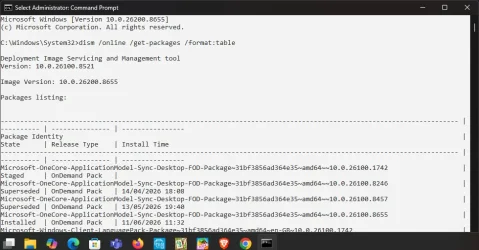
Did as you asked, here is the result:


1781433046692.webp
 

My Computer

System One

  • OS
    Windows 11 Home 25H2 26200.8246
    Computer type
    PC/Desktop
    Manufacturer/Model
    HP
I did not ask for anything.
 

My Computer

System One

  • OS
    Windows 11
    Computer type
    PC/Desktop
    Manufacturer/Model
    HP Pavilion
    CPU
    AMD Ryzen 7 5700G
    Motherboard
    Erica6
    Memory
    Micron Technology DDR4-3200 16GB
    Graphics Card(s)
    NVIDIA GeForce RTX 3060
    Sound Card
    Realtek ALC671
    Monitor(s) Displays
    Samsung SyncMaster U28E590
    Screen Resolution
    3840 x 2160
    Hard Drives
    SAMSUNG MZVLQ1T0HALB-000H1
Ok then, correction: did as you advised.

Are you able to see whether those updates are there please? I have tried although it is difficult for me to be able to tell.

Thanks.
 

My Computer

System One

  • OS
    Windows 11 Home 25H2 26200.8246
    Computer type
    PC/Desktop
    Manufacturer/Model
    HP
No screenshot wont list all updates.
 

My Computer

System One

  • OS
    Windows 11
    Computer type
    PC/Desktop
    Manufacturer/Model
    HP Pavilion
    CPU
    AMD Ryzen 7 5700G
    Motherboard
    Erica6
    Memory
    Micron Technology DDR4-3200 16GB
    Graphics Card(s)
    NVIDIA GeForce RTX 3060
    Sound Card
    Realtek ALC671
    Monitor(s) Displays
    Samsung SyncMaster U28E590
    Screen Resolution
    3840 x 2160
    Hard Drives
    SAMSUNG MZVLQ1T0HALB-000H1
I'm not at the PC at the moment, but the next time I am today, I will look.

Thanks.
 

My Computer

System One

  • OS
    Windows 11 Home 25H2 26200.8246
    Computer type
    PC/Desktop
    Manufacturer/Model
    HP
Right, so I've just ran that command again, although I cannot see those KB numbers (KB5094149, KB5094156, KB 5095971) anywhere there.
 

My Computer

System One

  • OS
    Windows 11 Home 25H2 26200.8246
    Computer type
    PC/Desktop
    Manufacturer/Model
    HP
Install them check for updates.
 

My Computer

System One

  • OS
    Windows 11
    Computer type
    PC/Desktop
    Manufacturer/Model
    HP Pavilion
    CPU
    AMD Ryzen 7 5700G
    Motherboard
    Erica6
    Memory
    Micron Technology DDR4-3200 16GB
    Graphics Card(s)
    NVIDIA GeForce RTX 3060
    Sound Card
    Realtek ALC671
    Monitor(s) Displays
    Samsung SyncMaster U28E590
    Screen Resolution
    3840 x 2160
    Hard Drives
    SAMSUNG MZVLQ1T0HALB-000H1
Hi, as you've kindly supplied your full Windows build number, then from the News section here (or perhaps just a Google search) you can see that you are up to date as of patch Tuesday, June 9th:

As such, you are up to date.

If you wish to see which updates are installed on your PC either
a. See your Update History
or
b. See the list in the Control Panel

Hint: If you wish to check for any updates being available without downloading them, get a copy of e.g. WUMT (free) - just search for that.
Handy utility which does more than that.

Note: Windows checks for updates by default every day.
 

My Computer

System One

  • OS
    Windows 11 Pro
    Computer type
    Laptop
    Manufacturer/Model
    Lenovo t480s
    CPU
    i7-8650U
    Memory
    16GB
    Graphics Card(s)
    Intel UHD 620
    Screen Resolution
    1920x1080
    Hard Drives
    C SN810 SDCPNRY-512G-1006
    Browser
    Edge, Firefox
    Antivirus
    Defender
If you wish to see which updates are installed on your PC either
a. See your Update History
or
b. See the list in the Control Panel

Hint: If you wish to check for any updates being available without downloading them, get a copy of e.g. WUMT (free) - just search for that.
Handy utility which does more than that.

Note: Windows checks for updates by default every day.

I did already try looking in Update History

Control panel list ?


Thanks for recommending Windows Update MiniTool; I'll have a look at that.


I know what you mean about going by the build number, but I want to be 100% sure.


I did follow the usual procedure on Tuesday 9th, going through Windows Update, so everything should be as normal.
 

My Computer

System One

  • OS
    Windows 11 Home 25H2 26200.8246
    Computer type
    PC/Desktop
    Manufacturer/Model
    HP
OK, so just tried that Windows Update Minitool.


I tried searching for those individual KBs (5094149, 5094156, 5095971). All I could find was KB5094126.


Confused.

I think I'll just take it as read that they were applied.


Thanks for your time and patience people.
 

My Computer

System One

  • OS
    Windows 11 Home 25H2 26200.8246
    Computer type
    PC/Desktop
    Manufacturer/Model
    HP
And thank you for your reply.

The WUMT scan will show you AVAILABLE updates. It will NOT show you updates which have already been applied. (Except it has a button/link to Update History).

You are over-worrying.

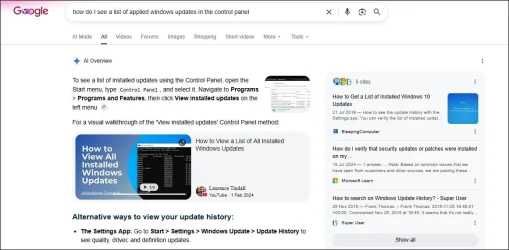
Control Panel: as you don't seem to know, you could have asked Google:
1.webp
 

My Computer

System One

  • OS
    Windows 11 Pro
    Computer type
    Laptop
    Manufacturer/Model
    Lenovo t480s
    CPU
    i7-8650U
    Memory
    16GB
    Graphics Card(s)
    Intel UHD 620
    Screen Resolution
    1920x1080
    Hard Drives
    C SN810 SDCPNRY-512G-1006
    Browser
    Edge, Firefox
    Antivirus
    Defender
Just tried the Control Panel method. It lists the following three:

KB 5054156
KB 5087051
KB 5094126

which I won't unstall.


Thank you for your information showing the Control Panel method. And also your reassurance.
 

My Computer

System One

  • OS
    Windows 11 Home 25H2 26200.8246
    Computer type
    PC/Desktop
    Manufacturer/Model
    HP
I think you're fine... (good to go, as they say) 😊
 

My Computer

System One

  • OS
    Windows 11 Pro
    Computer type
    Laptop
    Manufacturer/Model
    Lenovo t480s
    CPU
    i7-8650U
    Memory
    16GB
    Graphics Card(s)
    Intel UHD 620
    Screen Resolution
    1920x1080
    Hard Drives
    C SN810 SDCPNRY-512G-1006
    Browser
    Edge, Firefox
    Antivirus
    Defender
Back
Top Bottom