Updates keep failing to install


CompoSW

New member
Member
Local time
4:19 AM
Posts
29
OS
Windows 11
2025-11 Security Update (KB5068861) (26200.7171) this along with all other updates are failing to install I have tried
  1. SFC /scannow
  2. DISM restore health/scan/windows update scans & repairs
  3. Increased EFI Partition to 700mb
  4. Deleted/Reset windows update store/components
  5. Windows Disk Cleanup
  6. Complete windows 25H2 repair install
  7. Download the update and try to install manual
Can't notify Microsoft by any means ( not that they are interested) I have now given up even checking for updates there is no point if there is a continual fail
 

My Computer My Computer

At a glance

Windows 11
OS
Windows 11
Computer type
Laptop
Manufacturer/Model
Dell Inspiron15 3000
What error code are you receiving?
 

My Computer My Computer

At a glance

Linux Mint
OS
Linux Mint
Computer type
Laptop
Manufacturer/Model
System76 Lemur Pro
Have you tried an in-place upgrade?
 

My Computer My Computer

At a glance

W11
OS
W11
Computer type
PC/Desktop
Manufacturer/Model
2 HP Desktops, 1 Dell Desktop, 2 Dell XPS Laptops, 1 HP Laptop
Keyboard
Logitech
Mouse
Logitech MX Master 4 & 3
Internet Speed
500 mps
Browser
Firefox
Antivirus
Bitdefender
2025-11 Security Update (KB5068861) (26200.7171) this along with all other updates are failing to install I have tried
  1. SFC /scannow
  2. DISM restore health/scan/windows update scans & repairs
  3. Increased EFI Partition to 700mb
  4. Deleted/Reset windows update store/components
  5. Windows Disk Cleanup
  6. Complete windows 25H2 repair install
  7. Download the update and try to install manual
Can't notify Microsoft by any means ( not that they are interested) I have now given up even checking for updates there is no point if there is a continual fail

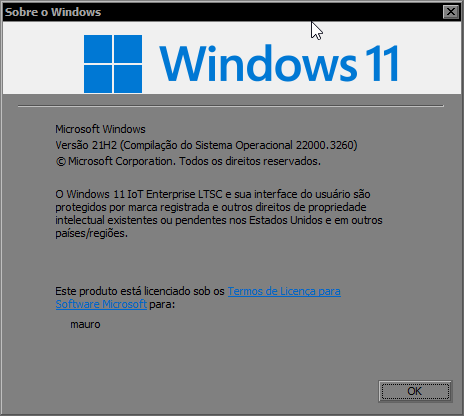
I've been using 11 21h2 for a year now, the update ended a year ago and it's working perfectly, no bugs. I don't plan on updating to 25h2 or 26h1, etc.

LCo97S.png
 

My Computer My Computer

At a glance

Windows 11 Iot Enterprise 21h2 22000.3260xeon E5-2697v232gb 8x4gb ddr3 1333 mhzgtx 570 poit of view
OS
Windows 11 Iot Enterprise 21h2 22000.3260
Computer type
PC/Desktop
Manufacturer/Model
Asus
CPU
xeon E5-2697v2
Motherboard
rampage iv extreme
Memory
32gb 8x4gb ddr3 1333 mhz
Graphics Card(s)
gtx 570 poit of view
Sound Card
realtek HD (ALC898)
Monitor(s) Displays
samsung b2030
Screen Resolution
1600x900
Hard Drives
2tb hd 5400 rpm
3tb hd 5400 rpm
1tb nvme pcie 3.0
PSU
hx850w
Keyboard
mtek
Internet Speed
500/250 gpon
Browser
r3dfox 146.0
Antivirus
none
Installation Failure: Windows failed to install the following update with error 0x800F0983: 2025-11 Security Update (KB5068861) (26200.7171).

That is from the Reliability History.
There are logs of these failures but with 1.5 million lines of text, I'm not going to look at that lot MS.
been going on since 12.11.2025
I have taken the measures you list and still same.

Just paused update for a number of weeks, consumers should not have to take complex measures.
Feedback App, nothing to date which is par for the course.
 

My Computer My Computer

At a glance

Windows 11
OS
Windows 11
I would start by running the built-in windows update troubleshooter, that error is often due to some component store corruption.

In system settings type troubleshoot, select 'other troubleshooters'

There should be one for Windows updates, click run
 

My Computer My Computer

At a glance

Linux Mint
OS
Linux Mint
Computer type
Laptop
Manufacturer/Model
System76 Lemur Pro
I've been using 11 21h2 for a year now, the update ended a year ago and it's working perfectly, no bugs. I don't plan on updating to 25h2 or 26h1, etc.

LCo97S.png
And I'm running 25H2 on 5 systems at home - also all running perfectly. If you use disc imaging (as you should), just create an image, do the in-place upgrade, and you can always restore the prior image if you want to (but you won't want to). The in-place upgrade may very well solve your problem - AND you'll be running the latest Windows release.
 

My Computer My Computer

At a glance

W11
OS
W11
Computer type
PC/Desktop
Manufacturer/Model
2 HP Desktops, 1 Dell Desktop, 2 Dell XPS Laptops, 1 HP Laptop
Keyboard
Logitech
Mouse
Logitech MX Master 4 & 3
Internet Speed
500 mps
Browser
Firefox
Antivirus
Bitdefender
About 2 hrs ago, UK time zone, along came "version 25H2 (repair version)" in Windows updates.
Problem appears to have been fixed.
 

My Computer My Computer

At a glance

Windows 11
OS
Windows 11

My Computer My Computer

At a glance

Windows 11
OS
Windows 11
Computer type
Laptop
Manufacturer/Model
Dell Inspiron15 3000

My Computer My Computer

At a glance

Windows 11
OS
Windows 11
Computer type
Laptop
Manufacturer/Model
Dell Inspiron15 3000
Please run an in place upgrade repair using an iso downloaded to a new desktop folder:


My Computer My Computer

At a glance

Windows 10Intel(R) Core(TM) i7-4800MQ CPU @ 2.70GHz16 GB Total: Manufacturer : Samsung MemoryTyp...NVIDIA Quadro K3100M; Intel(R) HD Graphics 4600
OS
Windows 10
Computer type
Laptop
Manufacturer/Model
HP
CPU
Intel(R) Core(TM) i7-4800MQ CPU @ 2.70GHz
Motherboard
Product : 190A Version : KBC Version 94.56
Memory
16 GB Total: Manufacturer : Samsung MemoryType : DDR3 FormFactor : SODIMM Capacity : 8GB Speed : 1600
Graphics Card(s)
NVIDIA Quadro K3100M; Intel(R) HD Graphics 4600
Sound Card
IDT High Definition Audio CODEC; PNP Device ID HDAUDIO\FUNC_01&VEN_111D&DEV_76E0
Hard Drives
Model Hitachi HTS727575A9E364
Antivirus
Microsoft Defender
Other Info
Mobile Workstation

Latest Support Threads

Back
Top Bottom