Upgraded to Windows11, pc freezing and crashing since


Please post a new V2 share link into the newest post.

For any new BSOD please post a new V2 share link into the newest post.
 

My Computer

System One

  • OS
    Windows 10
    Computer type
    Laptop
    Manufacturer/Model
    HP
    CPU
    Intel(R) Core(TM) i7-4800MQ CPU @ 2.70GHz
    Motherboard
    Product : 190A Version : KBC Version 94.56
    Memory
    16 GB Total: Manufacturer : Samsung MemoryType : DDR3 FormFactor : SODIMM Capacity : 8GB Speed : 1600
    Graphics Card(s)
    NVIDIA Quadro K3100M; Intel(R) HD Graphics 4600
    Sound Card
    IDT High Definition Audio CODEC; PNP Device ID HDAUDIO\FUNC_01&VEN_111D&DEV_76E0
    Hard Drives
    Model Hitachi HTS727575A9E364
    Antivirus
    Microsoft Defender
    Other Info
    Mobile Workstation
Run gather_additional_dump_files > post a share link


The problems reported in the opening post with the recent steps are typical of malfunctioning hardware.


The one day Windows installation has so far problems with

a) scannow
b) restorehealth
c) BSODs with bugchecks 124, 4E
d) Very old BIOS now up to date


Please clean install Windows 10 for testing.

Use only Microsoft default drivers.

Do not install any non-Microsoft drivers.

Do not install any third party software.

Make sure that disk cleanup is not performed.

For any new BSOD please post a new V2 share link into the newest post.


Code:
First ScanNow:
 
[CODE]Windows Resource Protection found corrupt files but was unable to fix some of them.

Code:
RestoreHealth:
 
Error: 0x800f0915
The repair content could not be found anywhere.
Check the internet connectivity or use the "Source" option to specify the location of the files that are required to restore the image. For more information on specifying a source location, see https://go.microsoft.com/fwlink/?LinkId=243077.
The DISM log file can be found at C:\Windows\Logs\DISM\dism.log

Code:
Second ScanNow:
 
Windows Resource Protection found corrupt files but was unable to fix some of them/Scan]


Code:
Event[750]
  Log Name: System
  Source: Microsoft-Windows-WHEA-Logger
  Date: 2025-11-11T20:51:49.7090000Z
  Event ID: 16
  Task: N/A
  Level: Error
  Opcode: Info 
  Keyword: N/A
  User: S-1-5-19
  User Name: NT AUTHORITY\LOCAL SERVICE
  Computer: RhynosPC
  Description:
A fatal hardware error has occurred.

Component: PCI Express Root Port
Error Source: Advanced Error Reporting (PCI Express)

Primary Bus:Device:Function: 0x0:0x1:0x0
Secondary Bus:Device:Function: 0x0:0x0:0x0
Primary Device Name:PCI\VEN_8086&DEV_460D&SUBSYS_86941043&REV_02
Secondary Device Name:


Code:
Event[715]
  Log Name: System
  Source: Microsoft-Windows-WER-SystemErrorReporting
  Date: 2025-11-11T20:51:48.6070000Z
  Event ID: 1001
  Task: N/A
  Level: Error
  Opcode: Info 
  Keyword: N/A
  User: S-1-5-18
  User Name: NT AUTHORITY\SYSTEM
  Computer: RhynosPC
  Description:
The computer has rebooted from a bugcheck.  The bugcheck was: 0x00000124 (0x0000000000000004, 0xffffe184c1a9f028, 0x0000000000000000, 0x0000000000000000). A dump was saved in: C:\Windows\Minidump\111125-5328-01.dmp. Report Id: 8b973083-f064-440f-bb68-f179bb5d0499.


Code:
Event[1106]
  Log Name: System
  Source: Microsoft-Windows-WER-SystemErrorReporting
  Date: 2025-11-12T16:43:11.6970000Z
  Event ID: 1001
  Task: N/A
  Level: Error
  Opcode: Info 
  Keyword: N/A
  User: S-1-5-18
  User Name: NT AUTHORITY\SYSTEM
  Computer: RhynosPC
  Description:
The computer has rebooted from a bugcheck.  The bugcheck was: 0x0000004e (0x0000000000000002, 0x000000000082dacb, 0x000000000087ffff, 0x0000000000000001). A dump was saved in: C:\Windows\Minidump\111225-6421-01.dmp. Report Id: 5df7419e-c0d2-44f1-8047-f140ffd3c4cf.
 
Last edited:

My Computer

System One

  • OS
    Windows 10
    Computer type
    Laptop
    Manufacturer/Model
    HP
    CPU
    Intel(R) Core(TM) i7-4800MQ CPU @ 2.70GHz
    Motherboard
    Product : 190A Version : KBC Version 94.56
    Memory
    16 GB Total: Manufacturer : Samsung MemoryType : DDR3 FormFactor : SODIMM Capacity : 8GB Speed : 1600
    Graphics Card(s)
    NVIDIA Quadro K3100M; Intel(R) HD Graphics 4600
    Sound Card
    IDT High Definition Audio CODEC; PNP Device ID HDAUDIO\FUNC_01&VEN_111D&DEV_76E0
    Hard Drives
    Model Hitachi HTS727575A9E364
    Antivirus
    Microsoft Defender
    Other Info
    Mobile Workstation
After the Windows 10 clean install:


1) Run Tuneup plus > post a share link


2) Turn off Windows fast startup:


3) Create a new restore point:


4) For any new BSOD post a new V2 share link into the newest post


5) Make sure that disk cleaning is not performed during the troubleshooting
 

My Computer

System One

  • OS
    Windows 10
    Computer type
    Laptop
    Manufacturer/Model
    HP
    CPU
    Intel(R) Core(TM) i7-4800MQ CPU @ 2.70GHz
    Motherboard
    Product : 190A Version : KBC Version 94.56
    Memory
    16 GB Total: Manufacturer : Samsung MemoryType : DDR3 FormFactor : SODIMM Capacity : 8GB Speed : 1600
    Graphics Card(s)
    NVIDIA Quadro K3100M; Intel(R) HD Graphics 4600
    Sound Card
    IDT High Definition Audio CODEC; PNP Device ID HDAUDIO\FUNC_01&VEN_111D&DEV_76E0
    Hard Drives
    Model Hitachi HTS727575A9E364
    Antivirus
    Microsoft Defender
    Other Info
    Mobile Workstation
After the Windows 10 clean install:


1) Run Tuneup plus > post a share link


2) Turn off Windows fast startup:


3) Create a new restore point:


4) For any new BSOD post a new V2 share link into the newest post


5) Make sure that disk cleaning is not performed during the troubleshooting
Gofile - Cloud Storage Made Simple here is the first windows 10 tuneup plus. no drivers or anything else adjusted or downloaded. moving on to steps 2 and 3 and will edit this post once that is done

edit: fast startup has been turned off and a restore point has been created

edit 2: ran sfc /scannow to double check, same response as on windows 11
 

My Computer

System One

  • OS
    windows 11
    Computer type
    PC/Desktop
    CPU
    i5 12400f
    Motherboard
    asus h670 plus d4
What on earth are people doing with their machines -- a CLEAN install of almost any version of Windows on appropriate hardware works 99.99999% of the time - even on a lot of older non supported hardware it usually works - you can disable secure boot )I always do that anyway as I often want to boot other OS'es etc often from external devices, and any computer made in thge last 10 -12 years wil have a TPM in it.

When installing clean - just remove (if poss) any weird hardware including USB devices, ensure the target HDD / SSD / NVME(SSD type) is "cleaned", and "converted to gpt" -- can be done via diskpart from the install disk (boot -->repair system and proceed until you get to command mode). Use all the DEFAULT options - you can alter all sorts of stuff later.

If no hard disks are detected then you might have something like a weird RAID driver or Intel Optane --but at Windows 11 install time you get a prompt for "load driver" and you can mount the device with the appropriate drivers on it to continue.

Performing an UPGRADE rather than a CLEAN install is different and can cause all sorts of problems -- a CLEAN W11 install should be simplicity itself on almost any capable machine (and zillions of ones theoretically not supported).

Cheers
jimbo.
 

My Computer

System One

  • OS
    Windows XP,11 Linux Fedora Rawhide pre-release 45
    Computer type
    PC/Desktop
    CPU
    2 X Intel i7
    Screen Resolution
    4KUHD X 2
What on earth are people doing with their machines -- a CLEAN install of almost any version of Windows on appropriate hardware works 99.99999% of the time - even on a lot of older non supported hardware it usually works - you can disable secure boot )I always do that anyway as I often want to boot other OS'es etc often from external devices, and any computer made in thge last 10 -12 years wil have a TPM in it.

When installing clean - just remove (if poss) any weird hardware including USB devices, ensure the target HDD / SSD / NVME(SSD type) is "cleaned", and "converted to gpt" -- can be done via diskpart from the install disk (boot -->repair system and proceed until you get to command mode). Use all the DEFAULT options - you can alter all sorts of stuff later.

If no hard disks are detected then you might have something like a weird RAID driver or Intel Optane --but at Windows 11 install time you get a prompt for "load driver" and you can mount the device with the appropriate drivers on it to continue.

Performing an UPGRADE rather than a CLEAN install is different and can cause all sorts of problems -- a CLEAN W11 install should be simplicity itself on almost any capable machine (and zillions of ones theoretically not supported).

Cheers
jimbo.
how can i check and verify that my hardware is not the issue? at first i upgraded from windows 10 to 11 which started this whole mess, but now I have fresh installed windows 11 twice and windows 10 once and continue getting the same error message.

when installing both windows 10 and 11 i made sure that when given the option i cleared out all the partitions on both ssd's to totally wipe them and boot up from usb. it showed them both only as available space with nothing else on them.

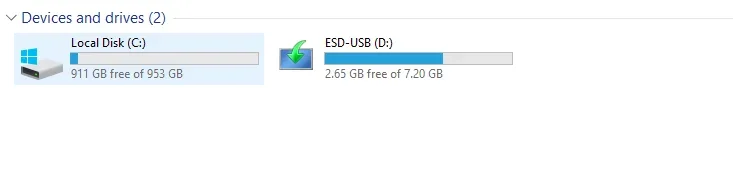
however now, when i open up file explorer and go to This PC, the devices and drives only show 1 ssd and the usb.

1763036324478.webp

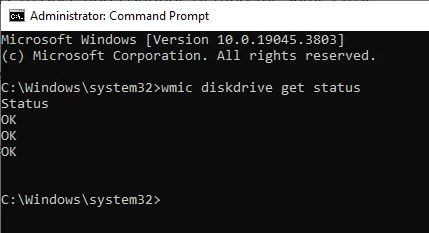
Edit: this says that the drives are fine, but i don't trust it lol

1763036287227.webp
 

My Computer

System One

  • OS
    windows 11
    Computer type
    PC/Desktop
    CPU
    i5 12400f
    Motherboard
    asus h670 plus d4
Are you supposed to upgrade win11 a long time ago? Like 3-4 years ago!
 

My Computer

System One

  • OS
    Wind 11 Pro 24H2 (Dev Channel)/23H2Beta (offline)
    Computer type
    PC/Desktop
    Manufacturer/Model
    DELL T7500
    CPU
    2 Intel Xeon 5680
    Memory
    120 Gb
    Graphics Card(s)
    MSI(Nvidia) GeForce GTX 970
    Monitor(s) Displays
    Dell S2719DGF
    Screen Resolution
    2560 x 1440 (155Hz)
    Hard Drives
    Samsung 2TB 870 (24H2 Device)
    Samsung 1TB 860 (23H2 Beta)
    PSU
    Dell 1100W
    Antivirus
    Premium Malwarebyte, AdwCleaner (Malwarebyte)
Are you supposed to upgrade win11 a long time ago? Like 3-4 years
I avoided upgrading to windows 11 because i have heard countless horror stories about it, and after this experience i agree that it is an inferior OS and would really love not to use it. i had 0 issues using my pc every day for 4 years on windows 10, and the literal second i upgrade to windows 11 it crashes my pc, corrupts itself, and starts this entire troubleshooting process. extremely frustrating
 

My Computer

System One

  • OS
    windows 11
    Computer type
    PC/Desktop
    CPU
    i5 12400f
    Motherboard
    asus h670 plus d4
I avoided upgrading to windows 11 because i have heard countless horror stories about it, and after this experience i agree that it is an inferior OS and would really love not to use it. i had 0 issues using my pc every day for 4 years on windows 10, and the literal second i upgrade to windows 11 it crashes my pc, corrupts itself, and starts this entire troubleshooting process. extremely frustrating
Upgrading from 10 to 11 is a long and tedious process if your hardware do not support it and you will definitely encounter this type of problem.but if you put a lot of time and effort it will work out. I am glad I had found this forum which helps me tremendously.

Windows is like a rabbit hole
 
Last edited:

My Computer

System One

  • OS
    Wind 11 Pro 24H2 (Dev Channel)/23H2Beta (offline)
    Computer type
    PC/Desktop
    Manufacturer/Model
    DELL T7500
    CPU
    2 Intel Xeon 5680
    Memory
    120 Gb
    Graphics Card(s)
    MSI(Nvidia) GeForce GTX 970
    Monitor(s) Displays
    Dell S2719DGF
    Screen Resolution
    2560 x 1440 (155Hz)
    Hard Drives
    Samsung 2TB 870 (24H2 Device)
    Samsung 1TB 860 (23H2 Beta)
    PSU
    Dell 1100W
    Antivirus
    Premium Malwarebyte, AdwCleaner (Malwarebyte)
Works fine by me

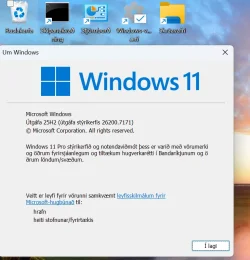
On an HP laptop with internal Intel optane NVME drive --installed clean - wiping previous W11 system supplied with the PC (back that up of course first though) -- no probs at all so far and it retains activation.


Skjámynd 2025-11-13 151820.webp

I agree updating from W10 especially on older hardware or having apps which directly address hardware rather than using API's might be an issue but installing CLEAN is simplicity itself if you just leave everything to Windows -- you can fiddle around with it afterwards of course.

Also if you avoid the insider builds initially even stuff like network runs properly (usually problematic in Windows due to random nature of how it works which has been true ever since the early days of Windows (Windows 3.11 for Workgroups etc) !!

I'd do updating via a VM first from W10 -- it's a synch to then convert that to a Real machine -- just add the real drivers -- a restored VM to a physical system will usually boot with basic video drivers- windows update then is pretty good at finding what's required.

People who use Insider builds as their regular daily machine IMHO deserve the trouble they often run into --these are designed AS TEST SYSTEMS so defects can and probably will occur if you do anything more demanding on your machine than basic "Officy" stuff and internet browsing. If it all works without problems then you are lucky.

Nothing wrong in using those builds but understand their limitations and what they are primarily designed for. But for a machine you need to use daily - especially if work related -- avoid those insider builds unless on a VM or on a "Windows to GO" type of external device so your internal windows system isn't touched.

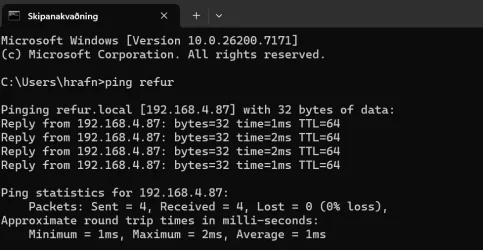
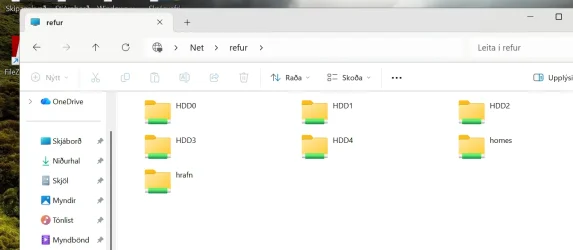
Even ping to NAS (Linux) server on home LAN is fine -- no need for SMB1 Netbios, weird TCPIP protocols etc -- just 100% bog standard default Windows (and in control panel - allow remote communications),

Skjámynd 2025-11-13 154128.webp


Skjámynd 2025-11-13 154239.webp
Cheers
jimbo
 
Last edited:

My Computer

System One

  • OS
    Windows XP,11 Linux Fedora Rawhide pre-release 45
    Computer type
    PC/Desktop
    CPU
    2 X Intel i7
    Screen Resolution
    4KUHD X 2

My Computer

System One

  • OS
    Windows 10
    Computer type
    Laptop
    Manufacturer/Model
    HP
    CPU
    Intel(R) Core(TM) i7-4800MQ CPU @ 2.70GHz
    Motherboard
    Product : 190A Version : KBC Version 94.56
    Memory
    16 GB Total: Manufacturer : Samsung MemoryType : DDR3 FormFactor : SODIMM Capacity : 8GB Speed : 1600
    Graphics Card(s)
    NVIDIA Quadro K3100M; Intel(R) HD Graphics 4600
    Sound Card
    IDT High Definition Audio CODEC; PNP Device ID HDAUDIO\FUNC_01&VEN_111D&DEV_76E0
    Hard Drives
    Model Hitachi HTS727575A9E364
    Antivirus
    Microsoft Defender
    Other Info
    Mobile Workstation
Please run:


Rerun Tuneup plus

Create a new restore point

Post share links
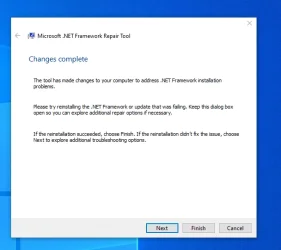
1763057236722.webp
i've made it to this point, unsure of if i should choose next or finish. there were two things that looked like they were adjusted
 

My Computer

System One

  • OS
    windows 11
    Computer type
    PC/Desktop
    CPU
    i5 12400f
    Motherboard
    asus h670 plus d4
I went ahead and hit finish, here are the results of the tuneup plus. sidenote, this time running it was MUCH slower than the other times I have if that means anything.

Please run:


Rerun Tuneup plus

Create a new restore point

Post share links
i've made it to this point, unsure of if i should choose next or finish. there were two things that looked like they were adjusted

Edit: i went ahead and hit finish, here are the results of the tuneup plus. sidenote, this time running it was MUCH slower than the other times i have if that means anything.


My Computer

System One

  • OS
    windows 11
    Computer type
    PC/Desktop
    CPU
    i5 12400f
    Motherboard
    asus h670 plus d4
sidenote, this time running it was MUCH slower than the other times i have if that means anything.

Nice!


Tuneup plus results were excellent.


Code:
    Started on Thu 11/13/2025 at 12:48:18.05

        [DISM /online /cleanup-image /RestoreHealth]

Deployment Image Servicing and Management tool
Version: 10.0.19041.3636

Image Version: 10.0.19045.3803

The restore operation completed successfully.

The operation completed successfully.

==================================================================

The second "SFC /ScanNow" was skipped, as the first output the following:

Windows Resource Protection did not find any integrity violations.


Code:
    Finished on Thu 11/13/2025 at 12:49:07.76
    It took 142 minutes and 41 seconds to complete the operations.
 

My Computer

System One

  • OS
    Windows 10
    Computer type
    Laptop
    Manufacturer/Model
    HP
    CPU
    Intel(R) Core(TM) i7-4800MQ CPU @ 2.70GHz
    Motherboard
    Product : 190A Version : KBC Version 94.56
    Memory
    16 GB Total: Manufacturer : Samsung MemoryType : DDR3 FormFactor : SODIMM Capacity : 8GB Speed : 1600
    Graphics Card(s)
    NVIDIA Quadro K3100M; Intel(R) HD Graphics 4600
    Sound Card
    IDT High Definition Audio CODEC; PNP Device ID HDAUDIO\FUNC_01&VEN_111D&DEV_76E0
    Hard Drives
    Model Hitachi HTS727575A9E364
    Antivirus
    Microsoft Defender
    Other Info
    Mobile Workstation

Nice!


Tuneup plus results were excellent.


Code:
    Started on Thu 11/13/2025 at 12:48:18.05

        [DISM /online /cleanup-image /RestoreHealth]

Deployment Image Servicing and Management tool
Version: 10.0.19041.3636

Image Version: 10.0.19045.3803

The restore operation completed successfully.

The operation completed successfully.

==================================================================

The second "SFC /ScanNow" was skipped, as the first output the following:

Windows Resource Protection did not find any integrity violations.


Code:
    Finished on Thu 11/13/2025 at 12:49:07.76
    It took 142 minutes and 41 seconds to complete the operations.
am i... free?

i just ran chkdsk and sfc /scannow and both of them came back clean. anything else i should check?
 

My Computer

System One

  • OS
    windows 11
    Computer type
    PC/Desktop
    CPU
    i5 12400f
    Motherboard
    asus h670 plus d4
Now you're monitoring for BSOD.


Please use reliability history:


If there are no BSODs for 4 - 7 days then > plan to install the drivers from the motherboard website > continue monitoring >

If there are BSODs with Windows 10 using only Microsoft default drivers then > plan to use software to stress test hardware


For any BSOD > post a new V2 share link into the newest post
 

My Computer

System One

  • OS
    Windows 10
    Computer type
    Laptop
    Manufacturer/Model
    HP
    CPU
    Intel(R) Core(TM) i7-4800MQ CPU @ 2.70GHz
    Motherboard
    Product : 190A Version : KBC Version 94.56
    Memory
    16 GB Total: Manufacturer : Samsung MemoryType : DDR3 FormFactor : SODIMM Capacity : 8GB Speed : 1600
    Graphics Card(s)
    NVIDIA Quadro K3100M; Intel(R) HD Graphics 4600
    Sound Card
    IDT High Definition Audio CODEC; PNP Device ID HDAUDIO\FUNC_01&VEN_111D&DEV_76E0
    Hard Drives
    Model Hitachi HTS727575A9E364
    Antivirus
    Microsoft Defender
    Other Info
    Mobile Workstation
Now you're monitoring for BSOD.


Please use reliability history:


If there are no BSODs for 4 - 7 days then > plan to install the drivers from the motherboard website > continue monitoring >

If there are BSODs with Windows 10 using only Microsoft default drivers then > plan to use software to stress test hardware


For any BSOD > post a new V2 share link into the newest post


here is the reliability history. & okay, i will either respond to your latest message on here next wednesday if i have no issues or earlier if i have bsod.

can i download my normal software (msi afterburner, steam, discord, etc) and use the pc for games/browsing, or should i hold off for now?
 

My Computer

System One

  • OS
    windows 11
    Computer type
    PC/Desktop
    CPU
    i5 12400f
    Motherboard
    asus h670 plus d4
Please run the computer with only the operating system and Microsoft default drivers so that there are minimal confounding factors.

Reliability history has a stability / instability chart.

If you see unexpected shutdowns and restarts with or without BSOD then post a V2 share link.

Event viewer system and application files will be checked before install the drivers from the motherboard website.
 

My Computer

System One

  • OS
    Windows 10
    Computer type
    Laptop
    Manufacturer/Model
    HP
    CPU
    Intel(R) Core(TM) i7-4800MQ CPU @ 2.70GHz
    Motherboard
    Product : 190A Version : KBC Version 94.56
    Memory
    16 GB Total: Manufacturer : Samsung MemoryType : DDR3 FormFactor : SODIMM Capacity : 8GB Speed : 1600
    Graphics Card(s)
    NVIDIA Quadro K3100M; Intel(R) HD Graphics 4600
    Sound Card
    IDT High Definition Audio CODEC; PNP Device ID HDAUDIO\FUNC_01&VEN_111D&DEV_76E0
    Hard Drives
    Model Hitachi HTS727575A9E364
    Antivirus
    Microsoft Defender
    Other Info
    Mobile Workstation
Any chance there a results for post #23:

Run gather_additional_dump_files > post a share link
 

My Computer

System One

  • OS
    Windows 10
    Computer type
    Laptop
    Manufacturer/Model
    HP
    CPU
    Intel(R) Core(TM) i7-4800MQ CPU @ 2.70GHz
    Motherboard
    Product : 190A Version : KBC Version 94.56
    Memory
    16 GB Total: Manufacturer : Samsung MemoryType : DDR3 FormFactor : SODIMM Capacity : 8GB Speed : 1600
    Graphics Card(s)
    NVIDIA Quadro K3100M; Intel(R) HD Graphics 4600
    Sound Card
    IDT High Definition Audio CODEC; PNP Device ID HDAUDIO\FUNC_01&VEN_111D&DEV_76E0
    Hard Drives
    Model Hitachi HTS727575A9E364
    Antivirus
    Microsoft Defender
    Other Info
    Mobile Workstation

Back
Top Bottom