USB Problem


Andol

Banned
Local time
9:35 PM
Posts
8
OS
win 11
Hallo Laptop Medion, WIN 11 Home 22H2, i5, 8GB Ram, 500GB SSD, efi bios
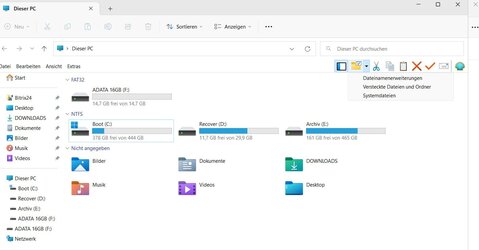
Wenn ich einen USB-Stick auf meinem Desktop-Computer formatiere, ist alles normal. Wenn ich es jedoch auf dem Laptop formatiere (egal ob in usb2 oder usb3), werden die Daten nach dem Auswerfen und erneuten Einsetzen des Sticks anders angezeigt. Siehe Fotos. Also direkt nach der Formatierung
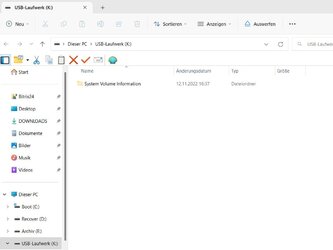
Usb.jpg

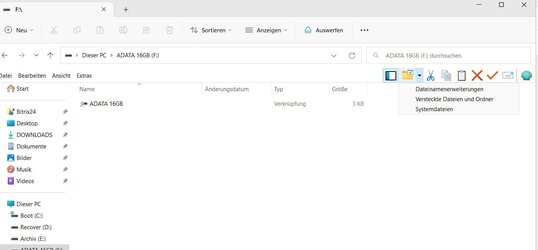
Zum Beispiel, wenn ich den Stecker einmal ziehe (auswerfe) und wieder einstecke. Übrigens mit allen USB-Sticks.
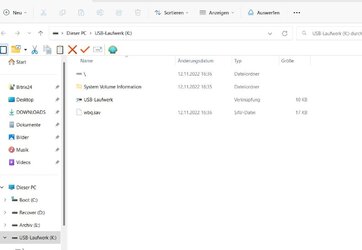
Usb1.jpg

Also, wenn der Stick einmal im Laptop war verändert sich die Struktur wie im Bild 2
Was kann das sein?
Grüsse
 
Windows Build/Version
10.022621 Build 22621

My Computer My Computer

At a glance

win 11
OS
win 11
Was kann das sein?
Grüsse

Please post in English....
Forum rule 10 said:
This is an English-based site. Please only post in English, or provide an English translation in your posts.
 

My Computers My Computers

  • At a glance

    Windows 11 HomeAMD Athlon Silver 3050U8GBRadeon Graphics
    OS
    Windows 11 Home
    Computer type
    Laptop
    Manufacturer/Model
    Acer Aspire 3 A315-23-R9VY
    CPU
    AMD Athlon Silver 3050U
    Memory
    8GB
    Graphics Card(s)
    Radeon Graphics
    Monitor(s) Displays
    laptop screen
    Screen Resolution
    1366x768 native resolution, up to 2560x1440 with Radeon Virtual Super Resolution
    Hard Drives
    1TB Samsung EVO 870 SSD (from April 2026: 250GB EVO 850)
    Internet Speed
    150 Mbps
    Browser
    Edge, Firefox
    Antivirus
    Defender
    Other Info
    fully 'Windows 11 ready' laptop. Windows 10 C: partition migrated from my old unsupported 'main machine' then upgraded to 11. A test migration ran Insider builds for 2 months. When 11 was released on 5th October 2021 it was re-imaged back to 10 and was offered the upgrade in Windows Update on 20th October. Windows Update offered the 22H2 Feature Update on 20th September 2022. It got the 23H2 Feature Update on 4th November 2023 through Windows Update, 24H2 on 3rd October 2024 through Windows Update by setting the Target Release Version for 24H2, and 25H2 on 30th September 2025 through Windows Update by setting the Target Release Version for 25H2.

    UPDATE - 11 April 2026: due to mechanical deterioration this PC has been retired from active duty. The OS with all software and files has been migrated to my System Seven in 'Other systems' to carry on as my general purpose 'main machine'.
  • At a glance

    Windows 11 ProIntel® Core™ i5-520M8GB(integrated graphics) Intel HD Graphics
    Operating System
    Windows 11 Pro
    Computer type
    Laptop
    Manufacturer/Model
    Dell Latitude E4310
    CPU
    Intel® Core™ i5-520M
    Motherboard
    0T6M8G
    Memory
    8GB
    Graphics card(s)
    (integrated graphics) Intel HD Graphics
    Screen Resolution
    1366x768
    Hard Drives
    500GB Crucial MX500 SSD
    Browser
    Firefox, Edge
    Antivirus
    Defender
    Other Info
    unsupported machine: Legacy bios, MBR, TPM 1.2, upgraded from W10 to W11 using W10/W11 hybrid install media workaround.

    In-place upgrade to 22H2 using ISO and a workaround.
    Feature Update to 23H2 by manually installing the Enablement Package.
    In-place upgrade to 24H2 using hybrid 23H2/24H2 install media.
    Upgraded to 25H2 by Enablement Package.

    Also running Insider Dev, and Canary builds and Windows 10 as native boot .vhdx.
  • My SYSTEM THREE is a Dell Latitude 5410, i7-10610U, 32GB RAM, 512GB NVMe ssd, supported device running Windows 11 Pro.

    My SYSTEM FOUR is a 2-in-1 convertible Lenovo Yoga 11e 20DA, Celeron N2930, 8GB RAM, 256GB ssd. Unsupported device: currently running Win10 Pro, plus Win11 Pro RTM and Insider Dev, Beta, and RP 24H2 as native boot vhdx.

    My SYSTEM FIVE is a Dell Latitude 3190 2-in-1, Pentium Silver N5030, 8GB RAM, 1TB NVMe ssd, supported device running Windows 11 Pro, plus Insider Beta, Dev, and Canary builds (and a few others) as a native boot .vhdx.

    My SYSTEM SIX is a Dell Latitude 5550, Core Ultra 7 165H, 64GB RAM, 1TB NVMe SSD, supported device, Windows 11 Pro 24H2, Hyper-V host machine. Updated to 25H2 on 30th September 2025.

    My SYSTEM SEVEN is a Lenovo Thinkpad T580, Intel Core i7-8650U, 16GB RAM, 512GB NVMe SSD + 2nd 512GB NVMe SSD, a supported device for Windows 11. This is my current general purpose 'main machine'. The installed Windows 11 Home from my System One has been migrated to this machine.
Hallo, ich benutze Google Translate, also wenn etwas nicht gut übersetzt, entschuldige ich mich.

Ein Grund, warum es von Computer zu Computer unterschiedlich angezeigt werden kann, ist, welche Ansichtsoptionen auf den Computern aktiviert sind. Ich habe jedoch ein paar Fragen...

1. Was passiert, wenn Sie den USB-Stick auf dem Laptop formatieren? Zeigt es das alles standardmäßig an?

2. What are you using the USB drive for? Those don't seem like common directories after a formatting, specifically the wbq.sav file.

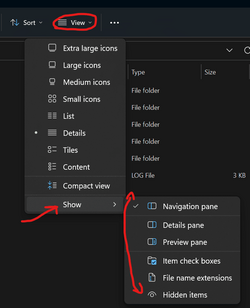
Tu mir diesen Gefallen. Vergleichen Sie im Datei-Explorer auf jedem Computer die unter Anzeigen > Anzeigen ausgewählten Optionen.
1668348223900.png
 

My Computer My Computer

At a glance

Windows 11 HomeAMD Ryzen 9 5900HX16 GB DDR4Nvidia RTX 3070
OS
Windows 11 Home
Computer type
Laptop
Manufacturer/Model
Alienware M15 Ryzen Edition
CPU
AMD Ryzen 9 5900HX
Memory
16 GB DDR4
Graphics Card(s)
Nvidia RTX 3070
Hard Drives
1TB SSD
Browser
Edge
Antivirus
Defender
Please post in English....

Bree, I apologize if I broke any rules... I just used Google Translate to help the person and did not realize everything had to be in English. I will refrain from continuing in foreign languages going forward.
 

My Computer My Computer

At a glance

Windows 11 HomeAMD Ryzen 9 5900HX16 GB DDR4Nvidia RTX 3070
OS
Windows 11 Home
Computer type
Laptop
Manufacturer/Model
Alienware M15 Ryzen Edition
CPU
AMD Ryzen 9 5900HX
Memory
16 GB DDR4
Graphics Card(s)
Nvidia RTX 3070
Hard Drives
1TB SSD
Browser
Edge
Antivirus
Defender
I just used Google Translate to help the person and did not realize everything had to be in English. I will refrain from continuing in foreign languages going forward.

the rules just say that if you can't post in English, then its OK to post as long as you also include a Google translation.
 

My Computers My Computers

  • At a glance

    Windows 11 HomeAMD Athlon Silver 3050U8GBRadeon Graphics
    OS
    Windows 11 Home
    Computer type
    Laptop
    Manufacturer/Model
    Acer Aspire 3 A315-23-R9VY
    CPU
    AMD Athlon Silver 3050U
    Memory
    8GB
    Graphics Card(s)
    Radeon Graphics
    Monitor(s) Displays
    laptop screen
    Screen Resolution
    1366x768 native resolution, up to 2560x1440 with Radeon Virtual Super Resolution
    Hard Drives
    1TB Samsung EVO 870 SSD (from April 2026: 250GB EVO 850)
    Internet Speed
    150 Mbps
    Browser
    Edge, Firefox
    Antivirus
    Defender
    Other Info
    fully 'Windows 11 ready' laptop. Windows 10 C: partition migrated from my old unsupported 'main machine' then upgraded to 11. A test migration ran Insider builds for 2 months. When 11 was released on 5th October 2021 it was re-imaged back to 10 and was offered the upgrade in Windows Update on 20th October. Windows Update offered the 22H2 Feature Update on 20th September 2022. It got the 23H2 Feature Update on 4th November 2023 through Windows Update, 24H2 on 3rd October 2024 through Windows Update by setting the Target Release Version for 24H2, and 25H2 on 30th September 2025 through Windows Update by setting the Target Release Version for 25H2.

    UPDATE - 11 April 2026: due to mechanical deterioration this PC has been retired from active duty. The OS with all software and files has been migrated to my System Seven in 'Other systems' to carry on as my general purpose 'main machine'.
  • At a glance

    Windows 11 ProIntel® Core™ i5-520M8GB(integrated graphics) Intel HD Graphics
    Operating System
    Windows 11 Pro
    Computer type
    Laptop
    Manufacturer/Model
    Dell Latitude E4310
    CPU
    Intel® Core™ i5-520M
    Motherboard
    0T6M8G
    Memory
    8GB
    Graphics card(s)
    (integrated graphics) Intel HD Graphics
    Screen Resolution
    1366x768
    Hard Drives
    500GB Crucial MX500 SSD
    Browser
    Firefox, Edge
    Antivirus
    Defender
    Other Info
    unsupported machine: Legacy bios, MBR, TPM 1.2, upgraded from W10 to W11 using W10/W11 hybrid install media workaround.

    In-place upgrade to 22H2 using ISO and a workaround.
    Feature Update to 23H2 by manually installing the Enablement Package.
    In-place upgrade to 24H2 using hybrid 23H2/24H2 install media.
    Upgraded to 25H2 by Enablement Package.

    Also running Insider Dev, and Canary builds and Windows 10 as native boot .vhdx.
  • My SYSTEM THREE is a Dell Latitude 5410, i7-10610U, 32GB RAM, 512GB NVMe ssd, supported device running Windows 11 Pro.

    My SYSTEM FOUR is a 2-in-1 convertible Lenovo Yoga 11e 20DA, Celeron N2930, 8GB RAM, 256GB ssd. Unsupported device: currently running Win10 Pro, plus Win11 Pro RTM and Insider Dev, Beta, and RP 24H2 as native boot vhdx.

    My SYSTEM FIVE is a Dell Latitude 3190 2-in-1, Pentium Silver N5030, 8GB RAM, 1TB NVMe ssd, supported device running Windows 11 Pro, plus Insider Beta, Dev, and Canary builds (and a few others) as a native boot .vhdx.

    My SYSTEM SIX is a Dell Latitude 5550, Core Ultra 7 165H, 64GB RAM, 1TB NVMe SSD, supported device, Windows 11 Pro 24H2, Hyper-V host machine. Updated to 25H2 on 30th September 2025.

    My SYSTEM SEVEN is a Lenovo Thinkpad T580, Intel Core i7-8650U, 16GB RAM, 512GB NVMe SSD + 2nd 512GB NVMe SSD, a supported device for Windows 11. This is my current general purpose 'main machine'. The installed Windows 11 Home from my System One has been migrated to this machine.
Hallo, ich benutze Google Translate, also wenn etwas nicht gut übersetzt, entschuldige ich mich.

Ein Grund, warum es von Computer zu Computer unterschiedlich angezeigt werden kann, ist, welche Ansichtsoptionen auf den Computern aktiviert sind. Ich habe jedoch ein paar Fragen...

1. Was passiert, wenn Sie den USB-Stick auf dem Laptop formatieren? Zeigt es das alles standardmäßig an?

2. Wofür verwenden Sie das USB-Laufwerk? Diese scheinen nach einer Formatierung keine allgemeinen Verzeichnisse zu sein, insbesondere die Datei wbq.sav.

Tu mir diesen Gefallen. Vergleichen Sie im Datei-Explorer auf jedem Computer die unter Anzeigen > Anzeigen ausgewählten Optionen.
View attachment 45053
Egal auf welchen PC ich formatiere, wenn der Stick dann im USB des Laptop einmal eingesteckt wurde verändert sich die Struktur wie auf den unteres Bild
Ich verstehe auch nicht was es mit dieser bwq.sav soll

Also, wenn der Stick (Alle egal welche) nach den Formatieren einmal im Laptop waren zeigen sie auf jeden PC die Falsche Struktur
 

My Computer My Computer

At a glance

win 11
OS
win 11
Andol,

Ich bin hier, um zu helfen, aber gemäß den Regeln der Community, die Bree mit uns geteilt hat, übersetzen Sie bitte ins Englische. Sie können Google Translate verwenden.

Ich verstehe, was Sie sagen, die Frage, die ich habe, haben Sie sich Ihre Ansichtseinstellungen für den Datei-Explorer angesehen? Ich habe in den geposteten Screenshots bemerkt, dass das, was Sie bereitgestellt haben, so aussieht, als ob der Datei-Explorer basierend auf den Ansichtseinstellungen verschiedene Optionen bietet. Können Sie einen Screenshot der Ansichtseinstellungen jedes Computers bereitstellen?

Translation:
I am here to help but as per the rules of the community which Bree shared with us, please translate to English. You can use Google Translate.

I understand what you are saying, the question I have, did you look at your view settings for File Explorer? I noticed in the posted screenshots that what you provided looks like File Explorer is set to provide different options based on the View settings. Can you provide a screenshot of the view settings of each computer?
 

My Computer My Computer

At a glance

Windows 11 HomeAMD Ryzen 9 5900HX16 GB DDR4Nvidia RTX 3070
OS
Windows 11 Home
Computer type
Laptop
Manufacturer/Model
Alienware M15 Ryzen Edition
CPU
AMD Ryzen 9 5900HX
Memory
16 GB DDR4
Graphics Card(s)
Nvidia RTX 3070
Hard Drives
1TB SSD
Browser
Edge
Antivirus
Defender
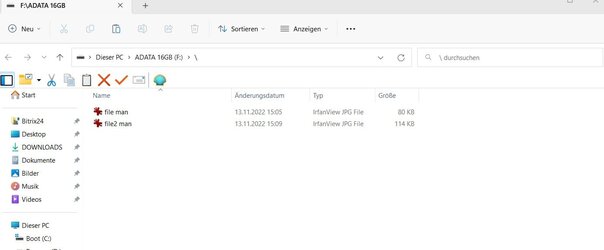
Auch wenn ich alle Ansichtsoptionen ausgeschaltet habe, zeigt der eingefügte Stick nicht sofort nach dem Klick darauf den Inhalt an, sondern einen gleichnamigen Ordner

So sieht es aus, wenn ich den Stick einführe
file2 man.jpg

Nach einem Klick auf Adata 16GB erscheint wieder Adata 16GB
file man.jpg

Danach kommt erst der Inhalt
file3 man.jpg

??????
By the way, it only happens with sticks, not with HDD or SSD
 
Last edited:

My Computer My Computer

At a glance

win 11
OS
win 11
Is your USB stick being detected by Windows as a "non-volume device"? If yes, that might explain why the behavior is different compared to HDD or SSD. Also note, some USB sticks come with a little piece of software on them. Typically that would be some kind of data backup/transfer/cataloging and/or data security (encryption) related program. Maybe when you plugged in the USB stick for the first time, before you had decided to reformat it, the AutoPlay settings of Windows caused such a program to be automatically installed on your laptop? So after you reformatted the stick, this program would still be actively running in the background and automatically recognize the stick regardless of whether you reformatted the stick. That's what I am guessing at least. I also am on a Medion laptop with Win 11 Home 22H2, I have been using Medion laptops for the past 12 years (almost). In my whole life, I have never seen a file named wbq.sav appear before.
 

My Computers My Computers

  • At a glance

    11 Homei7 13650HX16GB DDR5GeForce RTX 4060 Mobile
    OS
    11 Home
    Computer type
    Laptop
    Manufacturer/Model
    Asus TUF Gaming F16 (2024)
    CPU
    i7 13650HX
    Memory
    16GB DDR5
    Graphics Card(s)
    GeForce RTX 4060 Mobile
    Sound Card
    Eastern Electric MiniMax DAC Supreme; Emotiva UMC-200; Astell & Kern AK240
    Monitor(s) Displays
    Sony Bravia XR-55X90J
    Screen Resolution
    3840×2160
    Hard Drives
    512GB SSD internal
    37TB external
    PSU
    Li-ion
    Cooling
    2× Arc Flow Fans, 4× exhaust vents, 5× heatpipes
    Keyboard
    Logitech K800
    Mouse
    Logitech G402
    Internet Speed
    30Mbit/s up, 500Mbit/s down
    Browser
    FF
    Antivirus
    What's an antivirus?
  • At a glance

    11 Homei5 1135G716GB DDR4Intel Iris Xe
    Operating System
    11 Home
    Computer type
    Laptop
    Manufacturer/Model
    Medion S15450
    CPU
    i5 1135G7
    Memory
    16GB DDR4
    Graphics card(s)
    Intel Iris Xe
    Sound Card
    Eastern Electric MiniMax DAC Supreme; Emotiva UMC-200; Astell & Kern AK240
    Monitor(s) Displays
    Sony Bravia XR-55X90J
    Screen Resolution
    3840×2160
    Hard Drives
    2TB SSD internal
    37TB external
    PSU
    Li-ion
    Keyboard
    Logitech K800
    Mouse
    Logitech G402
    Internet Speed
    30Mbit/s up, 500Mbit/s down
    Browser
    FF
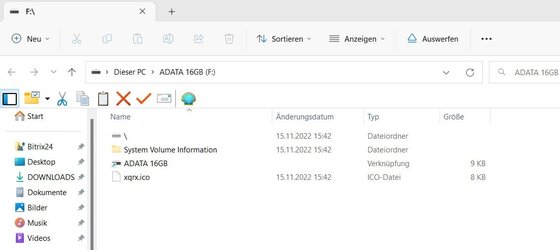
Thank you for your reply. Actually, the stick(s) is recognized as a volume in Autoplay. It's funny that the wbq.sav is no longer recognized, but a xqrx.ico. Can't really be because of the sticks because it only started about a month ago. Some of them are sticks that I've been using for years. I've also owned Medion laptops for 13 years and I'm really happy with them. Another case for the good Lord. RegardsScreenshot 2022-11-15 154523.jpg
 

My Computer My Computer

At a glance

win 11
OS
win 11
Vielen Dank für Ihre Antwort. Tatsächlich wird der/die Stick(s) in Autoplay als Volume erkannt. Es ist lustig, dass der wbq.sav nicht mehr erkannt wird, sondern ein xqrx.ico. Kann nicht wirklich an den Stöcken liegen, weil es erst vor etwa einem Monat angefangen hat. Einige davon sind Stöcke, die ich seit Jahren benutze. Ich besitze auch seit 13 Jahren Medion-Laptops und bin wirklich glücklich mit ihnen. Ein weiterer Fall für den lieben Gott. GrüßeView attachment 45345
Stiks
 

My Computer My Computer

At a glance

win 11
OS
win 11
Wieder alles im lot. Windows neu installiert.
Danke an alle.
 

My Computer My Computer

At a glance

win 11
OS
win 11
Back
Top Bottom