USB Thumb Drives unable to Eject Safely


optimxr

Well-known member
Local time
5:02 AM
Posts
34
OS
Windows 11 Pro, 24H2
After inserting a USB Thumb drive and transferring files or copying files, the Eject Mass Storage Device Safely pop-up window does nothing(no waiting message) and the USB Drive disappears from the pop-up window as well as the File Explorer list making it impossible to eject the device. If I restart the PC, the USB Thumb Drive reappears in the File Explorer List and the Eject Safely pop-up window as if all is now normal. However, the same exact behavior occurs when I attempt to eject the device as before.

Actions Taken:
1) Restart the PC.
2) Stop the device in Task Manager if it is in the apps or background list.
3) Disable the USB Select Suspend setting in Advanced Power Settings under Power Options in the Control Panel.
4) Change the Removal Policy from fast to Better Performance in Disk Management for the USB Storage Device.
5) Change USB Thumb Drive and scan for viruses.
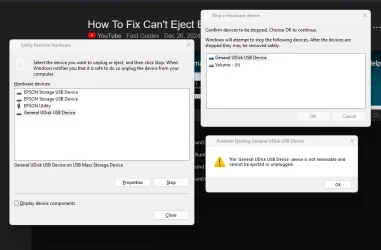
6) Run the hotplug utility from the command prompt as admin using the following command;
>RunDLL32.exe shell32.dll,Control_RunDLL hotplug.dll

Then Select the Storage Device and click STOP. See the screenshot of the error message stating that the device is not
Removable. I followed each step with a restart. I hope someone can give me better advice than what AI has provided, thanks.
Optimxr
 
Windows Build/Version
Windows 11 Pro, 25H2

Attachments

  • Disk Mngmt Error Msg to remove Storage Drive.webp
    Disk Mngmt Error Msg to remove Storage Drive.webp
    40.2 KB · Views: 3

My Computer

System One

  • OS
    Windows 11 Pro, 24H2
    Computer type
    PC/Desktop
    Manufacturer/Model
    Clone
    CPU
    Intel i5-2500K, LGA 1155
    Motherboard
    ASUS Prime z590-P
    Memory
    G.Skill Ripjaw DDR4 32GB
    Graphics Card(s)
    ASUS GeForce GT-730-SL-2GD5
    Sound Card
    None
    Monitor(s) Displays
    ASUS VX238H 23" HD
    Screen Resolution
    1280 x 1920
    Hard Drives
    Samsung 980Pro SSD(C:), Western Digital WD1001F, 1TB, SATA
    Hitachi HDS721010CLA332, 1TB, SATA, Hybrid
    PSU
    Roswill Glacier 850M
    Case
    Antec P7 Neo
    Cooling
    x3 120mm Chassis Fans
    Keyboard
    Logitech
    Mouse
    Logitech
    Internet Speed
    100 mb/s
    Browser
    Firefox
    Antivirus
    Bitdefender Full Security
    Other Info
    DVD-ROM Burner: LG UH12LS28, Blu-Ray x12, SATA
    HP G4010 Flatbed Scanner
    Epson R260 Printer
    Logitech Web Cam
I've never used the eject applet to remove a usb thumb drive. I wait until I'm certain the files are copied and just yank it. Never had any issues.
 

My Computer

System One

  • OS
    W11
    Computer type
    PC/Desktop
    Manufacturer/Model
    2 HP Desktops, 1 Dell Desktop, 2 Dell XPS Laptops, 1 HP Laptop
    Keyboard
    Logitech
    Mouse
    Logitech MX Master 4 & 3
    Internet Speed
    500 mps
    Browser
    Firefox
    Antivirus
    Bitdefender
I've never used the eject applet to remove a usb thumb drive. I wait until I'm certain the files are copied and just yank it. Never had any issues.
Same here...
 

My Computer

System One

  • OS
    Windows 11
    Computer type
    PC/Desktop
    CPU
    Intel Core i7 6700 @ 3.40GHz Skylake Tecnology 14 nm
    Motherboard
    Gigabyte Technology Co. Ltd. B150M-D3H DDR3-CF (U3E1)
    Memory
    16,0GB Single-Channel DDR3 @ 800 Mhz (11-11-11-28)
    Graphics Card(s)
    4096MB ATI Radeon RX 580 Series (Gigabyte)
    Sound Card
    Realtek High Definition Audio
    Monitor(s) Displays
    SAMSUNG S22E310
    Screen Resolution
    (1920x1080@60Hz)
    Hard Drives
    931GB Seagate ST1000LM024 HN-M101MBB (SATA )
    931GB Seagate ST1000LM024 HN-M101MBB (SATA )
    465GB Samsung SSD 980 500GB (Desconhecido (SSD))
    2794GB Seagate Expansion Desk USB Device (USB (SATA) )
    PSU
    Seventeam
    Case
    Nilko
    Keyboard
    Logitech
    Mouse
    Logitech M90
    Internet Speed
    600 / 300 mbps
    Browser
    MS Edge / Google Chrome
    Antivirus
    Windows Defender
the USB Drive disappears from the pop-up window as well as the File Explorer list
If you don't see in file explorer, take it out.
 

My Computers

System One System Two

  • OS
    Windows 11 Pro 25H2
    Computer type
    PC/Desktop
    Manufacturer/Model
    Dell Optiplex 7080
    CPU
    i9-10900 10 core 20 threads
    Motherboard
    DELL 0J37VM
    Memory
    32 gb
    Graphics Card(s)
    none-Intel UHD Graphics 630
    Sound Card
    Integrated Realtek
    Monitor(s) Displays
    Benq 27
    Screen Resolution
    2560x1440
    Hard Drives
    2x1tb Solidigm m.2 nvme /External drives 512gb Samsung m.2 sata+2tb Kingston m2.nvme
    PSU
    500w
    Case
    MT
    Cooling
    Dell Premium
    Keyboard
    Logitech wired
    Mouse
    Logitech wireless
    Internet Speed
    so slow I'm too embarrassed to tell
    Browser
    #1 Edge #2 Firefox
    Antivirus
    Defender+MWB Premium
  • Operating System
    Windows 11 Pro 24H2 26200.8457
    Computer type
    PC/Desktop
    Manufacturer/Model
    Beelink Mini PC SER5
    CPU
    AMD Ryzen 7 6800U
    Memory
    32 gb
    Graphics card(s)
    integrated
    Sound Card
    integrated
    Monitor(s) Displays
    Benq 27
    Screen Resolution
    2560x1440
    Hard Drives
    1TB Crucial nvme
    Keyboard
    Logitech wired
    Mouse
    Logitech wireless
    Internet Speed
    still too embarrassed to tell
    Browser
    Firefox
    Antivirus
    Defender
    Other Info
    System 3 is non compliant Dell 9020 i7-4770/24gb ram Win11 PRO 26200.8457
There are various ways to eject a USB device:


Also:


My Computers

System One System Two

  • OS
    Windows 11 Pro 25H2 Build 26200.8524
    Computer type
    PC/Desktop
    Manufacturer/Model
    Sin-built 2013
    CPU
    Intel(R) Core(TM) i7-4770K CPU @ 3.50GHz
    Motherboard
    ASUS ROG Maximus VI Formula
    Memory
    32.0 GB of I forget and the box is in storage.
    Graphics Card(s)
    Gigabyte nVidia GeForce GTX 1660 Super OC 6GB
    Sound Card
    Onboard thingy
    Monitor(s) Displays
    5 x LG 25MS500-B - 1 x 24MK430H-B - 1 x Wacom Pro 22" Touch Screen Tablet
    Screen Resolution
    All over the place
    Hard Drives
    Too many to list.
    OS on Samsung 1TB 870 QVO SATA
    PSU
    Silverstone 1500
    Case
    NZXT Phantom 820 Full-Tower Case
    Cooling
    Noctua NH-D15 Elite Class Dual Tower CPU Cooler / 6 x EziDIY 120mm / 2 x Corsair 140mm somethings / 1 x 140mm Thermaltake something / 2 x 200mm Corsair.
    Keyboard
    Corsair K95 / Logitech diNovo Edge Wireless
    Mouse
    Logitech: G402 / G502 / Mx Masters / Mx Air Cordless
    Internet Speed
    2000/500Mbps
    Browser
    All sorts
    Antivirus
    Kaspersky Premium
    Other Info
    ㅤㅤㅤㅤㅤㅤㅤㅤㅤㅤㅤㅤㅤㅤㅤㅤㅤㅤㅤㅤㅤㅤㅤㅤㅤㅤㅤㅤㅤㅤㅤㅤㅤㅤㅤㅤㅤㅤㅤㅤ⠀⠀⠀⠀⠀⠀⠀⠀⠀⠀
    TP-Link BE9300 WiFi 7 Bluetooth 5.4 (Archer TBE550E)
    TP-Link TX201 V1 2.5GB Lan

    Grandstream HT812 - VoIP
    ASUS DSL-AX82U - Mesh
    ASUS RT-AC68U - Mesh
    ASUS RT-BE88U Router

    Brother MFC-L2880DW Printer

    I’m on a horse.
  • Operating System
    Windows 11 Pro 25H2 Build 26200.8524
    Computer type
    Laptop
    Manufacturer/Model
    LENOVO Yoga 7 14IRL8 - 7i EVO OLED 14" Touchscreen i5 12 Core 16GB/512GB
    CPU
    Intel Core 12th Gen i5-1240P Processor (1.7 - 4.4GHz)
    Memory
    16GB LPDDR5 RAM
    Graphics card(s)
    Intel Iris Xe Graphics Processor
    Sound Card
    Optimized with Dolby Atmos®
    Screen Resolution
    QHD 2880 x 1800 OLED
    Hard Drives
    M.2 512GB
    Antivirus
    Defender / Malwarebytes
    Other Info
    …still on a horse.
Thanks all for the replies. Just to be clear, I have had several instances when I removed a flash drive and a external USB drive where the data on the drive was corrupted or disappeared all together as well as the removable drive itself became unusable. This is why I prefer to follow the Microsoft protocol when removing USB drives. I also have 3 other Windows 11 PCs that operate just fine with the same USB drive, so I am inclined to believe there is a issue with this particular PC and the problem has persisted through several Microsoft updates. Yes, I did change the removal policy in the disk Management advanced options but it did not seem to correct the problem either as quick removal or better Performance settings. Maybe I should try disabling my Bitdefender anti-virus as a test or bypass the startup apps. Did I mention that I also recently updated my Asus motherboard BIOS. Any other suggestions are welcomed.
Optimxr
 

My Computer

System One

  • OS
    Windows 11 Pro, 24H2
    Computer type
    PC/Desktop
    Manufacturer/Model
    Clone
    CPU
    Intel i5-2500K, LGA 1155
    Motherboard
    ASUS Prime z590-P
    Memory
    G.Skill Ripjaw DDR4 32GB
    Graphics Card(s)
    ASUS GeForce GT-730-SL-2GD5
    Sound Card
    None
    Monitor(s) Displays
    ASUS VX238H 23" HD
    Screen Resolution
    1280 x 1920
    Hard Drives
    Samsung 980Pro SSD(C:), Western Digital WD1001F, 1TB, SATA
    Hitachi HDS721010CLA332, 1TB, SATA, Hybrid
    PSU
    Roswill Glacier 850M
    Case
    Antec P7 Neo
    Cooling
    x3 120mm Chassis Fans
    Keyboard
    Logitech
    Mouse
    Logitech
    Internet Speed
    100 mb/s
    Browser
    Firefox
    Antivirus
    Bitdefender Full Security
    Other Info
    DVD-ROM Burner: LG UH12LS28, Blu-Ray x12, SATA
    HP G4010 Flatbed Scanner
    Epson R260 Printer
    Logitech Web Cam
It sounds like there is something that is still accessing the device. If something is writing to the drive as you remove it, the data will be corrupted. Close any programs that could be using it, including File Explorer. Use the task manager to end any process that could be accessing the drive. Also temporarily stop any real time malware protection you have running as it could be getting in the way. Ive seen anti-malware programs cause some pretty interesting issues. You said you updated your BIOS? Did this issue exist before updating the BIOS or after?

Other things to consider:
Try the same thing with a different USB drive and see if it gives you the same issues.
Updating your drivers.
Updating any malware scanners you use.
If this occured after updating the BIOS, it may be worth going through all the settings in the BIOS to see if anything pertaining to the USB ports was added or changed. Make a note of any setting you change incase you need to revert the change. If you have questions about any settings, take a picture of the screen and upload it here. Someone may be able to help. It may come down to downgrading the BIOS to fix the issue.
 

My Computer

System One

  • OS
    Windows 11 Pro For Workstations 25H2
    Computer type
    Laptop
    Manufacturer/Model
    Dell Precision 7550
    CPU
    Intel Xeon W-10855M @ 4.9Ghz
    Memory
    32GB OWC ECC DDR4-2666 RAM
    Graphics Card(s)
    iGPU: Intel UHD Graphics P630 | Discrete GPU: NVIDIA Quadro RTX 3000 6GB
    Sound Card
    Realtek Audio
    Monitor(s) Displays
    Integrated Ultrasharp
    Screen Resolution
    1920*1080
    Hard Drives
    OS: Samsung 980 PRO 500GB NVMe
    Data: Western Digital Black SN750 1TB
    PSU
    Dell 180W
    Internet Speed
    1Gbps
    Browser
    Edge Chromium
    Antivirus
    Microsoft Defender
    Other Info
    OpenSUSE Leap 16 VM
    Zorin OS 18 VM
@optimxr ,

Personally I use the USB Safely Remove program for my two computers. It will tell you what is blocking safe ejection. I much prefer it to the Windows safely eject app.

I have no connection with the company, other than as a very satisfied customer for many years. I have lifetime licenses with free upgrades. I have even purchased copies for friends.

Have a great day.

Regards,
Phil
 

My Computers

System One System Two

  • OS
    Windows 11 Pro Version 25H2 (Build 26200.8457
    Computer type
    PC/Desktop
    Manufacturer/Model
    Dell XPS8930 SE
    CPU
    Intel i7-9700K 4700 MHz
    Motherboard
    Dell XPS 8930
    Memory
    32 GB (4 x 8GB SK Hynix DDR4 @1333 MHz) (2666 MHz)
    Graphics Card(s)
    NVIDIA GeForce RTX 2060 (6 GB) GDDR6 300 MHz
    Sound Card
    None
    Monitor(s) Displays
    Dell UltraSharp U2518D 25"
    Screen Resolution
    2560 x 1440
    Hard Drives
    NVMe Intel 1024 TB
    Seagate 2 TB, SATA-III
    Western Digital Black 4TB
    PSU
    850 W Gold Standard
    Case
    Dell XPS 8930 Base (Special Edition)
    Cooling
    Air
    Keyboard
    Dell 0G4D2W
    Mouse
    Dell MOCZUL
    Internet Speed
    Download 553 Mbps, Upload 686 Mbps
    Browser
    Google Chrome
    Antivirus
    ESET Smart Security Premium, plus Malwarebytes Premium
    Other Info
    BIOS Version 1.1.31
  • Operating System
    Windows 11 Pro Version 25H2 (Build 26200.8457)
    Computer type
    Laptop
    Manufacturer/Model
    Dell XPS 15 7590
    CPU
    i7-9750H 4.5 GHz
    Motherboard
    Dell XPS 15 7590
    Memory
    16 GB (2 x 8GB @ 1333 MHz) DDR4-2666 MHz
    Graphics card(s)
    NVIDIA GeForce 1650 4 GB GDDR5
    Sound Card
    None
    Monitor(s) Displays
    Dell XPS 15 7590, 15.6" InfinityEdge Anti-Glare, Non-Touch
    Screen Resolution
    1920 x 1080
    Hard Drives
    512 GB M.2 PCle NVMe SK Hynix
    PSU
    130W Power Adapter
    Case
    Dell XPS 15 7590
    Cooling
    Air
    Keyboard
    Laptop
    Mouse
    Logitech M510
    Internet Speed
    Download: 400 Mbps, Upload: 203 Mbps
    Browser
    Google Chrome
    Antivirus
    ESET Smart Security Premium, plus Malwarebytes Premium
    Other Info
    BIOS Version 1.35.0
Back
Top Bottom