General Use AI Actions in File Explorer in Windows 11


Actions_header.webp

This tutorial will show you how to use AI actions in File Explorer for your account in Windows 11.

Starting with Windows 11 build 262100.6725 (24H2), Microsoft is introducing AI actions in File Explorer. With AI actions in File Explorer, you can interact more deeply with your files by right-clicking to quickly take actions like editing images or summarizing documents. Like with Click to Do, AI actions in File Explorer allow you to stay in your flow while leveraging the power of AI to take advantage of editing tools in apps or Copilot functionality without having to open your file. AI actions in File Explorer are easily accessible. This experience is not yet available for customers in the EEA (European Economic Area).
  • Image actions: You can now use four AI-powered image actions with .jpg, .jpeg, and .png files. Visual Search searches the web using an image instead of text. Blur Background opens the Photos app to highlight the subject and blur the background. Erase Objects removes unwanted elements from your photo. Remove Background uses Paint to change any image leaving a smooth cut out of the subject.
  • AI actions for Microsoft 365 makes it easier to work with your documents. With the Summarize action in Copilot, you can quickly generate summaries of files stored in OneDrive and SharePoint—no need to open each one. This AI action requires an active Microsoft 365 subscription and a Copilot license (Microsoft account and Microsoft Entra ID supported)
Starting with Windows 11 build 26220.7262 (Dev and Beta), Microsoft is reconfiguring the CFR that supported AI Actions in File Explorer – Insiders may see a temporary loss in image actions and Copilot summary actions as this is relaunched and gradually rolled out to Insiders in the Dev & Beta Channels.

Starting with Windows 11 build 26220.7344 (Dev & Beta), if there are no available or enabled AI Actions, this section will no longer show in the context menu.

Reference:

If you don't have AI actions available in the builds above yet, then you can use the ViVeTool command below to enable it.

vivetool /enable /id:54792954,55345819

(enable 48433719 and reboot if the command above doesn't work.)



Here's How:

1 Right click on a file you want to use AI actions on.

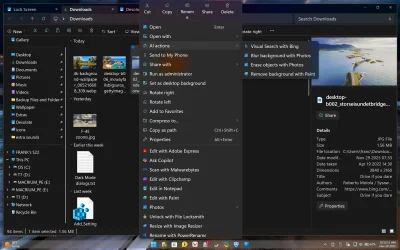
2 Click/tap on AI actions, and click/tap on an available action you want to use on the file. (see screenshot below)

AI_actions_context_menu.webp


Currently, you can try one of four image actions for seamless editing or web searches with images:
  • Visual Search with Bing: Allows you to search the web using an image instead of text. Find similar images and products, get details about sites using the image, and identify landmarks, plants, and famous faces. From searching what you see on your screen, to shopping your preferred style, getting help with that homework problem, or translating text, getting answers is more intuitive than ever.
  • Blur Background with Photos: Opens the Photos app which automatically finds the background in the photo, and with a single click, instantly highlights your subject and blurs out the background. You can also customize the effect by adjusting the Blur Intensity or use the Brush Tool to modify the areas being blurred.
  • Erase Objects with Photos : Select or highlight an unwanted element in your photo and Generative Erase makes it disappear. It allows you to fix and remove distractions from your photos.
  • Remove Background with Paint: Allows you to alter any image automatically in just one click leaving a smooth cutout of the subject. Background removal can detect the subject from the entire canvas or using the selection tool.
These four image actions currently support these file types: .jpg, .jpeg, and .png.

Over the course of the coming weeks, Microsoft will begin to roll out new AI actions for Microsoft 365 files:
  • Summarize: With Copilot you can generate summaries of various document types stored on OneDrive and SharePoint without the need to open them individually. Find the information you need quickly! Supported file types: .docx, .doc, .pptx, .ppt, .xlsx, .xls, .pdf, .rtf, .txt, .loop.
  • Create an FAQ: Copilot can help you turn your OneDrive files into a neatly formatted, AI-generated Q&A list. Whether you’re building internal knowledge bases, prepping for meetings, or crafting quick-start guides, “Create an FAQ” distills complex information into clear, shareable FAQs in seconds. Supported file types: xlsx, .ppt, .pptx, .doc, .docx, .pdf, .txt, .rtf, .aspx, .htm, and .html.
To see AI actions for Microsoft 365 files, you must be:
  • For Summarize, you need to be Microsoft 365 subscriber with a Copilot subscription (Microsoft account and Microsoft Entra ID supported).
  • For Create an FAQ, you need to be a commercial Microsoft 365 subscriber with a Copilot subscription (Microsoft Entra ID supported). Consumer support with a Microsoft account is coming later.
  • Enrolled in the Microsoft 365 Insider Program. Your PC will need to be part of the Beta Channel update channel. Use these instructions to get setup today: Become a Microsoft 365 Insider on Windows.

That's it,
Shawn Brink


Last edited:
anyone figured out the way to add that option in legacy context menu?
 

My Computers

System One System Two

  • OS
    Windows 11 Pro 25H2 (WinMac v1.4.0)
    Computer type
    PC/Desktop
    CPU
    Intel Core i5-12400F
    Motherboard
    B760 GAMING X DDR4
    Memory
    16 GB (DDR4, 3200 MHz)
    Graphics Card(s)
    NVIDIA GeForce RTX 2070 Super
    Screen Resolution
    2560x1440 @ 240Hz
    Other Info
    I loved modding and customizing operating systems since very young age, gaining experience from all important systems, including Windows, Ubuntu, MacOS and Android, which led to creation of Windows 11 mod called WinMac. Seamlessly blending the elegance of macOS with the versatility of Windows, my customized interface elevates user experience through meticulously crafted modifications and UI enhancements.

    With WinMac, every interaction with Windows 11 environment is imbued with a touch of sophistication, where the boundaries between the Windows and Mac universes blur, offering a sublime computing experience that transcends conventional limitations of Windows 11.
  • Operating System
    macOS Sonoma
    Computer type
    Laptop
    Manufacturer/Model
    Apple MacBook Pro
    CPU
    Apple M3 Pro
    Memory
    18 GB
can't get this to work in the latest Beta Build!
is this abandoned?
 

My Computer

System One

  • OS
    Windows 11 Pro (Currently 25H2)
    Computer type
    PC/Desktop
    CPU
    Intel Core i7 5820k
    Motherboard
    Asus X99A
    Memory
    32GB RAM
    Graphics Card(s)
    Nvidia RTX 5090
    Sound Card
    Intergraded
    Monitor(s) Displays
    Samsung OdysseyG7
    Screen Resolution
    4K HDR
    Hard Drives
    2x Samsung M2 990Pro 4TB
    PSU
    Corsair RM1000X
    Case
    Fractal Design
    Cooling
    In & Outtake Noctua 3000 RPMs
    Keyboard
    Razer Black widow
    Mouse
    Razer Naga Trinity
    Internet Speed
    1000Mbit
    Browser
    Edge
    Antivirus
    Custom
can't get this to work in the latest Beta Build!
is this abandoned?

I still have the context menu in the latest Dev build, but it's empty.
 

My Computers

System One System Two

  • OS
    Windows 11 Pro for Workstations
    Computer type
    PC/Desktop
    Manufacturer/Model
    Custom self build
    CPU
    Intel i7-8700K 5 GHz
    Motherboard
    ASUS ROG Maximus XI Formula Z390
    Memory
    64 GB (4x16GB) G.SKILL TridentZ RGB DDR4 3600 MHz (F4-3600C18D-32GTZR)
    Graphics Card(s)
    ASUS ROG-STRIX-GTX1080TI-O11G-GAMING (11GB GDDR5X)
    Sound Card
    Integrated Digital Audio (S/PDIF)
    Monitor(s) Displays
    2 x Samsung Odyssey G75 27"
    Screen Resolution
    2560x1440
    Hard Drives
    1TB Samsung 990 PRO M.2,
    4TB Samsung 990 PRO M.2,
    TerraMaster F8 SSD Plus NAS
    PSU
    Seasonic Prime Titanium 850W
    Case
    Thermaltake Core P3 wall mounted
    Cooling
    Corsair Hydro H115i
    Keyboard
    Amazon Basics Wired Full Keyboard MD005
    Mouse
    Logitech MX Master 4
    Internet Speed
    2 Gbps Download and 100 Mbps Upload
    Browser
    Chrome and Edge
    Antivirus
    Microsoft Defender
    Other Info
    Logitech Z625 speaker system,
    Logitech BRIO 4K Pro webcam,
    HP Color LaserJet Pro MFP M477fdn,
    CyberPower CP1500PFCLCD
    Galaxy S23 Plus phone
  • Operating System
    Windows 11 Pro
    Computer type
    Laptop
    Manufacturer/Model
    Surface Laptop 7 Copilot+ PC
    CPU
    Snapdragon X Elite (12 core) 3.42 GHz
    Memory
    16 GB LPDDR5x-7467 MHz
    Monitor(s) Displays
    15" HDR
    Screen Resolution
    2496 x 1664
    Hard Drives
    1 TB SSD
    Internet Speed
    Wi-Fi 7 and Bluetooth 5.4
    Browser
    Chrome and Edge
    Antivirus
    Microsoft Defender
you have a .REG for the AI actions?
but i not have AI actions in file explorer in my update 26220.7271
 

My Computer

System One

  • OS
    Windows 11 Pro 25H2
    Computer type
    Laptop
you have a .REG for the AI actions?
but i not have AI actions in file explorer in my update 26220.7271

Hello, and welcome to the forum. :alien:

As a test, right click on an JPG or PNG image file to see if you may have the "AI actions" context menu. If not, then you should be able to use the vivetool command at the top of this tutorial to enable the feature if wanted.
 

My Computers

System One System Two

  • OS
    Windows 11 Pro for Workstations
    Computer type
    PC/Desktop
    Manufacturer/Model
    Custom self build
    CPU
    Intel i7-8700K 5 GHz
    Motherboard
    ASUS ROG Maximus XI Formula Z390
    Memory
    64 GB (4x16GB) G.SKILL TridentZ RGB DDR4 3600 MHz (F4-3600C18D-32GTZR)
    Graphics Card(s)
    ASUS ROG-STRIX-GTX1080TI-O11G-GAMING (11GB GDDR5X)
    Sound Card
    Integrated Digital Audio (S/PDIF)
    Monitor(s) Displays
    2 x Samsung Odyssey G75 27"
    Screen Resolution
    2560x1440
    Hard Drives
    1TB Samsung 990 PRO M.2,
    4TB Samsung 990 PRO M.2,
    TerraMaster F8 SSD Plus NAS
    PSU
    Seasonic Prime Titanium 850W
    Case
    Thermaltake Core P3 wall mounted
    Cooling
    Corsair Hydro H115i
    Keyboard
    Amazon Basics Wired Full Keyboard MD005
    Mouse
    Logitech MX Master 4
    Internet Speed
    2 Gbps Download and 100 Mbps Upload
    Browser
    Chrome and Edge
    Antivirus
    Microsoft Defender
    Other Info
    Logitech Z625 speaker system,
    Logitech BRIO 4K Pro webcam,
    HP Color LaserJet Pro MFP M477fdn,
    CyberPower CP1500PFCLCD
    Galaxy S23 Plus phone
  • Operating System
    Windows 11 Pro
    Computer type
    Laptop
    Manufacturer/Model
    Surface Laptop 7 Copilot+ PC
    CPU
    Snapdragon X Elite (12 core) 3.42 GHz
    Memory
    16 GB LPDDR5x-7467 MHz
    Monitor(s) Displays
    15" HDR
    Screen Resolution
    2496 x 1664
    Hard Drives
    1 TB SSD
    Internet Speed
    Wi-Fi 7 and Bluetooth 5.4
    Browser
    Chrome and Edge
    Antivirus
    Microsoft Defender
Hello, and welcome to the forum. :alien:

As a test, right click on an JPG or PNG image file to see if you may have the "AI actions" context menu. If not, then you should be able to use the vivetool command at the top of this tutorial to enable the feature if wanted.
no. i not have this feature with vivetool
 

My Computer

System One

  • OS
    Windows 11 Pro 25H2
    Computer type
    Laptop

My Computers

System One System Two

  • OS
    Windows 11 Pro for Workstations
    Computer type
    PC/Desktop
    Manufacturer/Model
    Custom self build
    CPU
    Intel i7-8700K 5 GHz
    Motherboard
    ASUS ROG Maximus XI Formula Z390
    Memory
    64 GB (4x16GB) G.SKILL TridentZ RGB DDR4 3600 MHz (F4-3600C18D-32GTZR)
    Graphics Card(s)
    ASUS ROG-STRIX-GTX1080TI-O11G-GAMING (11GB GDDR5X)
    Sound Card
    Integrated Digital Audio (S/PDIF)
    Monitor(s) Displays
    2 x Samsung Odyssey G75 27"
    Screen Resolution
    2560x1440
    Hard Drives
    1TB Samsung 990 PRO M.2,
    4TB Samsung 990 PRO M.2,
    TerraMaster F8 SSD Plus NAS
    PSU
    Seasonic Prime Titanium 850W
    Case
    Thermaltake Core P3 wall mounted
    Cooling
    Corsair Hydro H115i
    Keyboard
    Amazon Basics Wired Full Keyboard MD005
    Mouse
    Logitech MX Master 4
    Internet Speed
    2 Gbps Download and 100 Mbps Upload
    Browser
    Chrome and Edge
    Antivirus
    Microsoft Defender
    Other Info
    Logitech Z625 speaker system,
    Logitech BRIO 4K Pro webcam,
    HP Color LaserJet Pro MFP M477fdn,
    CyberPower CP1500PFCLCD
    Galaxy S23 Plus phone
  • Operating System
    Windows 11 Pro
    Computer type
    Laptop
    Manufacturer/Model
    Surface Laptop 7 Copilot+ PC
    CPU
    Snapdragon X Elite (12 core) 3.42 GHz
    Memory
    16 GB LPDDR5x-7467 MHz
    Monitor(s) Displays
    15" HDR
    Screen Resolution
    2496 x 1664
    Hard Drives
    1 TB SSD
    Internet Speed
    Wi-Fi 7 and Bluetooth 5.4
    Browser
    Chrome and Edge
    Antivirus
    Microsoft Defender
no. i not have this feature with vivetool
I have this on both Beta and RP builds. You can try the new Vivetool feature bundle id:57048237 and see if that enables it.

Stable Channel​

These are the ViveTool codes to enable features in the Stable Channel of Windows 11.

  • December 2025 update codes:
    • 57048237: Feature bundle.
    • 59162732,55994763: Widgets redesign.
    • 41356296: Taskbar new autohide.
    • 45690266: Cloud File Search in File Explorer.
    • 59265307: About settings redesign.
    • 57882334: Share any Taskbar window.
    • 53343270: Device info card in Settings.
 

Attachments

  • Screenshot 2025-11-29 101220.webp
    Screenshot 2025-11-29 101220.webp
    240.4 KB · Views: 23

My Computers

System One System Two

  • OS
    Windows 11 25H2
    Computer type
    Laptop
    Manufacturer/Model
    Alienware 18 Area-51
    CPU
    Intel Core Ultra 9 275HX (24-Core)
    Motherboard
    Alienware
    Memory
    64GB DDR5 6400MT/s
    Graphics Card(s)
    NVIDIA GeForce RTX 5080 and Intel UHD Graphics
    Sound Card
    Onboard, Realtek high-performance Audio chips (ALC3329 & ALC1708))
    Monitor(s) Displays
    300HZ 18-inch QHD 500 nit Comfort View+
    Screen Resolution
    2560 x 1600
    Hard Drives
    2TB NVMe M.2 PCIe Gen 5 SSD
    Case
    Magnesium Alloy
    Cooling
    Advanced Cryo-Tech Quad-Fan Cooling system & large vapor chamber
    Keyboard
    Cherry MX ultra low profile mechanical keyboard with per key AlienFX RGB lighting
    Mouse
    Logitech MX Master 4
    Browser
    Vivaldi (main), Firefox, Chrome, Edge
    Antivirus
    MS Defender and Malwarebytes Free
  • Operating System
    Windows 11 25H2
    Computer type
    Laptop
    Manufacturer/Model
    Microsoft Surface Laptop 7
    CPU
    Qualcomm Snapdragon X Elite (12 Core) ARM based CPU
    Motherboard
    Microsoft Corp.
    Memory
    16GB LPDDR5
    Graphics card(s)
    Qualcomm Adreno X1-85
    Sound Card
    Omnisonic speakers with Dolby Atmos spatial sound
    Monitor(s) Displays
    120 Hz 13.8-inch 600 nit PixelSense Flow touchscreen
    Screen Resolution
    2304x1536
    Hard Drives
    1TB NVMe Gen 4 SSD
    Case
    Anodized Aluminum
    Cooling
    Traditional active cooling fan system
    Keyboard
    Mechanical QWERTY, backlit when in use
    Mouse
    Logitech MX Master 4 and Surface Arc Mouse
    Browser
    Vivaldi (main), Firefox, Chrome, Edge
    Antivirus
    MS Defender and Malwarebytes Free

Beta and Dev Channels​

These ViveTool codes apply to the preview builds available in the Beta and Dev Channels of the Windows Insider Program.

  • Build 26220.7271:
    • 59765208: Xbox Full Screen Experience.
    • 55324166,59673297: Point-in-time Restore
    • 58423575: File Explorer decluttered context menu.
    • 58778013: File Explorer startup pre-loading.
    • 59339532: Resume for more mobile apps support.
 

My Computers

System One System Two

  • OS
    Windows 11 25H2
    Computer type
    Laptop
    Manufacturer/Model
    Alienware 18 Area-51
    CPU
    Intel Core Ultra 9 275HX (24-Core)
    Motherboard
    Alienware
    Memory
    64GB DDR5 6400MT/s
    Graphics Card(s)
    NVIDIA GeForce RTX 5080 and Intel UHD Graphics
    Sound Card
    Onboard, Realtek high-performance Audio chips (ALC3329 & ALC1708))
    Monitor(s) Displays
    300HZ 18-inch QHD 500 nit Comfort View+
    Screen Resolution
    2560 x 1600
    Hard Drives
    2TB NVMe M.2 PCIe Gen 5 SSD
    Case
    Magnesium Alloy
    Cooling
    Advanced Cryo-Tech Quad-Fan Cooling system & large vapor chamber
    Keyboard
    Cherry MX ultra low profile mechanical keyboard with per key AlienFX RGB lighting
    Mouse
    Logitech MX Master 4
    Browser
    Vivaldi (main), Firefox, Chrome, Edge
    Antivirus
    MS Defender and Malwarebytes Free
  • Operating System
    Windows 11 25H2
    Computer type
    Laptop
    Manufacturer/Model
    Microsoft Surface Laptop 7
    CPU
    Qualcomm Snapdragon X Elite (12 Core) ARM based CPU
    Motherboard
    Microsoft Corp.
    Memory
    16GB LPDDR5
    Graphics card(s)
    Qualcomm Adreno X1-85
    Sound Card
    Omnisonic speakers with Dolby Atmos spatial sound
    Monitor(s) Displays
    120 Hz 13.8-inch 600 nit PixelSense Flow touchscreen
    Screen Resolution
    2304x1536
    Hard Drives
    1TB NVMe Gen 4 SSD
    Case
    Anodized Aluminum
    Cooling
    Traditional active cooling fan system
    Keyboard
    Mechanical QWERTY, backlit when in use
    Mouse
    Logitech MX Master 4 and Surface Arc Mouse
    Browser
    Vivaldi (main), Firefox, Chrome, Edge
    Antivirus
    MS Defender and Malwarebytes Free

Beta and Dev Channels​

These ViveTool codes apply to the preview builds available in the Beta and Dev Channels of the Windows Insider Program.

  • Build 26220.7271:
    • 59765208: Xbox Full Screen Experience.
    • 55324166,59673297: Point-in-time Restore
    • 58423575: File Explorer decluttered context menu.
    • 58778013: File Explorer startup pre-loading.
    • 59339532: Resume for more mobile apps support.
not have.....
 

My Computer

System One

  • OS
    Windows 11 Pro 25H2
    Computer type
    Laptop

My Computers

System One System Two

  • OS
    Windows 11 25H2
    Computer type
    Laptop
    Manufacturer/Model
    Alienware 18 Area-51
    CPU
    Intel Core Ultra 9 275HX (24-Core)
    Motherboard
    Alienware
    Memory
    64GB DDR5 6400MT/s
    Graphics Card(s)
    NVIDIA GeForce RTX 5080 and Intel UHD Graphics
    Sound Card
    Onboard, Realtek high-performance Audio chips (ALC3329 & ALC1708))
    Monitor(s) Displays
    300HZ 18-inch QHD 500 nit Comfort View+
    Screen Resolution
    2560 x 1600
    Hard Drives
    2TB NVMe M.2 PCIe Gen 5 SSD
    Case
    Magnesium Alloy
    Cooling
    Advanced Cryo-Tech Quad-Fan Cooling system & large vapor chamber
    Keyboard
    Cherry MX ultra low profile mechanical keyboard with per key AlienFX RGB lighting
    Mouse
    Logitech MX Master 4
    Browser
    Vivaldi (main), Firefox, Chrome, Edge
    Antivirus
    MS Defender and Malwarebytes Free
  • Operating System
    Windows 11 25H2
    Computer type
    Laptop
    Manufacturer/Model
    Microsoft Surface Laptop 7
    CPU
    Qualcomm Snapdragon X Elite (12 Core) ARM based CPU
    Motherboard
    Microsoft Corp.
    Memory
    16GB LPDDR5
    Graphics card(s)
    Qualcomm Adreno X1-85
    Sound Card
    Omnisonic speakers with Dolby Atmos spatial sound
    Monitor(s) Displays
    120 Hz 13.8-inch 600 nit PixelSense Flow touchscreen
    Screen Resolution
    2304x1536
    Hard Drives
    1TB NVMe Gen 4 SSD
    Case
    Anodized Aluminum
    Cooling
    Traditional active cooling fan system
    Keyboard
    Mechanical QWERTY, backlit when in use
    Mouse
    Logitech MX Master 4 and Surface Arc Mouse
    Browser
    Vivaldi (main), Firefox, Chrome, Edge
    Antivirus
    MS Defender and Malwarebytes Free
@pifs22

Found your problem:

This experience is not yet available for customers in the EEA (European Economic Area).
 

My Computers

System One System Two

  • OS
    Windows 11 Pro for Workstations
    Computer type
    PC/Desktop
    Manufacturer/Model
    Custom self build
    CPU
    Intel i7-8700K 5 GHz
    Motherboard
    ASUS ROG Maximus XI Formula Z390
    Memory
    64 GB (4x16GB) G.SKILL TridentZ RGB DDR4 3600 MHz (F4-3600C18D-32GTZR)
    Graphics Card(s)
    ASUS ROG-STRIX-GTX1080TI-O11G-GAMING (11GB GDDR5X)
    Sound Card
    Integrated Digital Audio (S/PDIF)
    Monitor(s) Displays
    2 x Samsung Odyssey G75 27"
    Screen Resolution
    2560x1440
    Hard Drives
    1TB Samsung 990 PRO M.2,
    4TB Samsung 990 PRO M.2,
    TerraMaster F8 SSD Plus NAS
    PSU
    Seasonic Prime Titanium 850W
    Case
    Thermaltake Core P3 wall mounted
    Cooling
    Corsair Hydro H115i
    Keyboard
    Amazon Basics Wired Full Keyboard MD005
    Mouse
    Logitech MX Master 4
    Internet Speed
    2 Gbps Download and 100 Mbps Upload
    Browser
    Chrome and Edge
    Antivirus
    Microsoft Defender
    Other Info
    Logitech Z625 speaker system,
    Logitech BRIO 4K Pro webcam,
    HP Color LaserJet Pro MFP M477fdn,
    CyberPower CP1500PFCLCD
    Galaxy S23 Plus phone
  • Operating System
    Windows 11 Pro
    Computer type
    Laptop
    Manufacturer/Model
    Surface Laptop 7 Copilot+ PC
    CPU
    Snapdragon X Elite (12 core) 3.42 GHz
    Memory
    16 GB LPDDR5x-7467 MHz
    Monitor(s) Displays
    15" HDR
    Screen Resolution
    2496 x 1664
    Hard Drives
    1 TB SSD
    Internet Speed
    Wi-Fi 7 and Bluetooth 5.4
    Browser
    Chrome and Edge
    Antivirus
    Microsoft Defender

My Computers

System One System Two

  • OS
    Windows 11 Pro for Workstations
    Computer type
    PC/Desktop
    Manufacturer/Model
    Custom self build
    CPU
    Intel i7-8700K 5 GHz
    Motherboard
    ASUS ROG Maximus XI Formula Z390
    Memory
    64 GB (4x16GB) G.SKILL TridentZ RGB DDR4 3600 MHz (F4-3600C18D-32GTZR)
    Graphics Card(s)
    ASUS ROG-STRIX-GTX1080TI-O11G-GAMING (11GB GDDR5X)
    Sound Card
    Integrated Digital Audio (S/PDIF)
    Monitor(s) Displays
    2 x Samsung Odyssey G75 27"
    Screen Resolution
    2560x1440
    Hard Drives
    1TB Samsung 990 PRO M.2,
    4TB Samsung 990 PRO M.2,
    TerraMaster F8 SSD Plus NAS
    PSU
    Seasonic Prime Titanium 850W
    Case
    Thermaltake Core P3 wall mounted
    Cooling
    Corsair Hydro H115i
    Keyboard
    Amazon Basics Wired Full Keyboard MD005
    Mouse
    Logitech MX Master 4
    Internet Speed
    2 Gbps Download and 100 Mbps Upload
    Browser
    Chrome and Edge
    Antivirus
    Microsoft Defender
    Other Info
    Logitech Z625 speaker system,
    Logitech BRIO 4K Pro webcam,
    HP Color LaserJet Pro MFP M477fdn,
    CyberPower CP1500PFCLCD
    Galaxy S23 Plus phone
  • Operating System
    Windows 11 Pro
    Computer type
    Laptop
    Manufacturer/Model
    Surface Laptop 7 Copilot+ PC
    CPU
    Snapdragon X Elite (12 core) 3.42 GHz
    Memory
    16 GB LPDDR5x-7467 MHz
    Monitor(s) Displays
    15" HDR
    Screen Resolution
    2496 x 1664
    Hard Drives
    1 TB SSD
    Internet Speed
    Wi-Fi 7 and Bluetooth 5.4
    Browser
    Chrome and Edge
    Antivirus
    Microsoft Defender

My Computers

System One System Two

  • OS
    Windows 11 Pro for Workstations
    Computer type
    PC/Desktop
    Manufacturer/Model
    Custom self build
    CPU
    Intel i7-8700K 5 GHz
    Motherboard
    ASUS ROG Maximus XI Formula Z390
    Memory
    64 GB (4x16GB) G.SKILL TridentZ RGB DDR4 3600 MHz (F4-3600C18D-32GTZR)
    Graphics Card(s)
    ASUS ROG-STRIX-GTX1080TI-O11G-GAMING (11GB GDDR5X)
    Sound Card
    Integrated Digital Audio (S/PDIF)
    Monitor(s) Displays
    2 x Samsung Odyssey G75 27"
    Screen Resolution
    2560x1440
    Hard Drives
    1TB Samsung 990 PRO M.2,
    4TB Samsung 990 PRO M.2,
    TerraMaster F8 SSD Plus NAS
    PSU
    Seasonic Prime Titanium 850W
    Case
    Thermaltake Core P3 wall mounted
    Cooling
    Corsair Hydro H115i
    Keyboard
    Amazon Basics Wired Full Keyboard MD005
    Mouse
    Logitech MX Master 4
    Internet Speed
    2 Gbps Download and 100 Mbps Upload
    Browser
    Chrome and Edge
    Antivirus
    Microsoft Defender
    Other Info
    Logitech Z625 speaker system,
    Logitech BRIO 4K Pro webcam,
    HP Color LaserJet Pro MFP M477fdn,
    CyberPower CP1500PFCLCD
    Galaxy S23 Plus phone
  • Operating System
    Windows 11 Pro
    Computer type
    Laptop
    Manufacturer/Model
    Surface Laptop 7 Copilot+ PC
    CPU
    Snapdragon X Elite (12 core) 3.42 GHz
    Memory
    16 GB LPDDR5x-7467 MHz
    Monitor(s) Displays
    15" HDR
    Screen Resolution
    2496 x 1664
    Hard Drives
    1 TB SSD
    Internet Speed
    Wi-Fi 7 and Bluetooth 5.4
    Browser
    Chrome and Edge
    Antivirus
    Microsoft Defender

Latest Support Threads

Back
Top Bottom