Use Microsoft account on new pc


janey6

Well-known member
Local time
6:55 PM
Posts
26
OS
Windows 11 Pro
I have just bought a pc with Windows 11 installed. When I switched on, it created a Local User. I want to sign in to my Microsoft account instead. When I try to do this, it wants me to scan a QR code which logs me into Microsoft. It does not add this to Account in my Control panel. In File Explorer, I only see 'User' not my name. How do I solve this, please?
 

My Computer

System One

  • OS
    Windows 11 Pro
    Computer type
    PC/Desktop
    Manufacturer/Model
    HP EliteDesk
    CPU
    Intel(R) Core(TM) i7-9700 [email protected]
    Memory
    16 GB
I have just bought a pc with Windows 11 installed. When I switched on, it created a Local User. I want to sign in to my Microsoft account instead. When I try to do this, it wants me to scan a QR code which logs me into Microsoft. It does not add this to Account in my Control panel. In File Explorer, I only see 'User' not my name. How do I solve this, please?

Hi Janey,

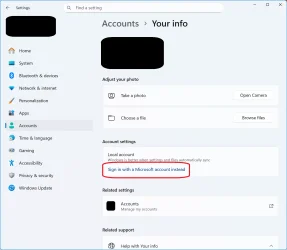
Try going to Settings>Accounts then click on "Sign in with a Microsoft account instead" under Account Settings. (see below circled in red)


login to MS account.webp

Kind regards,

tecknot
 

My Computer

System One

  • OS
    Windows 11 Pro 25H2 build 26200.8457
    Computer type
    Laptop
    Manufacturer/Model
    Lenovo ThinkPad Workstation P72
    CPU
    Intel i7 8750H @ 2.2 GHz
    Motherboard
    Lenovo 01YU291
    Memory
    16 GB (all Samsung) DDR4-3200 SODIMM (non-ECC) PCIe 3
    Graphics Card(s)
    Intel UHD Graphics 630 & NVIDIA Quadro P600
    Sound Card
    Realtek ALC3286 & Focusrite Saffire 24 Pro DSP
    Monitor(s) Displays
    17.3"
    Screen Resolution
    3840x2160
    Hard Drives
    1TB SSD Samsung 860 EVO SATA 3
    1TB SSD Samsung 970 EVO M.2 NVMe PCIe 3 x 4
    2TB SSD Samsung 990 PRO M.2 NVMe PCIe 3 x 4
    PSU
    230W
    Cooling
    fan
    Keyboard
    UltraNav
    Mouse
    Kensington wireless Orbit
    Internet Speed
    640Mbps
    Browser
    DuckDuckGo and Firefox
    Antivirus
    Defender
    Other Info
    CM246 Chipset
Hi Janey, I can see that tecKnot can readNot, so I'll try to help out.

You may want to try using netplwiz to change the account name, but I doubt that's going to give you the desired effects. To open netplwiz, just type "netplwiz" into a command prompt that's run as administrator. Right click the account and select properties to get to the name change menu.

If you want to have your new account name reflected correctly system wide, the easiest approach is to create a new Windows account with your desired account name.

You may want to try using netplwiz to change the account name, but I doubt that's going to give you the desired effects. To open netplwiz, just type "netplwiz" into a command prompt that's run as administrator. Right click the account and select properties to get to the name change menu.

There's zero documentation from Microsoft for updating the file directory to reflect account name changes because doing so oftentimes breaks things that no-one has the knowledge or patience to diagnose and fix.
 

My Computer

System One

  • OS
    Windows 11
    Computer type
    Laptop
    Manufacturer/Model
    HP
Hi Janey, I can see that tecKnot can readNot, so I'll try to help out.

You may want to try using netplwiz to change the account name...

The issue it not a name change but the type of account Janey wants. That is, an MS account as opposed to a local account. Janey did not describe how she made her account in the first place, I suggested one way of doing it.

Kind regards,

tecknot
 

My Computer

System One

  • OS
    Windows 11 Pro 25H2 build 26200.8457
    Computer type
    Laptop
    Manufacturer/Model
    Lenovo ThinkPad Workstation P72
    CPU
    Intel i7 8750H @ 2.2 GHz
    Motherboard
    Lenovo 01YU291
    Memory
    16 GB (all Samsung) DDR4-3200 SODIMM (non-ECC) PCIe 3
    Graphics Card(s)
    Intel UHD Graphics 630 & NVIDIA Quadro P600
    Sound Card
    Realtek ALC3286 & Focusrite Saffire 24 Pro DSP
    Monitor(s) Displays
    17.3"
    Screen Resolution
    3840x2160
    Hard Drives
    1TB SSD Samsung 860 EVO SATA 3
    1TB SSD Samsung 970 EVO M.2 NVMe PCIe 3 x 4
    2TB SSD Samsung 990 PRO M.2 NVMe PCIe 3 x 4
    PSU
    230W
    Cooling
    fan
    Keyboard
    UltraNav
    Mouse
    Kensington wireless Orbit
    Internet Speed
    640Mbps
    Browser
    DuckDuckGo and Firefox
    Antivirus
    Defender
    Other Info
    CM246 Chipset
Is this a normal Windows 11 behaviour? I've got doubts about the security.

I've never done a clean install of Windows 11, I've done 2 of Windows 10 instead (and I updated the former to 11 afterwards, what didn't imply any account main setting). In the 1st one (a new pre-built) I was guided to have an Administrator user with MS account. I don't recall the details but I saw I was doing things (like establishing a password to use the OS, afterwards a PIN, and indentifying myself with my real name) I had never done before, with a high degree of security and compliance with the MS defaults (compared to what I was used to). I didn't think it a lot b/c the computer was for tele-working and thought it was all benefitial, and Windows 10 was new to me (I had used Windows 7 in foreign computers but my own one had Vista, used ala XP or even 98 with better visuals -or even DOS with graphical GUI :p- and nothing about accounts and such, or either they were 100% transparent). In the 2nd clean install I understood and "regulated" it a bit better but I also used an MS account (the same I had created before) and my real name.

I've never adquired a 2hd hand full computer. I've sold a few with OS included, but the latter one was in 2004, not sure if XP or 98 and nothing ("visible" at least) about users and security. In all cases my computers had recent new OS installs with some free "obvious" utilities. Idk what the buyers did with my installs, but they were ready for any user to inmediately use the computer, install his or her programs etc.

I would need to learn how to sell a Windows 10/11 computer, supposing the buyer isn't very expert or hasn't given concrete directions. A local Admin account is what's more similar to what I used to do, but it isn't the MS default. Were "secure" my computers? The age, the world and the computers world were different. In the early 90s I heard that some childs from northern Europe got to access Pentagon etc computers just for fun, but neither the journalists nor I were understanding the issue, until I learnt what Internet is I didn't understand anything (specially the physical connection part).

 

My Computer

System One

  • OS
    Windows 11
    Manufacturer/Model
    MeLE Quieter 2Q (fanless miniPC)
    CPU
    Celeron J4125 (10th gen)
    Memory
    8GB DDR4
    Monitor(s) Displays
    Samsung SyncMaster T260
    Screen Resolution
    1920x1200
    Hard Drives
    256GB eMMC (Windows)
    2TB USB3 HDD Toshiba (Data)
Thank you for all your replies.

I have now achieved changing from a Local User to my Microsoft account and all is working well.

I notice in File Explorer, under Users, that I am shown by the first 4 letters of my email address. On my other computer - also in my Microsoft account - I’m shown as Mrs_B, which I much prefer.
Can I change this in some way, please?
 

My Computer

System One

  • OS
    Windows 11 Pro
    Computer type
    PC/Desktop
    Manufacturer/Model
    HP EliteDesk
    CPU
    Intel(R) Core(TM) i7-9700 [email protected]
    Memory
    16 GB
Good morning, Janey.

To change the User name in your profile is a bit involved. Here is a tutorial to help you through the process: Change Name of User Profile Folder.

I hope this resolves your issues. Please let us know if you should need anything further.

Kind regards,

tecknot
 

My Computer

System One

  • OS
    Windows 11 Pro 25H2 build 26200.8457
    Computer type
    Laptop
    Manufacturer/Model
    Lenovo ThinkPad Workstation P72
    CPU
    Intel i7 8750H @ 2.2 GHz
    Motherboard
    Lenovo 01YU291
    Memory
    16 GB (all Samsung) DDR4-3200 SODIMM (non-ECC) PCIe 3
    Graphics Card(s)
    Intel UHD Graphics 630 & NVIDIA Quadro P600
    Sound Card
    Realtek ALC3286 & Focusrite Saffire 24 Pro DSP
    Monitor(s) Displays
    17.3"
    Screen Resolution
    3840x2160
    Hard Drives
    1TB SSD Samsung 860 EVO SATA 3
    1TB SSD Samsung 970 EVO M.2 NVMe PCIe 3 x 4
    2TB SSD Samsung 990 PRO M.2 NVMe PCIe 3 x 4
    PSU
    230W
    Cooling
    fan
    Keyboard
    UltraNav
    Mouse
    Kensington wireless Orbit
    Internet Speed
    640Mbps
    Browser
    DuckDuckGo and Firefox
    Antivirus
    Defender
    Other Info
    CM246 Chipset
Thanks tecknot

I’ve looked at the link, opened Command Prompt and typed “cd oobe”.
It just shows “The system cannot find the path specified” so I couldn’t proceed.

Can you help, please?
 

My Computer

System One

  • OS
    Windows 11 Pro
    Computer type
    PC/Desktop
    Manufacturer/Model
    HP EliteDesk
    CPU
    Intel(R) Core(TM) i7-9700 [email protected]
    Memory
    16 GB
Thanks tecknot

I’ve looked at the link, opened Command Prompt and typed “cd oobe”.
It just shows “The system cannot find the path specified” so I couldn’t proceed.

Can you help, please?

Hi Janey,

That step is to take place when installing Windows ("...during OOBE set up. To do so, follow these steps..."). Since you already have Windows installed, start at step 1.

Let me know if you need further assistance.

Kind regards,

tecknot
 

My Computer

System One

  • OS
    Windows 11 Pro 25H2 build 26200.8457
    Computer type
    Laptop
    Manufacturer/Model
    Lenovo ThinkPad Workstation P72
    CPU
    Intel i7 8750H @ 2.2 GHz
    Motherboard
    Lenovo 01YU291
    Memory
    16 GB (all Samsung) DDR4-3200 SODIMM (non-ECC) PCIe 3
    Graphics Card(s)
    Intel UHD Graphics 630 & NVIDIA Quadro P600
    Sound Card
    Realtek ALC3286 & Focusrite Saffire 24 Pro DSP
    Monitor(s) Displays
    17.3"
    Screen Resolution
    3840x2160
    Hard Drives
    1TB SSD Samsung 860 EVO SATA 3
    1TB SSD Samsung 970 EVO M.2 NVMe PCIe 3 x 4
    2TB SSD Samsung 990 PRO M.2 NVMe PCIe 3 x 4
    PSU
    230W
    Cooling
    fan
    Keyboard
    UltraNav
    Mouse
    Kensington wireless Orbit
    Internet Speed
    640Mbps
    Browser
    DuckDuckGo and Firefox
    Antivirus
    Defender
    Other Info
    CM246 Chipset

Latest Support Threads

Back
Top Bottom