Viewing Macrium activity


wimorrison

Well-known member
Member
VIP
Local time
6:50 PM
Posts
285
OS
Win11 26100.3323
Is there a way to see what Macrium is doing, in particular how long the backup has to run when Macrium starts a scheduled backup?

I had a differential backup start this morning automatically, and I wanted to close down the laptop, therefore opened Macrium to see how long the activity would take, but Macrium doesn't seem to show as an activity when run from the scheduler as a system task. Fortunately it finished quite quickly, however when it does a monthly full backup that won't be quick and being able to see if it is going to take 10 mins or 30 mins would be useful.

Does anyone know how to view the activities when they are being run like this?

Thanks
 

My Computer My Computer

At a glance

Win11 26100.332312th Gen Intel(R) Core(TM) i7-1270P 2.20 GHz16Gb
OS
Win11 26100.3323
Computer type
Laptop
Manufacturer/Model
Dell Latitude 7430
CPU
12th Gen Intel(R) Core(TM) i7-1270P 2.20 GHz
Motherboard
Dell
Memory
16Gb
Is there a way to see what Macrium is doing, in particular how long the backup has to run when Macrium starts a scheduled backup?

I had a differential backup start this morning automatically, and I wanted to close down the laptop, therefore opened Macrium to see how long the activity would take, but Macrium doesn't seem to show as an activity when run from the scheduler as a system task. Fortunately it finished quite quickly, however when it does a monthly full backup that won't be quick and being able to see if it is going to take 10 mins or 30 mins would be useful.

Does anyone know how to view the activities when they are being run like this?

Thanks


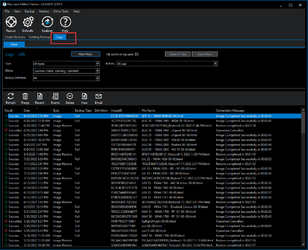
You can always open "Logs" (top left), and see how long the last one took.
It lists all of them, so you should be able to get an average as well.

Image1.png


For Differentials... the closer together in time, you take them...
the less the size and therefore time it takes to complete should change.


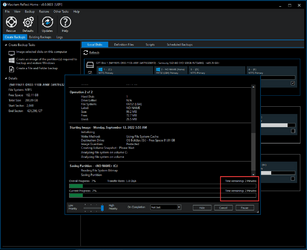
There's also this. I assume it shows for differentials as well.
I only make full backups, and leave the program "open" while it's running.
So I always see this "page" of the program.
I don't know if this shows when Macrium is running in the background, and then opened.

Image1.png
 
Last edited:

My Computers My Computers

  • At a glance

    Win 11 Home ♦♦♦26200.8655 ♦♦♦♦♦♦♦25H2AMD Ryzen 7 3700XG.Skill (F4-3200C14D-16GTZKW)EVGA RTX 2070 (08G-P4-2171-KR)
    OS
    Win 11 Home ♦♦♦26200.8655 ♦♦♦♦♦♦♦25H2
    Computer type
    PC/Desktop
    Manufacturer/Model
    Built by Ghot® [May 2020]
    CPU
    AMD Ryzen 7 3700X
    Motherboard
    Asus Pro WS X570-ACE (BIOS 5302)
    Memory
    G.Skill (F4-3200C14D-16GTZKW)
    Graphics Card(s)
    EVGA RTX 2070 (08G-P4-2171-KR)
    Sound Card
    Realtek ALC1220P / ALC S1220A
    Monitor(s) Displays
    Dell U3011 30"
    Screen Resolution
    2560 x 1600
    Hard Drives
    2x Samsung 860 EVO 500GB,
    WD 4TB Black FZBX - SATA III,
    WD 8TB Black FZBX - SATA III,
    DRW-24B1ST CD/DVD Burner
    PSU
    PC Power & Cooling 750W Quad EPS12V
    Case
    Cooler Master ATCS 840 Tower
    Cooling
    CM Hyper 212 EVO (push/pull)
    Keyboard
    Ducky DK9008 Shine II Blue LED
    Mouse
    Logitech Optical M-100
    Internet Speed
    300/300
    Browser
    Firefox (latest)
    Antivirus
    Bitdefender Total Security
    Other Info
    Speakers: Klipsch Pro Media 2.1
  • At a glance

    Windows XP Pro 32bit w/SP3AMD Athlon 64 X2 5000+ (OC'd @ 3.2Ghz)TWIN2X2048-6400C4DHX (2 x 1GB, DDR2 800)EVGA 256-P2-N758-TR GeForce 8600GT SSC
    Operating System
    Windows XP Pro 32bit w/SP3
    Computer type
    PC/Desktop
    Manufacturer/Model
    Built by Ghot® (not in use)
    CPU
    AMD Athlon 64 X2 5000+ (OC'd @ 3.2Ghz)
    Motherboard
    ASUS M2N32-SLI Deluxe Wireless Edition
    Memory
    TWIN2X2048-6400C4DHX (2 x 1GB, DDR2 800)
    Graphics card(s)
    EVGA 256-P2-N758-TR GeForce 8600GT SSC
    Sound Card
    Onboard
    Monitor(s) Displays
    ViewSonic G90FB Black 19" Professional (CRT)
    Screen Resolution
    up to 2048 x 1536
    Hard Drives
    WD 36GB 10,000rpm Raptor SATA
    Seagate 80GB 7200rpm SATA
    Lite-On LTR-52246S CD/RW
    Lite-On LH-18A1P CD/DVD Burner
    PSU
    PC Power & Cooling Silencer 750 Quad EPS12V
    Case
    Generic Beige case, 80mm fans
    Cooling
    ZALMAN 9500A 92mm CPU Cooler
    Keyboard
    Logitech Classic Keybooard 200
    Mouse
    Logitech Optical M-BT96a
    Internet Speed
    300/300
    Browser
    Firefox 3.x ??
    Antivirus
    Symantec (Norton)
    Other Info
    Still assembled, still runs. Haven't turned it on for 15 years?
The lower screen is what I want to view, the upper one is useful to confirm that it has been done, but it is unfortunately after the event. The lower screen is not shown at all, and currently I cannot find where the schedule is kept (it isn't in the Windows Scheduler) to change the account to my account, nor to all the service to run and interact with the screen which *may* allow the lower screen to be displayed.
 

My Computer My Computer

At a glance

Win11 26100.332312th Gen Intel(R) Core(TM) i7-1270P 2.20 GHz16Gb
OS
Win11 26100.3323
Computer type
Laptop
Manufacturer/Model
Dell Latitude 7430
CPU
12th Gen Intel(R) Core(TM) i7-1270P 2.20 GHz
Motherboard
Dell
Memory
16Gb
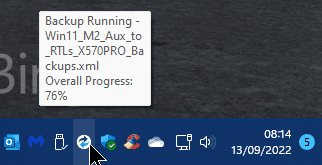
@wimorrison As long as you have enabled Macrium icons to appear in the System Tray under Settings, then you will see an icon there when a scheduled job runs. Hovering the mouse over it will show the current status.

1.png

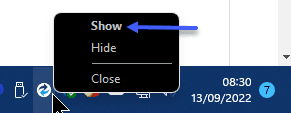
Right-clicking on it will give you the option to "Show" the running task.

2.png

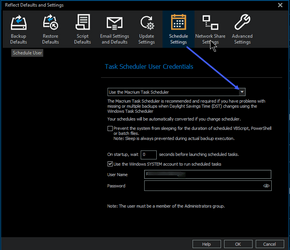
Due to problems previously using Macrium with DST zones, they introduced the option for the Scheduler. You can change it in the Defaults.

4.png
 

My Computers My Computers

  • At a glance

    Win 11 Pro3.6 GHz. AMD Ryzen 5 3600 6-core16GBNVidia GeForce GT710
    OS
    Win 11 Pro
    Computer type
    PC/Desktop
    Manufacturer/Model
    Home built.
    CPU
    3.6 GHz. AMD Ryzen 5 3600 6-core
    Motherboard
    ASUS PRIME X570-PRO (BIOS 5013 Installed 26/10/2024)
    Memory
    16GB
    Graphics Card(s)
    NVidia GeForce GT710
    Sound Card
    Onboard Realtek
    Monitor(s) Displays
    Samsung S24F350
    Screen Resolution
    1920 x 1080
    Hard Drives
    Samsung 980 PRO 250GB
    Samsung 970 EVO Plus 250GB
    Seagate ST500DM002-1BD142 500GB
    2 x .Samsung 1TB T7 Portables--only one fitted at a time. Swapped weekly on a Thursday for backups using Macrium Reflect X.
    PSU
    Corsair TX650W
    Case
    Novatech
    Cooling
    Wraith
    Keyboard
    Novatech Combo
    Mouse
    Novatech Combo
    Internet Speed
    Currently 513.88 Mbps Down 69.48 Mbps Up
    Browser
    Firefox
    Antivirus
    Windows Defender: Malwarebytes Premium.
    Other Info
    Synology DS218J NAS.
    Networked CanonPixie MG5750.
    All Disks are running Bitlocker.
  • At a glance

    Windows 11 Pro3.6 GHz AMD Ryzen 5 3600 6-core16GBNVidia GT710
    Operating System
    Windows 11 Pro
    Computer type
    PC/Desktop
    Manufacturer/Model
    Home built
    CPU
    3.6 GHz AMD Ryzen 5 3600 6-core
    Motherboard
    ASUS PRIME X570-P (BIOS 5013 Installed 26/10/2024)
    Memory
    16GB
    Graphics card(s)
    NVidia GT710
    Sound Card
    Onboard Realtek
    Monitor(s) Displays
    Viewsonic VX2260WM
    Screen Resolution
    1920 x 1080
    Hard Drives
    Samsung 980 PRO 250GB, Kingston SA400S37120G 120GB, Kingston SA400S37240G 240GB,Seagate ST500DM009. External USB 3.1 Docking Station with Seagate ST1000DM0 for Macrium Reflect backups. All Disks running Bitlocker.
    PSU
    Corsair TX550M
    Case
    Corsair 110Q
    Cooling
    Wraith
    Keyboard
    As above.
    Mouse
    Logitech MK270 Combo
    Internet Speed
    Same as System 1.
    Browser
    Firefox
    Antivirus
    Windows Defender; Malwarebytes Premium
    Other Info
    Same as System #1 except this one is using a T4U Wi-Fi Adapter to connect to Router.
    Also have an ASUS Vivobook M513UA Laptop running Windows 11 Pro.
@RTeeL I knew it had to be possible somehow - thank you for this, I am certain that others will also find this useful!!
:thumbsup:
 

My Computer My Computer

At a glance

Win11 26100.332312th Gen Intel(R) Core(TM) i7-1270P 2.20 GHz16Gb
OS
Win11 26100.3323
Computer type
Laptop
Manufacturer/Model
Dell Latitude 7430
CPU
12th Gen Intel(R) Core(TM) i7-1270P 2.20 GHz
Motherboard
Dell
Memory
16Gb

Latest Support Threads

Back
Top Bottom