
Solved W11 Sign in and Network access.


britgeezer

Well-known member
Member
Local time
3:33 AM
Posts
104
Location
New Joisey
OS
Windows 11 25H2 OS Build 26200.8117
So, I'm old enough to have been through almost every windows iteration and my memory is failing.
I was experimenting with a backup SW and managed to kill the windows installation on my primary PC, of course the backup didn't work either. In the end I had to use my recovery USB to start over. Well almost start over, since it retained my bypass of password and kept the pin. Now my problem and question.

Since W7 I have used a single account, per PC, where I am the admin and defeated password and pin to let my multiple PC's start automatically. I have a Microsoft account for each using different emails since sync creates problems with my icons on different size screens.

I have one PC that I use as a server to store a lot of stuff, but I'm now unable to access it with the new SW build since it wants to know my password for the server.
I haven't used a password for the server or my own PC in years and have no idea what it could be. As you can see below my PC sees the server.
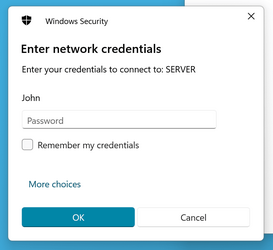
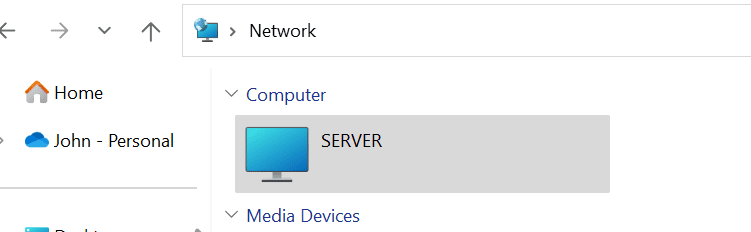
1687293681558.png1687294095888.png

I tried Passfab winkey to remove the password without success, they simply refunded me without answering my question.
So,....... if I don't know or there is no password to enter, how do I get my network connection back?

I have just seen the thread from Denis about creating local accounts but I'm not sure if that would help me in this case.
 
Windows Build/Version
Windows 11, version 22H2

My Computers My Computers

  • At a glance

    Windows 11 25H2 OS Build 26200.8117Intel Core Ultra 7-265K32GB Corsair Vengeance DDR5 PC6400Intel ARC B580
    OS
    Windows 11 25H2 OS Build 26200.8117
    Computer type
    PC/Desktop
    Manufacturer/Model
    Self Build
    CPU
    Intel Core Ultra 7-265K
    Motherboard
    Gigabyte Aorus Elite WiFi7 ICE Z890
    Memory
    32GB Corsair Vengeance DDR5 PC6400
    Graphics Card(s)
    Intel ARC B580
    Sound Card
    On board
    Monitor(s) Displays
    LG
    Hard Drives
    1+2GB NVME, 2GB SSD x 2
    PSU
    MSI 650W
    Case
    Fractal Design 7 Solid
    Cooling
    Air
    Keyboard
    Logitech MX key S
    Mouse
    Logitech MX keyS
    Internet Speed
    1GB
    Browser
    Edge and Chrome
    Other Info
    Also have two Dell LT's using W11 Pro and 25H2
  • At a glance

    Windows 11 24H2 OS Build 26100.2705AMD Ryzen 5600G32 GB Corsair VengeanceIntegrated
    Operating System
    Windows 11 24H2 OS Build 26100.2705
    Computer type
    PC/Desktop
    Manufacturer/Model
    self build
    CPU
    AMD Ryzen 5600G
    Motherboard
    Gigabyte Aorus B550
    Memory
    32 GB Corsair Vengeance
    Graphics card(s)
    Integrated
    Sound Card
    onboard
    Monitor(s) Displays
    TV/ Monitor
    Hard Drives
    Crucial 500GB NVME
    2x 12TB Seagate spinners.
    2 x 8TB WD spinner
    PSU
    650W
    Case
    Micro ATX box
    Cooling
    Air
    Internet Speed
    1GB
    Browser
    Edge and Chrome
    Antivirus
    Malwarebytes
    Other Info
    Its my Server / occasional user.
    The 12TB drives use Stablebit Drivepool :)
but I'm now unable to access it with the new SW build since it wants to know my password for the server.
On your server computer press start and type gpedit.msc
run gpedit as Administrator and navigate to:

Computer Configuration/Windows Settings/Security Settings/Local Policies/Security Options/Accounts

On the right find and disable option:
Limit local account use of blank passwords to console logon only

Open command prompt and execute gpupdate.exe or restart server computer.

edit:
I meant "disable", sorry.
 

My Computer My Computer

At a glance

Windows 11 Pro 23H2Intel i3 8100 @3.6Ghz1 x 16GB DDR4 @2400 MHzNvidia GeForce GT 1030 2GB SDDR4
OS
Windows 11 Pro 23H2
Computer type
PC/Desktop
Manufacturer/Model
MSI / MS-7B29
CPU
Intel i3 8100 @3.6Ghz
Motherboard
H310M PRO-VDH (MS-7B29)
Memory
1 x 16GB DDR4 @2400 MHz
Graphics Card(s)
Nvidia GeForce GT 1030 2GB SDDR4
Sound Card
Realtek VEN_10EC&DEV_0887 / NVIDIA VEN_10DE&DEV_0081
Monitor(s) Displays
Acer V226HQL
Screen Resolution
1920 x 1080
Hard Drives
SSD 500 GB Crucial MX500 / HDD 1 TB TOSHIBA DT01ACA100
PSU
ATX, details unknown
Case
Everest 551B
Cooling
details unknown
Keyboard
Mechanical Gaming Hydra R7 - Rampage
Mouse
Logitech G703
Internet Speed
Down: 28Mbps / Up: 19Mbps
Browser
Microsoft Edge
Antivirus
Microsoft Defender Antivirus
Other Info
Bluetooth: TP Link 5.0 Nano USB adapter UB500
WLAN: D-Link 150 Pico USB adapter, N standard
Web camera: Logitech C270 HD 720p @30fps
Microphone: Trust MICO, model 23790
On your server computer press start and type gpedit.msc
run gpedit as Administrator and navigate to:

Computer Configuration/Windows Settings/Security Settings/Local Policies/Security Options/Accounts

On the right find and disable option:
Limit local account use of blank passwords to console logon only

Open command prompt and execute gpupdate.exe or restart server computer.

edit:
I meant "disable", sorry.
Well, I followed your instructions and rebooted, but still can't access my server.
I tried from the server to access my PC and while can see the PC and default and user tabs, all the content folders of default are empty. Although there is some content on the PC. Do I need to make the same change on my PC?

I checked and the line referenced above is disabled, as far as I can tell the subject server folders are still shared (why do they keep changing the setup screens) but now there is no sign of the server under networks from my PC. When I try to open the quick link, I had saved from before it still asks me to enter my credentials.

This rabbit hole is getting deeper.
 

My Computers My Computers

  • At a glance

    Windows 11 25H2 OS Build 26200.8117Intel Core Ultra 7-265K32GB Corsair Vengeance DDR5 PC6400Intel ARC B580
    OS
    Windows 11 25H2 OS Build 26200.8117
    Computer type
    PC/Desktop
    Manufacturer/Model
    Self Build
    CPU
    Intel Core Ultra 7-265K
    Motherboard
    Gigabyte Aorus Elite WiFi7 ICE Z890
    Memory
    32GB Corsair Vengeance DDR5 PC6400
    Graphics Card(s)
    Intel ARC B580
    Sound Card
    On board
    Monitor(s) Displays
    LG
    Hard Drives
    1+2GB NVME, 2GB SSD x 2
    PSU
    MSI 650W
    Case
    Fractal Design 7 Solid
    Cooling
    Air
    Keyboard
    Logitech MX key S
    Mouse
    Logitech MX keyS
    Internet Speed
    1GB
    Browser
    Edge and Chrome
    Other Info
    Also have two Dell LT's using W11 Pro and 25H2
  • At a glance

    Windows 11 24H2 OS Build 26100.2705AMD Ryzen 5600G32 GB Corsair VengeanceIntegrated
    Operating System
    Windows 11 24H2 OS Build 26100.2705
    Computer type
    PC/Desktop
    Manufacturer/Model
    self build
    CPU
    AMD Ryzen 5600G
    Motherboard
    Gigabyte Aorus B550
    Memory
    32 GB Corsair Vengeance
    Graphics card(s)
    Integrated
    Sound Card
    onboard
    Monitor(s) Displays
    TV/ Monitor
    Hard Drives
    Crucial 500GB NVME
    2x 12TB Seagate spinners.
    2 x 8TB WD spinner
    PSU
    650W
    Case
    Micro ATX box
    Cooling
    Air
    Internet Speed
    1GB
    Browser
    Edge and Chrome
    Antivirus
    Malwarebytes
    Other Info
    Its my Server / occasional user.
    The 12TB drives use Stablebit Drivepool :)

Do I need to make the same change on my PC?
No need, honestly I never tested this option but I believed it's purpose is for that, you can set it back to enabled.

I'm afraid remote login without password is not possible then.
 

My Computer My Computer

At a glance

Windows 11 Pro 23H2Intel i3 8100 @3.6Ghz1 x 16GB DDR4 @2400 MHzNvidia GeForce GT 1030 2GB SDDR4
OS
Windows 11 Pro 23H2
Computer type
PC/Desktop
Manufacturer/Model
MSI / MS-7B29
CPU
Intel i3 8100 @3.6Ghz
Motherboard
H310M PRO-VDH (MS-7B29)
Memory
1 x 16GB DDR4 @2400 MHz
Graphics Card(s)
Nvidia GeForce GT 1030 2GB SDDR4
Sound Card
Realtek VEN_10EC&DEV_0887 / NVIDIA VEN_10DE&DEV_0081
Monitor(s) Displays
Acer V226HQL
Screen Resolution
1920 x 1080
Hard Drives
SSD 500 GB Crucial MX500 / HDD 1 TB TOSHIBA DT01ACA100
PSU
ATX, details unknown
Case
Everest 551B
Cooling
details unknown
Keyboard
Mechanical Gaming Hydra R7 - Rampage
Mouse
Logitech G703
Internet Speed
Down: 28Mbps / Up: 19Mbps
Browser
Microsoft Edge
Antivirus
Microsoft Defender Antivirus
Other Info
Bluetooth: TP Link 5.0 Nano USB adapter UB500
WLAN: D-Link 150 Pico USB adapter, N standard
Web camera: Logitech C270 HD 720p @30fps
Microphone: Trust MICO, model 23790
I'm afraid remote login without password is not possible then.
Not an issue for me - I just want to access the PC's on my Notwork...
Maybe I need to use local network settings.
 

My Computers My Computers

  • At a glance

    Windows 11 25H2 OS Build 26200.8117Intel Core Ultra 7-265K32GB Corsair Vengeance DDR5 PC6400Intel ARC B580
    OS
    Windows 11 25H2 OS Build 26200.8117
    Computer type
    PC/Desktop
    Manufacturer/Model
    Self Build
    CPU
    Intel Core Ultra 7-265K
    Motherboard
    Gigabyte Aorus Elite WiFi7 ICE Z890
    Memory
    32GB Corsair Vengeance DDR5 PC6400
    Graphics Card(s)
    Intel ARC B580
    Sound Card
    On board
    Monitor(s) Displays
    LG
    Hard Drives
    1+2GB NVME, 2GB SSD x 2
    PSU
    MSI 650W
    Case
    Fractal Design 7 Solid
    Cooling
    Air
    Keyboard
    Logitech MX key S
    Mouse
    Logitech MX keyS
    Internet Speed
    1GB
    Browser
    Edge and Chrome
    Other Info
    Also have two Dell LT's using W11 Pro and 25H2
  • At a glance

    Windows 11 24H2 OS Build 26100.2705AMD Ryzen 5600G32 GB Corsair VengeanceIntegrated
    Operating System
    Windows 11 24H2 OS Build 26100.2705
    Computer type
    PC/Desktop
    Manufacturer/Model
    self build
    CPU
    AMD Ryzen 5600G
    Motherboard
    Gigabyte Aorus B550
    Memory
    32 GB Corsair Vengeance
    Graphics card(s)
    Integrated
    Sound Card
    onboard
    Monitor(s) Displays
    TV/ Monitor
    Hard Drives
    Crucial 500GB NVME
    2x 12TB Seagate spinners.
    2 x 8TB WD spinner
    PSU
    650W
    Case
    Micro ATX box
    Cooling
    Air
    Internet Speed
    1GB
    Browser
    Edge and Chrome
    Antivirus
    Malwarebytes
    Other Info
    Its my Server / occasional user.
    The 12TB drives use Stablebit Drivepool :)
Not an issue for me - I just want to access the PC's on my Notwork...
It asks you for password which is basically the same thing as login.

Maybe I need to use local network settings.
You can try, there is an option in network and sharing -> advanced sharing center (in control panel on server, which opens settings in win11) the options is called "password protected sharing".

See this tutorial:
 

My Computer My Computer

At a glance

Windows 11 Pro 23H2Intel i3 8100 @3.6Ghz1 x 16GB DDR4 @2400 MHzNvidia GeForce GT 1030 2GB SDDR4
OS
Windows 11 Pro 23H2
Computer type
PC/Desktop
Manufacturer/Model
MSI / MS-7B29
CPU
Intel i3 8100 @3.6Ghz
Motherboard
H310M PRO-VDH (MS-7B29)
Memory
1 x 16GB DDR4 @2400 MHz
Graphics Card(s)
Nvidia GeForce GT 1030 2GB SDDR4
Sound Card
Realtek VEN_10EC&DEV_0887 / NVIDIA VEN_10DE&DEV_0081
Monitor(s) Displays
Acer V226HQL
Screen Resolution
1920 x 1080
Hard Drives
SSD 500 GB Crucial MX500 / HDD 1 TB TOSHIBA DT01ACA100
PSU
ATX, details unknown
Case
Everest 551B
Cooling
details unknown
Keyboard
Mechanical Gaming Hydra R7 - Rampage
Mouse
Logitech G703
Internet Speed
Down: 28Mbps / Up: 19Mbps
Browser
Microsoft Edge
Antivirus
Microsoft Defender Antivirus
Other Info
Bluetooth: TP Link 5.0 Nano USB adapter UB500
WLAN: D-Link 150 Pico USB adapter, N standard
Web camera: Logitech C270 HD 720p @30fps
Microphone: Trust MICO, model 23790
Resolved, I was using my PC name instead of Administrator:rolleyes:
Access now OK to server.
 

My Computers My Computers

  • At a glance

    Windows 11 25H2 OS Build 26200.8117Intel Core Ultra 7-265K32GB Corsair Vengeance DDR5 PC6400Intel ARC B580
    OS
    Windows 11 25H2 OS Build 26200.8117
    Computer type
    PC/Desktop
    Manufacturer/Model
    Self Build
    CPU
    Intel Core Ultra 7-265K
    Motherboard
    Gigabyte Aorus Elite WiFi7 ICE Z890
    Memory
    32GB Corsair Vengeance DDR5 PC6400
    Graphics Card(s)
    Intel ARC B580
    Sound Card
    On board
    Monitor(s) Displays
    LG
    Hard Drives
    1+2GB NVME, 2GB SSD x 2
    PSU
    MSI 650W
    Case
    Fractal Design 7 Solid
    Cooling
    Air
    Keyboard
    Logitech MX key S
    Mouse
    Logitech MX keyS
    Internet Speed
    1GB
    Browser
    Edge and Chrome
    Other Info
    Also have two Dell LT's using W11 Pro and 25H2
  • At a glance

    Windows 11 24H2 OS Build 26100.2705AMD Ryzen 5600G32 GB Corsair VengeanceIntegrated
    Operating System
    Windows 11 24H2 OS Build 26100.2705
    Computer type
    PC/Desktop
    Manufacturer/Model
    self build
    CPU
    AMD Ryzen 5600G
    Motherboard
    Gigabyte Aorus B550
    Memory
    32 GB Corsair Vengeance
    Graphics card(s)
    Integrated
    Sound Card
    onboard
    Monitor(s) Displays
    TV/ Monitor
    Hard Drives
    Crucial 500GB NVME
    2x 12TB Seagate spinners.
    2 x 8TB WD spinner
    PSU
    650W
    Case
    Micro ATX box
    Cooling
    Air
    Internet Speed
    1GB
    Browser
    Edge and Chrome
    Antivirus
    Malwarebytes
    Other Info
    Its my Server / occasional user.
    The 12TB drives use Stablebit Drivepool :)
Resolved, I was using my PC name instead of Administrator:rolleyes:
Access now OK to server.
lol, thank you for feedback, I've learned something new as well.
 

My Computer My Computer

At a glance

Windows 11 Pro 23H2Intel i3 8100 @3.6Ghz1 x 16GB DDR4 @2400 MHzNvidia GeForce GT 1030 2GB SDDR4
OS
Windows 11 Pro 23H2
Computer type
PC/Desktop
Manufacturer/Model
MSI / MS-7B29
CPU
Intel i3 8100 @3.6Ghz
Motherboard
H310M PRO-VDH (MS-7B29)
Memory
1 x 16GB DDR4 @2400 MHz
Graphics Card(s)
Nvidia GeForce GT 1030 2GB SDDR4
Sound Card
Realtek VEN_10EC&DEV_0887 / NVIDIA VEN_10DE&DEV_0081
Monitor(s) Displays
Acer V226HQL
Screen Resolution
1920 x 1080
Hard Drives
SSD 500 GB Crucial MX500 / HDD 1 TB TOSHIBA DT01ACA100
PSU
ATX, details unknown
Case
Everest 551B
Cooling
details unknown
Keyboard
Mechanical Gaming Hydra R7 - Rampage
Mouse
Logitech G703
Internet Speed
Down: 28Mbps / Up: 19Mbps
Browser
Microsoft Edge
Antivirus
Microsoft Defender Antivirus
Other Info
Bluetooth: TP Link 5.0 Nano USB adapter UB500
WLAN: D-Link 150 Pico USB adapter, N standard
Web camera: Logitech C270 HD 720p @30fps
Microphone: Trust MICO, model 23790
Back
Top Bottom




