
aHumanError
Active member
- Local time
- 4:27 PM
- Posts
- 9
- OS
- Windows 11 Pro
Hi there.
The scenario is this: I set a custom wallpaper off my data partition that's encrypted by Bitlocker, I restart the laptop and of course the drive is then locked. Then, after a while my wallpaper completely disappears and the desktop turns black.
I done a test where I copied an image to the main drive, set it as the wallpaper, deleted it and sure enough the same thing happened. Conversely if I don't delete it the wallpaper stays as normal. What is going on with that? It's like Windows needs the original image to keep updating the desktop or whatever.
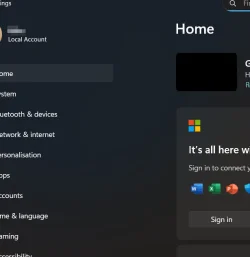
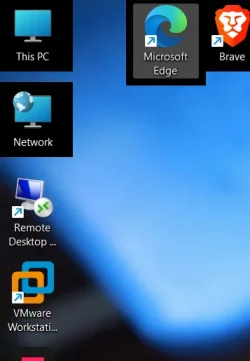
I have recently got a new laptop and when I realised this was happening I thought it could've been some kind of malware or some kind of software conflict so I took the time to reinstall Windows yet it's still happening. I can tell that it's going to turn black because when I go into settings the image of my wallpaper doesn't appear in the screen image at the top (Pic attached) and also when you mouse over desktop icons a black square appears around them (pic attached). But weirdly this doesn't seem to happen straight away, after I first log into Windows the wallpaper is there as normal and everythings fine, then it takes around 10~20 minutes before the wallpapers vanishes or sooner if the desktop is refreshed for any reason.
Can anybody recreate this? What on earth could cause this?
Edit:
Version 24H2 (Biuld 26100.4946)
Laptop: Elitebook 665 G11
The scenario is this: I set a custom wallpaper off my data partition that's encrypted by Bitlocker, I restart the laptop and of course the drive is then locked. Then, after a while my wallpaper completely disappears and the desktop turns black.
I done a test where I copied an image to the main drive, set it as the wallpaper, deleted it and sure enough the same thing happened. Conversely if I don't delete it the wallpaper stays as normal. What is going on with that? It's like Windows needs the original image to keep updating the desktop or whatever.
I have recently got a new laptop and when I realised this was happening I thought it could've been some kind of malware or some kind of software conflict so I took the time to reinstall Windows yet it's still happening. I can tell that it's going to turn black because when I go into settings the image of my wallpaper doesn't appear in the screen image at the top (Pic attached) and also when you mouse over desktop icons a black square appears around them (pic attached). But weirdly this doesn't seem to happen straight away, after I first log into Windows the wallpaper is there as normal and everythings fine, then it takes around 10~20 minutes before the wallpapers vanishes or sooner if the desktop is refreshed for any reason.
Can anybody recreate this? What on earth could cause this?
Edit:
Version 24H2 (Biuld 26100.4946)
Laptop: Elitebook 665 G11
My Computer
At a glance
Windows 11 ProAMD Ryzen 5 7535U16GB DDR5Radeon Graphics
- OS
- Windows 11 Pro
- Computer type
- Laptop
- Manufacturer/Model
- HP EliteBook
- CPU
- AMD Ryzen 5 7535U
- Motherboard
- HP
- Memory
- 16GB DDR5
- Graphics Card(s)
- Radeon Graphics
- Sound Card
- Poly Studio
- Monitor(s) Displays
- 16” WUXGA Display with 16:10 Ratio
- Screen Resolution
- 1920x1200
- Hard Drives
- 2TB NVME









