WD Elements appears as 'local disk'


I would like some advice with this enclosure (below). I bought it and it didn't work. I've attached various drives but ithose haven't worked.
I bought the same model and that didn't work either. Im changing brands . . .

What brand would you suggest that I buy? [I dont want to spend more than $25 - $30.

Thank you
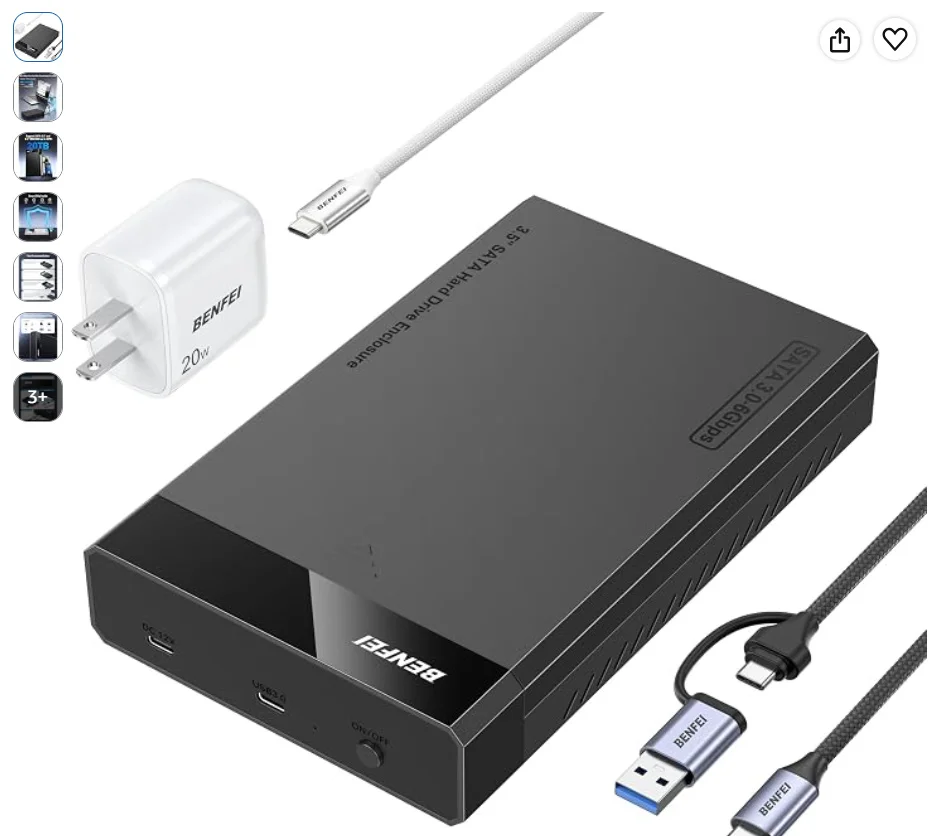
BENFEI 3.5/2.5 Inch SATA HDD/SSD Enclosure, Tool-Free Design, Supports 20TB HDD & UASP​


bandicam 2026-10-10 07-08-54-626.webp
 

My Computer My Computer

At a glance

Win 11 Home, 25H2, build 26200.8737Intel(R) Core(TM) i3-N305 (1.80 GHz)8.00 GB (7.70 GB usable)
OS
Win 11 Home, 25H2, build 26200.8737
Computer type
Laptop
Manufacturer/Model
Lenovo.
CPU
Intel(R) Core(TM) i3-N305 (1.80 GHz)
Motherboard
64-bit operating system, x64-based processor
Memory
8.00 GB (7.70 GB usable)
Hard Drives
2 TB
Browser
Google Chrome, Version 151.0.7922.172 (Official Build) (64-bit)
If cost is no consideration, I would buy this https://www.amazon.ca/SABRENT-Docki...X4LSHS4/dp/B0BX4LSHS4/ref=dp_ob_title_ce?th=1

(Personally I have Four Orico products attached to my Desktop PC in India all purchased in 2019 {one two-slot Orico dock, switched on only when necessary for backups) and two 2.5" enclosures and one 3.5" enclosure plugged in/switched on only when necessary for temporary storage and experiments} At 80y+4m I have stopped purchasing any computer electronics now - time to quit and be happy with what one has and does :-) :-))
 

My Computers My Computers

  • At a glance

    Windows 11 Pro Version:25H2 OS Build: 26200.916812th Gen Intel core i5-1235U(Alder16*2 (32 GB) DDR 4-3200(1600MHz) Crucial Tech...Intel Iris Xe Graphics (Internal)
    OS
    Windows 11 Pro Version:25H2 OS Build: 26200.9168
    Computer type
    PC/Desktop
    Manufacturer/Model
    Beelink Mini PC Model: SEi12
    CPU
    12th Gen Intel core i5-1235U(Alder
    Motherboard
    SEi (manufactured by AZW)
    Memory
    16*2 (32 GB) DDR 4-3200(1600MHz) Crucial Technology
    Graphics Card(s)
    Intel Iris Xe Graphics (Internal)
    Sound Card
    Internal
    Monitor(s) Displays
    BenQ GW2283
    Screen Resolution
    1920*1080
    Hard Drives
    500GB NVME (Kingston SNV2S500G)
    1TB (Crucial CT1000BX500SSD1)
    PSU
    Power Brick 19V-6.32A , 120.08W
    Keyboard
    Dell KB3322Wi (Wireless)
    Mouse
    Dell WM118t (Wireless)
    Internet Speed
    4G/5G
    Browser
    MS Edge, Chrome
    Antivirus
    Malwarebytes Premium - Subscription
  • At a glance

    Windows 11 Home Version 25H2 Build 26200.9168Intel Core i3 8145UIntel Optane 16GB module + DDR 4 16GB (Optane...Intel UHD Graphics 620
    Operating System
    Windows 11 Home Version 25H2 Build 26200.9168
    Computer type
    PC/Desktop
    Manufacturer/Model
    Dell Inspiron 3280 AIO 22"
    CPU
    Intel Core i3 8145U
    Motherboard
    Dell inc. 027W48
    Memory
    Intel Optane 16GB module + DDR 4 16GB (Optane disabled.)
    Graphics card(s)
    Intel UHD Graphics 620
    Sound Card
    Internal
    Monitor(s) Displays
    Dell Monitor 22"
    Screen Resolution
    1920x1080
    Hard Drives
    Crucial CT1000BX500SSD1 ; 1000,2 GB
    PSU
    Power Brick
    Case
    All-in one
    Keyboard
    Dell Wireless KM636
    Mouse
    Dell Wireless KM 636
    Internet Speed
    4G
    Browser
    Edge, Chrome
    Antivirus
    Malwarebytes
    Other Info
    Upgraded from Windows 10 Home to Windows 11 Home on 28 Oct 2023
BTW, referring to your post #49, your WD My Passport 25E1 USB [1.0 TB] is dead as a dodo with all bad sectors filling the reserved space and many pending bad sectors to be relocated .but has no space left for it. Cannot be resurrected by any means. You could have easlily got that report running the Hard Disk Sentinel. That would also help monitoring all your disks, When bad sectors start showing up and get relocated it will warn you to backup all data in the disk, if you intend not losing the data.
 
Last edited:

My Computers My Computers

  • At a glance

    Windows 11 Pro Version:25H2 OS Build: 26200.916812th Gen Intel core i5-1235U(Alder16*2 (32 GB) DDR 4-3200(1600MHz) Crucial Tech...Intel Iris Xe Graphics (Internal)
    OS
    Windows 11 Pro Version:25H2 OS Build: 26200.9168
    Computer type
    PC/Desktop
    Manufacturer/Model
    Beelink Mini PC Model: SEi12
    CPU
    12th Gen Intel core i5-1235U(Alder
    Motherboard
    SEi (manufactured by AZW)
    Memory
    16*2 (32 GB) DDR 4-3200(1600MHz) Crucial Technology
    Graphics Card(s)
    Intel Iris Xe Graphics (Internal)
    Sound Card
    Internal
    Monitor(s) Displays
    BenQ GW2283
    Screen Resolution
    1920*1080
    Hard Drives
    500GB NVME (Kingston SNV2S500G)
    1TB (Crucial CT1000BX500SSD1)
    PSU
    Power Brick 19V-6.32A , 120.08W
    Keyboard
    Dell KB3322Wi (Wireless)
    Mouse
    Dell WM118t (Wireless)
    Internet Speed
    4G/5G
    Browser
    MS Edge, Chrome
    Antivirus
    Malwarebytes Premium - Subscription
  • At a glance

    Windows 11 Home Version 25H2 Build 26200.9168Intel Core i3 8145UIntel Optane 16GB module + DDR 4 16GB (Optane...Intel UHD Graphics 620
    Operating System
    Windows 11 Home Version 25H2 Build 26200.9168
    Computer type
    PC/Desktop
    Manufacturer/Model
    Dell Inspiron 3280 AIO 22"
    CPU
    Intel Core i3 8145U
    Motherboard
    Dell inc. 027W48
    Memory
    Intel Optane 16GB module + DDR 4 16GB (Optane disabled.)
    Graphics card(s)
    Intel UHD Graphics 620
    Sound Card
    Internal
    Monitor(s) Displays
    Dell Monitor 22"
    Screen Resolution
    1920x1080
    Hard Drives
    Crucial CT1000BX500SSD1 ; 1000,2 GB
    PSU
    Power Brick
    Case
    All-in one
    Keyboard
    Dell Wireless KM636
    Mouse
    Dell Wireless KM 636
    Internet Speed
    4G
    Browser
    Edge, Chrome
    Antivirus
    Malwarebytes
    Other Info
    Upgraded from Windows 10 Home to Windows 11 Home on 28 Oct 2023
I make it easy for me... i stay away from disks with chip-encryption. :cool:
Again. User preference. Encryption can be a nasty bit of bizznizz. Fortunately, at the time, I had a friend who had connections that afforded my the privilege of decrypting what I saved to my WD My Book. My friend is gone now and I wouldn't know the first thing to do should I find myself in those circumstances once again. I think the whole deal is a scam, really : Get the user to buy the product, wait for the bridge to fail, user calls for assistance, WD special recovery services steps in.... for a nominal fee.

How much is my data worth to me? A: Worth enough to strip off the WD Elements/My Book to an unencrypted drive and likely duplicating that data in a personally configured LSI RAID array. These older style drives can indeed be "shucked" and connected directly to a standard SATA configuration or, popped inside a regular external drive bay that doesn't use encryption. At that point I completely wipe the drive (1's and 0's) and reformat it via MiniTool Partion Wizard. Now Seagate is a different matter. You can turn off encryption on Seagate external hard drives. At least you sure can on the ones I have. You can also mirror data on the ones I use. Even then these drives are used by me as secondary and tertiary backups. I never completely rely on external drives to "save the day" because they often don't and they often out right fail. That said, some backup is better than no backup at all.

My motto regarding externals? IF it can't be shucked it should be chucked. These drives are known to fail and aren't known for long life.

User preference prevails.
 

My Computer My Computer

At a glance

WIN 11, WIN 10, WIN 8.1, WIN 7 U, WIN 7 PRO, ...Intel i7 6900K and i9-7960X / AMD 3800X (8 core)128 GB CORSAIR DOMINATOR PLATINUM (B DIE)NVIDIA 1070 and RTX 3070
OS
WIN 11, WIN 10, WIN 8.1, WIN 7 U, WIN 7 PRO, WIN 7 HOME (32 Bit), LINUX MINT
Computer type
PC/Desktop
Manufacturer/Model
DIY, ASUS, and DELL
CPU
Intel i7 6900K and i9-7960X / AMD 3800X (8 core)
Motherboard
ASUS X99E-WS USB 3.1 and ASUS X299 SAGE
Memory
128 GB CORSAIR DOMINATOR PLATINUM (B DIE)
Graphics Card(s)
NVIDIA 1070 and RTX 3070
Sound Card
Crystal Sound (onboard)
Monitor(s) Displays
single Samsung 30" 4K and 8" aux monitor
Screen Resolution
4K and something equally attrocious. I'll be working on this.
Hard Drives
A, B, C, D, E, F, G, H, I, J, K, L, M, N, O, P, Q, R, S, T, U, V, W

Ports X, Y, and Z are reserved for USB access and removable drives.

Drive types consist of the following: Various mechanical hard drives bearing the brand names, Seagate, Toshiba, and Western Digital. Various NVMe drives bearing the brand names Kingston, Intel, Silicon Power, Crucial, Western Digital, and Team Group. Various SATA SSDs bearing various different brand names.

RAID arrays included:

LSI RAID 10 (WD Velociraptors) 1115.72 GB
LSI RAID 10 (WD SSDS) 463.80 GB

INTEL RAID 0 (KINGSTON HYPER X) System 447.14 GB
INTEL RAID 1 TOSHIBA ENTERPRIZE class Data 2794.52 GB
INTEL RAID 1 SEAGATE HYBRID 931.51 GB
PSU
SEVERAL. I prefer my Corsair Platinum HX1000i but I also like EVGA power supplies
Case
ThermalTake Level 10 GT (among others)
Cooling
Noctua is my favorite and I use it in my main. I also own various other coolers.
Keyboard
all kinds.
Mouse
all kinds
Internet Speed
360 mbps - 1 gbps (depending)
Browser
FIREFOX
Antivirus
KASPERSKY (no apologies)
Other Info
Gave Dell touch screen with Windows 11 to daughter and got me an OTVOC. Being a PC builder I own many desktop PCs as well. I am a father of five providing PCs, laptops, and tablets for all my family, most of which I have modified, rebuilt, or simply built from scratch. I do not own a cell phone, never have, never will.
If cost is no consideration, I would buy this https://www.amazon.ca/SABRENT-Docki...X4LSHS4/dp/B0BX4LSHS4/ref=dp_ob_title_ce?th=1

(Personally I have Four Orico products attached to my Desktop PC in India all purchased in 2019 {one two-slot Orico dock, switched on only when necessary for backups) and two 2.5" enclosures and one 3.5" enclosure plugged in/switched on only when necessary for temporary storage and experiments} At 80y+4m I have stopped purchasing any computer electronics now - time to quit and be happy with what one has and does :-) :-))
I have a little clear view Orico that has come in rather handy over the years. I like it for its portability, i can slide it into a pocket easily, and it's completely transparent. I'm not quite 70 and already I feel much the same as you mentioned: Be happy with the toys I already have and leave all that over priced stuff to the next generation.
 

My Computer My Computer

At a glance

WIN 11, WIN 10, WIN 8.1, WIN 7 U, WIN 7 PRO, ...Intel i7 6900K and i9-7960X / AMD 3800X (8 core)128 GB CORSAIR DOMINATOR PLATINUM (B DIE)NVIDIA 1070 and RTX 3070
OS
WIN 11, WIN 10, WIN 8.1, WIN 7 U, WIN 7 PRO, WIN 7 HOME (32 Bit), LINUX MINT
Computer type
PC/Desktop
Manufacturer/Model
DIY, ASUS, and DELL
CPU
Intel i7 6900K and i9-7960X / AMD 3800X (8 core)
Motherboard
ASUS X99E-WS USB 3.1 and ASUS X299 SAGE
Memory
128 GB CORSAIR DOMINATOR PLATINUM (B DIE)
Graphics Card(s)
NVIDIA 1070 and RTX 3070
Sound Card
Crystal Sound (onboard)
Monitor(s) Displays
single Samsung 30" 4K and 8" aux monitor
Screen Resolution
4K and something equally attrocious. I'll be working on this.
Hard Drives
A, B, C, D, E, F, G, H, I, J, K, L, M, N, O, P, Q, R, S, T, U, V, W

Ports X, Y, and Z are reserved for USB access and removable drives.

Drive types consist of the following: Various mechanical hard drives bearing the brand names, Seagate, Toshiba, and Western Digital. Various NVMe drives bearing the brand names Kingston, Intel, Silicon Power, Crucial, Western Digital, and Team Group. Various SATA SSDs bearing various different brand names.

RAID arrays included:

LSI RAID 10 (WD Velociraptors) 1115.72 GB
LSI RAID 10 (WD SSDS) 463.80 GB

INTEL RAID 0 (KINGSTON HYPER X) System 447.14 GB
INTEL RAID 1 TOSHIBA ENTERPRIZE class Data 2794.52 GB
INTEL RAID 1 SEAGATE HYBRID 931.51 GB
PSU
SEVERAL. I prefer my Corsair Platinum HX1000i but I also like EVGA power supplies
Case
ThermalTake Level 10 GT (among others)
Cooling
Noctua is my favorite and I use it in my main. I also own various other coolers.
Keyboard
all kinds.
Mouse
all kinds
Internet Speed
360 mbps - 1 gbps (depending)
Browser
FIREFOX
Antivirus
KASPERSKY (no apologies)
Other Info
Gave Dell touch screen with Windows 11 to daughter and got me an OTVOC. Being a PC builder I own many desktop PCs as well. I am a father of five providing PCs, laptops, and tablets for all my family, most of which I have modified, rebuilt, or simply built from scratch. I do not own a cell phone, never have, never will.
I would like some advice with this enclosure (below). I bought it and it didn't work. I've attached various drives but ithose haven't worked.
I bought the same model and that didn't work either. Im changing brands . . .

What brand would you suggest that I buy? [I dont want to spend more than $25 - $30.

Thank you

BENFEI 3.5/2.5 Inch SATA HDD/SSD Enclosure, Tool-Free Design, Supports 20TB HDD & UASP​


View attachment 186124
As I stated previously, if you have a lot of drives to pan through you should get a toaster.

TOASTER << We call them "toasters" in the trade because they look and behave like toasters.

The problem with the cheaper docking stations is that they burn out fast. I went through three versions of what you have in the picture you shared and mine were made by Sabrent. Get a toaster if you want it to last. The bridges in those cheap docking stations only last a couple of years and then they die just like the WD My Books and WD Elements.
 

My Computer My Computer

At a glance

WIN 11, WIN 10, WIN 8.1, WIN 7 U, WIN 7 PRO, ...Intel i7 6900K and i9-7960X / AMD 3800X (8 core)128 GB CORSAIR DOMINATOR PLATINUM (B DIE)NVIDIA 1070 and RTX 3070
OS
WIN 11, WIN 10, WIN 8.1, WIN 7 U, WIN 7 PRO, WIN 7 HOME (32 Bit), LINUX MINT
Computer type
PC/Desktop
Manufacturer/Model
DIY, ASUS, and DELL
CPU
Intel i7 6900K and i9-7960X / AMD 3800X (8 core)
Motherboard
ASUS X99E-WS USB 3.1 and ASUS X299 SAGE
Memory
128 GB CORSAIR DOMINATOR PLATINUM (B DIE)
Graphics Card(s)
NVIDIA 1070 and RTX 3070
Sound Card
Crystal Sound (onboard)
Monitor(s) Displays
single Samsung 30" 4K and 8" aux monitor
Screen Resolution
4K and something equally attrocious. I'll be working on this.
Hard Drives
A, B, C, D, E, F, G, H, I, J, K, L, M, N, O, P, Q, R, S, T, U, V, W

Ports X, Y, and Z are reserved for USB access and removable drives.

Drive types consist of the following: Various mechanical hard drives bearing the brand names, Seagate, Toshiba, and Western Digital. Various NVMe drives bearing the brand names Kingston, Intel, Silicon Power, Crucial, Western Digital, and Team Group. Various SATA SSDs bearing various different brand names.

RAID arrays included:

LSI RAID 10 (WD Velociraptors) 1115.72 GB
LSI RAID 10 (WD SSDS) 463.80 GB

INTEL RAID 0 (KINGSTON HYPER X) System 447.14 GB
INTEL RAID 1 TOSHIBA ENTERPRIZE class Data 2794.52 GB
INTEL RAID 1 SEAGATE HYBRID 931.51 GB
PSU
SEVERAL. I prefer my Corsair Platinum HX1000i but I also like EVGA power supplies
Case
ThermalTake Level 10 GT (among others)
Cooling
Noctua is my favorite and I use it in my main. I also own various other coolers.
Keyboard
all kinds.
Mouse
all kinds
Internet Speed
360 mbps - 1 gbps (depending)
Browser
FIREFOX
Antivirus
KASPERSKY (no apologies)
Other Info
Gave Dell touch screen with Windows 11 to daughter and got me an OTVOC. Being a PC builder I own many desktop PCs as well. I am a father of five providing PCs, laptops, and tablets for all my family, most of which I have modified, rebuilt, or simply built from scratch. I do not own a cell phone, never have, never will.
Thank you for trhe recommendations. I couldn't find an Erico for a reasonable price.
I paid $200 for Ulanzi video editing items so price is a consideration

I was going to order this

MAIWO External Hard Drive Enclosure for 3.5 2.5 Inch SATA HDD SSD, USB 3.0 to SATA Converter Case Reader with 12V 2A Power Adapter, Tool-Free, Support 24TB HDD & UASP​


https://www.amazon.ca/MAIWO-External-Enclosure-Converter-Tool-Free/dp/B0G1XMS74Y/ref=sr_1_55?crid=2H7YBVDAPO1C3&dib=eyJ2IjoiMSJ9.3FTo0zluLli-wX_1DjcbWmrFCX6nVWY5BRAKtYMD5LaYaS0g7P-fp4HGYvgR9dcI0-Zr65SX_3IQJn4flFeZ7Q.uFLt0xptTec2-UprRVwyzXwlgA5KzUcXfGFzNX3YtDw&dib_tag=se&keywords=sata+enclosure+orico&qid=1791658934&sprefix=sata+enclosure+orico,aps,243&sr=8-55&xpid=UUlNtGxVzLvGS
 

Attachments

  • 61Cldyrwh3L._AC_UL480_FMwebp_QL65_.webp
    61Cldyrwh3L._AC_UL480_FMwebp_QL65_.webp
    10.4 KB · Views: 1
  • 61n7DQt0HeL._AC_UL480_FMwebp_QL65_.webp
    61n7DQt0HeL._AC_UL480_FMwebp_QL65_.webp
    19.5 KB · Views: 1

My Computer My Computer

At a glance

Win 11 Home, 25H2, build 26200.8737Intel(R) Core(TM) i3-N305 (1.80 GHz)8.00 GB (7.70 GB usable)
OS
Win 11 Home, 25H2, build 26200.8737
Computer type
Laptop
Manufacturer/Model
Lenovo.
CPU
Intel(R) Core(TM) i3-N305 (1.80 GHz)
Motherboard
64-bit operating system, x64-based processor
Memory
8.00 GB (7.70 GB usable)
Hard Drives
2 TB
Browser
Google Chrome, Version 151.0.7922.172 (Official Build) (64-bit)
I'm not familiar with those video editing devices but okay, I confess that I do own one of those MAIWO units. So far it hasn't given me any trouble and I've had it for a couple of years. I only turn it on when needed and that is likely why I haven't burned out the bridge in the thing. I don't like recommending hardware until I've had thorough use of the item(s) myself. I suppose if one is on a poor man's budget this device will work in a pinch. I still prefer using my toaster for scanning dubious drives. I have a lot of drives. I keep triplicates of my archived data. Not saying everyone should but that's just my preference. There's a reason those units are so cheap. The MAIWO outlasted my Ssbrents but to be fair it never saw the workload I put on my Sabrent units. The choice is yours. User preference prevails. I prefer toasters.
 

My Computer My Computer

At a glance

WIN 11, WIN 10, WIN 8.1, WIN 7 U, WIN 7 PRO, ...Intel i7 6900K and i9-7960X / AMD 3800X (8 core)128 GB CORSAIR DOMINATOR PLATINUM (B DIE)NVIDIA 1070 and RTX 3070
OS
WIN 11, WIN 10, WIN 8.1, WIN 7 U, WIN 7 PRO, WIN 7 HOME (32 Bit), LINUX MINT
Computer type
PC/Desktop
Manufacturer/Model
DIY, ASUS, and DELL
CPU
Intel i7 6900K and i9-7960X / AMD 3800X (8 core)
Motherboard
ASUS X99E-WS USB 3.1 and ASUS X299 SAGE
Memory
128 GB CORSAIR DOMINATOR PLATINUM (B DIE)
Graphics Card(s)
NVIDIA 1070 and RTX 3070
Sound Card
Crystal Sound (onboard)
Monitor(s) Displays
single Samsung 30" 4K and 8" aux monitor
Screen Resolution
4K and something equally attrocious. I'll be working on this.
Hard Drives
A, B, C, D, E, F, G, H, I, J, K, L, M, N, O, P, Q, R, S, T, U, V, W

Ports X, Y, and Z are reserved for USB access and removable drives.

Drive types consist of the following: Various mechanical hard drives bearing the brand names, Seagate, Toshiba, and Western Digital. Various NVMe drives bearing the brand names Kingston, Intel, Silicon Power, Crucial, Western Digital, and Team Group. Various SATA SSDs bearing various different brand names.

RAID arrays included:

LSI RAID 10 (WD Velociraptors) 1115.72 GB
LSI RAID 10 (WD SSDS) 463.80 GB

INTEL RAID 0 (KINGSTON HYPER X) System 447.14 GB
INTEL RAID 1 TOSHIBA ENTERPRIZE class Data 2794.52 GB
INTEL RAID 1 SEAGATE HYBRID 931.51 GB
PSU
SEVERAL. I prefer my Corsair Platinum HX1000i but I also like EVGA power supplies
Case
ThermalTake Level 10 GT (among others)
Cooling
Noctua is my favorite and I use it in my main. I also own various other coolers.
Keyboard
all kinds.
Mouse
all kinds
Internet Speed
360 mbps - 1 gbps (depending)
Browser
FIREFOX
Antivirus
KASPERSKY (no apologies)
Other Info
Gave Dell touch screen with Windows 11 to daughter and got me an OTVOC. Being a PC builder I own many desktop PCs as well. I am a father of five providing PCs, laptops, and tablets for all my family, most of which I have modified, rebuilt, or simply built from scratch. I do not own a cell phone, never have, never will.

My Computer My Computer

At a glance

Win 11 Home, 25H2, build 26200.8737Intel(R) Core(TM) i3-N305 (1.80 GHz)8.00 GB (7.70 GB usable)
OS
Win 11 Home, 25H2, build 26200.8737
Computer type
Laptop
Manufacturer/Model
Lenovo.
CPU
Intel(R) Core(TM) i3-N305 (1.80 GHz)
Motherboard
64-bit operating system, x64-based processor
Memory
8.00 GB (7.70 GB usable)
Hard Drives
2 TB
Browser
Google Chrome, Version 151.0.7922.172 (Official Build) (64-bit)

Latest Support Threads

Back
Top Bottom