Web pages take forever to load . . .


archfoto

Well-known member
Member
VIP
Local time
4:03 PM
Posts
176
OS
Windows 11 Pro Version 25H2 (OS Build 26200.8655)
Why does it take so long to bring up a web page lately? Is anyone else experiencing this? I have noticed it on Edge and Chrome. I have very high-speed Xfinity internet speeds thru an ethernet cable. I have the most powerful computer I have ever owned, with a 1TB SSD, 64GB of memory, and fast Intel i9 processor (12th gen), as well as a lot of video card ram (12 GB). With the Windows 11 Pro Version 25H2 (OS Build 26200.8037), sometimes it takes quite a bit of time to bring up some web pages that I normally visit every day. This computer came with Win 11 Pro installed. I have Norton AV. Is it Norton, the security of Windows, or both, or is it the browsers. Otherwise, this thing works apps instantaneously on almost everything else. Video rendering is fast, image editing is a snap, etc.
 
Windows Build/Version
Windows 11 Pro Version 25H2 (OS Build 26200.8037)
Last edited:

My Computers My Computers

  • At a glance

    Windows 11 Pro Version 25H2 (OS Build 26200.8...i9 12th Generation64GBPNY 3060 12GB
    OS
    Windows 11 Pro Version 25H2 (OS Build 26200.8655)
    Computer type
    PC/Desktop
    Manufacturer/Model
    Dell 8950
    CPU
    i9 12th Generation
    Memory
    64GB
    Graphics Card(s)
    PNY 3060 12GB
    Monitor(s) Displays
    NEC EA27IU
    Screen Resolution
    3840X2160
    Hard Drives
    SSD internal, external drives
    Cooling
    Advanced Air Cooling
    Keyboard
    Microsoft
    Mouse
    Logitech
    Internet Speed
    High-Speed
    Browser
    MS Edge
    Antivirus
    Norton 360
  • At a glance

    Win 11 Pro 25H2 (OS Build 26200.8655)Intel Ultra 7 265 (20 cores) processor32GB DDR5 RamBuilt-in Intel UHD Graphics
    Operating System
    Win 11 Pro 25H2 (OS Build 26200.8655)
    Computer type
    PC/Desktop
    Manufacturer/Model
    Dell Tower ECT1250
    CPU
    Intel Ultra 7 265 (20 cores) processor
    Memory
    32GB DDR5 Ram
    Graphics card(s)
    Built-in Intel UHD Graphics
    Sound Card
    Built-in
    Screen Resolution
    1920X1080
    Hard Drives
    2TB internal SSD
    Case
    Tower
You have to isolate where it is breaking down. Are other devices on your network working as expected?
If not-look toward the network, not windows.

You have all those things you mentioned and are paying for that high speed internet service, but what speed are you actually getting?If it's not what you're paying for, contact your ISP.

If it points back to just this one device, things to try:

Clear browser cache in Chrome..
  1. On your computer, open Chrome.
  2. At the top right, click More. Delete browsing data.
  3. Choose a time range, like Last hour or All time.
  4. Select the types of information you want to remove.
  5. Click Delete data. If you delete cookies while signed in to Chrome, Chrome refreshes the Google cookies that keep you signed in.
Clear cache in Edge.
Clear dns resolver cache. Flush DNS Resolver Cache in Windows 11

You can try changing the dns server to use google or cloudfare rather than your ISP dns server.
How to change DNS server settings in Windows 10 and 11 | PDQ

Reset network adapters
 

My Computers My Computers

  • At a glance

    Windows 11 Pro 25H2 26200.8655i9-10900 10 core 20 threads32 gbnone-Intel UHD Graphics 630
    OS
    Windows 11 Pro 25H2 26200.8655
    Computer type
    PC/Desktop
    Manufacturer/Model
    Dell Optiplex 7080
    CPU
    i9-10900 10 core 20 threads
    Motherboard
    DELL 0J37VM
    Memory
    32 gb
    Graphics Card(s)
    none-Intel UHD Graphics 630
    Sound Card
    Integrated Realtek
    Monitor(s) Displays
    Benq 27
    Screen Resolution
    2560x1440
    Hard Drives
    2x1tb Solidigm m.2 nvme /External drives 512gb Samsung m.2 sata+2tb Kingston m2.nvme
    PSU
    500w
    Case
    MT
    Cooling
    Dell Premium
    Keyboard
    Logitech wired
    Mouse
    Logitech wireless
    Internet Speed
    so slow I'm too embarrassed to tell
    Browser
    #1 Edge #2 Firefox
    Antivirus
    Defender+MWB Premium
  • At a glance

    Windows 11 Pro 24H2 26200.8457AMD Ryzen 7 6800U32 gbintegrated
    Operating System
    Windows 11 Pro 24H2 26200.8457
    Computer type
    PC/Desktop
    Manufacturer/Model
    Beelink Mini PC SER5
    CPU
    AMD Ryzen 7 6800U
    Memory
    32 gb
    Graphics card(s)
    integrated
    Sound Card
    integrated
    Monitor(s) Displays
    Benq 27
    Screen Resolution
    2560x1440
    Hard Drives
    1TB Crucial nvme
    Keyboard
    Logitech wired
    Mouse
    Logitech wireless
    Internet Speed
    still too embarrassed to tell
    Browser
    Firefox
    Antivirus
    Defender
    Other Info
    System 3 is non compliant Dell 9020 i7-4770/24gb ram Win11 PRO 26200.8457
Hi Glasskuter -

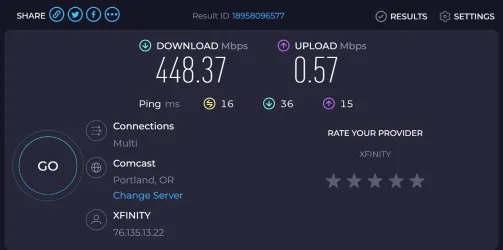
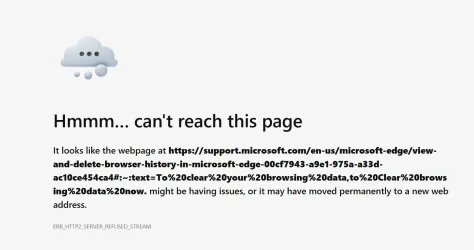
Thanks for the tips. Here are my upload and download speeds (attached) I came up with when clicking the link you put in your post. Also, the second attachment is what I get when clicking the second link, this one remains and keeps circling indefinitely. A question: If I reset my network adapters, A) will it mean that I have to sign into my Xfinity modem/router again and put in the passcode, and B) will it interfere with my other wi-fi computer on another floor, and cause disruptions there?

I used Chrome forever, until one day all my bookmarks decided to move around, while some vanished. I don't love Edge, but everything is right where it should be, when using it. I also noticed that YouTube videos are slower to load on both browsers, but longer on Edge. As far as cleaning out the cache goes, I really hate having to put in my username and password every time I do that. While I have a password manager, not all websites are equal. Some, you can just click on the pw mgr. link and it fills out the rest, or some variation of this. Sometimes, copying and pasting stuff from the manager, and sometimes having several sign-ins listed for one website, as they changed their pages. Everyone seems to want to move the goalposts sometimes. Anyway, all of this interrupts my workflow.
 

Attachments

  • Screenshot 2026-03-14 142749.webp
    Screenshot 2026-03-14 142749.webp
    39.8 KB · Views: 1
  • Screenshot 2026-03-14 143247.webp
    Screenshot 2026-03-14 143247.webp
    62.3 KB · Views: 1

My Computers My Computers

  • At a glance

    Windows 11 Pro Version 25H2 (OS Build 26200.8...i9 12th Generation64GBPNY 3060 12GB
    OS
    Windows 11 Pro Version 25H2 (OS Build 26200.8655)
    Computer type
    PC/Desktop
    Manufacturer/Model
    Dell 8950
    CPU
    i9 12th Generation
    Memory
    64GB
    Graphics Card(s)
    PNY 3060 12GB
    Monitor(s) Displays
    NEC EA27IU
    Screen Resolution
    3840X2160
    Hard Drives
    SSD internal, external drives
    Cooling
    Advanced Air Cooling
    Keyboard
    Microsoft
    Mouse
    Logitech
    Internet Speed
    High-Speed
    Browser
    MS Edge
    Antivirus
    Norton 360
  • At a glance

    Win 11 Pro 25H2 (OS Build 26200.8655)Intel Ultra 7 265 (20 cores) processor32GB DDR5 RamBuilt-in Intel UHD Graphics
    Operating System
    Win 11 Pro 25H2 (OS Build 26200.8655)
    Computer type
    PC/Desktop
    Manufacturer/Model
    Dell Tower ECT1250
    CPU
    Intel Ultra 7 265 (20 cores) processor
    Memory
    32GB DDR5 Ram
    Graphics card(s)
    Built-in Intel UHD Graphics
    Sound Card
    Built-in
    Screen Resolution
    1920X1080
    Hard Drives
    2TB internal SSD
    Case
    Tower
With those speeds, I would be contacting my isp.
 

My Computers My Computers

  • At a glance

    Windows 11 Pro 25H2 26200.8655i9-10900 10 core 20 threads32 gbnone-Intel UHD Graphics 630
    OS
    Windows 11 Pro 25H2 26200.8655
    Computer type
    PC/Desktop
    Manufacturer/Model
    Dell Optiplex 7080
    CPU
    i9-10900 10 core 20 threads
    Motherboard
    DELL 0J37VM
    Memory
    32 gb
    Graphics Card(s)
    none-Intel UHD Graphics 630
    Sound Card
    Integrated Realtek
    Monitor(s) Displays
    Benq 27
    Screen Resolution
    2560x1440
    Hard Drives
    2x1tb Solidigm m.2 nvme /External drives 512gb Samsung m.2 sata+2tb Kingston m2.nvme
    PSU
    500w
    Case
    MT
    Cooling
    Dell Premium
    Keyboard
    Logitech wired
    Mouse
    Logitech wireless
    Internet Speed
    so slow I'm too embarrassed to tell
    Browser
    #1 Edge #2 Firefox
    Antivirus
    Defender+MWB Premium
  • At a glance

    Windows 11 Pro 24H2 26200.8457AMD Ryzen 7 6800U32 gbintegrated
    Operating System
    Windows 11 Pro 24H2 26200.8457
    Computer type
    PC/Desktop
    Manufacturer/Model
    Beelink Mini PC SER5
    CPU
    AMD Ryzen 7 6800U
    Memory
    32 gb
    Graphics card(s)
    integrated
    Sound Card
    integrated
    Monitor(s) Displays
    Benq 27
    Screen Resolution
    2560x1440
    Hard Drives
    1TB Crucial nvme
    Keyboard
    Logitech wired
    Mouse
    Logitech wireless
    Internet Speed
    still too embarrassed to tell
    Browser
    Firefox
    Antivirus
    Defender
    Other Info
    System 3 is non compliant Dell 9020 i7-4770/24gb ram Win11 PRO 26200.8457
ERR_HTTP2_SERVER_REFUSED_STREAM likely points to a security software problem, where it's blocking or interfering with network traffic.

Temporarily disable Norton AV, and test your speeds on a relatively safe website (ie. www.microsoft.com). If your SpeedTest results are relatively fast, but browser performance is terrible then your AV or some browser add-on's are dragging page load times.

Another trick is to create a new Windows local user account, and check out the browser speed from a clean user profile.
 

My Computer My Computer

At a glance

Windows 7
OS
Windows 7
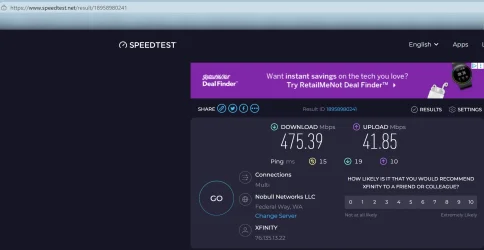
Tried disabling AV - no change. Finally bit the bullet and cleared the cache and cookies, and got it to go a lot faster. Did another speed test before that with Ookla. See attached. BTW, upload speed has always been high when uploading videos and high-res pix!
 

Attachments

  • Screenshot 2026-03-14 224159.webp
    Screenshot 2026-03-14 224159.webp
    81.7 KB · Views: 1

My Computers My Computers

  • At a glance

    Windows 11 Pro Version 25H2 (OS Build 26200.8...i9 12th Generation64GBPNY 3060 12GB
    OS
    Windows 11 Pro Version 25H2 (OS Build 26200.8655)
    Computer type
    PC/Desktop
    Manufacturer/Model
    Dell 8950
    CPU
    i9 12th Generation
    Memory
    64GB
    Graphics Card(s)
    PNY 3060 12GB
    Monitor(s) Displays
    NEC EA27IU
    Screen Resolution
    3840X2160
    Hard Drives
    SSD internal, external drives
    Cooling
    Advanced Air Cooling
    Keyboard
    Microsoft
    Mouse
    Logitech
    Internet Speed
    High-Speed
    Browser
    MS Edge
    Antivirus
    Norton 360
  • At a glance

    Win 11 Pro 25H2 (OS Build 26200.8655)Intel Ultra 7 265 (20 cores) processor32GB DDR5 RamBuilt-in Intel UHD Graphics
    Operating System
    Win 11 Pro 25H2 (OS Build 26200.8655)
    Computer type
    PC/Desktop
    Manufacturer/Model
    Dell Tower ECT1250
    CPU
    Intel Ultra 7 265 (20 cores) processor
    Memory
    32GB DDR5 Ram
    Graphics card(s)
    Built-in Intel UHD Graphics
    Sound Card
    Built-in
    Screen Resolution
    1920X1080
    Hard Drives
    2TB internal SSD
    Case
    Tower
Two days ago I noticed that Chrome was taking a very long time to load web pages. It only happened on first web site I loaded. Edge didn’t exhibit this behavior. I tried all their suggested fixes and nothing worked. Since I have all my setting, links, and login info saved to my Google Account, I finally just uninstalled and reinstalled Chrome. Problem fixed! Don’t know if this will fix your issues. It’s possible that the last Chrome update went wonkie.
 

My Computers My Computers

  • At a glance

    Windows 11 Pro10th Gen Intel(R) Core(TM) i7-10700, 2.90GHz32GB, 2x16GB, DDR4, 2933MhzNVIDIA(R) GeForce(R) RTX 2060 SUPER(TM) 8GB G...
    OS
    Windows 11 Pro
    Computer type
    PC/Desktop
    Manufacturer/Model
    Dell 8940 XPS
    CPU
    10th Gen Intel(R) Core(TM) i7-10700, 2.90GHz
    Motherboard
    Dell 0KV3RP (U3E1)
    Memory
    32GB, 2x16GB, DDR4, 2933Mhz
    Graphics Card(s)
    NVIDIA(R) GeForce(R) RTX 2060 SUPER(TM) 8GB GDDR6
    Sound Card
    Onboard, Realtek Codec, NVIDIA Hi Def Audio, Intel Display Audio
    Monitor(s) Displays
    Dell UltraSharp U3415W
    Screen Resolution
    3440x1440
    Hard Drives
    2TB M.2 PCIe NVMe SSD; 2TB Samsung SSD 860 EVO; 2TB Samsung SSD 860 EVO 2
    PSU
    500 W Dell
    Case
    Night Sky Bezel Chassis
    Cooling
    Dell
    Keyboard
    Logi Wireless
    Mouse
    Logi Wireless
    Internet Speed
    111 Mbps Download, 132 Mbps Upload
    Browser
    Edge, Chrome
    Antivirus
    Windows Defender, MalwareBytes
  • At a glance

    Windows 11 ProIntel 13900K Core I9 24 Core LGA 170032GB (2x16) Kingston Fury Beast 6000MHZ DDR5nVidia 4090 Founders Edition
    Operating System
    Windows 11 Pro
    Computer type
    PC/Desktop
    Manufacturer/Model
    Falcon Northwest Talon
    CPU
    Intel 13900K Core I9 24 Core LGA 1700
    Motherboard
    Asus ROG Z970 Maximus Hero
    Memory
    32GB (2x16) Kingston Fury Beast 6000MHZ DDR5
    Graphics card(s)
    nVidia 4090 Founders Edition
    Sound Card
    Motherboard
    Monitor(s) Displays
    Alienware 34” Curved OLED
    Screen Resolution
    4K
    Hard Drives
    SSD M.2 Kingston Renegade Fury 4 TB x 2; Western Digital Red Pro 8 TB SATA III
    PSU
    1000W ECGA Platinum Modular ATX
    Case
    Falcon NW Custom
    Cooling
    AIO Falcon NW 280mm Liquid Cooler
    Keyboard
    Logitech Pro Gamer
    Mouse
    Logitech G502
    Internet Speed
    111 Mbps Download, 132 Mbps Upload
    Browser
    Edge, Chrome
    Antivirus
    Windows Defender, MalwareBytes
    Other Info
    Noise Blocker Fans
Two days ago I noticed that Chrome was taking a very long time to load web pages. It only happened on first web site I loaded. Edge didn’t exhibit this behavior. I tried all their suggested fixes and nothing worked. Since I have all my setting, links, and login info saved to my Google Account, I finally just uninstalled and reinstalled Chrome. Problem fixed! Don’t know if this will fix your issues. It’s possible that the last Chrome update went wonkie.
Hi SoFine409 -
This problem has been around for a while thru several updates of both browsers. The problem is not universal. Some web pages pop right up, while just a bit ago, the Win 11 forum took 20 seconds. It is perplexing!
 

My Computers My Computers

  • At a glance

    Windows 11 Pro Version 25H2 (OS Build 26200.8...i9 12th Generation64GBPNY 3060 12GB
    OS
    Windows 11 Pro Version 25H2 (OS Build 26200.8655)
    Computer type
    PC/Desktop
    Manufacturer/Model
    Dell 8950
    CPU
    i9 12th Generation
    Memory
    64GB
    Graphics Card(s)
    PNY 3060 12GB
    Monitor(s) Displays
    NEC EA27IU
    Screen Resolution
    3840X2160
    Hard Drives
    SSD internal, external drives
    Cooling
    Advanced Air Cooling
    Keyboard
    Microsoft
    Mouse
    Logitech
    Internet Speed
    High-Speed
    Browser
    MS Edge
    Antivirus
    Norton 360
  • At a glance

    Win 11 Pro 25H2 (OS Build 26200.8655)Intel Ultra 7 265 (20 cores) processor32GB DDR5 RamBuilt-in Intel UHD Graphics
    Operating System
    Win 11 Pro 25H2 (OS Build 26200.8655)
    Computer type
    PC/Desktop
    Manufacturer/Model
    Dell Tower ECT1250
    CPU
    Intel Ultra 7 265 (20 cores) processor
    Memory
    32GB DDR5 Ram
    Graphics card(s)
    Built-in Intel UHD Graphics
    Sound Card
    Built-in
    Screen Resolution
    1920X1080
    Hard Drives
    2TB internal SSD
    Case
    Tower
Google AI says . . . Slow DNS Resolution is the most common culprit when a speed test shows 450 Mbps but browsing feels sluggish. Before a page starts loading, your computer must "look up" its address. Comcast's default DNS servers can sometimes be slow to respond or time out, adding 10–20 seconds of delay before the first piece of data arrives.


Recommended Troubleshooting Steps

  1. Change Your DNS: Manually set your device or router to use a faster public DNS like Google DNS (8.8.8.8 and 8.8.4.4) or Cloudflare DNS (1.1.1.1). Users often report this "magically" fixes the issue.
  2. Flush Your DNS Cache: Clear out old lookup data. On Windows, open the Command Prompt and type ipconfig /flushdns. On Mac, use the Terminal command sudo dscacheutil -flushcache.
  3. Test in Incognito/Private Mode: Open the slow pages in a private window. If they load instantly, a browser extension or corrupted cookie is likely the cause.
  4. Check for Local Outages: Use the Xfinity App or Xfinity Assistant to see if there are known performance issues in your specific neighborhood.
  5. Restart Your Gateway: Unplug your modem/router for 30–60 seconds. This can clear temporary firmware glitches and refresh your connection to the local node
 

My Computers My Computers

  • At a glance

    Windows 11 (up to date)Intel i5 12400Corsair Vengeance LPX 16GBOn Board the Z690
    OS
    Windows 11 (up to date)
    Computer type
    PC/Desktop
    Manufacturer/Model
    Custom
    CPU
    Intel i5 12400
    Motherboard
    Gigabyte Z690 UA
    Memory
    Corsair Vengeance LPX 16GB
    Graphics Card(s)
    On Board the Z690
    Sound Card
    On Board
    Monitor(s) Displays
    43" Samsung tu7000
    Screen Resolution
    2560 x 1440
    Hard Drives
    SAMSUNG SSD 1TB NVMe M.2
    PSU
    Thermaltake smart 500w 80+
    Case
    LIAN LANCOOL_205M
    Cooling
    Bunch of fans . . . :o) (lights dont work)
    Keyboard
    Unicomp: Ultra Classic White Buckling Spring USB
    Mouse
    M510
    Internet Speed
    50mbps on Ethernet
    Browser
    Fire Fox
    Antivirus
    Windows
    Other Info
    Love this computer but I still prefer Win-7 like I love my old Lazy Boy Recliner . . . it just feels better.
  • At a glance

    WIN-7-64BIT and Win-11 pro for testing on uns...i5-3570K CPU @ 3.40GHz, 3801 Mhz, 4 Core(s), ...16 GB - Crucial Ballistick 4GB PC3-14900 DDR3...NVIDIA GeForce GTX 1050
    Operating System
    WIN-7-64BIT and Win-11 pro for testing on unsupported hardware
    Computer type
    PC/Desktop
    Manufacturer/Model
    Home built
    CPU
    i5-3570K CPU @ 3.40GHz, 3801 Mhz, 4 Core(s), 4 Logical Processor(s)
    Motherboard
    GA-Z77-HD3
    Memory
    16 GB - Crucial Ballistick 4GB PC3-14900 DDR3-1333 MHz
    Graphics card(s)
    NVIDIA GeForce GTX 1050
    Sound Card
    On Board
    Monitor(s) Displays
    ASUS VP278
    Screen Resolution
    1920 x 1080
    Hard Drives
    4 - internal Samsung 2.5" SSD, 1 WD HDD 7200 and some external drives
    PSU
    EVGA 550w
    Case
    Old Gygabyte Tower
    Cooling
    Yes
    Keyboard
    Unicomp - UNIOP4A USB (like the old IBM Model H that I started with)
    Mouse
    M510
    Internet Speed
    50mbps
    Browser
    Firefox
    Antivirus
    Windows
    Other Info
    The only thing it lack is USB-3.2 on the front face but it has 3.0 on the back
Google AI says . . . Slow DNS Resolution is the most common culprit when a speed test shows 450 Mbps but browsing feels sluggish. Before a page starts loading, your computer must "look up" its address. Comcast's default DNS servers can sometimes be slow to respond or time out, adding 10–20 seconds of delay before the first piece of data arrives.


Recommended Troubleshooting Steps

  1. Change Your DNS: Manually set your device or router to use a faster public DNS like Google DNS (8.8.8.8 and 8.8.4.4) or Cloudflare DNS (1.1.1.1). Users often report this "magically" fixes the issue.
  2. Flush Your DNS Cache: Clear out old lookup data. On Windows, open the Command Prompt and type ipconfig /flushdns. On Mac, use the Terminal command sudo dscacheutil -flushcache.
  3. Test in Incognito/Private Mode: Open the slow pages in a private window. If they load instantly, a browser extension or corrupted cookie is likely the cause.
  4. Check for Local Outages: Use the Xfinity App or Xfinity Assistant to see if there are known performance issues in your specific neighborhood.
  5. Restart Your Gateway: Unplug your modem/router for 30–60 seconds. This can clear temporary firmware glitches and refresh your connection to the local node
Hi John 1955 -

That seemed to make the web pages come up faster.

Thanks to all who have helped on this. I even changed out my ethernet cable to see if that was part of the problem.
 

My Computers My Computers

  • At a glance

    Windows 11 Pro Version 25H2 (OS Build 26200.8...i9 12th Generation64GBPNY 3060 12GB
    OS
    Windows 11 Pro Version 25H2 (OS Build 26200.8655)
    Computer type
    PC/Desktop
    Manufacturer/Model
    Dell 8950
    CPU
    i9 12th Generation
    Memory
    64GB
    Graphics Card(s)
    PNY 3060 12GB
    Monitor(s) Displays
    NEC EA27IU
    Screen Resolution
    3840X2160
    Hard Drives
    SSD internal, external drives
    Cooling
    Advanced Air Cooling
    Keyboard
    Microsoft
    Mouse
    Logitech
    Internet Speed
    High-Speed
    Browser
    MS Edge
    Antivirus
    Norton 360
  • At a glance

    Win 11 Pro 25H2 (OS Build 26200.8655)Intel Ultra 7 265 (20 cores) processor32GB DDR5 RamBuilt-in Intel UHD Graphics
    Operating System
    Win 11 Pro 25H2 (OS Build 26200.8655)
    Computer type
    PC/Desktop
    Manufacturer/Model
    Dell Tower ECT1250
    CPU
    Intel Ultra 7 265 (20 cores) processor
    Memory
    32GB DDR5 Ram
    Graphics card(s)
    Built-in Intel UHD Graphics
    Sound Card
    Built-in
    Screen Resolution
    1920X1080
    Hard Drives
    2TB internal SSD
    Case
    Tower
Back
Top Bottom