Solved Weird Video Artifacts Randomly Appearing


ASFinavar2023

Member
Local time
8:34 AM
Posts
3
OS
Windows 11
I am running Win 11 23H2 22631.2792 (full specs in my profile) and have seen this weird video thing happen (see attached).

Sometimes it just flashes on the screen and then goes away. It's usually triggered by mouse movement (both BT mouse and USB mouse). Sometimes, it does that for a second or two; others, it stays like that. This most often happens when I have a web browser open and the Everquest game client. However, it seems to happen with some other apps as well.

What I have tried so far:
  • Disabling every start-up program not essential
  • Clean install of the nVidia driver
  • Up to date on all Windows patches
  • Once it starts happening, killing all apps and slowly killing background tasks, nothing consistently resolves it
  • It's a home-built machine, but one of a pair and the only one that exhibits the problem
  • Heat doesn't seem to be an issue; Everything runs in the mid-50s on idle and has peaked at 68, well below the 85 max for GPU throttling.

Rebooting *usually* clears it. Cold start always does, at least for a while. Sometimes, this takes an hour or more to show up; sometimes, it happens immediately. I am looking for any clues at this point.
 

Attachments

  • IMG_2916.JPEG
    IMG_2916.JPEG
    416.9 KB · Views: 6

My Computer My Computer

At a glance

Windows 11Core i5-13600KT-Force Delta TUF Gaming Alliance RGB DDR5 Ra...ASUS GeForce RTX 3060 V2 OC Edition 12GB GDDR...
OS
Windows 11
Computer type
PC/Desktop
Manufacturer/Model
Custom
CPU
Core i5-13600K
Motherboard
ASUS ROG Strix B760-I Gaming WiFi Intel® B760 LGA 1700 mini-ITX motherboard
Memory
T-Force Delta TUF Gaming Alliance RGB DDR5 Ram 32GB (2x16GB) 5200MHz PC5-41600 CL40
Graphics Card(s)
ASUS GeForce RTX 3060 V2 OC Edition 12GB GDDR6 Gaming Graphics Card (PCIe 4.0, 12GB GDDR6)
Sound Card
RealTek
Monitor(s) Displays
Samsung 4K TV
Screen Resolution
3840x2160
Hard Drives
Crucial P5 Plus 1TB PCIe Gen4 3D NAND NVMe M.2 Gaming SSD
PSU
SilverStone SX700-PT SFX 700W, 80+ Platinum Power Supply
Case
Cooler Master MasterBox NR200/P Mini ITX Case Black
Cooling
Thermaltake Contac 9 SE CPU Cooler
Keyboard
Logitech MX Keys Mechanical
Mouse
Logitech MX Master 3S
Internet Speed
FIOS 1GB
Browser
Firefox
Antivirus
Microsoft
Have you tried physically reseating your graphics card, it may have a poor connection in the card edge connector slot.

Another possibility is the power connections to the card. Check and clean all pins etc. with some INOX or electrical contact cleaner.

It may also be failing RAM on the graphics card. There is software out there that can test the graphics card RAM.

memtest_vulkan is one such software, but I'm not sure it is suitable for your particular graphics card.

It may also be other software running on your system causing a conflict.

Try booting into safe mode and see if you still have the issue there.

BTW, Welcome to the forum :-)
 

My Computer My Computer

At a glance

Windows 11 ProRyzen 9 3900XG-Skill RipjawsV F4-3600C18 (16GB x 2)Gigabyte RX 5700 XT Gaming OC
OS
Windows 11 Pro
Computer type
PC/Desktop
CPU
Ryzen 9 3900X
Motherboard
ASUS ROG Strix X570-E Gaming
Memory
G-Skill RipjawsV F4-3600C18 (16GB x 2)
Graphics Card(s)
Gigabyte RX 5700 XT Gaming OC
Sound Card
Realtek ALC1220P
Monitor(s) Displays
ASUS VE278 (x 2)
Screen Resolution
1920x1080
Hard Drives
Samsung 850 Pro 256GB
Samsung 970 Pro NVMe 512GB (x 2)
ST10000VN0004 10TB (x 2)
ST10000VN0008 10TB (x 2)
ST4000VN000 4TB (x 2)
PSU
Corsair HX1000
Case
Corsair Carbide 400R
Cooling
AMD Wraith Prism (Stock)
Keyboard
Logitech G213
Mouse
Logitech G502
Internet Speed
100Mbps down / 40Mbps up
Browser
Firefox - Chrome - Edge
Antivirus
Windows Defender - Clamwin
Intel UHD Graphics 770

Same when switching to integrated graphics ?

Is the HDMI cable good ?
 

My Computer My Computer

At a glance

Microsoft Windows 11 HomeIntel Core i5-13490F2 x 16 Patriot Memory (PDP Systems) PSD516G56...GIGABYTE GeForce RTX 4070 WINDFORCE OC 12G (G...
OS
Microsoft Windows 11 Home
Computer type
PC/Desktop
Manufacturer/Model
MSI MS-7D98
CPU
Intel Core i5-13490F
Motherboard
MSI B760 GAMING PLUS WIFI
Memory
2 x 16 Patriot Memory (PDP Systems) PSD516G560081 6400MT (32-37-37-74); 1.35V)
Graphics Card(s)
GIGABYTE GeForce RTX 4070 WINDFORCE OC 12G (GV-N4070WF3OC-12GD)
Sound Card
Bluetooth Аудио
Monitor(s) Displays
INNOCN 15K1F
Screen Resolution
1920 x 1080
Hard Drives
WD_BLACK SN770 250GB
KINGSTON SNV2S1000G (ELFK0S.6)
PSU
Thermaltake Toughpower GF3 1000W
Case
CG560 - DeepCool
Cooling
ID-COOLING SE-224-XTS / 2 x 140Mm Fan - rear and top; 3 x 120Mm - front
Keyboard
Corsair K70 RGB TKL
Mouse
Corsair KATAR PRO XT
Internet Speed
100 Mbps
Browser
Firefox
Antivirus
Microsoft Defender Antivirus
Other Info
https://www.userbenchmark.com/UserRun/66553205
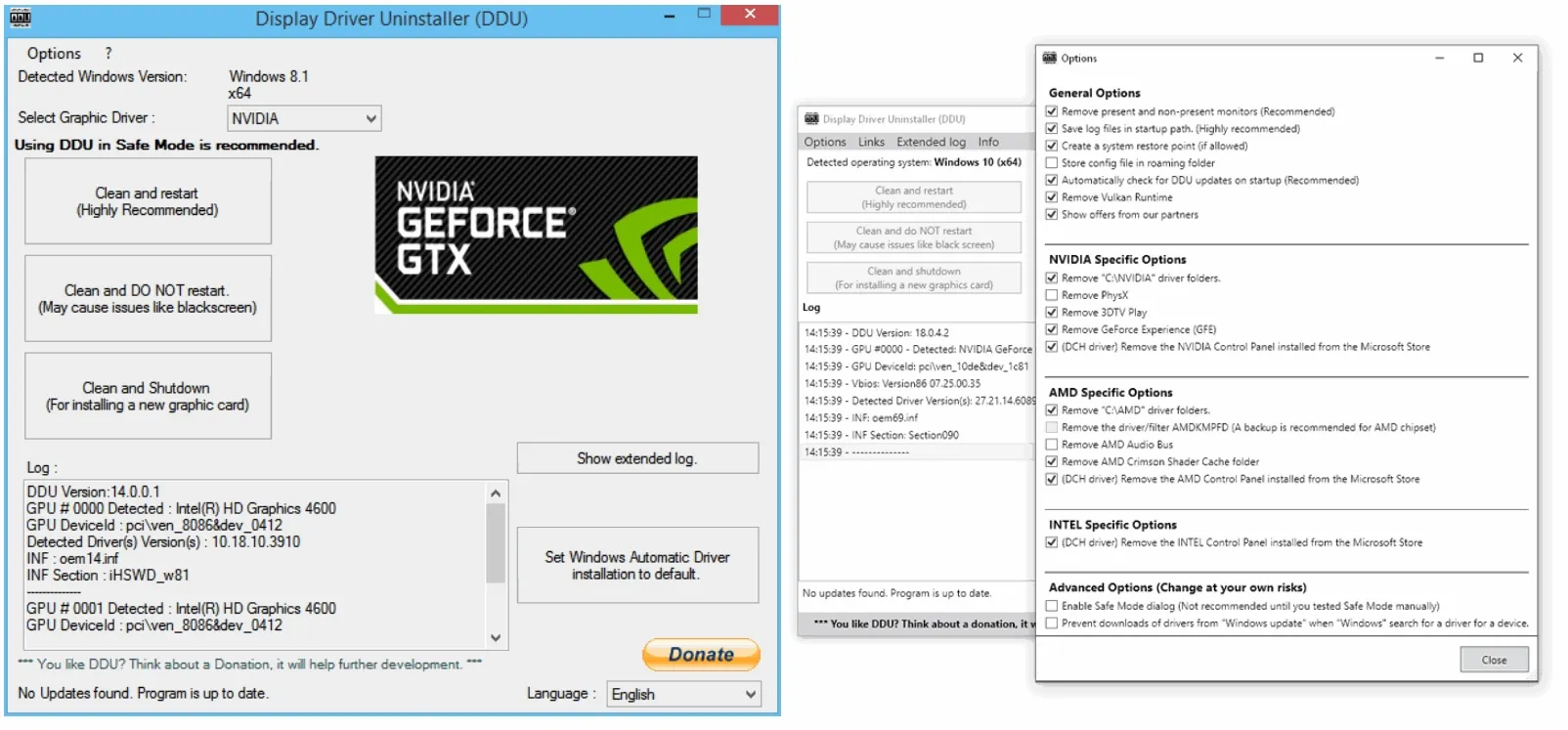
Have you overclocked your graphics card. If so turn it off. In fact, if one has a problem, troubleshooting should be done with all overclocking off. I'd be zeroing in on the graphics card or it's driver. As was suggested, reseat the card. You say you reinstalled the Nvidia driver. Did you uninstall the previous driver and graphics software using Display Driver Uninstaller (DDU) in safe mode. Try an older driver. Also try another video cable.
If none of that works, I would be suspecting the card.
 

My Computers My Computers

  • At a glance

    Windows 11 Pro 25H2 26200.9168i9-10900 10 core 20 threads32 gbnone-Intel UHD Graphics 630
    OS
    Windows 11 Pro 25H2 26200.9168
    Computer type
    PC/Desktop
    Manufacturer/Model
    Dell Optiplex 7080
    CPU
    i9-10900 10 core 20 threads
    Motherboard
    DELL 0J37VM
    Memory
    32 gb
    Graphics Card(s)
    none-Intel UHD Graphics 630
    Sound Card
    Integrated Realtek
    Monitor(s) Displays
    Benq 27
    Screen Resolution
    2560x1440
    Hard Drives
    2x1tb Solidigm m.2 nvme /External drives 512gb Samsung m.2 sata+2tb Kingston m2.nvme
    PSU
    500w
    Case
    MT
    Cooling
    Dell Premium
    Keyboard
    Logitech wired
    Mouse
    Logitech wireless
    Internet Speed
    so slow I'm too embarrassed to tell
    Browser
    #1 Edge #2 Firefox
    Antivirus
    Defender+MWB Premium
  • At a glance

    Windows 11 Pro 24H2 26200.9168AMD Ryzen 7 6800U32 gbintegrated
    Operating System
    Windows 11 Pro 24H2 26200.9168
    Computer type
    PC/Desktop
    Manufacturer/Model
    Beelink Mini PC SER5
    CPU
    AMD Ryzen 7 6800U
    Memory
    32 gb
    Graphics card(s)
    integrated
    Sound Card
    integrated
    Monitor(s) Displays
    Benq 27
    Screen Resolution
    2560x1440
    Hard Drives
    1TB Crucial nvme
    Keyboard
    Logitech wired
    Mouse
    Logitech wireless
    Internet Speed
    still too embarrassed to tell
    Browser
    Firefox
    Antivirus
    Defender
  • System 3 is non compliant Dell 9020 i7-4770/24gb ram Win11 PRO 26200.9168
Does it show the same problem in the simple BIOS screen? Could be a failing GPU. There is a fix to bake failing GPUs in the oven but it never worked for me.
 

My Computer My Computer

At a glance

Windows 11 ProCore i7-13700K64 GB Kingston Fury Beast DDR5Gigabyte GeForce RTX 2060 Super Gaming OC 8G
OS
Windows 11 Pro
Computer type
PC/Desktop
Manufacturer/Model
Self build
CPU
Core i7-13700K
Motherboard
Asus TUF Gaming Plus WiFi Z790
Memory
64 GB Kingston Fury Beast DDR5
Graphics Card(s)
Gigabyte GeForce RTX 2060 Super Gaming OC 8G
Sound Card
Realtek S1200A
Monitor(s) Displays
Viewsonic VP2770 & Dell (secondary)
Screen Resolution
2560 x 1440
Hard Drives
Kingston KC3000 2TB NVME SSD & SATA HDDs & SSD
PSU
EVGA SuperNova G2 850W
Case
Nanoxia Deep Silence 1
Cooling
Noctua NH-D14
Keyboard
Microsoft Digital Media Pro
Mouse
Logitech Wireless
Internet Speed
80 Mb / s
Browser
Chrome
Antivirus
Defender, Malwarebytes Free & AdwCleaner
Thanks for the suggestions; great stuff.

  • I don't overclock anything, always seems to be more trouble than it's worth.
  • I downloaded and ran a memtest on the graphics card, and it came back clean
  • No reason to suspect the cable, but swapped it out anyway with a known good one.

When I get a chance today, I will reseat the card as well. The problem isn't consistent; sometimes it manifests immediately, sometimes hours later, so I'll see how it goes.
 

My Computer My Computer

At a glance

Windows 11Core i5-13600KT-Force Delta TUF Gaming Alliance RGB DDR5 Ra...ASUS GeForce RTX 3060 V2 OC Edition 12GB GDDR...
OS
Windows 11
Computer type
PC/Desktop
Manufacturer/Model
Custom
CPU
Core i5-13600K
Motherboard
ASUS ROG Strix B760-I Gaming WiFi Intel® B760 LGA 1700 mini-ITX motherboard
Memory
T-Force Delta TUF Gaming Alliance RGB DDR5 Ram 32GB (2x16GB) 5200MHz PC5-41600 CL40
Graphics Card(s)
ASUS GeForce RTX 3060 V2 OC Edition 12GB GDDR6 Gaming Graphics Card (PCIe 4.0, 12GB GDDR6)
Sound Card
RealTek
Monitor(s) Displays
Samsung 4K TV
Screen Resolution
3840x2160
Hard Drives
Crucial P5 Plus 1TB PCIe Gen4 3D NAND NVMe M.2 Gaming SSD
PSU
SilverStone SX700-PT SFX 700W, 80+ Platinum Power Supply
Case
Cooler Master MasterBox NR200/P Mini ITX Case Black
Cooling
Thermaltake Contac 9 SE CPU Cooler
Keyboard
Logitech MX Keys Mechanical
Mouse
Logitech MX Master 3S
Internet Speed
FIOS 1GB
Browser
Firefox
Antivirus
Microsoft
I tried the DDU in Safe Mode this time and it looks promising. I can't reproduce it on demand, but several hours of use and no issue.
 

My Computer My Computer

At a glance

Windows 11Core i5-13600KT-Force Delta TUF Gaming Alliance RGB DDR5 Ra...ASUS GeForce RTX 3060 V2 OC Edition 12GB GDDR...
OS
Windows 11
Computer type
PC/Desktop
Manufacturer/Model
Custom
CPU
Core i5-13600K
Motherboard
ASUS ROG Strix B760-I Gaming WiFi Intel® B760 LGA 1700 mini-ITX motherboard
Memory
T-Force Delta TUF Gaming Alliance RGB DDR5 Ram 32GB (2x16GB) 5200MHz PC5-41600 CL40
Graphics Card(s)
ASUS GeForce RTX 3060 V2 OC Edition 12GB GDDR6 Gaming Graphics Card (PCIe 4.0, 12GB GDDR6)
Sound Card
RealTek
Monitor(s) Displays
Samsung 4K TV
Screen Resolution
3840x2160
Hard Drives
Crucial P5 Plus 1TB PCIe Gen4 3D NAND NVMe M.2 Gaming SSD
PSU
SilverStone SX700-PT SFX 700W, 80+ Platinum Power Supply
Case
Cooler Master MasterBox NR200/P Mini ITX Case Black
Cooling
Thermaltake Contac 9 SE CPU Cooler
Keyboard
Logitech MX Keys Mechanical
Mouse
Logitech MX Master 3S
Internet Speed
FIOS 1GB
Browser
Firefox
Antivirus
Microsoft
I have some glitches too and had performance inpact when updated to 23H2. I think 23H2 is full of bugs
 

My Computer My Computer

At a glance

Windows 11 22H2AMD Ryzen 7 5900XFury Beast RGB DDR4 4x8GB 3600mhzMSI Nvidia Geforce RTX 2070 SUPER
OS
Windows 11 22H2
Computer type
PC/Desktop
Manufacturer/Model
Allways built myself
CPU
AMD Ryzen 7 5900X
Motherboard
MSI X570 Tomahawk wifi
Memory
Fury Beast RGB DDR4 4x8GB 3600mhz
Graphics Card(s)
MSI Nvidia Geforce RTX 2070 SUPER
Sound Card
Built In REALTEK
Monitor(s) Displays
AOC 32" Curved 144HZ
Screen Resolution
1920x1080
Hard Drives
Samsung 980 PRO NVME 1TB
Samsung 970 PRO NVME 500GB
Samsung 850 EVO SSD 250GB
PSU
Corsair RM850 850W (2019)
Case
Lian Li Dynamic EVO
Cooling
NZXT Kraken Z73
Keyboard
SteelSeries Apex PRO
Mouse
XTRFY XG-M4-RGB
Internet Speed
500Mbit down and 100mbit up
Browser
Chrome
Antivirus
Total AV
Other Info
Cooling Fans: Lian Li UNI FAN SL-INFINITY 10 pieces

Latest Support Threads

Back
Top Bottom