What Cable Is This?


newmann

Well-known member
VIP
Local time
6:39 PM
Posts
598
OS
Windows 11 Pro
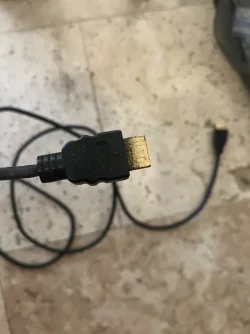
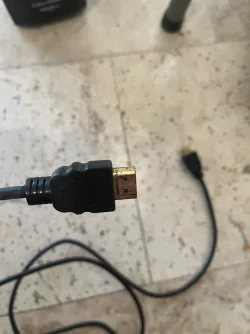
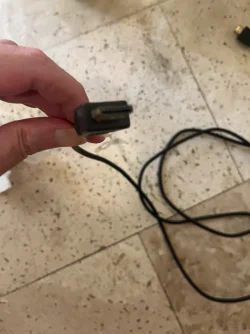
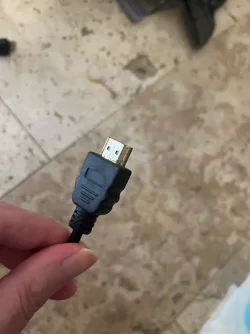
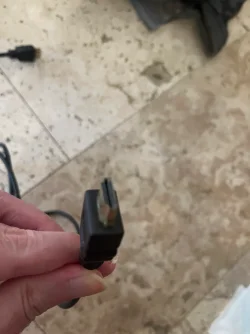
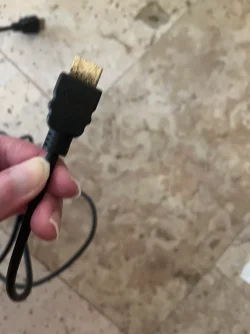
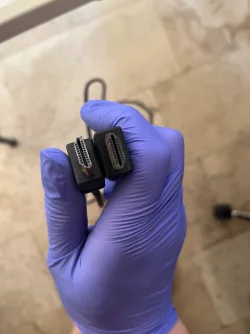
Can someone tell me what Cable is this? One end looks like HDMI but not sure of the other one? The other end I flipped it upside down.

Does anyone know if this is compatible with the Asus C624BQ Monitor below? I am not sure how I got this cable but this cable didn't come with the Asus monitor right? I currently use a dvi to HDMI cable with this monitor with my XPS laptop. I'm trying to figure out what monitor came with the box for the Asus 24 monitor?
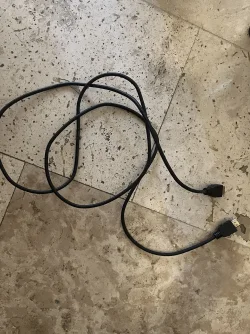
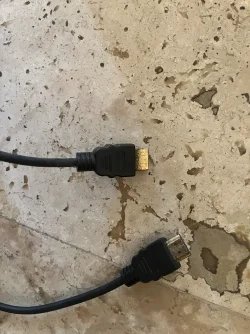
Cable 1.webpCable 1.webpCable 2.webp
 

My Computer My Computer

At a glance

Windows 11 Pro
OS
Windows 11 Pro
Can't really see one end but the other is DisplayPort.
In the second picture, which part is displayport? The cable on the bottom right? The top cable in the 2nd picture, looks like it says HDMI on it?
 

My Computer My Computer

At a glance

Windows 11 Pro
OS
Windows 11 Pro
Could you make a photo of the open side of connectors with visible contacts? HDMI and DP look quite similar from the long distance, need to see closely.
 

My Computer My Computer

At a glance

Windows 11 Pro 25H2AMD Rysen 5 4600H32 GB (2 x 16 GB Samsung SO-DIMM DDR4-3200)GeForce GTX 1650 Ti, 4 GB GDDR6

OS
Windows 11 Pro 25H2

Computer type
Laptop
Manufacturer/Model
Lenovo Legion 5-15ARH05
CPU
AMD Rysen 5 4600H
Memory
32 GB (2 x 16 GB Samsung SO-DIMM DDR4-3200)
Graphics Card(s)
GeForce GTX 1650 Ti, 4 GB GDDR6
Screen Resolution
1920x1080
Hard Drives
SSD M.2 512 GB SAMSUNG MZALQ512; SSD M.2 1 TB Seagate FireCuda 530
Mouse
Logitech M650L in Bluetooth mode
It would have been helpful if one of the pictures showed the end of the connector (the upper one in each photo), rather than the flat surface. The lower cable end seems to be HDMI.

The specs for the monitor don't list an HDMI port. The cable looks rather old and filthy.

It's an old monitor (2015).

The Google AI bot says:

ASUS C624BQ monitor typically includes a VGA (D-sub) cable, an audio cable, a DisplayPort cable, a USB cable, and the power cord, alongside the quick start guide and warranty card (though exact bundled accessories can vary slightly depending on your specific region or retailer).​
 

My Computers My Computers

  • At a glance

    Windows 11 26300.9278Amd Threadripper 7970X128GB (4 X 32) G.Skill DDR5 6400 (RDIMM)Gigabyte RTX 4090 OC
    OS
    Windows 11 26300.9278
    Computer type
    PC/Desktop
    Manufacturer/Model
    homebuilt
    CPU
    Amd Threadripper 7970X
    Motherboard
    Gigabyte TRX50 Aero D Rev. 1.0
    Memory
    128GB (4 X 32) G.Skill DDR5 6400 (RDIMM)
    Graphics Card(s)
    Gigabyte RTX 4090 OC
    Sound Card
    none (USB to speakers), Realtek
    Monitor(s) Displays
    Innocn 32" OLED
    Screen Resolution
    3840 X 2160 @ 60Hz
    Hard Drives
    Crucial T700 2TB M.2 NVME SSD
    WD 4TB Blue SATA SSD
    Seagate 18TB IronWolf Pro
    PSU
    BeQuiet! Straight Power 12 1500W
    Case
    Lian Li 011 Dynamic Evo XL
    Cooling
    SilverStone Technology XE360-TR5, with 3 Phanteks T30 fans
    Keyboard
    Cherry KC 500 MX LP (mechanical)
    Mouse
    Logitech M500s (wired)
    Internet Speed
    2000/250 Mbps (down/up)
    Other Info
    xFinity gateway
  • At a glance

    windows 11 26300.9278Intel I9-13900K64GB G.Skill DDR5-6000Gigabyte RTX 3090 ti
    Operating System
    windows 11 26300.9278
    Computer type
    PC/Desktop
    Manufacturer/Model
    homebuilt
    CPU
    Intel I9-13900K
    Motherboard
    Asus RoG Strix Z690-E
    Memory
    64GB G.Skill DDR5-6000
    Graphics card(s)
    Gigabyte RTX 3090 ti
    Sound Card
    built in Realtek
    Monitor(s) Displays
    Philips 27E1N8900 27" OLED
    Screen Resolution
    3840 X 2160 @60Hz
    Hard Drives
    WDC SN850 1TB
    8TB Seagate Ironwolf
    4TB Seagate Ironwolf
    PSU
    eVGA SuperNOVA 1300 GT
    Case
    Lian Li 011 Dynamic Evo
    Cooling
    Corsair iCUE H150i ELITE CAPELLIX Liquid CPU Cooler
    Keyboard
    Cherry Streaming (wired)
    Mouse
    Logitech M500s (wired)
What about taking a picture of connectors from the end instead of your floor and the wire.
 

My Computer My Computer

At a glance

Windows 11 ProIntel i5 12600KG.Skill Ripjaws V DDR4 3600 MHz / PC4-28800 C...Intel® UHD Graphics 770 (iGPU)
OS
Windows 11 Pro

Computer type
PC/Desktop
Manufacturer/Model
Homemade by me
CPU
Intel i5 12600K
Motherboard
MSI PRO Z690-A DDR4
Memory
G.Skill Ripjaws V DDR4 3600 MHz / PC4-28800 CL16 2x8 GB
Graphics Card(s)
Intel® UHD Graphics 770 (iGPU)
Sound Card
8-Channel (7.1) HD Audio
Monitor(s) Displays
Legion/Lenovo Y25-25
Screen Resolution
Full HD 1920 x 1080
Hard Drives
WD Black NVMe M.2 500 GB (system drive)
Case
Lian-Li
Keyboard
Old solid and heavy IBM🙂
Mouse
Logitech
Internet Speed
1000 mbit
Antivirus
Avast free
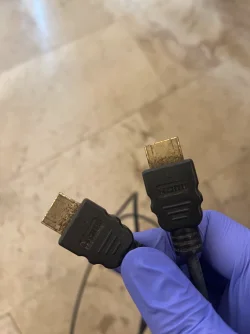
The first 3 pictures is one end of the cable. The last 3 pictures is the other end of the same cable.
IMG_7288.webpIMG_7289.webpIMG_7290.webpIMG_7291.webpIMG_7292.webpIMG_7294.webp
 

My Computer My Computer

At a glance

Windows 11 Pro
OS
Windows 11 Pro
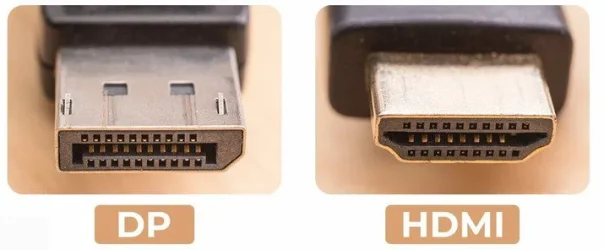
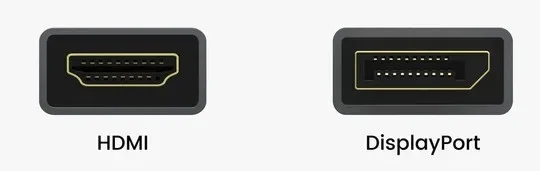
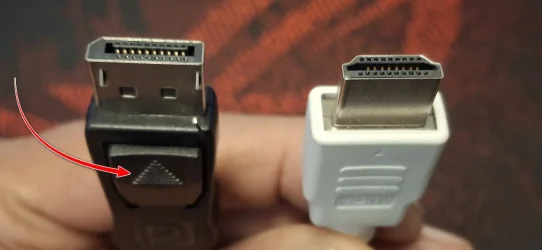
HDMI is beveled on each side and displayport is beveled on one side.

Screenshot 2026-09-19 141828.webp
 

My Computer My Computer

At a glance

Windows 11 Pro
OS
Windows 11 Pro
The person that mentioned one end appears to be displayport. The other end has to be HDMI right? It does seem like it even has the letters HDMI showing as well?
 

My Computer My Computer

At a glance

Windows 11 Pro
OS
Windows 11 Pro
I posted pictures.
I just took a closer look and I see letters HDMI on each end. So this is 100% a HDMI to HDMI cable then right?
 

My Computer My Computer

At a glance

Windows 11 Pro
OS
Windows 11 Pro
I just took a closer look and I see letters HDMI on each end. So this is 100% a HDMI to HDMI cable then right?


Picture I posted makes the differences pretty clear.


Here is another.

Screenshot 2026-09-19 144948.webp
 

My Computer My Computer

At a glance

Windows 11 Pro
OS
Windows 11 Pro

My Computers My Computers

  • At a glance

    Windows 11 2xH2 (latest update ... forever anal)Intel i5-124008GBNVIDIA GeForce GT730
    OS
    Windows 11 2xH2 (latest update ... forever anal)
    Computer type
    PC/Desktop
    Manufacturer/Model
    HP Slim S01
    CPU
    Intel i5-12400
    Memory
    8GB
    Graphics Card(s)
    NVIDIA GeForce GT730
    Sound Card
    OOBE
    Monitor(s) Displays
    Acer 32"
    Screen Resolution
    1920x1080
    Hard Drives
    512GB KIOXIA NVMe
    1TB SATA SSD
    PSU
    OOBE
    Case
    OOBE
    Cooling
    OOBE
    Keyboard
    BT
    Mouse
    BT
    Browser
    Brave FFox Chrome Opera
    Antivirus
    KIS
  • At a glance

    Windows 11 Pro 2xH2 (latest update ... 4ever ...i7-1165G7 @ 2.80GHzIntel Iris Xe Graphics
    Operating System
    Windows 11 Pro 2xH2 (latest update ... 4ever anal)
    Computer type
    Laptop
    Manufacturer/Model
    HP Pavillion 15
    CPU
    i7-1165G7 @ 2.80GHz
    Graphics card(s)
    Intel Iris Xe Graphics
    Hard Drives
    Samsung NVMe 512GB
    + numerous/multiple SSD Type C USB enclosures
    Internet Speed
    NBN FTTN 50
    Browser
    Brave
    Antivirus
    KIS
Picture I posted makes the differences pretty clear.


Here is another.

View attachment 183477
I'm confused. You said one of it is displayport. So one is or not? I can't really tell from looking at it and comparing the picture.

The thing here is in both ends... there is the letters HDMI on each end. So if it does that, it has to be HDMI to HDMI cable then right? It can't be HDMI to displayport?
 

My Computer My Computer

At a glance

Windows 11 Pro
OS
Windows 11 Pro
I just took a closer look and I see letters HDMI on each end. So this is 100% a HDMI to HDMI cable then right?
The picture is too blurry to tell, but it may be an HDMI to DP cable. Can you provide one that is closer to being in focus?


IMG_7290.webp
 

My Computers My Computers

  • At a glance

    Windows 11 26300.9278Amd Threadripper 7970X128GB (4 X 32) G.Skill DDR5 6400 (RDIMM)Gigabyte RTX 4090 OC
    OS
    Windows 11 26300.9278
    Computer type
    PC/Desktop
    Manufacturer/Model
    homebuilt
    CPU
    Amd Threadripper 7970X
    Motherboard
    Gigabyte TRX50 Aero D Rev. 1.0
    Memory
    128GB (4 X 32) G.Skill DDR5 6400 (RDIMM)
    Graphics Card(s)
    Gigabyte RTX 4090 OC
    Sound Card
    none (USB to speakers), Realtek
    Monitor(s) Displays
    Innocn 32" OLED
    Screen Resolution
    3840 X 2160 @ 60Hz
    Hard Drives
    Crucial T700 2TB M.2 NVME SSD
    WD 4TB Blue SATA SSD
    Seagate 18TB IronWolf Pro
    PSU
    BeQuiet! Straight Power 12 1500W
    Case
    Lian Li 011 Dynamic Evo XL
    Cooling
    SilverStone Technology XE360-TR5, with 3 Phanteks T30 fans
    Keyboard
    Cherry KC 500 MX LP (mechanical)
    Mouse
    Logitech M500s (wired)
    Internet Speed
    2000/250 Mbps (down/up)
    Other Info
    xFinity gateway
  • At a glance

    windows 11 26300.9278Intel I9-13900K64GB G.Skill DDR5-6000Gigabyte RTX 3090 ti
    Operating System
    windows 11 26300.9278
    Computer type
    PC/Desktop
    Manufacturer/Model
    homebuilt
    CPU
    Intel I9-13900K
    Motherboard
    Asus RoG Strix Z690-E
    Memory
    64GB G.Skill DDR5-6000
    Graphics card(s)
    Gigabyte RTX 3090 ti
    Sound Card
    built in Realtek
    Monitor(s) Displays
    Philips 27E1N8900 27" OLED
    Screen Resolution
    3840 X 2160 @60Hz
    Hard Drives
    WDC SN850 1TB
    8TB Seagate Ironwolf
    4TB Seagate Ironwolf
    PSU
    eVGA SuperNOVA 1300 GT
    Case
    Lian Li 011 Dynamic Evo
    Cooling
    Corsair iCUE H150i ELITE CAPELLIX Liquid CPU Cooler
    Keyboard
    Cherry Streaming (wired)
    Mouse
    Logitech M500s (wired)
.. which are too indistinct to make any definitive decision

However, looks like a HDMI <> Display Port cable, which I have found next to bloody useless on a number of occassions.


When I look at the cable really closely, there is HDMI letters on each end though. So wouldn't that mean it's HDMI to HDMI?
 

My Computer My Computer

At a glance

Windows 11 Pro
OS
Windows 11 Pro
The picture is too blurry to tell, but it may be an HDMI to DP cable. Can you provide one that is closer to being in focus?


View attachment 183478
For some reason I can't get a clear picture. However, it does have the letters HDMI on each end of the cable though. If so, would that mean It has to be HDMI to HDMI then? Can't imagine one end of the cable is displayport if it has HDMI on each end?
 

My Computer My Computer

At a glance

Windows 11 Pro
OS
Windows 11 Pro
So wouldn't that mean it's HDMI to HDMI?
And we could tell ... if we had a better quality clearer end-on image? The cable itself is irrelevant, it's the connectors and the pin configuration that tells what it is.

However, given the apparent condition of the terminals, other letters could be hidden/worn. And I'm not sure I'd want to plug either end into anything of mine, anyway
 

My Computers My Computers

  • At a glance

    Windows 11 2xH2 (latest update ... forever anal)Intel i5-124008GBNVIDIA GeForce GT730
    OS
    Windows 11 2xH2 (latest update ... forever anal)
    Computer type
    PC/Desktop
    Manufacturer/Model
    HP Slim S01
    CPU
    Intel i5-12400
    Memory
    8GB
    Graphics Card(s)
    NVIDIA GeForce GT730
    Sound Card
    OOBE
    Monitor(s) Displays
    Acer 32"
    Screen Resolution
    1920x1080
    Hard Drives
    512GB KIOXIA NVMe
    1TB SATA SSD
    PSU
    OOBE
    Case
    OOBE
    Cooling
    OOBE
    Keyboard
    BT
    Mouse
    BT
    Browser
    Brave FFox Chrome Opera
    Antivirus
    KIS
  • At a glance

    Windows 11 Pro 2xH2 (latest update ... 4ever ...i7-1165G7 @ 2.80GHzIntel Iris Xe Graphics
    Operating System
    Windows 11 Pro 2xH2 (latest update ... 4ever anal)
    Computer type
    Laptop
    Manufacturer/Model
    HP Pavillion 15
    CPU
    i7-1165G7 @ 2.80GHz
    Graphics card(s)
    Intel Iris Xe Graphics
    Hard Drives
    Samsung NVMe 512GB
    + numerous/multiple SSD Type C USB enclosures
    Internet Speed
    NBN FTTN 50
    Browser
    Brave
    Antivirus
    KIS
The Display Port cable will also have a locking button...

c.webp
 

My Computers My Computers

  • At a glance

    Windows 11 Pro
    OS
    Windows 11 Pro
    Computer type
    PC/Desktop
    Manufacturer/Model
    ASUS ROG Strix
  • At a glance

    Windows 11 Pro
    Operating System
    Windows 11 Pro
    Computer type
    Laptop
    Manufacturer/Model
    ASUS VivoBook
  • ASUS VivoBook 'Lite' ~ Windows 11 Home
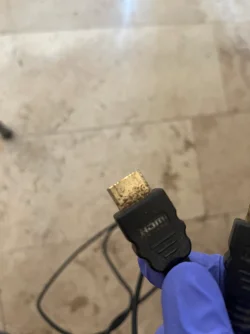
I think that is as close up as I can get. Notice it seems to have the letters. HDMI on both ends.

So it's HDMI to HDMI? Or still one of the ends is displayport?

IMG_7295.webpIMG_7296.webpIMG_7297.webp
 

My Computer My Computer

At a glance

Windows 11 Pro
OS
Windows 11 Pro

Latest Support Threads

Back
Top Bottom