JavaScript is disabled. For a better experience, please enable JavaScript in your browser before proceeding.
You are using an out of date browser. It may not display this or other websites correctly.
You should upgrade or use an
alternative browser .
Solved What could cause this drop in copying speed?
𝐒𝐩𝐞𝐚𝐤𝐬 𝐀𝐧𝐜𝐢𝐞𝐧𝐭 𝐆𝐞𝐞𝐤
Guru
VIP
Windows Build/Version
11Pro 23H2 22631.2715
11 Pro 24H2 26100.2454 i7-9700 @ 3.00GHz 32GBDDR4 @ 2666MHz Intel HD 630 Graphics onboard 11 Pro 24H2 26100.2454 PC/Desktop Lenovo ThinkCentre M920S SFF i7-9700 @ 3.00GHz Lenovo 3132 32GBDDR4 @ 2666MHz Intel HD 630 Graphics onboard Realtek HD Audio LG E2442 1920x1080 1 x Samsung 970 EVO PLUS 500GB NVMe SSD, 1 x WD_BLACK SN770 Lenovo SFF Cherry Stream TKL JK-8600US-2 Wired LogiTech M510 wireless Fast (for fixed wireless!) Chrome, sometimes Firefox Malwarebytes Premium & Defender (working together beautifully!)
11 Pro 24H2 26100.2454 i5-8400 @ 2.80GHz 32GB DDR4 @ 2600MHz Intel HD 630 Graphics onboard 11 Pro 24H2 26100.2454 PC/Desktop Lenovo ThinkCentre M920S SFF i5-8400 @ 2.80GHz Lenovo 3132 32GB DDR4 @ 2600MHz Intel HD 630 Graphics onboard Realtek High Definition Audio onboard LG FULL HD (1920x1080@59Hz) 1920 x 1080 1 x Samsung 970 EVO PLUS NVMe; 1 x Samsung 980 NVMe SSD Lenovo Think Centre SFF Cherry Stream TKL JK-8600US-2 Wired LogiTech M510 wireless Fast (for fixed wireless!) Chrome Malwarebytes Premium and MS Defender, beautiful together
Well-known member
Guru
VIP
The Windows Defender and UAC is scanning the files been copied which will slow down speed.
Windows 11 AMD Ryzen 7 5700G Micron Technology DDR4-3200 16GB NVIDIA GeForce RTX 3060 Windows 11 PC/Desktop HP Pavilion AMD Ryzen 7 5700G Erica6 Micron Technology DDR4-3200 16GB NVIDIA GeForce RTX 3060 Realtek ALC671 Samsung SyncMaster U28E590 3840 x 2160 SAMSUNG MZVLQ1T0HALB-000H1
Well-known member
Power User
VIP
Guessing... SLC cache may be full. Tell the model of your external (and internal) SSD. Then check at Tom's Hardware about the size of their SLC cache. may coincident.
Windows 10 Pro, Windows 11 Dev Intel I3 10100 16 GB DDR4 Crucial Intel on chip Windows 10 Pro, Windows 11 Dev PC/Desktop Homebuilt Intel I3 10100 ASUS B460M 16 GB DDR4 Crucial Intel on chip Realtek onboard ASUS 24, LG 24 Full HD x 2 kingston A2000 NVMe PCIe 500 GB LC Power 650W Noname Air 2x 120mm Cherry G-81 Logitech M500 100/20 Firefox, Vivaldi MS Defender
Windows 10 Home Ryzen 7 4700u 8 GB DDR4 AMD Vega Windows 10 Home Laptop ASUS/Vivobook Flip 14 Ryzen 7 4700u 8 GB DDR4 AMD Vega Realtek onboard 14" FullHD 512 Samsung NVMe PCIe - Laptop Touchpad, Touchscreen 100/20 Firefox, Vivaldi MS Defender
𝐒𝐩𝐞𝐚𝐤𝐬 𝐀𝐧𝐜𝐢𝐞𝐧𝐭 𝐆𝐞𝐞𝐤
Guru
VIP
Thread Starter
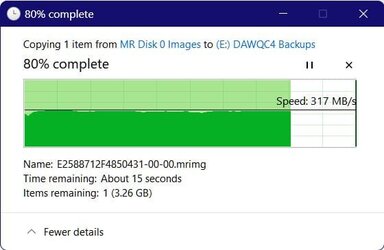
Just noticed that the backup image being copied is the same in all three of my shots above, and wondered whether there might be something about that particular image that was gumming up the works, so I copied that image from the same internal to the same external again (this was after the time it took to get this OP up on the forum), with this result, so it ain't the image.
11 Pro 24H2 26100.2454 i7-9700 @ 3.00GHz 32GBDDR4 @ 2666MHz Intel HD 630 Graphics onboard 11 Pro 24H2 26100.2454 PC/Desktop Lenovo ThinkCentre M920S SFF i7-9700 @ 3.00GHz Lenovo 3132 32GBDDR4 @ 2666MHz Intel HD 630 Graphics onboard Realtek HD Audio LG E2442 1920x1080 1 x Samsung 970 EVO PLUS 500GB NVMe SSD, 1 x WD_BLACK SN770 Lenovo SFF Cherry Stream TKL JK-8600US-2 Wired LogiTech M510 wireless Fast (for fixed wireless!) Chrome, sometimes Firefox Malwarebytes Premium & Defender (working together beautifully!)
11 Pro 24H2 26100.2454 i5-8400 @ 2.80GHz 32GB DDR4 @ 2600MHz Intel HD 630 Graphics onboard 11 Pro 24H2 26100.2454 PC/Desktop Lenovo ThinkCentre M920S SFF i5-8400 @ 2.80GHz Lenovo 3132 32GB DDR4 @ 2600MHz Intel HD 630 Graphics onboard Realtek High Definition Audio onboard LG FULL HD (1920x1080@59Hz) 1920 x 1080 1 x Samsung 970 EVO PLUS NVMe; 1 x Samsung 980 NVMe SSD Lenovo Think Centre SFF Cherry Stream TKL JK-8600US-2 Wired LogiTech M510 wireless Fast (for fixed wireless!) Chrome Malwarebytes Premium and MS Defender, beautiful together
𝐒𝐩𝐞𝐚𝐤𝐬 𝐀𝐧𝐜𝐢𝐞𝐧𝐭 𝐆𝐞𝐞𝐤
Guru
VIP
Thread Starter
@FreeBooter That scanning behavior should be roughly constant throughout the transfer of files, shouldn't it?
@AndreTen Source is Samsung SSD 980 500GB, target is KINGSTON SA400S37240G : 240.0 GB on both my office computers (I mean, they're the same models, not the same disks; I have two externals, one for each machine, but the externals are the same model, size, and age, and so are the internals), but only this one (System 2 in my specs) shows this behavior.
11 Pro 24H2 26100.2454 i7-9700 @ 3.00GHz 32GBDDR4 @ 2666MHz Intel HD 630 Graphics onboard 11 Pro 24H2 26100.2454 PC/Desktop Lenovo ThinkCentre M920S SFF i7-9700 @ 3.00GHz Lenovo 3132 32GBDDR4 @ 2666MHz Intel HD 630 Graphics onboard Realtek HD Audio LG E2442 1920x1080 1 x Samsung 970 EVO PLUS 500GB NVMe SSD, 1 x WD_BLACK SN770 Lenovo SFF Cherry Stream TKL JK-8600US-2 Wired LogiTech M510 wireless Fast (for fixed wireless!) Chrome, sometimes Firefox Malwarebytes Premium & Defender (working together beautifully!)
11 Pro 24H2 26100.2454 i5-8400 @ 2.80GHz 32GB DDR4 @ 2600MHz Intel HD 630 Graphics onboard 11 Pro 24H2 26100.2454 PC/Desktop Lenovo ThinkCentre M920S SFF i5-8400 @ 2.80GHz Lenovo 3132 32GB DDR4 @ 2600MHz Intel HD 630 Graphics onboard Realtek High Definition Audio onboard LG FULL HD (1920x1080@59Hz) 1920 x 1080 1 x Samsung 970 EVO PLUS NVMe; 1 x Samsung 980 NVMe SSD Lenovo Think Centre SFF Cherry Stream TKL JK-8600US-2 Wired LogiTech M510 wireless Fast (for fixed wireless!) Chrome Malwarebytes Premium and MS Defender, beautiful together
Well-known member
Member
VIP
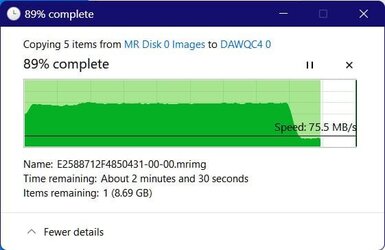
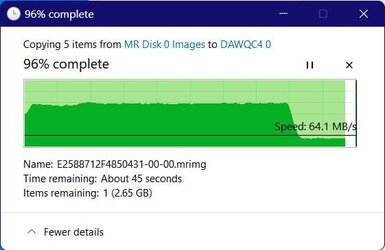
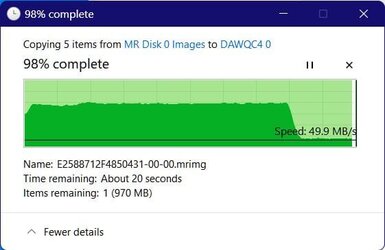
I'm copying MR backup images from an NVMe to a USB-conected external SSD. I'd like to find out what causes this precipitous drop in copying speed at some point in the multiple-image-copying process, so that (maybe?) I could fix it. I've noticed this phenomenon during my last few backups from internal to external.
Noting to fix - speed changes when copying files are "normal".
I never copy backup images. The process can be time-consuming, and eventually cause corruptions.
Well-known member
Guru
VIP
I'm copying MR backup images from an NVMe to a USB-conected external SSD. I'd like to find out what causes this precipitous drop in copying speed at some point in the multiple-image-copying process, so that (maybe?) I could fix it. I've noticed this phenomenon during my last few backups from internal to external.
View attachment 80908 View attachment 80909
View attachment 80910
The explanation really is quite simple, and normal.
When copying data, it is initially copied to a RAM buffer which is faster than direct writing, but eventually depending on how much data is being written, the buffer gets filled, and data can only be added to buffer as fast as it is being written to the source drive.
You have no direct control over the size of the buffer but in simple terms, the more RAM you have, the bigger the buffer.
Note: whilst the buffer is being filled, data is being written to the target drive.
Last edited: Dec 11, 2023
Windows 11 Pro + Win11 Canary VM. I9 13th gen i9-13900H 2.60 GHZ 16 GB soldered Integrated Intel Iris XE Windows 11 Pro + Win11 Canary VM. Laptop ASUS Zenbook 14 I9 13th gen i9-13900H 2.60 GHZ Yep, Laptop has one. 16 GB soldered Integrated Intel Iris XE Realtek built in laptop OLED screen 2880x1800 touchscreen 1 TB NVME SSD (only weakness is only one slot) Internal + 65W thunderbolt USB4 charger Yep, got one Stella Artois (UK pint cans - 568 ml) - extra cost. Built in UK keybd Bluetooth , wireless dongled, wired 900 mbs (ethernet), wifi 6 typical 350-450 mb/s both up and down Edge Defender TPM 2.0, 2xUSB4 thunderbolt, 1xUsb3 (usb a), 1xUsb-c, hdmi out, 3.5 mm audio out/in combo, ASUS backlit trackpad (inc. switchable number pad)
𝐒𝐩𝐞𝐚𝐤𝐬 𝐀𝐧𝐜𝐢𝐞𝐧𝐭 𝐆𝐞𝐞𝐤
Guru
VIP
Thread Starter
@cereberus 32GB RAM, @2400MHz, on this machine. I don't think I have any use for more RAM than that on this five-year-old PC.
11 Pro 24H2 26100.2454 i7-9700 @ 3.00GHz 32GBDDR4 @ 2666MHz Intel HD 630 Graphics onboard 11 Pro 24H2 26100.2454 PC/Desktop Lenovo ThinkCentre M920S SFF i7-9700 @ 3.00GHz Lenovo 3132 32GBDDR4 @ 2666MHz Intel HD 630 Graphics onboard Realtek HD Audio LG E2442 1920x1080 1 x Samsung 970 EVO PLUS 500GB NVMe SSD, 1 x WD_BLACK SN770 Lenovo SFF Cherry Stream TKL JK-8600US-2 Wired LogiTech M510 wireless Fast (for fixed wireless!) Chrome, sometimes Firefox Malwarebytes Premium & Defender (working together beautifully!)
11 Pro 24H2 26100.2454 i5-8400 @ 2.80GHz 32GB DDR4 @ 2600MHz Intel HD 630 Graphics onboard 11 Pro 24H2 26100.2454 PC/Desktop Lenovo ThinkCentre M920S SFF i5-8400 @ 2.80GHz Lenovo 3132 32GB DDR4 @ 2600MHz Intel HD 630 Graphics onboard Realtek High Definition Audio onboard LG FULL HD (1920x1080@59Hz) 1920 x 1080 1 x Samsung 970 EVO PLUS NVMe; 1 x Samsung 980 NVMe SSD Lenovo Think Centre SFF Cherry Stream TKL JK-8600US-2 Wired LogiTech M510 wireless Fast (for fixed wireless!) Chrome Malwarebytes Premium and MS Defender, beautiful together
𝐒𝐩𝐞𝐚𝐤𝐬 𝐀𝐧𝐜𝐢𝐞𝐧𝐭 𝐆𝐞𝐞𝐤
Guru
VIP
Thread Starter
Your use of "source" seems to differ from mine: I call the "source" the disk or file that's being copied; the "target" is the disk or folder it's being copied TO. Thanks for the explanation, though.
11 Pro 24H2 26100.2454 i7-9700 @ 3.00GHz 32GBDDR4 @ 2666MHz Intel HD 630 Graphics onboard 11 Pro 24H2 26100.2454 PC/Desktop Lenovo ThinkCentre M920S SFF i7-9700 @ 3.00GHz Lenovo 3132 32GBDDR4 @ 2666MHz Intel HD 630 Graphics onboard Realtek HD Audio LG E2442 1920x1080 1 x Samsung 970 EVO PLUS 500GB NVMe SSD, 1 x WD_BLACK SN770 Lenovo SFF Cherry Stream TKL JK-8600US-2 Wired LogiTech M510 wireless Fast (for fixed wireless!) Chrome, sometimes Firefox Malwarebytes Premium & Defender (working together beautifully!)
11 Pro 24H2 26100.2454 i5-8400 @ 2.80GHz 32GB DDR4 @ 2600MHz Intel HD 630 Graphics onboard 11 Pro 24H2 26100.2454 PC/Desktop Lenovo ThinkCentre M920S SFF i5-8400 @ 2.80GHz Lenovo 3132 32GB DDR4 @ 2600MHz Intel HD 630 Graphics onboard Realtek High Definition Audio onboard LG FULL HD (1920x1080@59Hz) 1920 x 1080 1 x Samsung 970 EVO PLUS NVMe; 1 x Samsung 980 NVMe SSD Lenovo Think Centre SFF Cherry Stream TKL JK-8600US-2 Wired LogiTech M510 wireless Fast (for fixed wireless!) Chrome Malwarebytes Premium and MS Defender, beautiful together
Have you monitored the temperatures of the devices (controller temperature in particular).
Windows 11 Pro Intel Core i9 14900K 5800/4500 P/E 96GB (2x48) G.skill Ripjaws 6800 Asus ROG Strix 4070 Ti OC Windows 11 Pro PC/Desktop DIY Photoshop/Audio/Game/tinker Intel Core i9 14900K 5800/4500 P/E Asus ROG Maximus Z790 Dark Hero 96GB (2x48) G.skill Ripjaws 6800 Asus ROG Strix 4070 Ti OC B&W 606 S3 speakers; Audiolabs 7000a integrated amp; RSL 10S Mk2 sub Eizo CG2730 ColorEdge, ViewSonic VP2768 2560 x 1440 x 2 nvme: 4TB WDC SN850X, 1TB SN850, 2TB SK-Hynix P41 850W Seasonic Vertex PX-850 FD North XL Mesh, Black Walnut EK Nucleus black 360 AIO w/Phanteks T30 fans; 2 Noctua NF-A14 Chromax ; T30 and Thermalright M-2 for memory Keychron Q3 Max TKL w/GMK Redsuns Red Samuri keycaps Logitech G305 wireless gaming 575 Mb/s down | 25 Mb/s up Firefox Defender, Macrium Reflect X Phangkey Amaterasu V2 Desk Mat
Laptop Apple M1 2560x1600 Firefox
𝐒𝐩𝐞𝐚𝐤𝐬 𝐀𝐧𝐜𝐢𝐞𝐧𝐭 𝐆𝐞𝐞𝐤
Guru
VIP
Thread Starter
Well, yes, I monitored Crystal Disk Info while this was happening. Nothing warm there.
11 Pro 24H2 26100.2454 i7-9700 @ 3.00GHz 32GBDDR4 @ 2666MHz Intel HD 630 Graphics onboard 11 Pro 24H2 26100.2454 PC/Desktop Lenovo ThinkCentre M920S SFF i7-9700 @ 3.00GHz Lenovo 3132 32GBDDR4 @ 2666MHz Intel HD 630 Graphics onboard Realtek HD Audio LG E2442 1920x1080 1 x Samsung 970 EVO PLUS 500GB NVMe SSD, 1 x WD_BLACK SN770 Lenovo SFF Cherry Stream TKL JK-8600US-2 Wired LogiTech M510 wireless Fast (for fixed wireless!) Chrome, sometimes Firefox Malwarebytes Premium & Defender (working together beautifully!)
11 Pro 24H2 26100.2454 i5-8400 @ 2.80GHz 32GB DDR4 @ 2600MHz Intel HD 630 Graphics onboard 11 Pro 24H2 26100.2454 PC/Desktop Lenovo ThinkCentre M920S SFF i5-8400 @ 2.80GHz Lenovo 3132 32GB DDR4 @ 2600MHz Intel HD 630 Graphics onboard Realtek High Definition Audio onboard LG FULL HD (1920x1080@59Hz) 1920 x 1080 1 x Samsung 970 EVO PLUS NVMe; 1 x Samsung 980 NVMe SSD Lenovo Think Centre SFF Cherry Stream TKL JK-8600US-2 Wired LogiTech M510 wireless Fast (for fixed wireless!) Chrome Malwarebytes Premium and MS Defender, beautiful together
Well-known member
Guru
VIP
Your use of "source" seems to differ from mine: I call the "source" the disk or file that's being copied; the "target" is the disk or folder it's being copied TO. Thanks for the explanation, though.
yeah, my mistake - of course, I meant target.
Had you less than 32 gb, the "drop off" would occur much earlier.
Depending on number of files, and size tools like robocopy (multi-threading) or fastcopy can be a lot faster. It is rather pot luck though.
Windows 11 Pro + Win11 Canary VM. I9 13th gen i9-13900H 2.60 GHZ 16 GB soldered Integrated Intel Iris XE Windows 11 Pro + Win11 Canary VM. Laptop ASUS Zenbook 14 I9 13th gen i9-13900H 2.60 GHZ Yep, Laptop has one. 16 GB soldered Integrated Intel Iris XE Realtek built in laptop OLED screen 2880x1800 touchscreen 1 TB NVME SSD (only weakness is only one slot) Internal + 65W thunderbolt USB4 charger Yep, got one Stella Artois (UK pint cans - 568 ml) - extra cost. Built in UK keybd Bluetooth , wireless dongled, wired 900 mbs (ethernet), wifi 6 typical 350-450 mb/s both up and down Edge Defender TPM 2.0, 2xUSB4 thunderbolt, 1xUsb3 (usb a), 1xUsb-c, hdmi out, 3.5 mm audio out/in combo, ASUS backlit trackpad (inc. switchable number pad)
𝐒𝐩𝐞𝐚𝐤𝐬 𝐀𝐧𝐜𝐢𝐞𝐧𝐭 𝐆𝐞𝐞𝐤
Guru
VIP
Thread Starter
@cereberus Thanks again for your contribution to my understanding of this copying behavior. I'm glad I don't see it on my System 1.
@Anibor_11 I make backups of my backups all the time. It's extra insurance. And I periodically verify the backed-up backups with Macrium, to make sure they're still sound.
11 Pro 24H2 26100.2454 i7-9700 @ 3.00GHz 32GBDDR4 @ 2666MHz Intel HD 630 Graphics onboard 11 Pro 24H2 26100.2454 PC/Desktop Lenovo ThinkCentre M920S SFF i7-9700 @ 3.00GHz Lenovo 3132 32GBDDR4 @ 2666MHz Intel HD 630 Graphics onboard Realtek HD Audio LG E2442 1920x1080 1 x Samsung 970 EVO PLUS 500GB NVMe SSD, 1 x WD_BLACK SN770 Lenovo SFF Cherry Stream TKL JK-8600US-2 Wired LogiTech M510 wireless Fast (for fixed wireless!) Chrome, sometimes Firefox Malwarebytes Premium & Defender (working together beautifully!)
11 Pro 24H2 26100.2454 i5-8400 @ 2.80GHz 32GB DDR4 @ 2600MHz Intel HD 630 Graphics onboard 11 Pro 24H2 26100.2454 PC/Desktop Lenovo ThinkCentre M920S SFF i5-8400 @ 2.80GHz Lenovo 3132 32GB DDR4 @ 2600MHz Intel HD 630 Graphics onboard Realtek High Definition Audio onboard LG FULL HD (1920x1080@59Hz) 1920 x 1080 1 x Samsung 970 EVO PLUS NVMe; 1 x Samsung 980 NVMe SSD Lenovo Think Centre SFF Cherry Stream TKL JK-8600US-2 Wired LogiTech M510 wireless Fast (for fixed wireless!) Chrome Malwarebytes Premium and MS Defender, beautiful together
Well-known member
Power User
VIP
This is all interesting to me. You can see a HUGE difference in copy speeds if transferring between 2 NVMe "Pro" type drives (on the same motherboard connections) with the larger DRAM buffers the "pro" versions offer. However when copying between a fast NVMe drive and slower media, like Sata, USB, etc the speed differences become more noticeable.
Win 7/10/11 PC/Desktop I'm a computer enthusiast so have quite a few systems that I run. More like an advanced hobby.
Retired R.C.M.P. Veteran
Power User
VIP
@Wisewiz ,
I make backups of my backups all the time. It's extra insurance. And I periodically verify the backed-up backups with Macrium, to make sure they're still sound.
That makes two of us, at least. That's where I noticed the copy speed fluctuations during my weekly copy of my backup image to an external hard drive. Someone around here said: "
You can never have too much backup ."
Backup images on an internal backup drive or an always-connected external drive are potential victims of a ransomware attack, some variants of which target backup files.
Have a great day.
Regards,
Phil
Windows 11 Pro Version 26H2 (Build 26300.9711) Intel i7-9700K 4700 MHz 32 GB (4 x 8GB SK Hynix DDR4 @1333 MHz) (2666... NVIDIA GeForce RTX 2060 (6 GB) GDDR6 300 MHz Windows 11 Pro Version 26H2 (Build 26300.9711) PC/Desktop Dell XPS8930 SE Intel i7-9700K 4700 MHz Dell XPS 8930 32 GB (4 x 8GB SK Hynix DDR4 @1333 MHz) (2666 MHz) NVIDIA GeForce RTX 2060 (6 GB) GDDR6 300 MHz None Dell UltraSharp U2518D 25" 2560 x 1440 NVMe Intel 1024 TB 850 W Gold Standard Dell XPS 8930 Base (Special Edition) Air Dell 0G4D2W Dell MOCZUL Download 553 Mbps, Upload 686 Mbps Google Chrome ESET Smart Security Premium, plus Malwarebytes Premium BIOS Version 1.1.31
Windows 11 Pro Version 26H2 (Build 26300.9711) i7-9750H 4.5 GHz 16 GB (2 x 8GB @ 1333 MHz) DDR4-2666 MHz NVIDIA GeForce 1650 4 GB GDDR5 Windows 11 Pro Version 26H2 (Build 26300.9711) Laptop Dell XPS 15 7590 i7-9750H 4.5 GHz Dell XPS 15 7590 16 GB (2 x 8GB @ 1333 MHz) DDR4-2666 MHz NVIDIA GeForce 1650 4 GB GDDR5 None Dell XPS 15 7590, 15.6" InfinityEdge Anti-Glare, Non-Touch 1920 x 1080 512 GB M.2 PCle NVMe SK Hynix 130W Power Adapter Dell XPS 15 7590 Air Laptop Logitech M510 Download: 400 Mbps, Upload: 203 Mbps Google Chrome ESET Smart Security Premium, plus Malwarebytes Premium BIOS Version 1.35.0
Well-known member
Guru
VIP
@FreeBooter That scanning behavior should be roughly constant throughout the transfer of files, shouldn't it?
It depends on the size of the file, large files will take time to scan.
Windows 11 AMD Ryzen 7 5700G Micron Technology DDR4-3200 16GB NVIDIA GeForce RTX 3060 Windows 11 PC/Desktop HP Pavilion AMD Ryzen 7 5700G Erica6 Micron Technology DDR4-3200 16GB NVIDIA GeForce RTX 3060 Realtek ALC671 Samsung SyncMaster U28E590 3840 x 2160 SAMSUNG MZVLQ1T0HALB-000H1






 Apple 13" Macbook Pro 2020






