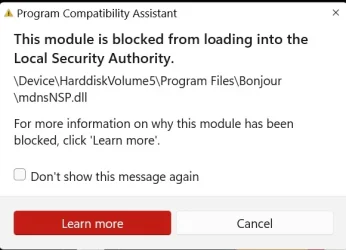
Solved What does this mean? What should I do?


therealsimpsons

Active member
Member
Local time
9:59 AM
Posts
66
OS
Win 11 64-Bit Home
Got this popup on my screen this morning when I booted up. Am I being signaled by Artemis II that they need help? :)
 
Windows Build/Version
25H2

Attachments

  • Screenshot 2026-04-05 094045.webp
    Screenshot 2026-04-05 094045.webp
    21.7 KB · Views: 2

My Computer

System One

  • OS
    Win 11 64-Bit Home
    Computer type
    PC/Desktop
    Manufacturer/Model
    Custom Build
    CPU
    12 Gen Intel i7-12700K 360 GHz
    Motherboard
    Gigabyte B760M
    Memory
    32 GB
    Graphics Card(s)
    EVGA Nividia GeForce RTX 3060 12GB
    Sound Card
    None
    Monitor(s) Displays
    Dell 32in curved
    Screen Resolution
    2560 x 1440
    Hard Drives
    Samsung 1 TB SSD M.2 970 EVO Nvme PicIe 3.0 x 4
    Seagate 2 TB SATA 7200 RPM 64MB
    PSU
    Apevia 800W GOLD
    Case
    Apevia ENZO
    Cooling
    2 Case Fans, ZeroTherm ZT100 Thermal Grease
    Keyboard
    Logitech K360
    Mouse
    Logitech GS 502 Hero
    Internet Speed
    650 mbps
    Browser
    Duck Duck Go
    Antivirus
    Webroot Anywhere
AI says:

The mdnsnsp.dll (Bonjour) module is blocked by Windows 11 LSA protection because it is an unsigned or outdated plugin attempting to load into secure memory. To resolve, disable the Bonjour Service in services.msc, unregister the DLL via Command Prompt, or uninstall Bonjour/iTunes and reinstall from the Microsoft Store.

Are you trying to use iTunes??

Rob
 

My Computer

System One

  • OS
    Windows 11 Professional 25H2
    Computer type
    PC/Desktop
    Manufacturer/Model
    Digital Storm VELOX
    CPU
    Intel Core i9 11900K
    Motherboard
    ASUS PRIME Z590-P
    Memory
    64GB
    Graphics Card(s)
    NVIDIA GeForce GTX 1650
    Sound Card
    Realtek onboard
    Monitor(s) Displays
    Acer R221Q 21.5"
    Screen Resolution
    1920 x 1080
    Hard Drives
    2 x Samsung SSD 990 EVO Plus (1 TB)
    2 x Seagate ST4000NE001 (4 TB)
    PSU
    None
    Case
    VELOX
    Cooling
    Cooler Master
    Keyboard
    Logitech
    Mouse
    Kensington trackball
    Browser
    Firefox, Chrome
    Antivirus
    Windows Defender, Malwarebytes
@OldMainframeGuy I recently downloaded iTunes in an attempt to back up my iPhone. When I discovered that Apple no longer supports the backup with iTunes, I deleted it. Thank you for the response.
 

My Computer

System One

  • OS
    Win 11 64-Bit Home
    Computer type
    PC/Desktop
    Manufacturer/Model
    Custom Build
    CPU
    12 Gen Intel i7-12700K 360 GHz
    Motherboard
    Gigabyte B760M
    Memory
    32 GB
    Graphics Card(s)
    EVGA Nividia GeForce RTX 3060 12GB
    Sound Card
    None
    Monitor(s) Displays
    Dell 32in curved
    Screen Resolution
    2560 x 1440
    Hard Drives
    Samsung 1 TB SSD M.2 970 EVO Nvme PicIe 3.0 x 4
    Seagate 2 TB SATA 7200 RPM 64MB
    PSU
    Apevia 800W GOLD
    Case
    Apevia ENZO
    Cooling
    2 Case Fans, ZeroTherm ZT100 Thermal Grease
    Keyboard
    Logitech K360
    Mouse
    Logitech GS 502 Hero
    Internet Speed
    650 mbps
    Browser
    Duck Duck Go
    Antivirus
    Webroot Anywhere
@OldMainframeGuy I recently downloaded iTunes in an attempt to back up my iPhone. When I discovered that Apple no longer supports the backup with iTunes, I deleted it. Thank you for the response.
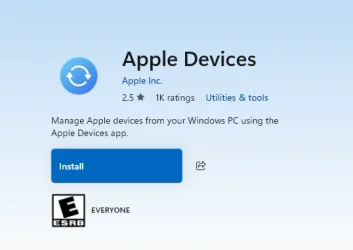
I'm happy it solved your problem. To back up your phone you can use Apple Devices in the Microsoft Store. I just had an adventure with that myself. I've got an old-as-the-hills first-generation iPod Touch which I was going to update with some music. iTunes refused to recognize the iPod so I did some Googling and found that Apple Devices (which I had installed to back up my iPhone) and iTunes conflict with each other in that iTunes will no longer recognize and iPod; solution was to uninstall Apple Devices. Way to go Apple! Two pieces of Apple software that can't live with each other.
 

My Computer

System One

  • OS
    Windows 11 Professional 25H2
    Computer type
    PC/Desktop
    Manufacturer/Model
    Digital Storm VELOX
    CPU
    Intel Core i9 11900K
    Motherboard
    ASUS PRIME Z590-P
    Memory
    64GB
    Graphics Card(s)
    NVIDIA GeForce GTX 1650
    Sound Card
    Realtek onboard
    Monitor(s) Displays
    Acer R221Q 21.5"
    Screen Resolution
    1920 x 1080
    Hard Drives
    2 x Samsung SSD 990 EVO Plus (1 TB)
    2 x Seagate ST4000NE001 (4 TB)
    PSU
    None
    Case
    VELOX
    Cooling
    Cooler Master
    Keyboard
    Logitech
    Mouse
    Kensington trackball
    Browser
    Firefox, Chrome
    Antivirus
    Windows Defender, Malwarebytes
@OldMainframeGuy I researched an alternative back up, and even installed the Apple Devices app. It was all Greek to me. I will try it again.

Edit: I see that you said Apple Devices in the MS store. Is that what it is called there? Is it an app I put on the phone, or the PC?
 
Last edited:

My Computer

System One

  • OS
    Win 11 64-Bit Home
    Computer type
    PC/Desktop
    Manufacturer/Model
    Custom Build
    CPU
    12 Gen Intel i7-12700K 360 GHz
    Motherboard
    Gigabyte B760M
    Memory
    32 GB
    Graphics Card(s)
    EVGA Nividia GeForce RTX 3060 12GB
    Sound Card
    None
    Monitor(s) Displays
    Dell 32in curved
    Screen Resolution
    2560 x 1440
    Hard Drives
    Samsung 1 TB SSD M.2 970 EVO Nvme PicIe 3.0 x 4
    Seagate 2 TB SATA 7200 RPM 64MB
    PSU
    Apevia 800W GOLD
    Case
    Apevia ENZO
    Cooling
    2 Case Fans, ZeroTherm ZT100 Thermal Grease
    Keyboard
    Logitech K360
    Mouse
    Logitech GS 502 Hero
    Internet Speed
    650 mbps
    Browser
    Duck Duck Go
    Antivirus
    Webroot Anywhere
@OldMainframeGuy I researched an alternative back up, and even installed the Apple Devices app. It was all Greek to me. I will try it again.

Edit: I see that you said Apple Devices in the MS store. Is that what it is called there? Is it an app I put on the phone, or the PC?
Yes, it's called Apple Devices and it's in the Microsoft Store. You install it on your Windows PC the same way you installed iTunes.

1775400417651.webp

I had to uninstall Apple Devices because it can't add music to an iPod; it can only delete music. Go figure. In any case, you use Apple Devices to back up your iPhone to your Windows PC. I used it for that and it worked OK.

Rob
 

My Computer

System One

  • OS
    Windows 11 Professional 25H2
    Computer type
    PC/Desktop
    Manufacturer/Model
    Digital Storm VELOX
    CPU
    Intel Core i9 11900K
    Motherboard
    ASUS PRIME Z590-P
    Memory
    64GB
    Graphics Card(s)
    NVIDIA GeForce GTX 1650
    Sound Card
    Realtek onboard
    Monitor(s) Displays
    Acer R221Q 21.5"
    Screen Resolution
    1920 x 1080
    Hard Drives
    2 x Samsung SSD 990 EVO Plus (1 TB)
    2 x Seagate ST4000NE001 (4 TB)
    PSU
    None
    Case
    VELOX
    Cooling
    Cooler Master
    Keyboard
    Logitech
    Mouse
    Kensington trackball
    Browser
    Firefox, Chrome
    Antivirus
    Windows Defender, Malwarebytes
I did it. All backed up on my PC. Thank you.
 

My Computer

System One

  • OS
    Win 11 64-Bit Home
    Computer type
    PC/Desktop
    Manufacturer/Model
    Custom Build
    CPU
    12 Gen Intel i7-12700K 360 GHz
    Motherboard
    Gigabyte B760M
    Memory
    32 GB
    Graphics Card(s)
    EVGA Nividia GeForce RTX 3060 12GB
    Sound Card
    None
    Monitor(s) Displays
    Dell 32in curved
    Screen Resolution
    2560 x 1440
    Hard Drives
    Samsung 1 TB SSD M.2 970 EVO Nvme PicIe 3.0 x 4
    Seagate 2 TB SATA 7200 RPM 64MB
    PSU
    Apevia 800W GOLD
    Case
    Apevia ENZO
    Cooling
    2 Case Fans, ZeroTherm ZT100 Thermal Grease
    Keyboard
    Logitech K360
    Mouse
    Logitech GS 502 Hero
    Internet Speed
    650 mbps
    Browser
    Duck Duck Go
    Antivirus
    Webroot Anywhere
I did it. All backed up on my PC. Thank you

Great! Not to belabor the point but I have the latest version of iTunes on my Windows 11 PC and it's able to back up my iPhone 15. I'm also at 25H2 so maybe you were just running an older version of iTunes. Whatever...you're backing up and that's what counts.

Rob
 

My Computer

System One

  • OS
    Windows 11 Professional 25H2
    Computer type
    PC/Desktop
    Manufacturer/Model
    Digital Storm VELOX
    CPU
    Intel Core i9 11900K
    Motherboard
    ASUS PRIME Z590-P
    Memory
    64GB
    Graphics Card(s)
    NVIDIA GeForce GTX 1650
    Sound Card
    Realtek onboard
    Monitor(s) Displays
    Acer R221Q 21.5"
    Screen Resolution
    1920 x 1080
    Hard Drives
    2 x Samsung SSD 990 EVO Plus (1 TB)
    2 x Seagate ST4000NE001 (4 TB)
    PSU
    None
    Case
    VELOX
    Cooling
    Cooler Master
    Keyboard
    Logitech
    Mouse
    Kensington trackball
    Browser
    Firefox, Chrome
    Antivirus
    Windows Defender, Malwarebytes
@OldMainframeGuy I recently downloaded iTunes in an attempt to back up my iPhone. When I discovered that Apple no longer supports the backup with iTunes, I deleted it. Thank you for the response.
Your iPhone has a built-in backup to the cloud.
 

My Computer

System One

  • OS
    Windows 11 Pro @2N23
    Computer type
    Laptop
    Manufacturer/Model
    Dell
    CPU
    AMD Ryzen 7
    Memory
    16gb
    Hard Drives
    M2 2TB SSD
    Browser
    Edge
    Antivirus
    ioBit
@OldMainframeGuy I recently downloaded iTunes in an attempt to back up my iPhone. When I discovered that Apple no longer supports the backup with iTunes, I deleted it. Thank you for the response.

Apple no longer supports backup in iTunes? I am still using it on the latest version of iTunes so I hope not. Where did you hear this?
TIA
 

My Computers

System One System Two

  • OS
    Windows 11 Pro x64
    Computer type
    PC/Desktop
    Manufacturer/Model
    📷🔈🎧 🪛 DIY Photoshop/Audio/Game/tinker
    CPU
    i9 14900K P/E 5.8/4.5 GHz, cache 5.0 GHz
    Motherboard
    Asus ROG Maximus Z790 Dark Hero
    Memory
    🐏 96GB (2x48) G.skill Ripjaws 6800 MT/s
    Graphics Card(s)
    Asus ROG Strix 4070 Ti OC
    Sound Card
    🔊Bowers & Wilkins 606 S3 speakers; Audiolabs 7000a integrated amp; RSL 10S Mk2 sub; Creative Pebble Pro Minimilist
    Monitor(s) Displays
    🖥️🖥️ Eizo CG2730 ColorEdge, ViewSonic VP2768
    Screen Resolution
    🖥️🖥️ 2560 x 1440p x 2
    Hard Drives
    💾 WDC SN850X 4TB nvme, SN850 1TB nvme, SK-Hynix 2 TB P41 nvme,. Sabrent USB-C DS-SC5B 5-bay docking station: 6TB WDC Black, 6TB Ironwolf Pro; 2x 2TB WDC Black HDD
    PSU
    ⚡️ 850W Seasonic Vertex PX-850 ATX 3.0/PCI-E 5.0
    Case
    Fractal Design North XL Mesh, Black Walnut
    Cooling
    ❄️ EK Nucleus black 360 AIO w/Phanteks T30-120 fans, 2 Noctua NF-A14 Chromax case fan, 1 T30-120 fan cooling memory
    Keyboard
    ⌨️ Keychron Q3 Max TKL with custom GMK Redsuns Red Samuri keycaps, TX Stabs
    Mouse
    🖱️ Logitech G305 wireless gaming
    Internet Speed
    ⬇️ 500 Mb/s ⬆️ 12 Mb/s
    Browser
    🔥🦊 Firefox
    Antivirus
    🦺 Defender, Macrium Reflect X 🏆
    Other Info
    Phangkey Amaterasu V2 Desk Mat
  • Computer type
    Laptop
    Manufacturer/Model
    💻 Apple 13" Macbook Pro 2020 (m1)
    CPU
    Apple M1
    Screen Resolution
    2560x1600
    Browser
    Firefox
recently downloaded iTunes in an attempt to back up my iPhone. When I discovered that Apple no longer supports the backup with iTunes, I deleted it. Thank you for the response.
Bonjour was (still is?) a separate component of iTunes software. I can remember when using iTunes, Bonjour was uninstallable separately. That may still be the case

What you might need to do is re-download and install iTunes (which will include Bonjour). Then use RevoUninstaller to uninstall both iTunes and Bonjour (including using the post-install advance option of RevoUnin to remove all leftover files/folders/registry entries)

  • Install and run RevoUninstaller
  • Options tab (along the top) > Uninstaller (LH column)
  • Untick [/Make a Restore Point before uninstall/]
  • Tick [/Checkmark all leftovers by default/]
  • Uninstaller tab > Double click the desired program
  • Run the uninstallation process
  • IMPORTANT
  • DO NOT reboot even if prompted when completed (Cancel if prompted)
  • Select the Advanced button and then run the process to remove all leftover files/folders/registry entries left behind after a normal default uninstall process
  • If prompted at any stage previously, now do the reboot
 

My Computers

System One System Two

  • OS
    Windows 11 2xH2 (latest update ... forever anal)
    Computer type
    PC/Desktop
    Manufacturer/Model
    HP Slim S01
    CPU
    Intel i5-12400
    Memory
    8GB
    Graphics Card(s)
    NVIDIA GeForce GT730
    Sound Card
    OOBE
    Monitor(s) Displays
    Acer 32"
    Screen Resolution
    1920x1080
    Hard Drives
    512GB KIOXIA NVMe
    1TB SATA SSD
    PSU
    OOBE
    Case
    OOBE
    Cooling
    OOBE
    Keyboard
    BT
    Mouse
    BT
    Browser
    Brave FFox Chrome Opera
    Antivirus
    KIS
  • Operating System
    Windows 11 Pro 2xH2 (latest update ... 4ever anal)
    Computer type
    Laptop
    Manufacturer/Model
    HP Pavillion 15
    CPU
    i7-1165G7 @ 2.80GHz
    Graphics card(s)
    Intel Iris Xe Graphics
    Hard Drives
    Samsung NVMe 512GB
    + numerous/multiple SSD Type C USB enclosures
    Internet Speed
    NBN FTTN 50
    Browser
    Brave
    Antivirus
    KIS
Apple no longer supports backup in iTunes? I am still using it on the latest version of iTunes so I hope not. Where did you hear this?
TIA
I think the OP might have been using an older version of iTunes that was having an issue with Windows 11. I am using the the latest version downloaded from the Microsoft Store and it does in fact support backing up an iPhone.
 

My Computer

System One

  • OS
    Windows 11 Professional 25H2
    Computer type
    PC/Desktop
    Manufacturer/Model
    Digital Storm VELOX
    CPU
    Intel Core i9 11900K
    Motherboard
    ASUS PRIME Z590-P
    Memory
    64GB
    Graphics Card(s)
    NVIDIA GeForce GTX 1650
    Sound Card
    Realtek onboard
    Monitor(s) Displays
    Acer R221Q 21.5"
    Screen Resolution
    1920 x 1080
    Hard Drives
    2 x Samsung SSD 990 EVO Plus (1 TB)
    2 x Seagate ST4000NE001 (4 TB)
    PSU
    None
    Case
    VELOX
    Cooling
    Cooler Master
    Keyboard
    Logitech
    Mouse
    Kensington trackball
    Browser
    Firefox, Chrome
    Antivirus
    Windows Defender, Malwarebytes

My Computer

System One

  • OS
    Win 11 64-Bit Home
    Computer type
    PC/Desktop
    Manufacturer/Model
    Custom Build
    CPU
    12 Gen Intel i7-12700K 360 GHz
    Motherboard
    Gigabyte B760M
    Memory
    32 GB
    Graphics Card(s)
    EVGA Nividia GeForce RTX 3060 12GB
    Sound Card
    None
    Monitor(s) Displays
    Dell 32in curved
    Screen Resolution
    2560 x 1440
    Hard Drives
    Samsung 1 TB SSD M.2 970 EVO Nvme PicIe 3.0 x 4
    Seagate 2 TB SATA 7200 RPM 64MB
    PSU
    Apevia 800W GOLD
    Case
    Apevia ENZO
    Cooling
    2 Case Fans, ZeroTherm ZT100 Thermal Grease
    Keyboard
    Logitech K360
    Mouse
    Logitech GS 502 Hero
    Internet Speed
    650 mbps
    Browser
    Duck Duck Go
    Antivirus
    Webroot Anywhere
Disabled. No way.
You usually get 5GB of "free" iCloud storage. On your phone, if you visit Settings -> Apple Account -> iCloud -> iCloud Backup do you have "Back up this iPhone" enabled? I opted for an iCloud subscription (50GB); it's dirt cheap - $1/month.
 

My Computer

System One

  • OS
    Windows 11 Professional 25H2
    Computer type
    PC/Desktop
    Manufacturer/Model
    Digital Storm VELOX
    CPU
    Intel Core i9 11900K
    Motherboard
    ASUS PRIME Z590-P
    Memory
    64GB
    Graphics Card(s)
    NVIDIA GeForce GTX 1650
    Sound Card
    Realtek onboard
    Monitor(s) Displays
    Acer R221Q 21.5"
    Screen Resolution
    1920 x 1080
    Hard Drives
    2 x Samsung SSD 990 EVO Plus (1 TB)
    2 x Seagate ST4000NE001 (4 TB)
    PSU
    None
    Case
    VELOX
    Cooling
    Cooler Master
    Keyboard
    Logitech
    Mouse
    Kensington trackball
    Browser
    Firefox, Chrome
    Antivirus
    Windows Defender, Malwarebytes
You usually get 5GB of "free" iCloud storage. On your phone, if you visit Settings -> Apple Account -> iCloud -> iCloud Backup do you have "Back up this iPhone" enabled? I opted for an iCloud subscription (50GB); it's dirt cheap - $1/month.
I wasn't clear. I have iCloud disabled, and every other Cloud on all systems disabled. Old fashioned here. I do my own storage, on two 2-TB external drives.
 

My Computer

System One

  • OS
    Win 11 64-Bit Home
    Computer type
    PC/Desktop
    Manufacturer/Model
    Custom Build
    CPU
    12 Gen Intel i7-12700K 360 GHz
    Motherboard
    Gigabyte B760M
    Memory
    32 GB
    Graphics Card(s)
    EVGA Nividia GeForce RTX 3060 12GB
    Sound Card
    None
    Monitor(s) Displays
    Dell 32in curved
    Screen Resolution
    2560 x 1440
    Hard Drives
    Samsung 1 TB SSD M.2 970 EVO Nvme PicIe 3.0 x 4
    Seagate 2 TB SATA 7200 RPM 64MB
    PSU
    Apevia 800W GOLD
    Case
    Apevia ENZO
    Cooling
    2 Case Fans, ZeroTherm ZT100 Thermal Grease
    Keyboard
    Logitech K360
    Mouse
    Logitech GS 502 Hero
    Internet Speed
    650 mbps
    Browser
    Duck Duck Go
    Antivirus
    Webroot Anywhere
I think the OP might have been using an older version of iTunes that was having an issue with Windows 11. I am using the the latest version downloaded from the Microsoft Store and it does in fact support backing up an iPhone.
I am making a local backup of my Iphone with it too.
 
Last edited:

My Computers

System One System Two

  • OS
    Windows 11 Pro x64
    Computer type
    PC/Desktop
    Manufacturer/Model
    📷🔈🎧 🪛 DIY Photoshop/Audio/Game/tinker
    CPU
    i9 14900K P/E 5.8/4.5 GHz, cache 5.0 GHz
    Motherboard
    Asus ROG Maximus Z790 Dark Hero
    Memory
    🐏 96GB (2x48) G.skill Ripjaws 6800 MT/s
    Graphics Card(s)
    Asus ROG Strix 4070 Ti OC
    Sound Card
    🔊Bowers & Wilkins 606 S3 speakers; Audiolabs 7000a integrated amp; RSL 10S Mk2 sub; Creative Pebble Pro Minimilist
    Monitor(s) Displays
    🖥️🖥️ Eizo CG2730 ColorEdge, ViewSonic VP2768
    Screen Resolution
    🖥️🖥️ 2560 x 1440p x 2
    Hard Drives
    💾 WDC SN850X 4TB nvme, SN850 1TB nvme, SK-Hynix 2 TB P41 nvme,. Sabrent USB-C DS-SC5B 5-bay docking station: 6TB WDC Black, 6TB Ironwolf Pro; 2x 2TB WDC Black HDD
    PSU
    ⚡️ 850W Seasonic Vertex PX-850 ATX 3.0/PCI-E 5.0
    Case
    Fractal Design North XL Mesh, Black Walnut
    Cooling
    ❄️ EK Nucleus black 360 AIO w/Phanteks T30-120 fans, 2 Noctua NF-A14 Chromax case fan, 1 T30-120 fan cooling memory
    Keyboard
    ⌨️ Keychron Q3 Max TKL with custom GMK Redsuns Red Samuri keycaps, TX Stabs
    Mouse
    🖱️ Logitech G305 wireless gaming
    Internet Speed
    ⬇️ 500 Mb/s ⬆️ 12 Mb/s
    Browser
    🔥🦊 Firefox
    Antivirus
    🦺 Defender, Macrium Reflect X 🏆
    Other Info
    Phangkey Amaterasu V2 Desk Mat
  • Computer type
    Laptop
    Manufacturer/Model
    💻 Apple 13" Macbook Pro 2020 (m1)
    CPU
    Apple M1
    Screen Resolution
    2560x1600
    Browser
    Firefox

Latest Support Threads

Back
Top Bottom