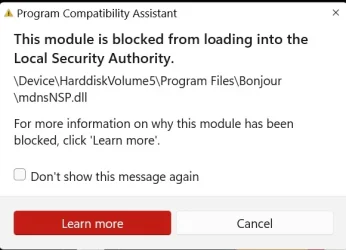
Solved What does this mean? What should I do?


therealsimpsons

Active member
Member
Local time
6:14 PM
Posts
66
OS
Win 11 64-Bit Home
Got this popup on my screen this morning when I booted up. Am I being signaled by Artemis II that they need help? :)
 
Windows Build/Version
25H2

Attachments

  • Screenshot 2026-04-05 094045.webp
    Screenshot 2026-04-05 094045.webp
    21.7 KB · Views: 2

My Computer My Computer

At a glance

Win 11 64-Bit Home12 Gen Intel i7-12700K 360 GHz32 GBEVGA Nividia GeForce RTX 3060 12GB
OS
Win 11 64-Bit Home
Computer type
PC/Desktop
Manufacturer/Model
Custom Build
CPU
12 Gen Intel i7-12700K 360 GHz
Motherboard
Gigabyte B760M
Memory
32 GB
Graphics Card(s)
EVGA Nividia GeForce RTX 3060 12GB
Sound Card
None
Monitor(s) Displays
Dell 32in curved
Screen Resolution
2560 x 1440
Hard Drives
Samsung 1 TB SSD M.2 970 EVO Nvme PicIe 3.0 x 4
Seagate 2 TB SATA 7200 RPM 64MB
PSU
Apevia 800W GOLD
Case
Apevia ENZO
Cooling
2 Case Fans, ZeroTherm ZT100 Thermal Grease
Keyboard
Logitech K360
Mouse
Logitech GS 502 Hero
Internet Speed
650 mbps
Browser
Duck Duck Go
Antivirus
Webroot Anywhere
AI says:

The mdnsnsp.dll (Bonjour) module is blocked by Windows 11 LSA protection because it is an unsigned or outdated plugin attempting to load into secure memory. To resolve, disable the Bonjour Service in services.msc, unregister the DLL via Command Prompt, or uninstall Bonjour/iTunes and reinstall from the Microsoft Store.

Are you trying to use iTunes??

Rob
 

My Computer My Computer

At a glance

Windows 11 Professional 25H2Intel Core i9 11900K64GBNVIDIA GeForce GTX 1650
OS
Windows 11 Professional 25H2
Computer type
PC/Desktop
Manufacturer/Model
Digital Storm VELOX
CPU
Intel Core i9 11900K
Motherboard
ASUS PRIME Z590-P
Memory
64GB
Graphics Card(s)
NVIDIA GeForce GTX 1650
Sound Card
Realtek onboard
Monitor(s) Displays
Acer R221Q 21.5"
Screen Resolution
1920 x 1080
Hard Drives
2 x Samsung SSD 990 EVO Plus (1 TB)
2 x Seagate ST4000NE001 (4 TB)
PSU
None
Case
VELOX
Cooling
Cooler Master
Keyboard
Logitech
Mouse
Kensington trackball
Browser
Firefox, Chrome
Antivirus
Windows Defender, Malwarebytes
@OldMainframeGuy I recently downloaded iTunes in an attempt to back up my iPhone. When I discovered that Apple no longer supports the backup with iTunes, I deleted it. Thank you for the response.
 

My Computer My Computer

At a glance

Win 11 64-Bit Home12 Gen Intel i7-12700K 360 GHz32 GBEVGA Nividia GeForce RTX 3060 12GB
OS
Win 11 64-Bit Home
Computer type
PC/Desktop
Manufacturer/Model
Custom Build
CPU
12 Gen Intel i7-12700K 360 GHz
Motherboard
Gigabyte B760M
Memory
32 GB
Graphics Card(s)
EVGA Nividia GeForce RTX 3060 12GB
Sound Card
None
Monitor(s) Displays
Dell 32in curved
Screen Resolution
2560 x 1440
Hard Drives
Samsung 1 TB SSD M.2 970 EVO Nvme PicIe 3.0 x 4
Seagate 2 TB SATA 7200 RPM 64MB
PSU
Apevia 800W GOLD
Case
Apevia ENZO
Cooling
2 Case Fans, ZeroTherm ZT100 Thermal Grease
Keyboard
Logitech K360
Mouse
Logitech GS 502 Hero
Internet Speed
650 mbps
Browser
Duck Duck Go
Antivirus
Webroot Anywhere
@OldMainframeGuy I recently downloaded iTunes in an attempt to back up my iPhone. When I discovered that Apple no longer supports the backup with iTunes, I deleted it. Thank you for the response.
I'm happy it solved your problem. To back up your phone you can use Apple Devices in the Microsoft Store. I just had an adventure with that myself. I've got an old-as-the-hills first-generation iPod Touch which I was going to update with some music. iTunes refused to recognize the iPod so I did some Googling and found that Apple Devices (which I had installed to back up my iPhone) and iTunes conflict with each other in that iTunes will no longer recognize and iPod; solution was to uninstall Apple Devices. Way to go Apple! Two pieces of Apple software that can't live with each other.
 

My Computer My Computer

At a glance

Windows 11 Professional 25H2Intel Core i9 11900K64GBNVIDIA GeForce GTX 1650
OS
Windows 11 Professional 25H2
Computer type
PC/Desktop
Manufacturer/Model
Digital Storm VELOX
CPU
Intel Core i9 11900K
Motherboard
ASUS PRIME Z590-P
Memory
64GB
Graphics Card(s)
NVIDIA GeForce GTX 1650
Sound Card
Realtek onboard
Monitor(s) Displays
Acer R221Q 21.5"
Screen Resolution
1920 x 1080
Hard Drives
2 x Samsung SSD 990 EVO Plus (1 TB)
2 x Seagate ST4000NE001 (4 TB)
PSU
None
Case
VELOX
Cooling
Cooler Master
Keyboard
Logitech
Mouse
Kensington trackball
Browser
Firefox, Chrome
Antivirus
Windows Defender, Malwarebytes
@OldMainframeGuy I researched an alternative back up, and even installed the Apple Devices app. It was all Greek to me. I will try it again.

Edit: I see that you said Apple Devices in the MS store. Is that what it is called there? Is it an app I put on the phone, or the PC?
 
Last edited:

My Computer My Computer

At a glance

Win 11 64-Bit Home12 Gen Intel i7-12700K 360 GHz32 GBEVGA Nividia GeForce RTX 3060 12GB
OS
Win 11 64-Bit Home
Computer type
PC/Desktop
Manufacturer/Model
Custom Build
CPU
12 Gen Intel i7-12700K 360 GHz
Motherboard
Gigabyte B760M
Memory
32 GB
Graphics Card(s)
EVGA Nividia GeForce RTX 3060 12GB
Sound Card
None
Monitor(s) Displays
Dell 32in curved
Screen Resolution
2560 x 1440
Hard Drives
Samsung 1 TB SSD M.2 970 EVO Nvme PicIe 3.0 x 4
Seagate 2 TB SATA 7200 RPM 64MB
PSU
Apevia 800W GOLD
Case
Apevia ENZO
Cooling
2 Case Fans, ZeroTherm ZT100 Thermal Grease
Keyboard
Logitech K360
Mouse
Logitech GS 502 Hero
Internet Speed
650 mbps
Browser
Duck Duck Go
Antivirus
Webroot Anywhere
@OldMainframeGuy I researched an alternative back up, and even installed the Apple Devices app. It was all Greek to me. I will try it again.

Edit: I see that you said Apple Devices in the MS store. Is that what it is called there? Is it an app I put on the phone, or the PC?
Yes, it's called Apple Devices and it's in the Microsoft Store. You install it on your Windows PC the same way you installed iTunes.

1775400417651.webp

I had to uninstall Apple Devices because it can't add music to an iPod; it can only delete music. Go figure. In any case, you use Apple Devices to back up your iPhone to your Windows PC. I used it for that and it worked OK.

Rob
 

My Computer My Computer

At a glance

Windows 11 Professional 25H2Intel Core i9 11900K64GBNVIDIA GeForce GTX 1650
OS
Windows 11 Professional 25H2
Computer type
PC/Desktop
Manufacturer/Model
Digital Storm VELOX
CPU
Intel Core i9 11900K
Motherboard
ASUS PRIME Z590-P
Memory
64GB
Graphics Card(s)
NVIDIA GeForce GTX 1650
Sound Card
Realtek onboard
Monitor(s) Displays
Acer R221Q 21.5"
Screen Resolution
1920 x 1080
Hard Drives
2 x Samsung SSD 990 EVO Plus (1 TB)
2 x Seagate ST4000NE001 (4 TB)
PSU
None
Case
VELOX
Cooling
Cooler Master
Keyboard
Logitech
Mouse
Kensington trackball
Browser
Firefox, Chrome
Antivirus
Windows Defender, Malwarebytes
I did it. All backed up on my PC. Thank you.
 

My Computer My Computer

At a glance

Win 11 64-Bit Home12 Gen Intel i7-12700K 360 GHz32 GBEVGA Nividia GeForce RTX 3060 12GB
OS
Win 11 64-Bit Home
Computer type
PC/Desktop
Manufacturer/Model
Custom Build
CPU
12 Gen Intel i7-12700K 360 GHz
Motherboard
Gigabyte B760M
Memory
32 GB
Graphics Card(s)
EVGA Nividia GeForce RTX 3060 12GB
Sound Card
None
Monitor(s) Displays
Dell 32in curved
Screen Resolution
2560 x 1440
Hard Drives
Samsung 1 TB SSD M.2 970 EVO Nvme PicIe 3.0 x 4
Seagate 2 TB SATA 7200 RPM 64MB
PSU
Apevia 800W GOLD
Case
Apevia ENZO
Cooling
2 Case Fans, ZeroTherm ZT100 Thermal Grease
Keyboard
Logitech K360
Mouse
Logitech GS 502 Hero
Internet Speed
650 mbps
Browser
Duck Duck Go
Antivirus
Webroot Anywhere
I did it. All backed up on my PC. Thank you

Great! Not to belabor the point but I have the latest version of iTunes on my Windows 11 PC and it's able to back up my iPhone 15. I'm also at 25H2 so maybe you were just running an older version of iTunes. Whatever...you're backing up and that's what counts.

Rob
 

My Computer My Computer

At a glance

Windows 11 Professional 25H2Intel Core i9 11900K64GBNVIDIA GeForce GTX 1650
OS
Windows 11 Professional 25H2
Computer type
PC/Desktop
Manufacturer/Model
Digital Storm VELOX
CPU
Intel Core i9 11900K
Motherboard
ASUS PRIME Z590-P
Memory
64GB
Graphics Card(s)
NVIDIA GeForce GTX 1650
Sound Card
Realtek onboard
Monitor(s) Displays
Acer R221Q 21.5"
Screen Resolution
1920 x 1080
Hard Drives
2 x Samsung SSD 990 EVO Plus (1 TB)
2 x Seagate ST4000NE001 (4 TB)
PSU
None
Case
VELOX
Cooling
Cooler Master
Keyboard
Logitech
Mouse
Kensington trackball
Browser
Firefox, Chrome
Antivirus
Windows Defender, Malwarebytes
@OldMainframeGuy I recently downloaded iTunes in an attempt to back up my iPhone. When I discovered that Apple no longer supports the backup with iTunes, I deleted it. Thank you for the response.
Your iPhone has a built-in backup to the cloud.
 

My Computer My Computer

At a glance

Windows 11 Pro @2N23AMD Ryzen 716gb
OS
Windows 11 Pro @2N23
Computer type
Laptop
Manufacturer/Model
Dell
CPU
AMD Ryzen 7
Memory
16gb
Hard Drives
M2 2TB SSD
Browser
Edge
Antivirus
ioBit
@OldMainframeGuy I recently downloaded iTunes in an attempt to back up my iPhone. When I discovered that Apple no longer supports the backup with iTunes, I deleted it. Thank you for the response.

Apple no longer supports backup in iTunes? I am still using it on the latest version of iTunes so I hope not. Where did you hear this?
TIA
 

My Computers My Computers

  • At a glance

    Windows 11 ProIntel Core i9 14900K 5800/4500 P/E all core96GB (2x48) G.skill Ripjaws 6800 MT/s DDR5Asus ROG Strix 4070 Ti OC
    OS
    Windows 11 Pro
    Computer type
    PC/Desktop
    Manufacturer/Model
    DIY Photoshop/Audio/Game/tinker
    CPU
    Intel Core i9 14900K 5800/4500 P/E all core
    Motherboard
    Asus ROG Maximus Z790 Dark Hero
    Memory
    96GB (2x48) G.skill Ripjaws 6800 MT/s DDR5
    Graphics Card(s)
    Asus ROG Strix 4070 Ti OC
    Sound Card
    Bowers & Wilkins 606 S3 speakers; Audiolabs 7000a integrated amp; RSL 10S Mk2 sub; Creative Pebble Pro Minimilist
    Monitor(s) Displays
    Eizo CG2730 ColorEdge, ViewSonic VP2768, i1 Display Pro calibration puck
    Screen Resolution
    2560 x 1440p x 2
    Hard Drives
    WDC SN850X 4TB nvme, SN850 1TB nvme, SK-Hynix 2 TB P41 nvme,. Sabrent USB-C DS-SC5B 5-bay docking station: 6TB WDC Black, 6TB Ironwolf Pro; 2x 2TB WDC Black HDD
    PSU
    850W Seasonic Vertex PX-850 ATX 3.0/PCI-E 5.0
    Case
    Fractal Design North XL Mesh, Black Walnut
    Cooling
    EK Nucleus black 360 AIO w/Phanteks T30-120 fans, 2 Noctua NF-A14 Chromax case fan, 1 T30-120 fan cooling memory
    Keyboard
    Keychron Q3 Max TKL with custom GMK Redsuns Red Samuri keycaps, TX Stabs
    Mouse
    Logitech G305 wireless gaming
    Internet Speed
    575 Mb/s down | 25 Mb/s up
    Browser
    Firefox
    Antivirus
    Defender, Macrium Reflect X
    Other Info
    Phangkey Amaterasu V2 Desk Mat
  • At a glance

    Apple M1
    Computer type
    Laptop
    Manufacturer/Model
    💻 Apple 13" Macbook Pro 2020 (m1)

    CPU
    Apple M1
    Screen Resolution
    2560x1600
    Browser
    Firefox
recently downloaded iTunes in an attempt to back up my iPhone. When I discovered that Apple no longer supports the backup with iTunes, I deleted it. Thank you for the response.
Bonjour was (still is?) a separate component of iTunes software. I can remember when using iTunes, Bonjour was uninstallable separately. That may still be the case

What you might need to do is re-download and install iTunes (which will include Bonjour). Then use RevoUninstaller to uninstall both iTunes and Bonjour (including using the post-install advance option of RevoUnin to remove all leftover files/folders/registry entries)

  • Install and run RevoUninstaller
  • Options tab (along the top) > Uninstaller (LH column)
  • Untick [/Make a Restore Point before uninstall/]
  • Tick [/Checkmark all leftovers by default/]
  • Uninstaller tab > Double click the desired program
  • Run the uninstallation process
  • IMPORTANT
  • DO NOT reboot even if prompted when completed (Cancel if prompted)
  • Select the Advanced button and then run the process to remove all leftover files/folders/registry entries left behind after a normal default uninstall process
  • If prompted at any stage previously, now do the reboot
 

My Computers My Computers

  • At a glance

    Windows 11 2xH2 (latest update ... forever anal)Intel i5-124008GBNVIDIA GeForce GT730
    OS
    Windows 11 2xH2 (latest update ... forever anal)
    Computer type
    PC/Desktop
    Manufacturer/Model
    HP Slim S01
    CPU
    Intel i5-12400
    Memory
    8GB
    Graphics Card(s)
    NVIDIA GeForce GT730
    Sound Card
    OOBE
    Monitor(s) Displays
    Acer 32"
    Screen Resolution
    1920x1080
    Hard Drives
    512GB KIOXIA NVMe
    1TB SATA SSD
    PSU
    OOBE
    Case
    OOBE
    Cooling
    OOBE
    Keyboard
    BT
    Mouse
    BT
    Browser
    Brave FFox Chrome Opera
    Antivirus
    KIS
  • At a glance

    Windows 11 Pro 2xH2 (latest update ... 4ever ...i7-1165G7 @ 2.80GHzIntel Iris Xe Graphics
    Operating System
    Windows 11 Pro 2xH2 (latest update ... 4ever anal)
    Computer type
    Laptop
    Manufacturer/Model
    HP Pavillion 15
    CPU
    i7-1165G7 @ 2.80GHz
    Graphics card(s)
    Intel Iris Xe Graphics
    Hard Drives
    Samsung NVMe 512GB
    + numerous/multiple SSD Type C USB enclosures
    Internet Speed
    NBN FTTN 50
    Browser
    Brave
    Antivirus
    KIS
Apple no longer supports backup in iTunes? I am still using it on the latest version of iTunes so I hope not. Where did you hear this?
TIA
I think the OP might have been using an older version of iTunes that was having an issue with Windows 11. I am using the the latest version downloaded from the Microsoft Store and it does in fact support backing up an iPhone.
 

My Computer My Computer

At a glance

Windows 11 Professional 25H2Intel Core i9 11900K64GBNVIDIA GeForce GTX 1650
OS
Windows 11 Professional 25H2
Computer type
PC/Desktop
Manufacturer/Model
Digital Storm VELOX
CPU
Intel Core i9 11900K
Motherboard
ASUS PRIME Z590-P
Memory
64GB
Graphics Card(s)
NVIDIA GeForce GTX 1650
Sound Card
Realtek onboard
Monitor(s) Displays
Acer R221Q 21.5"
Screen Resolution
1920 x 1080
Hard Drives
2 x Samsung SSD 990 EVO Plus (1 TB)
2 x Seagate ST4000NE001 (4 TB)
PSU
None
Case
VELOX
Cooling
Cooler Master
Keyboard
Logitech
Mouse
Kensington trackball
Browser
Firefox, Chrome
Antivirus
Windows Defender, Malwarebytes

My Computer My Computer

At a glance

Win 11 64-Bit Home12 Gen Intel i7-12700K 360 GHz32 GBEVGA Nividia GeForce RTX 3060 12GB
OS
Win 11 64-Bit Home
Computer type
PC/Desktop
Manufacturer/Model
Custom Build
CPU
12 Gen Intel i7-12700K 360 GHz
Motherboard
Gigabyte B760M
Memory
32 GB
Graphics Card(s)
EVGA Nividia GeForce RTX 3060 12GB
Sound Card
None
Monitor(s) Displays
Dell 32in curved
Screen Resolution
2560 x 1440
Hard Drives
Samsung 1 TB SSD M.2 970 EVO Nvme PicIe 3.0 x 4
Seagate 2 TB SATA 7200 RPM 64MB
PSU
Apevia 800W GOLD
Case
Apevia ENZO
Cooling
2 Case Fans, ZeroTherm ZT100 Thermal Grease
Keyboard
Logitech K360
Mouse
Logitech GS 502 Hero
Internet Speed
650 mbps
Browser
Duck Duck Go
Antivirus
Webroot Anywhere
Disabled. No way.
You usually get 5GB of "free" iCloud storage. On your phone, if you visit Settings -> Apple Account -> iCloud -> iCloud Backup do you have "Back up this iPhone" enabled? I opted for an iCloud subscription (50GB); it's dirt cheap - $1/month.
 

My Computer My Computer

At a glance

Windows 11 Professional 25H2Intel Core i9 11900K64GBNVIDIA GeForce GTX 1650
OS
Windows 11 Professional 25H2
Computer type
PC/Desktop
Manufacturer/Model
Digital Storm VELOX
CPU
Intel Core i9 11900K
Motherboard
ASUS PRIME Z590-P
Memory
64GB
Graphics Card(s)
NVIDIA GeForce GTX 1650
Sound Card
Realtek onboard
Monitor(s) Displays
Acer R221Q 21.5"
Screen Resolution
1920 x 1080
Hard Drives
2 x Samsung SSD 990 EVO Plus (1 TB)
2 x Seagate ST4000NE001 (4 TB)
PSU
None
Case
VELOX
Cooling
Cooler Master
Keyboard
Logitech
Mouse
Kensington trackball
Browser
Firefox, Chrome
Antivirus
Windows Defender, Malwarebytes
You usually get 5GB of "free" iCloud storage. On your phone, if you visit Settings -> Apple Account -> iCloud -> iCloud Backup do you have "Back up this iPhone" enabled? I opted for an iCloud subscription (50GB); it's dirt cheap - $1/month.
I wasn't clear. I have iCloud disabled, and every other Cloud on all systems disabled. Old fashioned here. I do my own storage, on two 2-TB external drives.
 

My Computer My Computer

At a glance

Win 11 64-Bit Home12 Gen Intel i7-12700K 360 GHz32 GBEVGA Nividia GeForce RTX 3060 12GB
OS
Win 11 64-Bit Home
Computer type
PC/Desktop
Manufacturer/Model
Custom Build
CPU
12 Gen Intel i7-12700K 360 GHz
Motherboard
Gigabyte B760M
Memory
32 GB
Graphics Card(s)
EVGA Nividia GeForce RTX 3060 12GB
Sound Card
None
Monitor(s) Displays
Dell 32in curved
Screen Resolution
2560 x 1440
Hard Drives
Samsung 1 TB SSD M.2 970 EVO Nvme PicIe 3.0 x 4
Seagate 2 TB SATA 7200 RPM 64MB
PSU
Apevia 800W GOLD
Case
Apevia ENZO
Cooling
2 Case Fans, ZeroTherm ZT100 Thermal Grease
Keyboard
Logitech K360
Mouse
Logitech GS 502 Hero
Internet Speed
650 mbps
Browser
Duck Duck Go
Antivirus
Webroot Anywhere
I think the OP might have been using an older version of iTunes that was having an issue with Windows 11. I am using the the latest version downloaded from the Microsoft Store and it does in fact support backing up an iPhone.
I am making a local backup of my Iphone with it too.
 
Last edited:

My Computers My Computers

  • At a glance

    Windows 11 ProIntel Core i9 14900K 5800/4500 P/E all core96GB (2x48) G.skill Ripjaws 6800 MT/s DDR5Asus ROG Strix 4070 Ti OC
    OS
    Windows 11 Pro
    Computer type
    PC/Desktop
    Manufacturer/Model
    DIY Photoshop/Audio/Game/tinker
    CPU
    Intel Core i9 14900K 5800/4500 P/E all core
    Motherboard
    Asus ROG Maximus Z790 Dark Hero
    Memory
    96GB (2x48) G.skill Ripjaws 6800 MT/s DDR5
    Graphics Card(s)
    Asus ROG Strix 4070 Ti OC
    Sound Card
    Bowers & Wilkins 606 S3 speakers; Audiolabs 7000a integrated amp; RSL 10S Mk2 sub; Creative Pebble Pro Minimilist
    Monitor(s) Displays
    Eizo CG2730 ColorEdge, ViewSonic VP2768, i1 Display Pro calibration puck
    Screen Resolution
    2560 x 1440p x 2
    Hard Drives
    WDC SN850X 4TB nvme, SN850 1TB nvme, SK-Hynix 2 TB P41 nvme,. Sabrent USB-C DS-SC5B 5-bay docking station: 6TB WDC Black, 6TB Ironwolf Pro; 2x 2TB WDC Black HDD
    PSU
    850W Seasonic Vertex PX-850 ATX 3.0/PCI-E 5.0
    Case
    Fractal Design North XL Mesh, Black Walnut
    Cooling
    EK Nucleus black 360 AIO w/Phanteks T30-120 fans, 2 Noctua NF-A14 Chromax case fan, 1 T30-120 fan cooling memory
    Keyboard
    Keychron Q3 Max TKL with custom GMK Redsuns Red Samuri keycaps, TX Stabs
    Mouse
    Logitech G305 wireless gaming
    Internet Speed
    575 Mb/s down | 25 Mb/s up
    Browser
    Firefox
    Antivirus
    Defender, Macrium Reflect X
    Other Info
    Phangkey Amaterasu V2 Desk Mat
  • At a glance

    Apple M1
    Computer type
    Laptop
    Manufacturer/Model
    💻 Apple 13" Macbook Pro 2020 (m1)

    CPU
    Apple M1
    Screen Resolution
    2560x1600
    Browser
    Firefox
Back
Top Bottom