Solved What happens to WinSXS?


Birk

Well-known member
Member
VIP
Local time
1:24 PM
Posts
336
OS
Win11 Pro
My Win10/64 Home WinSXS directory is a little over 5GB on disk (about 8.4GB logical space.) When I upgrade to Win11 what happens to WinSXS? Does it get smaller, stay the same size, or get bigger?
 

My Computer My Computer

At a glance

Win11 ProAMD Ryzen 5 5500U16 GBRadeon 2100
OS
Win11 Pro
Computer type
PC/Desktop
Manufacturer/Model
BeeLink SER Mini
CPU
AMD Ryzen 5 5500U
Motherboard
BeeLink SER
Memory
16 GB
Graphics Card(s)
Radeon 2100
Sound Card
none
Monitor(s) Displays
Primary: Phillips 4K; Secondary: LG 4K
Screen Resolution
Both 3860 x 2160
Hard Drives
C: NVme 500 GB Windows only
D: 128 GB NVme User data + Windows Temp via Junction Link
PSU
External
Case
Mini
Cooling
Internal fan
Keyboard
Logitech Wireless Lighted
Mouse
Kensington ExpertMouse wireless trackball
Internet Speed
500/500
Browser
Brave
Antivirus
Windows Defender

My Computers My Computers

  • At a glance

    Win 11 Home ♦♦♦26300.9445 ♦♦♦♦♦♦♦26H2AMD Ryzen 7 3700XG.Skill (F4-3200C14D-16GTZKW)EVGA RTX 2070 (08G-P4-2171-KR)
    OS
    Win 11 Home ♦♦♦26300.9445 ♦♦♦♦♦♦♦26H2
    Computer type
    PC/Desktop
    Manufacturer/Model
    Built by Ghot® [May 2020]
    CPU
    AMD Ryzen 7 3700X
    Motherboard
    Asus Pro WS X570-ACE (BIOS 5302)
    Memory
    G.Skill (F4-3200C14D-16GTZKW)
    Graphics Card(s)
    EVGA RTX 2070 (08G-P4-2171-KR)
    Sound Card
    Realtek ALC1220P / ALC S1220A
    Monitor(s) Displays
    Dell U3011 30"
    Screen Resolution
    2560 x 1600
    Hard Drives
    2x Samsung 860 EVO 500GB,
    WD 4TB Black FZBX - SATA III,
    WD 8TB Black FZBX - SATA III,
    DRW-24B1ST CD/DVD Burner
    PSU
    PC Power & Cooling 750W Quad EPS12V
    Case
    Cooler Master ATCS 840 Tower
    Cooling
    CM Hyper 212 EVO (push/pull)
    Keyboard
    Ducky DK9008 Shine II Blue LED
    Mouse
    Logitech Optical M-100
    Internet Speed
    300/300
    Browser
    Firefox (latest)
    Antivirus
    Bitdefender Total Security
    Other Info
    Speakers: Klipsch Pro Media 2.1
  • At a glance

    Windows XP Pro 32bit w/SP3AMD Athlon 64 X2 5000+ (OC'd @ 3.2Ghz)TWIN2X2048-6400C4DHX (2 x 1GB, DDR2 800)EVGA 256-P2-N758-TR GeForce 8600GT SSC
    Operating System
    Windows XP Pro 32bit w/SP3
    Computer type
    PC/Desktop
    Manufacturer/Model
    Built by Ghot® (not in use)
    CPU
    AMD Athlon 64 X2 5000+ (OC'd @ 3.2Ghz)
    Motherboard
    ASUS M2N32-SLI Deluxe Wireless Edition
    Memory
    TWIN2X2048-6400C4DHX (2 x 1GB, DDR2 800)
    Graphics card(s)
    EVGA 256-P2-N758-TR GeForce 8600GT SSC
    Sound Card
    Onboard
    Monitor(s) Displays
    ViewSonic G90FB Black 19" Professional (CRT)
    Screen Resolution
    up to 2048 x 1536
    Hard Drives
    WD 36GB 10,000rpm Raptor SATA
    Seagate 80GB 7200rpm SATA
    Lite-On LTR-52246S CD/RW
    Lite-On LH-18A1P CD/DVD Burner
    PSU
    PC Power & Cooling Silencer 750 Quad EPS12V
    Case
    Generic Beige case, 80mm fans
    Cooling
    ZALMAN 9500A 92mm CPU Cooler
    Keyboard
    Logitech Classic Keybooard 200
    Mouse
    Logitech Optical M-BT96a
    Internet Speed
    300/300
    Browser
    Firefox 3.x ??
    Antivirus
    Symantec (Norton)
    Other Info
    Still assembled, still runs. Haven't turned it on for 15 years?
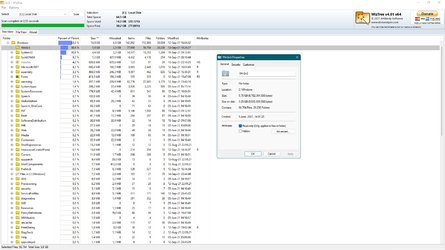
I guess that depends how you optimize? Mine has 3,29GB on disk (5,75GB size). Windows compressed.
 

Attachments

  • capture_09152021_012748.jpg
    capture_09152021_012748.jpg
    231.6 KB · Views: 4

My Computer My Computer

At a glance

Home2FH2CanAMD Ryzen 5 8600G (07/24)2x32GB Kingston FURY DDR5 5600 MHz CL36 @5200...ASROCK Radeon RX 6600 Challenger D 8G @48FPS ...
OS
Home2FH2Can
Computer type
PC/Desktop
CPU
AMD Ryzen 5 8600G (07/24)
Motherboard
ASROCK B650M-HDV/M.2 (07/24) BIOS 4.43 AGESA ComboAM5 1.3.0.1b Patch A (07/26)
Memory
2x32GB Kingston FURY DDR5 5600 MHz CL36 @5200 CL40 (07/24)
Graphics Card(s)
ASROCK Radeon RX 6600 Challenger D 8G @48FPS (08/24)
Sound Card
Creative Sound BlasterX AE-5 Plus (05/24)
Monitor(s) Displays
24" Philips 24M1N3200ZS/00 (05/24)
Screen Resolution
1920×1080@165Hz via DP1.4
Hard Drives
Kingston KC3000 NVMe 2TB (05/24)
ADATA XPG GAMMIX S11 Pro 512GB (07/19)
PSU
Seasonic Core GM 550 Gold (04/24)
Case
Fractal Design Define 7 Mini with 3x Noctua NF-P14s/12@555rpm (04/24)
Cooling
Noctua NH-U12S with Noctua NF-P12 (04/24)
Keyboard
HP Pavilion Wired Keyboard 300 (07/24) + Rabalux 76017 Parker (01/24)
Mouse
Logitech M330 Silent Plus (07/26)
Internet Speed
500/100 Mbps via RouterOS (05/21) & TCP Optimizer
Browser
Edge, Brave for YouTube, LibreWolf for FB
Antivirus
NextDNS blocking 1/3 Traffic
Other Info
Phone: Motorola Moto G86 (02/26)
Backup: Hasleo Backup Suite (PreOS)
Headphones: Sennheiser RS170 (09/10)
Chair: Huzaro Force 4.4 Grey Mesh (05/24)
Notifier: Xiaomi Mi Band 9 Milanese (10/24)
FlexCore USB-C 3.2 Gen 1 (M) to LAN (F) (08/25)
My Win10/64 Home WinSXS directory is a little over 5GB on disk (about 8.4GB logical space.) When I upgrade to Win11 what happens to WinSXS? Does it get smaller, stay the same size, or get bigger?
Welcome to Eleven Forum

The exact size of WinSxS depends on how many updates you have had since Windows was last upgraded and whether or not you have cleaned up the component store recently. File Explorer does not show an accurate size due to the hardlinks that may be used in the component store. You can find out the actual size of the component store by running the command Dism /online /cleanup-image /analyzecomponentstore in a Command Prompt (Admin).


When you upgrade to W11 the old W10 component store will be completely replaced with a new one for W11. Typically the size will be about the same as the W10 one or a little smaller. My WinSxS for W11 Home is 6.74GB while the install of W10 Home 21H1 that I copied from another machine to upgrade it to W11 now has a WinSxS of 7.39GB on that original machine.

Windows 11
WinSxS size - W11 Home x64.PNG

Windows 10
WinSxS size - W10 Home x64.PNG
 

My Computers My Computers

  • At a glance

    Windows 11 HomeAMD Athlon Silver 3050U8GBRadeon Graphics
    OS
    Windows 11 Home
    Computer type
    Laptop
    Manufacturer/Model
    Acer Aspire 3 A315-23-R9VY
    CPU
    AMD Athlon Silver 3050U
    Memory
    8GB
    Graphics Card(s)
    Radeon Graphics
    Monitor(s) Displays
    laptop screen
    Screen Resolution
    1366x768 native resolution, up to 2560x1440 with Radeon Virtual Super Resolution
    Hard Drives
    1TB Samsung EVO 870 SSD (from April 2026: 250GB EVO 850)
    Internet Speed
    150 Mbps
    Browser
    Edge, Firefox
    Antivirus
    Defender
    Other Info
    UPDATE - 11 April 2026: due to lid hinges starting to break up this laptop has been retired from active duty. The OS with all software and files has been migrated to my System Seven in 'Other systems' to carry on as my general purpose 'main machine'.

    I've now clean installed 25H2 and used Garlin's scripts to update Secure Boot to CA 2023 and revoke the PCA 2011 certificates. It's new role is to test secure boot issues.

    Info for 2021-2026:
    fully 'Windows 11 ready' laptop. Windows 10 C: partition migrated from my old unsupported 'main machine' then upgraded to 11. A test migration ran Insider builds for 2 months. When 11 was released on 5th October 2021 it was re-imaged back to 10 and was offered the upgrade in Windows Update on 20th October. Windows Update offered the 22H2 Feature Update on 20th September 2022. It got the 23H2 Feature Update on 4th November 2023 through Windows Update, 24H2 on 3rd October 2024 through Windows Update by setting the Target Release Version for 24H2, and 25H2 on 30th September 2025 through Windows Update by setting the Target Release Version for 25H2.
  • At a glance

    Windows 11 ProIntel® Core™ i5-520M8GB(integrated graphics) Intel HD Graphics
    Operating System
    Windows 11 Pro
    Computer type
    Laptop
    Manufacturer/Model
    Dell Latitude E4310
    CPU
    Intel® Core™ i5-520M
    Motherboard
    0T6M8G
    Memory
    8GB
    Graphics card(s)
    (integrated graphics) Intel HD Graphics
    Screen Resolution
    1366x768
    Hard Drives
    500GB Crucial MX500 SSD
    Browser
    Firefox, Edge
    Antivirus
    Defender
    Other Info
    unsupported machine: Legacy bios, MBR, TPM 1.2, upgraded from W10 to W11 using W10/W11 hybrid install media workaround.

    In-place upgrade to 22H2 using ISO and a workaround.
    Feature Update to 23H2 by manually installing the Enablement Package.
    In-place upgrade to 24H2 using hybrid 23H2/24H2 install media.
    Upgraded to 25H2 by Enablement Package.

    Also running Insider Experimental 263xx and 29xxx builds and Windows 10 as native boot .vhdx.
  • My SYSTEM THREE is a Dell Latitude 5410, i7-10610U, 32GB RAM, 512GB NVMe ssd, supported device running Windows 11 Pro.

    My SYSTEM FOUR was a 2-in-1 convertible Lenovo Yoga 11e (1st gen) type 20DA, Celeron N2930, 8GB RAM, 256GB ssd. Unsupported device. This has now been sold. It has been replaced by my System Eight.

    My SYSTEM FIVE is a Dell Latitude 3190 2-in-1, Pentium Silver N5030, 8GB RAM, 1TB NVMe ssd, supported device running Windows 11 Pro, plus Insider Beta, Experimental 263xx and 29xxx builds (and a few others) as a native boot .vhdx.

    My SYSTEM SIX is a Dell Latitude 5550, Core Ultra 7 165H, 64GB RAM, 1TB NVMe SSD, supported device, Windows 11 Pro, Hyper-V host machine. Updated to 25H2 on 30th September 2025.

    My SYSTEM SEVEN is a Lenovo Thinkpad T580, 1920x1080 touchscreen, Intel Core i7-8650U, 16GB RAM, 512GB NVMe SSD + 2nd 512GB NVMe SSD, a supported device for Windows 11. This is my current general purpose 'main machine'. The installed Windows 11 Home from my System One has been migrated to this machine. As its new home has an existing digital licence for Pro I've been able to upgrade the migrated OS from Home to Pro.

    My SYSTEM EIGHT is a 2-in-1 convertible Lenovo Yoga 11e (5th gen) type 20LN, Celeron N4120, 8GB RAM, 512GB NVMe ssd, a supported device for Windows 11. Currently running Windows 11 Pro, plus Insider Beta, Experimental 263xx and 29xxx builds as native boot vhdx.
I just cleanly installed Windows 11 build 22454 on Friday night, and I've got about 95% of my stuff back installed (haven't installed the games yet) and this is mine:

198.png
 

My Computers My Computers

  • At a glance

    Windows 11 23H2 Current buildAMD Ryzen 9 3950X4 * 32 GB - Corsair Vengeance 3600 MHzEVGA GeForce RTX 3080 Ti XC3 ULTRA GAMING (12...
    OS
    Windows 11 23H2 Current build
    Computer type
    PC/Desktop
    Manufacturer/Model
    HomeBrew
    CPU
    AMD Ryzen 9 3950X
    Motherboard
    MSI MEG X570 GODLIKE
    Memory
    4 * 32 GB - Corsair Vengeance 3600 MHz
    Graphics Card(s)
    EVGA GeForce RTX 3080 Ti XC3 ULTRA GAMING (12G-P5-3955-KR)
    Sound Card
    Realtek® ALC1220 Codec
    Monitor(s) Displays
    2x Eve Spectrum ES07D03 4K Gaming Monitor (Matte) | Eve Spectrum ES07DC9 4K Gaming Monitor (Glossy)
    Screen Resolution
    3x 3840 x 2160
    Hard Drives
    3x Samsung 980 Pro NVMe PCIe 4 M.2 2 TB SSD (MZ-V8P2T0B/AM) } 3x Sabrent Rocket NVMe 4.0 1 TB SSD (USB)
    PSU
    PC Power & Cooling’s Silencer Series 1050 Watt, 80 Plus Platinum
    Case
    Fractal Design Define 7 XL Dark ATX Full Tower Case
    Cooling
    Arctic Liquid Freezer III 420 RGB + Air 3x 140mm case fans (pull front) + 1x 120 mm (push back) and 1 x 120 mm (pull bottom)
    Keyboard
    SteelSeries Apex Pro Wired Gaming Keyboard
    Mouse
    Logitech MX Master 3S | MX Master 3 for Business
    Internet Speed
    AT&T LightSpeed Gigabit Duplex Ftth
    Browser
    Nightly (default) + Firefox (stable), Chrome, Edge , Arc
    Antivirus
    Defender + MB 5 Beta
  • At a glance

    ChromeOS Flex Dev Channel (current)Intel(R) Core(TM) i5-6300U CPU @ 2.40GHz, 250...16 GBIntel(R) HD Graphics 520
    Operating System
    ChromeOS Flex Dev Channel (current)
    Computer type
    Laptop
    Manufacturer/Model
    Dell Latitude E5470
    CPU
    Intel(R) Core(TM) i5-6300U CPU @ 2.40GHz, 2501 Mhz, 2 Core(s), 4 Logical Processor(s)
    Motherboard
    Dell
    Memory
    16 GB
    Graphics card(s)
    Intel(R) HD Graphics 520
    Sound Card
    Intel(R) HD Graphics 520 + RealTek Audio
    Monitor(s) Displays
    Dell laptop display 15"
    Screen Resolution
    1920 * 1080
    Hard Drives
    Toshiba 128GB M.2 22300 drive
    INTEL Cherryville 520 Series SSDSC2CW180A 180 GB SATA III SSD
    PSU
    Dell
    Case
    Dell
    Cooling
    Dell
    Keyboard
    Dell
    Mouse
    Logitech MX Master 3S (shared w. Sys 1) | Dell TouchPad
    Internet Speed
    AT&T LightSpeed Gigabit Duplex Ftth
I've done the WinSXS cleaning many times. It is good news that Win11 starts over with a clean directory.
 

My Computer My Computer

At a glance

Win11 ProAMD Ryzen 5 5500U16 GBRadeon 2100
OS
Win11 Pro
Computer type
PC/Desktop
Manufacturer/Model
BeeLink SER Mini
CPU
AMD Ryzen 5 5500U
Motherboard
BeeLink SER
Memory
16 GB
Graphics Card(s)
Radeon 2100
Sound Card
none
Monitor(s) Displays
Primary: Phillips 4K; Secondary: LG 4K
Screen Resolution
Both 3860 x 2160
Hard Drives
C: NVme 500 GB Windows only
D: 128 GB NVme User data + Windows Temp via Junction Link
PSU
External
Case
Mini
Cooling
Internal fan
Keyboard
Logitech Wireless Lighted
Mouse
Kensington ExpertMouse wireless trackball
Internet Speed
500/500
Browser
Brave
Antivirus
Windows Defender

WinSXS is a special folder, basically it tells Fibs!!

in order to ensure that applications that require older versions of .DLL and some other support library files when a .DLL file is updated the system creates a symbolic link to the older version and this is stored in WinSXS. this phantom copy is used to redirect to the actual older copy, if any program executable calls the older .DLL (in reality it adds a link to all versions of the .DLLs and cleans up those that are deleted when systems are updated)

Now, a Symbolic link is designed to look identical to the OS as the original files or folder that it points to this includes it's size and Size on Disk so that executables can confirm it's the right file, however, the actual Symbolic link only takes up a few bytes.

before worrying too much about a huge WinSXS folder if possible check the size of the folder from outside Windows ( live linux or similar ) you may be surprised by the actual size reported

This is the way it was explained to me back in my server days , current MS info ...


My Computers My Computers

  • At a glance

    Windows 11 Pro x64 [Latest Release Preview] [...AMD RYZEN 9 7950X OEM64GB [2x32GB Corsair Vengeance 560 AMD DDR5]3XS* ASUS DUAL RTX 4060 OC 8G
    OS
    Windows 11 Pro x64 [Latest Release Preview] [Win11 PRO HighEnd MUP-00005 DD]
    Computer type
    PC/Desktop
    Manufacturer/Model
    Scan 3XS to my design
    CPU
    AMD RYZEN 9 7950X OEM
    Motherboard
    *3XS*ASUS TUF B650 PLUS WIFI
    Memory
    64GB [2x32GB Corsair Vengeance 560 AMD DDR5]
    Graphics Card(s)
    3XS* ASUS DUAL RTX 4060 OC 8G
    Sound Card
    On motherboard Feeding SPDiF 5.1 system [plus local sound to each monitor]
    Monitor(s) Displays
    32" UHD 32 Bit HDR Monitor + 43" UHD 4K 32Bit HDR TV
    Screen Resolution
    2 x 3840 x 2160
    Hard Drives
    3XS Samsung 980Pro 2TB M.2 PCIe4 4 x 8TB Data + Various Externals from 1TB to 8TB, 10TB NAS
    PSU
    3XS Corsair RM850x 850w Fully Modular
    Case
    FDesign Define 7 XL BK TGL Case - Black
    Cooling
    3XS iCUE H150i ELITE Liquid Cool, Quiet Case fans
    Keyboard
    Wireless Logitec MX Keys + K830 [Depending on where I'm Sat]
    Mouse
    Wireless Logitec - MX Master 3S +
    Internet Speed
    950 MB Down 55 MB Up
    Browser
    Latest Chrome
    Antivirus
    BitDefender Total Security [Latest]
    Other Info
    Also run...
    Dell XPS 17 Laptop
    HP Laptop 8GB - Windows 10 Pro x64 HP 15.2"
    Nexus 7 Android tablet [x2]
    Samsung 10.2" tablet
    Blackview 10.2 Tablet
    Sony Z3 Android Smartphone
    Samsung S9 Plus Smartphone
    Wacom Pro Medium Pen Pad
    Wacom Pro Small Pen Pad
    Wacom ExpressKey Remote
    Loopdeck+ Graphics Controller
    Shuttle Pro v2 Control Pad
  • At a glance

    Windows 11 Pro x64 [Latest release]i7 10750H32 GBStock Intel + GTX 1650 Ti
    Operating System
    Windows 11 Pro x64 [Latest release]
    Computer type
    Laptop
    Manufacturer/Model
    Dell XPS 17 9700
    CPU
    i7 10750H
    Motherboard
    Stock
    Memory
    32 GB
    Graphics card(s)
    Stock Intel + GTX 1650 Ti
    Sound Card
    Stock 4 speaker
    Monitor(s) Displays
    Stock 17" + 32" 4K 3840 x 2160 HDR-10
    Screen Resolution
    3840 x 2400 HDR touchscreen
    Hard Drives
    2TB M2 NVMe
    PSU
    Stock
    Case
    Stock Aluminium / Carbon Fibre
    Cooling
    Stock + 2 fan cooling pad
    Keyboard
    Stock Illuminated + Logi - MX Keys
    Mouse
    Stock Trackpad +Logi Mx Master 3 or MX Ergo Trackball
    Internet Speed
    950 MB Down 55 MB Up
    Browser
    Latest Chrome
    Antivirus
    BitDefender Total Security 2021
    Other Info
    Also use an Adjustable Support for Laptop and Adjustable stand for monitor
barman58: you are exactly correct. WinSXS (Windows Side by Side) was created back in the old days of "DLL Hell" which happened when different developers/vendors used the same DLL file in their software distributions. All sorts of problems developed when Windows would release an update that had updated DLL's of the same name as those already in use, but with slightly different functionality.

The initial approach to fix this was to just let each piece of software store it's own copy of it's DLL's, but this of course resulted in many duplicate copies. I'm guessing that's when someone at Microsoft developed the concept of Symbolic Links, sometimes called Junction Links, which appear to Windows as real DLL's but are actually just a pointer to the physical DLL in some other place.

The nice thing about this concept is that these symbolic links work for directories just as well as individual files. There is an old program called Junction Link Magic (Download Junction Link Magic 2.0.3.0)
that lets people create links of their own. I use this to get directories normally on my boot drive moved off to a different drive so my Macrium backups don't take so long to complete. I've not yet been brave enough to try this for WinSXS though.
 

My Computer My Computer

At a glance

Win11 ProAMD Ryzen 5 5500U16 GBRadeon 2100
OS
Win11 Pro
Computer type
PC/Desktop
Manufacturer/Model
BeeLink SER Mini
CPU
AMD Ryzen 5 5500U
Motherboard
BeeLink SER
Memory
16 GB
Graphics Card(s)
Radeon 2100
Sound Card
none
Monitor(s) Displays
Primary: Phillips 4K; Secondary: LG 4K
Screen Resolution
Both 3860 x 2160
Hard Drives
C: NVme 500 GB Windows only
D: 128 GB NVme User data + Windows Temp via Junction Link
PSU
External
Case
Mini
Cooling
Internal fan
Keyboard
Logitech Wireless Lighted
Mouse
Kensington ExpertMouse wireless trackball
Internet Speed
500/500
Browser
Brave
Antivirus
Windows Defender
Mine's a bit bigger, but tolerable at under 7 GB:
1631731688319.png
HTH,
--Ed--
 

My Computers My Computers

  • At a glance

    Windows 11i7-8650U (8th Gen/Kaby Lake)16 GBIntel UHD Graphics 620
    OS
    Windows 11
    Computer type
    Laptop
    Manufacturer/Model
    Lenovo X380 Yoga
    CPU
    i7-8650U (8th Gen/Kaby Lake)
    Motherboard
    20LH000MUS (U3E1)
    Memory
    16 GB
    Graphics Card(s)
    Intel UHD Graphics 620
    Sound Card
    Integrated Conexant SmartAudio HD
    Monitor(s) Displays
    FlexView Display
    Screen Resolution
    1920x1080
    Hard Drives
    Toshiba 1 TB PCIe x3 NVMe SSD
    external 5TB Seagate USB-C attached HDD
    PSU
    Lenovo integrated 65W power brick
    Case
    Laptop
    Cooling
    Laptop
    Keyboard
    Integrated Lenovo ThinkPad keyboard
    Mouse
    touchscreen, touchpad
    Internet Speed
    GbE (Spectrum/Charter)
    Browser
    all of em
    Antivirus
    Defender
    Other Info
    Purchased early 2019 as Windows Insider test PC
  • At a glance

    Windows 11Ryzen 5800X128 GB (4x32 DDR5-5600)NVIDIA 3070Ti
    Operating System
    Windows 11
    Computer type
    PC/Desktop
    Manufacturer/Model
    DIY
    CPU
    Ryzen 5800X
    Motherboard
    Asrock B550 Extreme4
    Memory
    128 GB (4x32 DDR5-5600)
    Graphics card(s)
    NVIDIA 3070Ti
    Sound Card
    built-in
    Monitor(s) Displays
    2xDell 2707
    Screen Resolution
    1980x1200
    Hard Drives
    2XNVMe, multiple HDDs from 3 to 12 TB
    PSU
    Seasonic 650
    Case
    NZXT Flo 6
    Cooling
    dual-fan air cooler
    Keyboard
    Logitech Wave
    Mouse
    Logitech Logi
    Internet Speed
    GbE
    Browser
    all of 'em
    Antivirus
    Defender
    Other Info
    temperamental UEFI
@Birk

I would not advise using junctions/Symbolic links within WinSxS as the Russian doll effect on the sub directories could cause unpredictable results - of course It may work perfectly but I personally would just not trust it
 

My Computers My Computers

  • At a glance

    Windows 11 Pro x64 [Latest Release Preview] [...AMD RYZEN 9 7950X OEM64GB [2x32GB Corsair Vengeance 560 AMD DDR5]3XS* ASUS DUAL RTX 4060 OC 8G
    OS
    Windows 11 Pro x64 [Latest Release Preview] [Win11 PRO HighEnd MUP-00005 DD]
    Computer type
    PC/Desktop
    Manufacturer/Model
    Scan 3XS to my design
    CPU
    AMD RYZEN 9 7950X OEM
    Motherboard
    *3XS*ASUS TUF B650 PLUS WIFI
    Memory
    64GB [2x32GB Corsair Vengeance 560 AMD DDR5]
    Graphics Card(s)
    3XS* ASUS DUAL RTX 4060 OC 8G
    Sound Card
    On motherboard Feeding SPDiF 5.1 system [plus local sound to each monitor]
    Monitor(s) Displays
    32" UHD 32 Bit HDR Monitor + 43" UHD 4K 32Bit HDR TV
    Screen Resolution
    2 x 3840 x 2160
    Hard Drives
    3XS Samsung 980Pro 2TB M.2 PCIe4 4 x 8TB Data + Various Externals from 1TB to 8TB, 10TB NAS
    PSU
    3XS Corsair RM850x 850w Fully Modular
    Case
    FDesign Define 7 XL BK TGL Case - Black
    Cooling
    3XS iCUE H150i ELITE Liquid Cool, Quiet Case fans
    Keyboard
    Wireless Logitec MX Keys + K830 [Depending on where I'm Sat]
    Mouse
    Wireless Logitec - MX Master 3S +
    Internet Speed
    950 MB Down 55 MB Up
    Browser
    Latest Chrome
    Antivirus
    BitDefender Total Security [Latest]
    Other Info
    Also run...
    Dell XPS 17 Laptop
    HP Laptop 8GB - Windows 10 Pro x64 HP 15.2"
    Nexus 7 Android tablet [x2]
    Samsung 10.2" tablet
    Blackview 10.2 Tablet
    Sony Z3 Android Smartphone
    Samsung S9 Plus Smartphone
    Wacom Pro Medium Pen Pad
    Wacom Pro Small Pen Pad
    Wacom ExpressKey Remote
    Loopdeck+ Graphics Controller
    Shuttle Pro v2 Control Pad
  • At a glance

    Windows 11 Pro x64 [Latest release]i7 10750H32 GBStock Intel + GTX 1650 Ti
    Operating System
    Windows 11 Pro x64 [Latest release]
    Computer type
    Laptop
    Manufacturer/Model
    Dell XPS 17 9700
    CPU
    i7 10750H
    Motherboard
    Stock
    Memory
    32 GB
    Graphics card(s)
    Stock Intel + GTX 1650 Ti
    Sound Card
    Stock 4 speaker
    Monitor(s) Displays
    Stock 17" + 32" 4K 3840 x 2160 HDR-10
    Screen Resolution
    3840 x 2400 HDR touchscreen
    Hard Drives
    2TB M2 NVMe
    PSU
    Stock
    Case
    Stock Aluminium / Carbon Fibre
    Cooling
    Stock + 2 fan cooling pad
    Keyboard
    Stock Illuminated + Logi - MX Keys
    Mouse
    Stock Trackpad +Logi Mx Master 3 or MX Ergo Trackball
    Internet Speed
    950 MB Down 55 MB Up
    Browser
    Latest Chrome
    Antivirus
    BitDefender Total Security 2021
    Other Info
    Also use an Adjustable Support for Laptop and Adjustable stand for monitor
@Birk

I would not advise using junctions/Symbolic links within WinSxS...
@Birk
Microsoft don't use junctions/symbolic links in WinSxS. They use hardlinks.

For operating system files, it can appear that more than one copy of the same version of a file is stored in more than one place on the operating system, but there’s usually only one real copy of the file. The rest of the copies are just “projected” by hard linking from the component store..... This might lead you to think that the WinSxS folder takes up more disk space than it really does....

There are three types of file links supported in the NTFS file system: hard links, junctions, and symbolic links.....
 

My Computers My Computers

  • At a glance

    Windows 11 HomeAMD Athlon Silver 3050U8GBRadeon Graphics
    OS
    Windows 11 Home
    Computer type
    Laptop
    Manufacturer/Model
    Acer Aspire 3 A315-23-R9VY
    CPU
    AMD Athlon Silver 3050U
    Memory
    8GB
    Graphics Card(s)
    Radeon Graphics
    Monitor(s) Displays
    laptop screen
    Screen Resolution
    1366x768 native resolution, up to 2560x1440 with Radeon Virtual Super Resolution
    Hard Drives
    1TB Samsung EVO 870 SSD (from April 2026: 250GB EVO 850)
    Internet Speed
    150 Mbps
    Browser
    Edge, Firefox
    Antivirus
    Defender
    Other Info
    UPDATE - 11 April 2026: due to lid hinges starting to break up this laptop has been retired from active duty. The OS with all software and files has been migrated to my System Seven in 'Other systems' to carry on as my general purpose 'main machine'.

    I've now clean installed 25H2 and used Garlin's scripts to update Secure Boot to CA 2023 and revoke the PCA 2011 certificates. It's new role is to test secure boot issues.

    Info for 2021-2026:
    fully 'Windows 11 ready' laptop. Windows 10 C: partition migrated from my old unsupported 'main machine' then upgraded to 11. A test migration ran Insider builds for 2 months. When 11 was released on 5th October 2021 it was re-imaged back to 10 and was offered the upgrade in Windows Update on 20th October. Windows Update offered the 22H2 Feature Update on 20th September 2022. It got the 23H2 Feature Update on 4th November 2023 through Windows Update, 24H2 on 3rd October 2024 through Windows Update by setting the Target Release Version for 24H2, and 25H2 on 30th September 2025 through Windows Update by setting the Target Release Version for 25H2.
  • At a glance

    Windows 11 ProIntel® Core™ i5-520M8GB(integrated graphics) Intel HD Graphics
    Operating System
    Windows 11 Pro
    Computer type
    Laptop
    Manufacturer/Model
    Dell Latitude E4310
    CPU
    Intel® Core™ i5-520M
    Motherboard
    0T6M8G
    Memory
    8GB
    Graphics card(s)
    (integrated graphics) Intel HD Graphics
    Screen Resolution
    1366x768
    Hard Drives
    500GB Crucial MX500 SSD
    Browser
    Firefox, Edge
    Antivirus
    Defender
    Other Info
    unsupported machine: Legacy bios, MBR, TPM 1.2, upgraded from W10 to W11 using W10/W11 hybrid install media workaround.

    In-place upgrade to 22H2 using ISO and a workaround.
    Feature Update to 23H2 by manually installing the Enablement Package.
    In-place upgrade to 24H2 using hybrid 23H2/24H2 install media.
    Upgraded to 25H2 by Enablement Package.

    Also running Insider Experimental 263xx and 29xxx builds and Windows 10 as native boot .vhdx.
  • My SYSTEM THREE is a Dell Latitude 5410, i7-10610U, 32GB RAM, 512GB NVMe ssd, supported device running Windows 11 Pro.

    My SYSTEM FOUR was a 2-in-1 convertible Lenovo Yoga 11e (1st gen) type 20DA, Celeron N2930, 8GB RAM, 256GB ssd. Unsupported device. This has now been sold. It has been replaced by my System Eight.

    My SYSTEM FIVE is a Dell Latitude 3190 2-in-1, Pentium Silver N5030, 8GB RAM, 1TB NVMe ssd, supported device running Windows 11 Pro, plus Insider Beta, Experimental 263xx and 29xxx builds (and a few others) as a native boot .vhdx.

    My SYSTEM SIX is a Dell Latitude 5550, Core Ultra 7 165H, 64GB RAM, 1TB NVMe SSD, supported device, Windows 11 Pro, Hyper-V host machine. Updated to 25H2 on 30th September 2025.

    My SYSTEM SEVEN is a Lenovo Thinkpad T580, 1920x1080 touchscreen, Intel Core i7-8650U, 16GB RAM, 512GB NVMe SSD + 2nd 512GB NVMe SSD, a supported device for Windows 11. This is my current general purpose 'main machine'. The installed Windows 11 Home from my System One has been migrated to this machine. As its new home has an existing digital licence for Pro I've been able to upgrade the migrated OS from Home to Pro.

    My SYSTEM EIGHT is a 2-in-1 convertible Lenovo Yoga 11e (5th gen) type 20LN, Celeron N4120, 8GB RAM, 512GB NVMe ssd, a supported device for Windows 11. Currently running Windows 11 Pro, plus Insider Beta, Experimental 263xx and 29xxx builds as native boot vhdx.
Back
Top Bottom