What is a local account??? and what is it good for????


No. I did find that the document and picture folders on my OneDrive are also in the Users/My user name folder on my C drive.

Edit: Without the OneDrive folder the size is down to 190GB.
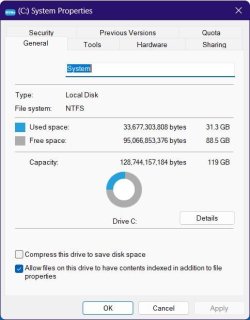
That reads a little closer to home. Apparently the used space on my C: is 145GB
None of my user files are on C. But if I added all the drives up, I’d guess it would be in the Terabytes. I’m a horder.
 

My Computers My Computers

  • At a glance

    Windows 11 Pro 25H2 Build 26200.8655Intel(R) Core(TM) i7-4770K CPU @ 3.50GHz32.0 GB of I forget and the box is in storage.Gigabyte nVidia GeForce GTX 1660 Super OC 6GB
    OS
    Windows 11 Pro 25H2 Build 26200.8655
    Computer type
    PC/Desktop
    Manufacturer/Model
    Sin-built 2013
    CPU
    Intel(R) Core(TM) i7-4770K CPU @ 3.50GHz
    Motherboard
    ASUS ROG Maximus VI Formula
    Memory
    32.0 GB of I forget and the box is in storage.
    Graphics Card(s)
    Gigabyte nVidia GeForce GTX 1660 Super OC 6GB
    Sound Card
    ROG SupremeFX Formula 8-Channel High Definition Audio
    Monitor(s) Displays
    5 x LG 25MS500-B - 1 x 24MK430H-B - 1 x Wacom Pro 22" Touch Screen Tablet
    Screen Resolution
    All over the place
    Hard Drives
    Too many to list. OS on Samsung 1TB 870 QVO SATA
    PSU
    Silverstone 1500
    Case
    NZXT Phantom 820 Full-Tower Case
    Cooling
    Noctua NH-D15 Elite Class Dual Tower CPU Cooler / 6 x EziDIY 120mm / 2 x Corsair 140mm somethings / 1 x 140mm Thermaltake something / 2 x 200mm Corsair.
    Keyboard
    Corsair K95 / Logitech diNovo Edge Wireless
    Mouse
    Logitech: G402 / G502 / Mx Masters / Mx Air Cordless
    Internet Speed
    2000/500Mbps
    Browser
    All sorts
    Antivirus
    Kaspersky Premium
    Other Info
    ㅤㅤㅤㅤㅤㅤㅤㅤㅤㅤㅤㅤㅤㅤㅤㅤㅤㅤㅤㅤㅤㅤㅤㅤㅤㅤㅤㅤㅤㅤㅤㅤㅤㅤㅤㅤㅤㅤㅤㅤ⠀⠀⠀⠀⠀⠀⠀⠀⠀⠀
    TP-Link BE9300 WiFi 7 Bluetooth 5.4 (Archer TBE550E)
    TP-Link TX201 V1 2.5GB Lan

    Grandstream HT812 - VoIP
    ASUS DSL-AX82U - Mesh
    ASUS RT-AC68U - Mesh
    ASUS RT-BE88U Router

    Brother MFC-L2880DW Printer

    I’m on a horse.
  • At a glance

    Windows 11 Pro 25H2 Build 26200.8655 (Wifes)13th Generation Intel® Core™ i5-1340P Process...16GB LPDDR5-52001x Intel® Iris® Xe Graphics
    Operating System
    Windows 11 Pro 25H2 Build 26200.8655 (Wifes)
    Computer type
    Laptop
    Manufacturer/Model
    LENOVO Yoga 7 14IRL8 - Type 82YL
    CPU
    13th Generation Intel® Core™ i5-1340P Processor(Core™ i5-1340P)
    Memory
    16GB LPDDR5-5200
    Graphics card(s)
    1x Intel® Iris® Xe Graphics
    Sound Card
    Optimized with Dolby Atmos®
    Screen Resolution
    QHD 2880 x 1800 OLED
    Hard Drives
    M.2 512 GB SSD PCIe
    Mouse
    Logiteck MX Master 3S
    Internet Speed
    2000/500
    Antivirus
    Defender / Malwarebytes
    Other Info
    …still on a horse.


    Wireless Network: Wi-Fi 6E 2x2 AX; Bluetooth® 5.1 or above
    Ports: 1x 1 Novo button; 2 in 1 Audio Combo jack; Micro SD Card Reader; HDMI 1.4b; 2 x USB Type-C (TBT4)
    USB 3.2 Gen 2 DP 1.4a
    PD 3.0); 1 x USB 3.2 Gen1 Type A
    Camera
    1x 1080P FHD IR/RGB Hybrid with Privacy Shutter and Dual Array Microphone
    Graphics
    1x Intel® Iris® Xe Graphics
    Monitor
    14" WUXGA
    Form Factor
    Convertible Notebook
  • Windows 11 Pro 25H2 Build 26200.8655 (Wifes)

    Yoga 7 2-in-1 14IML9 - Type 83DJ

    Processor: Intel® Core™ Ultra 7 155H Processor(Core™ Ultra 7 155H)

    Memory: 32GB LPD5X-7467

    Hard Drive: 1 TB SSD PCIe

    Wireless Network: 1x Wi-Fi 6E 2x2 AX; Bluetooth® 5.1 or above

    Ports: 1 x HDMI 2.1 TMDS; 1 x Novo Button; 1 x Combo Audio Jack
    2 x USB-C (USB 4.0)
    1 x USB-A 3.2 Gen 1

    Camera: 1080P FHD IR Hybrid with Dual Microphone

    Graphics: Intel® Arc™ Graphics

    Monitor: 14" 2.8K

    ...Where's my horse?
That reads a little closer to home. Apparently the used space on my C: is 145GB
None of my user files are on C. But if I added all the drives up, I’d guess it would be in the Terabytes. I’m a horder.
I'm nowhere near being low on space but I do need to clean out the duplicate and unneeded files from my OneDrive.
 

My Computers My Computers

  • At a glance

    Windows 11 Pro 25H2Intel Core i7-10700K16GB (8GB PC4-19200 DDR4 SDRAM x2)NVIDIA GeForce GTX 1050 TI
    OS
    Windows 11 Pro 25H2
    Computer type
    PC/Desktop
    Manufacturer/Model
    PowerSpec B746
    CPU
    Intel Core i7-10700K
    Motherboard
    ASRock Z490 Phantom Gaming 4/ax
    Memory
    16GB (8GB PC4-19200 DDR4 SDRAM x2)
    Graphics Card(s)
    NVIDIA GeForce GTX 1050 TI
    Sound Card
    Realtek Audio
    Monitor(s) Displays
    #1. LG ULTRAWIDE 34" #2. AOC Q32G2WG3 32"
    Screen Resolution
    #1. 3440 X 1440 #2. 1920 x 1080
    Hard Drives
    NVMe WDC WDS100T2B0C-00PXH0 1TB
    Samsung SSD 860 EVO 1TB
    PSU
    750 Watts (62.5A)
    Case
    PowerSpec/Lian Li ATX 205
    Keyboard
    Logitech K270
    Mouse
    Logitech M185
    Browser
    Microsoft Edge and Firefox
    Antivirus
    Webroot SecureAnywhere CE 26.1
  • At a glance

    Windows 11 Canary ChannelIntel Core i5-8400 CPU @ 2.80GHz16 MB DDR 4-2666
    Operating System
    Windows 11 Canary Channel
    Computer type
    PC/Desktop
    Manufacturer/Model
    PowerSpec G156
    CPU
    Intel Core i5-8400 CPU @ 2.80GHz
    Motherboard
    AsusTeK Prime B360M-A
    Memory
    16 MB DDR 4-2666
    Monitor(s) Displays
    23" Speptre HDMI 75Hz
    Screen Resolution
    1920x1080
    Hard Drives
    Samsung 970 EVO 500GB NVMe
    Keyboard
    Logitek K270
    Mouse
    Logitek M185
    Browser
    Firefox, Edge and Edge Canary
    Antivirus
    Windows Defender
The only program I have installed on C: is Google Chrome. All the rest are on D:. I have no games. My MR disk images of C: AND D: (my Disk 0) take, well, you can see the log. Oh, and my page file is on D: as well. I currently have about 40 programs.

Clipboard_01.jpg Clipboard_02.jpg
 

My Computers My Computers

  • At a glance

    11 Pro 24H2 26100.2454i7-9700 @ 3.00GHz32GBDDR4 @ 2666MHzIntel HD 630 Graphics onboard
    OS
    11 Pro 24H2 26100.2454
    Computer type
    PC/Desktop
    Manufacturer/Model
    Lenovo ThinkCentre M920S SFF
    CPU
    i7-9700 @ 3.00GHz
    Motherboard
    Lenovo 3132
    Memory
    32GBDDR4 @ 2666MHz
    Graphics Card(s)
    Intel HD 630 Graphics onboard
    Sound Card
    Realtek HD Audio
    Monitor(s) Displays
    LG E2442
    Screen Resolution
    1920x1080
    Hard Drives
    1 x Samsung 970 EVO PLUS 500GB NVMe SSD, 1 x WD_BLACK SN770
    250GB NVMe SSD (OS and programs), 1 x WD_BLACK SN770
    500GB NVMe SSD (Data)
    Case
    Lenovo SFF
    Keyboard
    Cherry Stream TKL JK-8600US-2 Wired
    Mouse
    LogiTech M510 wireless
    Internet Speed
    Fast (for fixed wireless!)
    Browser
    Chrome, sometimes Firefox
    Antivirus
    Malwarebytes Premium & Defender (working together beautifully!)
  • At a glance

    11 Pro 24H2 26100.2454i5-8400 @ 2.80GHz32GB DDR4 @ 2600MHzIntel HD 630 Graphics onboard
    Operating System
    11 Pro 24H2 26100.2454
    Computer type
    PC/Desktop
    Manufacturer/Model
    Lenovo ThinkCentre M920S SFF
    CPU
    i5-8400 @ 2.80GHz
    Motherboard
    Lenovo 3132
    Memory
    32GB DDR4 @ 2600MHz
    Graphics card(s)
    Intel HD 630 Graphics onboard
    Sound Card
    Realtek High Definition Audio onboard
    Monitor(s) Displays
    LG FULL HD (1920x1080@59Hz)
    Screen Resolution
    1920 x 1080
    Hard Drives
    1 x Samsung 970 EVO PLUS NVMe; 1 x Samsung 980 NVMe SSD
    Case
    Lenovo Think Centre SFF
    Keyboard
    Cherry Stream TKL JK-8600US-2 Wired
    Mouse
    LogiTech M510 wireless
    Internet Speed
    Fast (for fixed wireless!)
    Browser
    Chrome
    Antivirus
    Malwarebytes Premium and MS Defender, beautiful together
First, please excuse me (I have apologized so often...)

This is the largest response I have gotten. Coming on the heels of NOTHING it's a bit overwhelming. I'm so happy to see some of my friends back...
That having been said, I'm going to answer the questions directed toward me and my problems, first.
 

My Computers My Computers

  • At a glance

    Win11 Pro16GB2.30 gigahertz Intel 11th Gen Core i7-11800H
    OS
    Win11 Pro
    Computer type
    PC/Desktop
    Manufacturer/Model
    Beelink
    Memory
    16GB
    Graphics Card(s)
    2.30 gigahertz Intel 11th Gen Core i7-11800H
    Sound Card
    Intel® Smart Sound Technology for USB Audio
    Monitor(s) Displays
    laptop (small) and 1 or 2 external monitors
    Screen Resolution
    -
    Hard Drives
    PC711 NVMe SK hynix 1TB 1.02 TB NVMe ANB2N582412102F0G_0001
    PSU
    -
    Case
    Laptop
    Cooling
    fan
    Keyboard
    External!
    Mouse
    External
    Internet Speed
    -
    Browser
    Chrome (Chrome profiles), Firefox (Bookmark Search Plus2), Edge (History page), Opera (annoying)
    Antivirus
    WinDefender
    Other Info
    Win11 Home 23H2 22631.3447
  • At a glance

    Win108068 MB Usable Installed Memory2.30 gigahertz Intel 11th Gen Core i7-11800H
    Operating System
    Win10
    Computer type
    PC/Desktop
    Manufacturer/Model
    self
    Motherboard
    Gigabyte B75M-D3H
    Memory
    8068 MB Usable Installed Memory
    Graphics card(s)
    2.30 gigahertz Intel 11th Gen Core i7-11800H
    Sound Card
    Intel® Smart Sound Technology for USB Audio
    Monitor(s) Displays
    3 Displays
    Screen Resolution
    n/a
    Hard Drives
    SSD and others (internal and external)
    Case
    Desktop
    Cooling
    Fan
    Keyboard
    External
    Mouse
    External
    Browser
    Chrome, Firefox, Tor, Brave, Opera, etc.
    Antivirus
    Win Defender
    Other Info
    Win10 & unfortunately OneDrive: Can't completely rid myself of this!!
Thanks for returning. I was afraid I’d lost everyone (I still am, I miss some of you.).
I’m ready, though not feeling too confident to: A) disconnect my external hard drive containing everything I want from this computer. B) Reformat the drive as a Win11 (no MS365; no OneDrive) computer. (I DON’T WANT to format it as a MS365/OneDrive computer and then have to uninstall MS365 and OneDrive.)
But first I want to tell the story behind the huge BitLocker partition I discovered.
Diane bought the computer from COSTCO (3 month takeback). Though new at the time it was always temperamental and never particularly fast. Sometime right after the 3-month time period (isn’t that always the way it is) the computer started acting oddly. Diane started receiving messages relating to something called “Bit Locker”. We called DELL and COSTCO. They agreed this was a problem; they wanted to have nothing to do with it. Eventually the issue was assigned to COSTCO’s “Concierge” help, to some unhelpful person at Dell; and (if I recall correctly) someone at Microsoft. Whatever they did, it took days and repeated calls. When they all finally declared the problem had been taken care of we had no idea the solution consisted of tucking it away in a hidden partition.
I don’t deny Bit Partition isn’t useful or important in the right context. However from what we were told it was never supposed to be part of this computer’s initial experience .It was not supposed to surface on a new, largely unused, computer.
Regarding your other questions, I have used large CAD programs, I designed and built my house using CAD for every aspect of it. I’ve also used the full Adobe Suite professionally. BUT NONE OF THESE PROGRAMS WERE EVER LOADED ONTO THIS COMPUTER! This has only been used as a run-of-the-mill email/browser/small app computer. Unfortunately, I infected it with Microsoft 365 and OneDrive.
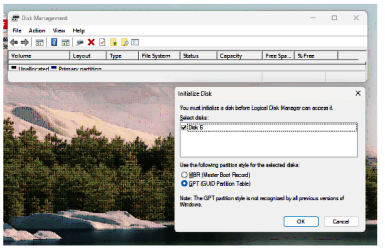
I was in the process of reformatting a 1Tb drive to handle the Macrium Image (the drive mounted with no Disk letter or presence) when I noticed the Bit Locker partition… Now I am wondering if my 1Tb drive is going to be able to hold an image of the computer’s C-Drive.
In other words: How much usable space is on my C-Drive if “Properties” tells me I have used 167GB of 1Tb and Disk Management reveals 953.2 GB have been used in addition to the 167. Conclusion: Is my 1TB drive sufficient to hold an index of what is supposed to be a 1TB C-drive.
Before I attempt the clean install, I will attempt a Macrium Reflect Image. I’m employing the manual 1707870649675.png. Can I proceed to image the drive before doing something about the hidden partition? Also, do I need to prepare some recovery thumb drive, or CD, to restore this messed up C-Drive in case everything doesn’t go well?
I know I have been directed to this place before (and I will look for it if necessary) but will one of you do me the favor of AGAIN directing me to the tutorial instructing me how to install a CLEAN copy of Win11—one that doesn’t involve having to encounter and deal with the MS365 or OneDrive.
 

My Computers My Computers

  • At a glance

    Win11 Pro16GB2.30 gigahertz Intel 11th Gen Core i7-11800H
    OS
    Win11 Pro
    Computer type
    PC/Desktop
    Manufacturer/Model
    Beelink
    Memory
    16GB
    Graphics Card(s)
    2.30 gigahertz Intel 11th Gen Core i7-11800H
    Sound Card
    Intel® Smart Sound Technology for USB Audio
    Monitor(s) Displays
    laptop (small) and 1 or 2 external monitors
    Screen Resolution
    -
    Hard Drives
    PC711 NVMe SK hynix 1TB 1.02 TB NVMe ANB2N582412102F0G_0001
    PSU
    -
    Case
    Laptop
    Cooling
    fan
    Keyboard
    External!
    Mouse
    External
    Internet Speed
    -
    Browser
    Chrome (Chrome profiles), Firefox (Bookmark Search Plus2), Edge (History page), Opera (annoying)
    Antivirus
    WinDefender
    Other Info
    Win11 Home 23H2 22631.3447
  • At a glance

    Win108068 MB Usable Installed Memory2.30 gigahertz Intel 11th Gen Core i7-11800H
    Operating System
    Win10
    Computer type
    PC/Desktop
    Manufacturer/Model
    self
    Motherboard
    Gigabyte B75M-D3H
    Memory
    8068 MB Usable Installed Memory
    Graphics card(s)
    2.30 gigahertz Intel 11th Gen Core i7-11800H
    Sound Card
    Intel® Smart Sound Technology for USB Audio
    Monitor(s) Displays
    3 Displays
    Screen Resolution
    n/a
    Hard Drives
    SSD and others (internal and external)
    Case
    Desktop
    Cooling
    Fan
    Keyboard
    External
    Mouse
    External
    Browser
    Chrome, Firefox, Tor, Brave, Opera, etc.
    Antivirus
    Win Defender
    Other Info
    Win10 & unfortunately OneDrive: Can't completely rid myself of this!!
Oh, in the process of bringing up Disk Management, this came up:
1707870805174.png
Is it anything I need to know or deal with?
 

My Computers My Computers

  • At a glance

    Win11 Pro16GB2.30 gigahertz Intel 11th Gen Core i7-11800H
    OS
    Win11 Pro
    Computer type
    PC/Desktop
    Manufacturer/Model
    Beelink
    Memory
    16GB
    Graphics Card(s)
    2.30 gigahertz Intel 11th Gen Core i7-11800H
    Sound Card
    Intel® Smart Sound Technology for USB Audio
    Monitor(s) Displays
    laptop (small) and 1 or 2 external monitors
    Screen Resolution
    -
    Hard Drives
    PC711 NVMe SK hynix 1TB 1.02 TB NVMe ANB2N582412102F0G_0001
    PSU
    -
    Case
    Laptop
    Cooling
    fan
    Keyboard
    External!
    Mouse
    External
    Internet Speed
    -
    Browser
    Chrome (Chrome profiles), Firefox (Bookmark Search Plus2), Edge (History page), Opera (annoying)
    Antivirus
    WinDefender
    Other Info
    Win11 Home 23H2 22631.3447
  • At a glance

    Win108068 MB Usable Installed Memory2.30 gigahertz Intel 11th Gen Core i7-11800H
    Operating System
    Win10
    Computer type
    PC/Desktop
    Manufacturer/Model
    self
    Motherboard
    Gigabyte B75M-D3H
    Memory
    8068 MB Usable Installed Memory
    Graphics card(s)
    2.30 gigahertz Intel 11th Gen Core i7-11800H
    Sound Card
    Intel® Smart Sound Technology for USB Audio
    Monitor(s) Displays
    3 Displays
    Screen Resolution
    n/a
    Hard Drives
    SSD and others (internal and external)
    Case
    Desktop
    Cooling
    Fan
    Keyboard
    External
    Mouse
    External
    Browser
    Chrome, Firefox, Tor, Brave, Opera, etc.
    Antivirus
    Win Defender
    Other Info
    Win10 & unfortunately OneDrive: Can't completely rid myself of this!!
I'm going to answer the questions directed toward me and my problems
Personally, I think you should decide what your questions are and ask about each one in a new thread for each one dedicated to that question & that question only.

Trying to deal with them all at once ends up with such an unwieldy thread that proper comprehension becomes difficult if not impossible.
I can, for example, help you with the topic of user folder relocations but I haven't get a clue what your problem is in that regard and I do not want to spend a day reading the whole thread trying to pick out the bits that relate to that topic.


All the best,
Denis
 

My Computer My Computer

At a glance

Windows 11 Home x64 Version 25H2 Build 26200....
OS
Windows 11 Home x64 Version 25H2 Build 26200.8037
I do have a lot of games installed but most of them are the hidden object search type of games from the bargain bin at Walmart. I have four games I purchased from my Steam account. My Steam folder is 42.8GB. I also have a lot of programs installed.

Edit: I got curious and did some digging into my system. When I checked the OneDrive folder under User/My User Name, it is storing all of my files and folders from OneDrive locally. The folder size is 148GB.
I moved the OneDrive folder from the Users\My User Name to my D drive. Drive C is now down to 170GB.
 

My Computers My Computers

  • At a glance

    Windows 11 Pro 25H2Intel Core i7-10700K16GB (8GB PC4-19200 DDR4 SDRAM x2)NVIDIA GeForce GTX 1050 TI
    OS
    Windows 11 Pro 25H2
    Computer type
    PC/Desktop
    Manufacturer/Model
    PowerSpec B746
    CPU
    Intel Core i7-10700K
    Motherboard
    ASRock Z490 Phantom Gaming 4/ax
    Memory
    16GB (8GB PC4-19200 DDR4 SDRAM x2)
    Graphics Card(s)
    NVIDIA GeForce GTX 1050 TI
    Sound Card
    Realtek Audio
    Monitor(s) Displays
    #1. LG ULTRAWIDE 34" #2. AOC Q32G2WG3 32"
    Screen Resolution
    #1. 3440 X 1440 #2. 1920 x 1080
    Hard Drives
    NVMe WDC WDS100T2B0C-00PXH0 1TB
    Samsung SSD 860 EVO 1TB
    PSU
    750 Watts (62.5A)
    Case
    PowerSpec/Lian Li ATX 205
    Keyboard
    Logitech K270
    Mouse
    Logitech M185
    Browser
    Microsoft Edge and Firefox
    Antivirus
    Webroot SecureAnywhere CE 26.1
  • At a glance

    Windows 11 Canary ChannelIntel Core i5-8400 CPU @ 2.80GHz16 MB DDR 4-2666
    Operating System
    Windows 11 Canary Channel
    Computer type
    PC/Desktop
    Manufacturer/Model
    PowerSpec G156
    CPU
    Intel Core i5-8400 CPU @ 2.80GHz
    Motherboard
    AsusTeK Prime B360M-A
    Memory
    16 MB DDR 4-2666
    Monitor(s) Displays
    23" Speptre HDMI 75Hz
    Screen Resolution
    1920x1080
    Hard Drives
    Samsung 970 EVO 500GB NVMe
    Keyboard
    Logitek K270
    Mouse
    Logitek M185
    Browser
    Firefox, Edge and Edge Canary
    Antivirus
    Windows Defender
Back
Top Bottom