Microsoft Copilot Blog:
Introducing tailored skills for Sales, Service, Education, and Legal roles along with an expanded library of plugins
Work today doesn’t happen in one app, and every role has repeatable tasks that take more than a quick prompt to complete. Cowork is built for that reality. With expanded connections to the systems you use every day, and role-based skills that capture recurring workflows, you can keep work moving without jumping between apps or repeating instructions each time.Expanding plugins for Cowork
Last month, we introduced the plugin registry as the one place to discover and govern plugins across Microsoft Copilot experiences. If you already use plugins in Cowork, then nothing changes: you find them, turn them on, and use them the same way you do today. What changes is how much you can choose from. Cowork now draws on an expanded set of plugins, skills, and connectors, including:- Power Platform connectors: Cowork can work with the business apps and services your organization already connects through Power Platform. Power Platform connectors are rolling out over the coming weeks, and you can see the full list of Power Platform connectors here.
- Federated Copilot connectors: Bring live data from external systems into Cowork with Model Context Protocol (MCP), using your own permissions in those systems. Learn more in the federated connectors overview.
- Role-based plugins: Bring tailored skills for Sales, Service, Education, and Legal into Cowork, built specifically for the workflows your team does every day. Find these in the new Roles & Industry section of the plugin library and learn more about role-based plugins for Cowork here.
Role-based plugins
Sellers, service teams, educators, and legal professionals all have work that repeats every week: prepping for the next customer meeting, working through a queue of cases, getting a course ready for a new term, or reviewing a contract against an approved playbook. New Sales, Service, Education, and Legal plugins for Cowork package the business processes these teams rely on into skills, so Cowork starts with pre-built workflows for those roles instead of a blank prompt. These plugins are available today in the new Roles & Industry section of the Customize page.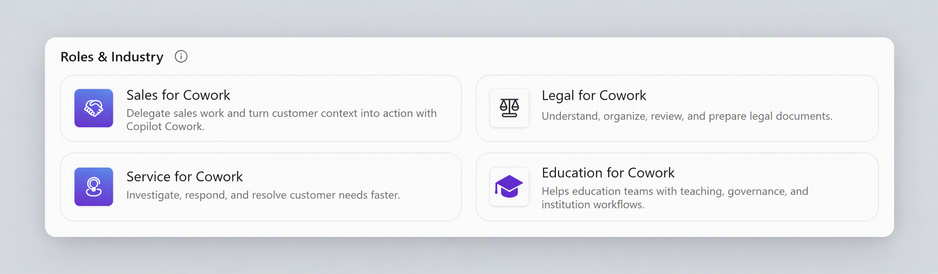
Roles & Industry plugins section in the Copilot app
Sales
Walk into every customer conversation prepared and leave with the next step already moving. The Sales plugin helps you research accounts, prepare for meetings, map the buying group, follow up, and decide which deals to work next. It grounds its work with your email, meetings, and files, with CRM data optional.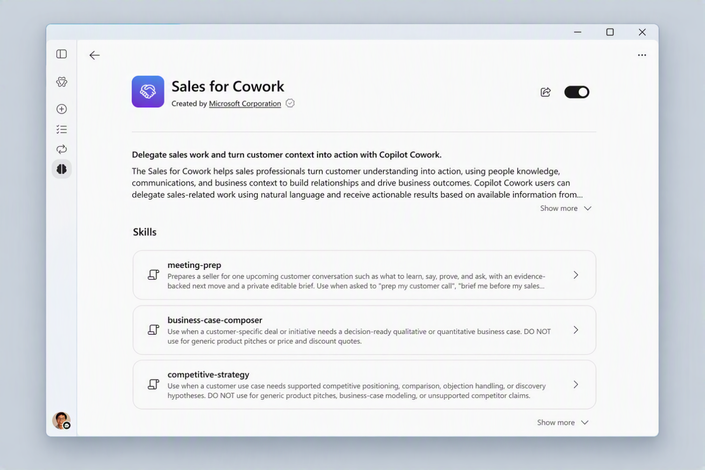
Sales for Cowork description page in the Copilot app
Examples of skills include:
- Post-meeting follow-up: Captures decisions, commitments, owners and dates, and then drafts a customer follow-up for review.
- Pipeline prioritization: Ranks open opportunities by value, urgency, risk, and momentum with reasons for what to work next.
- Deal catch-up: Shows what changed across deals since a stated baseline, separating customer movement from record updates.
- Competitive strategy: Tailors positioning and objection responses to the deal using approved competitor evidence and honest tradeoffs.
- Business case composer: Builds a decision-ready case from the customer’s evidence and flags missing inputs.
- Engagement risk insights: Flags deals or accounts that are going quiet, single-threaded or stalling.
- /post-meeting-follow-up "After today’s Northwind meeting, reconcile the notes with prior commitments. Capture decisions, owners and dates, propose supported record changes, and draft a customer follow-up for my review."
- /pipeline-prioritizer "Review my open opportunities for this week. Weigh value, urgency, risk, momentum, and where I can change the outcome; return a ranked worklist with the evidence, unknowns, and next action for each."
- /deal-catchup "Show what has changed across my active deals since last week. Separate customer movement from CRM housekeeping, source each material change, and propose any record updates for my review."
Service
Spend less time sorting cases and more time solving them. The Service plugin helps service teams triage a queue, prepare for the next customer interaction, research a source-backed answer, draft a reply and turn what they learned into reusable knowledge. It grounds its work with your email, meetings, and files, with CRM data optional.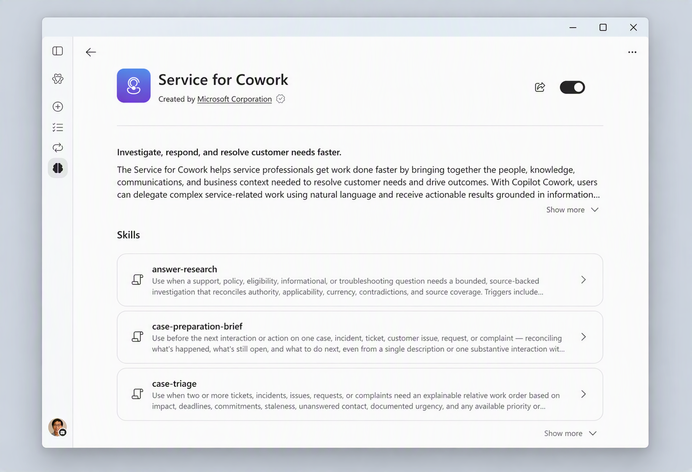
Service for Cowork description page in the Copilot app
Examples of skills include:
- Case triage: Orders open cases by deadlines, customer impact, commitments, and unanswered contact with the rationale visible.
- Case preparation brief: Summarizes one case’s status, chronology, attempted fixes, and open commitments before the next interaction.
- Answer research: Researches a source-backed answer to a support or policy question and flags conflicting or incomplete evidence.
- Draft customer reply: Drafts a customer response from verified facts and applicable policy, leaving it for review before sending.
- Knowledge harvest: Turns a verified resolution or workaround into draft guidance without customer-identifying details.
- /case-triage “Review my open escalations and build a prioritized worklist. Weigh deadlines, customer impact, prior commitments, and unanswered messages; show the evidence and unknowns behind the order.”
- /draft-customer-reply “Use the customer’s question, verified case facts and applicable policy to draft a reply for my review. Separate confirmed outcomes from proposed remedies, cite the policy, and flag anything I must verify before sending.”
- /knowledge-harvest “Use the verified resolution from this case to draft reusable guidance. Separate symptoms, cause, workaround and tested fix, remove customer-identifying details, and check for overlap with existing articles.”
Using Dynamics 365?
Last week, we introduced 30 new CRM skills for Cowork across Dynamics 365 Sales, Customer Service, and Customer Insights.
Education
Give education leaders time back for their highest-priority work. The Education plugin helps leaders and educators move faster on the recurring work that keeps institutions running: assembling accreditation evidence, making learning more accessible, maintaining instructional continuity, identifying patterns in learner feedback, and governing AI responsibly, so more time goes to students and strategy. Read more in the Education blog.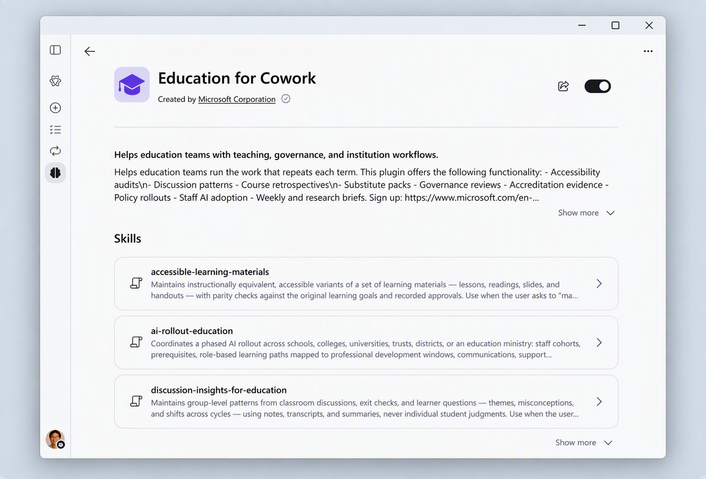
Education for Cowork description page in the Copilot app
Examples of skills include:
- Evidence package for accreditation and review: Maps accreditation or review requirements to evidence and flags thin, stale, or missing coverage.
- Governance review: Reviews an AI tool’s technical, data, security, accessibility, policy, and support evidence before recommending next steps.
- AI rollout for education: Plans phased AI adoption across institutional roles, governance requirements, prerequisites, and the academic calendar.
- Discussion insights: Identifies group-level patterns in de-identified learning discussions, feedback, and questions.
- Accessible learning materials: Audits course and learning materials for accessibility and creates revised versions while preserving learning objectives.
- Instructional continuity: Creates a source-checked continuity package containing plans, schedules, procedures, and materials.
- /evidence-package-for-education “Map our accreditation requirements to the available institutional evidence. Build an evidence index, assess coverage, flag stale or missing support, and produce a prioritized gap list for the review team.”
- /accessible-learning-materials “Review these course materials for accessibility and learner usability. Check structure, reading order, link text, image descriptions, captions, and document navigation; provide a prioritized issue list and draft revisions for review.”
- /instructional-continuity “Build a continuity package for next term’s program. Gather the current curriculum, prior plans, academic-calendar milestones, and institutional guidance; create a readiness checklist, resource inventory, key dates, and first-phase plan. Flag decisions still needed.”
Legal
The Legal plugin brings 20 legal skills to Cowork, built on the same skills also available in Word. Review and redline in Word, then take a matter further in Cowork across agreements, emails, meetings and files. Read the full announcement introducing Microsoft Copilot for legal.
Legal for Cowork description page in the Copilot app
Examples of skills include:
- Review contracts: Checks a contract against the applicable playbook and identifies terms that need attention.
- Summarize redlines: Explains redline changes, their impact, and which party benefits.
- Identify legal obligations: Extracts obligations, key dates, and deadlines across legal documents.
- Compare key terms: Highlights similarities and differences in key terms across documents.
- Check execution readiness: Flags issues to address before a legal document is ready for signature.
- Build case chronology: Organizes key events, dates, and facts from case materials into a chronology.
- /compare-key-terms “Extract and compare key terms across these agreements and create an Excel portfolio tracker, with each result linked to its source. Highlight material differences and anything requiring my review. Once I confirm the material issues, draft a red-flag summary for the deal team.”
- /create-playbook “Build an NDA playbook from these precedents, capturing our standard positions, accepted fallbacks, and rejected positions. Surface any inconsistencies or gaps for my review. Once I approve the proposed positions, update the playbook and draft an approval request for the senior lawyer.”
Don't see a plugin? Your admin may need to make it available first, or you may need to request access.
For the full list of skills in each plugin, see the available plugins for Cowork.
Start easily with the task catalog
Not sure where to begin? The updated task catalog rolling out in Cowork now includes task ideas for Customer Service, Executives, Finance, Marketing, and Sales roles. Each one is a starting point for real work, like prepping for a customer meeting, triaging a case queue, or summarizing close status. Pick a task, fill in the details, and Cowork takes it from there. Pair a catalog task with the matching skills for even better results.Where to find it: Open Cowork and browse the task catalog from “Show more” below the prompt box. The updated task catalog will roll out by the end of October.
Kick tasks off from the apps you already use
Event-driven tasks already let Cowork pick up work when an email or Teams message arrives. Through plugins and Power Platform connectors, Cowork can now watch for a change in the systems your team relies on, like a new case or a deal that moves stages, and start the work when an event occurs.Describe what to watch for and the task you want to start in plain language, and Cowork proposes the automation in a card that shows the event, what Cowork will do, and the permissions it needs. Review it, approve it, and the task runs on its own from then on. You'll find it with your other automations on the Automations page, where you can pause, edit or check its run history.
Try:
- "When a new high-priority case is opened in [ERP], prepare a case brief with the customer's history and draft a first reply for my review."
- "Whenever an opportunity in [CRM] moves to Negotiation, build a one-page deal brief, and flag any open risks."
- "When a new contract lands in our [document system] legal intake folder, review it against our playbook, and send me a summary of the deviations."
Event-driven tasks keep you in control. They run with your permissions and see only what you can see. When a task sends a message or changes a record in another system, Cowork prepares the action and waits for your approval.
Learn more about setting up event-driven tasks. Supported triggers are defined by partners and can be found within the documentation for each plugin or connector.
Get started
Open the Roles & Industry library, add the relevant plugin for your role, and try one of the prompts above or start from a suggested task in the task catalog. Pair it with event-driven triggers from the tools your team already uses to delegate your entire workflow with Cowork. Source:
What’s New in Cowork: Expanded plugins and role-based skills | Microsoft Community Hub
Follow the latest Copilot Cowork updates and discover new ways to delegate your complex work.
 techcommunity.microsoft.com