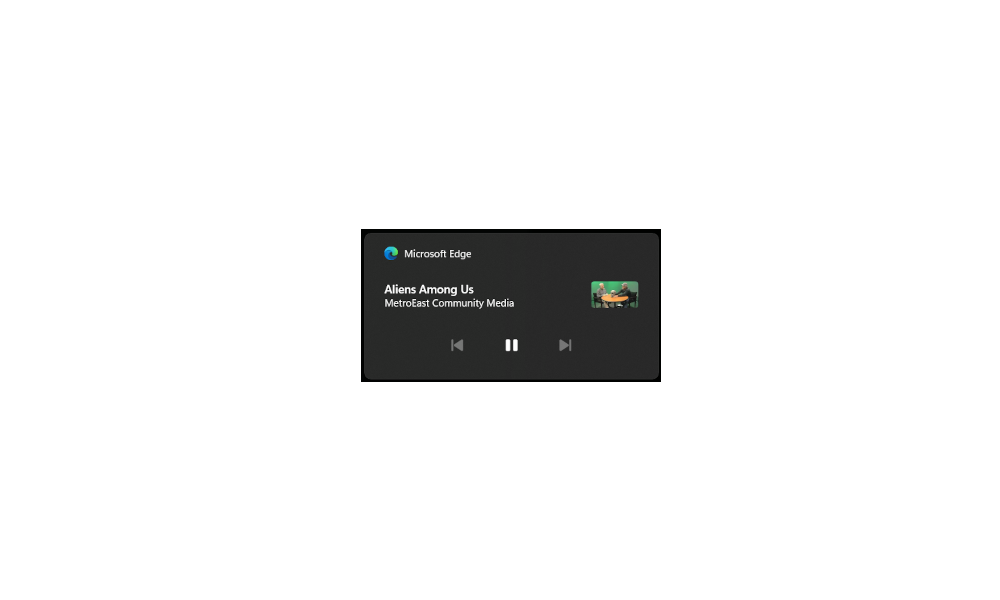
What is the name of this type/location of Notification? Want To Remove it


pacificSurf

Well-known member
Member
Local time
10:00 PM
Posts
168
OS
windwos 11 pro
Im Trying to search tutorials on how to remove it but I don't know what the name of it is, it's not system tray? and I tried turning off notification in the settings already.

Screenshot 2023-12-29 131825.png
 
Windows Build/Version
22h2 / 22621.2861

My Computer My Computer

At a glance

windwos 11 pro
OS
windwos 11 pro
Toast Notifications

If you want to completely disable notifications for an application go into the Windows settings, search notifications, from the list of applications find the target application and toggle off notifications.

If you want to disable notifications from a particular site in Firefox, go to settings > 'security and privacy'. Look for notifications > settings. Add the domain and change it to deny
 
Last edited:

My Computer My Computer

At a glance

Linux Mint
OS
Linux Mint
Computer type
Laptop
Manufacturer/Model
System76 Lemur Pro
Toast Notifications

If you want to completely disable notifications for an application go into the Windows settings, search notifications, from the list of applications find the target application and toggle off notifications.

If you want to disable notifications from a particular site in Firefox, go to settings > 'security and privacy'. Look for notifications > settings. Add the domain and change it to deny
Thanks. So we should be able to turn off these toast notifications? Unfortunately neither one of those settings are reflecting on my end.

Screenshot 2023-12-29 134805.png

Screenshot 2023-12-29 135227.png
 

My Computer My Computer

At a glance

windwos 11 pro
OS
windwos 11 pro
privacy & security in Firefox, not Windows
 

My Computer My Computer

At a glance

Linux Mint
OS
Linux Mint
Computer type
Laptop
Manufacturer/Model
System76 Lemur Pro

My Computer My Computer

At a glance

Windows 11AMD Ryzen 7 5700GMicron Technology DDR4-3200 16GBNVIDIA GeForce RTX 3060
OS
Windows 11
Computer type
PC/Desktop
Manufacturer/Model
HP Pavilion
CPU
AMD Ryzen 7 5700G
Motherboard
Erica6
Memory
Micron Technology DDR4-3200 16GB
Graphics Card(s)
NVIDIA GeForce RTX 3060
Sound Card
Realtek ALC671
Monitor(s) Displays
Samsung SyncMaster U28E590
Screen Resolution
3840 x 2160
Hard Drives
SAMSUNG MZVLQ1T0HALB-000H1
You can also try, in Firefox, type about:config in the address bar. Accept the warning. Type alert and double click the 'useSystemBackend' so it shows false. Then restart Firefox
 

My Computer My Computer

At a glance

Linux Mint
OS
Linux Mint
Computer type
Laptop
Manufacturer/Model
System76 Lemur Pro
privacy & security in Firefox, not Windows
Oh I see. I went into it in firefox, I dont have any website set to allow, rather than denying every website over time that does this, can I just turn if off for firefox toast notifications all together on windows 11? I dont want that toast pop up at all from firefox on windows 11

Firefox is not listed as an app in the Notifications of windows 11 settings
 

My Computer My Computer

At a glance

windwos 11 pro
OS
windwos 11 pro
Thanks, but that only lets you block individual sites to allow or deny. I currently have no sites listed. It Does not seem to have an option to just turn off all push notifications in general universally. I just want to disable this entire Toast notification thing. Im fine with the little system tray popups in the bottom right that fade away after a few seconds. I assume that is different than toast notifications
 

My Computer My Computer

At a glance

windwos 11 pro
OS
windwos 11 pro
Hello @pacificSurf, :alien:

Those would be the media controls from Firefox. You should be able to use option 3 or 4 below to disable them.


My Computers My Computers

  • At a glance

    Windows 11 Pro for WorkstationsIntel i7-8700K 5 GHz64 GB (4x16GB) G.SKILL TridentZ RGB DDR4 3600...ASUS ROG-STRIX-GTX1080TI-O11G-GAMING (11GB GD...
    OS
    Windows 11 Pro for Workstations
    Computer type
    PC/Desktop
    Manufacturer/Model
    Custom self build
    CPU
    Intel i7-8700K 5 GHz
    Motherboard
    ASUS ROG Maximus XI Formula Z390
    Memory
    64 GB (4x16GB) G.SKILL TridentZ RGB DDR4 3600 MHz (F4-3600C18D-32GTZR)
    Graphics Card(s)
    ASUS ROG-STRIX-GTX1080TI-O11G-GAMING (11GB GDDR5X)
    Sound Card
    Integrated Digital Audio (S/PDIF)
    Monitor(s) Displays
    2 x Samsung Odyssey G75 27"
    Screen Resolution
    2560x1440
    Hard Drives
    1TB Samsung 990 PRO M.2,
    4TB Samsung 990 PRO M.2,
    TerraMaster F8 SSD Plus NAS
    PSU
    Seasonic Prime Titanium 850W
    Case
    Thermaltake Core P3 wall mounted
    Cooling
    Corsair Hydro H115i
    Keyboard
    Amazon Basics Wired Full Keyboard MD005
    Mouse
    Logitech MX Master 4
    Internet Speed
    2 Gbps Download and 100 Mbps Upload
    Browser
    Chrome and Edge
    Antivirus
    Microsoft Defender
    Other Info
    Logitech Z625 speaker system,
    Logitech BRIO 4K Pro webcam,
    HP Color LaserJet Pro MFP M477fdn,
    CyberPower CP1500PFCLCD
    Galaxy S23 Plus phone
  • At a glance

    Windows 11 ProSnapdragon X Elite (12 core) 3.42 GHz16 GB LPDDR5x-7467 MHz
    Operating System
    Windows 11 Pro
    Computer type
    Laptop
    Manufacturer/Model
    Surface Laptop 7 Copilot+ PC
    CPU
    Snapdragon X Elite (12 core) 3.42 GHz
    Memory
    16 GB LPDDR5x-7467 MHz
    Monitor(s) Displays
    15" HDR
    Screen Resolution
    2496 x 1664
    Hard Drives
    1 TB SSD
    Internet Speed
    Wi-Fi 7 and Bluetooth 5.4
    Browser
    Chrome and Edge
    Antivirus
    Microsoft Defender
Hello @pacificSurf, :alien:

Those would be the media controls from Firefox. You should be able to use option 3 or 4 below to disable them.

Ah okay. Thanks that worked! "Media Bar" seems to be the official name of the pop up/bar.
I also get these media bar popups for some other apps too. So I searched to see if there is a way to turn it off Universally from a Windows 11 level, it appears that is NOT possible according to microsoft

Firefox was the main problem one anyhow, so thats eliminated now.


So Toast Notifications are different, Im assuming this is a toast notification:

Screenshot 2023-12-29 142100.png
 
Last edited:

My Computer My Computer

At a glance

windwos 11 pro
OS
windwos 11 pro
Correct, that would be a notification banner at the bottom right corner.
 

My Computers My Computers

  • At a glance

    Windows 11 Pro for WorkstationsIntel i7-8700K 5 GHz64 GB (4x16GB) G.SKILL TridentZ RGB DDR4 3600...ASUS ROG-STRIX-GTX1080TI-O11G-GAMING (11GB GD...
    OS
    Windows 11 Pro for Workstations
    Computer type
    PC/Desktop
    Manufacturer/Model
    Custom self build
    CPU
    Intel i7-8700K 5 GHz
    Motherboard
    ASUS ROG Maximus XI Formula Z390
    Memory
    64 GB (4x16GB) G.SKILL TridentZ RGB DDR4 3600 MHz (F4-3600C18D-32GTZR)
    Graphics Card(s)
    ASUS ROG-STRIX-GTX1080TI-O11G-GAMING (11GB GDDR5X)
    Sound Card
    Integrated Digital Audio (S/PDIF)
    Monitor(s) Displays
    2 x Samsung Odyssey G75 27"
    Screen Resolution
    2560x1440
    Hard Drives
    1TB Samsung 990 PRO M.2,
    4TB Samsung 990 PRO M.2,
    TerraMaster F8 SSD Plus NAS
    PSU
    Seasonic Prime Titanium 850W
    Case
    Thermaltake Core P3 wall mounted
    Cooling
    Corsair Hydro H115i
    Keyboard
    Amazon Basics Wired Full Keyboard MD005
    Mouse
    Logitech MX Master 4
    Internet Speed
    2 Gbps Download and 100 Mbps Upload
    Browser
    Chrome and Edge
    Antivirus
    Microsoft Defender
    Other Info
    Logitech Z625 speaker system,
    Logitech BRIO 4K Pro webcam,
    HP Color LaserJet Pro MFP M477fdn,
    CyberPower CP1500PFCLCD
    Galaxy S23 Plus phone
  • At a glance

    Windows 11 ProSnapdragon X Elite (12 core) 3.42 GHz16 GB LPDDR5x-7467 MHz
    Operating System
    Windows 11 Pro
    Computer type
    Laptop
    Manufacturer/Model
    Surface Laptop 7 Copilot+ PC
    CPU
    Snapdragon X Elite (12 core) 3.42 GHz
    Memory
    16 GB LPDDR5x-7467 MHz
    Monitor(s) Displays
    15" HDR
    Screen Resolution
    2496 x 1664
    Hard Drives
    1 TB SSD
    Internet Speed
    Wi-Fi 7 and Bluetooth 5.4
    Browser
    Chrome and Edge
    Antivirus
    Microsoft Defender

Latest Support Threads

Back
Top Bottom