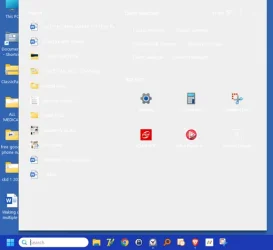
when I click the search box at bottom of screen everything is white


lnjr

Well-known member
Member
Local time
2:04 PM
Posts
49
OS
windows 11 Pro
Everything was fine yesterday. This morning when I go to the search box at the bottom left of my screen and type something in all the words are now white on the screen that comes up. I have not changed anything since last night and I can't figure out how to be able to see what the search shows since I can't read it. How can I fix this?
I am running Windows 11Pro Version 23H2 (OS Build 22631.7276). I have attached what I get now. 1784905732849.webp
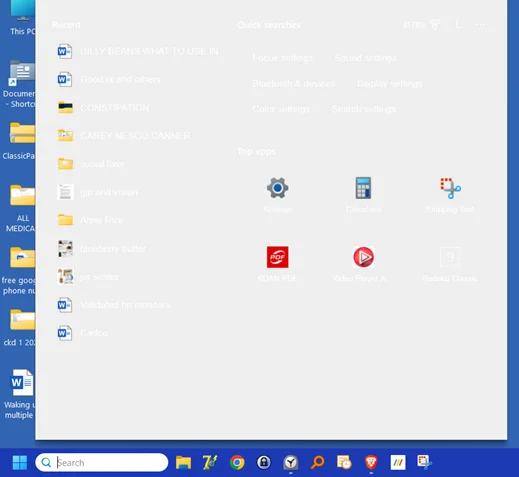
1784905732849.webp
Thank You
 

My Computers My Computers

  • At a glance

    windows 11 Pro11th Gen Intel Core i7-11390H (4 Cores, 8 Thr...32GB dual channel (DDR4)Intel® Iris® Xe
    OS
    windows 11 Pro
    Computer type
    PC/Desktop
    Manufacturer/Model
    geekom mini IT11
    CPU
    11th Gen Intel Core i7-11390H (4 Cores, 8 Threads, 12M
    Memory
    32GB dual channel (DDR4)
    Graphics Card(s)
    Intel® Iris® Xe
    Monitor(s) Displays
    HP S2031
    Hard Drives
    1TB SSD
  • At a glance

    Windows 11 ProIntel Core i7-13620HDDR4: SO-DIMM 32GB
    Operating System
    Windows 11 Pro
    Computer type
    PC/Desktop
    Manufacturer/Model
    Geekom Mini PC XT13 Pro
    CPU
    Intel Core i7-13620H
    Memory
    DDR4: SO-DIMM 32GB
    Monitor(s) Displays
    HPS2031
    Hard Drives
    M.2 1TB

My Computer My Computer

At a glance

Windows 11AMD Ryzen 7 5700GMicron Technology DDR4-3200 16GBNVIDIA GeForce RTX 3060
OS
Windows 11
Computer type
PC/Desktop
Manufacturer/Model
HP Pavilion
CPU
AMD Ryzen 7 5700G
Motherboard
Erica6
Memory
Micron Technology DDR4-3200 16GB
Graphics Card(s)
NVIDIA GeForce RTX 3060
Sound Card
Realtek ALC671
Monitor(s) Displays
Samsung SyncMaster U28E590
Screen Resolution
3840 x 2160
Hard Drives
SAMSUNG MZVLQ1T0HALB-000H1
Thanks!

I tried running Power Shell from admin and nothing happened. This is all I got
Windows PowerShell
Copyright (C) Microsoft Corporation. All rights reserved.

Install the latest PowerShell for new features and improvements! Windows PowerShell update message FAQ - PowerShell

PS C:\windows\system32> Get-AppxPackage Microsoft.Windows.Search | Reset-AppxPackage
PS C:\windows\system32>

So I typed exit and closed the screen.


I clicked on the next thing suggested - download the batch file and it took me to this screen
1784912069419.webp
If I click on either of those it simply gives me the option to copy file name

I thought that before I go any further I should wait to see what I am missing.

I did click that last thing listed and that takes me to a page to

Reset Windows Search PowerShell script - but that states it is for windows 10?​


My Computers My Computers

  • At a glance

    windows 11 Pro11th Gen Intel Core i7-11390H (4 Cores, 8 Thr...32GB dual channel (DDR4)Intel® Iris® Xe
    OS
    windows 11 Pro
    Computer type
    PC/Desktop
    Manufacturer/Model
    geekom mini IT11
    CPU
    11th Gen Intel Core i7-11390H (4 Cores, 8 Threads, 12M
    Memory
    32GB dual channel (DDR4)
    Graphics Card(s)
    Intel® Iris® Xe
    Monitor(s) Displays
    HP S2031
    Hard Drives
    1TB SSD
  • At a glance

    Windows 11 ProIntel Core i7-13620HDDR4: SO-DIMM 32GB
    Operating System
    Windows 11 Pro
    Computer type
    PC/Desktop
    Manufacturer/Model
    Geekom Mini PC XT13 Pro
    CPU
    Intel Core i7-13620H
    Memory
    DDR4: SO-DIMM 32GB
    Monitor(s) Displays
    HPS2031
    Hard Drives
    M.2 1TB
Back
Top Bottom