Why does Windows 11 Pro get stuck on logo if Intel Virtualization technology is enabled?


usualjuptier

New member
Local time
4:17 AM
Posts
4
OS
Windows 11
I recently got a new PC.

Hardware:

  • GIGABYTE B860 M-D (F8 latest bios update)
  • ULTRA 7 265KF
  • 32G DDR5
  • M.2 2 T.B
  • RTX 5060 8G
Current OS:

  • Windows 11 PRO 25H2 (26200.7840)
It came with pre-installed Windows 10 22H2. On day one, I downloaded Windows 11 Pro ISO and used Rufus to put it on USB flash drive.

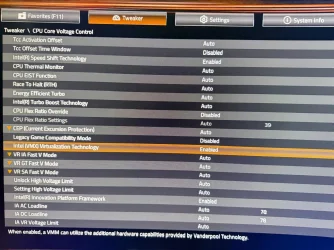
Then I tried to boot from USB to install Windows 11 Pro and it installed well until the first restart request after installing the Windows files part. When the installer asks for a restart, Windows stuck on the logo loading screen. I discovered Intel Virtualization Technology BIOS when I disabled it. I can continue the installation and pc not stuck anymore.

But, I’m working on a field that requires running virtual machines, so I enabled Hyper-V from the features. It cannot install fully until I enable Intel Virtualization Technology in the BIOS, and as you know, if it is enabled, Windows will not boot. So I searched online and found that I could disable the option for Memory Integrity in Windows Security, and when I tried it, the problem was solved, but not for Hyper-V. It is solved for normal Windows 11 and Intel Virtualization Technology is enabled. Now I can boot Windows 11 PRO and VMX enabled, but when I try to enable Hyper-V, the same issue came up: Windows stuck on the logo when booting.

I also searched online again and found this command bcdedit /set hypervisorlaunchtype auto. I booted on repair mode and wrote it on CMD. Windows continued normally, but I cannot run VM's on Hyper V. it says Virtual Machine "Name" could not be started because the hypervisor is not running.

I can run other programs for virtual machines normally, but I need to use Hyper-V. Anyone could face this issue or have a solution?

ok so now we have the following

Windows 11 PRO + Memory Integrity ON + VMX enabled = windows stuck on logo

Windows 11 PRO + Memory Integrity OFF + VMX enabled = WIndows boot fine ( can run vmware, virtualbox,etc)

Windows 11 PRO + Memory Integrity ON + VMX disabled= windows boot fine

Windows 11 PRO + Memory Integrity ON + VMX enabled + Hyper v = windows stuck on logo

Windows 11 PRO + Memory Integrity OFF + VMX enabled + Hyper v = windows stuck on logo

Windows 11 PRO + Memory Integrity OFF + VMX OFF+ Hyper v = windows run but hyper v not run vm's bec vmx is disabled
 
Windows Build/Version
26200.7840

Attachments

  • WhatsApp Image 2026-03-09 at 20.05.48.webp
    WhatsApp Image 2026-03-09 at 20.05.48.webp
    146.9 KB · Views: 1

My Computer

System One

  • OS
    Windows 11
    Computer type
    PC/Desktop
Is VT-d (Directed I/O) - set to Enabled? That's also needed to handle memory mapping for VMs (works hand in hand with VMX). If it's set to Auto - that can lead to conflicts/issues.
 

My Computer

System One

  • OS
    WinDOS 25H2
    Computer type
    Laptop
    CPU
    Intel & AMD
    Memory
    SO-DIMM SK Hynix 15.8 GB Dual-Channel DDR4-2666 (2 x 8 GB) 1329MHz (19-19-19-43)
    Graphics Card(s)
    nVidia RTX 2060 6GB Mobile GPU (TU106M)
    Sound Card
    Onbord Realtek ALC1220
    Screen Resolution
    1920 x 1080
    Hard Drives
    1x Samsung PM981 NVMe PCIe M.2 512GB / 1x Seagate Expansion ST1000LM035 1TB
Is VT-d (Directed I/O) - set to Enabled? That's also needed to handle memory mapping for VMs (works hand in hand with VMX). If it's set to Auto - that can lead to conflicts/issues.
Thanks for the reply. I tried both enabling and disabling it, but it had no effect on the issue.
 

My Computer

System One

  • OS
    Windows 11
    Computer type
    PC/Desktop
Probably has to do with VIrtualization Based Security being enabled in the OS, you gotta disable that first, to disable Virtualization later... I never saw a crash like that before, but could happen in some systems...
 

My Computers

System One System Two

  • OS
    Windows 11 Pro 25H2
    Computer type
    PC/Desktop
    Manufacturer/Model
    Built PC
    CPU
    AMD Ryzen 5 5600G @ 3.9/4.4Ghz
    Motherboard
    MSI B550M-PRO-WiFi Ver. 1.4
    Memory
    2 x 16 GB DDR4 Kingston Fury Beast 3200 Mhz
    Graphics Card(s)
    AMD Radeon RX 6600 XT MSI Mech 2X OC Edition 8 GB
    Sound Card
    Realtek High Definition Audio (Integrated)
    Monitor(s) Displays
    Samsung C50Rx 27" LED / HP S2031 20" LCD
    Screen Resolution
    1920 x 1080 px / 1600 x 900 px
    Hard Drives
    WD Blue SN570 NVME M.2 SSD [1 TB] -- External Drives: - WD Scorpion Blue 250 GB 5400 RPM (Data Backup) - Hitachi 500 GB 5400 RPM (Software / ISOs Backup) - Toshiba MQ01ABD100 1 TB 5400 RPM (OS Images) - HGST TravelStar 7K1000 1 TB, 7200 RPM USB 3.0 - ADATA SU800 2TB SSD USB 3.0
    PSU
    Corsair RM750e 750W Fully Modular
    Case
    Naceb Hydra NA-1602
    Cooling
    Naceb Orpheus x 3 (Front) + Naceb Cepheus 1200 RPM Max (Rear) + ThemalRight Assasin X 90 SE (CPU)
    Keyboard
    Logitech MK470 Wireless
    Mouse
    Logitech MK470 Wireless
    Internet Speed
    120 MB Symetrical
    Browser
    Firefox / Brave / Edge
    Antivirus
    Windows Defender
    Other Info
    - VMs: WMware Player - Windows 8.1 Pro x64 / Windows 11 Pro
    - Wacom Intuos Pro Small Tablet PTH-460
  • Operating System
    Windows 11 Pro 25H2
    Computer type
    Laptop
    Manufacturer/Model
    HP Pavilion 15-eh3000la (80M53LA)
    CPU
    AMD Ryzen 7 7730U @ 2.0/4.5 Ghz
    Motherboard
    HP 8BC7
    Memory
    2 x 16 GB Kingston Fury Impact DDR4 3200 Mhz
    Graphics card(s)
    Radeon (tm) Graphics Vega 8 (512 MB)
    Sound Card
    Realtek High Definition Audio (Integrated)
    Monitor(s) Displays
    AU Optronics
    Screen Resolution
    1920 x 1080 px (125% size)
    Hard Drives
    WD Blue SN570 1TB NVME M.2 Drive
    PSU
    45 Watt Charger
    Cooling
    Laptop Cooling Pad
    Keyboard
    Free Wolf Foldable Portable Keyboard
    Mouse
    Free Wolf Wireless Mouse
    Internet Speed
    120 MB Symetrical
    Browser
    Firefox / Brave / Edge
    Antivirus
    Windows Defender
    Other Info
    - 41mWh battery.
    - Wacom Intuos Pro Small Tablet PTH-460

My Computers

System One System Two

  • OS
    Windows 11 Pro 25H2 Build 26200.8524
    Computer type
    PC/Desktop
    Manufacturer/Model
    Sin-built 2013
    CPU
    Intel(R) Core(TM) i7-4770K CPU @ 3.50GHz
    Motherboard
    ASUS ROG Maximus VI Formula
    Memory
    32.0 GB of I forget and the box is in storage.
    Graphics Card(s)
    Gigabyte nVidia GeForce GTX 1660 Super OC 6GB
    Sound Card
    Onboard thingy
    Monitor(s) Displays
    5 x LG 25MS500-B - 1 x 24MK430H-B - 1 x Wacom Pro 22" Touch Screen Tablet
    Screen Resolution
    All over the place
    Hard Drives
    Too many to list.
    OS on Samsung 1TB 870 QVO SATA
    PSU
    Silverstone 1500
    Case
    NZXT Phantom 820 Full-Tower Case
    Cooling
    Noctua NH-D15 Elite Class Dual Tower CPU Cooler / 6 x EziDIY 120mm / 2 x Corsair 140mm somethings / 1 x 140mm Thermaltake something / 2 x 200mm Corsair.
    Keyboard
    Corsair K95 / Logitech diNovo Edge Wireless
    Mouse
    Logitech: G402 / G502 / Mx Masters / Mx Air Cordless
    Internet Speed
    2000/500Mbps
    Browser
    All sorts
    Antivirus
    Kaspersky Premium
    Other Info
    ㅤㅤㅤㅤㅤㅤㅤㅤㅤㅤㅤㅤㅤㅤㅤㅤㅤㅤㅤㅤㅤㅤㅤㅤㅤㅤㅤㅤㅤㅤㅤㅤㅤㅤㅤㅤㅤㅤㅤㅤ⠀⠀⠀⠀⠀⠀⠀⠀⠀⠀
    TP-Link BE9300 WiFi 7 Bluetooth 5.4 (Archer TBE550E)
    TP-Link TX201 V1 2.5GB Lan

    Grandstream HT812 - VoIP
    ASUS DSL-AX82U - Mesh
    ASUS RT-AC68U - Mesh
    ASUS RT-BE88U Router

    Brother MFC-L2880DW Printer

    I’m on a horse.
  • Operating System
    Windows 11 Pro 25H2 Build 26200.8524
    Computer type
    Laptop
    Manufacturer/Model
    LENOVO Yoga 7 14IRL8 - 7i EVO OLED 14" Touchscreen i5 12 Core 16GB/512GB
    CPU
    Intel Core 12th Gen i5-1240P Processor (1.7 - 4.4GHz)
    Memory
    16GB LPDDR5 RAM
    Graphics card(s)
    Intel Iris Xe Graphics Processor
    Sound Card
    Optimized with Dolby Atmos®
    Screen Resolution
    QHD 2880 x 1800 OLED
    Hard Drives
    M.2 512GB
    Antivirus
    Defender / Malwarebytes
    Other Info
    …still on a horse.
After 1 week of trying to fix this issue and contacting everyone I could reach, I will switch to a MSI motherboard.

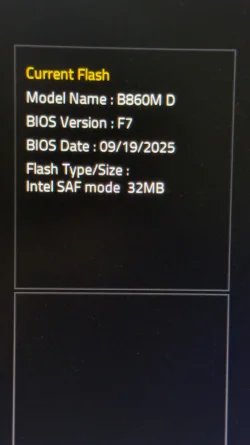
I tried different versions of BIOS ( F7, F8, F9) and all have the same problem. Also, the issue is not only related to Windows 11. I tried to install Windows 10 again, and it is not facing the issue while setting up like Windows 11, but it has the same issue when enabling Hyper-V.

also contacted Gigabyte and got a big useless reply.
1773159457185.webp
1773159487048.webp
1773159507356.webp
 

My Computer

System One

  • OS
    Windows 11
    Computer type
    PC/Desktop

Latest Support Threads

Back
Top Bottom