Why Refresh Rate Automatically Changing


DEL2023

Well-known member
Local time
7:24 AM
Posts
16
OS
Windows 11
ASUS TUF A15, Windows 1, version 23H2. OS keeps changing refresh rate from 60 hz to 144 hz. When this occurs, the lower 1/3 of the task bar becomes black & white horizontal line, maybe 4 to six lines.
Right clicking on desktop I can select Display Settings > Advanced Display and change the refresh rate back to 60 hz. This will hold for ten to thirty minutes at which time the refresh rate changes back to 144 hz.
There is no Dynamic Refresh Rate (DRR) feature / option listed to allow me to disable any DRR function.

Is there a known 'fix' to clamp down the display refresh rate to 60 hz ?

Is there something in the Registry that can resolve this ?

Thanks in advance,
DEL
 

My Computers My Computers

  • At a glance

    Windows 11Ryzen 7Radeon Graphics
    OS
    Windows 11
    Computer type
    Laptop
    Manufacturer/Model
    ASUS ROG (A15) TUF 506Q
    CPU
    Ryzen 7
    Graphics Card(s)
    Radeon Graphics
    Hard Drives
    SSD
  • At a glance

    Windows 11 ProAMD Ryzen 5 5600GT16GBRadeon
    Operating System
    Windows 11 Pro
    Computer type
    PC/Desktop
    Manufacturer/Model
    Home Built
    CPU
    AMD Ryzen 5 5600GT
    Motherboard
    ASUS B550M-A Prime
    Memory
    16GB
    Graphics card(s)
    Radeon
    Sound Card
    Realtek (onboard)
    Monitor(s) Displays
    Samsung
    Hard Drives
    Samsung 1TB SSD
    PSU
    650 Watts
    Case
    Antec
    Cooling
    Fans
    Keyboard
    IBM
    Mouse
    Trackball
    Internet Speed
    good enough
    Browser
    Chrome & Mozilla
    Antivirus
    Bitdefender
NVIDIA Control Panel ?
Intel® Graphics Command Center ?
MyASUS Software ?
 
Last edited:

My Computer My Computer

At a glance

Microsoft Windows 11 HomeIntel Core i5-13490F2 x 16 Patriot Memory (PDP Systems) PSD516G56...GIGABYTE GeForce RTX 4070 WINDFORCE OC 12G (G...
OS
Microsoft Windows 11 Home
Computer type
PC/Desktop
Manufacturer/Model
MSI MS-7D98
CPU
Intel Core i5-13490F
Motherboard
MSI B760 GAMING PLUS WIFI
Memory
2 x 16 Patriot Memory (PDP Systems) PSD516G560081 6400MT (32-37-37-74); 1.35V)
Graphics Card(s)
GIGABYTE GeForce RTX 4070 WINDFORCE OC 12G (GV-N4070WF3OC-12GD)
Sound Card
Bluetooth Аудио
Monitor(s) Displays
INNOCN 15K1F
Screen Resolution
1920 x 1080
Hard Drives
WD_BLACK SN770 250GB
KINGSTON SNV2S1000G (ELFK0S.6)
PSU
Thermaltake Toughpower GF3 1000W
Case
CG560 - DeepCool
Cooling
ID-COOLING SE-224-XTS / 2 x 140Mm Fan - rear and top; 3 x 120Mm - front
Keyboard
Corsair K70 RGB TKL
Mouse
Corsair KATAR PRO XT
Internet Speed
100 Mbps
Browser
Firefox
Antivirus
Microsoft Defender Antivirus
Other Info
https://www.userbenchmark.com/UserRun/66553205

My Computers My Computers

  • At a glance

    Windows 11 Pro 25H2 26200.9168i9-10900 10 core 20 threads32 gbnone-Intel UHD Graphics 630
    OS
    Windows 11 Pro 25H2 26200.9168
    Computer type
    PC/Desktop
    Manufacturer/Model
    Dell Optiplex 7080
    CPU
    i9-10900 10 core 20 threads
    Motherboard
    DELL 0J37VM
    Memory
    32 gb
    Graphics Card(s)
    none-Intel UHD Graphics 630
    Sound Card
    Integrated Realtek
    Monitor(s) Displays
    Benq 27
    Screen Resolution
    2560x1440
    Hard Drives
    2x1tb Solidigm m.2 nvme /External drives 512gb Samsung m.2 sata+2tb Kingston m2.nvme
    PSU
    500w
    Case
    MT
    Cooling
    Dell Premium
    Keyboard
    Logitech wired
    Mouse
    Logitech wireless
    Internet Speed
    so slow I'm too embarrassed to tell
    Browser
    #1 Edge #2 Firefox
    Antivirus
    Defender+MWB Premium
  • At a glance

    Windows 11 Pro 24H2 26200.9168AMD Ryzen 7 6800U32 gbintegrated
    Operating System
    Windows 11 Pro 24H2 26200.9168
    Computer type
    PC/Desktop
    Manufacturer/Model
    Beelink Mini PC SER5
    CPU
    AMD Ryzen 7 6800U
    Memory
    32 gb
    Graphics card(s)
    integrated
    Sound Card
    integrated
    Monitor(s) Displays
    Benq 27
    Screen Resolution
    2560x1440
    Hard Drives
    1TB Crucial nvme
    Keyboard
    Logitech wired
    Mouse
    Logitech wireless
    Internet Speed
    still too embarrassed to tell
    Browser
    Firefox
    Antivirus
    Defender
  • System 3 is non compliant Dell 9020 i7-4770/24gb ram Win11 PRO 26200.9168
Why do you need 60 Hz?
Let it be 144 Hz for the desktop.
Set your video card driver to 58 or 60 FPS.
 

My Computer My Computer

At a glance

Microsoft Windows 11 HomeIntel Core i5-13490F2 x 16 Patriot Memory (PDP Systems) PSD516G56...GIGABYTE GeForce RTX 4070 WINDFORCE OC 12G (G...
OS
Microsoft Windows 11 Home
Computer type
PC/Desktop
Manufacturer/Model
MSI MS-7D98
CPU
Intel Core i5-13490F
Motherboard
MSI B760 GAMING PLUS WIFI
Memory
2 x 16 Patriot Memory (PDP Systems) PSD516G560081 6400MT (32-37-37-74); 1.35V)
Graphics Card(s)
GIGABYTE GeForce RTX 4070 WINDFORCE OC 12G (GV-N4070WF3OC-12GD)
Sound Card
Bluetooth Аудио
Monitor(s) Displays
INNOCN 15K1F
Screen Resolution
1920 x 1080
Hard Drives
WD_BLACK SN770 250GB
KINGSTON SNV2S1000G (ELFK0S.6)
PSU
Thermaltake Toughpower GF3 1000W
Case
CG560 - DeepCool
Cooling
ID-COOLING SE-224-XTS / 2 x 140Mm Fan - rear and top; 3 x 120Mm - front
Keyboard
Corsair K70 RGB TKL
Mouse
Corsair KATAR PRO XT
Internet Speed
100 Mbps
Browser
Firefox
Antivirus
Microsoft Defender Antivirus
Other Info
https://www.userbenchmark.com/UserRun/66553205
Why do you need 60 Hz?
Let it be 144 Hz for the desktop.
Set your video card driver to 58 or 60 FPS.
When the PC changes to 144 hz, the lower 1/3 of the task bar becomes a series of black & white horizontal line, maybe 4 to six lines. Sometimes the horizontal lines will also occur at the top 1/2" of the screen as well as the bottom of the screen.

Besides, the 60 hz refresh rate works just fine for my needs.
 

My Computers My Computers

  • At a glance

    Windows 11Ryzen 7Radeon Graphics
    OS
    Windows 11
    Computer type
    Laptop
    Manufacturer/Model
    ASUS ROG (A15) TUF 506Q
    CPU
    Ryzen 7
    Graphics Card(s)
    Radeon Graphics
    Hard Drives
    SSD
  • At a glance

    Windows 11 ProAMD Ryzen 5 5600GT16GBRadeon
    Operating System
    Windows 11 Pro
    Computer type
    PC/Desktop
    Manufacturer/Model
    Home Built
    CPU
    AMD Ryzen 5 5600GT
    Motherboard
    ASUS B550M-A Prime
    Memory
    16GB
    Graphics card(s)
    Radeon
    Sound Card
    Realtek (onboard)
    Monitor(s) Displays
    Samsung
    Hard Drives
    Samsung 1TB SSD
    PSU
    650 Watts
    Case
    Antec
    Cooling
    Fans
    Keyboard
    IBM
    Mouse
    Trackball
    Internet Speed
    good enough
    Browser
    Chrome & Mozilla
    Antivirus
    Bitdefender
Update Display Drivers: Outdated or corrupted graphics drivers can cause display anomalies. Visit your laptop manufacturer’s website and download the latest display driver updates for your specific model. While there check also for newer chipset, BIOS/UEFI firmware (very important), network, sound, USB3 and other drivers, comparing to the ones presently installed in Device Manager.
 

My Computer My Computer

At a glance

Windows 11 Homei7-13700k(2 x 16 GB) 32 GBNVIDIA FOUNDERS EDITION GEFORCE RTX 4060-Ti
OS
Windows 11 Home
Computer type
PC/Desktop
Manufacturer/Model
DELL XPS 8960
CPU
i7-13700k
Motherboard
GENUINE DELL XPS 8960 DESKTOP MOTHERBOARD INTEL SOCKET LGA1700 XD433
Memory
(2 x 16 GB) 32 GB
Graphics Card(s)
NVIDIA FOUNDERS EDITION GEFORCE RTX 4060-Ti
Sound Card
ON BOARD 7.1 CHANNEL AUDIO
Monitor(s) Displays
DELL 27 MONITOR - P2722H
Screen Resolution
FULL HD (1080p) 1920 x 1080 at 60 Hz
Hard Drives
512 GB, M.2, PCIe NVMe, SSD (boot) + 1 TB, 7200 RPM, SATA, HDD (storage)
PSU
750W
Case
DELL
Cooling
DELL PERFORMANCE CPU LIQUID COOLING
Keyboard
AZIO
Mouse
LOGITECH M650
Internet Speed
INTERNET SPEED 100 MBPS
Browser
MICROSOFT EDGE AND GOOGLE CHROME
Antivirus
NORTON 360
Other Info
ALTEC LANSING SPEAKERS
Maybe you have a hardware problem.
 

My Computer My Computer

At a glance

Microsoft Windows 11 HomeIntel Core i5-13490F2 x 16 Patriot Memory (PDP Systems) PSD516G56...GIGABYTE GeForce RTX 4070 WINDFORCE OC 12G (G...
OS
Microsoft Windows 11 Home
Computer type
PC/Desktop
Manufacturer/Model
MSI MS-7D98
CPU
Intel Core i5-13490F
Motherboard
MSI B760 GAMING PLUS WIFI
Memory
2 x 16 Patriot Memory (PDP Systems) PSD516G560081 6400MT (32-37-37-74); 1.35V)
Graphics Card(s)
GIGABYTE GeForce RTX 4070 WINDFORCE OC 12G (GV-N4070WF3OC-12GD)
Sound Card
Bluetooth Аудио
Monitor(s) Displays
INNOCN 15K1F
Screen Resolution
1920 x 1080
Hard Drives
WD_BLACK SN770 250GB
KINGSTON SNV2S1000G (ELFK0S.6)
PSU
Thermaltake Toughpower GF3 1000W
Case
CG560 - DeepCool
Cooling
ID-COOLING SE-224-XTS / 2 x 140Mm Fan - rear and top; 3 x 120Mm - front
Keyboard
Corsair K70 RGB TKL
Mouse
Corsair KATAR PRO XT
Internet Speed
100 Mbps
Browser
Firefox
Antivirus
Microsoft Defender Antivirus
Other Info
https://www.userbenchmark.com/UserRun/66553205
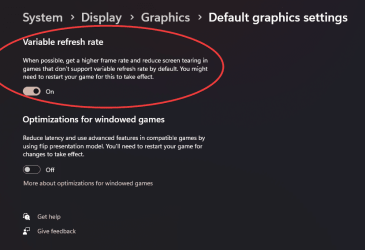
Check this setting in the Graphics section of Windows Settings. See screenshot attached.
 

Attachments

  • Win 11 Default graphics settings.png
    Win 11 Default graphics settings.png
    45.8 KB · Views: 15

My Computer My Computer

At a glance

Windows 11 Pro 26200.9278Ryzen 5 5600G24GB
OS
Windows 11 Pro 26200.9278
Computer type
PC/Desktop
Manufacturer/Model
Home Built
CPU
Ryzen 5 5600G
Motherboard
ASUS X470 Prime Pro
Memory
24GB
Monitor(s) Displays
Alienware 2518HF
Screen Resolution
1920 x 1080
Hard Drives
Boot: NVME WDC WDS500G; ASUS M.2 Riser card with 3 additional NVME drives
Various Internal SDD (Samsung and WDC) and HDD drives mostly Western Digital
PSU
Seasonic Focus Gold 650W
Case
Corsair 200R
Cooling
Noctua PWM fans x 3
Keyboard
Corsair K60 SE Pro
Mouse
Corsair Dark Core RGB Pro SE
Internet Speed
500/500
Browser
MS Edge
Antivirus
Malwarebytes Premium
@DEL2023 mine has been showing the same problem. Have you fixed it yet?
 

My Computer My Computer

At a glance

windows 11
OS
windows 11
Computer type
Laptop
Manufacturer/Model
asus
@DEL2023 mine has been showing the same problem. Have you fixed it yet?
Slither, I have not. At this point it appears to me the issue is hardware related. If I disconnect the AC power supply so the motherboard operating voltage is whatever the internal battery provides, the issue immediately stops. Plug the power supply in and the issue returns. If I connect an external monitor via the HDMI port, the issue is not visible on the external monitor. I checked ASUS for a newer video and display driver download, but this didn't seem to have an impact. Unfortunately, I don't have a DisplayPort-to-VGA/DVI or USB-to-VGA/DVI adapter to further isolate if the issue is repeatable at these levels.

I'd be interested to learn if the issue is repeatable with a DP or USB port adapter.

If you find a fix, I'd like to hear what you found.
 

My Computers My Computers

  • At a glance

    Windows 11Ryzen 7Radeon Graphics
    OS
    Windows 11
    Computer type
    Laptop
    Manufacturer/Model
    ASUS ROG (A15) TUF 506Q
    CPU
    Ryzen 7
    Graphics Card(s)
    Radeon Graphics
    Hard Drives
    SSD
  • At a glance

    Windows 11 ProAMD Ryzen 5 5600GT16GBRadeon
    Operating System
    Windows 11 Pro
    Computer type
    PC/Desktop
    Manufacturer/Model
    Home Built
    CPU
    AMD Ryzen 5 5600GT
    Motherboard
    ASUS B550M-A Prime
    Memory
    16GB
    Graphics card(s)
    Radeon
    Sound Card
    Realtek (onboard)
    Monitor(s) Displays
    Samsung
    Hard Drives
    Samsung 1TB SSD
    PSU
    650 Watts
    Case
    Antec
    Cooling
    Fans
    Keyboard
    IBM
    Mouse
    Trackball
    Internet Speed
    good enough
    Browser
    Chrome & Mozilla
    Antivirus
    Bitdefender
I've been having the same issue for a year. I've deactivated dynamic refresh rate from intel control panel and also done what telepro21 said but no luck.
I'm not sure it's a hardware problem. It might be. What you describe is basically the laptop switching to saver (battery) mode and the refresh rate dropping to 60hz by default hence why you don't have display issues then.

If you would change to energy saver and not performance power mode while your laptop is connected to a power supply then you wouldn't have issues with the display
 

My Computer My Computer

At a glance

Windows 11
OS
Windows 11
Hey I had this trouble but just found the fix. The problem was in armoury crate. The Panel Power Saver right there was on for me and it was the thing causing trouble. Turn it off and you'll be good to go.

1764292824119.webp
 

My Computer My Computer

At a glance

Windows 11
OS
Windows 11
Computer type
Laptop

Latest Support Threads

Back
Top Bottom