
Wife's PC on Release Preview keeps updating to Dev


RFS

Well-known member
Power User
VIP
Local time
5:47 AM
Posts
622
Location
Derbyshire, UK
OS
Windows 11 Home 26H2 RP
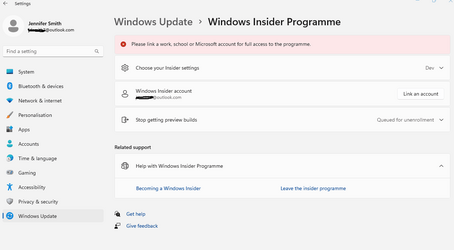
My wife's PC, which is fully compliant with Windows 11, is on Release Preview the same as mine. Couple of days ago it suddenly updated to the latest Dev version unprompted. Had to restore it from the Macrium dump, but it then tries again. The Windows Insider page is occasionally looking like this after booting
S1.png

Although logged on with MS account top left, the same account has not been linked in the Windows Insider. Hence it appears her PC defaults to Dev mode, which is good enough for WU to install the latest Dev version.

If I click on Link an account for the Insider account and select her address it immediately updates to this -

S2.png

But by then it's too late as WU is already doing the Dev update.

So if WU finds the Insider account is not linked, why does it go ahead and install the Dev version?

Wife's PC specs are the same as my System One, except the motherboard is an H510M.
 
Last edited:

My Computers My Computers

  • At a glance

    Windows 11 Home 26H2 RPIntel I3-1010016 GBNvidia GT 1030
    OS
    Windows 11 Home 26H2 RP
    Computer type
    PC/Desktop
    Manufacturer/Model
    Self-build
    CPU
    Intel I3-10100
    Motherboard
    MSI H410M-PRO
    Memory
    16 GB
    Graphics Card(s)
    Nvidia GT 1030
    Sound Card
    Motherboard default
    Monitor(s) Displays
    Philips 27 inch
    Screen Resolution
    1920x1080
    Hard Drives
    Samsung EVO 970 NVMe SSD 256 Gb
    Samsung QVO 870 SATA SSD 2 Tb
    PSU
    ATX 450W
    Keyboard
    Logitech
    Mouse
    Logitech Wireless
    Internet Speed
    930 Mb down / 120 Mb up
    Browser
    Edge
    Antivirus
    Windows Defender
    Other Info
    Microsoft Office 2021 Plus
  • At a glance

    Windows 11 HomeIntel i3-810016 GbNvidia GT 720
    Operating System
    Windows 11 Home
    Computer type
    PC/Desktop
    Manufacturer/Model
    Self-build
    CPU
    Intel i3-8100
    Motherboard
    Gigabyte Z370 D3
    Memory
    16 Gb
    Graphics card(s)
    Nvidia GT 720
    Sound Card
    Motherboard default
    Monitor(s) Displays
    Philips 27-inch
    Screen Resolution
    1920x1080
    Hard Drives
    Samsung 960 NVMe SSD 256 Gb
    Seagate 2 Tb HDD
    PSU
    ATX 450W
    Keyboard
    Microsoft
    Mouse
    Logitech Wireless
    Internet Speed
    930 Mb down / 120 Mb up
    Browser
    Edge
    Antivirus
    Windows Defender
Exactly the same thing is happening to me on one of my computers. The Insider Program is horribly messed up.
 

My Computer My Computer

At a glance

Windows 11 Pro 24H2i7-12700K32GBGTX 1650 iTX
OS
Windows 11 Pro 24H2
Computer type
PC/Desktop
Manufacturer/Model
Home Built
CPU
i7-12700K
Motherboard
ASUS TUF Z690-Plus WiFi DDR4
Memory
32GB
Graphics Card(s)
GTX 1650 iTX
Monitor(s) Displays
Dell 34" Curved IPS
Screen Resolution
3440 x 1440
PSU
Seasonic Focus GX-650 80+ Gold
Case
NZXT H510
Cooling
Enermax Aquafusion 240 ARGB
Mouse
Logitech G305
This issue has also been reported here. No obvious solution just yet.
 

My Computers My Computers

  • At a glance

    Windows 11 Home 26H2 RPIntel I3-1010016 GBNvidia GT 1030
    OS
    Windows 11 Home 26H2 RP
    Computer type
    PC/Desktop
    Manufacturer/Model
    Self-build
    CPU
    Intel I3-10100
    Motherboard
    MSI H410M-PRO
    Memory
    16 GB
    Graphics Card(s)
    Nvidia GT 1030
    Sound Card
    Motherboard default
    Monitor(s) Displays
    Philips 27 inch
    Screen Resolution
    1920x1080
    Hard Drives
    Samsung EVO 970 NVMe SSD 256 Gb
    Samsung QVO 870 SATA SSD 2 Tb
    PSU
    ATX 450W
    Keyboard
    Logitech
    Mouse
    Logitech Wireless
    Internet Speed
    930 Mb down / 120 Mb up
    Browser
    Edge
    Antivirus
    Windows Defender
    Other Info
    Microsoft Office 2021 Plus
  • At a glance

    Windows 11 HomeIntel i3-810016 GbNvidia GT 720
    Operating System
    Windows 11 Home
    Computer type
    PC/Desktop
    Manufacturer/Model
    Self-build
    CPU
    Intel i3-8100
    Motherboard
    Gigabyte Z370 D3
    Memory
    16 Gb
    Graphics card(s)
    Nvidia GT 720
    Sound Card
    Motherboard default
    Monitor(s) Displays
    Philips 27-inch
    Screen Resolution
    1920x1080
    Hard Drives
    Samsung 960 NVMe SSD 256 Gb
    Seagate 2 Tb HDD
    PSU
    ATX 450W
    Keyboard
    Microsoft
    Mouse
    Logitech Wireless
    Internet Speed
    930 Mb down / 120 Mb up
    Browser
    Edge
    Antivirus
    Windows Defender
I have the same problem here. It has a watermark (Insider Preview Evaluation Copy) on my desktop and unable to remove it, lol
 

My Computer My Computer

At a glance

Windows 11Intel i5 7500Kingston 8 GB DDR4Intel Graphics HD 630
OS
Windows 11
Computer type
PC/Desktop
Manufacturer/Model
DIY
CPU
Intel i5 7500
Motherboard
ASRock B250M
Memory
Kingston 8 GB DDR4
Graphics Card(s)
Intel Graphics HD 630
Monitor(s) Displays
HKC M242
Hard Drives
SanDisk SSD PLus 240
Browser
Chrome
Her PC has a copy of Office 2016 installed which I purchased in 2016 using an MS account I no longer use. But the licence is tied to that MS account so I have to keep it live. This means there are two MS accounts on her PC. I have removed this old one to see if it fixes the problem. Office 2016 is now complaining that there's an "Account Error" that needs to be fixed by signing in to that old account, but all applications are working and Office is still updating. So I'll leave it like that for now.

I have also logged on to that old account and deleted her PC from it. It's also not registered as an Insider account.
 

My Computers My Computers

  • At a glance

    Windows 11 Home 26H2 RPIntel I3-1010016 GBNvidia GT 1030
    OS
    Windows 11 Home 26H2 RP
    Computer type
    PC/Desktop
    Manufacturer/Model
    Self-build
    CPU
    Intel I3-10100
    Motherboard
    MSI H410M-PRO
    Memory
    16 GB
    Graphics Card(s)
    Nvidia GT 1030
    Sound Card
    Motherboard default
    Monitor(s) Displays
    Philips 27 inch
    Screen Resolution
    1920x1080
    Hard Drives
    Samsung EVO 970 NVMe SSD 256 Gb
    Samsung QVO 870 SATA SSD 2 Tb
    PSU
    ATX 450W
    Keyboard
    Logitech
    Mouse
    Logitech Wireless
    Internet Speed
    930 Mb down / 120 Mb up
    Browser
    Edge
    Antivirus
    Windows Defender
    Other Info
    Microsoft Office 2021 Plus
  • At a glance

    Windows 11 HomeIntel i3-810016 GbNvidia GT 720
    Operating System
    Windows 11 Home
    Computer type
    PC/Desktop
    Manufacturer/Model
    Self-build
    CPU
    Intel i3-8100
    Motherboard
    Gigabyte Z370 D3
    Memory
    16 Gb
    Graphics card(s)
    Nvidia GT 720
    Sound Card
    Motherboard default
    Monitor(s) Displays
    Philips 27-inch
    Screen Resolution
    1920x1080
    Hard Drives
    Samsung 960 NVMe SSD 256 Gb
    Seagate 2 Tb HDD
    PSU
    ATX 450W
    Keyboard
    Microsoft
    Mouse
    Logitech Wireless
    Internet Speed
    930 Mb down / 120 Mb up
    Browser
    Edge
    Antivirus
    Windows Defender
Back
Top Bottom




