- Local time
- 4:51 AM
- Posts
- 257
- Location
- Swartz Creek, MI, USA
- OS
- Windows 11 Home, 25H2, Latest OS Build
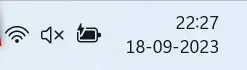
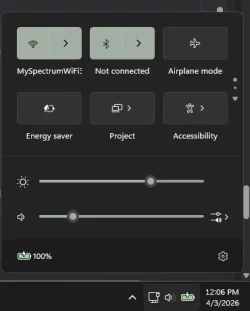
After the last update (KB5086672), that I installed yesterday, I no longer see the WiFi symbol in the taskbar (bottom right). I searched around but didn't find anything on this. It's really not a big deal because, the symbol that is there, shows me that I am connected to the internet. And, everything seems to be working correctly. I'm just wondering what happened to the old symbol. If there was something previously posted on this issue, could someone point me to it.

My Computers
System One System Two
-
- OS
- Windows 11 Home, 25H2, Latest OS Build
- Computer type
- Laptop
- Manufacturer/Model
- HP 15-dw0xx
- CPU
- Intel(R) Core(TM) i3-8145U CPU @ 2.10GHz 2.30 GHz
- Memory
- 8GB
- Screen Resolution
- 1366 x 768
- Hard Drives
- 930 GB
- Keyboard
- Built In
- Mouse
- Wireless Logitech M325S
- Browser
- Chrome 139.0.7258.128
- Antivirus
- Windows Defender
- Other Info
- Cygwin64
-
- Operating System
- Windows 10 Home, Version 22H2, Build19045.3693
- Computer type
- PC/Desktop
- Manufacturer/Model
- HP Pavilion
- CPU
- AMD E-300 with Radeon HD Graphics 1.30 GHz
- Memory
- 10GB
- Graphics card(s)
- Radeon HD Graphics 1.30 GHz
- Sound Card
- Realtek
- Monitor(s) Displays
- 15"
- Screen Resolution
- 1280 x 1024
- Hard Drives
- 700 GB
- Keyboard
- Wireless
- Mouse
- Wireless
- Browser
- Chrome
- Antivirus
- Windows Defender
- Other Info
- This computer is connected to my IC-735 radio.