Will Microsoft be adding more compatible Processors


Mikedyce

New member
Local time
10:21 AM
Posts
4
OS
Windows 10
I have a 3yr old Surface Pro with the following -
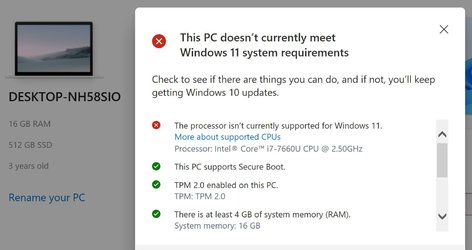
Capturesurface.JPG

Does anyone know if Microsoft are likely to be reviewing their list of approved processors, specifically to include Intel i7s?
Much as I would like to move to W11, I'm going to stick with W10 if they are not.

Mike.
 

My Computer My Computer

At a glance

Windows 10
OS
Windows 10
You`d have to ask Microsoft :)
 

My Computers My Computers

  • At a glance

    Windows 11 ProIntel Core i9 9900XGSkill Trident Z RGB 32GB 3600 16-16-16-36 (F...EVGA RTX 3080 12GB FTW3 Ultra Gaming (12G-P5-...
    OS
    Windows 11 Pro
    Computer type
    PC/Desktop
    Manufacturer/Model
    Skylake Special X299
    CPU
    Intel Core i9 9900X
    Motherboard
    Asus ROG Strix X299-E Gaming II
    Memory
    GSkill Trident Z RGB 32GB 3600 16-16-16-36 (F4-3600C16Q-32GTZR)
    Graphics Card(s)
    EVGA RTX 3080 12GB FTW3 Ultra Gaming (12G-P5-4877-KL)
    Sound Card
    Supreme FX
    Monitor(s) Displays
    Asus PG279Q
    Screen Resolution
    2560 x 1440 165Hz
    Hard Drives
    Samsung 980 Pro 500GB x2, Seagate Barracuda 4TB x2, Western Digital Black 4TB x1
    PSU
    EVGA 1200 P2, EVGA Black Custom Braided Cables
    Case
    Thermaltake View 31 Tempered Glass Limited Edition
    Cooling
    Corsair H115i, Thermal Grizzly Kryonaut
    Keyboard
    Logitech G910 Orion Spark
    Mouse
    Logitech G700s, Asus ROG GX860 Buzzard
    Internet Speed
    Verizon Fios Quantum Gateway 75/75
    Browser
    Edge
    Antivirus
    Windows Defender, Malwarebytes 4.5.2
    Other Info
    Thermaltake Riing Duo 14 x3, Thermaltake Riing Plus 14 x2, Corsair HS70 Pro Wireless Headset
  • At a glance

    Windows 10 ProIntel Core i7 6700KGSkill Trident Z RGB 16GB 3600 16-16-16-36 (F...EVGA GTX 980 Ti SC x2, EVGA Pro SLI Bridge
    Operating System
    Windows 10 Pro
    Computer type
    PC/Desktop
    Manufacturer/Model
    Skylake Special Z170
    CPU
    Intel Core i7 6700K
    Motherboard
    Asus Sabertooth Z170 Mark 1
    Memory
    GSkill Trident Z RGB 16GB 3600 16-16-16-36 (F4-3600C16D-16GTZR)
    Graphics card(s)
    EVGA GTX 980 Ti SC x2, EVGA Pro SLI Bridge
    Sound Card
    Realtek High Definition
    Monitor(s) Displays
    AOC G2460PG
    Screen Resolution
    1920 x 1080 144Hz
    Hard Drives
    Samsung 870 Evo 500GB, Seagate Barracuda 4TB x2
    PSU
    EVGA 1000 P2, EVGA White Custom Braided Cables
    Case
    Corsair Vengeance C70 Gunmetal Black
    Cooling
    Corsair H100i v2, Corsair ML120 x2, Thermal Grizzly Kryonaut
    Keyboard
    Logitech G910 Orion Spectrum
    Mouse
    Logitech G500s
    Internet Speed
    Verizon Fios Quantum Gateway 75/75
    Browser
    Edge
    Antivirus
    Windows Defender, Malwarebytes 4.5.2
    Other Info
    Corsair SP120 x4, LG Blu-ray Drive, Durabrand HT-395 100 Watt Dolby Digital Amp
IMO there's probably slightly more chance of spotting a Polar Bear in the Sahara Desert.
 
Last edited:

My Computers My Computers

  • At a glance

    macOS 14.x (plus Windows 11, Debian, FreeBSD ...Apple M1 Max (T6001) - 8 performance 2 effici...32GB LPDDR5Apple M1 Max (32-core)
    OS
    macOS 14.x (plus Windows 11, Debian, FreeBSD for ARM64)
    Computer type
    Laptop
    Manufacturer/Model
    MacBook Pro M1 MAX
    CPU
    Apple M1 Max (T6001) - 8 performance 2 efficiency cores
    Memory
    32GB LPDDR5
    Graphics Card(s)
    Apple M1 Max (32-core)
    Hard Drives
    a) 1TB SSD + + 1TB SD Card + external SSD Drives
    Browser
    1. Safari 2. DuckDuckGo
    Antivirus
    -
  • At a glance

    Windows 11 Pro, plus VirtualBox VMs: various ...i732GB
    Operating System
    Windows 11 Pro, plus VirtualBox VMs: various Windows & Linux
    Computer type
    Laptop
    Manufacturer/Model
    Microsoft Surface Laptop Studio
    CPU
    i7
    Memory
    32GB
    Hard Drives
    1TB SSD, plus external SSDs for Virtual Machines etc.
    Browser
    1. MS Edge 2. DuckDuckGo
    Antivirus
    Defender
Microsoft have already reviewed their initial Compatibility list for processors, and added a small number of Gen7 Intel processors to the list, No additional AMD processors were added.

I doubt the list will change again, although they have released Registry tweaks to allow not compliant processors to install the Windows 11 Official update.

This may however be a risky option as the support for such systems will be totally in the User's hands - there is also the fact that these systems may not be supplied with some, or all, future updates, automatically, ( these can be manually obtained and we include links to monthly updates to assist anyone who decides to go this route)

The better option may be to remain with Windows 10 whilst that is still supported for the next four years or until you upgrade your hardware
 

My Computers My Computers

  • At a glance

    Windows 11 Pro x64 [Latest Release Preview] [...AMD RYZEN 9 7950X OEM64GB [2x32GB Corsair Vengeance 560 AMD DDR5]3XS* ASUS DUAL RTX 4060 OC 8G
    OS
    Windows 11 Pro x64 [Latest Release Preview] [Win11 PRO HighEnd MUP-00005 DD]
    Computer type
    PC/Desktop
    Manufacturer/Model
    Scan 3XS to my design
    CPU
    AMD RYZEN 9 7950X OEM
    Motherboard
    *3XS*ASUS TUF B650 PLUS WIFI
    Memory
    64GB [2x32GB Corsair Vengeance 560 AMD DDR5]
    Graphics Card(s)
    3XS* ASUS DUAL RTX 4060 OC 8G
    Sound Card
    On motherboard Feeding SPDiF 5.1 system [plus local sound to each monitor]
    Monitor(s) Displays
    32" UHD 32 Bit HDR Monitor + 43" UHD 4K 32Bit HDR TV
    Screen Resolution
    2 x 3840 x 2160
    Hard Drives
    3XS Samsung 980Pro 2TB M.2 PCIe4 4 x 8TB Data + Various Externals from 1TB to 8TB, 10TB NAS
    PSU
    3XS Corsair RM850x 850w Fully Modular
    Case
    FDesign Define 7 XL BK TGL Case - Black
    Cooling
    3XS iCUE H150i ELITE Liquid Cool, Quiet Case fans
    Keyboard
    Wireless Logitec MX Keys + K830 [Depending on where I'm Sat]
    Mouse
    Wireless Logitec - MX Master 3S +
    Internet Speed
    950 MB Down 55 MB Up
    Browser
    Latest Chrome
    Antivirus
    BitDefender Total Security [Latest]
    Other Info
    Also run...
    Dell XPS 17 Laptop
    HP Laptop 8GB - Windows 10 Pro x64 HP 15.2"
    Nexus 7 Android tablet [x2]
    Samsung 10.2" tablet
    Blackview 10.2 Tablet
    Sony Z3 Android Smartphone
    Samsung S9 Plus Smartphone
    Wacom Pro Medium Pen Pad
    Wacom Pro Small Pen Pad
    Wacom ExpressKey Remote
    Loopdeck+ Graphics Controller
    Shuttle Pro v2 Control Pad
  • At a glance

    Windows 11 Pro x64 [Latest release]i7 10750H32 GBStock Intel + GTX 1650 Ti
    Operating System
    Windows 11 Pro x64 [Latest release]
    Computer type
    Laptop
    Manufacturer/Model
    Dell XPS 17 9700
    CPU
    i7 10750H
    Motherboard
    Stock
    Memory
    32 GB
    Graphics card(s)
    Stock Intel + GTX 1650 Ti
    Sound Card
    Stock 4 speaker
    Monitor(s) Displays
    Stock 17" + 32" 4K 3840 x 2160 HDR-10
    Screen Resolution
    3840 x 2400 HDR touchscreen
    Hard Drives
    2TB M2 NVMe
    PSU
    Stock
    Case
    Stock Aluminium / Carbon Fibre
    Cooling
    Stock + 2 fan cooling pad
    Keyboard
    Stock Illuminated + Logi - MX Keys
    Mouse
    Stock Trackpad +Logi Mx Master 3 or MX Ergo Trackball
    Internet Speed
    950 MB Down 55 MB Up
    Browser
    Latest Chrome
    Antivirus
    BitDefender Total Security 2021
    Other Info
    Also use an Adjustable Support for Laptop and Adjustable stand for monitor
I am in the same situation !

But there is something else: when I open "MSinfo32", nearly everthing seems ok, except two lines, which seem to indicate compatibility problems:

First: PCR 7. It says ist is "linkable" (or "may be linked", sorry my computer is in French), so it is not linked!
Second: In the line: Device Encryption Support Reasons for failed automatic device encryption: it says "Un-allowed DMA capable bus/device(s) detected" and "WinRe is not configured"..

Could someone of the experts here please be so kind and explain what this means, and if and how i can resolve this ?

Thanks Roger
 

My Computer My Computer

At a glance

WIN 11 / WIN 10 dual bootIntel Pentium G 4400 (Skylake)DDR4 12 GBinternal (Intel HD 510)
OS
WIN 11 / WIN 10 dual boot
Computer type
PC/Desktop
Manufacturer/Model
No clue (x64 based) from 2016
CPU
Intel Pentium G 4400 (Skylake)
Motherboard
MS 7971, Bios: American Megatrend C.E0 (2018)
Memory
DDR4 12 GB
Graphics Card(s)
internal (Intel HD 510)
Hard Drives
2x Western Digital (no SSD)
Thanks barman58, kind of what I thought. So I'll stick with W10, which incidentally has run pretty well without a hitch from the start.

Mike
 

My Computer My Computer

At a glance

Windows 10
OS
Windows 10
Hi,
MS is already allowing more cpu's than what they list
All one needs is tpm 1.2/ gpt/ uefi/ secure boot options activated

Ways to install Windows 11

If you want to break bad on all there are ways to install 11 with none of the requirements.
 

My Computer My Computer

At a glance

Win-7-10-11Pro's10900k & 9940x & 5930kTrident-Z Royal 4000c16 2x16gb & Trident-Z 36...Titan Xp & 1080ti FTW3 & evga 980ti gaming
OS
Win-7-10-11Pro's
Computer type
PC/Desktop
Manufacturer/Model
Acer 17" Nitro 7840sn/ 2x16gb 5600c40/ 4060/ stock 1tb-os/ 4tb sn850x
CPU
10900k & 9940x & 5930k
Motherboard
z490-Apex & x299-Apex & x99-Sabertooth
Memory
Trident-Z Royal 4000c16 2x16gb & Trident-Z 3600c16 4x8gb & 3200c14 4x8gb
Graphics Card(s)
Titan Xp & 1080ti FTW3 & evga 980ti gaming
Sound Card
Onboard Realtek x3
Monitor(s) Displays
1-AOC G2460PG 24"G-Sync 144Hz/ 2nd 1-ASUS VG248QE 24"/ 3rd LG 43" series
Screen Resolution
1920-1080 not sure what the t.v is besides 43" class scales from 1920-1080 perfectly
Hard Drives
2-WD-sn850x 4tb/ 970evo+500gb/ 980 pro 2tb.
PSU
1000p2 & 1200p2 & 850p2
Case
D450 x2 & 1 Test bench in cherry Entertainment center
Cooling
Custom water loops x3 with 2x mora 360mm rads only 980ti gaming air cooled
Keyboard
G710+x3
Mouse
Redragon x3
Internet Speed
xfinity gigabyte
Browser
Firefox
Antivirus
mbam pro
Hi,
MS is already allowing more cpu's than what they list
All one needs is tpm 1.2/ gpt/ uefi/ secure boot options activated

Ways to install Windows 11

If you want to break bad on all there are ways to install 11 with none of the requirements.
Current Surface has tpm 2 \7 secure boot compatible - it's the i7 that MS don't like.

Mike.
 

My Computer My Computer

At a glance

Windows 10
OS
Windows 10
Current Surface has tpm 2 \7 secure boot compatible - it's the i7 that MS don't like.

Mike.
Hi,
I wouldn't worry about it
Bitlocker might not work but who cares

Core isolation might not work but then again who cares turn virtualization off in bios you'll be more secure this is really for people that use hyper-v and vmware/... for virtual machine usage.

Turn off remote desktop also you'll be more secure.
 

My Computer My Computer

At a glance

Win-7-10-11Pro's10900k & 9940x & 5930kTrident-Z Royal 4000c16 2x16gb & Trident-Z 36...Titan Xp & 1080ti FTW3 & evga 980ti gaming
OS
Win-7-10-11Pro's
Computer type
PC/Desktop
Manufacturer/Model
Acer 17" Nitro 7840sn/ 2x16gb 5600c40/ 4060/ stock 1tb-os/ 4tb sn850x
CPU
10900k & 9940x & 5930k
Motherboard
z490-Apex & x299-Apex & x99-Sabertooth
Memory
Trident-Z Royal 4000c16 2x16gb & Trident-Z 3600c16 4x8gb & 3200c14 4x8gb
Graphics Card(s)
Titan Xp & 1080ti FTW3 & evga 980ti gaming
Sound Card
Onboard Realtek x3
Monitor(s) Displays
1-AOC G2460PG 24"G-Sync 144Hz/ 2nd 1-ASUS VG248QE 24"/ 3rd LG 43" series
Screen Resolution
1920-1080 not sure what the t.v is besides 43" class scales from 1920-1080 perfectly
Hard Drives
2-WD-sn850x 4tb/ 970evo+500gb/ 980 pro 2tb.
PSU
1000p2 & 1200p2 & 850p2
Case
D450 x2 & 1 Test bench in cherry Entertainment center
Cooling
Custom water loops x3 with 2x mora 360mm rads only 980ti gaming air cooled
Keyboard
G710+x3
Mouse
Redragon x3
Internet Speed
xfinity gigabyte
Browser
Firefox
Antivirus
mbam pro
First: PCR 7. It says ist is "linkable" (or "may be linked", sorry my computer is in French), so it is not linked!
Second: In the line: Device Encryption Support Reasons for failed automatic device encryption: it says "Un-allowed DMA capable bus/device(s) detected" and "WinRe is not configured"..

Could someone of the experts here please be so kind and explain what this means, and if and how i can resolve this ?

Thanks Roger

PCR 7 is one of the Platform Configuration Registers that lie inside the TPM module. It is hard to understand the error as your description is vague. You may want to run TPM.msc and see if it gives any precise warnings.

"reasons for failed automatic device encryption: un-allowed DMA capable bus" - this seems to relate to Bitlocker encryption. Bitlocker is not a necessary requirement for a Windows 11 upgrade. However, you still can check your DMA device in two ways:
1) in msinfo, under System summary, click on Hardware Resources, and then click on DMA.
2) in Device Manager, select View from the menu at the top of the Window, then select Resources by Type. Under your computer name, a node with Direct Memory Access (DMA) appears. Click on that to check your DMA devices. Select a DMA device and a Properties Window appears. Check the Device status for errors.

If you have any more questions of this nature, I suggest you start your own thread (question) on this Forum, to give yourself the best chance of receiving answers from the community.

Good luck.
 

My Computers My Computers

  • At a glance

    Windows 11AMD Ryzen 5 560016 GBSapphire Radeon RX 6500XT (8 GB version)
    OS
    Windows 11
    Computer type
    PC/Desktop
    CPU
    AMD Ryzen 5 5600
    Motherboard
    MSI B550-A Pro
    Memory
    16 GB
    Graphics Card(s)
    Sapphire Radeon RX 6500XT (8 GB version)
    Monitor(s) Displays
    BenQ Mobuiz EX2710Q QHD, Iiyama ProLite X23377HDS
    Hard Drives
    MSI Spatium M461 4TB
  • At a glance

    Windows 11Intel Celeron N4020
    Operating System
    Windows 11
    Computer type
    Laptop
    Manufacturer/Model
    Acer A114
    CPU
    Intel Celeron N4020
Thank you Iko 22,
I will enquire !
 

My Computer My Computer

At a glance

WIN 11 / WIN 10 dual bootIntel Pentium G 4400 (Skylake)DDR4 12 GBinternal (Intel HD 510)
OS
WIN 11 / WIN 10 dual boot
Computer type
PC/Desktop
Manufacturer/Model
No clue (x64 based) from 2016
CPU
Intel Pentium G 4400 (Skylake)
Motherboard
MS 7971, Bios: American Megatrend C.E0 (2018)
Memory
DDR4 12 GB
Graphics Card(s)
internal (Intel HD 510)
Hard Drives
2x Western Digital (no SSD)
Does anyone know if Microsoft are likely to be reviewing their list of approved processors, specifically to include Intel i7s?

highly unlikely MS will add more compatible older Intel CPUs
only new ones like the upcoming Alder Lake series (12th gen intel)

nothing older will be added
 

My Computer My Computer

At a glance

windows 10 ltsc
OS
windows 10 ltsc
Current Surface has tpm 2 \7 secure boot compatible - it's the i7 that MS don't like.

Mike.
Just to clarify, the i7 is a model within a family, or generation, of Intel CPUs and meets the requirements for Windows 11 if it is an 8th generation or above; even the about to be released Alder Lake 12th generation will have an i7 model.
 

My Computers My Computers

  • At a glance

    Windows 11 Pro 25H2Core i7 10700K 3.8 GHzCorsair Vengeance LPX DDR4 128 GB 3000MHzAsus ProArt GeForce RTX 4070 Ti Super 16 GB
    OS
    Windows 11 Pro 25H2
    Computer type
    PC/Desktop
    Manufacturer/Model
    Wordsworth 10000
    CPU
    Core i7 10700K 3.8 GHz
    Motherboard
    Asus ROG Strix Z590-A Gaming Wifi
    Memory
    Corsair Vengeance LPX DDR4 128 GB 3000MHz
    Graphics Card(s)
    Asus ProArt GeForce RTX 4070 Ti Super 16 GB
    Sound Card
    Asus Xonar DSX
    Monitor(s) Displays
    HP 2709m
    Screen Resolution
    1920x1080
    Hard Drives
    Samsung 990 Pro M.2 SSD 2 TB; Samsung 990 Pro M.2 SSD 4 TB
    PSU
    Thermaltake Toughpower GF3 1350W
    Case
    Fractal Design Meshify 2
    Cooling
    CPU-Noctua NH D15 Chromax, GPU-Stock, Case-Noctua Chromax 3x140
    Keyboard
    Microsoft Natural Ergo 4000
    Mouse
    HP X500
    Internet Speed
    Cable
    Browser
    Vivaldi, MS Edge
    Antivirus
    Malwarebytes 5.2.4, Windows Defender
    Other Info
    Klipsch Promedia 5.1 THX
    Asus External Blu-Ray 16D1X-USB 3.0
  • At a glance

    Windows 11 Pro 25H2Core i7 6700K 4.0 GHzCorsair Vengeance LPX DDR4 32 GB 3000MHzAsus GeForce GTX 1050 Ti
    Operating System
    Windows 11 Pro 25H2
    Computer type
    PC/Desktop
    Manufacturer/Model
    Wordsworth 6000
    CPU
    Core i7 6700K 4.0 GHz
    Motherboard
    Asus Z170 Pro
    Memory
    Corsair Vengeance LPX DDR4 32 GB 3000MHz
    Graphics card(s)
    Asus GeForce GTX 1050 Ti
    Sound Card
    Asus Xonar SE
    Monitor(s) Displays
    HP X24ih
    Screen Resolution
    1920x1080
    Hard Drives
    Intel 760p M.2 SSD 500 GB; Intel 540 SSD 480 GB; Intel 335 SSD 240 GB
    PSU
    Thermaltake Toughpower GF1 750W
    Case
    Lian Li PC-B70
    Cooling
    CPU- Noctua NH-D15; GPU-Stock; Case-Noctua Chromax 2x140, 2x120
    Keyboard
    Microsoft Wireless Comfort 5050
    Mouse
    Microsoft Wireless Comfort 5050
    Internet Speed
    Cable
    Browser
    Vivaldi, MS Edge
    Antivirus
    Malwarebytes 4.4.3, Windows Defender
    Other Info
    HP bd 340
    HP bd 240
    Denon DRA-800H
    Klipsch RP-600M
    Klipsch R-100SW (2)

    System 3 Specs
    Windows 11 Pro 25H2
    Core i7 10700K 3.8 GHz
    Asus ROG Strix Z590-A Gaming Wifi
    Corsair Vengeance LPX DDR4 32 GB 3200MHz
    Asus Radeon RX560 Dual 4 GB
    Xonar SE
    Samsung 980 Pro M.2 SSD 1 TB (2)
    Thermaltake Toughpower GF3 850W
    Fractal Design Meshify 2
    CPU-Noctua NH D15 Chromax, GPU-Stock, Case-Noctua Chromax 2x140,1x120
I have a 3yr old Surface Pro with the following -

View attachment 9706

Does anyone know if Microsoft are likely to be reviewing their list of approved processors, specifically to include Intel i7s?
Much as I would like to move to W11, I'm going to stick with W10 if they are not.

Mike.


I'm in the same boat as yourself. My CPU is a Haswell, but I plugged a TPM module into the mobo.

Microsoft "Help's" response to me on Twitter (Sept 28):

"We hope you're doing well, Tony. We previously mentioned that the list of compatible processors for Windows 11 is still being tested and updated, and you can monitor this article for any changes: https://msft.it/6019XeaXc. Alternatively, you can also use the PC Health Check app to verify your computer's compatibility with Windows 11."
 

My Computers My Computers

  • At a glance

    Windows 11 Pro / Linux ManjaroIntel i7-5960X (3.0GHz Base, 3.5 Turbo) Cappe...4 x 4GB G-Skill Ripjaws F4-3000C15-4GRR DDR4Gigabyte RTX 3080 Gaming OC (10GB)
    OS
    Windows 11 Pro / Linux Manjaro
    Computer type
    PC/Desktop
    Manufacturer/Model
    roll-yer-own
    CPU
    Intel i7-5960X (3.0GHz Base, 3.5 Turbo) Capped @ 4.5GHz
    Motherboard
    Asus Rampage V Extreme
    Memory
    4 x 4GB G-Skill Ripjaws F4-3000C15-4GRR DDR4
    Graphics Card(s)
    Gigabyte RTX 3080 Gaming OC (10GB)
    Sound Card
    Integrated audio (Realtek ALC1150)
    Monitor(s) Displays
    Asus ROG Swift PG278Q 144Hz
    Screen Resolution
    2560x1440
    Hard Drives
    Corsair Force MP510 NVMe (1.92TB), Samsung 850 Pro 1TB SSD, Samsung 850 EVO 1TB SSD, Seagate ST2000DX001-1CM164 (2TB) SSHD.
    PSU
    Antec HCP-1300 Platinum
    Case
    Corsair Obsidian 900D
    Cooling
    Kraken Z73 AIO CPU cooler w/ 3 x 120mm exhaust fans, 3 x 120mm front intake fans, 1 x rear 120mm exhaust fan.
    Keyboard
    Logitech G Pro TKL
    Mouse
    Logitech G Pro Wireless
    Internet Speed
    950Mb/550Mb
    Browser
    Brave
    Antivirus
    Windows Defender
    Other Info
    HTC Vive, Beyerdynamics MMX 300 gen 2 headphones.
  • At a glance

    Windows 10 Pro / Windows 11 Pro (First Leaked...Intel Xeon X5690 6c/12t (Westmere-EP)4 x 2GB Corsair Dominator 1600MHz DDR3, 2 x 4...Gigabyte Aorus GTX 1080 Ti Extreme Edition (1...
    Operating System
    Windows 10 Pro / Windows 11 Pro (First Leaked ISO)
    Computer type
    PC/Desktop
    Manufacturer/Model
    roll-yer-own
    CPU
    Intel Xeon X5690 6c/12t (Westmere-EP)
    Motherboard
    Asus Rampage II Extreme
    Memory
    4 x 2GB Corsair Dominator 1600MHz DDR3, 2 x 4GB A-Data 1333MHz DDR3
    Graphics card(s)
    Gigabyte Aorus GTX 1080 Ti Extreme Edition (11GB)
    Sound Card
    Integrated (SupremeFX X-Fi)
    Monitor(s) Displays
    BenQ XL2720Z 144Hz
    Screen Resolution
    1920x1080
    Hard Drives
    Samsung 850 Pro SSD 1TB, Samsung 870 QVO SSD 1TB, Intel Raid 0 ( 3 x WD Caviar Black SATA2 640GB)
    PSU
    ThermalTake ToughPower 1200W
    Case
    Thermaltake Armor+ (VHA6000SWA)
    Cooling
    Prolimatech Super Mega CPU H/S w/ 2 x 140mm Noctua fans.
    Keyboard
    Corsair Gaming K70 LUX RGB
    Mouse
    Roccat Kone XTD (Laser)
    Internet Speed
    950Mb/550Mb
    Browser
    Brave
    Antivirus
    Windows Defender
I have a 3yr old Surface Pro with the following -

View attachment 9706

Does anyone know if Microsoft are likely to be reviewing their list of approved processors, specifically to include Intel i7s?
Much as I would like to move to W11, I'm going to stick with W10 if they are not.

Mike.
Intel gives drivers for your CPU. Also gives beta for my 6th generation cpu. I did a clean install and i dont have problems , except the paint application , but i downloaded the older version of and it works OK. So , i believe that if you try a clean install they will work.
 

My Computer My Computer

At a glance

Windows 11 ProIntel 113700H16GBNVIDIA RTX 3050 ti
OS
Windows 11 Pro
Computer type
Laptop
Manufacturer/Model
HP Pavilion 17 cd2205nw
CPU
Intel 113700H
Memory
16GB
Graphics Card(s)
NVIDIA RTX 3050 ti
Screen Resolution
1980x1020
Hard Drives
Micron 512GB
Mouse
Logitech
Internet Speed
100Mbs
Browser
Vivaldi , Edge
Antivirus
Windows defender

Latest Support Threads

Back
Top Bottom