Solved win 10 update says not compatible with win 11, but it is - help pls


netrate

Well-known member
Local time
10:18 AM
Posts
44
OS
Win 11
I bought this system 2 years ago and it is up-to-date with spec etc. Yet when I try to go to win update, it says "your pc doesn't currently meet the min system requirements to run win 11"

Specs :

AMD Ryzen 5 5600G 3.9Ghz

32 GB Ram

Nvidia GeForce GTX 1070 (8 GB)

Storage : NVME and SSD

Win 10 pro version 22H2 build 19045.6456 installed Dec 2023

Any ideas?
 
Windows Build/Version
Win 10 pro version 22H2 build 19045.6456 installed Dec 2023

My Computer My Computer

At a glance

Win 11Athlon4 gigRadeon graphics 2.30
OS
Win 11
Computer type
Laptop
Manufacturer/Model
HP
CPU
Athlon
Memory
4 gig
Graphics Card(s)
Radeon graphics 2.30
Other Info
Win 11 home 226213007

My Computer My Computer

At a glance

Windows 11AMD Ryzen 9 5950XCorsair Vengeance LPX CMK32GX4M2B3200C16 (64 GB)Asus ProArt RTX 5070 Ti OC
OS
Windows 11
Computer type
PC/Desktop
Manufacturer/Model
Custom
CPU
AMD Ryzen 9 5950X
Motherboard
Asus ROG Strix X570-F Gaming
Memory
Corsair Vengeance LPX CMK32GX4M2B3200C16 (64 GB)
Graphics Card(s)
Asus ProArt RTX 5070 Ti OC
Sound Card
Sound Blaster AE-9
Monitor(s) Displays
2 x Dell UltraSharp U2413f
Screen Resolution
1920 x 1200
Hard Drives
Samsung 990 Pro (2000 GB, M.2 2280)
Seagate Barracuda Pro (12TB, 3.5")
Seagate Exos X12 512E (12TB, 3.5")
WD Red Plus (12 TB, 3.5", CMR)
Corsair Force MP510 M.2 NVME SSD (1788 GB)
Samsung SSD 870 EVO 2TB (SATA)
PSU
Seasonic Vertex PX-1000 (1000 W)
Case
Corsair Obsidian 750D
Cooling
Deepcool GamerStorm Captain 240 Pro (12cm)
Keyboard
Logitech G910
Mouse
Logitech G502
Internet Speed
1000 Mbit/s (synchronous)
Browser
Firefox, Vivaldi
Antivirus
GDATA Internet Security
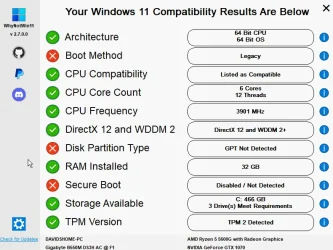
I am not sure what these mean so far. Hopefully these are all software fixes
1761079189758.webp
 

Attachments

  • 1761079179172.webp
    1761079179172.webp
    60.2 KB · Views: 1

My Computer My Computer

At a glance

Win 11Athlon4 gigRadeon graphics 2.30
OS
Win 11
Computer type
Laptop
Manufacturer/Model
HP
CPU
Athlon
Memory
4 gig
Graphics Card(s)
Radeon graphics 2.30
Other Info
Win 11 home 226213007

The processor is supported.
It may be the installation that's MBR, you need to convert to UEFI, and/or TPM 2.0 isn't enabled in the BIOS.
 

My Computer My Computer

At a glance

windows 11
OS
windows 11
Your boot method is Legacy (BIOS) but should be UEFI in order to install Windows 11. The disk partition type is MBR but should be GPT and secure boot is disabled but should be enabled in the UEFI.
 

My Computer My Computer

At a glance

Windows 11AMD Ryzen 9 5950XCorsair Vengeance LPX CMK32GX4M2B3200C16 (64 GB)Asus ProArt RTX 5070 Ti OC
OS
Windows 11
Computer type
PC/Desktop
Manufacturer/Model
Custom
CPU
AMD Ryzen 9 5950X
Motherboard
Asus ROG Strix X570-F Gaming
Memory
Corsair Vengeance LPX CMK32GX4M2B3200C16 (64 GB)
Graphics Card(s)
Asus ProArt RTX 5070 Ti OC
Sound Card
Sound Blaster AE-9
Monitor(s) Displays
2 x Dell UltraSharp U2413f
Screen Resolution
1920 x 1200
Hard Drives
Samsung 990 Pro (2000 GB, M.2 2280)
Seagate Barracuda Pro (12TB, 3.5")
Seagate Exos X12 512E (12TB, 3.5")
WD Red Plus (12 TB, 3.5", CMR)
Corsair Force MP510 M.2 NVME SSD (1788 GB)
Samsung SSD 870 EVO 2TB (SATA)
PSU
Seasonic Vertex PX-1000 (1000 W)
Case
Corsair Obsidian 750D
Cooling
Deepcool GamerStorm Captain 240 Pro (12cm)
Keyboard
Logitech G910
Mouse
Logitech G502
Internet Speed
1000 Mbit/s (synchronous)
Browser
Firefox, Vivaldi
Antivirus
GDATA Internet Security
You'll have to enable Secure Boot in the BIOS and use GPT for the partition to install Windows 11. Good luck!
 

My Computers My Computers

  • At a glance

    Windows 11 Education For 25H2Intel® Core i7 5500u8 GBIntel HD Family Graphics 5500 AMD Firepro 4150M
    OS
    Windows 11 Education For 25H2
    Computer type
    Laptop
    Manufacturer/Model
    HP ZBook G2
    CPU
    Intel® Core i7 5500u
    Motherboard
    HP
    Memory
    8 GB
    Graphics Card(s)
    Intel HD Family Graphics 5500 AMD Firepro 4150M
    Sound Card
    Realtek High Audio
    Hard Drives
    1 TB SSD
    Mouse
    HP USB Mouse
    Antivirus
    Windows Defender
  • At a glance

    Windows 11 Pro For Workstations 25H2Xeon 1535m v632 GBAMD Quadro Pro 4100
    Operating System
    Windows 11 Pro For Workstations 25H2
    Computer type
    Laptop
    Manufacturer/Model
    HP Zbook G4
    CPU
    Xeon 1535m v6
    Motherboard
    HP
    Memory
    32 GB
    Graphics card(s)
    AMD Quadro Pro 4100
    Sound Card
    Bang and Olufson Audio
    Hard Drives
    1TB SSD
    Mouse
    HP USB Mouse
    Antivirus
    Windows Defender
I would do the following:
1. Backup all your important data
2. Download the latest Windows 11 Iso and burn it to a USB stick using Rufus
3. Boot into UEFI and change the following settings: Boot method set to UEFI only and enable secure boot.
4. Boot from the USB stick and install Windows 11. When asked where to install let the installer use the whole system disk. This will erase all MBR partitions and create the necessary GPT partitions instead. Make sure you select the correct disk if you have more than one since this step will erase all data on the corresponding disk. If you want to be sure you can also temporarily disconnect all disks except the system disk for the duration of the install process.
 

My Computer My Computer

At a glance

Windows 11AMD Ryzen 9 5950XCorsair Vengeance LPX CMK32GX4M2B3200C16 (64 GB)Asus ProArt RTX 5070 Ti OC
OS
Windows 11
Computer type
PC/Desktop
Manufacturer/Model
Custom
CPU
AMD Ryzen 9 5950X
Motherboard
Asus ROG Strix X570-F Gaming
Memory
Corsair Vengeance LPX CMK32GX4M2B3200C16 (64 GB)
Graphics Card(s)
Asus ProArt RTX 5070 Ti OC
Sound Card
Sound Blaster AE-9
Monitor(s) Displays
2 x Dell UltraSharp U2413f
Screen Resolution
1920 x 1200
Hard Drives
Samsung 990 Pro (2000 GB, M.2 2280)
Seagate Barracuda Pro (12TB, 3.5")
Seagate Exos X12 512E (12TB, 3.5")
WD Red Plus (12 TB, 3.5", CMR)
Corsair Force MP510 M.2 NVME SSD (1788 GB)
Samsung SSD 870 EVO 2TB (SATA)
PSU
Seasonic Vertex PX-1000 (1000 W)
Case
Corsair Obsidian 750D
Cooling
Deepcool GamerStorm Captain 240 Pro (12cm)
Keyboard
Logitech G910
Mouse
Logitech G502
Internet Speed
1000 Mbit/s (synchronous)
Browser
Firefox, Vivaldi
Antivirus
GDATA Internet Security
I am not sure what these mean so far. Hopefully these are all software fixes
View attachment 149984
Do you have programs and files installed that you want to keep after installing windows 11?

Or will you prefer a clean new install?
 

My Computers My Computers

  • At a glance

    win 11 pro, 25H2i5-240032 GB DDR-3Intel HD Graphics 2000 (on-board)
    OS
    win 11 pro, 25H2
    Computer type
    PC/Desktop
    Manufacturer/Model
    Dell 790 (Mt)
    CPU
    i5-2400
    Motherboard
    Dell
    Memory
    32 GB DDR-3
    Graphics Card(s)
    Intel HD Graphics 2000 (on-board)
    Sound Card
    Intel Cougar Point PCH [B2] (On-Board)
    Monitor(s) Displays
    LG 27MN60T
  • At a glance

    Windows 11 home, 25H2Intel I7-3630QM16GB DDR3
    Operating System
    Windows 11 home, 25H2
    Computer type
    Laptop
    Manufacturer/Model
    Dell Inspiron 17R SE 7720
    CPU
    Intel I7-3630QM
    Memory
    16GB DDR3
    Hard Drives
    Samsung 500GB SSD
You make a backup of your Windows 10 in case things go wrong.

You follow this tutorial to convert:

First, locate in your computer's BIOS where to change the Legacy option to UEFI.
 

My Computer My Computer

At a glance

windows 11
OS
windows 11
You make a backup of your Windows 10 in case things go wrong.

You follow this tutorial to convert:

First, locate in your computer's BIOS where to change the Legacy option to UEFI.

The only note I would add is that mbr2gpt sometimes doesn't work if it is executed from a running windows installation using the /allowFullOS switch. I ran into this problem, so I probably will always run it offline if I ever need to do this again on some computer. You might have to boot the machine under win PE and run mbr2gpt while full windows system isn't active. It's not hard, just an extra step.
 

My Computers My Computers

  • At a glance

    win 11 pro, 25H2i5-240032 GB DDR-3Intel HD Graphics 2000 (on-board)
    OS
    win 11 pro, 25H2
    Computer type
    PC/Desktop
    Manufacturer/Model
    Dell 790 (Mt)
    CPU
    i5-2400
    Motherboard
    Dell
    Memory
    32 GB DDR-3
    Graphics Card(s)
    Intel HD Graphics 2000 (on-board)
    Sound Card
    Intel Cougar Point PCH [B2] (On-Board)
    Monitor(s) Displays
    LG 27MN60T
  • At a glance

    Windows 11 home, 25H2Intel I7-3630QM16GB DDR3
    Operating System
    Windows 11 home, 25H2
    Computer type
    Laptop
    Manufacturer/Model
    Dell Inspiron 17R SE 7720
    CPU
    Intel I7-3630QM
    Memory
    16GB DDR3
    Hard Drives
    Samsung 500GB SSD
Yes, making a backup first for sure. The program WhyNotWin11 looks like it has a second screen that lets me do the fixes from the program? I haven't done it yet because I need to back up first.
 

My Computer My Computer

At a glance

Win 11Athlon4 gigRadeon graphics 2.30
OS
Win 11
Computer type
Laptop
Manufacturer/Model
HP
CPU
Athlon
Memory
4 gig
Graphics Card(s)
Radeon graphics 2.30
Other Info
Win 11 home 226213007

Yes, making a backup first for sure. The program WhyNotWin11 looks like it has a second screen that lets me do the fixes from the program? I haven't done it yet because I need to back up first.
you can mess with all the mbr/uefi etc after upgrade...

extract the .zip, right click the .cmd and run as admin. when it says successful highlighted in green inside powershell, mount the win 11 iso and run setup.exe to upgrade.
 

Attachments

My Computer My Computer

At a glance

Windows 11 Pro
OS
Windows 11 Pro
I'd do it right and cleanly from the get-go.

Make a system image or at least save your important files to external media. In bios change boot mode from MBR (it may say legacy) to UEFI, and enable secure boot. (Your Windows 10 will no longer boot at this point)

Temporarily Remove any secondary drives leaving only your system drive. This is very important. Otherwise your BCD may write to the wrong drive. Then clean install.

This tutorial tells EVERYTHING you need to know step by step. (including how to create your windows 11 installation media) Follow it exactly. Make sure that at step 10, delete ALL partitions on the drive until it shows unallocated space. Choose this unallocated space as where you want to install windows.

It is up to you whether you want to use a local account (step 15) or a Microsoft account. Know that with a Microsoft account ,Windows automatically sets Documents, Desktop, Pictures, and Videos folders to use OneDrive as their default storage location. They are not stored on your local drive. Files are stored locally only with a local account.


My Computers My Computers

  • At a glance

    Windows 11 Pro 25H2 26200.8875i9-10900 10 core 20 threads32 gbnone-Intel UHD Graphics 630
    OS
    Windows 11 Pro 25H2 26200.8875
    Computer type
    PC/Desktop
    Manufacturer/Model
    Dell Optiplex 7080
    CPU
    i9-10900 10 core 20 threads
    Motherboard
    DELL 0J37VM
    Memory
    32 gb
    Graphics Card(s)
    none-Intel UHD Graphics 630
    Sound Card
    Integrated Realtek
    Monitor(s) Displays
    Benq 27
    Screen Resolution
    2560x1440
    Hard Drives
    2x1tb Solidigm m.2 nvme /External drives 512gb Samsung m.2 sata+2tb Kingston m2.nvme
    PSU
    500w
    Case
    MT
    Cooling
    Dell Premium
    Keyboard
    Logitech wired
    Mouse
    Logitech wireless
    Internet Speed
    so slow I'm too embarrassed to tell
    Browser
    #1 Edge #2 Firefox
    Antivirus
    Defender+MWB Premium
  • At a glance

    Windows 11 Pro 24H2 26200.8875AMD Ryzen 7 6800U32 gbintegrated
    Operating System
    Windows 11 Pro 24H2 26200.8875
    Computer type
    PC/Desktop
    Manufacturer/Model
    Beelink Mini PC SER5
    CPU
    AMD Ryzen 7 6800U
    Memory
    32 gb
    Graphics card(s)
    integrated
    Sound Card
    integrated
    Monitor(s) Displays
    Benq 27
    Screen Resolution
    2560x1440
    Hard Drives
    1TB Crucial nvme
    Keyboard
    Logitech wired
    Mouse
    Logitech wireless
    Internet Speed
    still too embarrassed to tell
    Browser
    Firefox
    Antivirus
    Defender
    Other Info
    System 3 is non compliant Dell 9020 i7-4770/24gb ram Win11 PRO 26200.8875
I would do the following:
1. Backup all your important data
2. Download the latest Windows 11 Iso and burn it to a USB stick using Rufus
3. Boot into UEFI and change the following settings: Boot method set to UEFI only and enable secure boot.
4. Boot from the USB stick and install Windows 11. When asked where to install let the installer use the whole system disk. This will erase all MBR partitions and create the necessary GPT partitions instead. Make sure you select the correct disk if you have more than one since this step will erase all data on the corresponding disk. If you want to be sure you can also temporarily disconnect all disks except the system disk for the duration of the install process.

^ This is how I do it.
But as glasskuter suggested, unplug all other drives.

Secure boot isn’t needed when creating the install media with Rufus, because after you click “Start” the following options show.

Plenty of options for an install.
Win-1960.webp


I’ve never had to use scripts, diagnostics or mess around during the install after creating the install media with Rufus. As I mentioned above, ample options to change before the USB media is created.
 
Last edited:

My Computers My Computers

  • At a glance

    Windows 11 Pro 25H2 Build 26200.8894Intel(R) Core(TM) i7-4770K CPU @ 3.50GHz32.0 GB of I forget and the box is in storage.Gigabyte nVidia GeForce GTX 1660 Super OC 6GB
    OS
    Windows 11 Pro 25H2 Build 26200.8894
    Computer type
    PC/Desktop
    Manufacturer/Model
    Sin-built 2013
    CPU
    Intel(R) Core(TM) i7-4770K CPU @ 3.50GHz
    Motherboard
    ASUS ROG Maximus VI Formula
    Memory
    32.0 GB of I forget and the box is in storage.
    Graphics Card(s)
    Gigabyte nVidia GeForce GTX 1660 Super OC 6GB
    Sound Card
    ROG SupremeFX Formula 8-Channel High Definition Audio
    Monitor(s) Displays
    5 x LG 25MS500-B - 1 x 24MK430H-B - 1 x Wacom Pro 22" Touch Screen Tablet
    Screen Resolution
    All over the place
    Hard Drives
    Too many to list. OS on Samsung 1TB 870 QVO SATA
    PSU
    Silverstone 1500
    Case
    NZXT Phantom 820 Full-Tower Case
    Cooling
    Noctua NH-D15 Elite Class Dual Tower CPU Cooler / 6 x EziDIY 120mm / 2 x Corsair 140mm somethings / 1 x 140mm Thermaltake something / 2 x 200mm Corsair.
    Keyboard
    Corsair K95 / Logitech diNovo Edge Wireless
    Mouse
    Logitech: G402 / G502 / Mx Masters / Mx Air Cordless
    Internet Speed
    2000/500Mbps
    Browser
    All sorts
    Antivirus
    Kaspersky Premium
    Other Info
    ㅤㅤㅤㅤㅤㅤㅤㅤㅤㅤㅤㅤㅤㅤㅤㅤㅤㅤㅤㅤㅤㅤㅤㅤㅤㅤㅤㅤㅤㅤㅤㅤㅤㅤㅤㅤㅤㅤㅤㅤ⠀⠀⠀⠀⠀⠀⠀⠀⠀⠀
    TP-Link BE9300 WiFi 7 Bluetooth 5.4 (Archer TBE550E)
    TP-Link TX201 V1 2.5GB Lan

    Grandstream HT812 - VoIP
    ASUS DSL-AX82U - Mesh
    ASUS RT-AC68U - Mesh
    ASUS RT-BE88U Router

    Brother MFC-L2880DW Printer

    I’m on a horse.
  • At a glance

    Windows 11 Pro 25H2 Build 26200.8894 (Wifes)13th Generation Intel® Core™ i5-1340P Process...16GB LPDDR5-52001x Intel® Iris® Xe Graphics
    Operating System
    Windows 11 Pro 25H2 Build 26200.8894 (Wifes)
    Computer type
    Laptop
    Manufacturer/Model
    LENOVO Yoga 7 14IRL8 - Type 82YL
    CPU
    13th Generation Intel® Core™ i5-1340P Processor(Core™ i5-1340P)
    Memory
    16GB LPDDR5-5200
    Graphics card(s)
    1x Intel® Iris® Xe Graphics
    Sound Card
    Optimized with Dolby Atmos®
    Screen Resolution
    QHD 2880 x 1800 OLED
    Hard Drives
    M.2 512 GB SSD PCIe
    Mouse
    Logiteck MX Master 3S
    Internet Speed
    2000/500
    Antivirus
    Defender / Malwarebytes
    Other Info
    …still on a horse.


    Wireless Network: Wi-Fi 6E 2x2 AX; Bluetooth® 5.1 or above
    Ports: 1x 1 Novo button; 2 in 1 Audio Combo jack; Micro SD Card Reader; HDMI 1.4b; 2 x USB Type-C (TBT4)
    USB 3.2 Gen 2 DP 1.4a
    PD 3.0); 1 x USB 3.2 Gen1 Type A
    Camera
    1x 1080P FHD IR/RGB Hybrid with Privacy Shutter and Dual Array Microphone
    Graphics
    1x Intel® Iris® Xe Graphics
    Monitor
    14" WUXGA
    Form Factor
    Convertible Notebook
  • Windows 11 Pro 25H2 Build 26200.8894 (Wifes)

    Yoga 7 2-in-1 14IML9 - Type 83DJ

    Processor: Intel® Core™ Ultra 7 155H Processor(Core™ Ultra 7 155H)

    Memory: 32GB LPD5X-7467

    Hard Drive: 1 TB SSD PCIe

    Wireless Network: 1x Wi-Fi 6E 2x2 AX; Bluetooth® 5.1 or above

    Ports: 1 x HDMI 2.1 TMDS; 1 x Novo Button; 1 x Combo Audio Jack
    2 x USB-C (USB 4.0)
    1 x USB-A 3.2 Gen 1

    Camera: 1080P FHD IR Hybrid with Dual Microphone

    Graphics: Intel® Arc™ Graphics

    Monitor: 14" 2.8K

    ...Where's my horse?
Please run these scripts > post share links


1) V2 log collector:


2) Tuneup plus:


3) Disk partition information:


My Computer My Computer

At a glance

Windows 10Intel(R) Core(TM) i7-4800MQ CPU @ 2.70GHz16 GB Total: Manufacturer : Samsung MemoryTyp...NVIDIA Quadro K3100M; Intel(R) HD Graphics 4600
OS
Windows 10
Computer type
Laptop
Manufacturer/Model
HP
CPU
Intel(R) Core(TM) i7-4800MQ CPU @ 2.70GHz
Motherboard
Product : 190A Version : KBC Version 94.56
Memory
16 GB Total: Manufacturer : Samsung MemoryType : DDR3 FormFactor : SODIMM Capacity : 8GB Speed : 1600
Graphics Card(s)
NVIDIA Quadro K3100M; Intel(R) HD Graphics 4600
Sound Card
IDT High Definition Audio CODEC; PNP Device ID HDAUDIO\FUNC_01&VEN_111D&DEV_76E0
Hard Drives
Model Hitachi HTS727575A9E364
Antivirus
Microsoft Defender
Other Info
Mobile Workstation
You can use this tool to determine whether or not your PC is Win 11 compatible. From the specs you mentioned the PC should be compatible. But if not you can download the latest Windows 11 Iso from Microsoft and use the tool Rufus to create a USB stick that circumvents almost all Windows 11 requirements that might hinder you from installing Windows 11. With this stick you can do an in place upgrade to Windows 11 25H2.
There is a simpler method to upgrade from Windows 10. Mount the Windows 11 ISO file and run setup.exe /product server. This bypasses the checks. I recommend disconnecting from the internet and declining updates during the installation.
 

My Computer My Computer

At a glance

Windows 11 ProCore i7-13700K64 GB Kingston Fury Beast DDR5Gigabyte GeForce RTX 2060 Super Gaming OC 8G
OS
Windows 11 Pro
Computer type
PC/Desktop
Manufacturer/Model
Self build
CPU
Core i7-13700K
Motherboard
Asus TUF Gaming Plus WiFi Z790
Memory
64 GB Kingston Fury Beast DDR5
Graphics Card(s)
Gigabyte GeForce RTX 2060 Super Gaming OC 8G
Sound Card
Realtek S1200A
Monitor(s) Displays
Viewsonic VP2770 & Dell (secondary)
Screen Resolution
2560 x 1440
Hard Drives
Kingston KC3000 2TB NVME SSD & SATA HDDs & SSD
PSU
EVGA SuperNova G2 850W
Case
Nanoxia Deep Silence 1
Cooling
Noctua NH-D14
Keyboard
Microsoft Digital Media Pro
Mouse
Logitech Wireless
Internet Speed
80 Mb / s
Browser
Chrome
Antivirus
Defender, Malwarebytes Free & AdwCleaner
Thank you for all of the replies. I am late getting back to this because I need to clean up my drive for backup and work has been taking up all my time but I will report back.
 

My Computer My Computer

At a glance

Win 11Athlon4 gigRadeon graphics 2.30
OS
Win 11
Computer type
Laptop
Manufacturer/Model
HP
CPU
Athlon
Memory
4 gig
Graphics Card(s)
Radeon graphics 2.30
Other Info
Win 11 home 226213007

Your boot method is Legacy (BIOS) but should be UEFI in order to install Windows 11.
Correct
The disk partition type is MBR but should be GPT
Correct
and secure boot is disabled but should be enabled in the UEFI.
BIOS must have an option to turn Secure Boot on but it DOESN'T need to be enabled.

Although you can convert the main drive from Legacy - MBR to UEFI - GPT under windows using mbr2gpt /allowFullOS I strongly do not recommend as it will create a new EFI partition after C: partition leaving the System partition useless.
If you do it offline (using WinRE (recovery) or WinPE (installation drive)) it will convert the System partition into the EFI partition.

- Detach or remove any other drives leaving on only the main drive
- Boot from a win 10 or Win 11 installation drive and at the Windows Setup screen, press Shift+F10 simultaneously to open a command line prompt and type
mbr2gpt /validate
If validate is successful. type
mbr2gpt /convert
Enter BIOS and change from Legacy to UEFI boot
 

My Computers My Computers

  • At a glance

    Windows 11 Pro - Windows 7 HP 64 - Lubuntui5 6600K - 800MHz to 4400MHz4+4G GSkill DDR4 3000IG - Intel 530
    OS
    Windows 11 Pro - Windows 7 HP 64 - Lubuntu
    Computer type
    PC/Desktop
    Manufacturer/Model
    custom build
    CPU
    i5 6600K - 800MHz to 4400MHz
    Motherboard
    GA-Z170-HD3P
    Memory
    4+4G GSkill DDR4 3000
    Graphics Card(s)
    IG - Intel 530
    Monitor(s) Displays
    Samsung 226BW
    Screen Resolution
    1680x1050
    Hard Drives
    (1) -1 SM951 – 128GB M.2 AHCI PCIe SSD drive for Win 11
    (2) -1 WD SATA 3 - 1T for Data
    (3) -1 WD SATA 3 - 1T for backup
    (4) -1 BX500 SSD - 256G for Windows 7 and Lubuntu
    PSU
    Thermaltake 450W TR2 gold
    Keyboard
    Old and good Chicony mechanical keyboard
    Mouse
    Logitech mX performance - 9 buttons (had to disable some)
    Internet Speed
    500 Mb/s
    Browser
    Firefox 64
  • At a glance

    Windows 11 Proi7-4500U 800- 3000MHz(4+4)G DDR3 1600IG intel 4400 + NVIDIA GeForce GT 745M
    Operating System
    Windows 11 Pro
    Computer type
    Laptop
    Manufacturer/Model
    Asus Q550LF
    CPU
    i7-4500U 800- 3000MHz
    Motherboard
    Asus Q550LF
    Memory
    (4+4)G DDR3 1600
    Graphics card(s)
    IG intel 4400 + NVIDIA GeForce GT 745M
    Sound Card
    Realtek
    Monitor(s) Displays
    LG Display LP156WF4-SPH1
    Screen Resolution
    1920 x 1080
    Hard Drives
    BX500 120G SSD for Windows and programs
    & 1T HDD for data
    Internet Speed
    500 Mb/s
    Browser
    Firefox 64
If you do it offline (using WinRE (recovery) or WinPE (installation drive)) it will convert the System partition into the EFI partition.
Microsoft’s documentation states that this applies only if "it is at least 100 MB (or 260 MB for 4K sector size disks) in size."

Older Windows 10 installations created a 500 MB System Reserved Partition, but Windows 10 22H2 creates only a 50 MB System Reserved Partition (when the disk does not use 4K sectors).


Creating an EFI system partition​

For Windows to remain bootable after the conversion, an EFI system partition must be in place. MBR2GPT creates the EFI system partition using the following rules:

  1. The existing MBR system partition is reused if it meets these requirements:
    • It isn't also the OS or Windows Recovery Environment partition.
    • It is at least 100 MB (or 260 MB for 4K sector size disks) in size.
    • It's less than or equal to 1 GB in size. This size is a safety precaution to ensure it isn't a data partition.
    • The conversion isn't being performed from the full OS. In this case, the existing MBR system partition is in use and can't be repurposed.
  2. If the existing MBR system partition can't be reused, a new EFI system partition is created by shrinking the OS partition. This new partition has a size of 100 MB (or 260 MB for 4K sector size disks) and is formatted FAT32.
If the existing MBR system partition isn't reused for the EFI system partition, it's no longer used by the boot process after the conversion. Other partitions aren't modified.

If the existing MBR system partition isn't reused for the EFI system partition, it might be assigned a drive letter. If this small partition isn't going to be used, its drive letter must be manually hidden.
 
Last edited:

My Computers My Computers

  • At a glance

    Windows 11 ProAMD Ryzen 9 9950X3DKingston FURY Beast 64GB (2x32GB) DDR5 6000MT/sASUS TUF Gaming Radeon RX 9070 OC Edition 16G...
    OS
    Windows 11 Pro
    Computer type
    PC/Desktop
    CPU
    AMD Ryzen 9 9950X3D
    Motherboard
    ASRock B650E Taichi Lite
    Memory
    Kingston FURY Beast 64GB (2x32GB) DDR5 6000MT/s
    Graphics Card(s)
    ASUS TUF Gaming Radeon RX 9070 OC Edition 16GB GDDR6
    Hard Drives
    Solidigm P44 Pro 2TB M.2 NVMe SSD
  • At a glance

    Windows 11 HomeIntel Core Ultra 9 275HX64GB (2x 32GB) DDR5-6400NVIDIA GeForce RTX 5080 16GB GDDR7 Laptop GPU
    Operating System
    Windows 11 Home
    Computer type
    Laptop
    Manufacturer/Model
    Lenovo Legion Pro 7i Gen 10 16"
    CPU
    Intel Core Ultra 9 275HX
    Memory
    64GB (2x 32GB) DDR5-6400
    Graphics card(s)
    NVIDIA GeForce RTX 5080 16GB GDDR7 Laptop GPU
    Hard Drives
    2x 1TB M.2 NVMe SSD (SK Hynix)

Latest Support Threads

Back
Top Bottom