Solved Win 11 computers don't see one another in network, but win 10 is fine


GerryPeters

Well-known member
Member
Local time
2:04 PM
Posts
169
OS
WIN 11 PRO
I have 3 computers in a network at my home. 2 are Win 11 and one if Win 10. IN my win 10, under file explorer networks, I see the 2 win 11 computers and sharing works fine. But on both Win 11 computers, neither one sees the other win 11 but both can see the Win 10. What's the fix?
 

My Computers

System One System Two

  • OS
    WIN 11 PRO
    Computer type
    PC/Desktop
    Manufacturer/Model
    Custom built - WIN 11 PRO 64-bit ,
    CPU
    Intel(R) Core(TM) i5-14400 2.50 Ghz,
    Motherboard
    ACER Z790 motherboard
    Memory
    32 Gigs
    Hard Drives
    256 gig M2 SSD boot HD, 3 internal HD's, 2 USB
  • Operating System
    Win 10 PRO
    Computer type
    PC/Desktop
    Manufacturer/Model
    CUSTOM
    CPU
    Haswell CPU 4790k @ 4.4GHz,
    Motherboard
    AsRock Z97 motherboard,
    Memory
    16 Gigs
    Hard Drives
    OS drive 250GB SSD,

Try This for both Win11 Computers

In Control Panel\All Control Panel Items\Programs and Features\Turn Windows Features on or off.
Check if there are No Ticks are on SMB 1.0/CIFS Client and SMB 1.0/CIFS Server Only a tick on SMB Direct

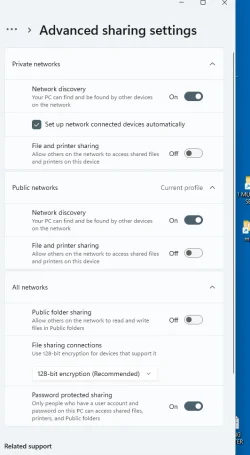
Make Sure you are on a Private Network NOT Public

Next go into Group Policy (Pro Version Only) gpedit.msc

Computer Configuration, Windows Settings, Security Settings, Local Policies, Security Options
Double click on Microsoft Network Client: Digitally sign communications (always)
Double click on Microsoft Network Client: Digitally sign communications (if server agrees)
Double click on Microsoft Network Server: Digitally sign communications (always)
Double click on Microsoft Network Server: Digitally sign communications (if server agrees)
Set all of these to "Disabled"
Click on OK.

Computer Configuration, Administrative Templates, Network, Lanman Workstation
Double click on "Enable Insecure Guest Logons"
Set this to "Enabled"
Click on OK.

Reboot
 

My Computer

System One

  • OS
    Windows 11 Pro
    Computer type
    PC/Desktop
    Manufacturer/Model
    Custom Build
    CPU
    Intel Core i9 12900KF
    Motherboard
    ASUS ROG Maximus Z690 Hero
    Memory
    Corsair 64GB DDR5 Vengeance C40 5200Mhz
    Graphics Card(s)
    ASUS GeForce RTX 3090 ROG Strix OC 24GB
    Sound Card
    OnBoard
    Monitor(s) Displays
    Acer Predator XB323UGP 32" QHD G-SYNC-C 144Hz 1MS IPS LED
    Screen Resolution
    2560 x 1440
    Hard Drives
    1x Samsung 980 Pro Series Gen4 250GB M.2 NVMe
    1x Samsung 980 Pro Series Gen4 500GB M.2 NVMe
    2x Samsung 980 Pro Series Gen4 2TB M.2 NVMe
    PSU
    Corsair AX1200i 1200W 80PLUS Titanium Modular
    Case
    Corsair 4000D Black Case w/ Tempered Glass Side Panel
    Cooling
    Noctua NH-U12A Chromax Black CPU Cooler, 4x Noctua 120mm Fans
    Keyboard
    Logitech MK545
    Mouse
    Logitech MX Master 3
    Internet Speed
    Fixed Wireless 150mbps/75mbps
    Browser
    Firefox
    Antivirus
    Kaspersky
    Other Info
    Thrustmaster TS-PC RACER
    Fanatec CSL Elite Pedals with the Load Cell Kit
    Yamaha Amp with Bose Speakers
I did it all, except not sure how to change from a public network to a private here's a screenshot
 

Attachments

  • win 11 netw.webp
    win 11 netw.webp
    34.3 KB · Views: 3

My Computers

System One System Two

  • OS
    WIN 11 PRO
    Computer type
    PC/Desktop
    Manufacturer/Model
    Custom built - WIN 11 PRO 64-bit ,
    CPU
    Intel(R) Core(TM) i5-14400 2.50 Ghz,
    Motherboard
    ACER Z790 motherboard
    Memory
    32 Gigs
    Hard Drives
    256 gig M2 SSD boot HD, 3 internal HD's, 2 USB
  • Operating System
    Win 10 PRO
    Computer type
    PC/Desktop
    Manufacturer/Model
    CUSTOM
    CPU
    Haswell CPU 4790k @ 4.4GHz,
    Motherboard
    AsRock Z97 motherboard,
    Memory
    16 Gigs
    Hard Drives
    OS drive 250GB SSD,

Make sure all Computers are on Private and reboot all once all settings have been done.

You may have to set your computers with a Static Network IP Address. Its usually set at default to Obtain an IP address automatically.


My Computer

System One

  • OS
    Windows 11 Pro
    Computer type
    PC/Desktop
    Manufacturer/Model
    Custom Build
    CPU
    Intel Core i9 12900KF
    Motherboard
    ASUS ROG Maximus Z690 Hero
    Memory
    Corsair 64GB DDR5 Vengeance C40 5200Mhz
    Graphics Card(s)
    ASUS GeForce RTX 3090 ROG Strix OC 24GB
    Sound Card
    OnBoard
    Monitor(s) Displays
    Acer Predator XB323UGP 32" QHD G-SYNC-C 144Hz 1MS IPS LED
    Screen Resolution
    2560 x 1440
    Hard Drives
    1x Samsung 980 Pro Series Gen4 250GB M.2 NVMe
    1x Samsung 980 Pro Series Gen4 500GB M.2 NVMe
    2x Samsung 980 Pro Series Gen4 2TB M.2 NVMe
    PSU
    Corsair AX1200i 1200W 80PLUS Titanium Modular
    Case
    Corsair 4000D Black Case w/ Tempered Glass Side Panel
    Cooling
    Noctua NH-U12A Chromax Black CPU Cooler, 4x Noctua 120mm Fans
    Keyboard
    Logitech MK545
    Mouse
    Logitech MX Master 3
    Internet Speed
    Fixed Wireless 150mbps/75mbps
    Browser
    Firefox
    Antivirus
    Kaspersky
    Other Info
    Thrustmaster TS-PC RACER
    Fanatec CSL Elite Pedals with the Load Cell Kit
    Yamaha Amp with Bose Speakers
In case you can't get networking working right you might want to try what I have done. I never trust finding my computer in Network. Usually I can't find them there. Instead I have created a workaround that works with all my computers with Windows 7, 10 and 11.

Note once I have the folder with the shortcuts done on one computer I can just copy it to the desktops on all the other computers.

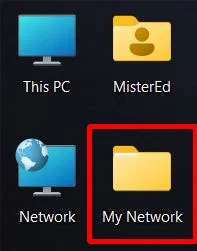
I created a folder on my desktop called My Network

n1.webp


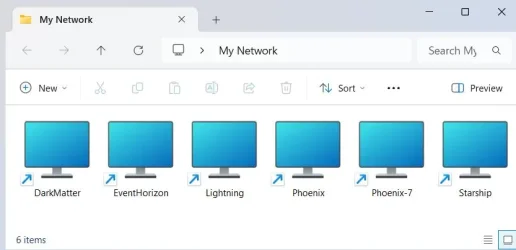
The folders contains shortcuts to all the computers in my network

n2.webp

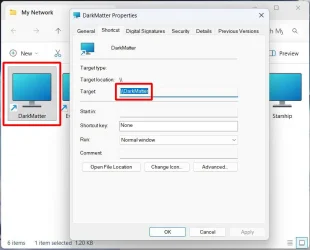
A shortcut consists of \\ + <computername>. For example the shortcut for computer DarkMatter is \\DarkMatter.

n3.webp
 

My Computers

System One System Two

  • OS
    Windows 11 Pro 25H2 (26200.6901)
    Computer type
    Laptop
    Manufacturer/Model
    ASUS TUF Gaming A15 (2022)
    CPU
    AMD Ryzen 7 6800H with Radeon 680M GPU (486MB RAM)
    Memory
    Crucial DDR5-4800 (2400MHz) 32GB (2 x 16GB)
    Graphics Card(s)
    NVIDIA RTX 3060 Laptop (6GB RAM)
    Sound Card
    n/a
    Monitor(s) Displays
    15.6-inch
    Screen Resolution
    1920x1080 300Hz
    Hard Drives
    2 x Samsung 990 Evo Plus (2TB M.2 NVME SSD)
    PSU
    n/a
    Mouse
    Wireless Mouse M510
    Internet Speed
    2100Mbps/300Mbps
    Browser
    Firefox
    Antivirus
    Malwarebytes
  • Operating System
    Windows 11 Pro 25H2 (26200.8246)
    Computer type
    PC/Desktop
    Manufacturer/Model
    Custom build
    CPU
    AMD Ryzen 7 5700X3D
    Motherboard
    ASUS ROG Strix B550-F Gaming WiFi II
    Memory
    G.SKILL Flare X 32GB (2x16GB) DDR4
    Graphics card(s)
    ASUS ROG-STRIX-RTX3060TI-08G-V2-GAMING (RTX 3060-Ti, 8GB RAM)
    Monitor(s) Displays
    Samsung G50D IPS 27"
    Screen Resolution
    1440p/180Hz
    Hard Drives
    SAMSUNG 990 EVO Plus (2TB] M.2 NVME SSD
    SAMSUNG 990 EVO Plus (4TB) M.2 NVME SSD
    PSU
    Corsair RM750x (750 watts)
    Case
    Cooler Master MasterCase 5
    Cooling
    Scythe Mugen 6
    Keyboard
    Logitech K520 (MK540 keyboard/mouse combo)
    Mouse
    Logitech M310 (MK540 keyboard/mouse combo)
    Internet Speed
    2100 Mbps down / 300 Mbps up
    Browser
    Firefox, Edge, Chrome
    Antivirus
    Malwarebytes (Premium)
    Other Info
    ASUS Blu-ray Burner BW-16D1HT (SATA) || Western Digital Easystore 20TB USB 3.0 external hard drive used with Acronis True Image 2025 backup software || HP OfficeJet Pro 6975 Printer/Scanner
Thanks Wolfzz, it worked like a charm - what a great forum!
 

My Computers

System One System Two

  • OS
    WIN 11 PRO
    Computer type
    PC/Desktop
    Manufacturer/Model
    Custom built - WIN 11 PRO 64-bit ,
    CPU
    Intel(R) Core(TM) i5-14400 2.50 Ghz,
    Motherboard
    ACER Z790 motherboard
    Memory
    32 Gigs
    Hard Drives
    256 gig M2 SSD boot HD, 3 internal HD's, 2 USB
  • Operating System
    Win 10 PRO
    Computer type
    PC/Desktop
    Manufacturer/Model
    CUSTOM
    CPU
    Haswell CPU 4790k @ 4.4GHz,
    Motherboard
    AsRock Z97 motherboard,
    Memory
    16 Gigs
    Hard Drives
    OS drive 250GB SSD,

Latest Support Threads

Back
Top Bottom