Win 11 Pro: Shutting down when clicking Hibernate


Bradavon

Well-known member
Member
Local time
10:56 AM
Posts
73
Location
South West, England
OS
Windows 11 Pro
Hi,

Model: Surface Laptop 7 ARM

The past couple of weeks when I Hibernate it Shuts down. Very occasionally it works and hibernates but there’s zero difference that’s clear. As a rule, when fixing issues, I Restart, not Shutdown.

I’ve tried:
  • Plugged in (haven’t tried on battery)
  • Windows Updates up to date
  • Fast Startup isn'ton
  • powercfg -h off -> powercfg -h on -> Restart -> Test Hibernate
  • powercfg /hibernate /type full
  • sfc /scannow
  • DISM /Online /Cleanup-Image /RestoreHealth - I combined this with "sfc /scannow" -> Restart -> Test Hibernate
  • Ran the Legacy Power Troubleshooter: msdt.exe /id PowerDiagnostic-> Restart -> Test Hibernate
  • Unplugged my USB Drive -> Restart -> Test Hibernate
  • I performed a: Clean Boot (support.microsoft.com)
    - Only two non-MS Services. I disabled both but it didn't fix it.
    NOTE: Both came with the Surface: A: Dolby DAX API set to Manual not running / Qualcomm qcdpps set to Automatic, don't know what this really does but the SOC is Qualcomm
    - I turned off everything in Settings -> Apps -> Startup
    -
    Restart -> Test Hibernate
  • Nothing in Reliability Monitor for the date/time of it shutting down
  • 1-2 times I’ve come back after going to bed and I’ve found the PC has also shutdown from Sleep Mode but as it’s only 1-2 times (every other time it’s still been in Sleep Mode). I’m unclear how relevant this is. It’s certainly possible I did something half asleep without realising.
Event Viewer Errors (In order):
  • Error: Windows failed to resume from hibernate with error status 0xC0000411.
  • Error: The previous system shutdown at 02:00:08 on ‎06/‎08/‎2026 was unexpected.
  • Critical: The system has rebooted without cleanly shutting down first. This error could be caused if the system stopped responding, crashed, or lost power unexpectedly.
  • Error: Device Association Service detected an endpoint discovery failure.
Powercfg:

powercfg /a
The following sleep states are available on this system:
Standby (S0 Low Power Idle) Network Connected
Hibernate

The following sleep states are not available on this system:
Hybrid Sleep
Standby (S3) is not available.
The hypervisor does not support this standby state.
Fast Startup
This action is disabled in the current system policy.


Thanks
 
Windows Build/Version
Windows Pro: 25H2 Build: 26200.8875

My Computer My Computer

At a glance

Windows 11 ProSnapdragon® X Plus (10 Core)16GB
OS
Windows 11 Pro
Computer type
Laptop
Manufacturer/Model
Microsoft Surface Laptop 7 (ARM)
CPU
Snapdragon® X Plus (10 Core)
Memory
16GB
Hard Drives
512GB SSD
Event Viewer Warnings (In order):

I thought these were my USB Hard Drive, so I unplugged it, but it’s still repeated so many times. It may be completely unrelated:
  • I thought these set of Warnings were my USB Hard Drive, so I unplugged it, but it’s still repeated so many times. It may be completely unrelated:
    - Warning:
    The driver \Driver\WudfRd failed to load.
    Device: ROOT\WINDOWSHELLOFACESOFTWAREDRIVER\0000
    Status: 0xC0000365
    - Warning: The driver \Driver\WudfRd failed to load.
    Device: SWD\DRIVERENUM\{926368f9-7527-4514-99c9-6e7363e7aeac}#Samsung_MZ9L4512HBLU00BMV_component&6&f470529&0
    Status: 0xC0000365
    - Warning (x2): The driver \Driver\WudfRd failed to load.
    Device: ACPI\QCOM0CA8\0
    Status: 0xC0000365
Other Warnings:
  • Warning: The application-specific permission settings do not grant Local Activation permission for the COM Server application with CLSID
    {9EA82395-E31B-41CA-8DF7-EC1CEE7194DF}
    and APPID
    {2ED83BAA-B2FD-43B1-99BF-E6149C622692}
    to the user NT AUTHORITY\NETWORK SERVICE SID (S-1-5-20) from address LocalHost (Using LRPC) running in the application container Unavailable SID (Unavailable). This security permission can be modified using the Component Services administrative tool.
  • Warning (x2): The application-specific permission settings do not grant Local Activation permission for the COM Server application with CLSID
    {00000000-0000-0000-0000-000000000000}
    and APPID
    {4839DDB7-58C2-48F5-8283-E1D1807D0D7D}
    to the user NT AUTHORITY\LOCAL SERVICE SID (S-1-5-19) from address LocalHost (Using LRPC) running in the application container Unavailable SID (Unavailable). This security permission can be modified using the Component Services administrative tool.
  • Warning (x3): The application-specific permission settings do not grant Local Launch permission for the COM Server application with CLSID
    Windows.SecurityCenter.WscCloudBackupProvider
    and APPID
    Unavailable
    to the user Surface-Laptop\brada SID (S-1-5-21-3715803901-3072057611-569336211-1001) from address LocalHost (Using LRPC) running in the application container Unavailable SID (Unavailable). This security permission can be modified using the Component Services administrative tool.
  • Warning (x3): The speed of processor 0 in group 0 is being limited by system firmware. The processor has been in this reduced performance state for 2 seconds since the last report.
  • Warning (x3): The application-specific permission settings do not grant Local Launch permission for the COM Server application with CLSID
    Windows.SecurityCenter.SecurityAppBroker
    and APPID
    Unavailable
    to the user NT AUTHORITY\SYSTEM SID (S-1-5-18) from address LocalHost (Using LRPC) running in the application container Unavailable SID (Unavailable). This security permission can be modified using the Component Services administrative tool.
  • Warning (x3): The speed of processor 4 in group 0 is being limited by system firmware. The processor has been in this reduced performance state for 0 seconds since the last report.
Thanks again.
 

My Computer My Computer

At a glance

Windows 11 ProSnapdragon® X Plus (10 Core)16GB
OS
Windows 11 Pro
Computer type
Laptop
Manufacturer/Model
Microsoft Surface Laptop 7 (ARM)
CPU
Snapdragon® X Plus (10 Core)
Memory
16GB
Hard Drives
512GB SSD
1) Please run the V2 log collector > post a share link


2) Run administrative command prompt: > post share links

wevtutil epl Application "%userprofile%\Desktop\application.evtx"

wevtutil epl System "%userprofile%\Desktop\system.evtx"
 

My Computer My Computer

At a glance

Windows 10Intel(R) Core(TM) i7-4800MQ CPU @ 2.70GHz16 GB Total: Manufacturer : Samsung MemoryTyp...NVIDIA Quadro K3100M; Intel(R) HD Graphics 4600
OS
Windows 10
Computer type
Laptop
Manufacturer/Model
HP
CPU
Intel(R) Core(TM) i7-4800MQ CPU @ 2.70GHz
Motherboard
Product : 190A Version : KBC Version 94.56
Memory
16 GB Total: Manufacturer : Samsung MemoryType : DDR3 FormFactor : SODIMM Capacity : 8GB Speed : 1600
Graphics Card(s)
NVIDIA Quadro K3100M; Intel(R) HD Graphics 4600
Sound Card
IDT High Definition Audio CODEC; PNP Device ID HDAUDIO\FUNC_01&VEN_111D&DEV_76E0
Hard Drives
Model Hitachi HTS727575A9E364
Antivirus
Microsoft Defender
Other Info
Mobile Workstation
I thought Surface Laptop 7 uses Modern Standby.
 

My Computer My Computer

At a glance

Windows 11 Pro
OS
Windows 11 Pro
I thought Surface Laptop 7 uses Modern Standby.
Hi. It's this is "(S0 Low Power Idle)". You can use this with Hibernate. I have been anyway since I got it May 2024 (think it was then summer 2024 anyway). Thanks.
 
Last edited:

My Computer My Computer

At a glance

Windows 11 ProSnapdragon® X Plus (10 Core)16GB
OS
Windows 11 Pro
Computer type
Laptop
Manufacturer/Model
Microsoft Surface Laptop 7 (ARM)
CPU
Snapdragon® X Plus (10 Core)
Memory
16GB
Hard Drives
512GB SSD
1) Please run the V2 log collector > post a share link


2) Run administrative command prompt: > post share links

wevtutil epl Application "%userprofile%\Desktop\application.evtx"

wevtutil epl System "%userprofile%\Desktop\system.evtx"
Thanks Zbook. I was thinking to ask this actually. After reading it on Reddit who said to do this. There's was Sleep/Hibernate causing BSODSs. Which my issue doesn't do. They also said to post it in the BSOD forum though, which didn't feel appropriate.

I will do tomorrow, it's 3am here. Thank you.

Will post it in here.
 

My Computer My Computer

At a glance

Windows 11 ProSnapdragon® X Plus (10 Core)16GB
OS
Windows 11 Pro
Computer type
Laptop
Manufacturer/Model
Microsoft Surface Laptop 7 (ARM)
CPU
Snapdragon® X Plus (10 Core)
Memory
16GB
Hard Drives
512GB SSD
1) Please add WMIC:

Code:
DISM /Online /Add-Capability /CapabilityName:WMIC~~~~


2) Run tuneup_plus_log.bat > post a share link


3) Run get_powercfg_info.bat > post a share link


My Computer My Computer

At a glance

Windows 10Intel(R) Core(TM) i7-4800MQ CPU @ 2.70GHz16 GB Total: Manufacturer : Samsung MemoryTyp...NVIDIA Quadro K3100M; Intel(R) HD Graphics 4600
OS
Windows 10
Computer type
Laptop
Manufacturer/Model
HP
CPU
Intel(R) Core(TM) i7-4800MQ CPU @ 2.70GHz
Motherboard
Product : 190A Version : KBC Version 94.56
Memory
16 GB Total: Manufacturer : Samsung MemoryType : DDR3 FormFactor : SODIMM Capacity : 8GB Speed : 1600
Graphics Card(s)
NVIDIA Quadro K3100M; Intel(R) HD Graphics 4600
Sound Card
IDT High Definition Audio CODEC; PNP Device ID HDAUDIO\FUNC_01&VEN_111D&DEV_76E0
Hard Drives
Model Hitachi HTS727575A9E364
Antivirus
Microsoft Defender
Other Info
Mobile Workstation
1) Please run the V2 log collector > post a share link


2) Run administrative command prompt: > post share links

wevtutil epl Application "%userprofile%\Desktop\application.evtx"

wevtutil epl System "%userprofile%\Desktop\system.evtx"
Requests 1 and 2:

https://1drv.ms/f/c/4caf157cd4c13cf1/IgCDvMLnhtmcS4dcIDJKEj4rAULoRvsG9rdEMO94HUox-Vg?e

Thanks
 
Last edited:

My Computer My Computer

At a glance

Windows 11 ProSnapdragon® X Plus (10 Core)16GB
OS
Windows 11 Pro
Computer type
Laptop
Manufacturer/Model
Microsoft Surface Laptop 7 (ARM)
CPU
Snapdragon® X Plus (10 Core)
Memory
16GB
Hard Drives
512GB SSD

My Computer My Computer

At a glance

Windows 10Intel(R) Core(TM) i7-4800MQ CPU @ 2.70GHz16 GB Total: Manufacturer : Samsung MemoryTyp...NVIDIA Quadro K3100M; Intel(R) HD Graphics 4600
OS
Windows 10
Computer type
Laptop
Manufacturer/Model
HP
CPU
Intel(R) Core(TM) i7-4800MQ CPU @ 2.70GHz
Motherboard
Product : 190A Version : KBC Version 94.56
Memory
16 GB Total: Manufacturer : Samsung MemoryType : DDR3 FormFactor : SODIMM Capacity : 8GB Speed : 1600
Graphics Card(s)
NVIDIA Quadro K3100M; Intel(R) HD Graphics 4600
Sound Card
IDT High Definition Audio CODEC; PNP Device ID HDAUDIO\FUNC_01&VEN_111D&DEV_76E0
Hard Drives
Model Hitachi HTS727575A9E364
Antivirus
Microsoft Defender
Other Info
Mobile Workstation
Yes, it's now visible.
 

My Computer My Computer

At a glance

Windows 10Intel(R) Core(TM) i7-4800MQ CPU @ 2.70GHz16 GB Total: Manufacturer : Samsung MemoryTyp...NVIDIA Quadro K3100M; Intel(R) HD Graphics 4600
OS
Windows 10
Computer type
Laptop
Manufacturer/Model
HP
CPU
Intel(R) Core(TM) i7-4800MQ CPU @ 2.70GHz
Motherboard
Product : 190A Version : KBC Version 94.56
Memory
16 GB Total: Manufacturer : Samsung MemoryType : DDR3 FormFactor : SODIMM Capacity : 8GB Speed : 1600
Graphics Card(s)
NVIDIA Quadro K3100M; Intel(R) HD Graphics 4600
Sound Card
IDT High Definition Audio CODEC; PNP Device ID HDAUDIO\FUNC_01&VEN_111D&DEV_76E0
Hard Drives
Model Hitachi HTS727575A9E364
Antivirus
Microsoft Defender
Other Info
Mobile Workstation

My Computer My Computer

At a glance

Windows 10Intel(R) Core(TM) i7-4800MQ CPU @ 2.70GHz16 GB Total: Manufacturer : Samsung MemoryTyp...NVIDIA Quadro K3100M; Intel(R) HD Graphics 4600
OS
Windows 10
Computer type
Laptop
Manufacturer/Model
HP
CPU
Intel(R) Core(TM) i7-4800MQ CPU @ 2.70GHz
Motherboard
Product : 190A Version : KBC Version 94.56
Memory
16 GB Total: Manufacturer : Samsung MemoryType : DDR3 FormFactor : SODIMM Capacity : 8GB Speed : 1600
Graphics Card(s)
NVIDIA Quadro K3100M; Intel(R) HD Graphics 4600
Sound Card
IDT High Definition Audio CODEC; PNP Device ID HDAUDIO\FUNC_01&VEN_111D&DEV_76E0
Hard Drives
Model Hitachi HTS727575A9E364
Antivirus
Microsoft Defender
Other Info
Mobile Workstation
1) Please add WMIC:

Code:
DISM /Online /Add-Capability /CapabilityName:WMIC~~~~

2) Run tuneup_plus_log.bat > post a share link
1. Done.

tuneup_plus_log.bat looks useful. Forgot to run CHKDSK.

2. tuneup_plus_log.bat -> Attached.

3. Get_Powercfg_info -> Attached.

Thanks again man.
 

Attachments

My Computer My Computer

At a glance

Windows 11 ProSnapdragon® X Plus (10 Core)16GB
OS
Windows 11 Pro
Computer type
Laptop
Manufacturer/Model
Microsoft Surface Laptop 7 (ARM)
CPU
Snapdragon® X Plus (10 Core)
Memory
16GB
Hard Drives
512GB SSD
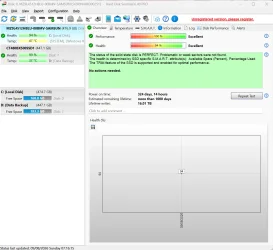
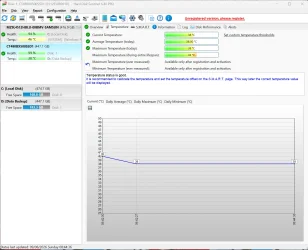
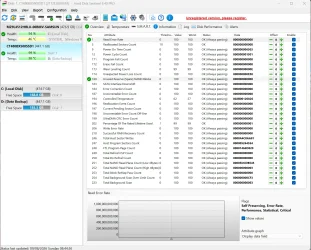
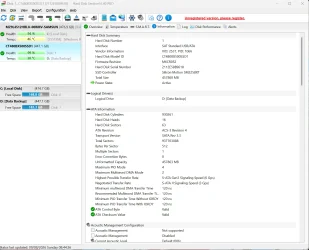
Please run HD Sentinel > post images or share links (all drives)

Hard Disk Sentinel - HDD health and temperature monitoring

a) Overview
b) Temperature
c) SMART

When available update the progress with post #7.
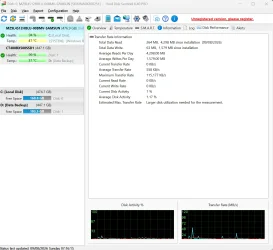
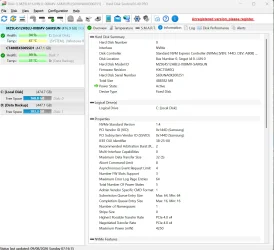
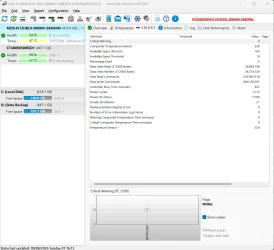
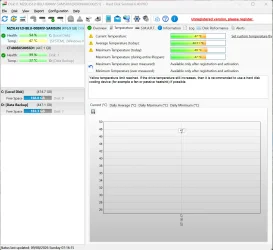
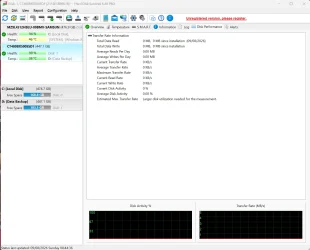
Requested Hard Disk Sentinel Pro v6.40 screenshots attached. Plus, Information and Disk Performance tabs (nothing in Logs and Alerts).

The only other drive is my USB Drive. I've not included this as the issue still happens when this is unplugged but LMK and I'll post it. Although you can see this in the screenshots.

Expecting 324 days means in total of its lifespan. It has been shutdown, just did to confirm it's not check a general power off. Thanks again.

The guidance on Ten Forums and Eleven Forums is extraordinary. I still use Ten for the guides, but both are the place to come. Gonna bookmark this thread. The principles in it don't only apply to my issue.
 

Attachments

  • Screenshot 2026-08-09 071910.webp
    Screenshot 2026-08-09 071910.webp
    122.7 KB · Views: 1
  • Screenshot 2026-08-09 071853.webp
    Screenshot 2026-08-09 071853.webp
    140.4 KB · Views: 1
  • Screenshot 2026-08-09 071842.webp
    Screenshot 2026-08-09 071842.webp
    108.7 KB · Views: 1
  • Screenshot 2026-08-09 071834.webp
    Screenshot 2026-08-09 071834.webp
    134.5 KB · Views: 1
  • Screenshot 2026-08-09 071817.webp
    Screenshot 2026-08-09 071817.webp
    103 KB · Views: 1

My Computer My Computer

At a glance

Windows 11 ProSnapdragon® X Plus (10 Core)16GB
OS
Windows 11 Pro
Computer type
Laptop
Manufacturer/Model
Microsoft Surface Laptop 7 (ARM)
CPU
Snapdragon® X Plus (10 Core)
Memory
16GB
Hard Drives
512GB SSD
@Bradavon

Here's ten points, just for filling out your computer specs. :-)
 

My Computers My Computers

  • At a glance

    Win 11 Home ♦♦♦26200.9168 ♦♦♦♦♦♦♦25H2AMD Ryzen 7 3700XG.Skill (F4-3200C14D-16GTZKW)EVGA RTX 2070 (08G-P4-2171-KR)
    OS
    Win 11 Home ♦♦♦26200.9168 ♦♦♦♦♦♦♦25H2
    Computer type
    PC/Desktop
    Manufacturer/Model
    Built by Ghot® [May 2020]
    CPU
    AMD Ryzen 7 3700X
    Motherboard
    Asus Pro WS X570-ACE (BIOS 5302)
    Memory
    G.Skill (F4-3200C14D-16GTZKW)
    Graphics Card(s)
    EVGA RTX 2070 (08G-P4-2171-KR)
    Sound Card
    Realtek ALC1220P / ALC S1220A
    Monitor(s) Displays
    Dell U3011 30"
    Screen Resolution
    2560 x 1600
    Hard Drives
    2x Samsung 860 EVO 500GB,
    WD 4TB Black FZBX - SATA III,
    WD 8TB Black FZBX - SATA III,
    DRW-24B1ST CD/DVD Burner
    PSU
    PC Power & Cooling 750W Quad EPS12V
    Case
    Cooler Master ATCS 840 Tower
    Cooling
    CM Hyper 212 EVO (push/pull)
    Keyboard
    Ducky DK9008 Shine II Blue LED
    Mouse
    Logitech Optical M-100
    Internet Speed
    300/300
    Browser
    Firefox (latest)
    Antivirus
    Bitdefender Total Security
    Other Info
    Speakers: Klipsch Pro Media 2.1
  • At a glance

    Windows XP Pro 32bit w/SP3AMD Athlon 64 X2 5000+ (OC'd @ 3.2Ghz)TWIN2X2048-6400C4DHX (2 x 1GB, DDR2 800)EVGA 256-P2-N758-TR GeForce 8600GT SSC
    Operating System
    Windows XP Pro 32bit w/SP3
    Computer type
    PC/Desktop
    Manufacturer/Model
    Built by Ghot® (not in use)
    CPU
    AMD Athlon 64 X2 5000+ (OC'd @ 3.2Ghz)
    Motherboard
    ASUS M2N32-SLI Deluxe Wireless Edition
    Memory
    TWIN2X2048-6400C4DHX (2 x 1GB, DDR2 800)
    Graphics card(s)
    EVGA 256-P2-N758-TR GeForce 8600GT SSC
    Sound Card
    Onboard
    Monitor(s) Displays
    ViewSonic G90FB Black 19" Professional (CRT)
    Screen Resolution
    up to 2048 x 1536
    Hard Drives
    WD 36GB 10,000rpm Raptor SATA
    Seagate 80GB 7200rpm SATA
    Lite-On LTR-52246S CD/RW
    Lite-On LH-18A1P CD/DVD Burner
    PSU
    PC Power & Cooling Silencer 750 Quad EPS12V
    Case
    Generic Beige case, 80mm fans
    Cooling
    ZALMAN 9500A 92mm CPU Cooler
    Keyboard
    Logitech Classic Keybooard 200
    Mouse
    Logitech Optical M-BT96a
    Internet Speed
    300/300
    Browser
    Firefox 3.x ??
    Antivirus
    Symantec (Norton)
    Other Info
    Still assembled, still runs. Haven't turned it on for 15 years?
Please click on the second drive in the leftmost column > post images


Code:
Event[296]
  Log Name: System
  Source: Microsoft-Windows-Ntfs
  Date: 2026-07-12T15:04:04.2090000Z
  Event ID: 140
  Task: N/A
  Level: Warning
  Opcode: Info 
  Keyword: N/A
  User: N/A
  User Name: N/A
  Computer: Surface-Laptop
  Description:
The system failed to flush data to the transaction log. Corruption may occur in VolumeId: D:, DeviceName: \Device\HarddiskVolume6.

           Failure status: A device which does not exist was specified.

           Device GUID: {f1f32f5a-9463-7a56-65b9-46753bdde3de}
           Device manufacturer: ORICO
           Device model: NS1066
           Device revision: 2.16
           Device serial number: 0123456789ABD7D
           Bus type: USB

           Adapter serial number:


Code:
 Microsoft Windows 11 Pro  Version 25H2 (OS Build 26200.8875)
 
==================================================================

    Started on 09/08/2026 at  6:29:17.21
    
        [SFC /ScanNow]
    
Beginning system scan.  This process will take some time.

Results:
 
Windows Resource Protection found corrupt files but was unable to fix some of them.

For online repairs, details are included in the CBS log file located at
windir\Logs\CBS\CBS.log. For example C:\Windows\Logs\CBS\CBS.log. For offline
repairs, details are included in the log file provided by the /OFFLOGFILE flag.
 
==================================================================
 
A TXT file named SFC_details-1.txt has been created.

==================================================================

    Started on 09/08/2026 at  6:30:31.35

        [DISM /online /cleanup-image /ScanHealth]

Deployment Image Servicing and Management tool
Version: 10.0.26100.8737

Image Version: 10.0.26200.8875
 
The component store is repairable.

The operation completed successfully.
 
==================================================================

    Started on 09/08/2026 at  6:31:40.74

        [DISM /online /cleanup-image /RestoreHealth]

Deployment Image Servicing and Management tool
Version: 10.0.26100.8737

Image Version: 10.0.26200.8875
 
The restore operation completed successfully.

The operation completed successfully.
 
==================================================================

    Started on 09/08/2026 at  6:41:14.44

        [SFC /ScanNow]

Beginning system scan.  This process will take some time.

Results:
 
Windows Resource Protection found corrupt files and successfully repaired them.

For online repairs, details are included in the CBS log file located at
windir\Logs\CBS\CBS.log. For example C:\Windows\Logs\CBS\CBS.log. For offline
repairs, details are included in the log file provided by the /OFFLOGFILE flag.
 
==================================================================
 
A TXT file named SFC_details-2.txt has been created.

==================================================================


Code:
2026-08-09 06:29:40, Info                  CSI    000000e6 [SR] Cannot repair member file [l:16]'Disk Cleanup.lnk' of Microsoft-Windows-cleanmgr, version 10.0.26100.8737, arch arm64, nonSxS, pkt {l:8 b:31bf3856ad364e35} in the store, hash mismatch
2026-08-09 06:29:40, Info                  CSI    000000e8 [SR] Cannot repair member file [l:16]'Disk Cleanup.lnk' of Microsoft-Windows-cleanmgr, version 10.0.26100.8737, arch arm64, nonSxS, pkt {l:8 b:31bf3856ad364e35} in the store, hash mismatch
2026-08-09 06:29:40, Info                  CSI    000000e9 [SR] This component was referenced by [l:116]'Microsoft-Windows-Client-Features-Package00~31bf3856ad364e35~arm64~~10.0.26100.8875.b17c46707f4382bff9f28a830dd136f6'
2026-08-09 06:29:40, Info                  CSI    000000ec [SR] Could not reproject corrupted file \??\C:\ProgramData\Microsoft\Windows\Start Menu\Programs\Administrative Tools\\Disk Cleanup.lnk; source file in store is also corrupted
2026-08-09 06:30:27, Info                  CSI    00000265 [SR] Verifying 82 components
2026-08-09 06:30:27, Info                  CSI    00000268 [SR] Repairing 1 components
2026-08-09 06:30:27, Info                  CSI    0000026b [SR] Cannot repair member file [l:16]'Disk Cleanup.lnk' of Microsoft-Windows-cleanmgr, version 10.0.26100.8737, arch arm64, nonSxS, pkt {l:8 b:31bf3856ad364e35} in the store, hash mismatch
2026-08-09 06:30:27, Info                  CSI    0000026d [SR] Cannot repair member file [l:16]'Disk Cleanup.lnk' of Microsoft-Windows-cleanmgr, version 10.0.26100.8737, arch arm64, nonSxS, pkt {l:8 b:31bf3856ad364e35} in the store, hash mismatch
2026-08-09 06:30:27, Info                  CSI    0000026e [SR] This component was referenced by [l:116]'Microsoft-Windows-Client-Features-Package00~31bf3856ad364e35~arm64~~10.0.26100.8875.b17c46707f4382bff9f28a830dd136f6'
2026-08-09 06:30:27, Info                  CSI    00000271 [SR] Could not reproject corrupted file \??\C:\ProgramData\Microsoft\Windows\Start Menu\Programs\Administrative Tools\\Disk Cleanup.lnk; source file in store is also corrupted
2026-08-09 06:30:27, Info                  CSI    00000272 [SR] Repair complete
2026-08-09 06:30:27, Info                  CSI    00000273 [SR] Committing transaction
2026-08-09 06:30:27, Info                  CSI    0000027b [SR] Verify and Repair Transaction completed. All files and registry keys listed in this transaction  have been successfully repaired


Code:
2026-08-09 06:41:37, Info                  CSI    00000657 [SR] Repairing file \??\C:\ProgramData\Microsoft\Windows\Start Menu\Programs\Administrative Tools\\Disk Cleanup.lnk from store
2026-08-09 06:42:22, Info                  CSI    000007d1 [SR] Verifying 82 components
2026-08-09 06:42:22, Info                  CSI    000007d4 [SR] Repairing 1 components
2026-08-09 06:42:22, Info                  CSI    000007d7 [SR] Repairing file \??\C:\ProgramData\Microsoft\Windows\Start Menu\Programs\Administrative Tools\\Disk Cleanup.lnk from store
2026-08-09 06:42:22, Info                  CSI    000007d8 [SR] Repair complete
2026-08-09 06:42:22, Info                  CSI    000007d9 [SR] Committing transaction
2026-08-09 06:42:22, Info                  CSI    000007e1 [SR] Verify and Repair Transaction completed. All files and registry keys listed in this transaction  have been successfully repaired


Code:
System Power State: Abnormal Shutdown
SESSION ID    START TIME    DURATION    STATE    ENTRY REASON    EXIT REASON    % CAPACITY REMAINING AT START   
287    2026-08-09 05:46:26    0:00:00    Abnormal Shutdown    Unknown    Unknown    -
Detailed Session Information
Battery Information
Remaining Charge Capacity At Entry [mWh]        0
Full Charge Capacity At Entry [mWh]        0
Remaining Charge Capacity At Exit [mWh]        0
Full Charge Capacity At Exit [mWh]        0
System Event Log
BootAppStatus        0xC0000411
BootAppCheckpoint        0x40600007
Checkpoint        16
CheckpointStatus        15
SystemSleepTransitionsToOn        1347354627
CsEntryScenarioInstanceId        2
LongPowerButtonPressDetected        0
LidReliability        0
InputSuppressionState        Disengaged
PowerButtonSuppressionState        Disengaged
LidState        Opened
 

My Computer My Computer

At a glance

Windows 10Intel(R) Core(TM) i7-4800MQ CPU @ 2.70GHz16 GB Total: Manufacturer : Samsung MemoryTyp...NVIDIA Quadro K3100M; Intel(R) HD Graphics 4600
OS
Windows 10
Computer type
Laptop
Manufacturer/Model
HP
CPU
Intel(R) Core(TM) i7-4800MQ CPU @ 2.70GHz
Motherboard
Product : 190A Version : KBC Version 94.56
Memory
16 GB Total: Manufacturer : Samsung MemoryType : DDR3 FormFactor : SODIMM Capacity : 8GB Speed : 1600
Graphics Card(s)
NVIDIA Quadro K3100M; Intel(R) HD Graphics 4600
Sound Card
IDT High Definition Audio CODEC; PNP Device ID HDAUDIO\FUNC_01&VEN_111D&DEV_76E0
Hard Drives
Model Hitachi HTS727575A9E364
Antivirus
Microsoft Defender
Other Info
Mobile Workstation
Code:
Event[296]
  Log Name: System
  Source: Microsoft-Windows-Ntfs
  Date: 2026-07-12T15:04:04.2090000Z
  Event ID: 140
  Task: N/A
  Level: Warning
  Opcode: Info
  Keyword: N/A
  User: N/A
  User Name: N/A
  Computer: Surface-Laptop
  Description:

The system failed to flush data to the transaction log. Corruption may occur in VolumeId: D:, DeviceName: \Device\HarddiskVolume6.

           Failure status: A device which does not exist was specified.

           Device GUID: {f1f32f5a-9463-7a56-65b9-46753bdde3de}
           Device manufacturer: ORICO
           Device model: NS1066
           Device revision: 2.16
           Device serial number: 0123456789ABD7D
           Bus type: USB

           Adapter serial number:
If you mean in relation to this drive? D: is my USB drive.

Maybe I should've run the tests with it unplugged as it may have muddied the waters. The issues occurs the same unplugged (well the USB cable it strictly still plugged into the monitor, but the drive is unplugged).

Started on 09/08/2026 at 6:29:17.21

[SFC /ScanNow]

Beginning system scan. This process will take some time.

Results:

Windows Resource Protection found corrupt files but was unable to fix some of them.

==================================================================

Started on 09/08/2026 at 6:41:14.44

[SFC /ScanNow]

Beginning system scan. This process will take some time.

Results:

Windows Resource Protection found corrupt files and successfully repaired them.

==================================================================

A TXT file named SFC_details-2.txt has been created.
As I can see a SFC error, even though it repaired it. To be sure, I've just re-run SFC /ScanNow and this time it had no errors whatsoever and was successful.
 

My Computer My Computer

At a glance

Windows 11 ProSnapdragon® X Plus (10 Core)16GB
OS
Windows 11 Pro
Computer type
Laptop
Manufacturer/Model
Microsoft Surface Laptop 7 (ARM)
CPU
Snapdragon® X Plus (10 Core)
Memory
16GB
Hard Drives
512GB SSD
Please post HDS images for ORICO NS1066 USB Device

a) Overview
b) Temperature
c) SMART


Code:
Description    Disk drive
Manufacturer    (Standard disk drives)
Model    ORICO NS1066 USB Device
Bytes/Sector    512
Media Loaded    Yes
Media Type    External hard disk media
Partitions    1
SCSI Bus    0
SCSI Logical Unit    0
SCSI Port    0
SCSI Target ID    0
Sectors/Track    63
Size    447.13 GB (480,101,368,320 bytes)
Total Cylinders    58,369
Total Sectors    937,697,985
Total Tracks    14,884,095
Tracks/Cylinder    255
Partition    Disk #1, Partition #0
Partition Size    447.11 GB (480,085,278,720 bytes)
Partition Starting Offset    16,777,216 bytes
    
Description    Disk drive
Manufacturer    (Standard disk drives)
Model    MZ9L4512HBLU-00BMV-SAMSUNG
Bytes/Sector    512
Media Loaded    Yes
Media Type    Fixed hard disk
Partitions    3
SCSI Bus    0
SCSI Logical Unit    0
SCSI Port    0
SCSI Target ID    0
Sectors/Track    63
Size    476.94 GB (512,105,932,800 bytes)
Total Cylinders    62,260
Total Sectors    1,000,206,900
Total Tracks    15,876,300
Tracks/Cylinder    255
Partition    Disk #0, Partition #0
Partition Size    260.00 MB (272,629,760 bytes)
Partition Starting Offset    1,048,576 bytes
Partition    Disk #0, Partition #1
Partition Size    474.67 GB (509,671,899,136 bytes)
Partition Starting Offset    290,455,552 bytes
Partition    Disk #0, Partition #2
Partition Size    2.00 GB (2,147,483,648 bytes)
Partition Starting Offset    509,962,354,688 bytes


Code:
Event[297]
  Log Name: System
  Source: Ntfs
  Date: 2026-07-12T15:04:04.2110000Z
  Event ID: 50
  Task: N/A
  Level: Warning
  Opcode: N/A
  Keyword: Classic,
  User: N/A
  User Name: N/A
  Computer: Surface-Laptop
  Description:
{Delayed Write Failed} Windows was unable to save all the data for the file \Device\HarddiskVolume6\$Mft. The data has been lost. This error may be caused by a failure of your computer hardware or network connection. Please try to save this file elsewhere.
 

My Computer My Computer

At a glance

Windows 10Intel(R) Core(TM) i7-4800MQ CPU @ 2.70GHz16 GB Total: Manufacturer : Samsung MemoryTyp...NVIDIA Quadro K3100M; Intel(R) HD Graphics 4600
OS
Windows 10
Computer type
Laptop
Manufacturer/Model
HP
CPU
Intel(R) Core(TM) i7-4800MQ CPU @ 2.70GHz
Motherboard
Product : 190A Version : KBC Version 94.56
Memory
16 GB Total: Manufacturer : Samsung MemoryType : DDR3 FormFactor : SODIMM Capacity : 8GB Speed : 1600
Graphics Card(s)
NVIDIA Quadro K3100M; Intel(R) HD Graphics 4600
Sound Card
IDT High Definition Audio CODEC; PNP Device ID HDAUDIO\FUNC_01&VEN_111D&DEV_76E0
Hard Drives
Model Hitachi HTS727575A9E364
Antivirus
Microsoft Defender
Other Info
Mobile Workstation
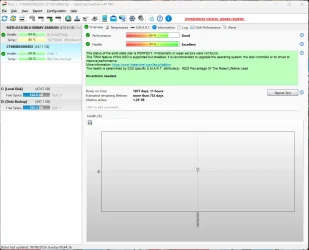
HDS > click on CT480BX500SSD1 (447.1GB) > Post images:

a) Overview
b) Temperature
c) SMART


Crash dump initialization failed!


Code:
Log Name:      System
Source:        volmgr
Date:          7/15/2026 9:43:29 PM
Event ID:      46
Task Category: None
Level:         Error
Keywords:      Classic
User:          N/A
Computer:      Surface-Laptop
Description:
Crash dump initialization failed!
Event Xml:
<Event xmlns="http://schemas.microsoft.com/win/2004/08/events/event">
  <System>
    <Provider Name="volmgr" />
    <EventID Qualifiers="49156">46</EventID>
    <Version>0</Version>
    <Level>2</Level>
    <Task>0</Task>
    <Opcode>0</Opcode>
    <Keywords>0x80000000000000</Keywords>
    <TimeCreated SystemTime="2026-07-16T02:43:29.3856766Z" />
    <EventRecordID>320050</EventRecordID>
    <Correlation />
    <Execution ProcessID="4" ThreadID="348" />
    <Channel>System</Channel>
    <Computer>Surface-Laptop</Computer>
    <Security />
  </System>
  <EventData>
    <Data>\Device\HarddiskVolume3</Data>
    <Binary>0000000001000000000000002E0004C0091000000F0000C000000000000000000000000000000000</Binary>
  </EventData>
</Event>


Code:
Event[32967]
  Log Name: System
  Source: disk
  Date: 2026-08-06T02:52:01.9110000Z
  Event ID: 11
  Task: None
  Level: Error
  Opcode: N/A
  Keyword: Classic,
  User: N/A
  User Name: N/A
  Computer: Surface-Laptop
  Description:
The driver detected a controller error on \Device\Harddisk1\DR1.


Code:
Event[32716]
  Log Name: System
  Source: disk
  Date: 2026-08-06T02:26:36.4500000Z
  Event ID: 11
  Task: None
  Level: Error
  Opcode: N/A
  Keyword: Classic,
  User: N/A
  User Name: N/A
  Computer: Surface-Laptop
  Description:
The driver detected a controller error on \Device\Harddisk1\DR1.
 

My Computer My Computer

At a glance

Windows 10Intel(R) Core(TM) i7-4800MQ CPU @ 2.70GHz16 GB Total: Manufacturer : Samsung MemoryTyp...NVIDIA Quadro K3100M; Intel(R) HD Graphics 4600
OS
Windows 10
Computer type
Laptop
Manufacturer/Model
HP
CPU
Intel(R) Core(TM) i7-4800MQ CPU @ 2.70GHz
Motherboard
Product : 190A Version : KBC Version 94.56
Memory
16 GB Total: Manufacturer : Samsung MemoryType : DDR3 FormFactor : SODIMM Capacity : 8GB Speed : 1600
Graphics Card(s)
NVIDIA Quadro K3100M; Intel(R) HD Graphics 4600
Sound Card
IDT High Definition Audio CODEC; PNP Device ID HDAUDIO\FUNC_01&VEN_111D&DEV_76E0
Hard Drives
Model Hitachi HTS727575A9E364
Antivirus
Microsoft Defender
Other Info
Mobile Workstation
HD Sentinel displayed 2 drives.

Images were posted for MZ9L4512HBLU.


When available post images for CT480BX500SSD1 (447.1GB)

Click on this drive so that it will display them in the columns and rows.


------------------------
Disk & DVD/CD-ROM Drives
------------------------
Drive: C:
Free Space: 175.1 GB
Total Space: 486.1 GB
File System: NTFS
Model: MZ9L4512HBLU-00BMV-SAMSUNG

Drive: D:
Free Space: 187.7 GB
Total Space: 457.8 GB
File System: NTFS
Model: ORICO NS1066 USB Device
 
Last edited:

My Computer My Computer

At a glance

Windows 10Intel(R) Core(TM) i7-4800MQ CPU @ 2.70GHz16 GB Total: Manufacturer : Samsung MemoryTyp...NVIDIA Quadro K3100M; Intel(R) HD Graphics 4600
OS
Windows 10
Computer type
Laptop
Manufacturer/Model
HP
CPU
Intel(R) Core(TM) i7-4800MQ CPU @ 2.70GHz
Motherboard
Product : 190A Version : KBC Version 94.56
Memory
16 GB Total: Manufacturer : Samsung MemoryType : DDR3 FormFactor : SODIMM Capacity : 8GB Speed : 1600
Graphics Card(s)
NVIDIA Quadro K3100M; Intel(R) HD Graphics 4600
Sound Card
IDT High Definition Audio CODEC; PNP Device ID HDAUDIO\FUNC_01&VEN_111D&DEV_76E0
Hard Drives
Model Hitachi HTS727575A9E364
Antivirus
Microsoft Defender
Other Info
Mobile Workstation
HD Sentinel displayed 2 drives.

When available post images for CT480BX500SSD1 (447.1GB)

Click on this drive so that it will display them in the columns and rows.
Oh this is what you meant by left column. This is what I meant by:

The only other drive is my USB Drive. I've not included this as the issue still happens when this is unplugged but LMK and I'll post it (well the USB cable is strictly still plugged into the monitor, but the drive is unplugged). Although you can see this in the screenshots.

Attached.

Due to errors above I ran:

chkdsk D:/r/x/b/scan/perf

Code:
Stage 1: Examining basic file system structure ...
  65024 file records processed.
File verification completed.
 Phase duration (File record verification): 530.04 milliseconds.
  4 large file records processed.
 Phase duration (Orphan file record recovery): 0.19 milliseconds.
  0 bad file records processed.
 Phase duration (Bad file record checking): 0.22 milliseconds.

Stage 2: Examining file name linkage ...
  92 reparse records processed.
  68012 index entries processed.
Index verification completed.
 Phase duration (Index verification): 902.72 milliseconds.
  0 unindexed files scanned.
 Phase duration (Orphan reconnection): 5.83 milliseconds.
  0 unindexed files recovered to lost and found.
 Phase duration (Orphan recovery to lost and found): 0.40 milliseconds.
  92 reparse records processed.
 Phase duration (Reparse point and Object ID verification): 1.07 milliseconds.

Stage 3: Examining security descriptors ...
Security descriptor verification completed.
 Phase duration (Security descriptor verification): 2.05 milliseconds.
  1495 data files processed.
 Phase duration (Data attribute verification): 0.20 milliseconds.
CHKDSK is verifying Usn Journal...
  3675304 USN bytes processed.
Usn Journal verification completed.
 Phase duration (USN journal verification): 30.50 milliseconds.

Stage 4: Looking for bad clusters in user file data ...
  65008 files processed.
File data verification completed.
 Phase duration (User file recovery): 30.28 minutes.

Stage 5: Looking for bad, free clusters ...
  48065731 free clusters processed.
Free space verification is complete.
 Phase duration (Free space recovery): 3.49 minutes.

Windows has scanned the file system and found no problems.
No further action is required.

 468833279 KB total disk space.
 276411752 KB in 34417 files.
      9208 KB in 1496 indexes.
         0 KB in bad sectors.
    149395 KB in use by the system.
     65536 KB occupied by the log file.
 192262924 KB available on disk.

      4096 bytes in each allocation unit.
 117208319 total allocation units on disk.
  48065731 allocation units available on disk.
Total duration: 33.80 minutes (2028205 ms).
 

Attachments

  • Screenshot 2026-08-09 084442.webp
    Screenshot 2026-08-09 084442.webp
    121.5 KB · Views: 1
  • Screenshot 2026-08-09 084452.webp
    Screenshot 2026-08-09 084452.webp
    174.1 KB · Views: 1
  • Screenshot 2026-08-09 084503.webp
    Screenshot 2026-08-09 084503.webp
    259.7 KB · Views: 1
  • Screenshot 2026-08-09 084517.webp
    Screenshot 2026-08-09 084517.webp
    146.3 KB · Views: 1
  • Screenshot 2026-08-09 084533.webp
    Screenshot 2026-08-09 084533.webp
    121.6 KB · Views: 1

My Computer My Computer

At a glance

Windows 11 ProSnapdragon® X Plus (10 Core)16GB
OS
Windows 11 Pro
Computer type
Laptop
Manufacturer/Model
Microsoft Surface Laptop 7 (ARM)
CPU
Snapdragon® X Plus (10 Core)
Memory
16GB
Hard Drives
512GB SSD

Latest Support Threads

Back
Top Bottom