Win 11 Pro: Shutting down when clicking Hibernate


Just noticed Sentinel is using Centigrade. LMK if you me to repost in Fahrenheit. It defaulted to this. I use Centigrade but you may not.
 

My Computer My Computer

At a glance

Windows 11 ProSnapdragon® X Plus (10 Core)16GB
OS
Windows 11 Pro
Computer type
Laptop
Manufacturer/Model
Microsoft Surface Laptop 7 (ARM)
CPU
Snapdragon® X Plus (10 Core)
Memory
16GB
Hard Drives
512GB SSD
Please detach this drive for several days.

Monitor the computer using: reliability-history


For any reported problems related to: > post new results for post #3

a) BSODs (Crash dump initialization failed!)

b) Unexpected shutdowns and restarts (The system has rebooted without cleanly shutting down first. This error could be caused if the system stopped responding, crashed, or lost power unexpectedly. ) (The previous system shutdown at .......... on .......... was unexpected.)

c) Hibernation (Windows failed to resume from hibernate with error status 0xC0000411. )
 

My Computer My Computer

At a glance

Windows 10Intel(R) Core(TM) i7-4800MQ CPU @ 2.70GHz16 GB Total: Manufacturer : Samsung MemoryTyp...NVIDIA Quadro K3100M; Intel(R) HD Graphics 4600
OS
Windows 10
Computer type
Laptop
Manufacturer/Model
HP
CPU
Intel(R) Core(TM) i7-4800MQ CPU @ 2.70GHz
Motherboard
Product : 190A Version : KBC Version 94.56
Memory
16 GB Total: Manufacturer : Samsung MemoryType : DDR3 FormFactor : SODIMM Capacity : 8GB Speed : 1600
Graphics Card(s)
NVIDIA Quadro K3100M; Intel(R) HD Graphics 4600
Sound Card
IDT High Definition Audio CODEC; PNP Device ID HDAUDIO\FUNC_01&VEN_111D&DEV_76E0
Hard Drives
Model Hitachi HTS727575A9E364
Antivirus
Microsoft Defender
Other Info
Mobile Workstation
Please detach this drive for several days.
I use it to backup the computer every Sunday, which has passed now. So sure will do. Given the errors it is a good idea. Although I'm confused how this is causes the issue, when hibernating the laptop causes it to shutdown when this is unplugged the same?

Monitor the computer using: reliability-history

Will do. Thanks

For any reported problems related to: > post new results for post #3
a) BSODs (Crash dump initialization failed!)
b) Unexpected shutdowns and restarts (The system has rebooted without cleanly shutting down first. This error could be caused if the system stopped responding, crashed, or lost power unexpectedly. ) (The previous system shutdown at .......... on .......... was unexpected.)
c) Hibernation (Windows failed to resume from hibernate with error status 0xC0000411. )
Apologies, how do you mean?
 
Last edited:

My Computer My Computer

At a glance

Windows 11 ProSnapdragon® X Plus (10 Core)16GB
OS
Windows 11 Pro
Computer type
Laptop
Manufacturer/Model
Microsoft Surface Laptop 7 (ARM)
CPU
Snapdragon® X Plus (10 Core)
Memory
16GB
Hard Drives
512GB SSD
There were multiple event viewer entries for the drive.

With the drive detached new files will be collected in 3 - 4 days.


Computer instability / stability will be monitored for a ,b c.
 

My Computer My Computer

At a glance

Windows 10Intel(R) Core(TM) i7-4800MQ CPU @ 2.70GHz16 GB Total: Manufacturer : Samsung MemoryTyp...NVIDIA Quadro K3100M; Intel(R) HD Graphics 4600
OS
Windows 10
Computer type
Laptop
Manufacturer/Model
HP
CPU
Intel(R) Core(TM) i7-4800MQ CPU @ 2.70GHz
Motherboard
Product : 190A Version : KBC Version 94.56
Memory
16 GB Total: Manufacturer : Samsung MemoryType : DDR3 FormFactor : SODIMM Capacity : 8GB Speed : 1600
Graphics Card(s)
NVIDIA Quadro K3100M; Intel(R) HD Graphics 4600
Sound Card
IDT High Definition Audio CODEC; PNP Device ID HDAUDIO\FUNC_01&VEN_111D&DEV_76E0
Hard Drives
Model Hitachi HTS727575A9E364
Antivirus
Microsoft Defender
Other Info
Mobile Workstation
Thanks understood. You're hoping A/B/C will go or reduce.

In regard to the reported problem, it will immediately reoccur if I hibernate. So lets come back to this in a few days, like you say,

Thanks for your time on this thus far.
 

My Computer My Computer

At a glance

Windows 11 ProSnapdragon® X Plus (10 Core)16GB
OS
Windows 11 Pro
Computer type
Laptop
Manufacturer/Model
Microsoft Surface Laptop 7 (ARM)
CPU
Snapdragon® X Plus (10 Core)
Memory
16GB
Hard Drives
512GB SSD
Thanks understood. You're hoping A/B/C will go or reduce.

In regard to the reported problem, it will immediately reoccur if I hibernate. So lets come back to this in a few days, like you say,

Thanks for your time on this thus far.

For any recurrent problems with the drive detached post new files per post #3.

Heading to sleep it's 3:31 am)
 

My Computer My Computer

At a glance

Windows 10Intel(R) Core(TM) i7-4800MQ CPU @ 2.70GHz16 GB Total: Manufacturer : Samsung MemoryTyp...NVIDIA Quadro K3100M; Intel(R) HD Graphics 4600
OS
Windows 10
Computer type
Laptop
Manufacturer/Model
HP
CPU
Intel(R) Core(TM) i7-4800MQ CPU @ 2.70GHz
Motherboard
Product : 190A Version : KBC Version 94.56
Memory
16 GB Total: Manufacturer : Samsung MemoryType : DDR3 FormFactor : SODIMM Capacity : 8GB Speed : 1600
Graphics Card(s)
NVIDIA Quadro K3100M; Intel(R) HD Graphics 4600
Sound Card
IDT High Definition Audio CODEC; PNP Device ID HDAUDIO\FUNC_01&VEN_111D&DEV_76E0
Hard Drives
Model Hitachi HTS727575A9E364
Antivirus
Microsoft Defender
Other Info
Mobile Workstation
From a User/Front end point of view I never have issues with the drive. Possibly surprising given it's got errors in Event Viewer etc...

Sure.
 

My Computer My Computer

At a glance

Windows 11 ProSnapdragon® X Plus (10 Core)16GB
OS
Windows 11 Pro
Computer type
Laptop
Manufacturer/Model
Microsoft Surface Laptop 7 (ARM)
CPU
Snapdragon® X Plus (10 Core)
Memory
16GB
Hard Drives
512GB SSD
1) Please run the V2 log collector > post a share link


2) Run administrative command prompt: > post share links

wevtutil epl Application "%userprofile%\Desktop\application.evtx"

wevtutil epl System "%userprofile%\Desktop\system.evtx"
Logs as asked above: https://1drv.ms/f/c/4caf157cd4c13cf1/IgCDyxnMyNpJRbcSIOjSe36oAdMtp7eotFh0QFoXacOVL2A

Please detach this drive for several days.

Monitor the computer using: reliability-history


For any reported problems related to: > post new results for post #3

a) BSODs (Crash dump initialization failed!)

b) Unexpected shutdowns and restarts (The system has rebooted without cleanly shutting down first. This error could be caused if the system stopped responding, crashed, or lost power unexpectedly. ) (The previous system shutdown at .......... on .......... was unexpected.)

c) Hibernation (Windows failed to resume from hibernate with error status 0xC0000411. )
@zbook Hi Post #3 above repost.

I tested using Hibernate before doing these logs and it's exactly the same I'm afraid. I'd tested a couple of times in the week, and it was exactly the same too. It still shuts down when I click hibernate.

I left the USB hard drive connected a few minutes after you asking me last Sunday (8th of August) to disconnect it but have left it unplugged since. Other than at this point, you won't see in the logs.

I've never had any issues with this drive.

Any further ideas or do you think it could still be linked? Thanks.
 

My Computer My Computer

At a glance

Windows 11 ProSnapdragon® X Plus (10 Core)16GB
OS
Windows 11 Pro
Computer type
Laptop
Manufacturer/Model
Microsoft Surface Laptop 7 (ARM)
CPU
Snapdragon® X Plus (10 Core)
Memory
16GB
Hard Drives
512GB SSD
What is the laptop's warranty status?

If not under warranty consider the feedback hub: (Send feedback to Microsoft with the Feedback Hub app | Microsoft Support)


Rewritten by AI:


Surface Laptop 7th Edition — Repeated Modern Standby / Hibernate Failure​


Device: Microsoft Surface Laptop 7th Edition
Processor: Snapdragon X, 10-core X1P64100 @ 3.40 GHz
OS: Windows 11 Pro, build 26200
System type: ARM64
BIOS: Microsoft 175.235.235, dated 02/04/2026
RAM: 16 GB


The system is repeatedly experiencing failures during or following Modern Standby (S0 Low Power Idle). I am requesting investigation of a possible Surface firmware, Snapdragon/SoC, Modern Standby, or power-management driver problem.


Observed behavior​


Power/SleepStudy data repeatedly shows substantially elevated power consumption while the machine is supposed to be in Sleep/Modern Standby.


For example, on August 12, 2026, one Sleep session lasted 3:37:39:


  • Energy consumed: 2,222 mWh
  • Average power: 613 mW
  • Battery drain: 4%
  • NoHwDrips.SOC: 99% / 3:36:59
  • Exit reason: Restricted Standby Battery Drain Budget Exceeded
  • The system subsequently entered Hibernate and later experienced an abnormal shutdown.

The SleepStudy data indicates that the SoC spent essentially the entire session outside hardware DRIPS.


The reported device activity was comparatively small:


  • Qualcomm Bus Device: 18 seconds
  • PCI Express Root Complex: 9 seconds
  • NVMe controller: 2 seconds
  • CPU C0 time: 2 seconds

The SleepStudy data therefore does not identify a single software/device offender whose recorded active time appears sufficient to account for the approximately 613 mW average consumption.


Repeated failures​


The same general pattern has occurred repeatedly on August 10, 12, 14, and 15:


  1. System enters Screen Off / Modern Standby.
  2. Sleep consumes substantially more power than expected.
  3. Modern Standby eventually exceeds its battery-drain budget.
  4. System transitions to Hibernate.
  5. Hibernate/resume subsequently fails or the system experiences an abnormal shutdown.
  6. Windows records Kernel-Power Event 41 with BugcheckCode 0.

August 15, 2026 — Kernel-Power Event 41​


The system recorded:


Log Name: System
Source: Microsoft-Windows-Kernel-Power
Date: 2026-08-15T21:01:49.2010000Z
Event ID: 41
Level: Critical
Computer: Surface-Laptop


The associated Event 41 data includes:


BugcheckCode: 0
BugcheckParameter1: 0x0
BugcheckParameter2: 0x0
BugcheckParameter3: 0x0
BugcheckParameter4: 0x0
SleepInProgress: 5
PowerButtonTimestamp: 0
BootAppStatus: 3221226513
Checkpoint: 16
ConnectedStandbyInProgress: false
SystemSleepTransitionsToOn: 35
BugcheckInfoFromEFI: false
CheckpointStatus: 15
LongPowerButtonPressDetected: false
LidReliability: false
WHEABootErrorCount: 0


Notably:


  • BugcheckCode = 0
  • WHEABootErrorCount = 0
  • LongPowerButtonPressDetected = false
  • PowerButtonTimestamp = 0

This does not appear to be a conventional Windows bugcheck/BSOD.


Hibernate resume failure​


The system also recorded:


Source: Microsoft-Windows-Kernel-Boot
Event ID: 16


Windows failed to resume from hibernate with error status 0xC0000411.


Windows subsequently recorded:


Source: EventLog
Event ID: 6008


The previous system shutdown was unexpected.


This is significant because the failure is not limited to excessive Modern Standby power consumption; the subsequent Hibernate/resume process is also failing.


Modern Standby configuration​


The system reports:


The following sleep states are available on this system:


Standby (S0 Low Power Idle) Network Connected
Hibernate


Traditional S1/S2/S3 sleep is unavailable because the system uses S0 Low Power Idle. The report also states that S3 is disabled by the current Device Guard configuration and that the hypervisor does not support S3.


Therefore, simply switching this machine to traditional S3 sleep does not appear to be an available normal Windows configuration.


Important SleepStudy evidence​


The strongest evidence is the following SleepStudy result:


System Power State: Sleep


Duration: 3:37:39
Energy Change: 2,222 mWh
Battery drain: 4%
Average power: 613 mW


Exit Reason:
Restricted Standby Battery Drain Budget Exceeded


NoHwDrips.SOC:
99%
3:36:59


The system therefore remained outside hardware DRIPS for essentially the entire 3½-hour Modern Standby session.


The reported top offenders accounted for only seconds of active time, while the system averaged approximately 613 mW for the entire session.


What I am asking Microsoft to investigate​


Please investigate this as a platform-level Modern Standby/S0 power-management problem, rather than treating Kernel-Power Event 41 by itself as an unexplained unexpected shutdown.


Specifically, please check:


  1. Surface Laptop 7th Edition firmware/UEFI
  2. Snapdragon X/Qualcomm SoC power-management firmware
  3. Modern Standby/S0 Low Power Idle implementation
  4. Surface platform/system firmware
  5. Qualcomm chipset and power-management drivers
  6. PCIe/NVMe power-state transitions
  7. Hardware DRIPS entry and exit
  8. Modern Standby → Hibernate transition
  9. Hibernate resume failure 0xC0000411
  10. Whether there is a known firmware or driver issue affecting Surface Laptop 7th Edition systems running Windows 11 build 26200.

Requested resolution​


The evidence shows a repeatable sequence of:


Modern Standby → failure to reach hardware DRIPS → excessive standby power consumption → standby battery-drain budget exceeded → Hibernate → Hibernate/resume failure → abnormal shutdown → Kernel-Power Event 41.


I would like Microsoft to determine whether this is a known Surface Laptop 7th Edition firmware/driver problem and, if not, whether the device requires firmware remediation, driver remediation, hardware diagnostics, or replacement/service.


I am specifically requesting that this be investigated as a Modern Standby/S0 platform power-management failure, rather than simply attributing the Event 41 entries to an unexpected shutdown.


Surface Laptop 7th Edition, Snapdragon X, Windows 11 26200.

The system repeatedly fails during Modern Standby.


The power history repeatedly shows abnormally high power consumption during Sleep.

The machine then goes through Hibernate and eventually records an abnormal shutdown.


Sleep sessions consume approximately 600–1,700 mW instead of entering a low-power state,

then transition to Hibernate and eventually produce Kernel-Power Event 41 with BugcheckCode 0.

This has happened repeatedly on August 10, 12, 14, and 15.

Please investigate a Modern Standby/S0 power-management or Surface firmware/driver problem.


Code:
Event[30624]
  Log Name: System
  Source: Microsoft-Windows-Kernel-Power
  Date: 2026-08-15T21:01:49.2010000Z
  Event ID: 41
  Task: N/A
  Level: Critical
  Opcode: Info
  Keyword: N/A
  User: S-1-5-18
  User Name: NT AUTHORITY\SYSTEM
  Computer: Surface-Laptop
  Description:
The system has rebooted without cleanly shutting down first. This error could be caused if the system stopped responding, crashed, or lost power unexpectedly.

Code:
Event[30589]
  Log Name: System
  Source: EventLog
  Date: 2026-08-15T21:02:01.0630000Z
  Event ID: 6008
  Task: None
  Level: Error
  Opcode: N/A
  Keyword: Classic,
  User: N/A
  User Name: N/A
  Computer: Surface-Laptop
  Description:
The previous system shutdown at 13:33:10 on ?15/?08/?2026 was unexpected.

Code:
Event[30575]
  Log Name: System
  Source: Microsoft-Windows-Kernel-Boot
  Date: 2026-08-15T21:01:46.8000000Z
  Event ID: 16
  Task: N/A
  Level: Error
  Opcode: Info
  Keyword: N/A
  User: S-1-5-18
  User Name: NT AUTHORITY\SYSTEM
  Computer: Surface-Laptop
  Description:
Windows failed to resume from hibernate with error status 0xC0000411.


Code:
Log Name:      System
Source:        Microsoft-Windows-Kernel-Power
Date:          8/15/2026 3:01:49 PM
Event ID:      41
Task Category: (63)
Level:         Critical
Keywords:      (70368744177664),(2)
User:          SYSTEM
Computer:      Surface-Laptop
Description:
The description for Event ID 41 from source Microsoft-Windows-Kernel-Power cannot be found. Either the component that raises this event is not installed on your local computer or the installation is corrupted. You can install or repair the component on the local computer.

If the event originated on another computer, the display information had to be saved with the event.

The following information was included with the event:

0
0
0
0
0
5
0
3221226513
16
False
35
115
False
15
115
False
False
0
0
1
0

The message resource is present but the message was not found in the message table

Event Xml:
<Event xmlns="http://schemas.microsoft.com/win/2004/08/events/event">
  <System>
    <Provider Name="Microsoft-Windows-Kernel-Power" Guid="{331c3b3a-2005-44c2-ac5e-77220c37d6b4}" />
    <EventID>41</EventID>
    <Version>10</Version>
    <Level>1</Level>
    <Task>63</Task>
    <Opcode>0</Opcode>
    <Keywords>0x8000400000000002</Keywords>
    <TimeCreated SystemTime="2026-08-15T20:01:49.2016382Z" />
    <EventRecordID>351743</EventRecordID>
    <Correlation />
    <Execution ProcessID="4" ThreadID="8" />
    <Channel>System</Channel>
    <Computer>Surface-Laptop</Computer>
    <Security UserID="S-1-5-18" />
  </System>
  <EventData>
    <Data Name="BugcheckCode">0</Data>
    <Data Name="BugcheckParameter1">0x0</Data>
    <Data Name="BugcheckParameter2">0x0</Data>
    <Data Name="BugcheckParameter3">0x0</Data>
    <Data Name="BugcheckParameter4">0x0</Data>
    <Data Name="SleepInProgress">5</Data>
    <Data Name="PowerButtonTimestamp">0</Data>
    <Data Name="BootAppStatus">3221226513</Data>
    <Data Name="Checkpoint">16</Data>
    <Data Name="ConnectedStandbyInProgress">false</Data>
    <Data Name="SystemSleepTransitionsToOn">35</Data>
    <Data Name="CsEntryScenarioInstanceId">115</Data>
    <Data Name="BugcheckInfoFromEFI">false</Data>
    <Data Name="CheckpointStatus">15</Data>
    <Data Name="CsEntryScenarioInstanceIdV2">115</Data>
    <Data Name="LongPowerButtonPressDetected">false</Data>
    <Data Name="LidReliability">false</Data>
    <Data Name="InputSuppressionState">0</Data>
    <Data Name="PowerButtonSuppressionState">0</Data>
    <Data Name="LidState">1</Data>
    <Data Name="WHEABootErrorCount">0</Data>
  </EventData>
</Event>

 

My Computer My Computer

At a glance

Windows 10Intel(R) Core(TM) i7-4800MQ CPU @ 2.70GHz16 GB Total: Manufacturer : Samsung MemoryTyp...NVIDIA Quadro K3100M; Intel(R) HD Graphics 4600
OS
Windows 10
Computer type
Laptop
Manufacturer/Model
HP
CPU
Intel(R) Core(TM) i7-4800MQ CPU @ 2.70GHz
Motherboard
Product : 190A Version : KBC Version 94.56
Memory
16 GB Total: Manufacturer : Samsung MemoryType : DDR3 FormFactor : SODIMM Capacity : 8GB Speed : 1600
Graphics Card(s)
NVIDIA Quadro K3100M; Intel(R) HD Graphics 4600
Sound Card
IDT High Definition Audio CODEC; PNP Device ID HDAUDIO\FUNC_01&VEN_111D&DEV_76E0
Hard Drives
Model Hitachi HTS727575A9E364
Antivirus
Microsoft Defender
Other Info
Mobile Workstation
Please include this report: power-report.html from the V2 log collector
 

My Computer My Computer

At a glance

Windows 10Intel(R) Core(TM) i7-4800MQ CPU @ 2.70GHz16 GB Total: Manufacturer : Samsung MemoryTyp...NVIDIA Quadro K3100M; Intel(R) HD Graphics 4600
OS
Windows 10
Computer type
Laptop
Manufacturer/Model
HP
CPU
Intel(R) Core(TM) i7-4800MQ CPU @ 2.70GHz
Motherboard
Product : 190A Version : KBC Version 94.56
Memory
16 GB Total: Manufacturer : Samsung MemoryType : DDR3 FormFactor : SODIMM Capacity : 8GB Speed : 1600
Graphics Card(s)
NVIDIA Quadro K3100M; Intel(R) HD Graphics 4600
Sound Card
IDT High Definition Audio CODEC; PNP Device ID HDAUDIO\FUNC_01&VEN_111D&DEV_76E0
Hard Drives
Model Hitachi HTS727575A9E364
Antivirus
Microsoft Defender
Other Info
Mobile Workstation

My Computer My Computer

At a glance

Windows 11 ProSnapdragon® X Plus (10 Core)16GB
OS
Windows 11 Pro
Computer type
Laptop
Manufacturer/Model
Microsoft Surface Laptop 7 (ARM)
CPU
Snapdragon® X Plus (10 Core)
Memory
16GB
Hard Drives
512GB SSD
It is the most direct method for Microsoft (feedback hub).

Unfortunately there could be no reply until other users provide their feedback.


V2 results > power reports > power-report.html

or


My Computer My Computer

At a glance

Windows 10Intel(R) Core(TM) i7-4800MQ CPU @ 2.70GHz16 GB Total: Manufacturer : Samsung MemoryTyp...NVIDIA Quadro K3100M; Intel(R) HD Graphics 4600
OS
Windows 10
Computer type
Laptop
Manufacturer/Model
HP
CPU
Intel(R) Core(TM) i7-4800MQ CPU @ 2.70GHz
Motherboard
Product : 190A Version : KBC Version 94.56
Memory
16 GB Total: Manufacturer : Samsung MemoryType : DDR3 FormFactor : SODIMM Capacity : 8GB Speed : 1600
Graphics Card(s)
NVIDIA Quadro K3100M; Intel(R) HD Graphics 4600
Sound Card
IDT High Definition Audio CODEC; PNP Device ID HDAUDIO\FUNC_01&VEN_111D&DEV_76E0
Hard Drives
Model Hitachi HTS727575A9E364
Antivirus
Microsoft Defender
Other Info
Mobile Workstation
Another option:

Make free backup images > clean install > monitor for recurrent problems vs fix > restore an image after testing has completed
 

My Computer My Computer

At a glance

Windows 10Intel(R) Core(TM) i7-4800MQ CPU @ 2.70GHz16 GB Total: Manufacturer : Samsung MemoryTyp...NVIDIA Quadro K3100M; Intel(R) HD Graphics 4600
OS
Windows 10
Computer type
Laptop
Manufacturer/Model
HP
CPU
Intel(R) Core(TM) i7-4800MQ CPU @ 2.70GHz
Motherboard
Product : 190A Version : KBC Version 94.56
Memory
16 GB Total: Manufacturer : Samsung MemoryType : DDR3 FormFactor : SODIMM Capacity : 8GB Speed : 1600
Graphics Card(s)
NVIDIA Quadro K3100M; Intel(R) HD Graphics 4600
Sound Card
IDT High Definition Audio CODEC; PNP Device ID HDAUDIO\FUNC_01&VEN_111D&DEV_76E0
Hard Drives
Model Hitachi HTS727575A9E364
Antivirus
Microsoft Defender
Other Info
Mobile Workstation
It is the most direct method for Microsoft (feedback hub).

Unfortunately there could be no reply until other users provide their feedback.

V2 results > power reports > power-report.html

or

Even though it's saying it has created a ZIP file in the TEMP folder, oddly batch-files-use-bsod-debugging-get_powercfg_info.bat isn't creating the ZIP in my TEMP folder now. It's got two of the four files in the TEMP, that are in the previous ZIP file I created for you on Sunday.

I'll use "V2 results > power reports > power-report.html".

There is also this, but whenever I've read from it it's often full of AI responses and I reckon non-Microsoft staff: Surface Laptop | Microsoft Community Hub

Thanks for all your time and the info on what to send to Microsoft.
 

My Computer My Computer

At a glance

Windows 11 ProSnapdragon® X Plus (10 Core)16GB
OS
Windows 11 Pro
Computer type
Laptop
Manufacturer/Model
Microsoft Surface Laptop 7 (ARM)
CPU
Snapdragon® X Plus (10 Core)
Memory
16GB
Hard Drives
512GB SSD
You're welcome.

Wished I could do more .


If not already tried, this is another tech support option:


My Computer My Computer

At a glance

Windows 10Intel(R) Core(TM) i7-4800MQ CPU @ 2.70GHz16 GB Total: Manufacturer : Samsung MemoryTyp...NVIDIA Quadro K3100M; Intel(R) HD Graphics 4600
OS
Windows 10
Computer type
Laptop
Manufacturer/Model
HP
CPU
Intel(R) Core(TM) i7-4800MQ CPU @ 2.70GHz
Motherboard
Product : 190A Version : KBC Version 94.56
Memory
16 GB Total: Manufacturer : Samsung MemoryType : DDR3 FormFactor : SODIMM Capacity : 8GB Speed : 1600
Graphics Card(s)
NVIDIA Quadro K3100M; Intel(R) HD Graphics 4600
Sound Card
IDT High Definition Audio CODEC; PNP Device ID HDAUDIO\FUNC_01&VEN_111D&DEV_76E0
Hard Drives
Model Hitachi HTS727575A9E364
Antivirus
Microsoft Defender
Other Info
Mobile Workstation
You're welcome.

Wished I could do more .

If not already tried, this is another tech support option:

This? - https://learn.microsoft.com/en-us/answers/tags/833/surface

Is better than this? - https://techcommunity.microsoft.com/category/surfacedevices/discussions/surfacelaptop
 

My Computer My Computer

At a glance

Windows 11 ProSnapdragon® X Plus (10 Core)16GB
OS
Windows 11 Pro
Computer type
Laptop
Manufacturer/Model
Microsoft Surface Laptop 7 (ARM)
CPU
Snapdragon® X Plus (10 Core)
Memory
16GB
Hard Drives
512GB SSD
Another option:

Make free backup images > clean install > monitor for recurrent problems vs fix > restore an image after testing has completed
Whilst not a pleasant option, it's actually not a bad idea. I hadn't considered this as it's so lengthy. It could eliminate it being a hardware issue, assuming it then works.

Which free backup image option would you recommend?
 

My Computer My Computer

At a glance

Windows 11 ProSnapdragon® X Plus (10 Core)16GB
OS
Windows 11 Pro
Computer type
Laptop
Manufacturer/Model
Microsoft Surface Laptop 7 (ARM)
CPU
Snapdragon® X Plus (10 Core)
Memory
16GB
Hard Drives
512GB SSD
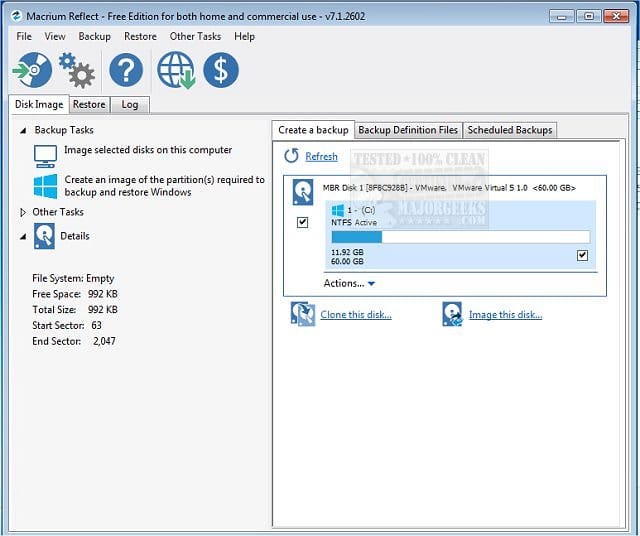
(Acronis, Aoemi, EaseUS, Hasleo, Macrium, Paragon, etc.)

Macrium is widely used in Ten Forums.

Macrium Software | Your Image is Everything


Backup and Restore with Macrium Reflect


My Computer My Computer

At a glance

Windows 10Intel(R) Core(TM) i7-4800MQ CPU @ 2.70GHz16 GB Total: Manufacturer : Samsung MemoryTyp...NVIDIA Quadro K3100M; Intel(R) HD Graphics 4600
OS
Windows 10
Computer type
Laptop
Manufacturer/Model
HP
CPU
Intel(R) Core(TM) i7-4800MQ CPU @ 2.70GHz
Motherboard
Product : 190A Version : KBC Version 94.56
Memory
16 GB Total: Manufacturer : Samsung MemoryType : DDR3 FormFactor : SODIMM Capacity : 8GB Speed : 1600
Graphics Card(s)
NVIDIA Quadro K3100M; Intel(R) HD Graphics 4600
Sound Card
IDT High Definition Audio CODEC; PNP Device ID HDAUDIO\FUNC_01&VEN_111D&DEV_76E0
Hard Drives
Model Hitachi HTS727575A9E364
Antivirus
Microsoft Defender
Other Info
Mobile Workstation
Oh wow thanks.

I've also got the Surface Laptop 7 ARM official Recovery Image from Microsoft's site, which I believe would effectively be the same as a clean install. I'd still need to do the backup/restore image, but this seems like a better option as it's for my model.

I've got it on a USB stick too. It's also 24H2 I'm pretty sure, so benefits from possible issues being introduced.
 
Last edited:

My Computer My Computer

At a glance

Windows 11 ProSnapdragon® X Plus (10 Core)16GB
OS
Windows 11 Pro
Computer type
Laptop
Manufacturer/Model
Microsoft Surface Laptop 7 (ARM)
CPU
Snapdragon® X Plus (10 Core)
Memory
16GB
Hard Drives
512GB SSD
Either method > make sure that the BIOS is up to date


One or more of these links may be useful:


My Computer My Computer

At a glance

Windows 10Intel(R) Core(TM) i7-4800MQ CPU @ 2.70GHz16 GB Total: Manufacturer : Samsung MemoryTyp...NVIDIA Quadro K3100M; Intel(R) HD Graphics 4600
OS
Windows 10
Computer type
Laptop
Manufacturer/Model
HP
CPU
Intel(R) Core(TM) i7-4800MQ CPU @ 2.70GHz
Motherboard
Product : 190A Version : KBC Version 94.56
Memory
16 GB Total: Manufacturer : Samsung MemoryType : DDR3 FormFactor : SODIMM Capacity : 8GB Speed : 1600
Graphics Card(s)
NVIDIA Quadro K3100M; Intel(R) HD Graphics 4600
Sound Card
IDT High Definition Audio CODEC; PNP Device ID HDAUDIO\FUNC_01&VEN_111D&DEV_76E0
Hard Drives
Model Hitachi HTS727575A9E364
Antivirus
Microsoft Defender
Other Info
Mobile Workstation

Latest Support Threads

Back
Top Bottom