Win 7 PC will not add Win 11 PC Printer.


suparoo

Well-known member
Member
Local time
3:14 AM
Posts
51
Location
S.E. Queensland
OS
Windows 11 Home Version 25H2 26200.8328
I am having trouble trying to connect my wife's Win 7 PC to my Canon iX6860 IJ Printer which is connected via USB on my Win 11 PC.
Each time I run Add a Printer in CP > Devices & Printers on her PC, I keep getting the error message... "Windows cannot connect to the printer. The specified network name is no longer available."
When the Select a Printer window opens, it has the right printer and the right address (as far as I know)... \\?????\Canon iX6860 series.
If I select the option "The printer that I want isn't listed" and select "Browse for a printer" > Next, it finds my PC and then when I click on it it shows the right printer, but Win 7 still will not connect to it. I get the error message above.

I have tried disabling EIS's AV and Firewall, it makes no difference.

Can anybody suggest what I maybe wrong or I am doing wrong?

Thanks!
 
Windows Build/Version
Win 11 Home v22H2 (OS Build 22261.2361)

My Computer My Computer

At a glance

Windows 11 Home Version 25H2 26200.8328Intel Core i5-12400F 2.5GHZ 18M LGA1700 Proce...Corsair Vengeance RGB RS 16GB (2x8GB) DDR4 32...Gigabyte GeForce RTX 4060 Ti EAGLE 8G Graphic...
OS
Windows 11 Home Version 25H2 26200.8328
Computer type
PC/Desktop
Manufacturer/Model
Centre Com Karuza Taurus Core i5 12400F RTX 4060 Ti Gaming PC
CPU
Intel Core i5-12400F 2.5GHZ 18M LGA1700 Processor
Motherboard
MSI B660M-A PRO WIFI DDR4 DDR4 LGA1700 mATX
Memory
Corsair Vengeance RGB RS 16GB (2x8GB) DDR4 3200MHz C16 RAM
Graphics Card(s)
Gigabyte GeForce RTX 4060 Ti EAGLE 8G Graphics Card
Sound Card
Realtek High Definition Audio
Monitor(s) Displays
27" Benq GW2760
Screen Resolution
1920 x 1080
Hard Drives
Kingston SNV2S/1000G NV2 1TB PCIe 4.0 NVMe M.2 2280 SSD
PSU
Corsair RM750e 80+ Gold 750W Power Supply
Case
Cooler Master MasterBox K501L ARGB Tempered Glass Side Panel MCB-K501L-KGNN-SR3
Cooling
Cooler Master Hyper 212 Spectrum V3 CPU Cooler - Cooler Master MasterFan MF120 Halo ARGB 120mm Fan
Keyboard
Logitech G213
Mouse
Razor Basilik V3 35K
Internet Speed
Download Mbps 940.00 Upload Mbps 96.00
Browser
Firefox 151.0.1 (64-bit)
Antivirus
Eset Smart Security Premium v19.0.14.0
Other Info
Canon iX6860 Inkjet Printer
Brother MFC-L2880DW Laser Printer
Mercusys MR90X AX6000 8-Stream Wi-Fi 6 Router
Logitech 5.1 Speakers
I think In the past I was able to add the
printer via direct IP
  • Click Add Printer.
  • Select Add Local Printer then click Next.
  • Select create new port, choose Standard TCP/IP from menu, then click Next.
  • Type static IP assigned to printer in Hostname or IP address field.
Also I would try to get her on Windows 10 at least due win 7 is really insecure due to being End Of Life.
 

My Computer My Computer

At a glance

Windows 11AMD Ryzen 7 6800H32GB3050Ti
OS
Windows 11
Computer type
Laptop
CPU
AMD Ryzen 7 6800H
Memory
32GB
Graphics Card(s)
3050Ti
Hard Drives
4TB SN850X
Samsung 2TB 970 Evo
Have you set up printer sharing in your machine? Select the Start button, then select Settings > Network & internet , and on the right side, select Sharing options. Under Private, select Turn on Network discovery and Turn on file and printer sharing.
Then share the printer.
  1. Select the Start button, then select Settings > Devices > Printers & scanners.
  2. Choose the printer you want to share, then select Manage.
  3. Select Printer Properties, then choose the Sharing tab.
  4. On the Sharing tab, select Share this printer.
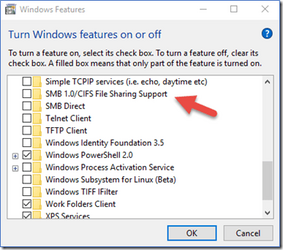
Try turning on SMB 1 in windows 11 features.

1696134435330.png

Your best bet would be to set the printer up as wireless (or use its ethernet connection.) Unplug the printer and uninstall the printer from both machines, Restart both machines.
Within the printer control panel set up wireless per your printer manual instructions. Then install the printer on both machines as a networked printer.

TBH I have not messed with Windows 7 in many, many years. There's a few folks here who has Windows 7 running as a VM. Windows 11 sometimes has trouble networking with Windows 10 so throwing 7 in the mix ....I would hesitate to say what one can expect.
 

My Computers My Computers

  • At a glance

    Windows 11 Pro 25H2 26200.8655i9-10900 10 core 20 threads32 gbnone-Intel UHD Graphics 630
    OS
    Windows 11 Pro 25H2 26200.8655
    Computer type
    PC/Desktop
    Manufacturer/Model
    Dell Optiplex 7080
    CPU
    i9-10900 10 core 20 threads
    Motherboard
    DELL 0J37VM
    Memory
    32 gb
    Graphics Card(s)
    none-Intel UHD Graphics 630
    Sound Card
    Integrated Realtek
    Monitor(s) Displays
    Benq 27
    Screen Resolution
    2560x1440
    Hard Drives
    2x1tb Solidigm m.2 nvme /External drives 512gb Samsung m.2 sata+2tb Kingston m2.nvme
    PSU
    500w
    Case
    MT
    Cooling
    Dell Premium
    Keyboard
    Logitech wired
    Mouse
    Logitech wireless
    Internet Speed
    so slow I'm too embarrassed to tell
    Browser
    #1 Edge #2 Firefox
    Antivirus
    Defender+MWB Premium
  • At a glance

    Windows 11 Pro 24H2 26200.8457AMD Ryzen 7 6800U32 gbintegrated
    Operating System
    Windows 11 Pro 24H2 26200.8457
    Computer type
    PC/Desktop
    Manufacturer/Model
    Beelink Mini PC SER5
    CPU
    AMD Ryzen 7 6800U
    Memory
    32 gb
    Graphics card(s)
    integrated
    Sound Card
    integrated
    Monitor(s) Displays
    Benq 27
    Screen Resolution
    2560x1440
    Hard Drives
    1TB Crucial nvme
    Keyboard
    Logitech wired
    Mouse
    Logitech wireless
    Internet Speed
    still too embarrassed to tell
    Browser
    Firefox
    Antivirus
    Defender
    Other Info
    System 3 is non compliant Dell 9020 i7-4770/24gb ram Win11 PRO 26200.8457
I think In the past I was able to add the
printer via direct IP
  • Click Add Printer.
  • Select Add Local Printer then click Next.
  • Select create new port, choose Standard TCP/IP from menu, then click Next.
  • Type static IP assigned to printer in Hostname or IP address field.
Also I would try to get her on Windows 10 at least due win 7 is really insecure due to being End Of Life.
The PC is too old for Windows 10.
Isn't Windows 10 also coming to it's EOL?
"We have been put on notice that Windows 10 22H2 is the final release, with only security updates coming our way until October 2025."
 

My Computer My Computer

At a glance

Windows 11 Home Version 25H2 26200.8328Intel Core i5-12400F 2.5GHZ 18M LGA1700 Proce...Corsair Vengeance RGB RS 16GB (2x8GB) DDR4 32...Gigabyte GeForce RTX 4060 Ti EAGLE 8G Graphic...
OS
Windows 11 Home Version 25H2 26200.8328
Computer type
PC/Desktop
Manufacturer/Model
Centre Com Karuza Taurus Core i5 12400F RTX 4060 Ti Gaming PC
CPU
Intel Core i5-12400F 2.5GHZ 18M LGA1700 Processor
Motherboard
MSI B660M-A PRO WIFI DDR4 DDR4 LGA1700 mATX
Memory
Corsair Vengeance RGB RS 16GB (2x8GB) DDR4 3200MHz C16 RAM
Graphics Card(s)
Gigabyte GeForce RTX 4060 Ti EAGLE 8G Graphics Card
Sound Card
Realtek High Definition Audio
Monitor(s) Displays
27" Benq GW2760
Screen Resolution
1920 x 1080
Hard Drives
Kingston SNV2S/1000G NV2 1TB PCIe 4.0 NVMe M.2 2280 SSD
PSU
Corsair RM750e 80+ Gold 750W Power Supply
Case
Cooler Master MasterBox K501L ARGB Tempered Glass Side Panel MCB-K501L-KGNN-SR3
Cooling
Cooler Master Hyper 212 Spectrum V3 CPU Cooler - Cooler Master MasterFan MF120 Halo ARGB 120mm Fan
Keyboard
Logitech G213
Mouse
Razor Basilik V3 35K
Internet Speed
Download Mbps 940.00 Upload Mbps 96.00
Browser
Firefox 151.0.1 (64-bit)
Antivirus
Eset Smart Security Premium v19.0.14.0
Other Info
Canon iX6860 Inkjet Printer
Brother MFC-L2880DW Laser Printer
Mercusys MR90X AX6000 8-Stream Wi-Fi 6 Router
Logitech 5.1 Speakers
The PC is too old for Windows 10.
Isn't Windows 10 also coming to it's EOL?
Windows 10 will reach end of support on October 14, 2025 so still have two more years off updates on 10 at least
 

My Computer My Computer

At a glance

Windows 11AMD Ryzen 7 6800H32GB3050Ti
OS
Windows 11
Computer type
Laptop
CPU
AMD Ryzen 7 6800H
Memory
32GB
Graphics Card(s)
3050Ti
Hard Drives
4TB SN850X
Samsung 2TB 970 Evo
Back
Top Bottom