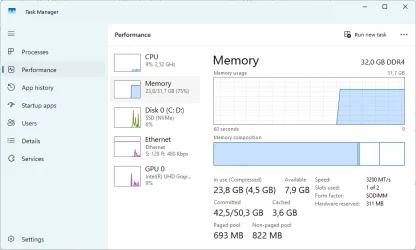
Win11: I can only use 75% of my 32Gb memory, on Win10 I could use all 100% of it.


dimaxxxer

Member
Local time
12:24 AM
Posts
26
OS
Win11
Hi.

When I had Win10 Pro when I opened multiple programs (Firefox with many tabs etc) I often reach 100% of used memory and only then I got a warning "low memory". Now on Win11 Pro I never reach more than 75-77% of my memory and then I get a low memory warning. I feel like windows is just stealing my money and I need to get an extra 16Gb or 32Gb instead of just using full amount. I've talked to ChatGPT and Gemini, my pagefile is managed by the system, no leaking drivers, software etc.

Thank you!
 
Windows Build/Version
Latest Win11 Pro

Attachments

  • memory.webp
    memory.webp
    33.3 KB · Views: 4

My Computer My Computer

At a glance

Win11
OS
Win11
Computer type
PC/Desktop
Manufacturer/Model
Dell
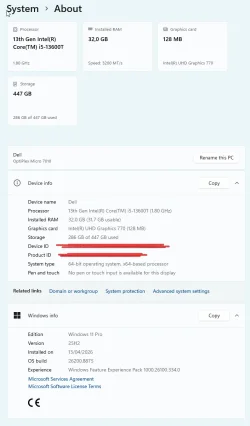
Can you go to Settings > System > About and show the "Installed Ram" section under Device Specs.

I also noticed you are using 1 DIMM slot instead of 2, is there a particular reason?
 

My Computer My Computer

At a glance

Windows 11 Pro 25H2i7 12700k64GB DDR5 [CMK64GX5M2B5200C40]MSI 4060 2x Ventus 8G
OS
Windows 11 Pro 25H2
Computer type
PC/Desktop
Manufacturer/Model
DIY
CPU
i7 12700k
Motherboard
7E07vMA [Z790 Pro Max Wifi]
Memory
64GB DDR5 [CMK64GX5M2B5200C40]
Graphics Card(s)
MSI 4060 2x Ventus 8G
Sound Card
Realtek® ALC4080 Codec
Monitor(s) Displays
ASUS VA24DQSB
Screen Resolution
1920x1080 @ 75hz
Hard Drives
Samsung 980 Pro 1TB (OS Drive)
Samsung 980 Pro 2TB (Secondary Drive)
Samsung 980 Pro 1TB (Other)
Samsung 860 Pro 512 (Other)
WD6400AAKS (Other)
PSU
Corsair 850x
Cooling
Noctua NH-D15
Mouse
G502 X Lightspeed
Browser
Chrome, Firefox
Antivirus
Malwarebytes Premium, Defender
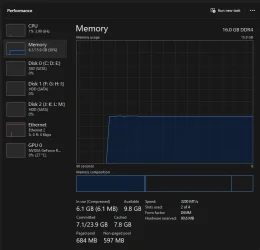
Windows 11 25H2 on mine with browser open and many tabs open, I think you have alot of stuf running in the background.

TaskMemory.webp
 

My Computer My Computer

At a glance

Win11 24H2 IOT LTSC / Win11 Pro 25H2AMD Ryzen 7 8700G / Ryzen 7 8700G / Ryzen 8600GF5-6000J3636F16GX2-FX5 32GB / Lexar Ares RGB ...internal
OS
Win11 24H2 IOT LTSC / Win11 Pro 25H2
Computer type
PC/Desktop
Manufacturer/Model
Gigabyte x2 / Asus = Home builds
CPU
AMD Ryzen 7 8700G / Ryzen 7 8700G / Ryzen 8600G
Motherboard
Gigabyte B650 AORUS ELITE AX V2 / ASUS TUF GAMING B650-PLUS / B650 GAMING X AX V2
Memory
F5-6000J3636F16GX2-FX5 32GB / Lexar Ares RGB LD5BU016G-R6000GDLA 32GB / Kingston FURY Beast 32 GB DDR5-5600
Graphics Card(s)
internal
Sound Card
Realtek
Monitor(s) Displays
BenQ 27 L EW2780
Screen Resolution
1920x1080
Hard Drives
Many M.2's (WD)
PSU
be quiet! Pure Power 13 M 550W
Case
Chieftec HC-10B-OP
Cooling
Gelid Solutions Tranquillo 5, many Noctua's 12x12
Keyboard
Microsoft
Mouse
Cherry
Internet Speed
500 mbs
Browser
Vivaldi
Antivirus
Eset
Other Info
PC builder / repair / Trouble-shooter etc.
please open system configuration
settings > windows tools > system configuration

in that window click the second tab 'boot'
in the boot window about halfway down to the left is a button 'Advanced Options'
click the advanced options button

in that advanced option window on the right is 'maximum memory'
tick the box and then set the maximum memory to 32768
(thats 32GB is 32768 in megabytes)

click OK and save all settings then a restart will be required
then see if that gives any improvement on your memory usage.

best of luck Steve ..
 
Last edited:

My Computers My Computers

  • At a glance

    Windows 11 HomeRyzen 7 5825u64GB DDR4 3200Ryzen 7 5825u
    OS
    Windows 11 Home
    Computer type
    PC/Desktop
    Manufacturer/Model
    HP 24" AiO
    CPU
    Ryzen 7 5825u
    Motherboard
    HP
    Memory
    64GB DDR4 3200
    Graphics Card(s)
    Ryzen 7 5825u
    Sound Card
    Realtek External 5w speaker bar.
    Monitor(s) Displays
    24" HP AiO
    Screen Resolution
    1920 x 1080 @60 Hz
    Hard Drives
    1TB WD Blue SN580 M2 SSD Partitioned C:/D: drives.
    2x 1TB USB HDD External Backup/Storage.
    all VeraCrypt encrypted.
    PSU
    90W external power brick
    Case
    24" All in One
    Cooling
    Default Air Cooling
    Keyboard
    Dell WiFi UK extended
    Mouse
    Dell WiFi 3 Button
    Internet Speed
    1GB full fibre
    Browser
    Vivaldi Browser/Email/Calendar
    Antivirus
    AVG Internet Security/Windows Defender
    Other Info
    Mainly Open Source Software
  • At a glance

    Ubuntu 22.04.5 LTSi5 7200u16GB DDR4Intel
    Operating System
    Ubuntu 22.04.5 LTS
    Computer type
    Laptop
    Manufacturer/Model
    Dell 13" Latitude 2017
    CPU
    i5 7200u
    Motherboard
    Dell
    Memory
    16GB DDR4
    Graphics card(s)
    Intel
    Sound Card
    Intel
    Monitor(s) Displays
    13" Dell Laptop
    Hard Drives
    250GB Crucial 2.5" SSD
    Mouse
    Generic WiFi 3 button
    Internet Speed
    WiFi only
    Browser
    Firefox
    Antivirus
    ClamAV TK
    Other Info
    Mainly Open Source Software
Here's what Copilot has to say;

What you’re seeing on Windows 11 is normal and expected. The low‑memory warning isn’t tied to RAM usage anymore — it’s tied to commit pressure, which includes RAM + pagefile + GPU shared memory + driver allocations + memory‑mapped files + system‑reserved regions.

In Windows 10, the OS would let RAM usage climb close to 100% before warning. The downside was instability: apps crashing, tabs unloading, GPU resets, and occasional system hangs.

Windows 11 changed the threshold intentionally. It warns earlier because:

  • Commit usage can be near the limit even when RAM is only 75%. Modern browsers, GPU drivers, and sandboxed processes reserve memory that doesn’t show up as “used RAM.”
  • Windows 11 reserves more memory for system components (GPU shared memory, security isolation, memory compression, WDDM 3.x, etc.).These reservations count toward commit but not toward visible RAM usage.
  • Memory compression is more aggressive, so RAM looks less full even when the system is under pressure.
  • The pagefile grows more conservatively than Windows 10, which makes commit limits easier to hit.
So the warning isn’t because Windows 11 is “stealing RAM” or preventing you from using what you paid for. It’s simply protecting system stability by warning based on the actual memory pressure instead of the old RAM‑only metric.

If your workloads ran fine on Windows 10, you don’t need more RAM unless you’re genuinely running out of commit headroom. The behavior itself is normal.
 

My Computers My Computers

  • At a glance

    Windows 11 ProIntel Series 3 Core Ultra X9 388H64GB LPDDR5x 9600 MT/sIntel Arc graphics B390 Panther Lake
    OS
    Windows 11 Pro
    Computer type
    Laptop
    Manufacturer/Model
    Dell XPS 16 DA16260
    CPU
    Intel Series 3 Core Ultra X9 388H
    Memory
    64GB LPDDR5x 9600 MT/s
    Graphics Card(s)
    Intel Arc graphics B390 Panther Lake
    Monitor(s) Displays
    16" 3.2K Tandem OLED Infinity Edge
    Screen Resolution
    3200 x 2000 16:10 236 PPI
    Hard Drives
    1 Terabyte M.2 PCIe NVMe SSD
    Case
    Black Anodized Aluminum
    Cooling
    Vapor Chamber Cooling
    Mouse
    None
    Internet Speed
    942 Mbps Netgear Mesh + 2 Satellites
    Browser
    Microsoft Edge (Chromium)
    Antivirus
    Windows Security (Defender)
    Other Info
    NPU delivering 67 TOPS
    Microsoft 365 subscription
    Microsoft Office 365
    Microsoft OneDrive 1TB Cloud
    Microsoft Visual Studio
    Microsoft Visual Studio Code
    Microsoft Sysinternals Suite
    Microsoft BitLocker
    Microsoft Copilot
    Dell Support Assist
    Dell Command | Update
    Macrium Reflect X subscription
    1Password Password Manager
    Amazon Kindle for PC
    Lightroom/Photoshop subscription
    Interactive Brokers Trader Workstation
  • At a glance

    Windows 11 ProSnapdragon® X Elite (12 Core) with Hexagon NP...32GB LPDDR5x 8448 MT/sIntegrated Adreno GPU
    Operating System
    Windows 11 Pro
    Computer type
    Laptop
    Manufacturer/Model
    Microsoft Surface Laptop 7
    CPU
    Snapdragon® X Elite (12 Core) with Hexagon NPU delivering 45 TOPS
    Memory
    32GB LPDDR5x 8448 MT/s
    Graphics card(s)
    Integrated Adreno GPU
    Sound Card
    Omnisonic speakers with Dolby Atmos spatial sound
    Monitor(s) Displays
    13.8″ PixelSense Flow touchscreen 120 Hz 600 NIT
    Screen Resolution
    2304 × 1536 (201 PPI), 3:2 aspect ratio
    Hard Drives
    1 TB PCIe NVMe Gen 4 SSD
    Case
    Black Anodized Aluminum
    Cooling
    Vapor Chamber Cooling
    Mouse
    None
    Internet Speed
    942 Mbps Netgear Mesh + 2 Satellites
    Browser
    Microsoft Edge (Chromium)
    Antivirus
    Windows Security (Defender)
    Other Info
    Microsoft 365 subscription (Office)
    Microsoft Office 365
    Microsoft OneDrive 1TB Cloud
    Microsoft Visual Studio 2026
    Microsoft Visual Studio Code
    Lightroom/Photoshop subscription
    1Password Password Manager
    Microsoft Sysinternals Suite
    Amazon Kindle for PC
    Microsoft BitLocker
    Microsoft Copilot
    Interactive Brokers Trader Workstation
Can you go to Settings > System > About and show the "Installed Ram" section under Device Specs.

I also noticed you are using 1 DIMM slot instead of 2, is there a particular reason?
Hi and thank you for an answer! Here is my memory info.
I have one 32gb stick in 1st slot. Do you think that could make a difference? I thought that it either works or not and it has nothing to do with how Windows is managing memory. Thanks!
 

Attachments

  • memory2.webp
    memory2.webp
    39.8 KB · Views: 6

My Computer My Computer

At a glance

Win11
OS
Win11
Computer type
PC/Desktop
Manufacturer/Model
Dell
Windows 11 25H2 on mine with browser open and many tabs open, I think you have alot of stuf running in the background.

View attachment 178453
Yes, I have a lot of rubbish running, but I want it to use all of my memory, not 75%. :)
 

My Computer My Computer

At a glance

Win11
OS
Win11
Computer type
PC/Desktop
Manufacturer/Model
Dell
please open system configuration
settings > windows tools > system configuration

in that window click the second tab 'boot'
in the boot window about halfway down to the left is a button 'Advanced Options'
click the advanced options button

in that advanced option window on the right is 'maximum memory'
tick the box and then set the maximum memory to 32768
(thats 32GB is 32768 in megabytes)

click OK and save all settings then a restart will be required
then see if that gives any improvement on your memory usage.

best of luck Steve ..
Hi Steve and thank you for answer! My system says I cannot change it due to SecureBoot feature... Windows help says that this setting cannot increase my memory usage, though, it is used for system diagnostics... Thank you for helping!
 

My Computer My Computer

At a glance

Win11
OS
Win11
Computer type
PC/Desktop
Manufacturer/Model
Dell
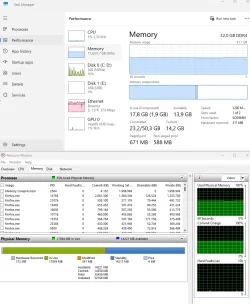
In the upper right corner of the memory section of task manager click on the three dots then the drop down will show the resource monitor option.

Click on that then go to the memory tab in resource monitor and you can see how much memory every program is using.

Screenshot 2026-08-03 140540.webp


If you are using integrated GPU then that will claim some ram from the system and you can not use that.


Your screenshot shows 23.8 in use and 7.9 available which would be 31.7 all together so I do not see the issue.
Need to use resource monitor and see what is using so much of the ram.

dd.webp
 

My Computer My Computer

At a glance

Windows 11 Pro
OS
Windows 11 Pro
Here's what Copilot has to say;

What you’re seeing on Windows 11 is normal and expected. The low‑memory warning isn’t tied to RAM usage anymore — it’s tied to commit pressure, which includes RAM + pagefile + GPU shared memory + driver allocations + memory‑mapped files + system‑reserved regions.

In Windows 10, the OS would let RAM usage climb close to 100% before warning. The downside was instability: apps crashing, tabs unloading, GPU resets, and occasional system hangs.

Windows 11 changed the threshold intentionally. It warns earlier because:

  • Commit usage can be near the limit even when RAM is only 75%. Modern browsers, GPU drivers, and sandboxed processes reserve memory that doesn’t show up as “used RAM.”
  • Windows 11 reserves more memory for system components (GPU shared memory, security isolation, memory compression, WDDM 3.x, etc.).These reservations count toward commit but not toward visible RAM usage.
  • Memory compression is more aggressive, so RAM looks less full even when the system is under pressure.
  • The pagefile grows more conservatively than Windows 10, which makes commit limits easier to hit.
So the warning isn’t because Windows 11 is “stealing RAM” or preventing you from using what you paid for. It’s simply protecting system stability by warning based on the actual memory pressure instead of the old RAM‑only metric.

If your workloads ran fine on Windows 10, you don’t need more RAM unless you’re genuinely running out of commit headroom. The behavior itself is normal.
Hi Gary and thank you for help! I asked many times ChatGPT, Gemini and Claude, but did not ask Copilot. :)

It is sad that I have 32gb and can use only 24. Weird thing. It is like buying a house with 4 bedrooms and you can use only 3. F..ck. :)
 

My Computer My Computer

At a glance

Win11
OS
Win11
Computer type
PC/Desktop
Manufacturer/Model
Dell
In the upper right corner of the memory section of task manager click on the three dots then the drop down will show the resource monitor option.

Click on that then go to the memory tab in resource monitor and you can see how much memory every program is using.

View attachment 178457
Thanks! I've gone through this many times, learned about commit memory etc. I know which app is using which amount of memory. I am ok with these apps, I just want them to use ALL memory I have paid for. Isn't it silly to have a 4-room house and be able to use 3 rooms only? :)
 

My Computer My Computer

At a glance

Win11
OS
Win11
Computer type
PC/Desktop
Manufacturer/Model
Dell
I see no RAM size usage limit Windows 11 has made significant improvements to how it handles both physical and virtual memory compared to Windows 10. The new memory management system in Windows 11 is smarter, faster, and better at using SSDs for virtual memory. While you will need a bit more physical memory (RAM) to run Windows 11, the overall experience should be more responsive and stable, especially when running multiple applications or large programs.
 

My Computer My Computer

At a glance

Windows 11AMD Ryzen 7 5700GMicron Technology DDR4-3200 16GBNVIDIA GeForce RTX 3060
OS
Windows 11
Computer type
PC/Desktop
Manufacturer/Model
HP Pavilion
CPU
AMD Ryzen 7 5700G
Motherboard
Erica6
Memory
Micron Technology DDR4-3200 16GB
Graphics Card(s)
NVIDIA GeForce RTX 3060
Sound Card
Realtek ALC671
Monitor(s) Displays
Samsung SyncMaster U28E590
Screen Resolution
3840 x 2160
Hard Drives
SAMSUNG MZVLQ1T0HALB-000H1
Thanks! I've gone through this many times, learned about commit memory etc. I know which app is using which amount of memory. I am ok with these apps, I just want them to use ALL memory I have paid for. Isn't it silly to have a 4-room house and be able to use 3 rooms only? :)
Pray that you never have to use all RAM as this will bring about out of memory error and slow down your computer.
 

My Computer My Computer

At a glance

Windows 11AMD Ryzen 7 5700GMicron Technology DDR4-3200 16GBNVIDIA GeForce RTX 3060
OS
Windows 11
Computer type
PC/Desktop
Manufacturer/Model
HP Pavilion
CPU
AMD Ryzen 7 5700G
Motherboard
Erica6
Memory
Micron Technology DDR4-3200 16GB
Graphics Card(s)
NVIDIA GeForce RTX 3060
Sound Card
Realtek ALC671
Monitor(s) Displays
Samsung SyncMaster U28E590
Screen Resolution
3840 x 2160
Hard Drives
SAMSUNG MZVLQ1T0HALB-000H1
I just want them to use ALL memory I have paid for.

Are you using Integrated graphics?

Those claim ram from the system as they do not have dedicated ram like a GPU does.
Integrated graphics can use up to 50% of the ram when using a demanding game or 3D application.

What does your resource monitor graph show?

Here is mine.

rr.webp
 

My Computer My Computer

At a glance

Windows 11 Pro
OS
Windows 11 Pro
In the upper right corner of the memory section of task manager click on the three dots then the drop down will show the resource monitor option.

Click on that then go to the memory tab in resource monitor and you can see how much memory every program is using.

View attachment 178457

If you are using integrated GPU then that will claim some ram from the system and you can not use that.


Your screenshot shows 23.8 in use and 7.9 available which would be 31.7 all together so I do not see the issue.
Need to use resource monitor and see what is using so much of the ram.

View attachment 178458
What do you think we could see in Resource monitor and how could it help us? My computer crashed and I had to restart it, I don't have all memory used it, so cannot test it in Resource Monitor.
 

My Computer My Computer

At a glance

Win11
OS
Win11
Computer type
PC/Desktop
Manufacturer/Model
Dell
Are you using Integrated graphics?

Those claim ram from the system as they do not have dedicated ram like a GPU does.
Integrated graphics can use up to 50% of the ram when using a demanding game or 3D application.

What does your resource monitor graph show?

Here is mine.

View attachment 178459
Yes, I have integrated graphics, but I never play games or do anything demanding.
 

Attachments

  • memory3.webp
    memory3.webp
    87.7 KB · Views: 5

My Computer My Computer

At a glance

Win11
OS
Win11
Computer type
PC/Desktop
Manufacturer/Model
Dell
I see no RAM size usage limit Windows 11 has made significant improvements to how it handles both physical and virtual memory compared to Windows 10. The new memory management system in Windows 11 is smarter, faster, and better at using SSDs for virtual memory. While you will need a bit more physical memory (RAM) to run Windows 11, the overall experience should be more responsive and stable, especially when running multiple applications or large programs.
So how did the memory management in Win11 became better? What are the benefits of being able to use only 24gb of memory out of 32gb? Imagine that you have a 4 room house and can only use 3 rooms and guys who built it told that it is actually a very nice feature to be able to use only 3 rooms. :)
 

My Computer My Computer

At a glance

Win11
OS
Win11
Computer type
PC/Desktop
Manufacturer/Model
Dell
but I never play games or do anything demanding

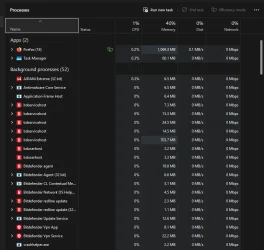
Firefox can be demanding if you have enough tabs open.

What does processes tab in task manager show firefox is using for memory?

Mine only using about 500 MB.

Screenshot 2026-08-03 142924.webp
 

My Computer My Computer

At a glance

Windows 11 Pro
OS
Windows 11 Pro
Firefox can be demanding if you have enough tabs open.

What does processes tab in task manager show firefox is using for memory?

Mine only using about 500 MB.

View attachment 178461
I have many tabs open, maybe 100. So alltogether my Firefox is about 5-6gb.
 

My Computer My Computer

At a glance

Win11
OS
Win11
Computer type
PC/Desktop
Manufacturer/Model
Dell
I have many tabs open, maybe 100. So alltogether my Firefox is about 5-6gb.


100 tabs???
Don't you use bookmarks?

Even when I'm comparing a bunch of items on Amazon and other stores... I rarely get more than 20-25 tabs open.


Image1.webp Image1.webp


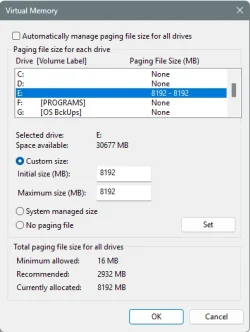
I don't use System managed page file.

Image1.webp


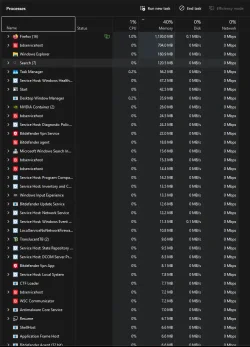
I only have 16GB of RAM and I never get low memory.


In Task Manager on the "Processes" tab, if you click at the top of the Memory column, it will sort with the things using the most memory, at the top...


Image1.webp
 
Last edited:

My Computers My Computers

  • At a glance

    Win 11 Home 26H2 26300.9711AMD Ryzen 7 3700XG.Skill (F4-3200C14D-16GTZKW)EVGA RTX 2070 (08G-P4-2171-KR)
    OS
    Win 11 Home 26H2 26300.9711
    Computer type
    PC/Desktop
    Manufacturer/Model
    Built by Ghot® [May 2020]
    CPU
    AMD Ryzen 7 3700X
    Motherboard
    Asus Pro WS X570-ACE (BIOS 5302)
    Memory
    G.Skill (F4-3200C14D-16GTZKW)
    Graphics Card(s)
    EVGA RTX 2070 (08G-P4-2171-KR)
    Sound Card
    Realtek ALC1220P / ALC S1220A
    Monitor(s) Displays
    Dell U3011 30"
    Screen Resolution
    2560 x 1600
    Hard Drives
    2x Samsung 860 EVO 500GB,
    WD 4TB Black FZBX - SATA III,
    WD 8TB Black FZBX - SATA III,
    DRW-24B1ST CD/DVD Burner
    PSU
    PC Power & Cooling 750W Quad EPS12V
    Case
    Cooler Master ATCS 840 Tower
    Cooling
    CM Hyper 212 EVO (push/pull)
    Keyboard
    Ducky DK9008 Shine II Blue LED
    Mouse
    Logitech Optical M-100
    Internet Speed
    300/300
    Browser
    Firefox (latest)
    Antivirus
    Bitdefender Total Security
    Other Info
    Speakers: Klipsch Pro Media 2.1
  • At a glance

    Windows XP Pro 32bit w/SP3AMD Athlon 64 X2 5000+ (OC'd @ 3.2Ghz)TWIN2X2048-6400C4DHX (2 x 1GB, DDR2 800)EVGA 256-P2-N758-TR GeForce 8600GT SSC
    Operating System
    Windows XP Pro 32bit w/SP3
    Computer type
    PC/Desktop
    Manufacturer/Model
    Built by Ghot® (not in use)
    CPU
    AMD Athlon 64 X2 5000+ (OC'd @ 3.2Ghz)
    Motherboard
    ASUS M2N32-SLI Deluxe Wireless Edition
    Memory
    TWIN2X2048-6400C4DHX (2 x 1GB, DDR2 800)
    Graphics card(s)
    EVGA 256-P2-N758-TR GeForce 8600GT SSC
    Sound Card
    Onboard
    Monitor(s) Displays
    ViewSonic G90FB Black 19" Professional (CRT)
    Screen Resolution
    up to 2048 x 1536
    Hard Drives
    WD 36GB 10,000rpm Raptor SATA
    Seagate 80GB 7200rpm SATA
    Lite-On LTR-52246S CD/RW
    Lite-On LH-18A1P CD/DVD Burner
    PSU
    PC Power & Cooling Silencer 750 Quad EPS12V
    Case
    Generic Beige case, 80mm fans
    Cooling
    ZALMAN 9500A 92mm CPU Cooler
    Keyboard
    Logitech Classic Keybooard 200
    Mouse
    Logitech Optical M-BT96a
    Internet Speed
    300/300
    Browser
    Firefox 3.x ??
    Antivirus
    Symantec (Norton)
    Other Info
    Still assembled, still runs. Haven't turned it on for 15 years?

Latest Support Threads

Back
Top Bottom