Win11 Update from Jan24-25 (KB5078127 or KB5074109)


merkelck

Well-known member
Local time
1:01 AM
Posts
13
Location
Plano, TEXAS
OS
win 11 Pro
This update has been nothing but an upset to my PC . The biggest most prevalent issue involves Google chrome and associated apps such as gmail, youtube, youtubetv and most important google passwords. Unless I have an instance of chrome running, I can not access these apps. What I have tried is to open chrome, then minimize it and then select the shortcuts to open the app. This works fine up to a point. If I open an email and then select an embedded link, the link will not open. I have actually seen various ideas solve the issue only to it have it return. Before this debacle occurred, I was using shortcuts derived by opening the app and then creating a shortcut from within the app. However, the last thing I tried, which actually seemed to work, was to open the app as an app and then create new shortcuts.
Any and all help greatly appreciated
KentM
 
Windows Build/Version
Version 25H2 (build 26200.7623)

My Computer

System One

  • OS
    win 11 Pro
    Computer type
    PC/Desktop
    Manufacturer/Model
    dell xps 8950
Have you tried updating or reinstalling Chrome?
 

My Computers

System One System Two

  • OS
    Windows 11 Enterprise 25H2 26200 7462
    Computer type
    PC/Desktop
    Manufacturer/Model
    Custom Build
    CPU
    Intel XEON E5-2699 v3
    Motherboard
    ASUS X99-A
    Memory
    64GB Teamgroup UD4-3600
    Graphics Card(s)
    NVIDIA GeForce GTX 1080 Ti
    Sound Card
    Integrated
    Monitor(s) Displays
    ACER X34 Predator
    Screen Resolution
    3440 x 1440
    Hard Drives
    Crucial CT1000P 3P SSD8 1TB
    Crucial CT1000 BX500 SSD 1TB
    PSU
    GameMax Pro
    Case
    Fractal Design
    Cooling
    Corsair H110iGT + 6 140mm Fans
    Keyboard
    Corsair K4
    Mouse
    G-Skill G502
    Internet Speed
    300MBs
    Browser
    Chrome
    Antivirus
    OEM
    Other Info
    ASUS RT-AC87U Router
  • Operating System
    25H2 26200.5074
    Computer type
    Laptop
    Manufacturer/Model
    ASUS X555LA
    Memory
    8GB
    Browser
    Chrome
    Antivirus
    OEM
Are you using any 3rd party tweakers?
 

My Computers

System One System Two

  • OS
    Windows 11 Enterprise 25H2 26200 7462
    Computer type
    PC/Desktop
    Manufacturer/Model
    Custom Build
    CPU
    Intel XEON E5-2699 v3
    Motherboard
    ASUS X99-A
    Memory
    64GB Teamgroup UD4-3600
    Graphics Card(s)
    NVIDIA GeForce GTX 1080 Ti
    Sound Card
    Integrated
    Monitor(s) Displays
    ACER X34 Predator
    Screen Resolution
    3440 x 1440
    Hard Drives
    Crucial CT1000P 3P SSD8 1TB
    Crucial CT1000 BX500 SSD 1TB
    PSU
    GameMax Pro
    Case
    Fractal Design
    Cooling
    Corsair H110iGT + 6 140mm Fans
    Keyboard
    Corsair K4
    Mouse
    G-Skill G502
    Internet Speed
    300MBs
    Browser
    Chrome
    Antivirus
    OEM
    Other Info
    ASUS RT-AC87U Router
  • Operating System
    25H2 26200.5074
    Computer type
    Laptop
    Manufacturer/Model
    ASUS X555LA
    Memory
    8GB
    Browser
    Chrome
    Antivirus
    OEM
I am not familiar with that term. tweakers
 

My Computer

System One

  • OS
    win 11 Pro
    Computer type
    PC/Desktop
    Manufacturer/Model
    dell xps 8950
If you are referring to third party apps regarding the use of Google, the answer is no.
 

My Computer

System One

  • OS
    win 11 Pro
    Computer type
    PC/Desktop
    Manufacturer/Model
    dell xps 8950
I'm referring to third party apps that tweak system settings.
 

My Computers

System One System Two

  • OS
    Windows 11 Enterprise 25H2 26200 7462
    Computer type
    PC/Desktop
    Manufacturer/Model
    Custom Build
    CPU
    Intel XEON E5-2699 v3
    Motherboard
    ASUS X99-A
    Memory
    64GB Teamgroup UD4-3600
    Graphics Card(s)
    NVIDIA GeForce GTX 1080 Ti
    Sound Card
    Integrated
    Monitor(s) Displays
    ACER X34 Predator
    Screen Resolution
    3440 x 1440
    Hard Drives
    Crucial CT1000P 3P SSD8 1TB
    Crucial CT1000 BX500 SSD 1TB
    PSU
    GameMax Pro
    Case
    Fractal Design
    Cooling
    Corsair H110iGT + 6 140mm Fans
    Keyboard
    Corsair K4
    Mouse
    G-Skill G502
    Internet Speed
    300MBs
    Browser
    Chrome
    Antivirus
    OEM
    Other Info
    ASUS RT-AC87U Router
  • Operating System
    25H2 26200.5074
    Computer type
    Laptop
    Manufacturer/Model
    ASUS X555LA
    Memory
    8GB
    Browser
    Chrome
    Antivirus
    OEM
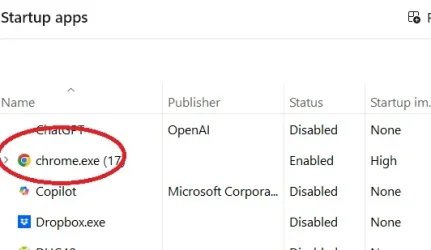
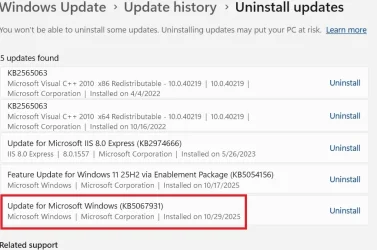
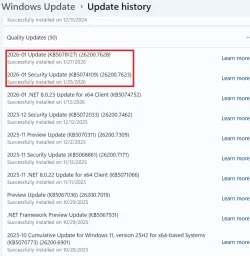
In an effort to make some progress, I made the following changes to see if I could correct or make any differences in this mess. I uninstalled two of the recent updates as shown in Attachment GOOG-03. After doing this I checked to see what else I could uninstall shown in GOOG_02. I do not understand if this is telling me that several other updates were removed or that I just can't uninstall them?? At any rate, after the uninstall procedure, a restart was required. Attachment GOOG_01 shows that I have chrome.exe in the startup. However, I could not open any of the shortcuts associated with chrome. I then opened chrome from the icon in the taskbar and immediately minimized it. After that I could open all the shortcuts for Google related apps and I was able to open all links referred to in emails. It appears that I need to figure out how to make sure that chrome restarts in the background every time I open the PC. There is a mention of that in the Settings of Chrome and I tried it both on and off. It made no difference which way I had it. Attachment GOOG_04.
At present, this is working the way I would like it to but I don't understand what happened with those two updates. I am definitely not going to install them again.
Once again any and all thoughts appreciated.
KentM
 

Attachments

  • GOOG_01.webp
    GOOG_01.webp
    13.1 KB · Views: 1
  • GOOG_02.webp
    GOOG_02.webp
    49.7 KB · Views: 1
  • GOOG_03.webp
    GOOG_03.webp
    66.4 KB · Views: 1
  • GOOG_04.webp
    GOOG_04.webp
    6.4 KB · Views: 1

My Computer

System One

  • OS
    win 11 Pro
    Computer type
    PC/Desktop
    Manufacturer/Model
    dell xps 8950
have you tried using SFC /scannow to check for system errors.

please open a Command prompt terminal as Administrator
write in to the command prompt window

sfc /scannow

then press enter

it any take some time to complete
if it comes up with errors
please restart your system and re-run sfc /scannow

you may have to do this several times until you are error free.
best of luck Steve ..
 

My Computers

System One System Two

  • OS
    Debian 13 KDE .. Windows 11 Home
    Computer type
    PC/Desktop
    Manufacturer/Model
    HP 24" AiO
    CPU
    Ryzen 7 5825u
    Motherboard
    HP
    Memory
    64GB DDR4 3200
    Graphics Card(s)
    Ryzen 7 5825u
    Sound Card
    RealTek
    Monitor(s) Displays
    24" HP AiO
    Screen Resolution
    1920 x 1080 @60 Hz
    Hard Drives
    1TB WD Blue SN580 M2 SSD Partitioned.
    2x 1TB USB HDD External Backup/Storage.
    PSU
    90W external power brick
    Case
    24" All in One
    Cooling
    Default Air Cooling
    Keyboard
    HP WiFi UK extended
    Mouse
    HP WiFi 3 Button
    Internet Speed
    1GB full fibre
    Browser
    Edge & Firefox
    Antivirus
    AVG Internet Security/Windows Defender
    Other Info
    Mainly Open Source Software
  • Operating System
    Ubuntu 22.04.5 LTS
    Computer type
    Laptop
    Manufacturer/Model
    Dell 13" Latitude 2017
    CPU
    i5 7200u
    Motherboard
    Dell
    Memory
    16GB DDR4
    Graphics card(s)
    Intel
    Sound Card
    Intel
    Monitor(s) Displays
    13" Dell Laptop
    Hard Drives
    250GB Crucial 2.5" SSD
    Mouse
    Generic WiFi 3 button
    Internet Speed
    WiFi only
    Browser
    Firefox
    Antivirus
    ClamAV TK
    Other Info
    Mainly Open Source Software
Thanks for your interest. I have done that several times most recently an hour ago or so. It never comes up with any errors. I am still at the point of trying to find out how to make the system think that chrome is running. When I run it minimized, things work fine. But then for some reason it is no longer running and I have start all over again.
 

My Computer

System One

  • OS
    win 11 Pro
    Computer type
    PC/Desktop
    Manufacturer/Model
    dell xps 8950
i found this that maybe of help

You can try the following

1. Check Battery Optimization Settings:
  • Go to Settings > Battery.
  • Tap Battery optimization.
  • Find Chrome and select Don't optimize.
2. Verify Background App Permissions:
  • Go to Settings > Apps & notifications.
  • Find Chrome and tap on it.
  • Under Permissions, ensure Background activity is enabled.
3. Chrome's Built-in Background App Setting:
  • Open Chrome Settings.
  • Search for "Background apps."
  • Enable "Continue running background apps when Google Chrome is closed."
4. Consider Using a Chrome Extension:
  • If you need more specific control over background tasks, consider using a Chrome extension like "Run In Background." This extension can help keep Chrome running in the background, even when all tabs are closed.
5. Check for System-Level Restrictions:
  • Some system-level settings or security software might interfere with Chrome's background processes. Review your device's settings and any third-party security software to ensure they're not blocking Chrome.i got the above from here

the above came from this link

best of luck Steve ..
 

My Computers

System One System Two

  • OS
    Debian 13 KDE .. Windows 11 Home
    Computer type
    PC/Desktop
    Manufacturer/Model
    HP 24" AiO
    CPU
    Ryzen 7 5825u
    Motherboard
    HP
    Memory
    64GB DDR4 3200
    Graphics Card(s)
    Ryzen 7 5825u
    Sound Card
    RealTek
    Monitor(s) Displays
    24" HP AiO
    Screen Resolution
    1920 x 1080 @60 Hz
    Hard Drives
    1TB WD Blue SN580 M2 SSD Partitioned.
    2x 1TB USB HDD External Backup/Storage.
    PSU
    90W external power brick
    Case
    24" All in One
    Cooling
    Default Air Cooling
    Keyboard
    HP WiFi UK extended
    Mouse
    HP WiFi 3 Button
    Internet Speed
    1GB full fibre
    Browser
    Edge & Firefox
    Antivirus
    AVG Internet Security/Windows Defender
    Other Info
    Mainly Open Source Software
  • Operating System
    Ubuntu 22.04.5 LTS
    Computer type
    Laptop
    Manufacturer/Model
    Dell 13" Latitude 2017
    CPU
    i5 7200u
    Motherboard
    Dell
    Memory
    16GB DDR4
    Graphics card(s)
    Intel
    Sound Card
    Intel
    Monitor(s) Displays
    13" Dell Laptop
    Hard Drives
    250GB Crucial 2.5" SSD
    Mouse
    Generic WiFi 3 button
    Internet Speed
    WiFi only
    Browser
    Firefox
    Antivirus
    ClamAV TK
    Other Info
    Mainly Open Source Software
Thanks for the info, Steve. I really thought something here would lead me to the solution but it hasn't so far. First of all , I had to decide which "SETTINGS" were being referred to. I finally decided it was Win11 settings unless specifically called out as Chrome Settings. (Item 3) Here are the results.
1. Not relevant as this is a desktop PC
2. On my PC, there is no such item as "Apps & Notifications" . There several references to Apps such as "Installed Apps", "Default Apps" but nothing regarding Notifications.
3. I have visited this setting in "chrome settings" before and it makes no difference if is enabled or not. I currently have it enabled.
4. I searched for the extension mentioned and can find no reference to it under the "Manage extensions" tab in chrome settings.
5. My second PC also running Win11 Pro and not infected by this, is running the same security software.

It appears that I am no further along.
Daze and confused
Kent
 

My Computer

System One

  • OS
    win 11 Pro
    Computer type
    PC/Desktop
    Manufacturer/Model
    dell xps 8950
It appears that I am no further along.
Daze and confused
Kent
And have yet to answer my question ref third party tweakers
 

My Computers

System One System Two

  • OS
    Windows 11 Enterprise 25H2 26200 7462
    Computer type
    PC/Desktop
    Manufacturer/Model
    Custom Build
    CPU
    Intel XEON E5-2699 v3
    Motherboard
    ASUS X99-A
    Memory
    64GB Teamgroup UD4-3600
    Graphics Card(s)
    NVIDIA GeForce GTX 1080 Ti
    Sound Card
    Integrated
    Monitor(s) Displays
    ACER X34 Predator
    Screen Resolution
    3440 x 1440
    Hard Drives
    Crucial CT1000P 3P SSD8 1TB
    Crucial CT1000 BX500 SSD 1TB
    PSU
    GameMax Pro
    Case
    Fractal Design
    Cooling
    Corsair H110iGT + 6 140mm Fans
    Keyboard
    Corsair K4
    Mouse
    G-Skill G502
    Internet Speed
    300MBs
    Browser
    Chrome
    Antivirus
    OEM
    Other Info
    ASUS RT-AC87U Router
  • Operating System
    25H2 26200.5074
    Computer type
    Laptop
    Manufacturer/Model
    ASUS X555LA
    Memory
    8GB
    Browser
    Chrome
    Antivirus
    OEM
Please give me an example of a "third party tweaker"
 

My Computer

System One

  • OS
    win 11 Pro
    Computer type
    PC/Desktop
    Manufacturer/Model
    dell xps 8950
Thanks to all who replied but after a week with no real results. I said "enough is enough" and did a repair with my latest recovery drive. Now I have to rebuild things, but the real value in all this was getting rid of stuff that did not need to be there.
 

My Computer

System One

  • OS
    win 11 Pro
    Computer type
    PC/Desktop
    Manufacturer/Model
    dell xps 8950

Latest Support Threads

Back
Top Bottom