Window Security Warning Icon


Arilyboo

Well-known member
Member
Local time
11:10 PM
Posts
69
OS
Windows 11 Pro
Just recently got this laptop brand new and have completely set it up and updated it according to manufacture's provided updates and windows updates. I'm still getting this warning on the windows security icon in the task bar however, I cannot find anything that needs attention. I've checked for antivirus updates and even ran a scan but I'm still getting this warning. Anyone know what else I need to be checking or looking at? It's just an annoyance.
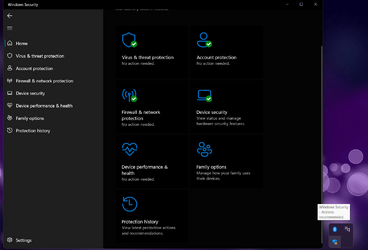

whatstheproblem.png
 
Windows Build/Version
Windows 11 Home 21H2 22000.978

My Computers My Computers

  • At a glance

    Windows 11 ProIntel Core i9-14700K128GBMSI Geforce RTX 4070 Ti X Trio 12GB
    OS
    Windows 11 Pro
    Computer type
    PC/Desktop
    CPU
    Intel Core i9-14700K
    Motherboard
    NZXT N7 Z790 Intel
    Memory
    128GB
    Graphics Card(s)
    MSI Geforce RTX 4070 Ti X Trio 12GB
    Sound Card
    Realtek(R) Audio
    Monitor(s) Displays
    Omen x 25
    Screen Resolution
    1920x1080
    Hard Drives
    4TB SSD and 2TB SSD
    PSU
    NZXT C1200 Gold ATX 3.1
    Case
    Hyte Y60 Snow White
    Cooling
    Corsair iCue H150i Elite LCD XT Liquid
    Keyboard
    NZXT Function 2
    Mouse
    NZXT Lift 2
    Internet Speed
    600mbps
    Browser
    Chrome
    Antivirus
    Windows Defender

  • At a glance

    Windows 11 Home14th Gen Intel Core i9 14900HX64 GBNVIDIA GeForce RTX 4090 16GB GDDR6
    Operating System
    Windows 11 Home
    Computer type
    Laptop
    Manufacturer/Model
    Dell/Alienware m18 R2
    CPU
    14th Gen Intel Core i9 14900HX
    Memory
    64 GB
    Graphics card(s)
    NVIDIA GeForce RTX 4090 16GB GDDR6
    Sound Card
    Realtek ALC3254
    Monitor(s) Displays
    18" QHD+
    Screen Resolution
    2560 x 1600
    Hard Drives
    2TB, M.2, PCIe NVMe, SSD
    Internet Speed
    600mbps
    Browser
    Chrome
    Antivirus
    Windows Defender
The "App & browser control" section of your Windows Security seems to be missing.

Have you tried Restart?

Others had the same issue when updating to recent builds:

App & Browser control section is completely missing from windows security center

Yes, I've had the computer for over a week now and have restarted multiple times. I searched for App and Browser control from the taskbar and was able to open the settings. I turned it on and now the warning has went away. Thank you for letting me know what the setting is called. I still have no idea why it's now showing up in the Security Center though.
 

My Computers My Computers

  • At a glance

    Windows 11 ProIntel Core i9-14700K128GBMSI Geforce RTX 4070 Ti X Trio 12GB
    OS
    Windows 11 Pro
    Computer type
    PC/Desktop
    CPU
    Intel Core i9-14700K
    Motherboard
    NZXT N7 Z790 Intel
    Memory
    128GB
    Graphics Card(s)
    MSI Geforce RTX 4070 Ti X Trio 12GB
    Sound Card
    Realtek(R) Audio
    Monitor(s) Displays
    Omen x 25
    Screen Resolution
    1920x1080
    Hard Drives
    4TB SSD and 2TB SSD
    PSU
    NZXT C1200 Gold ATX 3.1
    Case
    Hyte Y60 Snow White
    Cooling
    Corsair iCue H150i Elite LCD XT Liquid
    Keyboard
    NZXT Function 2
    Mouse
    NZXT Lift 2
    Internet Speed
    600mbps
    Browser
    Chrome
    Antivirus
    Windows Defender
  • At a glance

    Windows 11 Home14th Gen Intel Core i9 14900HX64 GBNVIDIA GeForce RTX 4090 16GB GDDR6
    Operating System
    Windows 11 Home
    Computer type
    Laptop
    Manufacturer/Model
    Dell/Alienware m18 R2
    CPU
    14th Gen Intel Core i9 14900HX
    Memory
    64 GB
    Graphics card(s)
    NVIDIA GeForce RTX 4090 16GB GDDR6
    Sound Card
    Realtek ALC3254
    Monitor(s) Displays
    18" QHD+
    Screen Resolution
    2560 x 1600
    Hard Drives
    2TB, M.2, PCIe NVMe, SSD
    Internet Speed
    600mbps
    Browser
    Chrome
    Antivirus
    Windows Defender
Yes, I've had the computer for over a week now and have restarted multiple times. I searched for App and Browser control from the taskbar and was able to open the settings. I turned it off and now the warning has went away. Thank you for letting me know what the setting it called. I still have no idea why it's now showing up in the Security Center though.
Sorry, but I have to ask: Actually Restart, not Shutdown then later power on?

Could you elaborate on what "it" you turned off?
 

My Computer My Computer

At a glance

Windows 11
OS
Windows 11
Computer type
Laptop
Sorry, but I have to ask: Actually Restart, not Shutdown then later power on?

Could you elaborate on what "it" you turned off?

Sorry for my miss-typing I edited my post. I turned on App and Browser Control not off. Also yes I've done plenty of restarts and shutdowns neither has worked.
 

My Computers My Computers

  • At a glance

    Windows 11 ProIntel Core i9-14700K128GBMSI Geforce RTX 4070 Ti X Trio 12GB
    OS
    Windows 11 Pro
    Computer type
    PC/Desktop
    CPU
    Intel Core i9-14700K
    Motherboard
    NZXT N7 Z790 Intel
    Memory
    128GB
    Graphics Card(s)
    MSI Geforce RTX 4070 Ti X Trio 12GB
    Sound Card
    Realtek(R) Audio
    Monitor(s) Displays
    Omen x 25
    Screen Resolution
    1920x1080
    Hard Drives
    4TB SSD and 2TB SSD
    PSU
    NZXT C1200 Gold ATX 3.1
    Case
    Hyte Y60 Snow White
    Cooling
    Corsair iCue H150i Elite LCD XT Liquid
    Keyboard
    NZXT Function 2
    Mouse
    NZXT Lift 2
    Internet Speed
    600mbps
    Browser
    Chrome
    Antivirus
    Windows Defender
  • At a glance

    Windows 11 Home14th Gen Intel Core i9 14900HX64 GBNVIDIA GeForce RTX 4090 16GB GDDR6
    Operating System
    Windows 11 Home
    Computer type
    Laptop
    Manufacturer/Model
    Dell/Alienware m18 R2
    CPU
    14th Gen Intel Core i9 14900HX
    Memory
    64 GB
    Graphics card(s)
    NVIDIA GeForce RTX 4090 16GB GDDR6
    Sound Card
    Realtek ALC3254
    Monitor(s) Displays
    18" QHD+
    Screen Resolution
    2560 x 1600
    Hard Drives
    2TB, M.2, PCIe NVMe, SSD
    Internet Speed
    600mbps
    Browser
    Chrome
    Antivirus
    Windows Defender
HI, Arilyboo.

Welcome to ElevenForum.


If all else fails... Repair install Win11

Wishing you the best. (y)
 

My Computer My Computer

At a glance

Windows 10 Pro 64-bit 22H2 19045.4046Intel i7-3770 @ 3.40GHz8 GBAMD 7500 Radeon HD Series
OS
Windows 10 Pro 64-bit 22H2 19045.4046
Computer type
PC/Desktop
Manufacturer/Model
Dell/Vostro 470 (Year 2012)
CPU
Intel i7-3770 @ 3.40GHz
Memory
8 GB
Graphics Card(s)
AMD 7500 Radeon HD Series
Sound Card
Realtek Hi-Def Audio
Monitor(s) Displays
Dell U2412M
Hard Drives
1 TB 7200 HDD
Keyboard
Dell/USB
Mouse
Dell/USB
Internet Speed
100/10
Browser
Edge
Antivirus
Windows Security/MalwareBytes Premium
Repair install doesn't fix it unfortunately but when you get the update to 22H2 it will be fixed.
 

My Computers My Computers

  • At a glance

    Win 11 ProAMD Ryzen™ 7 7730U24GB Dual-Channel DDR4 @ 1596MHz (22-22-22-52)512MB ATI AMD Radeon Graphics (ASUStek Comput...
    OS
    Win 11 Pro
    Computer type
    Laptop
    Manufacturer/Model
    ASUS Vivobook
    CPU
    AMD Ryzen™ 7 7730U
    Motherboard
    M1605YA
    Memory
    24GB Dual-Channel DDR4 @ 1596MHz (22-22-22-52)
    Graphics Card(s)
    512MB ATI AMD Radeon Graphics (ASUStek Computer Inc)
    Monitor(s) Displays
    Generic PnP Monitor (1920x1200@60Hz) - P1 PLUS (1920x1080@59Hz)
    Screen Resolution
    1920 X 1200
    Hard Drives
    953GB Western Digital WD
    PSU
    45 Watts
    Mouse
    Lenovo Bluetooth.
    Internet Speed
    500 Mbps
    Browser
    Edge
    Antivirus
    Defender
  • At a glance

    Windows 11AMD Ryzen 7 5800H / 3.2 GHz32 GB DDR4 SDRAM 3200 MHzNVIDIA GeForce RTX 3060 6 GB GDDR6 SDRAM
    Operating System
    Windows 11
    Computer type
    Laptop
    Manufacturer/Model
    ACER NITRO
    CPU
    AMD Ryzen 7 5800H / 3.2 GHz
    Motherboard
    CZ Scala_CAS (FP6)
    Memory
    32 GB DDR4 SDRAM 3200 MHz
    Graphics card(s)
    NVIDIA GeForce RTX 3060 6 GB GDDR6 SDRAM
    Sound Card
    Realtek Audio. NVIDIA High Definition Audio
    Monitor(s) Displays
    15.6" LED backlight 1920 x 1080 (Full HD) 144 Hz
    Screen Resolution
    1920 x 1080 (Full HD)
    Hard Drives
    Samsung 970 Evo Plus 2TB NVMe M.2
    PSU
    180 Watt, 19.5 V
    Mouse
    Lenovo Bluetooth
    Internet Speed
    500 Mbps
    Browser
    Edge
    Antivirus
    Defender
Repair install doesn't fix it unfortunately but when you get the update to 22H2 it will be fixed.

Interesting.

Thank you, for that information, Fabler2! :wink:
 

My Computer My Computer

At a glance

Windows 10 Pro 64-bit 22H2 19045.4046Intel i7-3770 @ 3.40GHz8 GBAMD 7500 Radeon HD Series
OS
Windows 10 Pro 64-bit 22H2 19045.4046
Computer type
PC/Desktop
Manufacturer/Model
Dell/Vostro 470 (Year 2012)
CPU
Intel i7-3770 @ 3.40GHz
Memory
8 GB
Graphics Card(s)
AMD 7500 Radeon HD Series
Sound Card
Realtek Hi-Def Audio
Monitor(s) Displays
Dell U2412M
Hard Drives
1 TB 7200 HDD
Keyboard
Dell/USB
Mouse
Dell/USB
Internet Speed
100/10
Browser
Edge
Antivirus
Windows Security/MalwareBytes Premium
A repair install will work if you use the latest ISO, which you can get from Microsoft:


My Computers My Computers

  • At a glance

    Win 11 Pro 25H2 26200.8655Intel® Core™ i7-14700KG.SKILL Ripjaws S5 Series 64GB (2 x 32GB) DDR5ASUS GeForce RTX 4070 Super 12GB
    OS
    Win 11 Pro 25H2 26200.8655
    Computer type
    PC/Desktop
    Manufacturer/Model
    Self Built
    CPU
    Intel® Core™ i7-14700K
    Motherboard
    ASUS TUF Z690-PLUS WIFI BIOS 4505 11/29/25
    Memory
    G.SKILL Ripjaws S5 Series 64GB (2 x 32GB) DDR5
    Graphics Card(s)
    ASUS GeForce RTX 4070 Super 12GB
    Sound Card
    Sound Blaster AE-5 Plus
    Monitor(s) Displays
    ASUS TUF Gaming 27" 2K HDR Gaming
    Screen Resolution
    2560 x 1440
    Hard Drives
    Samsung 990 Pro 1TB NVMe (Win 11 25H2)
    SK hynix P41 500GB NVMe 25H2 DEV/Games
    SK hynix P41 2TB NVMe (x3)
    Crucial P3 Plus 4TB
    PSU
    Corsair RM850x Shift
    Case
    Antec Dark Phantom DP502 FLUX
    Cooling
    Corsair Nautilus 360 RS AIO
    Keyboard
    Logitech MK 320
    Mouse
    Razer Basilisk V3
    Internet Speed
    750Mbs
    Browser
    Firefox
    Antivirus
    Winows Security
    Other Info
    MR 8.1 Home
  • At a glance

    Win 11 Pro 25H2 26200.8655Intel Core i7-11700F64 GB DDR4MSI GeForce RTX 3060 Ventus 2X 12GB
    Operating System
    Win 11 Pro 25H2 26200.8655
    Computer type
    PC/Desktop
    Manufacturer/Model
    Self Built
    CPU
    Intel Core i7-11700F
    Motherboard
    Asus TUF Gaming Z590 Plus WiFi (BIOS 2803)
    Memory
    64 GB DDR4
    Graphics card(s)
    MSI GeForce RTX 3060 Ventus 2X 12GB
    Sound Card
    SoundBlaster Audigy Fx V2
    Monitor(s) Displays
    Samsung F27T350
    Screen Resolution
    1920x1080
    Hard Drives
    Samsung 980 Pro 1TB
    Samsung 970 EVO Plus 2TB
    Samsung 870 EVO 500GB SSD
    PSU
    Corsair HX750
    Case
    Cougar MX330-G Window
    Cooling
    Thermalright Frozen Edge 240 Black AIO
    Internet Speed
    350Mbps
    Browser
    Firefox
    Antivirus
    Windows Security
  • System Three
    Win 11 Pro 25H2 26200.8655
    ASUS PRIME Z370-P II BIOS 3004 7/12/21
    Intel Core i7-8700 CPU @ 3.20GHz
    32GB DDR4 RAM (4x8)
    iGPU Intel UHD Graphics 630
    Mid-Tower Desktop

My Computers My Computers

  • At a glance

    Win 11 ProAMD Ryzen™ 7 7730U24GB Dual-Channel DDR4 @ 1596MHz (22-22-22-52)512MB ATI AMD Radeon Graphics (ASUStek Comput...
    OS
    Win 11 Pro
    Computer type
    Laptop
    Manufacturer/Model
    ASUS Vivobook
    CPU
    AMD Ryzen™ 7 7730U
    Motherboard
    M1605YA
    Memory
    24GB Dual-Channel DDR4 @ 1596MHz (22-22-22-52)
    Graphics Card(s)
    512MB ATI AMD Radeon Graphics (ASUStek Computer Inc)
    Monitor(s) Displays
    Generic PnP Monitor (1920x1200@60Hz) - P1 PLUS (1920x1080@59Hz)
    Screen Resolution
    1920 X 1200
    Hard Drives
    953GB Western Digital WD
    PSU
    45 Watts
    Mouse
    Lenovo Bluetooth.
    Internet Speed
    500 Mbps
    Browser
    Edge
    Antivirus
    Defender
  • At a glance

    Windows 11AMD Ryzen 7 5800H / 3.2 GHz32 GB DDR4 SDRAM 3200 MHzNVIDIA GeForce RTX 3060 6 GB GDDR6 SDRAM
    Operating System
    Windows 11
    Computer type
    Laptop
    Manufacturer/Model
    ACER NITRO
    CPU
    AMD Ryzen 7 5800H / 3.2 GHz
    Motherboard
    CZ Scala_CAS (FP6)
    Memory
    32 GB DDR4 SDRAM 3200 MHz
    Graphics card(s)
    NVIDIA GeForce RTX 3060 6 GB GDDR6 SDRAM
    Sound Card
    Realtek Audio. NVIDIA High Definition Audio
    Monitor(s) Displays
    15.6" LED backlight 1920 x 1080 (Full HD) 144 Hz
    Screen Resolution
    1920 x 1080 (Full HD)
    Hard Drives
    Samsung 970 Evo Plus 2TB NVMe M.2
    PSU
    180 Watt, 19.5 V
    Mouse
    Lenovo Bluetooth
    Internet Speed
    500 Mbps
    Browser
    Edge
    Antivirus
    Defender

My Computers My Computers

  • At a glance

    Win 11 Pro 25H2 26200.8655Intel® Core™ i7-14700KG.SKILL Ripjaws S5 Series 64GB (2 x 32GB) DDR5ASUS GeForce RTX 4070 Super 12GB
    OS
    Win 11 Pro 25H2 26200.8655
    Computer type
    PC/Desktop
    Manufacturer/Model
    Self Built
    CPU
    Intel® Core™ i7-14700K
    Motherboard
    ASUS TUF Z690-PLUS WIFI BIOS 4505 11/29/25
    Memory
    G.SKILL Ripjaws S5 Series 64GB (2 x 32GB) DDR5
    Graphics Card(s)
    ASUS GeForce RTX 4070 Super 12GB
    Sound Card
    Sound Blaster AE-5 Plus
    Monitor(s) Displays
    ASUS TUF Gaming 27" 2K HDR Gaming
    Screen Resolution
    2560 x 1440
    Hard Drives
    Samsung 990 Pro 1TB NVMe (Win 11 25H2)
    SK hynix P41 500GB NVMe 25H2 DEV/Games
    SK hynix P41 2TB NVMe (x3)
    Crucial P3 Plus 4TB
    PSU
    Corsair RM850x Shift
    Case
    Antec Dark Phantom DP502 FLUX
    Cooling
    Corsair Nautilus 360 RS AIO
    Keyboard
    Logitech MK 320
    Mouse
    Razer Basilisk V3
    Internet Speed
    750Mbs
    Browser
    Firefox
    Antivirus
    Winows Security
    Other Info
    MR 8.1 Home
  • At a glance

    Win 11 Pro 25H2 26200.8655Intel Core i7-11700F64 GB DDR4MSI GeForce RTX 3060 Ventus 2X 12GB
    Operating System
    Win 11 Pro 25H2 26200.8655
    Computer type
    PC/Desktop
    Manufacturer/Model
    Self Built
    CPU
    Intel Core i7-11700F
    Motherboard
    Asus TUF Gaming Z590 Plus WiFi (BIOS 2803)
    Memory
    64 GB DDR4
    Graphics card(s)
    MSI GeForce RTX 3060 Ventus 2X 12GB
    Sound Card
    SoundBlaster Audigy Fx V2
    Monitor(s) Displays
    Samsung F27T350
    Screen Resolution
    1920x1080
    Hard Drives
    Samsung 980 Pro 1TB
    Samsung 970 EVO Plus 2TB
    Samsung 870 EVO 500GB SSD
    PSU
    Corsair HX750
    Case
    Cougar MX330-G Window
    Cooling
    Thermalright Frozen Edge 240 Black AIO
    Internet Speed
    350Mbps
    Browser
    Firefox
    Antivirus
    Windows Security
  • System Three
    Win 11 Pro 25H2 26200.8655
    ASUS PRIME Z370-P II BIOS 3004 7/12/21
    Intel Core i7-8700 CPU @ 3.20GHz
    32GB DDR4 RAM (4x8)
    iGPU Intel UHD Graphics 630
    Mid-Tower Desktop
Correct, which will fix the issue of App and Browser Control not showing in Windows Security.
Just be aware that others are having issues when updating using this method. It's recommended to wait for WU.


My Computers My Computers

  • At a glance

    Win 11 ProAMD Ryzen™ 7 7730U24GB Dual-Channel DDR4 @ 1596MHz (22-22-22-52)512MB ATI AMD Radeon Graphics (ASUStek Comput...
    OS
    Win 11 Pro
    Computer type
    Laptop
    Manufacturer/Model
    ASUS Vivobook
    CPU
    AMD Ryzen™ 7 7730U
    Motherboard
    M1605YA
    Memory
    24GB Dual-Channel DDR4 @ 1596MHz (22-22-22-52)
    Graphics Card(s)
    512MB ATI AMD Radeon Graphics (ASUStek Computer Inc)
    Monitor(s) Displays
    Generic PnP Monitor (1920x1200@60Hz) - P1 PLUS (1920x1080@59Hz)
    Screen Resolution
    1920 X 1200
    Hard Drives
    953GB Western Digital WD
    PSU
    45 Watts
    Mouse
    Lenovo Bluetooth.
    Internet Speed
    500 Mbps
    Browser
    Edge
    Antivirus
    Defender
  • At a glance

    Windows 11AMD Ryzen 7 5800H / 3.2 GHz32 GB DDR4 SDRAM 3200 MHzNVIDIA GeForce RTX 3060 6 GB GDDR6 SDRAM
    Operating System
    Windows 11
    Computer type
    Laptop
    Manufacturer/Model
    ACER NITRO
    CPU
    AMD Ryzen 7 5800H / 3.2 GHz
    Motherboard
    CZ Scala_CAS (FP6)
    Memory
    32 GB DDR4 SDRAM 3200 MHz
    Graphics card(s)
    NVIDIA GeForce RTX 3060 6 GB GDDR6 SDRAM
    Sound Card
    Realtek Audio. NVIDIA High Definition Audio
    Monitor(s) Displays
    15.6" LED backlight 1920 x 1080 (Full HD) 144 Hz
    Screen Resolution
    1920 x 1080 (Full HD)
    Hard Drives
    Samsung 970 Evo Plus 2TB NVMe M.2
    PSU
    180 Watt, 19.5 V
    Mouse
    Lenovo Bluetooth
    Internet Speed
    500 Mbps
    Browser
    Edge
    Antivirus
    Defender
You can still get to App & Browser control by simply typing it in search, I had the same problem wondering how to get rid of the exclamation mark. Solved now. I didn't have to upgrade (hanging back on that set it to stay on 21H2 via group policy)


Screenshot 2022-09-24 121607.png
 

My Computer My Computer

At a glance

Windows 11Intel(R) Core(TM) i7-14700F (2.10 to 5.7 GHz)...32 GB Corsair Vengeance DDR5Nvidia 5060Ti 16GB
OS
Windows 11
Computer type
PC/Desktop
Manufacturer/Model
Scan
CPU
Intel(R) Core(TM) i7-14700F (2.10 to 5.7 GHz) 20 cores
Motherboard
ASUS Prime H610M-A WiFi D5
Memory
32 GB Corsair Vengeance DDR5
Graphics Card(s)
Nvidia 5060Ti 16GB
Sound Card
Onboard / Realtek
Monitor(s) Displays
BENQ GL2450
Screen Resolution
1920x1080
Hard Drives
1TB Cricial P310 (Heatsink) M.2
1 x Crucial SSD 480gb
1 x Crucial SSD 1TB
PSU
Corsair 650 w
Case
Coolmaster
Cooling
Scan Pro Glacier Liquid Cooling
Keyboard
HP keyboard and mouse combo
Mouse
HP keyboard and mouse combo
Internet Speed
900mbs
Browser
Chrome
Antivirus
Microsoft
You can still get to App & Browser control by simply typing it in search, I had the same problem wondering how to get rid of the exclamation mark. Solved now. I didn't have to upgrade (hanging back on that set it to stay on 21H2 via group policy)


View attachment 40085
Thanks for posting! I had been experiencing that exclamation mark on the defender icon for quite some time and, until your post, been unable to solve the problem.
 

My Computer My Computer

At a glance

Windows 11 ProfessionalIntel Core i5-940032GBIntegrated Intel UHD Graphics 630
OS
Windows 11 Professional
Computer type
PC/Desktop
Manufacturer/Model
Microcenter B677
CPU
Intel Core i5-9400
Motherboard
ASRock H310CM-HDV/M.2
Memory
32GB
Graphics Card(s)
Integrated Intel UHD Graphics 630
Sound Card
Intel Kaby Lake - High Definition Audio / cAVS (Audio, Voice, Speech) [A0]
Monitor(s) Displays
LG Model: GSM59F1
Screen Resolution
2560x1080
Case
Lian Li 205M
Antivirus
Kaspersky AV

Latest Support Threads

Back
Top Bottom