windows 10 iso file with ca 2023


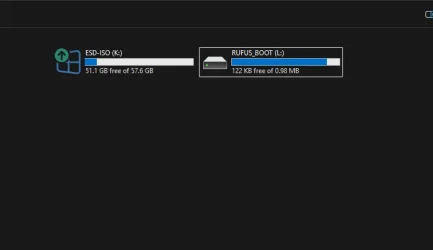
Rufus creates two volumes, a private one for booting from USB and another that holds the actual Windows install contents.

It looks like Rufus is enforcing an arbitrary rule to only install CA 2023 boot files for W11 25H2 images. Technically any updated W10 ESU or W11 install image has the CA 2023 boot files, because the Monthly Updates push the same CA 2023 files across all currently supported Windows releases.

The exception would be W11 21H2, which reached End of Life and stopped receiving more recent updates. But if you have a latest image created by UUP dump, it should have the latest CA 2023 files.

But I can understand why you want to avoid the headache of confirming if someone's ISO doesn't have the proper versions. You could have a slightly out-of-date ISO that has CA 2023 files, but the SVN number is behind. So if you tried booting this ISO (based on the files provided by the host or the ISO), it could possibly fail on another PC where someone already revoked PCA 2011 and the SVN is now higher than what you have.

Let's try this workaround:

1. Create a W10 image (19045.7417 or later) using UUP dump, but edit ConvertConfig.ini before starting:
Code:
UpdtBootFiles=1

This creates an image where the boot file is already replaced.

2. Use Rufus, but don't select the CA 2023 option. It will write your (pre-updated) image as-is to the USB drive.
GARLIN . in rufus there is no option for the ca 2023 for a windows 10 iso i have already tried the upp dump with convertconfig update boot files to 1
 

My Computer My Computer

At a glance

WINDOWS 11 WINDOWS 10Intel(R) Core(TM) i7 -3770K CPU 3.50 GZ 3501 ...32.0 GB (31.9 GB usable)AMD RADEON TM R5240 INTELL HD GRAPHICS 4600 T...
OS
WINDOWS 11 WINDOWS 10
Computer type
PC/Desktop
Manufacturer/Model
HP H8 1360T
CPU
Intel(R) Core(TM) i7 -3770K CPU 3.50 GZ 3501 4 CORE
Motherboard
PEGATRON 2AD5
Memory
32.0 GB (31.9 GB usable)
Graphics Card(s)
AMD RADEON TM R5240 INTELL HD GRAPHICS 4600 TIGER 1+1 USB
Sound Card
AMD HD . IDT
Monitor(s) Displays
AOC WAL MART SPECIAL . HP 2311 IX IPS LED DELL 1708 FP
Screen Resolution
1920 X 1080 1600X900 1280X940
Hard Drives
1 FAXING S 100 512GB 1 KINGSTON 120 GB SSD 1 X12 SSD 512 GB
PSU
300 WATT HP
Case
FULL
Cooling
ON BOARD FAN
Keyboard
LOGITEC K 520 WIRELESS
Mouse
LOGITEC M 510 WIRELESS
Internet Speed
55 UP 11.2 DOWN
Browser
CHROME EDGE
Antivirus
WINDOWS SECUIRTY
Other Info
NON SUPPORTED HARDWARE FOR WINDOWS 11
GARLIN . in rufus there is no option for the ca 2023 for a windows 10 iso i have already tried the upp dump with convertconfig update boot files to 1
In that case you just have Rufus create the USB normally.
 

My Computer My Computer

At a glance

Windows 7
OS
Windows 7
yes it can be done that way.
save the whole Rufus Win11 ISO to a folder
burn the Rufus USB with Win10

then remove (cut/copy) the Win10 boot folders out
and replace with the Win11 boot folders

i keep a copy of a whole Rufus USB Win11 25H2 with the Win10 boot folders in OneDrive.
that way i can download the Rufus ISO and upgrade a Win10 within the VM install
while the VM is running. it just uses OneDrive as a dropbox.

best of luck Steve ..
ok which one should i copy to the folder i created to the desktop iso k has windows 11 iso made by rufus
 

Attachments

  • Screenshot 2026-06-27 114550.webp
    Screenshot 2026-06-27 114550.webp
    5.9 KB · Views: 1

My Computer My Computer

At a glance

WINDOWS 11 WINDOWS 10Intel(R) Core(TM) i7 -3770K CPU 3.50 GZ 3501 ...32.0 GB (31.9 GB usable)AMD RADEON TM R5240 INTELL HD GRAPHICS 4600 T...
OS
WINDOWS 11 WINDOWS 10
Computer type
PC/Desktop
Manufacturer/Model
HP H8 1360T
CPU
Intel(R) Core(TM) i7 -3770K CPU 3.50 GZ 3501 4 CORE
Motherboard
PEGATRON 2AD5
Memory
32.0 GB (31.9 GB usable)
Graphics Card(s)
AMD RADEON TM R5240 INTELL HD GRAPHICS 4600 TIGER 1+1 USB
Sound Card
AMD HD . IDT
Monitor(s) Displays
AOC WAL MART SPECIAL . HP 2311 IX IPS LED DELL 1708 FP
Screen Resolution
1920 X 1080 1600X900 1280X940
Hard Drives
1 FAXING S 100 512GB 1 KINGSTON 120 GB SSD 1 X12 SSD 512 GB
PSU
300 WATT HP
Case
FULL
Cooling
ON BOARD FAN
Keyboard
LOGITEC K 520 WIRELESS
Mouse
LOGITEC M 510 WIRELESS
Internet Speed
55 UP 11.2 DOWN
Browser
CHROME EDGE
Antivirus
WINDOWS SECUIRTY
Other Info
NON SUPPORTED HARDWARE FOR WINDOWS 11
In that case you just have Rufus create the USB normally.
i have done that and it does not add the ca 2023 file and when it tries to boot up in sercue boot it throws the error of something boot signature or something
 

My Computer My Computer

At a glance

WINDOWS 11 WINDOWS 10Intel(R) Core(TM) i7 -3770K CPU 3.50 GZ 3501 ...32.0 GB (31.9 GB usable)AMD RADEON TM R5240 INTELL HD GRAPHICS 4600 T...
OS
WINDOWS 11 WINDOWS 10
Computer type
PC/Desktop
Manufacturer/Model
HP H8 1360T
CPU
Intel(R) Core(TM) i7 -3770K CPU 3.50 GZ 3501 4 CORE
Motherboard
PEGATRON 2AD5
Memory
32.0 GB (31.9 GB usable)
Graphics Card(s)
AMD RADEON TM R5240 INTELL HD GRAPHICS 4600 TIGER 1+1 USB
Sound Card
AMD HD . IDT
Monitor(s) Displays
AOC WAL MART SPECIAL . HP 2311 IX IPS LED DELL 1708 FP
Screen Resolution
1920 X 1080 1600X900 1280X940
Hard Drives
1 FAXING S 100 512GB 1 KINGSTON 120 GB SSD 1 X12 SSD 512 GB
PSU
300 WATT HP
Case
FULL
Cooling
ON BOARD FAN
Keyboard
LOGITEC K 520 WIRELESS
Mouse
LOGITEC M 510 WIRELESS
Internet Speed
55 UP 11.2 DOWN
Browser
CHROME EDGE
Antivirus
WINDOWS SECUIRTY
Other Info
NON SUPPORTED HARDWARE FOR WINDOWS 11
after you have burned the Rufus USB you can open it in Explorer1782579508261.webp

here is a picture of my Rufus USB folder
the boot folder is the first folder

best of luck Steve
 

My Computers My Computers

  • At a glance

    Debian 13 KDE .. Windows 11 HomeRyzen 7 5825u64GB DDR4 3200Ryzen 7 5825u
    OS
    Debian 13 KDE .. Windows 11 Home
    Computer type
    PC/Desktop
    Manufacturer/Model
    HP 24" AiO
    CPU
    Ryzen 7 5825u
    Motherboard
    HP
    Memory
    64GB DDR4 3200
    Graphics Card(s)
    Ryzen 7 5825u
    Sound Card
    RealTek
    Monitor(s) Displays
    24" HP AiO
    Screen Resolution
    1920 x 1080 @60 Hz
    Hard Drives
    1TB WD Blue SN580 M2 SSD Partitioned.
    2x 1TB USB HDD External Backup/Storage.
    PSU
    90W external power brick
    Case
    24" All in One
    Cooling
    Default Air Cooling
    Keyboard
    HP WiFi UK extended
    Mouse
    HP WiFi 3 Button
    Internet Speed
    1GB full fibre
    Browser
    Edge & Firefox
    Antivirus
    AVG Internet Security/Windows Defender
    Other Info
    Mainly Open Source Software
  • At a glance

    Ubuntu 22.04.5 LTSi5 7200u16GB DDR4Intel
    Operating System
    Ubuntu 22.04.5 LTS
    Computer type
    Laptop
    Manufacturer/Model
    Dell 13" Latitude 2017
    CPU
    i5 7200u
    Motherboard
    Dell
    Memory
    16GB DDR4
    Graphics card(s)
    Intel
    Sound Card
    Intel
    Monitor(s) Displays
    13" Dell Laptop
    Hard Drives
    250GB Crucial 2.5" SSD
    Mouse
    Generic WiFi 3 button
    Internet Speed
    WiFi only
    Browser
    Firefox
    Antivirus
    ClamAV TK
    Other Info
    Mainly Open Source Software
after you have burned the Rufus USB you can open it in ExplorerView attachment 175381

here is a picture of my Rufus USB folder
the boot folder is the first folder

best of luck Steve
so i just copy the rufus boot folder from rufus drive and copy it into the windows 10 . sorry this is very confusing to me .
 

My Computer My Computer

At a glance

WINDOWS 11 WINDOWS 10Intel(R) Core(TM) i7 -3770K CPU 3.50 GZ 3501 ...32.0 GB (31.9 GB usable)AMD RADEON TM R5240 INTELL HD GRAPHICS 4600 T...
OS
WINDOWS 11 WINDOWS 10
Computer type
PC/Desktop
Manufacturer/Model
HP H8 1360T
CPU
Intel(R) Core(TM) i7 -3770K CPU 3.50 GZ 3501 4 CORE
Motherboard
PEGATRON 2AD5
Memory
32.0 GB (31.9 GB usable)
Graphics Card(s)
AMD RADEON TM R5240 INTELL HD GRAPHICS 4600 TIGER 1+1 USB
Sound Card
AMD HD . IDT
Monitor(s) Displays
AOC WAL MART SPECIAL . HP 2311 IX IPS LED DELL 1708 FP
Screen Resolution
1920 X 1080 1600X900 1280X940
Hard Drives
1 FAXING S 100 512GB 1 KINGSTON 120 GB SSD 1 X12 SSD 512 GB
PSU
300 WATT HP
Case
FULL
Cooling
ON BOARD FAN
Keyboard
LOGITEC K 520 WIRELESS
Mouse
LOGITEC M 510 WIRELESS
Internet Speed
55 UP 11.2 DOWN
Browser
CHROME EDGE
Antivirus
WINDOWS SECUIRTY
Other Info
NON SUPPORTED HARDWARE FOR WINDOWS 11
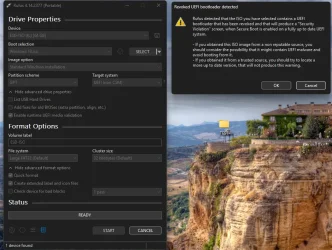
ok Garlin here is a screen shot of what rufus is saying when i try to create a windows 10 iso from the microsoft website (not using UPP dump)
 

Attachments

  • Screenshot 2026-06-27 122933.webp
    Screenshot 2026-06-27 122933.webp
    104.9 KB · Views: 1

My Computer My Computer

At a glance

WINDOWS 11 WINDOWS 10Intel(R) Core(TM) i7 -3770K CPU 3.50 GZ 3501 ...32.0 GB (31.9 GB usable)AMD RADEON TM R5240 INTELL HD GRAPHICS 4600 T...
OS
WINDOWS 11 WINDOWS 10
Computer type
PC/Desktop
Manufacturer/Model
HP H8 1360T
CPU
Intel(R) Core(TM) i7 -3770K CPU 3.50 GZ 3501 4 CORE
Motherboard
PEGATRON 2AD5
Memory
32.0 GB (31.9 GB usable)
Graphics Card(s)
AMD RADEON TM R5240 INTELL HD GRAPHICS 4600 TIGER 1+1 USB
Sound Card
AMD HD . IDT
Monitor(s) Displays
AOC WAL MART SPECIAL . HP 2311 IX IPS LED DELL 1708 FP
Screen Resolution
1920 X 1080 1600X900 1280X940
Hard Drives
1 FAXING S 100 512GB 1 KINGSTON 120 GB SSD 1 X12 SSD 512 GB
PSU
300 WATT HP
Case
FULL
Cooling
ON BOARD FAN
Keyboard
LOGITEC K 520 WIRELESS
Mouse
LOGITEC M 510 WIRELESS
Internet Speed
55 UP 11.2 DOWN
Browser
CHROME EDGE
Antivirus
WINDOWS SECUIRTY
Other Info
NON SUPPORTED HARDWARE FOR WINDOWS 11
so i just copy the rufus boot folder from rufus drive and copy it into the windows 10 . sorry this is very confusing to me .

1. from the Rufus Win10 USB cut/paste (remove) the boot folder
2. from the Rufus Win11 USB (folder) copy and paste the boot folder to the Win10 USB

best of luck Steve ..
 

My Computers My Computers

  • At a glance

    Debian 13 KDE .. Windows 11 HomeRyzen 7 5825u64GB DDR4 3200Ryzen 7 5825u
    OS
    Debian 13 KDE .. Windows 11 Home
    Computer type
    PC/Desktop
    Manufacturer/Model
    HP 24" AiO
    CPU
    Ryzen 7 5825u
    Motherboard
    HP
    Memory
    64GB DDR4 3200
    Graphics Card(s)
    Ryzen 7 5825u
    Sound Card
    RealTek
    Monitor(s) Displays
    24" HP AiO
    Screen Resolution
    1920 x 1080 @60 Hz
    Hard Drives
    1TB WD Blue SN580 M2 SSD Partitioned.
    2x 1TB USB HDD External Backup/Storage.
    PSU
    90W external power brick
    Case
    24" All in One
    Cooling
    Default Air Cooling
    Keyboard
    HP WiFi UK extended
    Mouse
    HP WiFi 3 Button
    Internet Speed
    1GB full fibre
    Browser
    Edge & Firefox
    Antivirus
    AVG Internet Security/Windows Defender
    Other Info
    Mainly Open Source Software
  • At a glance

    Ubuntu 22.04.5 LTSi5 7200u16GB DDR4Intel
    Operating System
    Ubuntu 22.04.5 LTS
    Computer type
    Laptop
    Manufacturer/Model
    Dell 13" Latitude 2017
    CPU
    i5 7200u
    Motherboard
    Dell
    Memory
    16GB DDR4
    Graphics card(s)
    Intel
    Sound Card
    Intel
    Monitor(s) Displays
    13" Dell Laptop
    Hard Drives
    250GB Crucial 2.5" SSD
    Mouse
    Generic WiFi 3 button
    Internet Speed
    WiFi only
    Browser
    Firefox
    Antivirus
    ClamAV TK
    Other Info
    Mainly Open Source Software
1. from the Rufus Win10 USB cut/paste (remove) the boot folder
2. from the Rufus Win11 USB (folder) copy and paste the boot folder to the Win10 USB

best of luck Steve ..
ok making a rufus 10 iso right now . will report back in a few
 

My Computer My Computer

At a glance

WINDOWS 11 WINDOWS 10Intel(R) Core(TM) i7 -3770K CPU 3.50 GZ 3501 ...32.0 GB (31.9 GB usable)AMD RADEON TM R5240 INTELL HD GRAPHICS 4600 T...
OS
WINDOWS 11 WINDOWS 10
Computer type
PC/Desktop
Manufacturer/Model
HP H8 1360T
CPU
Intel(R) Core(TM) i7 -3770K CPU 3.50 GZ 3501 4 CORE
Motherboard
PEGATRON 2AD5
Memory
32.0 GB (31.9 GB usable)
Graphics Card(s)
AMD RADEON TM R5240 INTELL HD GRAPHICS 4600 TIGER 1+1 USB
Sound Card
AMD HD . IDT
Monitor(s) Displays
AOC WAL MART SPECIAL . HP 2311 IX IPS LED DELL 1708 FP
Screen Resolution
1920 X 1080 1600X900 1280X940
Hard Drives
1 FAXING S 100 512GB 1 KINGSTON 120 GB SSD 1 X12 SSD 512 GB
PSU
300 WATT HP
Case
FULL
Cooling
ON BOARD FAN
Keyboard
LOGITEC K 520 WIRELESS
Mouse
LOGITEC M 510 WIRELESS
Internet Speed
55 UP 11.2 DOWN
Browser
CHROME EDGE
Antivirus
WINDOWS SECUIRTY
Other Info
NON SUPPORTED HARDWARE FOR WINDOWS 11
would not work for me aboout to just say forget it .
 

My Computer My Computer

At a glance

WINDOWS 11 WINDOWS 10Intel(R) Core(TM) i7 -3770K CPU 3.50 GZ 3501 ...32.0 GB (31.9 GB usable)AMD RADEON TM R5240 INTELL HD GRAPHICS 4600 T...
OS
WINDOWS 11 WINDOWS 10
Computer type
PC/Desktop
Manufacturer/Model
HP H8 1360T
CPU
Intel(R) Core(TM) i7 -3770K CPU 3.50 GZ 3501 4 CORE
Motherboard
PEGATRON 2AD5
Memory
32.0 GB (31.9 GB usable)
Graphics Card(s)
AMD RADEON TM R5240 INTELL HD GRAPHICS 4600 TIGER 1+1 USB
Sound Card
AMD HD . IDT
Monitor(s) Displays
AOC WAL MART SPECIAL . HP 2311 IX IPS LED DELL 1708 FP
Screen Resolution
1920 X 1080 1600X900 1280X940
Hard Drives
1 FAXING S 100 512GB 1 KINGSTON 120 GB SSD 1 X12 SSD 512 GB
PSU
300 WATT HP
Case
FULL
Cooling
ON BOARD FAN
Keyboard
LOGITEC K 520 WIRELESS
Mouse
LOGITEC M 510 WIRELESS
Internet Speed
55 UP 11.2 DOWN
Browser
CHROME EDGE
Antivirus
WINDOWS SECUIRTY
Other Info
NON SUPPORTED HARDWARE FOR WINDOWS 11

My Computer My Computer

At a glance

WINDOWS 11 WINDOWS 10Intel(R) Core(TM) i7 -3770K CPU 3.50 GZ 3501 ...32.0 GB (31.9 GB usable)AMD RADEON TM R5240 INTELL HD GRAPHICS 4600 T...
OS
WINDOWS 11 WINDOWS 10
Computer type
PC/Desktop
Manufacturer/Model
HP H8 1360T
CPU
Intel(R) Core(TM) i7 -3770K CPU 3.50 GZ 3501 4 CORE
Motherboard
PEGATRON 2AD5
Memory
32.0 GB (31.9 GB usable)
Graphics Card(s)
AMD RADEON TM R5240 INTELL HD GRAPHICS 4600 TIGER 1+1 USB
Sound Card
AMD HD . IDT
Monitor(s) Displays
AOC WAL MART SPECIAL . HP 2311 IX IPS LED DELL 1708 FP
Screen Resolution
1920 X 1080 1600X900 1280X940
Hard Drives
1 FAXING S 100 512GB 1 KINGSTON 120 GB SSD 1 X12 SSD 512 GB
PSU
300 WATT HP
Case
FULL
Cooling
ON BOARD FAN
Keyboard
LOGITEC K 520 WIRELESS
Mouse
LOGITEC M 510 WIRELESS
Internet Speed
55 UP 11.2 DOWN
Browser
CHROME EDGE
Antivirus
WINDOWS SECUIRTY
Other Info
NON SUPPORTED HARDWARE FOR WINDOWS 11
i sent u a direct message sir did u get it
yes i received your messages and answered them.

right i have to report failure.
i made a Rufus Win10 USB and already have a Rufus Win11 USB
i changed all boot folders and EFI files and then restarted the system

the system with secure boot enabled gave an error message and refused to load the Rufus USB because of a secure boot violation
i then went into the BIOS and disabled secure boot, restarted the system and the Rufus USB loaded to the install/setup screen.

so its looking like anybody wants to install or reinstall Windows 10 with the new secure 2023 certs is going to have too disable secure boot.

please except my apologises for the failure
best of luck Steve ..
 

My Computers My Computers

  • At a glance

    Debian 13 KDE .. Windows 11 HomeRyzen 7 5825u64GB DDR4 3200Ryzen 7 5825u
    OS
    Debian 13 KDE .. Windows 11 Home
    Computer type
    PC/Desktop
    Manufacturer/Model
    HP 24" AiO
    CPU
    Ryzen 7 5825u
    Motherboard
    HP
    Memory
    64GB DDR4 3200
    Graphics Card(s)
    Ryzen 7 5825u
    Sound Card
    RealTek
    Monitor(s) Displays
    24" HP AiO
    Screen Resolution
    1920 x 1080 @60 Hz
    Hard Drives
    1TB WD Blue SN580 M2 SSD Partitioned.
    2x 1TB USB HDD External Backup/Storage.
    PSU
    90W external power brick
    Case
    24" All in One
    Cooling
    Default Air Cooling
    Keyboard
    HP WiFi UK extended
    Mouse
    HP WiFi 3 Button
    Internet Speed
    1GB full fibre
    Browser
    Edge & Firefox
    Antivirus
    AVG Internet Security/Windows Defender
    Other Info
    Mainly Open Source Software
  • At a glance

    Ubuntu 22.04.5 LTSi5 7200u16GB DDR4Intel
    Operating System
    Ubuntu 22.04.5 LTS
    Computer type
    Laptop
    Manufacturer/Model
    Dell 13" Latitude 2017
    CPU
    i5 7200u
    Motherboard
    Dell
    Memory
    16GB DDR4
    Graphics card(s)
    Intel
    Sound Card
    Intel
    Monitor(s) Displays
    13" Dell Laptop
    Hard Drives
    250GB Crucial 2.5" SSD
    Mouse
    Generic WiFi 3 button
    Internet Speed
    WiFi only
    Browser
    Firefox
    Antivirus
    ClamAV TK
    Other Info
    Mainly Open Source Software
You might have to try VenToy.
 

My Computer My Computer

At a glance

Windows 7
OS
Windows 7
You might have to try VenToy.
VenToy on my system also comes up with secure boot violation
if i disable secure boot VenToy will load.

but i am wondering would a secure boot shim work within the boot/EFI folders
using another boot loader such as GRUB to kick start the Windows install.

edit. playing with something will report back in a few hours ..
best of luck Steve ..
 
Last edited:

My Computers My Computers

  • At a glance

    Debian 13 KDE .. Windows 11 HomeRyzen 7 5825u64GB DDR4 3200Ryzen 7 5825u
    OS
    Debian 13 KDE .. Windows 11 Home
    Computer type
    PC/Desktop
    Manufacturer/Model
    HP 24" AiO
    CPU
    Ryzen 7 5825u
    Motherboard
    HP
    Memory
    64GB DDR4 3200
    Graphics Card(s)
    Ryzen 7 5825u
    Sound Card
    RealTek
    Monitor(s) Displays
    24" HP AiO
    Screen Resolution
    1920 x 1080 @60 Hz
    Hard Drives
    1TB WD Blue SN580 M2 SSD Partitioned.
    2x 1TB USB HDD External Backup/Storage.
    PSU
    90W external power brick
    Case
    24" All in One
    Cooling
    Default Air Cooling
    Keyboard
    HP WiFi UK extended
    Mouse
    HP WiFi 3 Button
    Internet Speed
    1GB full fibre
    Browser
    Edge & Firefox
    Antivirus
    AVG Internet Security/Windows Defender
    Other Info
    Mainly Open Source Software
  • At a glance

    Ubuntu 22.04.5 LTSi5 7200u16GB DDR4Intel
    Operating System
    Ubuntu 22.04.5 LTS
    Computer type
    Laptop
    Manufacturer/Model
    Dell 13" Latitude 2017
    CPU
    i5 7200u
    Motherboard
    Dell
    Memory
    16GB DDR4
    Graphics card(s)
    Intel
    Sound Card
    Intel
    Monitor(s) Displays
    13" Dell Laptop
    Hard Drives
    250GB Crucial 2.5" SSD
    Mouse
    Generic WiFi 3 button
    Internet Speed
    WiFi only
    Browser
    Firefox
    Antivirus
    ClamAV TK
    Other Info
    Mainly Open Source Software
same here :
A BIG THANK YOU GOES TOXxXxX and garlin for trying to help me .
glad to know i am not the only one that was getting the error.
i have tried ventoy , rufus , and upp dump with the convert config update boot =1 .
can confirm all work with secure boot off during install , but when secure boot is enable will not boot.
i bet it will be the same thing if u tried windows 10 ltsc. looks like a lot of people are going to be mad that run dual os systems on secure boot when ms finally removes ca 2011. something tells me that winows 10 ltsc will have the same issue. and i bet the wife and cats that ms will not make a iso for win 10 with ca 2023 .
 

My Computer My Computer

At a glance

WINDOWS 11 WINDOWS 10Intel(R) Core(TM) i7 -3770K CPU 3.50 GZ 3501 ...32.0 GB (31.9 GB usable)AMD RADEON TM R5240 INTELL HD GRAPHICS 4600 T...
OS
WINDOWS 11 WINDOWS 10
Computer type
PC/Desktop
Manufacturer/Model
HP H8 1360T
CPU
Intel(R) Core(TM) i7 -3770K CPU 3.50 GZ 3501 4 CORE
Motherboard
PEGATRON 2AD5
Memory
32.0 GB (31.9 GB usable)
Graphics Card(s)
AMD RADEON TM R5240 INTELL HD GRAPHICS 4600 TIGER 1+1 USB
Sound Card
AMD HD . IDT
Monitor(s) Displays
AOC WAL MART SPECIAL . HP 2311 IX IPS LED DELL 1708 FP
Screen Resolution
1920 X 1080 1600X900 1280X940
Hard Drives
1 FAXING S 100 512GB 1 KINGSTON 120 GB SSD 1 X12 SSD 512 GB
PSU
300 WATT HP
Case
FULL
Cooling
ON BOARD FAN
Keyboard
LOGITEC K 520 WIRELESS
Mouse
LOGITEC M 510 WIRELESS
Internet Speed
55 UP 11.2 DOWN
Browser
CHROME EDGE
Antivirus
WINDOWS SECUIRTY
Other Info
NON SUPPORTED HARDWARE FOR WINDOWS 11
yes i received your messages and answered them.

right i have to report failure.
i made a Rufus Win10 USB and already have a Rufus Win11 USB
i changed all boot folders and EFI files and then restarted the system

the system with secure boot enabled gave an error message and refused to load the Rufus USB because of a secure boot violation
i then went into the BIOS and disabled secure boot, restarted the system and the Rufus USB loaded to the install/setup screen.

so its looking like anybody wants to install or reinstall Windows 10 with the new secure 2023 certs is going to have too disable secure boot.

please except my apologises for the failure
best of luck Steve ..
There is no use trying to fix the Windows 10 Setup USB flash drive. Just disable Secure Boot temporarily, clean install Windows 10 22H2, install all drivers including 2023 certificates in the Windows boot disk and then enable Secure Boot again. Lucky me that I run an unsupported computer without Secure Boot and I don't have to deal with all that trouble. As long as I keep Windows Defender updated and watch what I do online, I have no fear using the internet.
 

My Computers My Computers

  • At a glance

    Windows 11 Pro 23H2 (5699), 25H2 (8655)Mobile DualCore Intel Core 2 Duo T7250, 2000 MHz4GBMobile Intel(R) GMA 4500M (Mobile 4 series)
    OS
    Windows 11 Pro 23H2 (5699), 25H2 (8655)
    Computer type
    Laptop
    Manufacturer/Model
    Acer Extensa 5630EZ
    CPU
    Mobile DualCore Intel Core 2 Duo T7250, 2000 MHz
    Motherboard
    Acer Extensa 5630
    Memory
    4GB
    Graphics Card(s)
    Mobile Intel(R) GMA 4500M (Mobile 4 series)
    Sound Card
    Realtek ALC268 @ Intel 82801IB ICH9 - High Definition Audio Controller
    Monitor(s) Displays
    1
    Screen Resolution
    1280x800
    Hard Drives
    Samsung SSD 850 EVO 250GB SATA Device (250 GB, SATA-III)
    Internet Speed
    VDSL 50 Mbps
    Browser
    MICROSOFT EDGE
    Antivirus
    WINDOWS DEFENDER
    Other Info
    Legacy MBR installation, no TPM, no Secure Boot, no WDDM 2.0 graphics drivers, no SSE4.2, cannot get more unsupported ;) This is only my test laptop. I had installed Windows 11 here before upgrading my main PC. For my main PC I use everyday see my 2nd system specs.
  • At a glance

    Windows 11 Pro v25H2 (build 26200.8655)Intel Core-i7 3770 3.40GHz s1155 (3rd generat...2x Kingston Hyper-X Blu 8GB DDR3-1600GIGABYTE GeForce RTX 3050 WINDFORCE OC V2 6GB...
    Operating System
    Windows 11 Pro v25H2 (build 26200.8655)
    Computer type
    PC/Desktop
    Manufacturer/Model
    Custom-built PC
    CPU
    Intel Core-i7 3770 3.40GHz s1155 (3rd generation)
    Motherboard
    Asus P8H61 s1155 ATX
    Memory
    2x Kingston Hyper-X Blu 8GB DDR3-1600
    Graphics card(s)
    GIGABYTE GeForce RTX 3050 WINDFORCE OC V2 6GB (GV-N3050WF2OCV2-6GD)
    Sound Card
    Realtek HD audio (ALC887)
    Monitor(s) Displays
    Sony Bravia KDL-19L4000 19" LCD TV via VGA
    Screen Resolution
    1440x900 32-bit 60Hz
    Hard Drives
    WD Blue SA510 2.5 1000GB SSD as system disk, Western Digital Caviar Purple 4TB SATA III (WD40PURZ) as second
    PSU
    Thermaltake Litepower RGB 550W Full Wired
    Case
    SUPERCASE MIDI-TOWER
    Cooling
    Deepcool Gamma Archer CPU cooler, 1x 8cm fan at the back
    Keyboard
    Mitsumi 101-key PS/2
    Mouse
    Sunnyline OptiEye PS/2
    Internet Speed
    100Mbps
    Browser
    Microsoft Edge, Mozilla Firefox
    Antivirus
    Microsoft Windows Defender
    Other Info
    Legacy BIOS (MBR) installation, no TPM, no Secure Boot, WDDM 3.0 graphics drivers, WEI score 7.4
There is no use trying to fix it. Just disable Secure Boot temporarily, clean install Windows 10 22H2, install all drivers including 2023 certificates and then enable Secure Boot again.
its not that simple we have tried that . works perfect with secure boot off then when u enable secure boot it gives you a security error . i think if you have not revoked your Microsoft Windows Production PCA 2011 cert. you will be able to boot in secure . to come to think of it i was bootinig into windows 10 before i revoked mine.
 

My Computer My Computer

At a glance

WINDOWS 11 WINDOWS 10Intel(R) Core(TM) i7 -3770K CPU 3.50 GZ 3501 ...32.0 GB (31.9 GB usable)AMD RADEON TM R5240 INTELL HD GRAPHICS 4600 T...
OS
WINDOWS 11 WINDOWS 10
Computer type
PC/Desktop
Manufacturer/Model
HP H8 1360T
CPU
Intel(R) Core(TM) i7 -3770K CPU 3.50 GZ 3501 4 CORE
Motherboard
PEGATRON 2AD5
Memory
32.0 GB (31.9 GB usable)
Graphics Card(s)
AMD RADEON TM R5240 INTELL HD GRAPHICS 4600 TIGER 1+1 USB
Sound Card
AMD HD . IDT
Monitor(s) Displays
AOC WAL MART SPECIAL . HP 2311 IX IPS LED DELL 1708 FP
Screen Resolution
1920 X 1080 1600X900 1280X940
Hard Drives
1 FAXING S 100 512GB 1 KINGSTON 120 GB SSD 1 X12 SSD 512 GB
PSU
300 WATT HP
Case
FULL
Cooling
ON BOARD FAN
Keyboard
LOGITEC K 520 WIRELESS
Mouse
LOGITEC M 510 WIRELESS
Internet Speed
55 UP 11.2 DOWN
Browser
CHROME EDGE
Antivirus
WINDOWS SECUIRTY
Other Info
NON SUPPORTED HARDWARE FOR WINDOWS 11

@garlin
can the Windows 11 DBX certs be inserted/installed into a Windows 10 system after the Win10 has been installed.

reason.
install Windows 10 with secure boot disabled.
install the Windows 11 DBX certs in to Windows 10

restart and re-enable secure and restart the system
as both Win10 and Win11 both have the DBX files that should stop any secure boot violations.

at this time i have not found a way to install Win10 via a Rufus or VenToy USB with secure boot enabled
best of luck Steve ..
 

My Computers My Computers

  • At a glance

    Debian 13 KDE .. Windows 11 HomeRyzen 7 5825u64GB DDR4 3200Ryzen 7 5825u
    OS
    Debian 13 KDE .. Windows 11 Home
    Computer type
    PC/Desktop
    Manufacturer/Model
    HP 24" AiO
    CPU
    Ryzen 7 5825u
    Motherboard
    HP
    Memory
    64GB DDR4 3200
    Graphics Card(s)
    Ryzen 7 5825u
    Sound Card
    RealTek
    Monitor(s) Displays
    24" HP AiO
    Screen Resolution
    1920 x 1080 @60 Hz
    Hard Drives
    1TB WD Blue SN580 M2 SSD Partitioned.
    2x 1TB USB HDD External Backup/Storage.
    PSU
    90W external power brick
    Case
    24" All in One
    Cooling
    Default Air Cooling
    Keyboard
    HP WiFi UK extended
    Mouse
    HP WiFi 3 Button
    Internet Speed
    1GB full fibre
    Browser
    Edge & Firefox
    Antivirus
    AVG Internet Security/Windows Defender
    Other Info
    Mainly Open Source Software
  • At a glance

    Ubuntu 22.04.5 LTSi5 7200u16GB DDR4Intel
    Operating System
    Ubuntu 22.04.5 LTS
    Computer type
    Laptop
    Manufacturer/Model
    Dell 13" Latitude 2017
    CPU
    i5 7200u
    Motherboard
    Dell
    Memory
    16GB DDR4
    Graphics card(s)
    Intel
    Sound Card
    Intel
    Monitor(s) Displays
    13" Dell Laptop
    Hard Drives
    250GB Crucial 2.5" SSD
    Mouse
    Generic WiFi 3 button
    Internet Speed
    WiFi only
    Browser
    Firefox
    Antivirus
    ClamAV TK
    Other Info
    Mainly Open Source Software
The CA 2023 certs are the same, because they belong to the UEFI and not to Windows.

What can be different for each machine is the last version of the DBXUpdate file (typically banning individual non-Windows boot files) and the SVN. If you have the latest version of a W10 or W11 build, the boot manager and SVN should be equal or higher than the SVN already installed in the UEFI.

I haven't tried replicating this issue (I would need to first grab a current W10 image), but it sounds like a boot loader issue. Either the primary boot file is banned for some reason, or it fails when it chain boots into the Windows boot manager file. Both Rufus and Ventoy for different technical reasons don't boot directly from the Windows boot file, they use a non-Windows boot file and then call the Windows boot file in sequence.

MCT on the other hand uses the Windows boot file directly. But as you know, MCT for W10 22H2 no longer hands out updated images. MCT would create a more traditional boot media free of any non-Windows issues, but we can't use it to write a newer ISO to USB. We could use the ADK toolkit, but that's not as convenient as Rufus or Ventoy in getting set up.

I'll try to do some testing after getting a W10 image.
 

My Computer My Computer

At a glance

Windows 7
OS
Windows 7
@garlin
can the Windows 11 DBX certs be inserted/installed into a Windows 10 system after the Win10 has been installed.

reason.
install Windows 10 with secure boot disabled.
install the Windows 11 DBX certs in to Windows 10

restart and re-enable secure and restart the system
as both Win10 and Win11 both have the DBX files that should stop any secure boot violations.

at this time i have not found a way to install Win10 via a Rufus or VenToy USB with secure boot enabled
best of luck Steve ..
Much like what I said. Install Windowss 10 with Secure Boot off, install all drivers and 2023 certificates and then enable Secure Boot. It should at least be possible with some third-party tool.
 

My Computers My Computers

  • At a glance

    Windows 11 Pro 23H2 (5699), 25H2 (8655)Mobile DualCore Intel Core 2 Duo T7250, 2000 MHz4GBMobile Intel(R) GMA 4500M (Mobile 4 series)
    OS
    Windows 11 Pro 23H2 (5699), 25H2 (8655)
    Computer type
    Laptop
    Manufacturer/Model
    Acer Extensa 5630EZ
    CPU
    Mobile DualCore Intel Core 2 Duo T7250, 2000 MHz
    Motherboard
    Acer Extensa 5630
    Memory
    4GB
    Graphics Card(s)
    Mobile Intel(R) GMA 4500M (Mobile 4 series)
    Sound Card
    Realtek ALC268 @ Intel 82801IB ICH9 - High Definition Audio Controller
    Monitor(s) Displays
    1
    Screen Resolution
    1280x800
    Hard Drives
    Samsung SSD 850 EVO 250GB SATA Device (250 GB, SATA-III)
    Internet Speed
    VDSL 50 Mbps
    Browser
    MICROSOFT EDGE
    Antivirus
    WINDOWS DEFENDER
    Other Info
    Legacy MBR installation, no TPM, no Secure Boot, no WDDM 2.0 graphics drivers, no SSE4.2, cannot get more unsupported ;) This is only my test laptop. I had installed Windows 11 here before upgrading my main PC. For my main PC I use everyday see my 2nd system specs.
  • At a glance

    Windows 11 Pro v25H2 (build 26200.8655)Intel Core-i7 3770 3.40GHz s1155 (3rd generat...2x Kingston Hyper-X Blu 8GB DDR3-1600GIGABYTE GeForce RTX 3050 WINDFORCE OC V2 6GB...
    Operating System
    Windows 11 Pro v25H2 (build 26200.8655)
    Computer type
    PC/Desktop
    Manufacturer/Model
    Custom-built PC
    CPU
    Intel Core-i7 3770 3.40GHz s1155 (3rd generation)
    Motherboard
    Asus P8H61 s1155 ATX
    Memory
    2x Kingston Hyper-X Blu 8GB DDR3-1600
    Graphics card(s)
    GIGABYTE GeForce RTX 3050 WINDFORCE OC V2 6GB (GV-N3050WF2OCV2-6GD)
    Sound Card
    Realtek HD audio (ALC887)
    Monitor(s) Displays
    Sony Bravia KDL-19L4000 19" LCD TV via VGA
    Screen Resolution
    1440x900 32-bit 60Hz
    Hard Drives
    WD Blue SA510 2.5 1000GB SSD as system disk, Western Digital Caviar Purple 4TB SATA III (WD40PURZ) as second
    PSU
    Thermaltake Litepower RGB 550W Full Wired
    Case
    SUPERCASE MIDI-TOWER
    Cooling
    Deepcool Gamma Archer CPU cooler, 1x 8cm fan at the back
    Keyboard
    Mitsumi 101-key PS/2
    Mouse
    Sunnyline OptiEye PS/2
    Internet Speed
    100Mbps
    Browser
    Microsoft Edge, Mozilla Firefox
    Antivirus
    Microsoft Windows Defender
    Other Info
    Legacy BIOS (MBR) installation, no TPM, no Secure Boot, WDDM 3.0 graphics drivers, WEI score 7.4
Back
Top Bottom