Windows 10 update to W 11


PennsyNut

Active member
Local time
7:55 AM
Posts
65
Location
Midlothian TX
OS
Windows 11 Home 64-bit
I apologize if this was posted before. I did simple search and that didn't help.
I have a laptop with W 10 that says it's ready for W 11. When I do Windows Update, it offers to upgrade to W 11. So I know it's ready.
My question, and I'd like a yes or no.
Can I do the upgrade that way - and not lose anything? i.e. Not lose add ons, like Foxit or LibreOffice?
I don't want to have to go through all those online addons after the upgrade.
If this is not possible, I will wait until W 10 is no longer supported/sometime in 2025?
With my new Desktop W/11, a brand new install was required. So with my laptop, if it requires all the extra work. But with a straight upgrade direct from Microsoft, I'd hope it would not require all that extra work - downloading everything all over.
Or should I post this on tenforums?
 

My Computer My Computer

At a glance

Windows 11 Home 64-bitAMD K19 12 core2TB HDD + 238 SSDAMD Radeon
OS
Windows 11 Home 64-bit
Computer type
PC/Desktop
Manufacturer/Model
HP
CPU
AMD K19 12 core
Motherboard
HP 8906
Memory
2TB HDD + 238 SSD
Graphics Card(s)
AMD Radeon
Sound Card
Realtrek HD Audio
Monitor(s) Displays
Sceptre
Screen Resolution
1920x1080
Hard Drives
WDC WS20EZ..... & KBG50ZNV.....
Cooling
? has a fan!
Keyboard
Lenovo
Mouse
onn optical
Internet Speed
15
Browser
default Firefox back up Edge/instead of chrome
Antivirus
ESET
I apologize if this was posted before. I did simple search and that didn't help.
I have a laptop with W 10 that says it's ready for W 11. When I do Windows Update, it offers to upgrade to W 11. So I know it's ready.
My question, and I'd like a yes or no.
Can I do the upgrade that way - and not lose anything? i.e. Not lose add ons, like Foxit or LibreOffice?
I don't want to have to go through all those online addons after the upgrade.
If this is not possible, I will wait until W 10 is no longer supported/sometime in 2025?
With my new Desktop W/11, a brand new install was required. So with my laptop, if it requires all the extra work. But with a straight upgrade direct from Microsoft, I'd hope it would not require all that extra work - downloading everything all over.
Or should I post this on tenforums?
The question posed, can I do the update and not lose anything, doesn't have a direct yes or no answer. The general answer is that usually it will complete the update without a major issue, but (of course, there is always a "but" with an upgrade) there is always a possibility of a flawed update. As a precaution, you could do a system backup prior to the update and have that as your safety blanket. You could, also, just wait as you mentioned.
 

My Computer My Computer

At a glance

Windows 11 ProfessionalIntel Core i5-940032GBIntegrated Intel UHD Graphics 630
OS
Windows 11 Professional
Computer type
PC/Desktop
Manufacturer/Model
Microcenter B677
CPU
Intel Core i5-9400
Motherboard
ASRock H310CM-HDV/M.2
Memory
32GB
Graphics Card(s)
Integrated Intel UHD Graphics 630
Sound Card
Intel Kaby Lake - High Definition Audio / cAVS (Audio, Voice, Speech) [A0]
Monitor(s) Displays
LG Model: GSM59F1
Screen Resolution
2560x1080
Case
Lian Li 205M
Antivirus
Kaspersky AV
I think I understand. You are saying it might or might not be a problem.
But isn't there a way to know for sure? Since this is based upon the upgrade being offered direct via Windows update? My thinking is that it should be no problem because of that. But yes, we know that Microsoft don't always do what we think.
Another opinion, please.
I guess when I ask for a yes or no. It should get a response from someone that has already done it this way. And when done that way, did it require all that extra work or did it upgrade with Foxit and LibreOffice still on the laptop/PC.
 

My Computer My Computer

At a glance

Windows 11 Home 64-bitAMD K19 12 core2TB HDD + 238 SSDAMD Radeon
OS
Windows 11 Home 64-bit
Computer type
PC/Desktop
Manufacturer/Model
HP
CPU
AMD K19 12 core
Motherboard
HP 8906
Memory
2TB HDD + 238 SSD
Graphics Card(s)
AMD Radeon
Sound Card
Realtrek HD Audio
Monitor(s) Displays
Sceptre
Screen Resolution
1920x1080
Hard Drives
WDC WS20EZ..... & KBG50ZNV.....
Cooling
? has a fan!
Keyboard
Lenovo
Mouse
onn optical
Internet Speed
15
Browser
default Firefox back up Edge/instead of chrome
Antivirus
ESET
There are some partitions layout requirements.
Please post a whole window Disk Manager image of ALL your drives. Don't forget to expand the columns so we can read them. How to Post a Screenshot of Disk Management
If you have a MiniTool or AOMEI Partition use it instead or Windows disk manager.

If it does upgrade to Win 11 all your software will remain. Only old hardware can have drivers issues.
 

My Computers My Computers

  • At a glance

    Windows 11 Pro - Windows 7 HP 64 - Lubuntui5 6600K - 800MHz to 4400MHz4+4G GSkill DDR4 3000IG - Intel 530
    OS
    Windows 11 Pro - Windows 7 HP 64 - Lubuntu
    Computer type
    PC/Desktop
    Manufacturer/Model
    custom build
    CPU
    i5 6600K - 800MHz to 4400MHz
    Motherboard
    GA-Z170-HD3P
    Memory
    4+4G GSkill DDR4 3000
    Graphics Card(s)
    IG - Intel 530
    Monitor(s) Displays
    Samsung 226BW
    Screen Resolution
    1680x1050
    Hard Drives
    (1) -1 SM951 – 128GB M.2 AHCI PCIe SSD drive for Win 11
    (2) -1 WD SATA 3 - 1T for Data
    (3) -1 WD SATA 3 - 1T for backup
    (4) -1 BX500 SSD - 256G for Windows 7 and Lubuntu
    PSU
    Thermaltake 450W TR2 gold
    Keyboard
    Old and good Chicony mechanical keyboard
    Mouse
    Logitech mX performance - 9 buttons (had to disable some)
    Internet Speed
    500 Mb/s
    Browser
    Firefox 64
  • At a glance

    Windows 11 Proi7-4500U 800- 3000MHz(4+4)G DDR3 1600IG intel 4400 + NVIDIA GeForce GT 745M
    Operating System
    Windows 11 Pro
    Computer type
    Laptop
    Manufacturer/Model
    Asus Q550LF
    CPU
    i7-4500U 800- 3000MHz
    Motherboard
    Asus Q550LF
    Memory
    (4+4)G DDR3 1600
    Graphics card(s)
    IG intel 4400 + NVIDIA GeForce GT 745M
    Sound Card
    Realtek
    Monitor(s) Displays
    LG Display LP156WF4-SPH1
    Screen Resolution
    1920 x 1080
    Hard Drives
    BX500 120G SSD for Windows and programs
    & 1T HDD for data
    Internet Speed
    500 Mb/s
    Browser
    Firefox 64
Is this what you want?
 

Attachments

  • disk management.png
    disk management.png
    29.9 KB · Views: 2

My Computer My Computer

At a glance

Windows 11 Home 64-bitAMD K19 12 core2TB HDD + 238 SSDAMD Radeon
OS
Windows 11 Home 64-bit
Computer type
PC/Desktop
Manufacturer/Model
HP
CPU
AMD K19 12 core
Motherboard
HP 8906
Memory
2TB HDD + 238 SSD
Graphics Card(s)
AMD Radeon
Sound Card
Realtrek HD Audio
Monitor(s) Displays
Sceptre
Screen Resolution
1920x1080
Hard Drives
WDC WS20EZ..... & KBG50ZNV.....
Cooling
? has a fan!
Keyboard
Lenovo
Mouse
onn optical
Internet Speed
15
Browser
default Firefox back up Edge/instead of chrome
Antivirus
ESET
Whoops. Sorry. That was off my desktop. Laptop don't have email or such. I have to go to the laptop, scan the DM and bring it over to here to send. Ignore previous image.
 

My Computer My Computer

At a glance

Windows 11 Home 64-bitAMD K19 12 core2TB HDD + 238 SSDAMD Radeon
OS
Windows 11 Home 64-bit
Computer type
PC/Desktop
Manufacturer/Model
HP
CPU
AMD K19 12 core
Motherboard
HP 8906
Memory
2TB HDD + 238 SSD
Graphics Card(s)
AMD Radeon
Sound Card
Realtrek HD Audio
Monitor(s) Displays
Sceptre
Screen Resolution
1920x1080
Hard Drives
WDC WS20EZ..... & KBG50ZNV.....
Cooling
? has a fan!
Keyboard
Lenovo
Mouse
onn optical
Internet Speed
15
Browser
default Firefox back up Edge/instead of chrome
Antivirus
ESET
I tried. The laptop responds to "Disk Management.msc" with an error message:
You do not have rights to Disk Management on DESKTOP-24FIGOJ."
And of course, being a normal human being. I don't have the slightest idea of what that means.
That error message says "DESKTOP" and it's not, it's a laptop.
It also says something about a virtual disk management or disk manager.
I also tried to get Disk Manager like I did on this desktop, and that didn't work either. Again, something about no access to virtual disk manager.
i.e. NOW WHAT?
Also, I have no idea what "If you have a MiniTool or AOMEI Partition" is or are.
This is totally over my head.
 

My Computer My Computer

At a glance

Windows 11 Home 64-bitAMD K19 12 core2TB HDD + 238 SSDAMD Radeon
OS
Windows 11 Home 64-bit
Computer type
PC/Desktop
Manufacturer/Model
HP
CPU
AMD K19 12 core
Motherboard
HP 8906
Memory
2TB HDD + 238 SSD
Graphics Card(s)
AMD Radeon
Sound Card
Realtrek HD Audio
Monitor(s) Displays
Sceptre
Screen Resolution
1920x1080
Hard Drives
WDC WS20EZ..... & KBG50ZNV.....
Cooling
? has a fan!
Keyboard
Lenovo
Mouse
onn optical
Internet Speed
15
Browser
default Firefox back up Edge/instead of chrome
Antivirus
ESET
I guess when I ask for a yes or no. It should get a response from someone that has already done it this way. And when done that way, did it require all that extra work or did it upgrade with Foxit and LibreOffice still on the laptop/PC.
Yes, I have done it that way. I migrated my old 'main machine' laptop's Windows 10 to a new supported laptop to be ready to get the Windows 11 update when offered. It was offered on 20th October 2021 and I let Windows Update do the upgrade. Yes, all my previously installed software was still there and working after the upgrade.

I didn't have Foxit, and my LibreOffice is the Portable Apps version. What I did have was a collection of some quite old software I didn't want to loose, including PaintShop Pro 7.04, Microsoft AutoRoute, Microsoft's Windows Movie Maker 2012. All worked as well in Win11 as they had in Win10.

All the above could have been reinstalled if they hadn't survived the upgrade, but there was one in particular that would have been impossible to reinstall - that was Microsoft Office Starter 2010. That is a free version of Excel and Word that was only ever available on an OEM install of Windows 7. My old 'main machine' had retained it when upgraded from its original W7 to W10. That too remains present and working under Windows 11.
 

My Computers My Computers

  • At a glance

    Windows 11 HomeAMD Athlon Silver 3050U8GBRadeon Graphics
    OS
    Windows 11 Home
    Computer type
    Laptop
    Manufacturer/Model
    Acer Aspire 3 A315-23-R9VY
    CPU
    AMD Athlon Silver 3050U
    Memory
    8GB
    Graphics Card(s)
    Radeon Graphics
    Monitor(s) Displays
    laptop screen
    Screen Resolution
    1366x768 native resolution, up to 2560x1440 with Radeon Virtual Super Resolution
    Hard Drives
    1TB Samsung EVO 870 SSD (from April 2026: 250GB EVO 850)
    Internet Speed
    150 Mbps
    Browser
    Edge, Firefox
    Antivirus
    Defender
    Other Info
    fully 'Windows 11 ready' laptop. Windows 10 C: partition migrated from my old unsupported 'main machine' then upgraded to 11. A test migration ran Insider builds for 2 months. When 11 was released on 5th October 2021 it was re-imaged back to 10 and was offered the upgrade in Windows Update on 20th October. Windows Update offered the 22H2 Feature Update on 20th September 2022. It got the 23H2 Feature Update on 4th November 2023 through Windows Update, 24H2 on 3rd October 2024 through Windows Update by setting the Target Release Version for 24H2, and 25H2 on 30th September 2025 through Windows Update by setting the Target Release Version for 25H2.

    UPDATE - 11 April 2026: due to mechanical deterioration this PC has been retired from active duty. The OS with all software and files has been migrated to my System Seven in 'Other systems' to carry on as my general purpose 'main machine'.
  • At a glance

    Windows 11 ProIntel® Core™ i5-520M8GB(integrated graphics) Intel HD Graphics
    Operating System
    Windows 11 Pro
    Computer type
    Laptop
    Manufacturer/Model
    Dell Latitude E4310
    CPU
    Intel® Core™ i5-520M
    Motherboard
    0T6M8G
    Memory
    8GB
    Graphics card(s)
    (integrated graphics) Intel HD Graphics
    Screen Resolution
    1366x768
    Hard Drives
    500GB Crucial MX500 SSD
    Browser
    Firefox, Edge
    Antivirus
    Defender
    Other Info
    unsupported machine: Legacy bios, MBR, TPM 1.2, upgraded from W10 to W11 using W10/W11 hybrid install media workaround.

    In-place upgrade to 22H2 using ISO and a workaround.
    Feature Update to 23H2 by manually installing the Enablement Package.
    In-place upgrade to 24H2 using hybrid 23H2/24H2 install media.
    Upgraded to 25H2 by Enablement Package.

    Also running Insider Dev, and Canary builds and Windows 10 as native boot .vhdx.
  • My SYSTEM THREE is a Dell Latitude 5410, i7-10610U, 32GB RAM, 512GB NVMe ssd, supported device running Windows 11 Pro.

    My SYSTEM FOUR is a 2-in-1 convertible Lenovo Yoga 11e 20DA, Celeron N2930, 8GB RAM, 256GB ssd. Unsupported device: currently running Win10 Pro, plus Win11 Pro RTM and Insider Dev, Beta, and RP 24H2 as native boot vhdx.

    My SYSTEM FIVE is a Dell Latitude 3190 2-in-1, Pentium Silver N5030, 8GB RAM, 1TB NVMe ssd, supported device running Windows 11 Pro, plus Insider Beta, Dev, and Canary builds (and a few others) as a native boot .vhdx.

    My SYSTEM SIX is a Dell Latitude 5550, Core Ultra 7 165H, 64GB RAM, 1TB NVMe SSD, supported device, Windows 11 Pro 24H2, Hyper-V host machine. Updated to 25H2 on 30th September 2025.

    My SYSTEM SEVEN is a Lenovo Thinkpad T580, Intel Core i7-8650U, 16GB RAM, 512GB NVMe SSD + 2nd 512GB NVMe SSD, a supported device for Windows 11. This is my current general purpose 'main machine'. The installed Windows 11 Home from my System One has been migrated to this machine.
Did you run Disk Manager "as administrator"?
 

My Computers My Computers

  • At a glance

    Windows 11 Pro - Windows 7 HP 64 - Lubuntui5 6600K - 800MHz to 4400MHz4+4G GSkill DDR4 3000IG - Intel 530
    OS
    Windows 11 Pro - Windows 7 HP 64 - Lubuntu
    Computer type
    PC/Desktop
    Manufacturer/Model
    custom build
    CPU
    i5 6600K - 800MHz to 4400MHz
    Motherboard
    GA-Z170-HD3P
    Memory
    4+4G GSkill DDR4 3000
    Graphics Card(s)
    IG - Intel 530
    Monitor(s) Displays
    Samsung 226BW
    Screen Resolution
    1680x1050
    Hard Drives
    (1) -1 SM951 – 128GB M.2 AHCI PCIe SSD drive for Win 11
    (2) -1 WD SATA 3 - 1T for Data
    (3) -1 WD SATA 3 - 1T for backup
    (4) -1 BX500 SSD - 256G for Windows 7 and Lubuntu
    PSU
    Thermaltake 450W TR2 gold
    Keyboard
    Old and good Chicony mechanical keyboard
    Mouse
    Logitech mX performance - 9 buttons (had to disable some)
    Internet Speed
    500 Mb/s
    Browser
    Firefox 64
  • At a glance

    Windows 11 Proi7-4500U 800- 3000MHz(4+4)G DDR3 1600IG intel 4400 + NVIDIA GeForce GT 745M
    Operating System
    Windows 11 Pro
    Computer type
    Laptop
    Manufacturer/Model
    Asus Q550LF
    CPU
    i7-4500U 800- 3000MHz
    Motherboard
    Asus Q550LF
    Memory
    (4+4)G DDR3 1600
    Graphics card(s)
    IG intel 4400 + NVIDIA GeForce GT 745M
    Sound Card
    Realtek
    Monitor(s) Displays
    LG Display LP156WF4-SPH1
    Screen Resolution
    1920 x 1080
    Hard Drives
    BX500 120G SSD for Windows and programs
    & 1T HDD for data
    Internet Speed
    500 Mb/s
    Browser
    Firefox 64
To clarify my previous message, here's the screen shot from the laptop.
More to follow based upon Bree's response.
 

Attachments

  • disk management error.png.jpg
    disk management error.png.jpg
    24.6 KB · Views: 1

My Computer My Computer

At a glance

Windows 11 Home 64-bitAMD K19 12 core2TB HDD + 238 SSDAMD Radeon
OS
Windows 11 Home 64-bit
Computer type
PC/Desktop
Manufacturer/Model
HP
CPU
AMD K19 12 core
Motherboard
HP 8906
Memory
2TB HDD + 238 SSD
Graphics Card(s)
AMD Radeon
Sound Card
Realtrek HD Audio
Monitor(s) Displays
Sceptre
Screen Resolution
1920x1080
Hard Drives
WDC WS20EZ..... & KBG50ZNV.....
Cooling
? has a fan!
Keyboard
Lenovo
Mouse
onn optical
Internet Speed
15
Browser
default Firefox back up Edge/instead of chrome
Antivirus
ESET
My main concern is that I do NOT want to have to reinstall LibreOffice, Thunderbird, Firefox, Foxit, etc. When I bought this new desktop with W11, I had to re-install everything. It took me over a week to get it the way I had it on W 10.
With the laptop, and the darn stupid awkward keyboard, plus needing to use a mouse. Just call me a klutz with a laptop. But it is very useful for reading and keeping files updated. It's just not good at updating or installing.
Windows 10 update on my laptop takes so long - overnight in fact. The same update for Windows 11 on my desktop takes 3 minutes.
That's why I'm so concerned about how this will work on the laptop.
So, to Bree. I thank you very much. I will wait until I have plenty of time to do that upgrade on the laptop from 10 to 11. And, just for curiosity, I will go back and try as administrator to see if that works. I'm not in a rush, so this will take more time. Thanks to all.
 

My Computer My Computer

At a glance

Windows 11 Home 64-bitAMD K19 12 core2TB HDD + 238 SSDAMD Radeon
OS
Windows 11 Home 64-bit
Computer type
PC/Desktop
Manufacturer/Model
HP
CPU
AMD K19 12 core
Motherboard
HP 8906
Memory
2TB HDD + 238 SSD
Graphics Card(s)
AMD Radeon
Sound Card
Realtrek HD Audio
Monitor(s) Displays
Sceptre
Screen Resolution
1920x1080
Hard Drives
WDC WS20EZ..... & KBG50ZNV.....
Cooling
? has a fan!
Keyboard
Lenovo
Mouse
onn optical
Internet Speed
15
Browser
default Firefox back up Edge/instead of chrome
Antivirus
ESET
can be BitLocker

have you turned it on?
If so, turned off 1st before any new OS install.
 

My Computer My Computer

At a glance

Windows 7/11Intel i7-11800H32GB DDR4 3200MHzNVIDIA GeForce RTX 3070
OS
Windows 7/11
Computer type
PC/Desktop
Manufacturer/Model
HP/Lenovo/Asus
CPU
Intel i7-11800H
Motherboard
Lenovo Legion 5i Pro Gen 6
Memory
32GB DDR4 3200MHz
Graphics Card(s)
NVIDIA GeForce RTX 3070
Monitor(s) Displays
LG 35WN65C-B
Screen Resolution
3440 x 1440
Hard Drives
1TB PCIe SSD
Other Info
Edition Windows 11 Pro
Version 25H2
Installed on ‎12/‎12/‎2025
OS build 26200.7462
I agree with siliconbeaver, it would probably be a sensible precaution to turn Bitlocker off if you have it turned on. My upgrade was W10 Home to W11 Home, so it didn't have Bitlocker.

My main concern is that I do NOT want to have to reinstall LibreOffice, Thunderbird, Firefox, Foxit, etc. When I bought this new desktop with W11, I had to re-install everything. It took me over a week to get it the way I had it on W 10.
You should not have to reinstall anything, it should all still be there after the upgrade.
 

My Computers My Computers

  • At a glance

    Windows 11 HomeAMD Athlon Silver 3050U8GBRadeon Graphics
    OS
    Windows 11 Home
    Computer type
    Laptop
    Manufacturer/Model
    Acer Aspire 3 A315-23-R9VY
    CPU
    AMD Athlon Silver 3050U
    Memory
    8GB
    Graphics Card(s)
    Radeon Graphics
    Monitor(s) Displays
    laptop screen
    Screen Resolution
    1366x768 native resolution, up to 2560x1440 with Radeon Virtual Super Resolution
    Hard Drives
    1TB Samsung EVO 870 SSD (from April 2026: 250GB EVO 850)
    Internet Speed
    150 Mbps
    Browser
    Edge, Firefox
    Antivirus
    Defender
    Other Info
    fully 'Windows 11 ready' laptop. Windows 10 C: partition migrated from my old unsupported 'main machine' then upgraded to 11. A test migration ran Insider builds for 2 months. When 11 was released on 5th October 2021 it was re-imaged back to 10 and was offered the upgrade in Windows Update on 20th October. Windows Update offered the 22H2 Feature Update on 20th September 2022. It got the 23H2 Feature Update on 4th November 2023 through Windows Update, 24H2 on 3rd October 2024 through Windows Update by setting the Target Release Version for 24H2, and 25H2 on 30th September 2025 through Windows Update by setting the Target Release Version for 25H2.

    UPDATE - 11 April 2026: due to mechanical deterioration this PC has been retired from active duty. The OS with all software and files has been migrated to my System Seven in 'Other systems' to carry on as my general purpose 'main machine'.
  • At a glance

    Windows 11 ProIntel® Core™ i5-520M8GB(integrated graphics) Intel HD Graphics
    Operating System
    Windows 11 Pro
    Computer type
    Laptop
    Manufacturer/Model
    Dell Latitude E4310
    CPU
    Intel® Core™ i5-520M
    Motherboard
    0T6M8G
    Memory
    8GB
    Graphics card(s)
    (integrated graphics) Intel HD Graphics
    Screen Resolution
    1366x768
    Hard Drives
    500GB Crucial MX500 SSD
    Browser
    Firefox, Edge
    Antivirus
    Defender
    Other Info
    unsupported machine: Legacy bios, MBR, TPM 1.2, upgraded from W10 to W11 using W10/W11 hybrid install media workaround.

    In-place upgrade to 22H2 using ISO and a workaround.
    Feature Update to 23H2 by manually installing the Enablement Package.
    In-place upgrade to 24H2 using hybrid 23H2/24H2 install media.
    Upgraded to 25H2 by Enablement Package.

    Also running Insider Dev, and Canary builds and Windows 10 as native boot .vhdx.
  • My SYSTEM THREE is a Dell Latitude 5410, i7-10610U, 32GB RAM, 512GB NVMe ssd, supported device running Windows 11 Pro.

    My SYSTEM FOUR is a 2-in-1 convertible Lenovo Yoga 11e 20DA, Celeron N2930, 8GB RAM, 256GB ssd. Unsupported device: currently running Win10 Pro, plus Win11 Pro RTM and Insider Dev, Beta, and RP 24H2 as native boot vhdx.

    My SYSTEM FIVE is a Dell Latitude 3190 2-in-1, Pentium Silver N5030, 8GB RAM, 1TB NVMe ssd, supported device running Windows 11 Pro, plus Insider Beta, Dev, and Canary builds (and a few others) as a native boot .vhdx.

    My SYSTEM SIX is a Dell Latitude 5550, Core Ultra 7 165H, 64GB RAM, 1TB NVMe SSD, supported device, Windows 11 Pro 24H2, Hyper-V host machine. Updated to 25H2 on 30th September 2025.

    My SYSTEM SEVEN is a Lenovo Thinkpad T580, Intel Core i7-8650U, 16GB RAM, 512GB NVMe SSD + 2nd 512GB NVMe SSD, a supported device for Windows 11. This is my current general purpose 'main machine'. The installed Windows 11 Home from my System One has been migrated to this machine.
My experience about the Subject. I got a new Notebook in Oct. '21 when Win11 was released because nothing I had would properly install and run Win11, it came with Win10 and after setup I got the offer to Upgrade to Win11 and works fine, on it now. In Apr. '22 got a new Desktop, same thing, came with Win10 and Upgraded to Win11, now my main Desktop.

Last year I was also given a Desktop and a Notebook for any parts I could use, both from 2019 and Win10 that were Upgraded to Win11. I wiped both and started over with Win10 factory reset, no issues with Win11 on them.
 

My Computers My Computers

  • At a glance

    Win11 Pro RTM Version 24H2 Build 26100.4202Intel Core i5 11th Gen. 2.40GHz12GB
    OS
    Win11 Pro RTM Version 24H2 Build 26100.4202
    Computer type
    Laptop
    Manufacturer/Model
    Dell Vostro 3400
    CPU
    Intel Core i5 11th Gen. 2.40GHz
    Memory
    12GB
    Hard Drives
    256GB SSD NVMe M.2
  • At a glance

    Win11 Pro RTM Version 24H2 Build 26100.4202Intel Core i5 10th Gen. 2.90GHz16GBOnboard, no VGA, using a DisplayPort-to-VGA a...
    Operating System
    Win11 Pro RTM Version 24H2 Build 26100.4202
    Computer type
    PC/Desktop
    Manufacturer/Model
    Dell Vostro 5890
    CPU
    Intel Core i5 10th Gen. 2.90GHz
    Memory
    16GB
    Graphics card(s)
    Onboard, no VGA, using a DisplayPort-to-VGA adapter
    Monitor(s) Displays
    24" Dell
    Hard Drives
    512GB SSD NVMe, 4TB Seagate HDD
    Browser
    Firefox, Edge
    Antivirus
    Windows Defender/Microsoft Security
I got the same message on my desktop a few weeks ago. I did the upgrade from Windows 10 Pro to Windows 11 Pro last week. I had no real problems. 99% of the programs were unaffected. All my personal data was intact. However, a couple programs had to be repaired but that was expected. I also had to repair these programs every time Windows 10 had a major update.

BTW, I was offered an upgrade to Windows 11 22H2. However, the next day I was offered an update to Windows 11 23H2.
 

My Computers My Computers

  • At a glance

    Windows 11 Pro 25H2 (26200.6901)AMD Ryzen 7 6800H with Radeon 680M GPU (486MB...Crucial DDR5-4800 (2400MHz) 32GB (2 x 16GB)NVIDIA RTX 3060 Laptop (6GB RAM)
    OS
    Windows 11 Pro 25H2 (26200.6901)
    Computer type
    Laptop
    Manufacturer/Model
    ASUS TUF Gaming A15 (2022)
    CPU
    AMD Ryzen 7 6800H with Radeon 680M GPU (486MB RAM)
    Memory
    Crucial DDR5-4800 (2400MHz) 32GB (2 x 16GB)
    Graphics Card(s)
    NVIDIA RTX 3060 Laptop (6GB RAM)
    Sound Card
    n/a
    Monitor(s) Displays
    15.6-inch
    Screen Resolution
    1920x1080 300Hz
    Hard Drives
    2 x Samsung 990 Evo Plus (2TB M.2 NVME SSD)
    PSU
    n/a
    Mouse
    Wireless Mouse M510
    Internet Speed
    2100Mbps/300Mbps
    Browser
    Firefox
    Antivirus
    Malwarebytes
  • At a glance

    Windows 11 Pro 25H2 (26200.8246)AMD Ryzen 7 5700X3DG.SKILL Flare X 32GB (2x16GB) DDR4ASUS ROG-STRIX-RTX3060TI-08G-V2-GAMING (RTX 3...
    Operating System
    Windows 11 Pro 25H2 (26200.8246)
    Computer type
    PC/Desktop
    Manufacturer/Model
    Custom build
    CPU
    AMD Ryzen 7 5700X3D
    Motherboard
    ASUS ROG Strix B550-F Gaming WiFi II
    Memory
    G.SKILL Flare X 32GB (2x16GB) DDR4
    Graphics card(s)
    ASUS ROG-STRIX-RTX3060TI-08G-V2-GAMING (RTX 3060-Ti, 8GB RAM)
    Monitor(s) Displays
    Samsung G50D IPS 27"
    Screen Resolution
    1440p/180Hz
    Hard Drives
    SAMSUNG 990 EVO Plus (2TB] M.2 NVME SSD
    SAMSUNG 990 EVO Plus (4TB) M.2 NVME SSD
    PSU
    Corsair RM750x (750 watts)
    Case
    Cooler Master MasterCase 5
    Cooling
    Scythe Mugen 6
    Keyboard
    Logitech K520 (MK540 keyboard/mouse combo)
    Mouse
    Logitech M310 (MK540 keyboard/mouse combo)
    Internet Speed
    2100 Mbps down / 300 Mbps up
    Browser
    Firefox, Edge, Chrome
    Antivirus
    Malwarebytes (Premium)
    Other Info
    ASUS Blu-ray Burner BW-16D1HT (SATA) || Western Digital Easystore 20TB USB 3.0 external hard drive used with Acronis True Image 2025 backup software || HP OfficeJet Pro 6975 Printer/Scanner
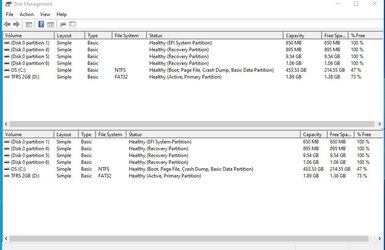
Here's Disk Management from laptop/W 10.
Does that help? Prove anything?
 

Attachments

  • disk management.jpg
    disk management.jpg
    66.6 KB · Views: 3

My Computer My Computer

At a glance

Windows 11 Home 64-bitAMD K19 12 core2TB HDD + 238 SSDAMD Radeon
OS
Windows 11 Home 64-bit
Computer type
PC/Desktop
Manufacturer/Model
HP
CPU
AMD K19 12 core
Motherboard
HP 8906
Memory
2TB HDD + 238 SSD
Graphics Card(s)
AMD Radeon
Sound Card
Realtrek HD Audio
Monitor(s) Displays
Sceptre
Screen Resolution
1920x1080
Hard Drives
WDC WS20EZ..... & KBG50ZNV.....
Cooling
? has a fan!
Keyboard
Lenovo
Mouse
onn optical
Internet Speed
15
Browser
default Firefox back up Edge/instead of chrome
Antivirus
ESET
Here's Disk Management from laptop/W 10.
Does that help? Prove anything?


On my comp... I had Windows 10 running clean and tight, so I just did an In-Place upgrade to Windows 11.
Didn't lose anything.

But, as others have mentioned... whatever you do, turn off Bitlocker first.


Here is the short version of the In-place upgrade tutorial...

DISABLE non-Microsoft:
a) antivirus software
b) firewall software
c) drive encryption software


Make a full OS backup with a program like Macrium Reflect or AOMEI Backupper Standard
Making a backup is optional, but always a smart move.
Macrium Reflect
AOMEI Backupper Standard (free)


Get the Windows 11 ISO (Option #2), and save it to your desktop...


Right click the ISO image and choose: MOUNT
Open File Explorer and you will see a new drive letter. It will "look" like a DVD optical drive.
Double click the new drive letter to open it.
Find setup.exe and double click it to start the in-place upgrade.

Choose the Keep personal files and apps option.

After it's all done... to UNmount the ISO image, right click the new drive letter and choose: EJECT.


All I had to do was a few Personalizations. :-)

000000 Win 10 vs Win 11.png
 

My Computers My Computers

  • At a glance

    Win 11 Home ♦♦♦26200.8655 ♦♦♦♦♦♦♦25H2AMD Ryzen 7 3700XG.Skill (F4-3200C14D-16GTZKW)EVGA RTX 2070 (08G-P4-2171-KR)
    OS
    Win 11 Home ♦♦♦26200.8655 ♦♦♦♦♦♦♦25H2
    Computer type
    PC/Desktop
    Manufacturer/Model
    Built by Ghot® [May 2020]
    CPU
    AMD Ryzen 7 3700X
    Motherboard
    Asus Pro WS X570-ACE (BIOS 5302)
    Memory
    G.Skill (F4-3200C14D-16GTZKW)
    Graphics Card(s)
    EVGA RTX 2070 (08G-P4-2171-KR)
    Sound Card
    Realtek ALC1220P / ALC S1220A
    Monitor(s) Displays
    Dell U3011 30"
    Screen Resolution
    2560 x 1600
    Hard Drives
    2x Samsung 860 EVO 500GB,
    WD 4TB Black FZBX - SATA III,
    WD 8TB Black FZBX - SATA III,
    DRW-24B1ST CD/DVD Burner
    PSU
    PC Power & Cooling 750W Quad EPS12V
    Case
    Cooler Master ATCS 840 Tower
    Cooling
    CM Hyper 212 EVO (push/pull)
    Keyboard
    Ducky DK9008 Shine II Blue LED
    Mouse
    Logitech Optical M-100
    Internet Speed
    300/300
    Browser
    Firefox (latest)
    Antivirus
    Bitdefender Total Security
    Other Info
    Speakers: Klipsch Pro Media 2.1
  • At a glance

    Windows XP Pro 32bit w/SP3AMD Athlon 64 X2 5000+ (OC'd @ 3.2Ghz)TWIN2X2048-6400C4DHX (2 x 1GB, DDR2 800)EVGA 256-P2-N758-TR GeForce 8600GT SSC
    Operating System
    Windows XP Pro 32bit w/SP3
    Computer type
    PC/Desktop
    Manufacturer/Model
    Built by Ghot® (not in use)
    CPU
    AMD Athlon 64 X2 5000+ (OC'd @ 3.2Ghz)
    Motherboard
    ASUS M2N32-SLI Deluxe Wireless Edition
    Memory
    TWIN2X2048-6400C4DHX (2 x 1GB, DDR2 800)
    Graphics card(s)
    EVGA 256-P2-N758-TR GeForce 8600GT SSC
    Sound Card
    Onboard
    Monitor(s) Displays
    ViewSonic G90FB Black 19" Professional (CRT)
    Screen Resolution
    up to 2048 x 1536
    Hard Drives
    WD 36GB 10,000rpm Raptor SATA
    Seagate 80GB 7200rpm SATA
    Lite-On LTR-52246S CD/RW
    Lite-On LH-18A1P CD/DVD Burner
    PSU
    PC Power & Cooling Silencer 750 Quad EPS12V
    Case
    Generic Beige case, 80mm fans
    Cooling
    ZALMAN 9500A 92mm CPU Cooler
    Keyboard
    Logitech Classic Keybooard 200
    Mouse
    Logitech Optical M-BT96a
    Internet Speed
    300/300
    Browser
    Firefox 3.x ??
    Antivirus
    Symantec (Norton)
    Other Info
    Still assembled, still runs. Haven't turned it on for 15 years?
I see that your laptop has more than one Recovery partition.
What are the specs of your laptop?
 

My Computers My Computers

  • At a glance

    Windows 11 Pro - Windows 7 HP 64 - Lubuntui5 6600K - 800MHz to 4400MHz4+4G GSkill DDR4 3000IG - Intel 530
    OS
    Windows 11 Pro - Windows 7 HP 64 - Lubuntu
    Computer type
    PC/Desktop
    Manufacturer/Model
    custom build
    CPU
    i5 6600K - 800MHz to 4400MHz
    Motherboard
    GA-Z170-HD3P
    Memory
    4+4G GSkill DDR4 3000
    Graphics Card(s)
    IG - Intel 530
    Monitor(s) Displays
    Samsung 226BW
    Screen Resolution
    1680x1050
    Hard Drives
    (1) -1 SM951 – 128GB M.2 AHCI PCIe SSD drive for Win 11
    (2) -1 WD SATA 3 - 1T for Data
    (3) -1 WD SATA 3 - 1T for backup
    (4) -1 BX500 SSD - 256G for Windows 7 and Lubuntu
    PSU
    Thermaltake 450W TR2 gold
    Keyboard
    Old and good Chicony mechanical keyboard
    Mouse
    Logitech mX performance - 9 buttons (had to disable some)
    Internet Speed
    500 Mb/s
    Browser
    Firefox 64
  • At a glance

    Windows 11 Proi7-4500U 800- 3000MHz(4+4)G DDR3 1600IG intel 4400 + NVIDIA GeForce GT 745M
    Operating System
    Windows 11 Pro
    Computer type
    Laptop
    Manufacturer/Model
    Asus Q550LF
    CPU
    i7-4500U 800- 3000MHz
    Motherboard
    Asus Q550LF
    Memory
    (4+4)G DDR3 1600
    Graphics card(s)
    IG intel 4400 + NVIDIA GeForce GT 745M
    Sound Card
    Realtek
    Monitor(s) Displays
    LG Display LP156WF4-SPH1
    Screen Resolution
    1920 x 1080
    Hard Drives
    BX500 120G SSD for Windows and programs
    & 1T HDD for data
    Internet Speed
    500 Mb/s
    Browser
    Firefox 64
Wow! A lot of what y'all are asking/recommending is way over my head. What's a Bitlocker? What's a recovery partition? What's an ISO? What's unmount the ISO? What's a program like Macrium Reflect or AOMEI Backupper Standard?
I do back up with flash drives. As many flash drives as necessary. I even have backups of some important files on more than one flash drive.
Do you try to back up the program files? I don't usually.
When I went from an old PC W 10 to the new PC W 11, I just used those flash drives and then with W 11, had to install all the software that was lost. Like Foxit, LibreOffice, Firefox, Thunderbird. And that was what I'm trying to avoid with this laptop. Since it's showing that it's OK to install W 11, I thought it might be worth doing. Since I'm now used to W 11 on the desktop.
Do I really need to know all that stuff mentioned at the beginning?
Can't I just upgrade on the laptop by clicking Install and follow the prompts? Knowing that I have my personal files on flash drives?
Why should I have to use a 3rd party back up? Isn't using flash drives the same? Just as using the cloud redundant?
I sometimes feel as though y'all are so far over my head that I'm just an ignorant old fogy!
 

My Computer My Computer

At a glance

Windows 11 Home 64-bitAMD K19 12 core2TB HDD + 238 SSDAMD Radeon
OS
Windows 11 Home 64-bit
Computer type
PC/Desktop
Manufacturer/Model
HP
CPU
AMD K19 12 core
Motherboard
HP 8906
Memory
2TB HDD + 238 SSD
Graphics Card(s)
AMD Radeon
Sound Card
Realtrek HD Audio
Monitor(s) Displays
Sceptre
Screen Resolution
1920x1080
Hard Drives
WDC WS20EZ..... & KBG50ZNV.....
Cooling
? has a fan!
Keyboard
Lenovo
Mouse
onn optical
Internet Speed
15
Browser
default Firefox back up Edge/instead of chrome
Antivirus
ESET
Yes, I have done it that way. I migrated my old 'main machine' laptop's Windows 10 to a new supported laptop to be ready to get the Windows 11 update when offered. It was offered on 20th October 2021 and I let Windows Update do the upgrade. Yes, all my previously installed software was still there and working after the upgrade.

I didn't have Foxit, and my LibreOffice is the Portable Apps version. What I did have was a collection of some quite old software I didn't want to loose, including PaintShop Pro 7.04, Microsoft AutoRoute, Microsoft's Windows Movie Maker 2012. All worked as well in Win11 as they had in Win10.

All the above could have been reinstalled if they hadn't survived the upgrade, but there was one in particular that would have been impossible to reinstall - that was Microsoft Office Starter 2010. That is a free version of Excel and Word that was only ever available on an OEM install of Windows 7. My old 'main machine' had retained it when upgraded from its original W7 to W10. That too remains present and working under Windows 11.
Here's Disk Management from laptop/W 10.
Does that help? Prove a
Here's Disk Management from laptop/W 10.
Does that help? Prove anything?
I apologize if this was posted before. I did simple search and that didn't help.
I have a laptop with W 10 that says it's ready for W 11. When I do Windows Update, it offers to upgrade to W 11. So I know it's ready.
My question, and I'd like a yes or no.
Can I do the upgrade that way - and not lose anything? i.e. Not lose add ons, like Foxit or LibreOffice?
I don't want to have to go through all those online addons after the upgrade.
If this is not possible, I will wait until W 10 is no longer supported/sometime in 2025?
With my new Desktop W/11, a brand new install was required. So with my laptop, if it requires all the extra work. But with a straight upgrade direct from Microsoft, I'd hope it would not require all that extra work - downloading everything all over.
Or should I post this on tenforums

I see that your laptop has more than one Recovery partition.
What are the specs of your laptop?
The issue often occurs after a couple of Windows upgrades or in-place repairs. If the previous recovery partition doesn't have enough space for the upgrade, then Windows will create an extra recovery partition with several hundred MBs disk space.
 

My Computer My Computer

At a glance

Windows 11 ProfessionalIntel Core i5-940032GBIntegrated Intel UHD Graphics 630
OS
Windows 11 Professional
Computer type
PC/Desktop
Manufacturer/Model
Microcenter B677
CPU
Intel Core i5-9400
Motherboard
ASRock H310CM-HDV/M.2
Memory
32GB
Graphics Card(s)
Integrated Intel UHD Graphics 630
Sound Card
Intel Kaby Lake - High Definition Audio / cAVS (Audio, Voice, Speech) [A0]
Monitor(s) Displays
LG Model: GSM59F1
Screen Resolution
2560x1080
Case
Lian Li 205M
Antivirus
Kaspersky AV
Back
Top Bottom