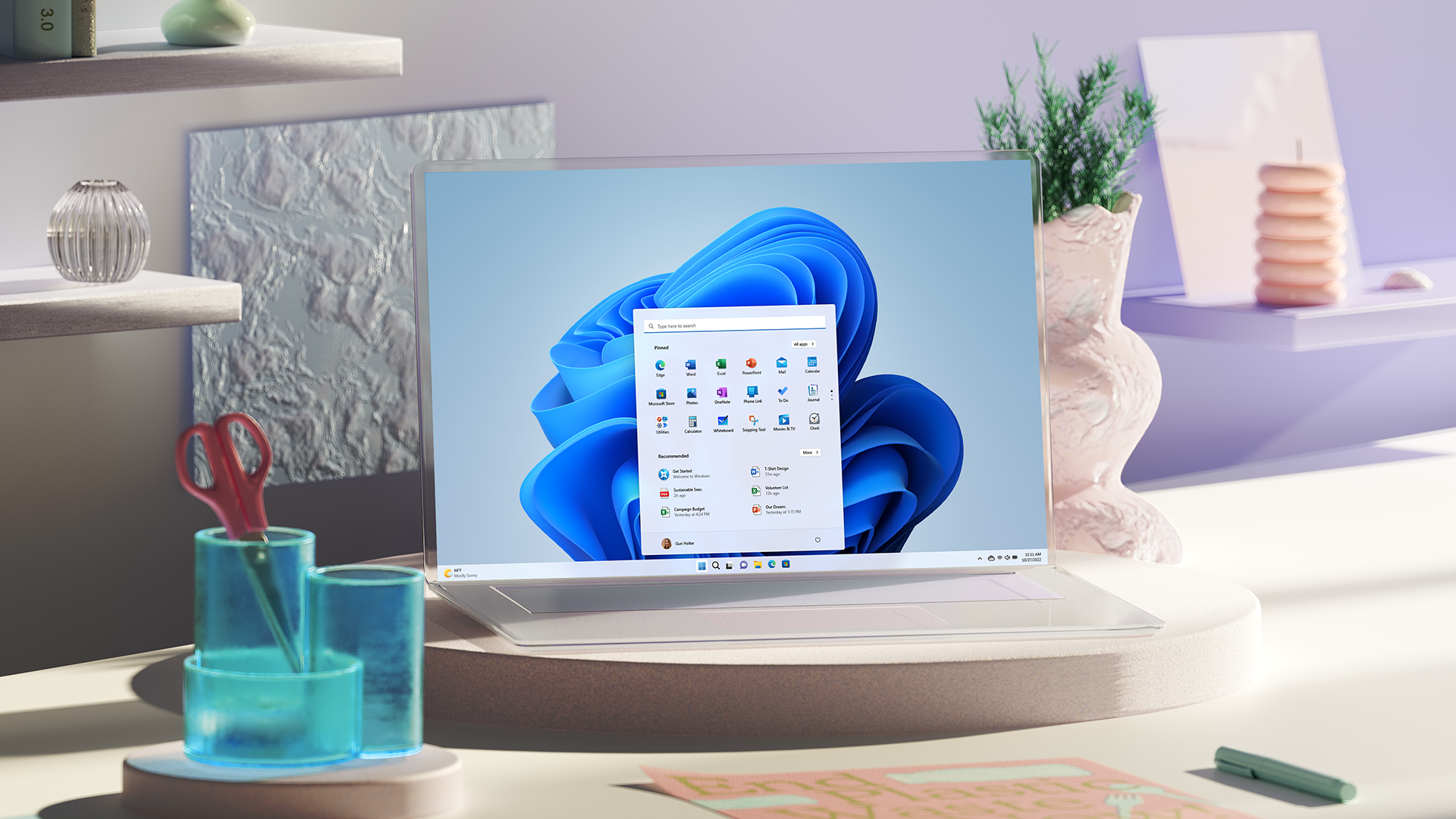
Windows 11 2022 Update (22H2) now available


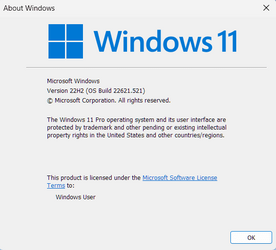
Windows 11 version 22H2 build 22621.521


Today, the Windows 11 2022 Update rolls out in 190+ countries.

The last few years have brought enduring changes in the ways we live, work and learn, with the PC playing a more critical role in our daily lives. Online options that didn’t previously exist for meetings, appointments, everyday tasks and access to entertainment emerged out of necessity, but remain due to convenience and efficiency. We formed new habits; and they stuck. The PC has fundamentally connected us in more emotional ways than ever before.

The rapid move to more flexible work and life also dramatically increased security threats for individuals and businesses, with 921 password attacks every second.

With last year’s launch of Windows 11 we gave the PC a modern refresh, making it faster and easier for you to accomplish the tasks you have relied on your PCs for most. We added foundational security built into Windows at home and at work to help keep you safe and with Windows 365, we took Windows to the cloud, empowering organizations to stream the full Windows experience on any device. More people are using Windows and spending more time on their PCs. In fact, Windows 11 is the most used and most loved version of Windows ever; this is both humbling and energizing for the team and I.

Our work is never done to ensure Windows evolves and adapts to you. With our first major update to Windows 11, we are taking the next step on our journey, focusing our innovation in four key areas to make your everyday easier:
  • Making the PC easier and safer to use for everyone
  • Empowering people to be more productive
  • Making Windows the best place to connect, create and play
  • Delivering added security, management and flexibility to the workplace

Making the PC easier and safer to use for everyone

Windows 11 brought a sense of ease to the PC, with an intuitive design people love. We’re building on that foundation with new features to ensure the content and information you need is always at your fingertips, including updates to the Start menu, faster and more accurate search, Quick Settings, improved local and current events coverage in your Widgets board, and the No. 1 ask from you, tabs in File Explorer1. All of this helps Windows anticipate your needs and save you time.
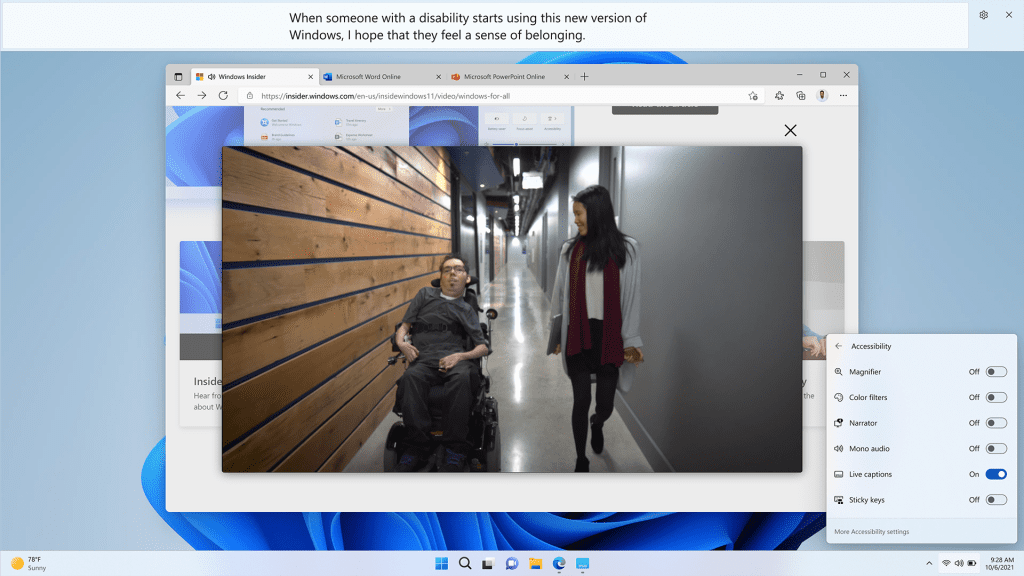
System wide live captions in Windows 11

System wide live captions in Windows 11

Technology has the power to empower each of us – to remove barriers and help people participate and connect. Nearly 1 in 5 people benefit from accessibility features on the PC and with this release we are continuing our commitment to make Windows work for everyone. We will deliver a set of new accessibility features including system wide live captions2 to automatically generate captions from any form of audio content on Windows 11, voice access (preview)2, which allows you to control your PC and author text using only your voice, and Natural Voices for Narrator2, which mirrors natural speech more closely, creating more pleasant-sounding audio to assist in reading or browsing the web.


Online safety, data privacy and security are top concerns for people and their families. Windows 11 is the most secure version of Windows yet. Microsoft uses over 43 trillion security signals daily to inform our comprehensive security solutions. Now we’re introducing Smart App control3 so you can confidently download any app you need without worry. We also know that security threats don’t stop when you shut your laptop, which is why we’ve built the Defender app for Microsoft 365 Personal and Family subscribers. Microsoft Defender for individuals extends Windows’ built-in security and expands device protection to your Android and iOS phones and Macs. Microsoft 365 customers in the U.S. will soon receive identity theft monitoring to help keep themselves, and their family’s personal information, safer online as part of their Microsoft 365 Personal or Family subscription.


Empowering people to be more productive

The PC has always been where people come to get things done – especially when it comes to tackling complex tasks. With enhancements to Snap layouts, the new Focus feature, and performance and battery optimizations, the new Windows 11 2022 update will help you be your most productive yet.
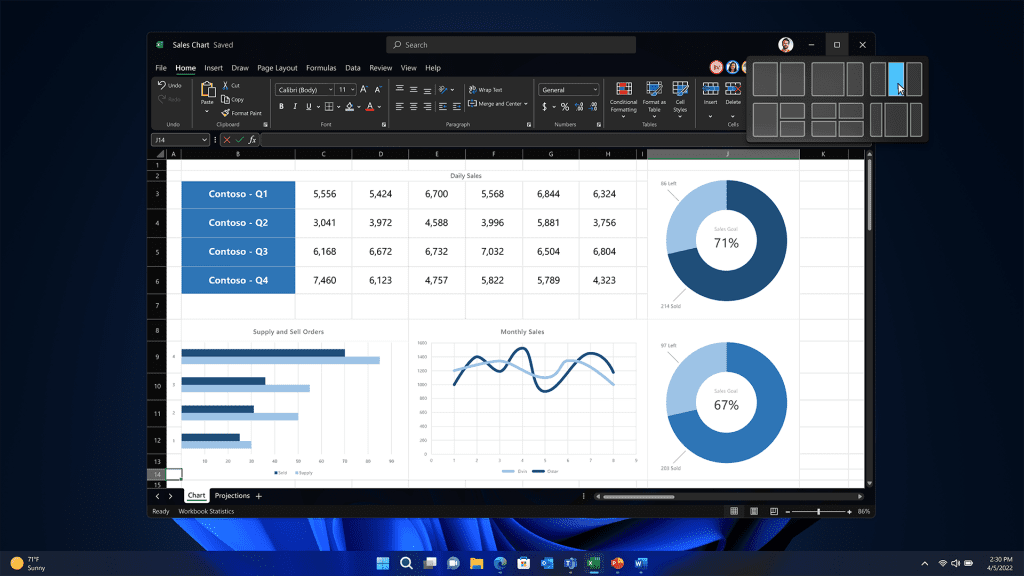
Enhancements to Snap layouts

Enhancements to Snap layouts

Snap layouts on Windows 11 have been a game changer for multitasking, helping people optimize their view when they need to have multiple apps or documents in front of them at the same time. With the new update, we’re making Snap layouts more versatile with better touch navigation and the ability to snap multiple browser tabs in Microsoft Edge.


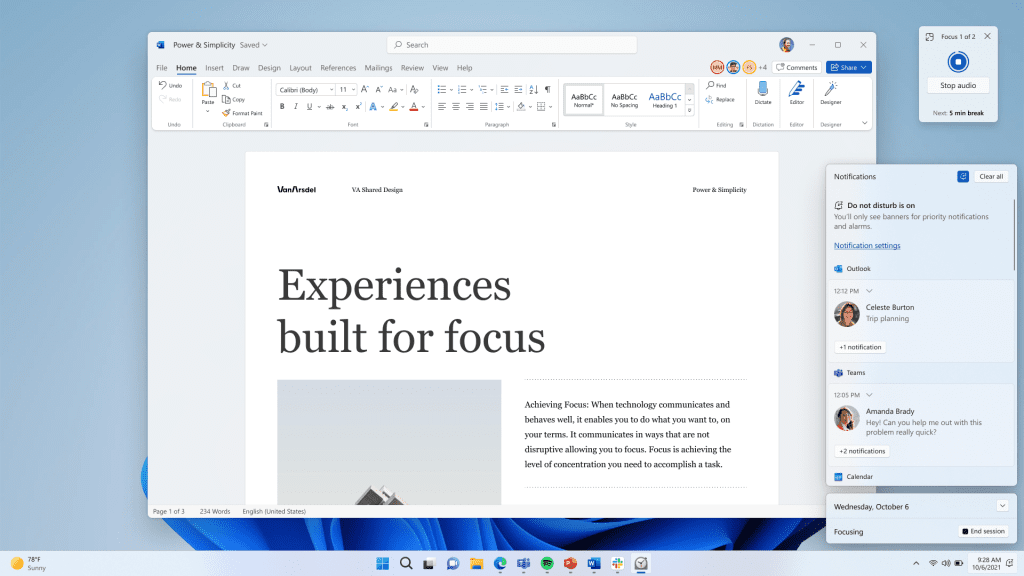
Focus session and Do Not Disturb in Windows 11

Focus session and Do Not Disturb in Windows 11

We’re introducing Focus sessions and Do Not Disturb to help you minimize distractions that pull you away from the task at hand. As you start a new focus session, Windows will turn on Do Not Disturb, which silences notifications, and turn off taskbar badges and application notifications in your taskbar. Focus is also integrated with the Clock App, launching a timer to help you focus, even reminding you to take breaks.


Making Windows the best place to connect, create and play

What we hear from our customers, from you, is that you’re using your PC for a wider variety of things than ever before. PC use is up for communications, creativity and gaming, as more people turn to Windows to connect, express themselves and play. With this update we’ve added features to make those experiences even better with Windows Studio Effects4 to improve video and audio calls, new creator tools, additional gaming features and updates to the Microsoft Store experience.
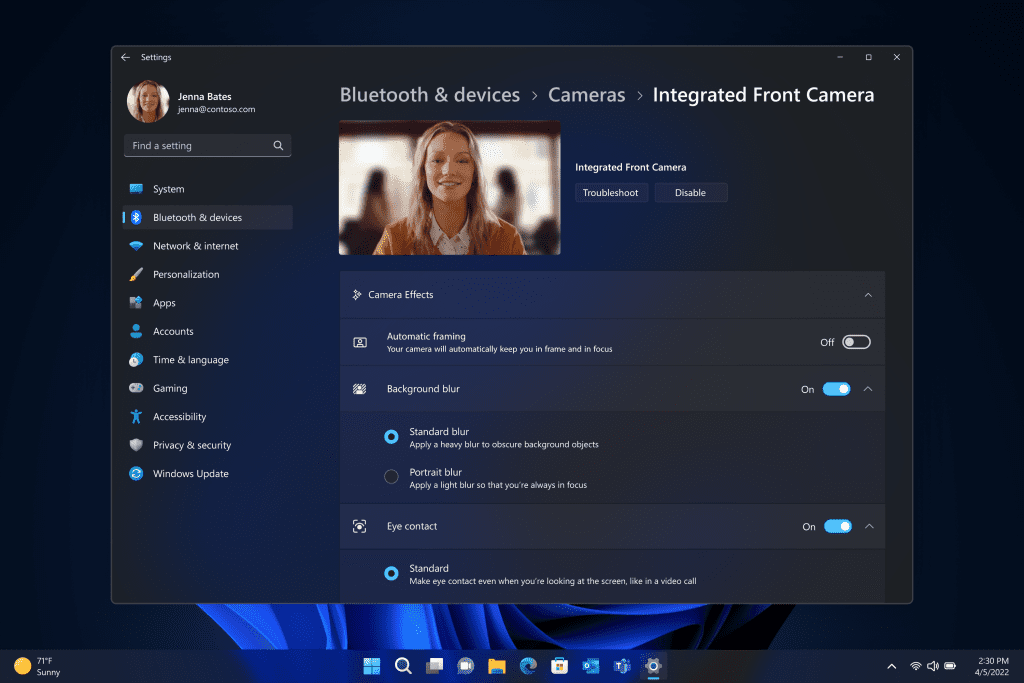
Windows Studio effects in Windows 11

Windows Studio effects in Windows 11

From work to community meetings to connecting with friends and family, video calls have become one of the essential tasks that defines the PC. New Windows Studio camera and audio effects help you look and sound your best on conference calls, enabled by advanced AI – with Voice Focus to filter out background noise and make sure you are heard, Background Blur so only you are seen, Eye Contact to help you make a better connection with people you’re talking to and Automatic Framing so the camera stays with you as you move.
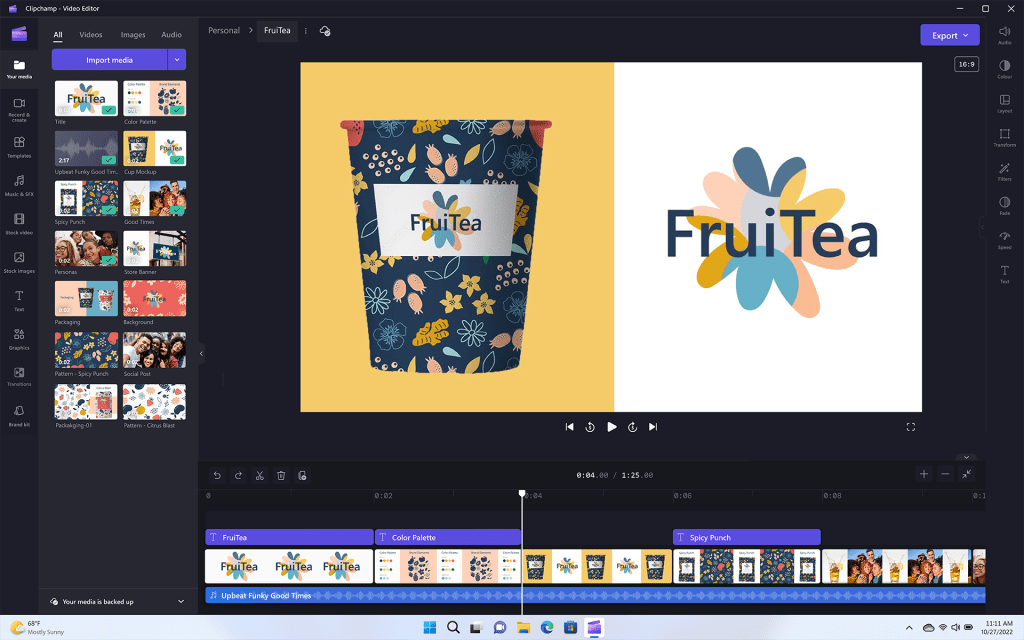
Clipchamp in Windows 11

Clipchamp in Windows 11

As the creator economy continues to grow, people are generating more creative content on Windows, including video. With this update, we’re excited to welcome Clipchamp as an inbox app to Windows 11 to make video editing fun and simple for you — with templates, effects and more.

We also want to continue to make Windows the best place to play games. This update will deliver performance optimizations to improve latency and unlock features like Auto HDR and Variable Refresh Rate on windowed games. And with Game Pass built right into Windows 11 through the Xbox app, players can access hundreds of high-quality PC games. To learn more about what’s new in gaming, visit Xbox Wire.


Having the right content fuels a great PC experience. A year ago, we redesigned the Microsoft Store on Windows to be more open and easier-to-use – a one-stop shop for the apps, games and TV shows you love. Today, through our partnership with Amazon, we are expanding the Amazon Appstore Preview to international markets, bringing more than 20,000 Android™ apps and games to Windows 11 devices that meet the feature-specific hardware requirements. In addition to a growing catalog of apps and games, we are also excited to share that we are moving to the next stage of the Microsoft Store Ads pilot – helping developers get content in front of the right customers. To learn about upcoming features for the Microsoft Store on Windows, visit this blog.


Delivering added security, management and flexibility to the workplace

The PC is the single most powerful productivity tool for today’s workforce. To keep employees productive and engaged, we know organizations need the tools to manage multiple Windows endpoints securely and easily, no matter where their people are working. To meet the needs of this increasingly complex landscape, the new Windows 11 2022 Update delivers the critically important new security features and new management tools for increased IT efficiency.

Windows 11 provides layers of hardware and software integrated for powerful, out-of-the box protection from the moment you start your device – and we’re continuing to innovate. The new Microsoft Defender SmartScreen identifies when people are entering their Microsoft credentials into a malicious application or hacked website and alerts them. We’ve added a presence sensing optional feature to Windows Hello for Business, so that devices equipped with presence sensors work with Windows Hello to securely log you in when you approach and lock your device when you leave. And if you’re an IT professional, you can provide secure, real-time support through the cloud with remote help.
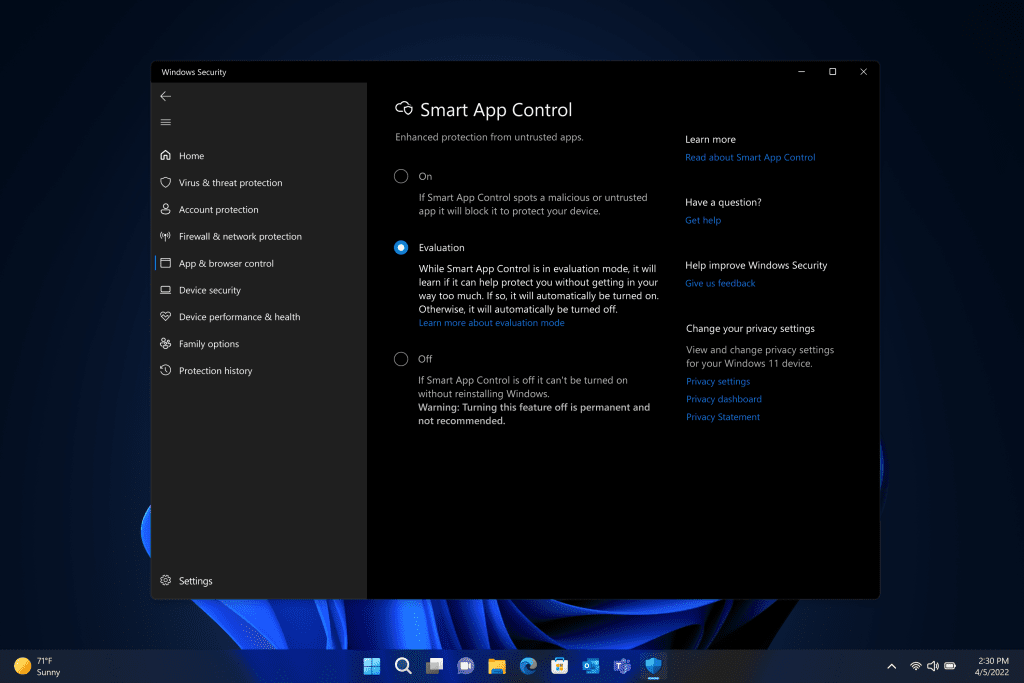
Smart App Control in Windows 11


Smart App Control in Windows 11

Smart App Control is also a valuable feature for businesses of all sizes. Available on new Windows 11 devices or with clean installations of the Windows 11 Update 2022, Smart App Control blocks untrusted or unsigned applications, script files and malicious macros from running on Windows 11. As a result, your employees can use the tools they want and need, while you can relax knowing your organization is protected. Built on the same AI used in Windows Defender Application Control, Smart App Control can predict the safety of an application in real-time before it runs on your device. This is a great solution for organizations who are not yet using a modern device management (MDM) tool like Microsoft Intune.

To learn more about what’s new in the update for commercial customers and IT, visit the Microsoft 365 Blog and for more on security, check out our Security Blog.


Delivering continuous Windows innovation and value

With the PC continuing to play a more meaningful role in our lives, we are committed to delivering continuous value and innovation into Windows and with Microsoft services like Microsoft Edge, Microsoft 365 and PC Game Pass.

You have heard me say before that details matter. The Windows 11 2022 Update has so many subtle, but important changes that come together to help you be your most productive and your most creative.

With this update we’re also taking steps to improve the Windows Update experience. Windows Update is now carbon aware, making it easier for your devices to reduce carbon emissions. When devices are plugged in, turned on, connected to the Internet and regional carbon intensity data is available, Windows Update will schedule installations at specific times of the day when doing so may result in lower carbon emissions because a higher proportion of electricity is coming from lower-carbon sources on the electric grid. We’ve also made some changes to the default power setting for Sleep and Screen off to help reduce carbon emissions when PCs are idle.

As we shared back in February, you’ll see us release new features into Windows 11 more frequently in addition to our annual update. We do this by leveraging the variety of update mechanisms we have in place including servicing, and Microsoft Store updates. Today, we’re excited to build on this with an additional set of experiences coming in October.
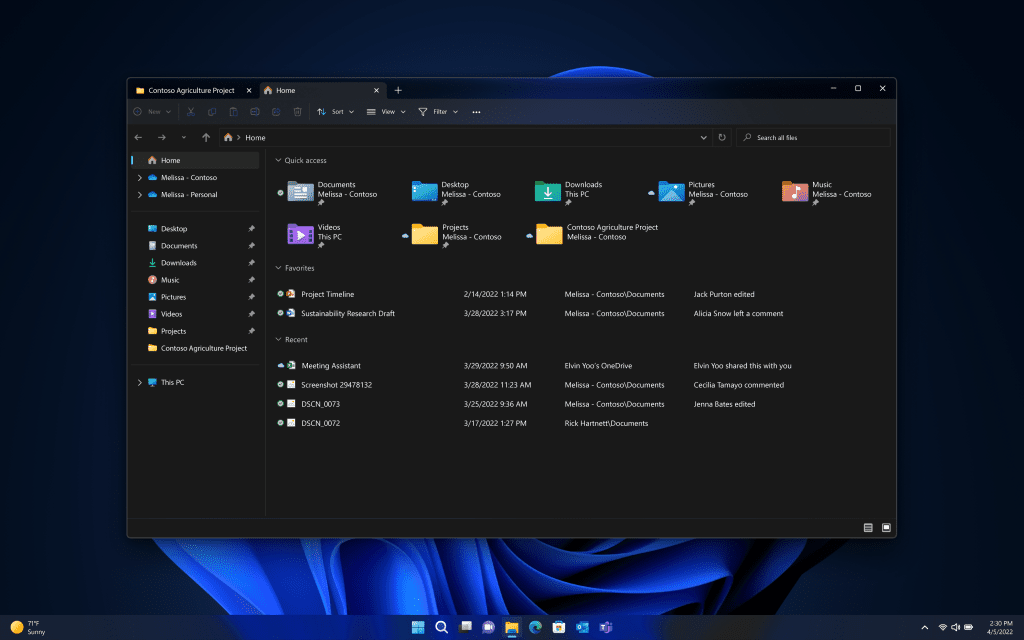
Tabs in File Explorer

Tabs in File Explorer
  • Enhancements to File Explorer, including bringing tabs to File Explorer to help you organize your File Explorer sessions like you do in Microsoft Edge. The new homepage in File Explorer gives you quick access to your favorite and recent files, so you can pin important files for quick and easy access – even including information at a glance of colleagues’ actions on your shared files through the power of OneDrive and personalized suggestions based on your Microsoft 365 account.

  • Photos app: In an update to the Photos app in Windows 11, we will be introducing a new photos-managing experience that brings a gorgeous gallery, simplifying browsing, finding, management and consumption of your collection of photos. It also allows you to easily backup your photos with OneDrive and enjoy powerful experiences on Windows devices, and offers a delightful “Memories” experience.

  • Suggested Actions on Copy: Copy phone numbers, future dates and get suggested actions such as making a call with Teams or Skype or adding an event in the Calendar app.

  • Taskbar Overflow: Taskbar will offer an entry point to an overflow menu that allows you to view all your overflowed apps in one space.
  • Share to more devices: Discover and share to more devices including desktops using nearby share.

How to get the Windows 11 2022 Update – there’s never been a better time to buy a new PC

With all of the exciting new features coming in this update, there’s never been a better time to purchase a new PC. We’re proud to offer Windows 11 on a broad array of devices from across the ecosystem. The best way to experience the magic of the update is on a new PC from Surface or our incredible ecosystem partners Acer, ASUS, Dell, HP, Lenovo, Samsung and Razer. Some of the latest new PCs include:
  • Acer TravelMate Spin P6 – Available for $1499, the Acer TravelMate Spin P6 makes a great business travel companion – sporting military-grade durability, a spill resistant keyboard and technology to improve your Microsoft Teams meetings.
  • ASUS ExpertBook B9 – The ASUS ExpertBook B9, starting at around $1699, features a lightweight, durable magnesium alloy design and an LED-illuminated numeric keypad on the touchpad that’s perfect for crunching numbers.
  • Dell Latitude 7330 – With configurations starting at $1749, the Dell Latitude 7330 offers a premium experience for connectivity and collaboration – powered by latest 12th Gen Intel Core processors and built with an enhanced FHD camera, WiFi-6E and optional 4G LTE connectivity.
  • HP Dragonfly Folio G3 – Powered by Intel vPro with 12th Gen Intel Core processors, HP Dragonfly Folio G3 features a pull-forward design that transitions from laptop to tablet making it easy to create and capture ideas. Starting at $2379.
  • Lenovo ThinkPad X1 Fold – The next-gen Lenovo ThinkPad X1 Fold, starting at $2499, is a sleek and full performance 16.3 inch foldable PC – with a 100% recycled woven performance fabric back cover and memory options up to 32GB.
  • The Samsung Galaxy Book Go 5G – Keeps you always connected starting at just $609. Designed to keep its cool without a fan, the Galaxy Book Go 5G features a lightweight design and is powered by the advanced, energy-efficient Snapdragon 8cx Gen 2 Compute Platform. With instant-on performance that draws less power and keeps the battery charged longer, you can be productive from anywhere.
  • Surface Laptop Studio – Seamlessly transition from laptop to entertainment-ready stage to portable creative canvas with our most powerful Surface Laptop – starting at $1,599.
  • Razer Blade 14 – Features the ultra-fast AMD Ryzen 9 6900HX processor and up to an NVIDIA GeForce RTX 3080Ti graphics card, enabling some of the most powerful gaming possible while on the go. With a buttery smooth QHD 165Hz display and improved DDR5 memory, the Blade 14 allows players to take full advantage of the powerful hardware inside, starting at just $1999.
Availability of the update begins today. To learn more about the roll out approach for the Windows 11 2022 Update, visit this blog post from John Cable.

We’re excited to take this next step with Windows 11, to inspire journeys like yours. Windows 11 was designed to bring people together, to help people play and have fun, to empower productivity and inspire creativity. Serving more than a billion people, Windows is the platform for the world’s innovation. For consumers, Windows 11 will make your everyday easier. For businesses, Windows 11 is the operating system for hybrid work and the most secure version of Windows yet. For developers and creators, Windows 11 is the open platform creating even greater economic opportunity for your creations. We will continue to invest in delivering Windows experiences that enrich people’s lives as we aspire to meet your evolving needs.

We can’t wait to see what you are inspired to do and create with the latest update.

Source:

See also:
 
Last edited:

I think you would have to uninstall the enablement package to go to 22521.598, but even then not sure what you need to do to get RTM.

I think you may need to download iso and do a repair upgrade?
the in-place repair upgrade with the RTM ISO should do it. Both 22621 and 22622 suould accept that and allow you to keep all installed apps and files. Same as you can rerair W10 19044 with a 19041 ISO. That's because it's basically the same OS system files, but with an enablement package installed.

I'll be testing that shortly, as soon as the MCT has made the ISO. I'll be taking my little (unsupported) laptop currently runnig Insider RP 22621 down to RTM 22H2 with an in-place upgrade.
 

My Computers My Computers

  • At a glance

    Windows 11 HomeAMD Athlon Silver 3050U8GBRadeon Graphics
    OS
    Windows 11 Home
    Computer type
    Laptop
    Manufacturer/Model
    Acer Aspire 3 A315-23-R9VY
    CPU
    AMD Athlon Silver 3050U
    Memory
    8GB
    Graphics Card(s)
    Radeon Graphics
    Monitor(s) Displays
    laptop screen
    Screen Resolution
    1366x768 native resolution, up to 2560x1440 with Radeon Virtual Super Resolution
    Hard Drives
    1TB Samsung EVO 870 SSD (from April 2026: 250GB EVO 850)
    Internet Speed
    150 Mbps
    Browser
    Edge, Firefox
    Antivirus
    Defender
    Other Info
    fully 'Windows 11 ready' laptop. Windows 10 C: partition migrated from my old unsupported 'main machine' then upgraded to 11. A test migration ran Insider builds for 2 months. When 11 was released on 5th October 2021 it was re-imaged back to 10 and was offered the upgrade in Windows Update on 20th October. Windows Update offered the 22H2 Feature Update on 20th September 2022. It got the 23H2 Feature Update on 4th November 2023 through Windows Update, 24H2 on 3rd October 2024 through Windows Update by setting the Target Release Version for 24H2, and 25H2 on 30th September 2025 through Windows Update by setting the Target Release Version for 25H2.

    UPDATE - 11 April 2026: due to mechanical deterioration this PC has been retired from active duty. The OS with all software and files has been migrated to my System Seven in 'Other systems' to carry on as my general purpose 'main machine'.
  • At a glance

    Windows 11 ProIntel® Core™ i5-520M8GB(integrated graphics) Intel HD Graphics
    Operating System
    Windows 11 Pro
    Computer type
    Laptop
    Manufacturer/Model
    Dell Latitude E4310
    CPU
    Intel® Core™ i5-520M
    Motherboard
    0T6M8G
    Memory
    8GB
    Graphics card(s)
    (integrated graphics) Intel HD Graphics
    Screen Resolution
    1366x768
    Hard Drives
    500GB Crucial MX500 SSD
    Browser
    Firefox, Edge
    Antivirus
    Defender
    Other Info
    unsupported machine: Legacy bios, MBR, TPM 1.2, upgraded from W10 to W11 using W10/W11 hybrid install media workaround.

    In-place upgrade to 22H2 using ISO and a workaround.
    Feature Update to 23H2 by manually installing the Enablement Package.
    In-place upgrade to 24H2 using hybrid 23H2/24H2 install media.
    Upgraded to 25H2 by Enablement Package.

    Also running Insider Dev, and Canary builds and Windows 10 as native boot .vhdx.
  • My SYSTEM THREE is a Dell Latitude 5410, i7-10610U, 32GB RAM, 512GB NVMe ssd, supported device running Windows 11 Pro.

    My SYSTEM FOUR is a 2-in-1 convertible Lenovo Yoga 11e 20DA, Celeron N2930, 8GB RAM, 256GB ssd. Unsupported device: currently running Win10 Pro, plus Win11 Pro RTM and Insider Dev, Beta, and RP 24H2 as native boot vhdx.

    My SYSTEM FIVE is a Dell Latitude 3190 2-in-1, Pentium Silver N5030, 8GB RAM, 1TB NVMe ssd, supported device running Windows 11 Pro, plus Insider Beta, Dev, and Canary builds (and a few others) as a native boot .vhdx.

    My SYSTEM SIX is a Dell Latitude 5550, Core Ultra 7 165H, 64GB RAM, 1TB NVMe SSD, supported device, Windows 11 Pro 24H2, Hyper-V host machine. Updated to 25H2 on 30th September 2025.

    My SYSTEM SEVEN is a Lenovo Thinkpad T580, Intel Core i7-8650U, 16GB RAM, 512GB NVMe SSD + 2nd 512GB NVMe SSD, a supported device for Windows 11. This is my current general purpose 'main machine'. The installed Windows 11 Home from my System One has been migrated to this machine.
Well, whatever you do, don't download the ISO from Windows. I did and it put me back on 22621.382 when I was on 22622.598.
That's the point - it is easy enough to get back to 22622.598 by rejoining Beta as an Insider.

Can you confirm you are not on an Insider build?

Also, do you have file explorer with tabs?
 

My Computer My Computer

At a glance

Windows 11 Pro + Win11 Canary VM.I9 13th gen i9-13900H 2.60 GHZ16 GB solderedIntegrated Intel Iris XE
OS
Windows 11 Pro + Win11 Canary VM.
Computer type
Laptop
Manufacturer/Model
ASUS Zenbook 14
CPU
I9 13th gen i9-13900H 2.60 GHZ
Motherboard
Yep, Laptop has one.
Memory
16 GB soldered
Graphics Card(s)
Integrated Intel Iris XE
Sound Card
Realtek built in
Monitor(s) Displays
laptop OLED screen
Screen Resolution
2880x1800 touchscreen
Hard Drives
1 TB NVME SSD (only weakness is only one slot)
PSU
Internal + 65W thunderbolt USB4 charger
Case
Yep, got one
Cooling
Stella Artois (UK pint cans - 568 ml) - extra cost.
Keyboard
Built in UK keybd
Mouse
Bluetooth , wireless dongled, wired
Internet Speed
900 mbs (ethernet), wifi 6 typical 350-450 mb/s both up and down
Browser
Edge
Antivirus
Defender
Other Info
TPM 2.0, 2xUSB4 thunderbolt, 1xUsb3 (usb a), 1xUsb-c, hdmi out, 3.5 mm audio out/in combo, ASUS backlit trackpad (inc. switchable number pad)

Macrium Reflect Home V8
Office 365 Family (6 users each 1TB onedrive space)
Hyper-V (a vm runs almost as fast as my older laptop)

My Computer My Computer

At a glance

Windows 11 Pro 24H2AMD Ryzen™ 9 7940HS Processor, 8 Cores/16 Thr...32Gb DDR5 5600MHz SODIMMIntegrated AMD Radeon 780M
OS
Windows 11 Pro 24H2
Computer type
PC/Desktop
Manufacturer/Model
MinisForum / UM790-Pro
CPU
AMD Ryzen™ 9 7940HS Processor, 8 Cores/16 Threads
Motherboard
MinisForum
Memory
32Gb DDR5 5600MHz SODIMM
Graphics Card(s)
Integrated AMD Radeon 780M
Sound Card
Onboard
Monitor(s) Displays
LG 32" 4K
Screen Resolution
3840 X 2160
Hard Drives
1 Gb WD - Black SN850X PCIe Gen4 NVMe SSD
1 Gb Kingston OMPGP41024Q-A0 Gen4 NVMe SSD
Keyboard
Logitech K800
Mouse
Logitech MX Master 3
Well, whatever you do, don't download the ISO from Windows. I did and it put me back on 22621.382 when I was on 22622.598.
That's the released build, but there should be a CU or two shortly, there usually is after a new release. Have you checked for updates yet?
 

My Computers My Computers

  • At a glance

    Windows 11 HomeAMD Athlon Silver 3050U8GBRadeon Graphics
    OS
    Windows 11 Home
    Computer type
    Laptop
    Manufacturer/Model
    Acer Aspire 3 A315-23-R9VY
    CPU
    AMD Athlon Silver 3050U
    Memory
    8GB
    Graphics Card(s)
    Radeon Graphics
    Monitor(s) Displays
    laptop screen
    Screen Resolution
    1366x768 native resolution, up to 2560x1440 with Radeon Virtual Super Resolution
    Hard Drives
    1TB Samsung EVO 870 SSD (from April 2026: 250GB EVO 850)
    Internet Speed
    150 Mbps
    Browser
    Edge, Firefox
    Antivirus
    Defender
    Other Info
    fully 'Windows 11 ready' laptop. Windows 10 C: partition migrated from my old unsupported 'main machine' then upgraded to 11. A test migration ran Insider builds for 2 months. When 11 was released on 5th October 2021 it was re-imaged back to 10 and was offered the upgrade in Windows Update on 20th October. Windows Update offered the 22H2 Feature Update on 20th September 2022. It got the 23H2 Feature Update on 4th November 2023 through Windows Update, 24H2 on 3rd October 2024 through Windows Update by setting the Target Release Version for 24H2, and 25H2 on 30th September 2025 through Windows Update by setting the Target Release Version for 25H2.

    UPDATE - 11 April 2026: due to mechanical deterioration this PC has been retired from active duty. The OS with all software and files has been migrated to my System Seven in 'Other systems' to carry on as my general purpose 'main machine'.
  • At a glance

    Windows 11 ProIntel® Core™ i5-520M8GB(integrated graphics) Intel HD Graphics
    Operating System
    Windows 11 Pro
    Computer type
    Laptop
    Manufacturer/Model
    Dell Latitude E4310
    CPU
    Intel® Core™ i5-520M
    Motherboard
    0T6M8G
    Memory
    8GB
    Graphics card(s)
    (integrated graphics) Intel HD Graphics
    Screen Resolution
    1366x768
    Hard Drives
    500GB Crucial MX500 SSD
    Browser
    Firefox, Edge
    Antivirus
    Defender
    Other Info
    unsupported machine: Legacy bios, MBR, TPM 1.2, upgraded from W10 to W11 using W10/W11 hybrid install media workaround.

    In-place upgrade to 22H2 using ISO and a workaround.
    Feature Update to 23H2 by manually installing the Enablement Package.
    In-place upgrade to 24H2 using hybrid 23H2/24H2 install media.
    Upgraded to 25H2 by Enablement Package.

    Also running Insider Dev, and Canary builds and Windows 10 as native boot .vhdx.
  • My SYSTEM THREE is a Dell Latitude 5410, i7-10610U, 32GB RAM, 512GB NVMe ssd, supported device running Windows 11 Pro.

    My SYSTEM FOUR is a 2-in-1 convertible Lenovo Yoga 11e 20DA, Celeron N2930, 8GB RAM, 256GB ssd. Unsupported device: currently running Win10 Pro, plus Win11 Pro RTM and Insider Dev, Beta, and RP 24H2 as native boot vhdx.

    My SYSTEM FIVE is a Dell Latitude 3190 2-in-1, Pentium Silver N5030, 8GB RAM, 1TB NVMe ssd, supported device running Windows 11 Pro, plus Insider Beta, Dev, and Canary builds (and a few others) as a native boot .vhdx.

    My SYSTEM SIX is a Dell Latitude 5550, Core Ultra 7 165H, 64GB RAM, 1TB NVMe SSD, supported device, Windows 11 Pro 24H2, Hyper-V host machine. Updated to 25H2 on 30th September 2025.

    My SYSTEM SEVEN is a Lenovo Thinkpad T580, Intel Core i7-8650U, 16GB RAM, 512GB NVMe SSD + 2nd 512GB NVMe SSD, a supported device for Windows 11. This is my current general purpose 'main machine'. The installed Windows 11 Home from my System One has been migrated to this machine.
Given the confusion, I am pausing windows updates for up to a week.

I have 22H2 22621.598 Beta, I am Queued for unenrollment, and I am looking forward to leaving the Insider program.
 

My Computer My Computer

At a glance

Win 11 Pro 25H2 ARM64 (Parallels VM) _ 26200....Apple Silicon M1 / 3.20 GHz (4 processors)16 GB
OS
Win 11 Pro 25H2 ARM64 (Parallels VM) _ 26200.8655
Computer type
Laptop
Manufacturer/Model
MacBook Pro (13-inch, M1, 2020)
CPU
Apple Silicon M1 / 3.20 GHz (4 processors)
Memory
16 GB
Monitor(s) Displays
13.3-inch (2560 × 1600)
Antivirus
N360 for Mac / Win / Win Defender
Other Info
Parallels Pro 26.3.3/ macOS Tahoe 26.5
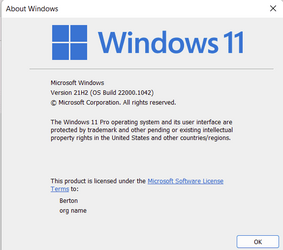
Just checked for updates and got Version 21H2 Build 22000.1042, KB5017383 plus an update for .NET.


1663697541015.png
 

My Computers My Computers

  • At a glance

    Win11 Pro RTM Version 24H2 Build 26100.4202Intel Core i5 11th Gen. 2.40GHz12GB
    OS
    Win11 Pro RTM Version 24H2 Build 26100.4202
    Computer type
    Laptop
    Manufacturer/Model
    Dell Vostro 3400
    CPU
    Intel Core i5 11th Gen. 2.40GHz
    Memory
    12GB
    Hard Drives
    256GB SSD NVMe M.2
  • At a glance

    Win11 Pro RTM Version 24H2 Build 26100.4202Intel Core i5 10th Gen. 2.90GHz16GBOnboard, no VGA, using a DisplayPort-to-VGA a...
    Operating System
    Win11 Pro RTM Version 24H2 Build 26100.4202
    Computer type
    PC/Desktop
    Manufacturer/Model
    Dell Vostro 5890
    CPU
    Intel Core i5 10th Gen. 2.90GHz
    Memory
    16GB
    Graphics card(s)
    Onboard, no VGA, using a DisplayPort-to-VGA adapter
    Monitor(s) Displays
    24" Dell
    Hard Drives
    512GB SSD NVMe, 4TB Seagate HDD
    Browser
    Firefox, Edge
    Antivirus
    Windows Defender/Microsoft Security
Well if you're sitting at the release version 22621.382 run the update and it will update to 22621.521 .
Have you done this?
 

My Computer My Computer

At a glance

Windows 11 Pro + Win11 Canary VM.I9 13th gen i9-13900H 2.60 GHZ16 GB solderedIntegrated Intel Iris XE
OS
Windows 11 Pro + Win11 Canary VM.
Computer type
Laptop
Manufacturer/Model
ASUS Zenbook 14
CPU
I9 13th gen i9-13900H 2.60 GHZ
Motherboard
Yep, Laptop has one.
Memory
16 GB soldered
Graphics Card(s)
Integrated Intel Iris XE
Sound Card
Realtek built in
Monitor(s) Displays
laptop OLED screen
Screen Resolution
2880x1800 touchscreen
Hard Drives
1 TB NVME SSD (only weakness is only one slot)
PSU
Internal + 65W thunderbolt USB4 charger
Case
Yep, got one
Cooling
Stella Artois (UK pint cans - 568 ml) - extra cost.
Keyboard
Built in UK keybd
Mouse
Bluetooth , wireless dongled, wired
Internet Speed
900 mbs (ethernet), wifi 6 typical 350-450 mb/s both up and down
Browser
Edge
Antivirus
Defender
Other Info
TPM 2.0, 2xUSB4 thunderbolt, 1xUsb3 (usb a), 1xUsb-c, hdmi out, 3.5 mm audio out/in combo, ASUS backlit trackpad (inc. switchable number pad)

Macrium Reflect Home V8
Office 365 Family (6 users each 1TB onedrive space)
Hyper-V (a vm runs almost as fast as my older laptop)
Only updated to 22000.1042 so no 22H2 here.
 

My Computers My Computers

  • At a glance

    Win 11 ProAMD Ryzen™ 7 7730U24GB Dual-Channel DDR4 @ 1596MHz (22-22-22-52)512MB ATI AMD Radeon Graphics (ASUStek Comput...
    OS
    Win 11 Pro
    Computer type
    Laptop
    Manufacturer/Model
    ASUS Vivobook
    CPU
    AMD Ryzen™ 7 7730U
    Motherboard
    M1605YA
    Memory
    24GB Dual-Channel DDR4 @ 1596MHz (22-22-22-52)
    Graphics Card(s)
    512MB ATI AMD Radeon Graphics (ASUStek Computer Inc)
    Monitor(s) Displays
    Generic PnP Monitor (1920x1200@60Hz) - P1 PLUS (1920x1080@59Hz)
    Screen Resolution
    1920 X 1200
    Hard Drives
    953GB Western Digital WD
    PSU
    45 Watts
    Mouse
    Lenovo Bluetooth.
    Internet Speed
    500 Mbps
    Browser
    Edge
    Antivirus
    Defender
  • At a glance

    Windows 11AMD Ryzen 7 5800H / 3.2 GHz32 GB DDR4 SDRAM 3200 MHzNVIDIA GeForce RTX 3060 6 GB GDDR6 SDRAM
    Operating System
    Windows 11
    Computer type
    Laptop
    Manufacturer/Model
    ACER NITRO
    CPU
    AMD Ryzen 7 5800H / 3.2 GHz
    Motherboard
    CZ Scala_CAS (FP6)
    Memory
    32 GB DDR4 SDRAM 3200 MHz
    Graphics card(s)
    NVIDIA GeForce RTX 3060 6 GB GDDR6 SDRAM
    Sound Card
    Realtek Audio. NVIDIA High Definition Audio
    Monitor(s) Displays
    15.6" LED backlight 1920 x 1080 (Full HD) 144 Hz
    Screen Resolution
    1920 x 1080 (Full HD)
    Hard Drives
    Samsung 970 Evo Plus 2TB NVMe M.2
    PSU
    180 Watt, 19.5 V
    Mouse
    Lenovo Bluetooth
    Internet Speed
    500 Mbps
    Browser
    Edge
    Antivirus
    Defender
I removed the CU that put me in 22622.598 and went back to 22621.598 and went to the RP and it says I still would have to do a clean install to get off the insider.
 

My Computers My Computers

  • At a glance

    Windows11 Pro 26200.8728Intel Core i9 14900F (24 -Core, 68 MB Total C...32GB DDR5RTX 4080 Super w/581.95
    OS
    Windows11 Pro 26200.8728
    Computer type
    PC/Desktop
    Manufacturer/Model
    Dell Alienware Aurora R16
    CPU
    Intel Core i9 14900F (24 -Core, 68 MB Total Cache)
    Motherboard
    Dell Alienware
    Memory
    32GB DDR5
    Graphics Card(s)
    RTX 4080 Super w/581.95
    Sound Card
    Realtec
    Monitor(s) Displays
    Corsair XENEON 32QHD165
    Screen Resolution
    2560 X 1440
    Hard Drives
    1-2TB Samsung 990 Pro PCIe NVMe M2 SSD
    1-4TB Samsung 990 Pro PCIe NVMe M2 SSD
    PSU
    1000 Watt Platinum Dell
    Case
    Alienware
    Cooling
    Liquid Closed Loop
    Keyboard
    Corsair Strafe RGB
    Mouse
    Logitech MK270 Wireless
    Internet Speed
    100Gb's Down-20 Up
    Browser
    Firefox 152.0.1
    Antivirus
    Defender
    Other Info
    Very Quiet And Fast
    CyberPower UPS CP1500PFCLCD
  • At a glance

    PClinuxOS Mate (2025.7)13th Gen Inter(R) Core(TM) i3-1315U64 GB DDR4 @3200 MHz.Internal
    Operating System
    PClinuxOS Mate (2025.7)
    Computer type
    PC/Desktop
    Manufacturer/Model
    Intel
    CPU
    13th Gen Inter(R) Core(TM) i3-1315U
    Motherboard
    Intel
    Memory
    64 GB DDR4 @3200 MHz.
    Graphics card(s)
    Internal
    Sound Card
    None
    Monitor(s) Displays
    Dell 2419HGCF
    Screen Resolution
    1920 X 1080
    Hard Drives
    SAMSUNG 980 PRO SSD 2TB, PCIe 4.0 M.2 2280
    PSU
    Chicony 30 Watt
    Case
    Small
    Keyboard
    Dell
    Mouse
    Razor
    Internet Speed
    1GB
    Browser
    Slimjet
45 minutes start to finish. All looks good so far.
1663698150053.png
 

My Computer My Computer

At a glance

Windows 11 ProAMD 9700X32 gb5050
OS
Windows 11 Pro
Computer type
PC/Desktop
CPU
AMD 9700X
Motherboard
ASUS B650E
Memory
32 gb
Graphics Card(s)
5050
Sound Card
On-board realtech
That's the released build, but there should be a CU or two shortly, there usually is after a new release. Have you checked for updates yet?
I did check for updates. I got the opportunity to update to 22622.598 again. I restored from this morning's backup. I'll check again later.
 

My Computers My Computers

  • At a glance

    Windows 11 Pro 25H2 RP channelRyzen 9 5900XCorsair Vengeance RGB PRO 64GB (2x32GB) DDR4 ...ASUS GeForce RTX 4070 Super OC 12GB DDR6 / ZO...
    OS
    Windows 11 Pro 25H2 RP channel
    Computer type
    PC/Desktop
    Manufacturer/Model
    Home built
    CPU
    Ryzen 9 5900X
    Motherboard
    MSI MPG X570S Edge Max WiFi
    Memory
    Corsair Vengeance RGB PRO 64GB (2x32GB) DDR4 3600 (PC4-28800) C18
    Graphics Card(s)
    ASUS GeForce RTX 4070 Super OC 12GB DDR6 / ZOTAC RTX 3060 Twin Edge OC 12GB GDDR6
    Sound Card
    Proprietary on MB / FiiO K5Pro DAC
    Monitor(s) Displays
    ViewSonic XG2530 25"/Benq XL2411P 24"/ ASUS VA24DQSB) 23.8"
    Screen Resolution
    1920x1080 240Hz/144Hz/60Hz (based on monitor setup above)
    Hard Drives
    SK hynix Gold P31 1TB PCIe NVMe Gen3 M.2 2280 Internal SSD
    ADATA XPG SX8200 Pro 1TB
    Samsung SSD 860 EVO 1TB 2.5 Inch SATA III Internal SSD
    PSU
    Corsair RM1000e
    Case
    Phanteks Enthoo Pro Full Tower Chassis with Window
    Cooling
    Corsair iCUE H60i RGB PRO XT Liquid CPU Cooler
    Keyboard
    Corsair K70
    Mouse
    Logitech MX Master 3
    Internet Speed
    ~950Mb/s download / ~700Mb/s upload
    Browser
    Edge (Chromium)
    Antivirus
    Norton 360
  • At a glance

    Windows 11 ProRyzen 7 3700X32MB DDR4I forget, but it's old. I can't see the need ...
    Operating System
    Windows 11 Pro
    Computer type
    PC/Desktop
    Manufacturer/Model
    Home Built
    CPU
    Ryzen 7 3700X
    Motherboard
    MSI B550 Gaming GEN3 Gaming Motherboard
    Memory
    32MB DDR4
    Graphics card(s)
    I forget, but it's old. I can't see the need to upgrade it.
    Sound Card
    Propietary
    Monitor(s) Displays
    ACER LED 24"
    Screen Resolution
    1920X1080
    Hard Drives
    1TB Samsung SSD 3.5"
    Case
    Corsair
    Cooling
    Stock
    Keyboard
    Logitech
    Mouse
    Logitech
    Internet Speed
    ~750Mb/s download / ~750Mb/s upload
    Browser
    Edge
    Antivirus
    Defender and Malware Bytes
  • ASUS Vivobook 16X, 16" WUXGA(1920x1200) Business Laptop Computer, AMD Ryzen 7, 16GB DDR4 RAM, 1TB SSD, Windows 11 Pro, Wi-Fi 6, USB-C, Full-Sized Keyboard, Webcam, HDMI
Windows 11 22h2.jpg
 

My Computer My Computer

At a glance

Windows 11 Pro 23H2 (22631.3155)AMD Ryzen 5 5600XKingston 16GB (2 x 8GB) DDR4 3200MHzGigabyte Radeon RX 580 AORUS 8GB GDDR5
OS
Windows 11 Pro 23H2 (22631.3155)
Computer type
PC/Desktop
CPU
AMD Ryzen 5 5600X
Motherboard
Asus TUF Gaming B550-Plus
Memory
Kingston 16GB (2 x 8GB) DDR4 3200MHz
Graphics Card(s)
Gigabyte Radeon RX 580 AORUS 8GB GDDR5
Monitor(s) Displays
Samsung
Screen Resolution
1920X11080
Hard Drives
Samsung 970 EVO Plus NVMe M.2 500GB (OS)
Samsung 980 NVMe 1TB (Games)
Samsung 860 EVO 250GB
Samsung 850 EVO 250GB (Music)
PSU
Super Flower / Leadex 750W 80Plus Titanium
Cooling
SilentiumPC Fortis 3 HE1425 v2
Keyboard
Logitech K520
Mouse
Logitech G700S
Internet Speed
50mbps/10mbps
Browser
Firefox, Chrome, Edge, Opera
Antivirus
Windows Defender
I've given up on following this thread, too much intermingling of the RTM and the Insider Preview versions.
 

My Computers My Computers

  • At a glance

    Win11 Pro RTM Version 24H2 Build 26100.4202Intel Core i5 11th Gen. 2.40GHz12GB
    OS
    Win11 Pro RTM Version 24H2 Build 26100.4202
    Computer type
    Laptop
    Manufacturer/Model
    Dell Vostro 3400
    CPU
    Intel Core i5 11th Gen. 2.40GHz
    Memory
    12GB
    Hard Drives
    256GB SSD NVMe M.2
  • At a glance

    Win11 Pro RTM Version 24H2 Build 26100.4202Intel Core i5 10th Gen. 2.90GHz16GBOnboard, no VGA, using a DisplayPort-to-VGA a...
    Operating System
    Win11 Pro RTM Version 24H2 Build 26100.4202
    Computer type
    PC/Desktop
    Manufacturer/Model
    Dell Vostro 5890
    CPU
    Intel Core i5 10th Gen. 2.90GHz
    Memory
    16GB
    Graphics card(s)
    Onboard, no VGA, using a DisplayPort-to-VGA adapter
    Monitor(s) Displays
    24" Dell
    Hard Drives
    512GB SSD NVMe, 4TB Seagate HDD
    Browser
    Firefox, Edge
    Antivirus
    Windows Defender/Microsoft Security
That's the point - it is easy enough to get back to 22622.598 by rejoining Beta as an Insider.

Can you confirm you are not on an Insider build?

Also, do you have file explorer with tabs?
I'm on the insider build. I have the file explorer with tabs. I just restored from this morning's backup. It was easier that way. I'm not back on 22622.598.
 

My Computers My Computers

  • At a glance

    Windows 11 Pro 25H2 RP channelRyzen 9 5900XCorsair Vengeance RGB PRO 64GB (2x32GB) DDR4 ...ASUS GeForce RTX 4070 Super OC 12GB DDR6 / ZO...
    OS
    Windows 11 Pro 25H2 RP channel
    Computer type
    PC/Desktop
    Manufacturer/Model
    Home built
    CPU
    Ryzen 9 5900X
    Motherboard
    MSI MPG X570S Edge Max WiFi
    Memory
    Corsair Vengeance RGB PRO 64GB (2x32GB) DDR4 3600 (PC4-28800) C18
    Graphics Card(s)
    ASUS GeForce RTX 4070 Super OC 12GB DDR6 / ZOTAC RTX 3060 Twin Edge OC 12GB GDDR6
    Sound Card
    Proprietary on MB / FiiO K5Pro DAC
    Monitor(s) Displays
    ViewSonic XG2530 25"/Benq XL2411P 24"/ ASUS VA24DQSB) 23.8"
    Screen Resolution
    1920x1080 240Hz/144Hz/60Hz (based on monitor setup above)
    Hard Drives
    SK hynix Gold P31 1TB PCIe NVMe Gen3 M.2 2280 Internal SSD
    ADATA XPG SX8200 Pro 1TB
    Samsung SSD 860 EVO 1TB 2.5 Inch SATA III Internal SSD
    PSU
    Corsair RM1000e
    Case
    Phanteks Enthoo Pro Full Tower Chassis with Window
    Cooling
    Corsair iCUE H60i RGB PRO XT Liquid CPU Cooler
    Keyboard
    Corsair K70
    Mouse
    Logitech MX Master 3
    Internet Speed
    ~950Mb/s download / ~700Mb/s upload
    Browser
    Edge (Chromium)
    Antivirus
    Norton 360
  • At a glance

    Windows 11 ProRyzen 7 3700X32MB DDR4I forget, but it's old. I can't see the need ...
    Operating System
    Windows 11 Pro
    Computer type
    PC/Desktop
    Manufacturer/Model
    Home Built
    CPU
    Ryzen 7 3700X
    Motherboard
    MSI B550 Gaming GEN3 Gaming Motherboard
    Memory
    32MB DDR4
    Graphics card(s)
    I forget, but it's old. I can't see the need to upgrade it.
    Sound Card
    Propietary
    Monitor(s) Displays
    ACER LED 24"
    Screen Resolution
    1920X1080
    Hard Drives
    1TB Samsung SSD 3.5"
    Case
    Corsair
    Cooling
    Stock
    Keyboard
    Logitech
    Mouse
    Logitech
    Internet Speed
    ~750Mb/s download / ~750Mb/s upload
    Browser
    Edge
    Antivirus
    Defender and Malware Bytes
  • ASUS Vivobook 16X, 16" WUXGA(1920x1200) Business Laptop Computer, AMD Ryzen 7, 16GB DDR4 RAM, 1TB SSD, Windows 11 Pro, Wi-Fi 6, USB-C, Full-Sized Keyboard, Webcam, HDMI
It looks as though if you were/are on Windows 11 v 22H2 RP (Build 22621.521), you don't get offered the update.
I can only conclude that this update is to (Build 22621.521).

Can anyone confirm this?
I confirm that the Build version offered by Windows Update is Build 22621.521


1663698587460.png
 

My Computers My Computers

  • At a glance

    Windows 11 ProIntel® Core™ i9-10940X - 14 CoresKingston HyperX Fury RGB 64GB DDR4-3200NVIDIA RTX 3060 Ti 8GB
    OS
    Windows 11 Pro
    Computer type
    PC/Desktop
    Manufacturer/Model
    Sharkoon SGC1 - RGB
    CPU
    Intel® Core™ i9-10940X - 14 Cores
    Motherboard
    Asus Prime X299-A II
    Memory
    Kingston HyperX Fury RGB 64GB DDR4-3200
    Graphics Card(s)
    NVIDIA RTX 3060 Ti 8GB
    Monitor(s) Displays
    LG Ultra HD
    Screen Resolution
    3840 x 2160
    Hard Drives
    SSD 4000GB Samsung 870 QVO SSD 500GB Crucial MX500 PSSD 2T Samsung T7 SCSI
    PSU
    850W Cooler Master
    Case
    Sharkoon SGC1 - RGB
    Cooling
    Cooler Master H412R
    Keyboard
    Corsair Vengeance-K70-RGB
    Mouse
    CONTUS Gaming Mouse
    Internet Speed
    1000/1000 (Mbps)
    Browser
    Chrome
    Antivirus
    Windows Defender
    Other Info
    CPU: Intel Core i9-10940X (Cascade Lake-X, L1)
    3300 MHz (33.00x100.0) @ 1183 MHz (12.00x98.6)
    Motherboard: ASUS PRIME X299-A II
    BIOS: 2001, 11/06/2024
    Chipset: Intel X299 (Kaby Lake)
    Memory: 65536 MBytes @ 1190 MHz, 17-17-17-39
    - 16384 MB PC25600 DDR4 SDRAM - Kingston KHX3200C16D4/16GX
    - 16384 MB PC25600 DDR4 SDRAM - Kingston KHX3200C16D4/16GX
    - 16384 MB PC25600 DDR4 SDRAM - Kingston KHX3200C16D4/16GX
    - 16384 MB PC25600 DDR4 SDRAM - Kingston KHX3200C16D4/16GX
    Graphics: NVIDIA GeForce RTX 3060 Ti
    NVIDIA GeForce RTX 3060 Ti, 8192 MB GDDR6 SDRAM
    Drive: CT500MX500SSD1, 488.4 GB, Serial ATA 6Gb/s @ 6Gb/s
    Drive: Samsung SSD 870 QVO 4TB, 3907.0 GB, Serial ATA 6Gb/s @ 6Gb/s
    Drive: Samsung SSD 860 QVO 4TB, 3907.0 GB, Serial ATA 6Gb/s @ 6Gb/s <-> USB
    Drive: Samsung SSD 860 EVO 4TB, 3907.0 GB, Serial ATA 6Gb/s @ 6Gb/s <-> USB
    Drive: Samsung Portable SSD T7, 1953.5 GB, NVMe
    Drive: Samsung Portable SSD T9, 3907.0 GB, NVMe
    Sound: Intel Kaby Lake - High Definition Audio / cAVS (Audio, Voice, Speech) [A0]
    Sound: NVIDIA GA104 - High Definition Audio Controller
    Network: Intel Ethernet Connection I219-V
    OS: Microsoft Windows 11 Professional (x64) Build 26200.8655 (25H2)


    MY THIRD DESKTOP SYSTEM
    ===================
    Computer: PCSpecialist Amd Trx50
    CPU: AMD Ryzen Threadripper 9980X (Shimada Peak, SHP-C1)
    3200 MHz (32.00x100.0) @ 2481 MHz (24.86x99.8)
    Motherboard: ASUS Pro WS TRX50-SAGE WIFI
    BIOS: 1203, 07/18/2025
    Chipset: AMD TRX50 (Promontory PROM21L.1)
    Memory: 262144 MBytes @ 3200 MHz, 52-52-52-103
    - 65536 MB PC51200 DDR5 SDRAM - Kingston 9965844-002.A01G
    - 65536 MB PC51200 DDR5 SDRAM - Kingston 9965844-002.A01G
    - 65536 MB PC51200 DDR5 SDRAM - Kingston 9965844-002.A01G
    - 65536 MB PC51200 DDR5 SDRAM - Kingston 9965844-002.A01G
    Graphics: Palit GeForce RTX 5080
    NVIDIA GeForce RTX 5080, 16303 MB GDDR7 SDRAM
    Drive: Samsung SSD 9100 PRO 4TB, 3907.0 GB, NVMe
    Drive: Corsair MP600 PRO NH, 7814.0 GB, NVMe
    Drive: CT2000T705SSD3, 1953.5 GB, NVMe
    Sound: NVIDIA GB203 - High Definition Audio Controller
    Sound: AMD Stones/Breithorn - HD Audio Controller (AZ)
    Network: Aquantia/Marvell AQC113 FastLinQ Edge 10Gbit Network Adapter
    Network: Intel Ethernet Controller I226-LM
    OS: Microsoft Windows 11 Professional (x64) Build 26200.8655 (25H2)
  • At a glance

    Windows 11 ProIntel® Core™ i5-12600KF - 10 CoresRAIDER GAMING 64GB DDR4-3200MSI GeForce RTX 4060 Ventus 2X Black 8G OC
    Operating System
    Windows 11 Pro
    Computer type
    PC/Desktop
    Manufacturer/Model
    MSI Intel
    CPU
    Intel® Core™ i5-12600KF - 10 Cores
    Motherboard
    MSI Pro B660M-G DDR4
    Memory
    RAIDER GAMING 64GB DDR4-3200
    Graphics card(s)
    MSI GeForce RTX 4060 Ventus 2X Black 8G OC
    Monitor(s) Displays
    Odyssey G70NC
    Screen Resolution
    3840 x 2160, 120 Hz - (HDR)
    Hard Drives
    MSI Spatium M371 500GB + 7x SSD 4TB
    PSU
    550 Watt MSI
    Case
    MSI MAG Forge 112R
    Cooling
    Watercooling MSI MAG CoreLiquid 240R V2 Black
    Internet Speed
    1000/1000 (Mbps)
    Browser
    Brave
    Antivirus
    Windows Defender
    Other Info
    Computer: MSI MS-7D45
    CPU: Intel Core i5-12600KF (Alder Lake-S 640, C0)
    3700 MHz (37.00x100.0) @ 798 MHz (8.00x99.8)
    Motherboard: MSI PRO B660M-G DDR4 (MS-7D45)
    BIOS: 1.O0, 08/07/2025
    Chipset: Intel B660 (Alder Lake-S PCH)
    Memory: 65536 MBytes @ 1596 MHz, 22-22-22-52
    - 32768 MB PC25600 DDR4 SDRAM - Crucial Technology CT32G4DFD832A.C16FF
    - 32768 MB PC25600 DDR4 SDRAM - Crucial Technology CT32G4DFD832A.C16FF
    Graphics: MSI RTX 4060 Ventus 2X Black OC
    NVIDIA GeForce RTX 4060, 8188 MB GDDR6 SDRAM
    Drive: MSI M371 500GB, 488.4 GB, NVMe
    Drive: Samsung SSD 870 QVO 8TB, 7814.0 GB, Serial ATA 6Gb/s @ 6Gb/s <-> USB
    Drive: Samsung SSD 870 QVO 8TB, 7814.0 GB, Serial ATA 6Gb/s @ 6Gb/s <-> USB
    Drive: Samsung Portable SSD T9, 3907.0 GB, NVMe
    Drive: Samsung Portable SSD T9, 3907.0 GB, NVMe
    Sound: Intel Alder Lake-S PCH - cAVS (Audio, Voice, Speech)
    Sound: NVIDIA AD106 - High Definition Audio Controller
    Network: RealTek Semiconductor RTL8125 Gaming 2.5GbE Family Ethernet Controller
    OS: Microsoft Windows 11 Professional (x64) Build 26200.8655 (25H2)
I confirm that the Build version offered by Windows Update is Build 22621.521


View attachment 39702

After checking again for Updates after installation of 22H2, I am getting new Updates...

No new reboot is needed. The 22H2 Build remains 22621.521.

1663698802560.png
 

My Computers My Computers

  • At a glance

    Windows 11 ProIntel® Core™ i9-10940X - 14 CoresKingston HyperX Fury RGB 64GB DDR4-3200NVIDIA RTX 3060 Ti 8GB
    OS
    Windows 11 Pro
    Computer type
    PC/Desktop
    Manufacturer/Model
    Sharkoon SGC1 - RGB
    CPU
    Intel® Core™ i9-10940X - 14 Cores
    Motherboard
    Asus Prime X299-A II
    Memory
    Kingston HyperX Fury RGB 64GB DDR4-3200
    Graphics Card(s)
    NVIDIA RTX 3060 Ti 8GB
    Monitor(s) Displays
    LG Ultra HD
    Screen Resolution
    3840 x 2160
    Hard Drives
    SSD 4000GB Samsung 870 QVO SSD 500GB Crucial MX500 PSSD 2T Samsung T7 SCSI
    PSU
    850W Cooler Master
    Case
    Sharkoon SGC1 - RGB
    Cooling
    Cooler Master H412R
    Keyboard
    Corsair Vengeance-K70-RGB
    Mouse
    CONTUS Gaming Mouse
    Internet Speed
    1000/1000 (Mbps)
    Browser
    Chrome
    Antivirus
    Windows Defender
    Other Info
    CPU: Intel Core i9-10940X (Cascade Lake-X, L1)
    3300 MHz (33.00x100.0) @ 1183 MHz (12.00x98.6)
    Motherboard: ASUS PRIME X299-A II
    BIOS: 2001, 11/06/2024
    Chipset: Intel X299 (Kaby Lake)
    Memory: 65536 MBytes @ 1190 MHz, 17-17-17-39
    - 16384 MB PC25600 DDR4 SDRAM - Kingston KHX3200C16D4/16GX
    - 16384 MB PC25600 DDR4 SDRAM - Kingston KHX3200C16D4/16GX
    - 16384 MB PC25600 DDR4 SDRAM - Kingston KHX3200C16D4/16GX
    - 16384 MB PC25600 DDR4 SDRAM - Kingston KHX3200C16D4/16GX
    Graphics: NVIDIA GeForce RTX 3060 Ti
    NVIDIA GeForce RTX 3060 Ti, 8192 MB GDDR6 SDRAM
    Drive: CT500MX500SSD1, 488.4 GB, Serial ATA 6Gb/s @ 6Gb/s
    Drive: Samsung SSD 870 QVO 4TB, 3907.0 GB, Serial ATA 6Gb/s @ 6Gb/s
    Drive: Samsung SSD 860 QVO 4TB, 3907.0 GB, Serial ATA 6Gb/s @ 6Gb/s <-> USB
    Drive: Samsung SSD 860 EVO 4TB, 3907.0 GB, Serial ATA 6Gb/s @ 6Gb/s <-> USB
    Drive: Samsung Portable SSD T7, 1953.5 GB, NVMe
    Drive: Samsung Portable SSD T9, 3907.0 GB, NVMe
    Sound: Intel Kaby Lake - High Definition Audio / cAVS (Audio, Voice, Speech) [A0]
    Sound: NVIDIA GA104 - High Definition Audio Controller
    Network: Intel Ethernet Connection I219-V
    OS: Microsoft Windows 11 Professional (x64) Build 26200.8655 (25H2)


    MY THIRD DESKTOP SYSTEM
    ===================
    Computer: PCSpecialist Amd Trx50
    CPU: AMD Ryzen Threadripper 9980X (Shimada Peak, SHP-C1)
    3200 MHz (32.00x100.0) @ 2481 MHz (24.86x99.8)
    Motherboard: ASUS Pro WS TRX50-SAGE WIFI
    BIOS: 1203, 07/18/2025
    Chipset: AMD TRX50 (Promontory PROM21L.1)
    Memory: 262144 MBytes @ 3200 MHz, 52-52-52-103
    - 65536 MB PC51200 DDR5 SDRAM - Kingston 9965844-002.A01G
    - 65536 MB PC51200 DDR5 SDRAM - Kingston 9965844-002.A01G
    - 65536 MB PC51200 DDR5 SDRAM - Kingston 9965844-002.A01G
    - 65536 MB PC51200 DDR5 SDRAM - Kingston 9965844-002.A01G
    Graphics: Palit GeForce RTX 5080
    NVIDIA GeForce RTX 5080, 16303 MB GDDR7 SDRAM
    Drive: Samsung SSD 9100 PRO 4TB, 3907.0 GB, NVMe
    Drive: Corsair MP600 PRO NH, 7814.0 GB, NVMe
    Drive: CT2000T705SSD3, 1953.5 GB, NVMe
    Sound: NVIDIA GB203 - High Definition Audio Controller
    Sound: AMD Stones/Breithorn - HD Audio Controller (AZ)
    Network: Aquantia/Marvell AQC113 FastLinQ Edge 10Gbit Network Adapter
    Network: Intel Ethernet Controller I226-LM
    OS: Microsoft Windows 11 Professional (x64) Build 26200.8655 (25H2)
  • At a glance

    Windows 11 ProIntel® Core™ i5-12600KF - 10 CoresRAIDER GAMING 64GB DDR4-3200MSI GeForce RTX 4060 Ventus 2X Black 8G OC
    Operating System
    Windows 11 Pro
    Computer type
    PC/Desktop
    Manufacturer/Model
    MSI Intel
    CPU
    Intel® Core™ i5-12600KF - 10 Cores
    Motherboard
    MSI Pro B660M-G DDR4
    Memory
    RAIDER GAMING 64GB DDR4-3200
    Graphics card(s)
    MSI GeForce RTX 4060 Ventus 2X Black 8G OC
    Monitor(s) Displays
    Odyssey G70NC
    Screen Resolution
    3840 x 2160, 120 Hz - (HDR)
    Hard Drives
    MSI Spatium M371 500GB + 7x SSD 4TB
    PSU
    550 Watt MSI
    Case
    MSI MAG Forge 112R
    Cooling
    Watercooling MSI MAG CoreLiquid 240R V2 Black
    Internet Speed
    1000/1000 (Mbps)
    Browser
    Brave
    Antivirus
    Windows Defender
    Other Info
    Computer: MSI MS-7D45
    CPU: Intel Core i5-12600KF (Alder Lake-S 640, C0)
    3700 MHz (37.00x100.0) @ 798 MHz (8.00x99.8)
    Motherboard: MSI PRO B660M-G DDR4 (MS-7D45)
    BIOS: 1.O0, 08/07/2025
    Chipset: Intel B660 (Alder Lake-S PCH)
    Memory: 65536 MBytes @ 1596 MHz, 22-22-22-52
    - 32768 MB PC25600 DDR4 SDRAM - Crucial Technology CT32G4DFD832A.C16FF
    - 32768 MB PC25600 DDR4 SDRAM - Crucial Technology CT32G4DFD832A.C16FF
    Graphics: MSI RTX 4060 Ventus 2X Black OC
    NVIDIA GeForce RTX 4060, 8188 MB GDDR6 SDRAM
    Drive: MSI M371 500GB, 488.4 GB, NVMe
    Drive: Samsung SSD 870 QVO 8TB, 7814.0 GB, Serial ATA 6Gb/s @ 6Gb/s <-> USB
    Drive: Samsung SSD 870 QVO 8TB, 7814.0 GB, Serial ATA 6Gb/s @ 6Gb/s <-> USB
    Drive: Samsung Portable SSD T9, 3907.0 GB, NVMe
    Drive: Samsung Portable SSD T9, 3907.0 GB, NVMe
    Sound: Intel Alder Lake-S PCH - cAVS (Audio, Voice, Speech)
    Sound: NVIDIA AD106 - High Definition Audio Controller
    Network: RealTek Semiconductor RTL8125 Gaming 2.5GbE Family Ethernet Controller
    OS: Microsoft Windows 11 Professional (x64) Build 26200.8655 (25H2)
Not Impressed with this 22h2 update. Nothing but errors and warnings. Anyone else got this load of c**p.
Screenshot 2022-09-20 193156.png
 

My Computers My Computers

  • At a glance

    Win 11 Pro 25H2Intel Ultra i7 270K PlusKingston Fury Renegrade 2x24 8400 M/tuMSI - GeForce RTX 5070 12 GB GAMING TRIO OC
    OS
    Win 11 Pro 25H2
    Computer type
    PC/Desktop
    Manufacturer/Model
    User Built
    CPU
    Intel Ultra i7 270K Plus
    Motherboard
    Asrock Taichi Z890 OCF
    Memory
    Kingston Fury Renegrade 2x24 8400 M/tu
    Graphics Card(s)
    MSI - GeForce RTX 5070 12 GB GAMING TRIO OC
    Sound Card
    Headphone DAC
    Monitor(s) Displays
    AOC QD OLED 4K 32" + Eizo 32" FlexScan 4K
    Screen Resolution
    3840x2160
    Hard Drives
    1x 9100 Pro 2TB Nvme 1x 990 Pro 2TB 1X 1TB 990 Pro
    PSU
    Be Quiet Pure Power 13 1K Watt ATX 3.1
    Case
    Corsair 5000T Air Flow
    Cooling
    Arctic Freezer 3 360 Pro
    Keyboard
    Cherry G80-3000N
    Mouse
    Corsair
    Internet Speed
    500Mbps
    Browser
    Firefox x64
    Antivirus
    Defender
    Other Info
    Backup software MR ver 10
  • At a glance

    Win 11 Pro 25H2Ultra i7 270K PlusKingston Fury 2x16 7200 M/tuMSI RTX 4070 Super OC 12 GB
    Operating System
    Win 11 Pro 25H2
    Computer type
    PC/Desktop
    Manufacturer/Model
    User Built
    CPU
    Ultra i7 270K Plus
    Motherboard
    Asus Z890 Strix - F
    Memory
    Kingston Fury 2x16 7200 M/tu
    Graphics card(s)
    MSI RTX 4070 Super OC 12 GB
    Sound Card
    Onboard
    Monitor(s) Displays
    KVM switch to AOC 4K 32" QD OLED
    Screen Resolution
    3840x2160
    Hard Drives
    Samsung 990 Pro 4TB+990 Pro 2TB +990 Pro 1TB
    PSU
    Super Flower Ledex 3 ATX 3.1 850 Watts
    Case
    Corsair 500d
    Cooling
    Noctua D15 Cromax

My Computers My Computers

  • At a glance

    Windows 11 ProIntel® Core™ i9-10940X - 14 CoresKingston HyperX Fury RGB 64GB DDR4-3200NVIDIA RTX 3060 Ti 8GB
    OS
    Windows 11 Pro
    Computer type
    PC/Desktop
    Manufacturer/Model
    Sharkoon SGC1 - RGB
    CPU
    Intel® Core™ i9-10940X - 14 Cores
    Motherboard
    Asus Prime X299-A II
    Memory
    Kingston HyperX Fury RGB 64GB DDR4-3200
    Graphics Card(s)
    NVIDIA RTX 3060 Ti 8GB
    Monitor(s) Displays
    LG Ultra HD
    Screen Resolution
    3840 x 2160
    Hard Drives
    SSD 4000GB Samsung 870 QVO SSD 500GB Crucial MX500 PSSD 2T Samsung T7 SCSI
    PSU
    850W Cooler Master
    Case
    Sharkoon SGC1 - RGB
    Cooling
    Cooler Master H412R
    Keyboard
    Corsair Vengeance-K70-RGB
    Mouse
    CONTUS Gaming Mouse
    Internet Speed
    1000/1000 (Mbps)
    Browser
    Chrome
    Antivirus
    Windows Defender
    Other Info
    CPU: Intel Core i9-10940X (Cascade Lake-X, L1)
    3300 MHz (33.00x100.0) @ 1183 MHz (12.00x98.6)
    Motherboard: ASUS PRIME X299-A II
    BIOS: 2001, 11/06/2024
    Chipset: Intel X299 (Kaby Lake)
    Memory: 65536 MBytes @ 1190 MHz, 17-17-17-39
    - 16384 MB PC25600 DDR4 SDRAM - Kingston KHX3200C16D4/16GX
    - 16384 MB PC25600 DDR4 SDRAM - Kingston KHX3200C16D4/16GX
    - 16384 MB PC25600 DDR4 SDRAM - Kingston KHX3200C16D4/16GX
    - 16384 MB PC25600 DDR4 SDRAM - Kingston KHX3200C16D4/16GX
    Graphics: NVIDIA GeForce RTX 3060 Ti
    NVIDIA GeForce RTX 3060 Ti, 8192 MB GDDR6 SDRAM
    Drive: CT500MX500SSD1, 488.4 GB, Serial ATA 6Gb/s @ 6Gb/s
    Drive: Samsung SSD 870 QVO 4TB, 3907.0 GB, Serial ATA 6Gb/s @ 6Gb/s
    Drive: Samsung SSD 860 QVO 4TB, 3907.0 GB, Serial ATA 6Gb/s @ 6Gb/s <-> USB
    Drive: Samsung SSD 860 EVO 4TB, 3907.0 GB, Serial ATA 6Gb/s @ 6Gb/s <-> USB
    Drive: Samsung Portable SSD T7, 1953.5 GB, NVMe
    Drive: Samsung Portable SSD T9, 3907.0 GB, NVMe
    Sound: Intel Kaby Lake - High Definition Audio / cAVS (Audio, Voice, Speech) [A0]
    Sound: NVIDIA GA104 - High Definition Audio Controller
    Network: Intel Ethernet Connection I219-V
    OS: Microsoft Windows 11 Professional (x64) Build 26200.8655 (25H2)


    MY THIRD DESKTOP SYSTEM
    ===================
    Computer: PCSpecialist Amd Trx50
    CPU: AMD Ryzen Threadripper 9980X (Shimada Peak, SHP-C1)
    3200 MHz (32.00x100.0) @ 2481 MHz (24.86x99.8)
    Motherboard: ASUS Pro WS TRX50-SAGE WIFI
    BIOS: 1203, 07/18/2025
    Chipset: AMD TRX50 (Promontory PROM21L.1)
    Memory: 262144 MBytes @ 3200 MHz, 52-52-52-103
    - 65536 MB PC51200 DDR5 SDRAM - Kingston 9965844-002.A01G
    - 65536 MB PC51200 DDR5 SDRAM - Kingston 9965844-002.A01G
    - 65536 MB PC51200 DDR5 SDRAM - Kingston 9965844-002.A01G
    - 65536 MB PC51200 DDR5 SDRAM - Kingston 9965844-002.A01G
    Graphics: Palit GeForce RTX 5080
    NVIDIA GeForce RTX 5080, 16303 MB GDDR7 SDRAM
    Drive: Samsung SSD 9100 PRO 4TB, 3907.0 GB, NVMe
    Drive: Corsair MP600 PRO NH, 7814.0 GB, NVMe
    Drive: CT2000T705SSD3, 1953.5 GB, NVMe
    Sound: NVIDIA GB203 - High Definition Audio Controller
    Sound: AMD Stones/Breithorn - HD Audio Controller (AZ)
    Network: Aquantia/Marvell AQC113 FastLinQ Edge 10Gbit Network Adapter
    Network: Intel Ethernet Controller I226-LM
    OS: Microsoft Windows 11 Professional (x64) Build 26200.8655 (25H2)
  • At a glance

    Windows 11 ProIntel® Core™ i5-12600KF - 10 CoresRAIDER GAMING 64GB DDR4-3200MSI GeForce RTX 4060 Ventus 2X Black 8G OC
    Operating System
    Windows 11 Pro
    Computer type
    PC/Desktop
    Manufacturer/Model
    MSI Intel
    CPU
    Intel® Core™ i5-12600KF - 10 Cores
    Motherboard
    MSI Pro B660M-G DDR4
    Memory
    RAIDER GAMING 64GB DDR4-3200
    Graphics card(s)
    MSI GeForce RTX 4060 Ventus 2X Black 8G OC
    Monitor(s) Displays
    Odyssey G70NC
    Screen Resolution
    3840 x 2160, 120 Hz - (HDR)
    Hard Drives
    MSI Spatium M371 500GB + 7x SSD 4TB
    PSU
    550 Watt MSI
    Case
    MSI MAG Forge 112R
    Cooling
    Watercooling MSI MAG CoreLiquid 240R V2 Black
    Internet Speed
    1000/1000 (Mbps)
    Browser
    Brave
    Antivirus
    Windows Defender
    Other Info
    Computer: MSI MS-7D45
    CPU: Intel Core i5-12600KF (Alder Lake-S 640, C0)
    3700 MHz (37.00x100.0) @ 798 MHz (8.00x99.8)
    Motherboard: MSI PRO B660M-G DDR4 (MS-7D45)
    BIOS: 1.O0, 08/07/2025
    Chipset: Intel B660 (Alder Lake-S PCH)
    Memory: 65536 MBytes @ 1596 MHz, 22-22-22-52
    - 32768 MB PC25600 DDR4 SDRAM - Crucial Technology CT32G4DFD832A.C16FF
    - 32768 MB PC25600 DDR4 SDRAM - Crucial Technology CT32G4DFD832A.C16FF
    Graphics: MSI RTX 4060 Ventus 2X Black OC
    NVIDIA GeForce RTX 4060, 8188 MB GDDR6 SDRAM
    Drive: MSI M371 500GB, 488.4 GB, NVMe
    Drive: Samsung SSD 870 QVO 8TB, 7814.0 GB, Serial ATA 6Gb/s @ 6Gb/s <-> USB
    Drive: Samsung SSD 870 QVO 8TB, 7814.0 GB, Serial ATA 6Gb/s @ 6Gb/s <-> USB
    Drive: Samsung Portable SSD T9, 3907.0 GB, NVMe
    Drive: Samsung Portable SSD T9, 3907.0 GB, NVMe
    Sound: Intel Alder Lake-S PCH - cAVS (Audio, Voice, Speech)
    Sound: NVIDIA AD106 - High Definition Audio Controller
    Network: RealTek Semiconductor RTL8125 Gaming 2.5GbE Family Ethernet Controller
    OS: Microsoft Windows 11 Professional (x64) Build 26200.8655 (25H2)
Not Impressed with this 22h2 update. Nothing but errors and warnings. Anyone else got this load of c**p.
View attachment 39705
i thought that would be fixed in release lol.. guess i dont need to install it then.. so annoying
 

My Computer My Computer

At a glance

Windows 114770k16 gb Kingston2070 super
OS
Windows 11
Computer type
PC/Desktop
Manufacturer/Model
-
CPU
4770k
Motherboard
Asus Maximus Formula VI
Memory
16 gb Kingston
Graphics Card(s)
2070 super
I've given up on following this thread, too much intermingling of the RTM and the Insider Preview versions.
And Beta intermingled with RP and RTM, too. very confusing to me, too.
 

My Computers My Computers

  • At a glance

    windows 10 & 11AMD Ryzen 7X64GbRadeon RX 480 8Gb
    OS
    windows 10 & 11
    Computer type
    PC/Desktop
    Manufacturer/Model
    iBuyPower (special build)
    CPU
    AMD Ryzen 7X
    Motherboard
    Asus Prime x370 Pro
    Memory
    64Gb
    Graphics Card(s)
    Radeon RX 480 8Gb
    Monitor(s) Displays
    Samsung UHD 27 inch
    Screen Resolution
    UHD
    Hard Drives
    3 Samsung 1 TB SSD each; 1 Samsung PCIe M.2 at 2 TB
  • At a glance

    Windows 11 proAMD 9 5900X32 GbNvidia GeForce RTX 3080 Ti 12 GB GDDR6X
    Operating System
    Windows 11 pro
    Computer type
    PC/Desktop
    Manufacturer/Model
    IBuyPower
    CPU
    AMD 9 5900X
    Motherboard
    Asus x570 ROG Crosshair VIII Dark Hero WI-FI 6E ARGB
    Memory
    32 Gb
    Graphics card(s)
    Nvidia GeForce RTX 3080 Ti 12 GB GDDR6X
    Sound Card
    3D PREMIUM surround sound onboard
    Monitor(s) Displays
    Samsung 32 inch UHD curved monitor
    Screen Resolution
    UHD
    Hard Drives
    Samsung 980 pro 2 tb gen 4 NVMe ssd
    PSU
    850 watt consair RM850X
    Case
    Lian Li LANCOOL ONE tempered glass RGB gaming case
    Cooling
    DEEPCOOL GAMERSTORM RGB 240 mm CASTLE 240EX liquid cooler
    Keyboard
    Ares m.2 gaming keyboard
    Mouse
    Ares m.2 gaming optical mouse
    Internet Speed
    450
    Browser
    Firefox / Edge
    Antivirus
    Windows defender
    Other Info
    With all this gaming rig I am not a gamer!

Latest Support Threads

Back
Top Bottom