Insider Windows 11 22H2 Insider Dev and Beta Build 22593.1 (ni_release) - April 6


UPDATE 4/13:


Hello Windows Insiders, today we are releasing Windows 11 Insider Preview Build 22593 to the Dev and Beta Channels.

TL;DR

  • We’ve received a lot of feedback from Windows Insiders in the Beta Channel about the desktop watermark. It is normal to see this watermark on your desktop after updating to the latest pre-release builds. It does not change the licensing of your device. But please note that these are pre-release builds that do expire so it’s important for you to stay up to date with the latest builds we’re releasing.
  • This build includes only a handful of changes and improvements but includes a good set of fixes that will improve Insider’s overall experience on their device.
  • We also added some new known issues so please read below as they may affect you.

Changes and Improvements

[General]
  • [REMINDER] As described in our in our blog post here, Windows Insiders who use the Dev Channel may get to try out new ideas, longer lead features, and experiences that may never get released. In this build, a limited set of Insiders will see the first of these experimental features as we explore additional ways to help people discover and get quick access to content they care about on the web with the Windows search box. If you see some of these concepts, be sure to let us know what you think via Feedback Hub (Win + F) and choose category Desktop Environment > Search.
  • Updated WIN + X so that if Windows Terminal is installed the menu will include an entry for Terminal, and in cases where Windows Terminal is uninstalled it will display Windows PowerShell.

[File Explorer]
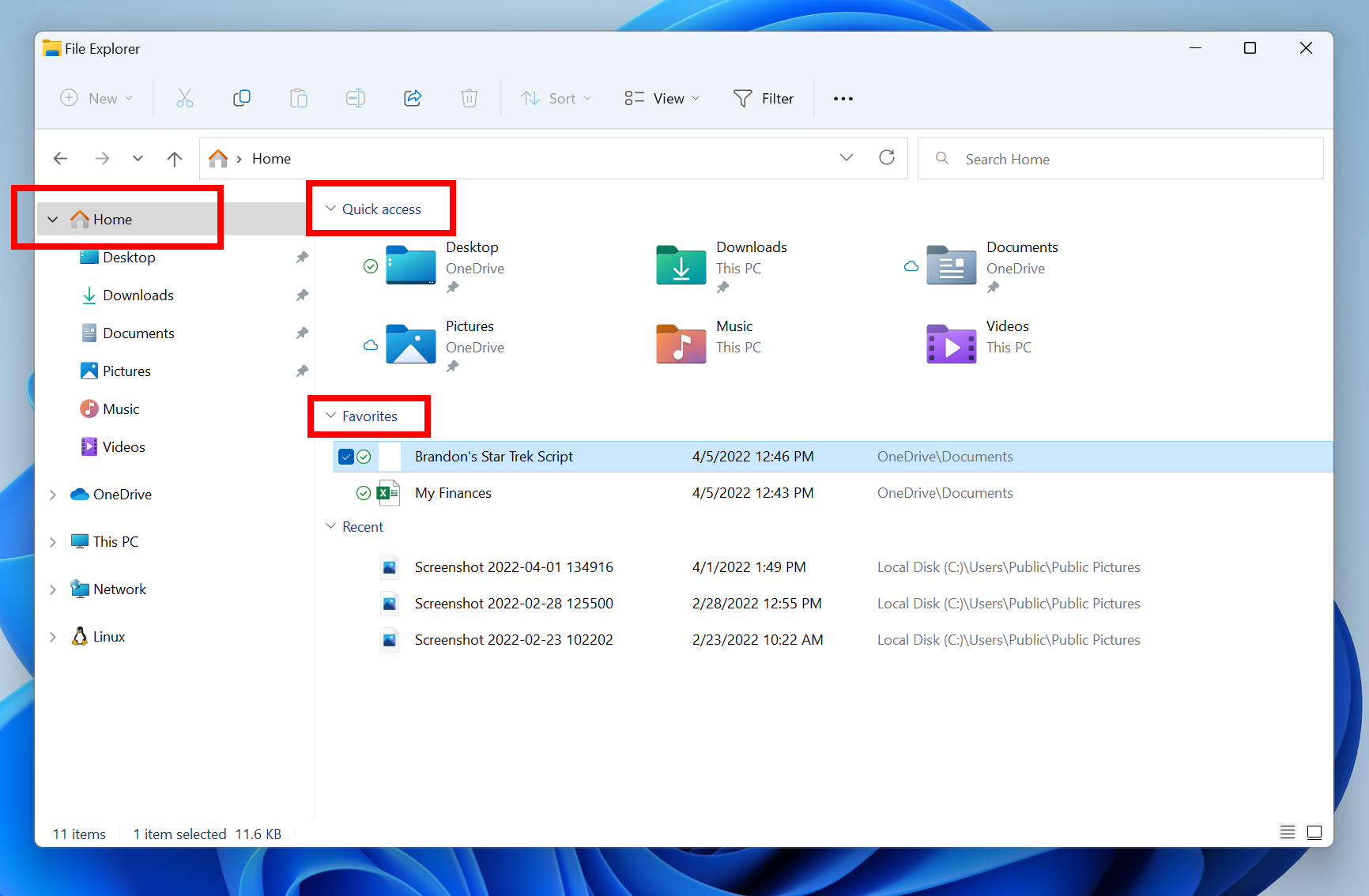
  • The default homepage of File Explorer is now called Home. The name Quick access has been repurposed for the pinned/frequent folders section and Pinned files is now called Favorites to align with Office and OneDrive.

The default homepage of File Explorer is now called Home with the name Quick access repurposed for the pinned/frequent folders section and Pinned files is now called Favorites.
  • Recent and pinned files displayed in Home are now searchable using the search box in File Explorer even if they are not local files, so you can find Office files recently shared with you.
[Input]
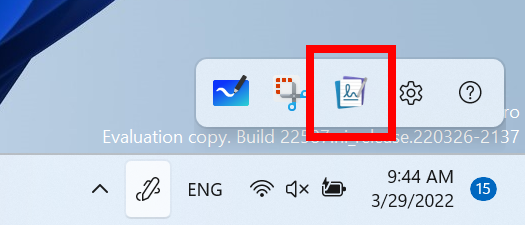
  • Microsoft Journal is now pinned by default on the Pen menu. If you don’t have the app installed, it will be installed from the Microsoft Store if chosen on the Pen menu.

Journal, a Microsoft Garage Project, is now pinned by default on the Pen menu.

[Windowing]
  • If you press WIN + Z to open snap layouts, all the layouts will now show associated numbers, so you can quickly use the number keys to select the desired layout.
[Focus]
  • Added 5-minute increments for everything under a half hour to focus session length options.

[Windows Security]
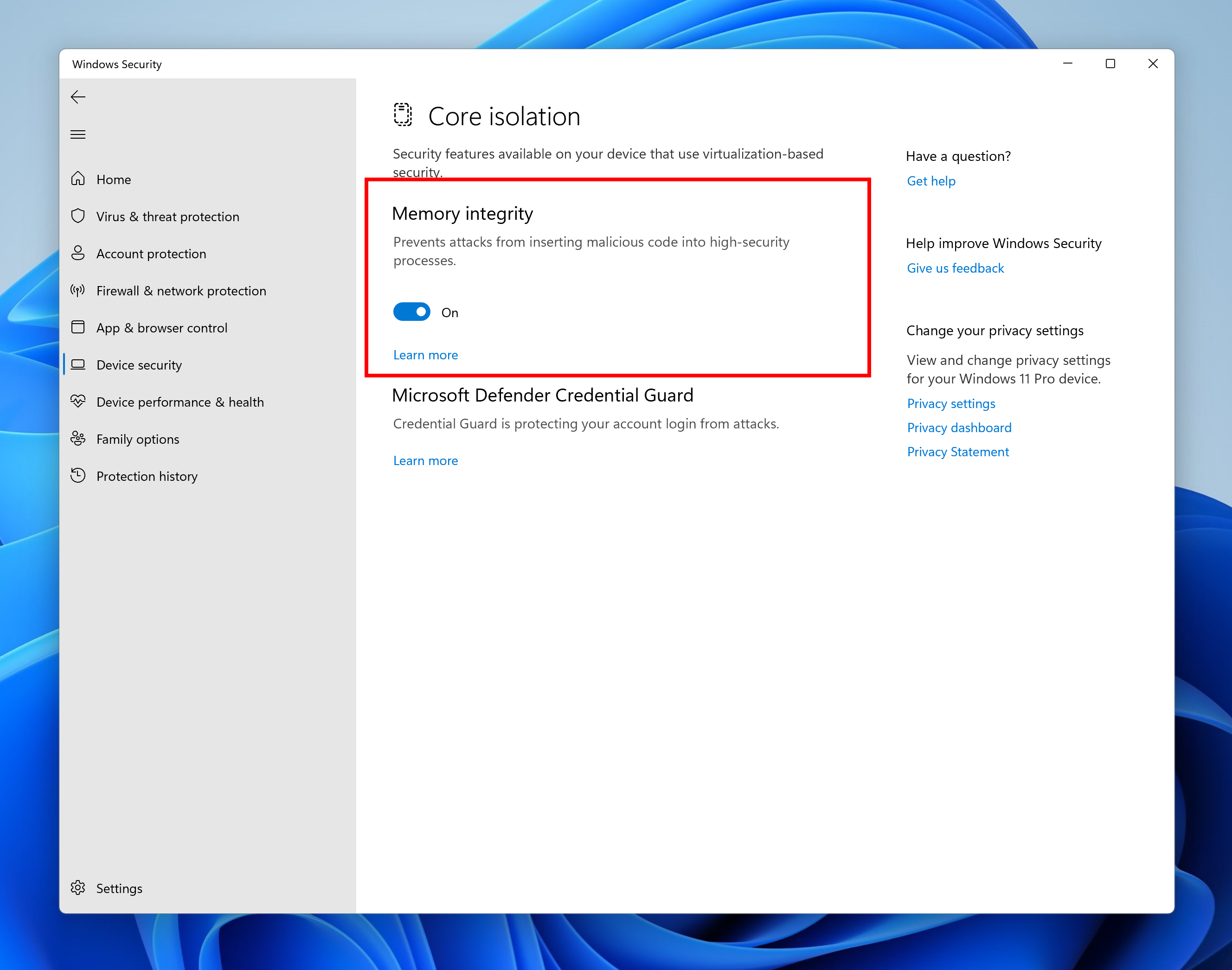
  • Memory integrity is a feature in Windows 11 designed to prevent attacks from inserting malicious code into high-security processes. This feature can be found in Windows Security under Device Security > Core isolation. In the most recent Insider Preview builds, we will notify the user that this feature is currently turned off so that action can be taken for the user to turn it back on so that their device is as secure as possible against malicious attacks.

Memory integrity in Windows Security.

[Input]
  • Updated the ADLaM keyboard layout to add access to brackets and ADLaM Hamza. To access these:
    • Right Alt + \ will now input »
    • Right Alt + | will now input «
    • Right Alt + Shift + [ will now input {
    • Right Alt + Shift + ] will now input }
    • Ctrl + Shift + ; will now input the Hamza character
  • Updated the Pashto keyboard layout so that ې and ئ are now directly accessible on the keyboard. Accessing ظ and ط is now done by holding Shift and pressing the aforementioned letters, respectively.

Fixes

[General]
  • Fixed a few more issues impacting explorer.exe reliability in recent flights.
[Taskbar]
  • Fixed an issue where app icons were unexpectedly animating in from the upper left when launching a new app.
  • Improved the performance of rearranging taskbar icons.
  • Addressed an issue in the previous flight leading to duplicate app icons after closing and re-opening an app.
  • If you have a lot of apps open, the icons shouldn’t overlap the date and time on your secondary monitors anymore.
  • Taskbar will no longer disappear when you enter search over a full screen window.
  • Fixed an issue that was causing icon spacing to invert so that it was large when it should be small and vice versa when switching in and out of the tablet-optimized taskbar.
  • Tablet-optimized taskbar will now stay visible over full screen apps when expanded and only hide when you collapse it.
  • If you have multiple keyboards for your current language, the input indicator will now only show one row of text when the tablet-optimized taskbar is in a collapsed state, so that it doesn’t get clipped.
  • Fixed a crash that was causing taskbar to get stuck in the tablet-optimized taskbar view.
  • Settings will now remember your taskbar’s auto-hide setting more consistently.
  • Mitigated an issue where some app icons in the system tray which were expected to flash weren’t doing that.
  • Fixed an issue causing system tray icons to get stuck there even after you closed the application.
  • Made a fix for an issue where some mouse move events weren’t being passed to apps for icons in the system tray.
  • Addressed an issue leading to a decrease in Notification Center launch reliability in recent flights.
  • Mitigated an issue causing the Notification Center and its context to sometimes show the wrong color text for the system’s theme, making it unreadable.
  • Updated the names of some of the months in the Simplified and Traditional Chinese lunar calendar to be more accurate.
[Start menu]
  • Updated the design of the folders in Start so that they’re a little bigger, making it easier to see the app icons highlighted within the folder without having to open it.
  • Fixed an issue where if you created a folder in Start in the same position as a deleted folder, it would show the old name.
  • If you tab into naming a folder in Start with your keyboard, you can now tab back out instead of having to hit Esc.
  • Fixed an issue where when using the keyboard to select options following WIN + X didn’t work. And dismissing WIN + X should be more consistent now.
  • Fixed an issue where the prompt wasn’t coming to the front when launching Windows Terminal as an admin from Start’s right-click context menu (WIN + X).
  • The search icon in the taskbar should no longer unexpectedly flash when closing the Start menu.
[Search]
  • Made some improvements to help with search indexer thread and memory usage for users with a very high number of indexed items.
  • Fixed an issue impacting search reliability (where you would type into the search window or Start and nothing would happen) in recent flights.
  • Made another fix to help address an issue where the search searches flyout could get stuck on the screen in a transparent area.
[File Explorer]
  • Improved performance of loading Home in File Explorer.
  • Fixed a scaling issue where the context menu could be an unexpected size when invoking it on systems with mixed DPI monitors.
  • Addressed an issue where the Show More Options entry in the context menu wasn’t working for items in File Explorer’s navigation pane (for example, if you were to right click on This PC).
  • Did some work to help reduce the chance you will see “Loading” for app entries in the context menu.
  • Fixed an issue which was causing the “Open in Windows Terminal” context menu option to be unexpectedly missing for secondary users in some cases.
  • Opening suggested results shown while entering search terms in File Explorer’s search box should now work as expected.
  • Mitigated an underlying issue leading to the address bar being inaccessible in certain cases.
  • Mitigated an issue leading to increased launch time for certain file types in the previous flight.
[Widgets]
  • We fixed the issue where sometimes when pinning from the Feed, the pinned widget is placed at the top instead of below other pinned widgets.
  • We fixed the issue where after rearranging widgets in the widgets board, some users experience problems with widgets in the pinned section rendering incorrectly.
[Input]
  • Fixed an issue preventing several input UI surfaces from displaying following explorer.exe crashes in recent flights – this included the emoji panel, candidate windows, clipboard history, and the touch keyboard.
  • Mitigated an issue where Narrator was silent when launching the emoji panel in certain cases, for example if the search box wasn’t displayed.
  • Fixed an issue that was causing custom theme changes in Settings > Personalization > Text input to not save properly sometimes.
  • Addressed a few more color issues with the touch keyboard, including where after changing from dark to light mode, the touch keyboard might end up with a mix of dark and light.
  • Updated the touch keyboard button so that pressing it always shows the touch keyboard, rather than hiding it if it’s visible.
  • Returned the Backspace key to the touch keyboard’s small layout when using Chinese (Traditional).
  • Improved reliability of launching the touch keyboard on the login screen.
  • You should be able to use the Japanese IME’s context menu on the login screen to change conversion mode now.
  • Fixed an issue where the Chinese (Traditional) IMEs were only showing 5 suggested associated phrases when they should have been showing 9.
  • Fixed an issue where if you’d set a custom background image under Settings > Personalization > Text Input, the preview wouldn’t show how it looked in the candidate window for Chinese (Simplified).
  • Addressed a rendering issue with the corners of the IME toolbar.
  • Fixed an issue where the IME toolbar wasn’t hiding and showing correctly when using the previous version of the Japanese IME.
  • Improved voice typing reliability.
  • Updated voice typing error message “Voice typing is limited on this app” to be “Some voice typing features might not work in this app”, so it’s a little clearer that basic voice typing will still work.
  • Fixed an issue causing some voice typing commands not to work, for example “scratch that” (刮除它) in Chinese (Simplified).
  • Addressed an issue where the setting “Disable Touch while using Pen” under Settings > Bluetooth & Devices > Pen & Windows Ink would arbitrarily not take effect sometimes on first boot in recent flights.

  • Fixed an issue causing the Get-InstalledLanguage and Install-Language PowerShell commands to unexpectedly fail with error 0x8007023E for some languages.
[Settings]
  • If keyboard focus is on the chevron for a collapsible region on a Settings page, for example, the Snap windows section under System > Multitasking, you can now use the left and right arrows to expand and collapse the area.
  • Fixed an issue impacting reliability of System > Power & Battery.
  • When using the custom color picker on Personalization > Colors now, it should appear centered in the window frame and not randomly off to the side.
  • Setting your background image fit to “fit” under Personalization > Background should no longer cause the background image preview to become a solid color.
  • Addressed another issue that could cause Windows Spotlight to unexpectedly stop updating for a prolonged period of time.
  • Fixed an issue that was causing the Settings app to crash when going to focus settings.
  • Fixed an issue that was letting keyboard focus go to elements in the contrast theme previews in Accessibility > Contrast Themes that you couldn’t interact with.
  • Fixed an issue where leaving the contrast themes editor in Settings by selecting the breadcrumbs would clear the dropdown selection, but the buttons were still acting as if you had a theme selected.
  • Updated the text description for voice typing under Accessibility > Speech to make more sense when using the Japanese display language.
  • Addressed an issue that was preventing Quick Settings from launching with its new touch gesture.
  • Quick Settings will now show the correct icon to represent your audio output device again.
[Windowing]
  • Mitigated an issue which could lead to explorer.exe crashes when using ALT + Tab.
  • Fixed an issue where the keyboard focus outline in ALT + Tab sometimes was smaller than the displayed thumbnail.
  • Addressed an underlying DWM issue which was leading to crashes when using touch gestures from the sides of the screen.
  • Fixed a DWM crash when rotating the screen.
  • Mitigated an issue leading to some lag when resizing two apps snapped side by side in certain cases.
  • Fixed an issue where snap assist could unexpectedly dismiss if the initial window wouldn’t fit into the selected zone size. Now we resize the snap assist regions accordingly when minimum window size of the initial snapped window is larger than the selected zone.
  • If you invoke Task View with touch, the close buttons should no longer overlap with the window titles.
  • Hovering your mouse over the tooltip with the Desktop’s name will no longer unexpectedly make the Desktops flyout dismiss.
  • Using drag and drop to reorder your Desktops via the Desktop flyout should no longer leave a thumbnail of the Desktop you moved stuck on the screen.
[Voice access]
  • Fixed a crash that was impacting voice access reliability.
  • Addressed an issue that was preventing voice access’s speech models from downloading correctly.
[Live captions]
  • Addressed an underlying issue leading to live captions showing a download error, even though the download had actually completed successfully.
  • Live captions will now remember your chosen settings for position across sessions.
  • Mitigated an issue where the live captions position changed to floating when entering full screen, but the settings incorrectly showed the last position still.
  • Removed the live captions notification about audio playing from multiple apps as it was popping up repeatedly during usage.
  • The border of the live captions window will now match the style of all other borders in contrast themes.
[Narrator]
  • We fixed the issue that was causing natural voices to break up sporadically in recent builds.
  • Narrator will now read out the word minutes with the duration times listed in Settings for focus options.
  • Fixed an issue that was causing Narrator to read dialog buttons incorrectly in scan mode.
[Task Manager]
  • Removed backplate (colored square) from UWP app icons were displayed in Task Manager.
  • Mitigated an issue where the one side of the View button did not appear to do anything.
  • Fixed an issue which was causing the real time update speed to get set to Paused on its own. Please note, if you were impacted by this, you will need to make a one-time change to set the setting back to your preferred update speed after upgrading to this build.
[Other]
  • Mitigated an issue which was leading to a black (albeit interactable) screen when playing certain full screen games with Auto HDR enabled.
  • Fixed a memory leak in Connected Devices Platform User Service.
  • The volume and brightness flyouts you get when using your hardware keys will no longer show a focus window outline on top of them.
  • If WIN + Alt + K is pressed when a supported app isn’t running, the pop-up text displayed will now say “No supported apps in use for mic mute”, instead of “Mic mute unavailable”, so it’s clearer.
  • Addressed an issue which was leading to unexpected errors being displayed in Event Viewer when conhost.exe was activated.
NOTE: Some fixes noted here in Insider Preview builds from the active development branch may make their way into the servicing updates for the released version of Windows 11 that became generally available on October 5th, 2021.

Known issues

[General]
  • We will not be offering new builds to Windows Insiders in China on Lenovo PCs.
  • Windows Insiders running Windows 10 who join the Dev or Beta Channels to get the latest builds may encounter a download error code 0xc8000402 while trying to download the latest build. As a workaround, please join the Release Preview Channel first, install Windows 11 from there (Build 22000.xxxx), and then switch to the Dev or Beta Channel to receive the latest Insider Preview build. This issue is understood and will be fixed in an upcoming build.
  • We’re investigating reports that a few Insiders have been experiencing an issue where explorer.exe is crashing repeatedly in a loop in the latest builds and unable to successfully load. This build includes a mitigation that may help some Insiders who were experiencing this.
  • When opening Group Policy editor, an Administrative Template error will pop up. Click “Ok” to dismiss and continue using Group Policy editor normally.
  • Devices using Windows Information Protection (formerly EDP) policies will not be able to access controlled data via protected apps such as Outlook, Word, Microsoft Edge, etc. on this build. It is recommended that users temporarily pause updates under Settings > Windows Update until a new Insider Preview build is released with a fix. If you have installed Build 22593 already, you can roll back to the prior build to restore expected data access.
[Taskbar]
  • The taskbar doesn’t always automatically collapse after launching an app or tapping outside of the expanded taskbar on 2-in-1 devices.
  • Some areas of the OS are not yet tracking the height of the expanded taskbar on 2-in-1 devices so you may see overlapping components.
  • We’re working on fixing an issue where hovering over some app icons in the system tray isn’t showing previews or tooltips.
[File Explorer]
  • We’re working on fixing issues regarding icon sizing, visual bugs, and text clipping in the flyout showing OneDrive storage.
  • Using the right-click option to rename a file in File Explorer will cause explorer.exe to crash. As a workaround, please single-click to highlight the file and use the rename button in the File Explorer command bar to complete the rename process.
[Widgets]
  • The widgets board may not open successfully when using the gesture from the side of the screen. If you are impacted, please tap the Widgets icon in the taskbar for now instead.
[Network]
  • We’re investigating reports from the previous flight of internet connectivity issues when certain VPNs are connected.
[Live captions]
  • Certain apps in full screen (e.g., video players) prevent live captions from being visible.
  • Certain apps positioned near the top of the screen and closed before live captions is run will re-launch behind the live captions window positioned at top. Use the system menu (ALT + Spacebar) while the app has focus to move the app’s window further down.
  • The very top of maximized apps (e.g., title bar window management buttons) can’t be reached with touch while live captions is positioned at the top.

For developers

You can download the latest Windows Insider SDK at aka.ms/windowsinsidersdk.

SDK NuGet packages are now also flighting at NuGet Gallery | WindowsSDK which include:
These NuGet packages provide more granular access to the SDK and better integrate in CI/CD pipelines.

About the Dev & Beta Channels [Updated!]

As a reminder, we are evolving the way we develop and release to Insiders with the Dev and Beta Channels now representing parallel development paths from our engineers. The Dev Channel will be a place where we will try out different concepts, incubate new ideas, and work on long lead items that may not get released to general customers. The Beta Channel will be the place we preview experiences that are closer to what we will ship to our general customers. However, this does not mean every feature we try out in the Beta Channel will ship. We encourage Insiders to read this blog post from last month that outlines the ways we’ll try things out with Insiders in the Dev and Beta Channels.

Now that the Dev and Beta Channels are receiving the same builds, the limited window has opened for Insiders to switch channels if you wish to do so by following these simple steps:
  1. Open Settings > Windows Update > Windows Insider Program.
  2. Select Choose your Insider settings.
  3. Select Beta Channel.
  4. The next time you receive an update, it will be for your new channel.

IMPORTANT: This window will close once we release builds with higher build numbers to the Dev Channel. If your device stays on the Dev Channel and receives a build that is a higher build number than what is in the Beta Channel, you will have to do a clean installation of the released version of Windows 11 on your device to switch to the Beta Channel.

These aren’t always stable builds, and sometimes you will see issues that block key activities or require workarounds. It is important to make sure you read the known issues listed in our blog posts as we document many of these issues with each flight.

The desktop watermark you see at the lower right corner of your desktop is normal for these pre-release builds.


Important Insider Links

Thanks,
Amanda & Brandon

Source:


Check Windows Updates


UUP Dump:

64-bit ISO download:
Select language for Windows 11 Insider Preview 22593.1 (ni_release) amd64

ARM64 ISO download: Select language for Windows 11 Insider Preview 22593.1 (ni_release) arm64

 
Last edited:
I mean, if we are getting the same builds from now on, then what will be the difference?
It is only temporary the builds are aligned. Soon Dev will jump ahead of Beta as curent builld approaches release (date unknown).
It has already started in a small way. The latest Update Stack Package version 922.402.211.0 was only issued to the Dev channel.
 

My Computers My Computers

  • At a glance

    Windows 11 HomeAMD Athlon Silver 3050U8GBRadeon Graphics
    OS
    Windows 11 Home
    Computer type
    Laptop
    Manufacturer/Model
    Acer Aspire 3 A315-23-R9VY
    CPU
    AMD Athlon Silver 3050U
    Memory
    8GB
    Graphics Card(s)
    Radeon Graphics
    Monitor(s) Displays
    laptop screen
    Screen Resolution
    1366x768 native resolution, up to 2560x1440 with Radeon Virtual Super Resolution
    Hard Drives
    1TB Samsung EVO 870 SSD (from April 2026: 250GB EVO 850)
    Internet Speed
    150 Mbps
    Browser
    Edge, Firefox
    Antivirus
    Defender
    Other Info
    fully 'Windows 11 ready' laptop. Windows 10 C: partition migrated from my old unsupported 'main machine' then upgraded to 11. A test migration ran Insider builds for 2 months. When 11 was released on 5th October 2021 it was re-imaged back to 10 and was offered the upgrade in Windows Update on 20th October. Windows Update offered the 22H2 Feature Update on 20th September 2022. It got the 23H2 Feature Update on 4th November 2023 through Windows Update, 24H2 on 3rd October 2024 through Windows Update by setting the Target Release Version for 24H2, and 25H2 on 30th September 2025 through Windows Update by setting the Target Release Version for 25H2.

    UPDATE - 11 April 2026: due to mechanical deterioration this PC has been retired from active duty. The OS with all software and files has been migrated to my System Seven in 'Other systems' to carry on as my general purpose 'main machine'.
  • At a glance

    Windows 11 ProIntel® Core™ i5-520M8GB(integrated graphics) Intel HD Graphics
    Operating System
    Windows 11 Pro
    Computer type
    Laptop
    Manufacturer/Model
    Dell Latitude E4310
    CPU
    Intel® Core™ i5-520M
    Motherboard
    0T6M8G
    Memory
    8GB
    Graphics card(s)
    (integrated graphics) Intel HD Graphics
    Screen Resolution
    1366x768
    Hard Drives
    500GB Crucial MX500 SSD
    Browser
    Firefox, Edge
    Antivirus
    Defender
    Other Info
    unsupported machine: Legacy bios, MBR, TPM 1.2, upgraded from W10 to W11 using W10/W11 hybrid install media workaround.

    In-place upgrade to 22H2 using ISO and a workaround.
    Feature Update to 23H2 by manually installing the Enablement Package.
    In-place upgrade to 24H2 using hybrid 23H2/24H2 install media.
    Upgraded to 25H2 by Enablement Package.

    Also running Insider Dev, and Canary builds and Windows 10 as native boot .vhdx.
  • My SYSTEM THREE is a Dell Latitude 5410, i7-10610U, 32GB RAM, 512GB NVMe ssd, supported device running Windows 11 Pro.

    My SYSTEM FOUR is a 2-in-1 convertible Lenovo Yoga 11e 20DA, Celeron N2930, 8GB RAM, 256GB ssd. Unsupported device: currently running Win10 Pro, plus Win11 Pro RTM and Insider Dev, Beta, and RP 24H2 as native boot vhdx.

    My SYSTEM FIVE is a Dell Latitude 3190 2-in-1, Pentium Silver N5030, 8GB RAM, 1TB NVMe ssd, supported device running Windows 11 Pro, plus Insider Beta, Dev, and Canary builds (and a few others) as a native boot .vhdx.

    My SYSTEM SIX is a Dell Latitude 5550, Core Ultra 7 165H, 64GB RAM, 1TB NVMe SSD, supported device, Windows 11 Pro 24H2, Hyper-V host machine. Updated to 25H2 on 30th September 2025.

    My SYSTEM SEVEN is a Lenovo Thinkpad T580, Intel Core i7-8650U, 16GB RAM, 512GB NVMe SSD + 2nd 512GB NVMe SSD, a supported device for Windows 11. This is my current general purpose 'main machine'. The installed Windows 11 Home from my System One has been migrated to this machine.
It has already started in a small way. The latest Update Stack Package version 922.402.211.0 was only issued to the Dev channel.
There was something like that Yesterday in regular windows.
1649414402987.png

It said Stack package (to help something) before installation.
 

My Computer My Computer

At a glance

W11 Pro and Insider DevAMD Ryzen 9 7900x2x16GB Kingston 6000MHz, Cl 32 @ 6200MHz Cl30Gigabyte Rx 6600XT Gaming OC 8G Pro
OS
W11 Pro and Insider Dev
Computer type
PC/Desktop
Manufacturer/Model
Home brewed
CPU
AMD Ryzen 9 7900x
Motherboard
ASROCK b650 PRO RS
Memory
2x16GB Kingston 6000MHz, Cl 32 @ 6200MHz Cl30
Graphics Card(s)
Gigabyte Rx 6600XT Gaming OC 8G Pro
Sound Card
MB, Realtek Ac1220p
Monitor(s) Displays
3 x 27"
Screen Resolution
1080p
Hard Drives
Kingston KC3000. 1TBSamsung 970 evo Plus 500GB, Crucial P1 NVMe 1TB, Lexar NVMe 2 TB, Silicon Power M.2 SATA 500GB
PSU
Seasonic 750W
Case
Custom Raidmax
Cooling
Arctic Liquid Freezer III 360mm
Internet Speed
20/19 mbps
Hi folks
@cereberus

I did one more try using VMware Wks with the iso made by the link you recommended - and this seems to be installing ok on windows version 225.xxx.xx

So it looks as if KVM/QEMU on Ubuntu server LTS 20.04 is hideously broken.

Working perfectly with Vmware wks pro V 16.2.3 build 19376536

Screenshot_20220408_111058.png


(I knew I should have stayed with Arch Linux -- but as loads of people use UBUNTU I thought I'd give it a "Whirl").

anyway I'll complete the install just to prove it can be done -- and then restore my old Arch Linux image on the laptop I'm using for testing.

Cheers
jimbo
 

My Computer My Computer

At a glance

Windows XP,11 Linux Fedora Rawhide pre-releas...2 X Intel i7
OS
Windows XP,11 Linux Fedora Rawhide pre-release 45
Computer type
PC/Desktop
CPU
2 X Intel i7
Screen Resolution
4KUHD X 2
Hi folks
#Especially @cereberus

I Always knew UBUNTU was a POS !!! even though it's mega popular.

Went back to ARCH linux did a complete install again from scratch of the HOST OS to test the process -- installed KVM/QEMU and package SWTPM from standard package manager (pacman) and OVMF for sec boot / UEFI boot for KVM/QEMU VM's. No need to run any tpmsetup or whatever for Windows guests -- simply install the package and add the XML file as shown on the HOST for the VM. The arch linux system is mega fast too.

Added the file shown to the XML for the virtual machine configuration -- in the <devices> section for the TPM emulator -- nothing extra needed

Working a treat --and I used the bog standard ISO from UUPDUMP created with the aria2 script (100% std)

I wasn't going to give up on this quite so easily

Screenshot_20220408_144503.png


Cheers
jimbo
 

My Computer My Computer

At a glance

Windows XP,11 Linux Fedora Rawhide pre-releas...2 X Intel i7
OS
Windows XP,11 Linux Fedora Rawhide pre-release 45
Computer type
PC/Desktop
CPU
2 X Intel i7
Screen Resolution
4KUHD X 2
Hi folks
#Especially @cereberus

I Always knew UBUNTU was a POS !!! even though it's mega popular.

Went back to ARCH linux did a complete install again from scratch of the HOST OS to test the process -- installed KVM/QEMU and package SWTPM from standard package manager (pacman) and OVMF for sec boot / UEFI boot for KVM/QEMU VM's. No need to run any tpmsetup or whatever for Windows guests -- simply install the package and add the XML file as shown on the HOST for the VM. The arch linux system is mega fast too.

Added the file shown to the XML for the virtual machine configuration -- in the <devices> section for the TPM emulator -- nothing extra needed

Working a treat --and I used the bog standard ISO from UUPDUMP created with the aria2 script (100% std)

I wasn't going to give up on this quite so easily

View attachment 26473


Cheers
jimbo
The only reason I use Ubuntu is that it is the only OS I know how to add an rdp server and run in enhanced mode in Hyper-V and add sound - that was a learning curve in its own right.
 

My Computer My Computer

At a glance

Windows 11 Pro + Win11 Canary VM.I9 13th gen i9-13900H 2.60 GHZ16 GB solderedIntegrated Intel Iris XE
OS
Windows 11 Pro + Win11 Canary VM.
Computer type
Laptop
Manufacturer/Model
ASUS Zenbook 14
CPU
I9 13th gen i9-13900H 2.60 GHZ
Motherboard
Yep, Laptop has one.
Memory
16 GB soldered
Graphics Card(s)
Integrated Intel Iris XE
Sound Card
Realtek built in
Monitor(s) Displays
laptop OLED screen
Screen Resolution
2880x1800 touchscreen
Hard Drives
1 TB NVME SSD (only weakness is only one slot)
PSU
Internal + 65W thunderbolt USB4 charger
Case
Yep, got one
Cooling
Stella Artois (UK pint cans - 568 ml) - extra cost.
Keyboard
Built in UK keybd
Mouse
Bluetooth , wireless dongled, wired
Internet Speed
900 mbs (ethernet), wifi 6 typical 350-450 mb/s both up and down
Browser
Edge
Antivirus
Defender
Other Info
TPM 2.0, 2xUSB4 thunderbolt, 1xUsb3 (usb a), 1xUsb-c, hdmi out, 3.5 mm audio out/in combo, ASUS backlit trackpad (inc. switchable number pad)

Macrium Reflect Home V8
Office 365 Family (6 users each 1TB onedrive space)
Hyper-V (a vm runs almost as fast as my older laptop)
The only reason I use Ubuntu is that it is the only OS I know how to add an rdp server and run in enhanced mode in Hyper-V and add sound - that was a learning curve in its own right.
Hi there

I'm Back in business back again on Arch Linux Host -- I HATE UBUNTU with a passion -- anyway thanks for the testing this week --I probably learned more about Windows and Linux kernels than I've done in the past 30 years !!!!!!

Canonical ("Owners of Ubuntu") are everything the open source community doesn't like. At least IBM give Fedora and Red Hat support - while Arch Linux has always been 100% open source even if people think "more difficult to get to grips with" - which really isn't true any more - the Arch Wiki is often the "Standard documentation" used for people using many other distros too,

Anyway thanks especially to @cereberus for all the testing and feedback.

Everybody have a good weekend. Remember though if I'm asked to test things I do it properly !!!!

Here's final outcome !! Windows updating on VM (KVM /QEMU) on arch linux to latest insider build with no probs using the "bog standard" UUP ISO.

Screenshot_20220408_172442.png

I'm off to the "boozer" for some nice "Scottish Imports"

All working fine now on KVM/QEMU for this release .

For Host Linux NAS systems and Windows VM's --Forget about UBUNTU !!!!

Arch Linux WORKS !!! (although you do have to know what you are doing).

Screenshot_20220408_205919.png

For those pesky Winaero W7 games for W10/W11 :

Reinstall and re-boot fixed the Winaero W7 games for W10/W11 problem too so everything working again !!!!
Screenshot_20220408_211853.png


Have a great weekend everyone and finally a decently "Pandemic Free" Easter.

Cheers
jimbo
 
Last edited:

My Computer My Computer

At a glance

Windows XP,11 Linux Fedora Rawhide pre-releas...2 X Intel i7
OS
Windows XP,11 Linux Fedora Rawhide pre-release 45
Computer type
PC/Desktop
CPU
2 X Intel i7
Screen Resolution
4KUHD X 2
Ubuntu is not the issue here...probably just some switch turned off in default Ubuntu kernel. Default Ubuntu kernel is a one fits all version and is not the best option available, but works well enough for most people, which is the point of the base distribution. To get it all working you probably need to reconfigure and recompile the kernel with all relevant switches enabled.

Arch on the other hand should have all the latest and greatest bells and whistles enabled by default, so there is that. Could even be that the Ubuntu virtualization packages are out of date, which is not uncommon, while Arch most likely has the latest ones.
 

My Computers My Computers

  • At a glance

    Win 11 Pro 25H2 26200.8457 / Linux Mint 22.3Ryzen 7 2700U Pro32GBiGPU Vega 10
    OS
    Win 11 Pro 25H2 26200.8457 / Linux Mint 22.3
    Computer type
    Laptop
    Manufacturer/Model
    Lenovo A485
    CPU
    Ryzen 7 2700U Pro
    Motherboard
    Lenovo (WiFi/BT module upgraded to Intel Wireless-AC-9260)
    Memory
    32GB
    Graphics Card(s)
    iGPU Vega 10
    Sound Card
    Realtek
    Monitor(s) Displays
    14" FHD (built-in) + 14" Lenovo Thinkvision M14t (touch+pen) + 32" Asus PB328
    Screen Resolution
    FHD + FHD + 1440p
    Hard Drives
    Intel 660p m.2 nVME PCIe3.0 x2 512GB
    PSU
    125W(Dock)/65W(Travel Adapter)
    Keyboard
    Thinkpad / Logitech MX Keys
    Mouse
    Logitech MX Master 2S
    Internet Speed
    1/1Gbit
    Browser
    Firefox
    Antivirus
    Windows Defender
    Other Info
    SecureBoot: Enabled
    TPM2.0: Enabled
    AMD-V: Enabled
  • At a glance

    Win 11 Pro 25H2 26200.8521(RP)i7-7700k @4.8GHz32GB 2x16GB 2133MHz CL15EVGA GTX1080Ti FTW 11GB
    Operating System
    Win 11 Pro 25H2 26200.8521(RP)
    Computer type
    PC/Desktop
    Manufacturer/Model
    Custom
    CPU
    i7-7700k @4.8GHz
    Motherboard
    Asus PRIME Z270-A
    Memory
    32GB 2x16GB 2133MHz CL15
    Graphics card(s)
    EVGA GTX1080Ti FTW 11GB
    Sound Card
    Integrated
    Monitor(s) Displays
    32" 10-bit Asus PB328Q
    Screen Resolution
    WQHD 2560x1440
    Hard Drives
    512GB ADATA SX8000NP NVMe PCIe Gen 3 x4
    PSU
    850W
    Case
    Fractal Design Define 7
    Cooling
    Noctua NH-D15 chromax.black
    Keyboard
    Logitech MX Keys
    Mouse
    Logitech MX Master 2S
    Internet Speed
    1/1Gbit
    Browser
    Firefox
    Antivirus
    Windows Defender
    Other Info
    AC WiFi Card

My Computer My Computer

At a glance

Windows 11 (22H2)Intel i7-7700HQCorsair 2x8GB DDR4 2400 MHz CL16Nvidia GTX 1050 Ti 4GB
OS
Windows 11 (22H2)
Computer type
Laptop
Manufacturer/Model
Acer Aspire VX 15 (VX5-591G)
CPU
Intel i7-7700HQ
Motherboard
KBL-HM175
Memory
Corsair 2x8GB DDR4 2400 MHz CL16
Graphics Card(s)
Nvidia GTX 1050 Ti 4GB
Sound Card
Realtek ALC225
Monitor(s) Displays
1
Screen Resolution
1080p
Hard Drives
Adata SX8200 Pro 512GB
Crucial MX500 1TB
Mouse
Logitech G502 X Plus
Internet Speed
20 Mbps
Browser
Microsoft Edge
Antivirus
Windows Defender
is this not available for those who moved to Beta channel?
No, only the Dev channel at the moment. I can confirm this as I have two VMs, one Dev the other Beta. Only the Dev one was offered it.
 

My Computers My Computers

  • At a glance

    Windows 11 HomeAMD Athlon Silver 3050U8GBRadeon Graphics
    OS
    Windows 11 Home
    Computer type
    Laptop
    Manufacturer/Model
    Acer Aspire 3 A315-23-R9VY
    CPU
    AMD Athlon Silver 3050U
    Memory
    8GB
    Graphics Card(s)
    Radeon Graphics
    Monitor(s) Displays
    laptop screen
    Screen Resolution
    1366x768 native resolution, up to 2560x1440 with Radeon Virtual Super Resolution
    Hard Drives
    1TB Samsung EVO 870 SSD (from April 2026: 250GB EVO 850)
    Internet Speed
    150 Mbps
    Browser
    Edge, Firefox
    Antivirus
    Defender
    Other Info
    fully 'Windows 11 ready' laptop. Windows 10 C: partition migrated from my old unsupported 'main machine' then upgraded to 11. A test migration ran Insider builds for 2 months. When 11 was released on 5th October 2021 it was re-imaged back to 10 and was offered the upgrade in Windows Update on 20th October. Windows Update offered the 22H2 Feature Update on 20th September 2022. It got the 23H2 Feature Update on 4th November 2023 through Windows Update, 24H2 on 3rd October 2024 through Windows Update by setting the Target Release Version for 24H2, and 25H2 on 30th September 2025 through Windows Update by setting the Target Release Version for 25H2.

    UPDATE - 11 April 2026: due to mechanical deterioration this PC has been retired from active duty. The OS with all software and files has been migrated to my System Seven in 'Other systems' to carry on as my general purpose 'main machine'.
  • At a glance

    Windows 11 ProIntel® Core™ i5-520M8GB(integrated graphics) Intel HD Graphics
    Operating System
    Windows 11 Pro
    Computer type
    Laptop
    Manufacturer/Model
    Dell Latitude E4310
    CPU
    Intel® Core™ i5-520M
    Motherboard
    0T6M8G
    Memory
    8GB
    Graphics card(s)
    (integrated graphics) Intel HD Graphics
    Screen Resolution
    1366x768
    Hard Drives
    500GB Crucial MX500 SSD
    Browser
    Firefox, Edge
    Antivirus
    Defender
    Other Info
    unsupported machine: Legacy bios, MBR, TPM 1.2, upgraded from W10 to W11 using W10/W11 hybrid install media workaround.

    In-place upgrade to 22H2 using ISO and a workaround.
    Feature Update to 23H2 by manually installing the Enablement Package.
    In-place upgrade to 24H2 using hybrid 23H2/24H2 install media.
    Upgraded to 25H2 by Enablement Package.

    Also running Insider Dev, and Canary builds and Windows 10 as native boot .vhdx.
  • My SYSTEM THREE is a Dell Latitude 5410, i7-10610U, 32GB RAM, 512GB NVMe ssd, supported device running Windows 11 Pro.

    My SYSTEM FOUR is a 2-in-1 convertible Lenovo Yoga 11e 20DA, Celeron N2930, 8GB RAM, 256GB ssd. Unsupported device: currently running Win10 Pro, plus Win11 Pro RTM and Insider Dev, Beta, and RP 24H2 as native boot vhdx.

    My SYSTEM FIVE is a Dell Latitude 3190 2-in-1, Pentium Silver N5030, 8GB RAM, 1TB NVMe ssd, supported device running Windows 11 Pro, plus Insider Beta, Dev, and Canary builds (and a few others) as a native boot .vhdx.

    My SYSTEM SIX is a Dell Latitude 5550, Core Ultra 7 165H, 64GB RAM, 1TB NVMe SSD, supported device, Windows 11 Pro 24H2, Hyper-V host machine. Updated to 25H2 on 30th September 2025.

    My SYSTEM SEVEN is a Lenovo Thinkpad T580, Intel Core i7-8650U, 16GB RAM, 512GB NVMe SSD + 2nd 512GB NVMe SSD, a supported device for Windows 11. This is my current general purpose 'main machine'. The installed Windows 11 Home from my System One has been migrated to this machine.
No, only the Dev channel at the moment. I can confirm this as I have two VMs, one Dev the other Beta. Only the Dev one was offered it.
Good to know as so far, I have been updating Dev vhd and just copying vhd and moving to Beta in copy aa it is quicker. Now I will need to update separately.

I rather wonder how much more updates will be done to Beta?
 

My Computer My Computer

At a glance

Windows 11 Pro + Win11 Canary VM.I9 13th gen i9-13900H 2.60 GHZ16 GB solderedIntegrated Intel Iris XE
OS
Windows 11 Pro + Win11 Canary VM.
Computer type
Laptop
Manufacturer/Model
ASUS Zenbook 14
CPU
I9 13th gen i9-13900H 2.60 GHZ
Motherboard
Yep, Laptop has one.
Memory
16 GB soldered
Graphics Card(s)
Integrated Intel Iris XE
Sound Card
Realtek built in
Monitor(s) Displays
laptop OLED screen
Screen Resolution
2880x1800 touchscreen
Hard Drives
1 TB NVME SSD (only weakness is only one slot)
PSU
Internal + 65W thunderbolt USB4 charger
Case
Yep, got one
Cooling
Stella Artois (UK pint cans - 568 ml) - extra cost.
Keyboard
Built in UK keybd
Mouse
Bluetooth , wireless dongled, wired
Internet Speed
900 mbs (ethernet), wifi 6 typical 350-450 mb/s both up and down
Browser
Edge
Antivirus
Defender
Other Info
TPM 2.0, 2xUSB4 thunderbolt, 1xUsb3 (usb a), 1xUsb-c, hdmi out, 3.5 mm audio out/in combo, ASUS backlit trackpad (inc. switchable number pad)

Macrium Reflect Home V8
Office 365 Family (6 users each 1TB onedrive space)
Hyper-V (a vm runs almost as fast as my older laptop)
Ubuntu is not the issue here...probably just some switch turned off in default Ubuntu kernel. Default Ubuntu kernel is a one fits all version and is not the best option available, but works well enough for most people, which is the point of the base distribution. To get it all working you probably need to reconfigure and recompile the kernel with all relevant switches enabled.

Arch on the other hand should have all the latest and greatest bells and whistles enabled by default, so there is that. Could even be that the Ubuntu virtualization packages are out of date, which is not uncommon, while Arch most likely has the latest ones.
Hi there
probably true as it's a Rolling release.

BTW if you do an In place upgrade via WU to build 22593.1 (ni release) the installer checks for TPM V2 - and will fail if it doesn't find one.

I started the VM removing the "Emulated IBM TPM that I've been using - and update failed saying "Windows 11 can't run on this machine " -- failure cause TPM 2

Added the TPM back into the VM -- working fine again. !! Looks like Ms are starting to get pickier over hardware.

Screenshot_20220409_114621.png

Cheerts
jimbo
 
Last edited:

My Computer My Computer

At a glance

Windows XP,11 Linux Fedora Rawhide pre-releas...2 X Intel i7
OS
Windows XP,11 Linux Fedora Rawhide pre-release 45
Computer type
PC/Desktop
CPU
2 X Intel i7
Screen Resolution
4KUHD X 2
Looks like Ms are starting to get pickier over hardware.
Indeed they are, which is the whole purpose of Windows 11. More forced security, which is a good thing to be honest. Still would like to have the option to choose though.
 

My Computers My Computers

  • At a glance

    Win 11 Pro 25H2 26200.8457 / Linux Mint 22.3Ryzen 7 2700U Pro32GBiGPU Vega 10
    OS
    Win 11 Pro 25H2 26200.8457 / Linux Mint 22.3
    Computer type
    Laptop
    Manufacturer/Model
    Lenovo A485
    CPU
    Ryzen 7 2700U Pro
    Motherboard
    Lenovo (WiFi/BT module upgraded to Intel Wireless-AC-9260)
    Memory
    32GB
    Graphics Card(s)
    iGPU Vega 10
    Sound Card
    Realtek
    Monitor(s) Displays
    14" FHD (built-in) + 14" Lenovo Thinkvision M14t (touch+pen) + 32" Asus PB328
    Screen Resolution
    FHD + FHD + 1440p
    Hard Drives
    Intel 660p m.2 nVME PCIe3.0 x2 512GB
    PSU
    125W(Dock)/65W(Travel Adapter)
    Keyboard
    Thinkpad / Logitech MX Keys
    Mouse
    Logitech MX Master 2S
    Internet Speed
    1/1Gbit
    Browser
    Firefox
    Antivirus
    Windows Defender
    Other Info
    SecureBoot: Enabled
    TPM2.0: Enabled
    AMD-V: Enabled
  • At a glance

    Win 11 Pro 25H2 26200.8521(RP)i7-7700k @4.8GHz32GB 2x16GB 2133MHz CL15EVGA GTX1080Ti FTW 11GB
    Operating System
    Win 11 Pro 25H2 26200.8521(RP)
    Computer type
    PC/Desktop
    Manufacturer/Model
    Custom
    CPU
    i7-7700k @4.8GHz
    Motherboard
    Asus PRIME Z270-A
    Memory
    32GB 2x16GB 2133MHz CL15
    Graphics card(s)
    EVGA GTX1080Ti FTW 11GB
    Sound Card
    Integrated
    Monitor(s) Displays
    32" 10-bit Asus PB328Q
    Screen Resolution
    WQHD 2560x1440
    Hard Drives
    512GB ADATA SX8000NP NVMe PCIe Gen 3 x4
    PSU
    850W
    Case
    Fractal Design Define 7
    Cooling
    Noctua NH-D15 chromax.black
    Keyboard
    Logitech MX Keys
    Mouse
    Logitech MX Master 2S
    Internet Speed
    1/1Gbit
    Browser
    Firefox
    Antivirus
    Windows Defender
    Other Info
    AC WiFi Card

My Computer My Computer

At a glance

Windows 11 Pro Beta, 11 Dev, W11 CanaryAMD Ryzen™ 9 5900HX32GBNVIDIA® GeForce RTX™ 3070 8GB GDDR6
OS
Windows 11 Pro Beta, 11 Dev, W11 Canary
Computer type
Laptop
Manufacturer/Model
Dell Alienware M15 Ryzen Edition R6
CPU
AMD Ryzen™ 9 5900HX
Memory
32GB
Graphics Card(s)
NVIDIA® GeForce RTX™ 3070 8GB GDDR6
Hard Drives
1 x Samsung 980 Pro 1TB
1 x Samsung 970 Evo Plus 1TB
There is a choice....10 or 11
If you're on Intel 12th gen CPU I don't see Windows 10 as an option. As far as I am aware it gets confused when it comes to choosing between Performance and Efficiency cores.
 

My Computers My Computers

  • At a glance

    Win 11 Pro 25H2 26200.8457 / Linux Mint 22.3Ryzen 7 2700U Pro32GBiGPU Vega 10
    OS
    Win 11 Pro 25H2 26200.8457 / Linux Mint 22.3
    Computer type
    Laptop
    Manufacturer/Model
    Lenovo A485
    CPU
    Ryzen 7 2700U Pro
    Motherboard
    Lenovo (WiFi/BT module upgraded to Intel Wireless-AC-9260)
    Memory
    32GB
    Graphics Card(s)
    iGPU Vega 10
    Sound Card
    Realtek
    Monitor(s) Displays
    14" FHD (built-in) + 14" Lenovo Thinkvision M14t (touch+pen) + 32" Asus PB328
    Screen Resolution
    FHD + FHD + 1440p
    Hard Drives
    Intel 660p m.2 nVME PCIe3.0 x2 512GB
    PSU
    125W(Dock)/65W(Travel Adapter)
    Keyboard
    Thinkpad / Logitech MX Keys
    Mouse
    Logitech MX Master 2S
    Internet Speed
    1/1Gbit
    Browser
    Firefox
    Antivirus
    Windows Defender
    Other Info
    SecureBoot: Enabled
    TPM2.0: Enabled
    AMD-V: Enabled
  • At a glance

    Win 11 Pro 25H2 26200.8521(RP)i7-7700k @4.8GHz32GB 2x16GB 2133MHz CL15EVGA GTX1080Ti FTW 11GB
    Operating System
    Win 11 Pro 25H2 26200.8521(RP)
    Computer type
    PC/Desktop
    Manufacturer/Model
    Custom
    CPU
    i7-7700k @4.8GHz
    Motherboard
    Asus PRIME Z270-A
    Memory
    32GB 2x16GB 2133MHz CL15
    Graphics card(s)
    EVGA GTX1080Ti FTW 11GB
    Sound Card
    Integrated
    Monitor(s) Displays
    32" 10-bit Asus PB328Q
    Screen Resolution
    WQHD 2560x1440
    Hard Drives
    512GB ADATA SX8000NP NVMe PCIe Gen 3 x4
    PSU
    850W
    Case
    Fractal Design Define 7
    Cooling
    Noctua NH-D15 chromax.black
    Keyboard
    Logitech MX Keys
    Mouse
    Logitech MX Master 2S
    Internet Speed
    1/1Gbit
    Browser
    Firefox
    Antivirus
    Windows Defender
    Other Info
    AC WiFi Card
I sucessfully did the update on Thursday (#112) and when I switched back on on Friday, only 26 hours later, the beta pc had misplaced its activation. I had to get Microsoft to phone me and they eventually got the pc activated. I gave the lady from Microsoft some good feedback for her help. Has anyone else had an activation problem?

As for Ubuntu, I liked it but I'm not using it at the moment as I got myself completely knotted up with the passwords.
 

My Computers My Computers

  • At a glance

    W11 pro betaAthlon 3000G16Gb Crucial DDR4 2400onboard cpu
    OS
    W11 pro beta
    Computer type
    PC/Desktop
    Manufacturer/Model
    home built
    CPU
    Athlon 3000G
    Motherboard
    Asrock A320M-HDV r4.0
    Memory
    16Gb Crucial DDR4 2400
    Graphics Card(s)
    onboard cpu
    Sound Card
    onboard
    Monitor(s) Displays
    LG 22EA53
    Screen Resolution
    1920 x 1080
    Hard Drives
    WD black SN750 M2 500Gb
    PSU
    500W Seasonic core 80+gold non modular
    Case
    Fractal Design Define R2
    Cooling
    front 2 x 120mm rear 100mm stock psu
    Internet Speed
    135/20
    Browser
    Firefox and edge
    Antivirus
    Windows Security and free Malwarebytes
  • At a glance

    W11 pro 64 beta (from W10 pro system builder ...Ryzen 7 5700G4 x 8Gb Corsair Vengeance LPX 3000 DDR4onboard cpu
    Operating System
    W11 pro 64 beta (from W10 pro system builder pack)
    Computer type
    PC/Desktop
    Manufacturer/Model
    homebuilt
    CPU
    Ryzen 7 5700G
    Motherboard
    MSI B450 tomahawk max II
    Memory
    4 x 8Gb Corsair Vengeance LPX 3000 DDR4
    Graphics card(s)
    onboard cpu
    Sound Card
    motherboard
    Monitor(s) Displays
    AOC 27
    Screen Resolution
    2560 x 1440
    Hard Drives
    WD 1Tb Black M2 SN850X on Asus hyper M2 X16 max V2 card
    PSU
    Be Quiet 400 semi modular 80+gold
    Case
    Coolermaster Silencio 650
    Cooling
    140mm front, 120 rear Akasa Vegas Chroma AM
    Internet Speed
    135/20
    Browser
    edge/Firefox
    Antivirus
    WD plus Malwarebytes free
It has already started in a small way. The latest Update Stack Package version 922.402.211.0 was only issued to the Dev channel.
Thank both of you for clearing that up for me! I'm still glad to stick with Beta, in that case.

Cerberus, no, I was talking a system restore file. I could do the image backup, too, of course, but what disappeared on me is a system exe--which I could not find anywhere...:wink: My thought was that a mere system restore point file would restore me to a point before the Display Properties failed to display. System restore would be much quicker, but just in case I'll do a system restore first and then an MR image backup, too.


I'm going to try again with 22593.100...I get stubborn like that, sometimes.

EDIT: Back on 22593, and everything is functioning normally at this point.
 
Last edited:

My Computer My Computer

At a glance

Win11 Experimental Channel for 26H2 buildsAMD R7 7800X3DGSkill 2x16GB @ 6400MT/sXFX 9070 XT SWIFT tri-fan (PCIe5.0)
OS
Win11 Experimental Channel for 26H2 builds
Computer type
PC/Desktop
Manufacturer/Model
a cherry-picked assembly
CPU
AMD R7 7800X3D
Motherboard
MSI x870 Tomahawk Wi-Fi, 8-layer, 2 oz copper, server PCB
Memory
GSkill 2x16GB @ 6400MT/s
Graphics Card(s)
XFX 9070 XT SWIFT tri-fan (PCIe5.0)
Sound Card
Creative Labs G8 USB External Sound device, Gaming DAC, Sound Card & Earphone AMP.. HIGHLY RECOMMENDED, btw. Totally changed my opinion of external USB sound. I like!...;)
Monitor(s) Displays
Philips 42" OLED @ 4k
Screen Resolution
3840x2160
Hard Drives
*Boot: Samsung 980 Pro 2 TB NVMe (PCIe4x4)
*Samsung 980 EVO NVMe 500GB (PCIe 4x4)
*Kingston SNV3S2000G 2TB NVMe (PCIe4x4)
*Samsung 960 EVO 250GB NVMe(PCIe3x2)
*8TB Toshiba x300 HDD
*ST4000DM004 S3 4TB HDD
PSU
Gigabyte 850W Gold, Rev 2
Case
Lian Li Lancool 217, white, with wood trim, very nice looking--tired of black, 5-fans standard
Cooling
Air coutesy Lian Li
Keyboard
Cherry MX 2.0S RGB
Mouse
Razer Basilisk V3 24k DPI
Internet Speed
~950Mbps down and up!
Browser
Firefox x64 DE
Antivirus
Defender
Other Info
Great New system. Exceeds my expectations by quite a bit, btw. I love the USB G8 SoundBlaster, it's quite an improvement over the G6!
Thank both of you for clearing that up for me! I'm still glad to stick with Beta, in that case.

Cerberus, no, I was talking a system restore file. I could do the image backup, too, of course, but what disappeared on me is a system exe--which I could not find anywhere...:wink: My thought was that a mere system restore point file would restore me to a point before the Display Properties failed to display. System restore would be much quicker, but just in case I'll do a system restore first and then an MR image backup, too.

I'm going to try again with 22593.100...I get stubborn like that, sometimes.
A system restore point would probably not work. It is not a backup system and restore points get wiped when you do a build upgrade.
 

My Computer My Computer

At a glance

Windows 11 Pro + Win11 Canary VM.I9 13th gen i9-13900H 2.60 GHZ16 GB solderedIntegrated Intel Iris XE
OS
Windows 11 Pro + Win11 Canary VM.
Computer type
Laptop
Manufacturer/Model
ASUS Zenbook 14
CPU
I9 13th gen i9-13900H 2.60 GHZ
Motherboard
Yep, Laptop has one.
Memory
16 GB soldered
Graphics Card(s)
Integrated Intel Iris XE
Sound Card
Realtek built in
Monitor(s) Displays
laptop OLED screen
Screen Resolution
2880x1800 touchscreen
Hard Drives
1 TB NVME SSD (only weakness is only one slot)
PSU
Internal + 65W thunderbolt USB4 charger
Case
Yep, got one
Cooling
Stella Artois (UK pint cans - 568 ml) - extra cost.
Keyboard
Built in UK keybd
Mouse
Bluetooth , wireless dongled, wired
Internet Speed
900 mbs (ethernet), wifi 6 typical 350-450 mb/s both up and down
Browser
Edge
Antivirus
Defender
Other Info
TPM 2.0, 2xUSB4 thunderbolt, 1xUsb3 (usb a), 1xUsb-c, hdmi out, 3.5 mm audio out/in combo, ASUS backlit trackpad (inc. switchable number pad)

Macrium Reflect Home V8
Office 365 Family (6 users each 1TB onedrive space)
Hyper-V (a vm runs almost as fast as my older laptop)
A system restore point would probably not work. It is not a backup system and restore points get wiped when you do a build upgrade.
No, what I meant was to do a system restore immediately after the build upgrade to 22593. Once I had put my device drivers right after the upgrade, and was satisfied that Display Properties was now responding properly, I actually saved two restore points, and am backing up the C:\ image with MR as we speak. I know the restore points won't transfer from build to build, certainly. Thanks again for the clarification on the soon-to-be-seen differences between the Dev and Beta channel builds!
 

My Computer My Computer

At a glance

Win11 Experimental Channel for 26H2 buildsAMD R7 7800X3DGSkill 2x16GB @ 6400MT/sXFX 9070 XT SWIFT tri-fan (PCIe5.0)
OS
Win11 Experimental Channel for 26H2 builds
Computer type
PC/Desktop
Manufacturer/Model
a cherry-picked assembly
CPU
AMD R7 7800X3D
Motherboard
MSI x870 Tomahawk Wi-Fi, 8-layer, 2 oz copper, server PCB
Memory
GSkill 2x16GB @ 6400MT/s
Graphics Card(s)
XFX 9070 XT SWIFT tri-fan (PCIe5.0)
Sound Card
Creative Labs G8 USB External Sound device, Gaming DAC, Sound Card & Earphone AMP.. HIGHLY RECOMMENDED, btw. Totally changed my opinion of external USB sound. I like!...;)
Monitor(s) Displays
Philips 42" OLED @ 4k
Screen Resolution
3840x2160
Hard Drives
*Boot: Samsung 980 Pro 2 TB NVMe (PCIe4x4)
*Samsung 980 EVO NVMe 500GB (PCIe 4x4)
*Kingston SNV3S2000G 2TB NVMe (PCIe4x4)
*Samsung 960 EVO 250GB NVMe(PCIe3x2)
*8TB Toshiba x300 HDD
*ST4000DM004 S3 4TB HDD
PSU
Gigabyte 850W Gold, Rev 2
Case
Lian Li Lancool 217, white, with wood trim, very nice looking--tired of black, 5-fans standard
Cooling
Air coutesy Lian Li
Keyboard
Cherry MX 2.0S RGB
Mouse
Razer Basilisk V3 24k DPI
Internet Speed
~950Mbps down and up!
Browser
Firefox x64 DE
Antivirus
Defender
Other Info
Great New system. Exceeds my expectations by quite a bit, btw. I love the USB G8 SoundBlaster, it's quite an improvement over the G6!
Query for anyone who might know something about this...has Microsoft dispensed with the desktop icon cache? I'm using Desktop OK to arrange my desktop icons--I have a considerable number of them in my 4k desktop--but so far in Win11 if there is a functioning icon cache it isn't working. Rebuilding it, and so on, accomplishes nothing for me so far. I can do it with a third party App (Desktop OK, freeware, has worked well with every version of Win10 and Win11 I've thrown at it) but I was curious.

It isn't apparent to me that Microsoft is being as attentive to the desktop as it has been in previous versions of Windows. Sometimes I get the feeling that the only thing they are doing is working on UI development for mobile--hard to understand this either-or mentality that seems to afflict Win11 development thus far. The lack of fluidity and options for taskbar placement seems but another compromise for the sake of mobile, but I note that desktops are still very much in use these days, AFAIK.
 

My Computer My Computer

At a glance

Win11 Experimental Channel for 26H2 buildsAMD R7 7800X3DGSkill 2x16GB @ 6400MT/sXFX 9070 XT SWIFT tri-fan (PCIe5.0)
OS
Win11 Experimental Channel for 26H2 builds
Computer type
PC/Desktop
Manufacturer/Model
a cherry-picked assembly
CPU
AMD R7 7800X3D
Motherboard
MSI x870 Tomahawk Wi-Fi, 8-layer, 2 oz copper, server PCB
Memory
GSkill 2x16GB @ 6400MT/s
Graphics Card(s)
XFX 9070 XT SWIFT tri-fan (PCIe5.0)
Sound Card
Creative Labs G8 USB External Sound device, Gaming DAC, Sound Card & Earphone AMP.. HIGHLY RECOMMENDED, btw. Totally changed my opinion of external USB sound. I like!...;)
Monitor(s) Displays
Philips 42" OLED @ 4k
Screen Resolution
3840x2160
Hard Drives
*Boot: Samsung 980 Pro 2 TB NVMe (PCIe4x4)
*Samsung 980 EVO NVMe 500GB (PCIe 4x4)
*Kingston SNV3S2000G 2TB NVMe (PCIe4x4)
*Samsung 960 EVO 250GB NVMe(PCIe3x2)
*8TB Toshiba x300 HDD
*ST4000DM004 S3 4TB HDD
PSU
Gigabyte 850W Gold, Rev 2
Case
Lian Li Lancool 217, white, with wood trim, very nice looking--tired of black, 5-fans standard
Cooling
Air coutesy Lian Li
Keyboard
Cherry MX 2.0S RGB
Mouse
Razer Basilisk V3 24k DPI
Internet Speed
~950Mbps down and up!
Browser
Firefox x64 DE
Antivirus
Defender
Other Info
Great New system. Exceeds my expectations by quite a bit, btw. I love the USB G8 SoundBlaster, it's quite an improvement over the G6!
No, what I meant was to do a system restore immediately after the build upgrade to 22593. Once I had put my device drivers right after the upgrade, and was satisfied that Display Properties was now responding properly, I actually saved two restore points, and am backing up the C:\ image with MR as we speak. I know the restore points won't transfer from build to build, certainly. Thanks again for the clarification on the soon-to-be-seen differences between the Dev and Beta channel builds!
Ah ok - clearer now. Problem with restore points is they are rather transient and get wiped if new ones get added unless you reserve a lot of space.
 

My Computer My Computer

At a glance

Windows 11 Pro + Win11 Canary VM.I9 13th gen i9-13900H 2.60 GHZ16 GB solderedIntegrated Intel Iris XE
OS
Windows 11 Pro + Win11 Canary VM.
Computer type
Laptop
Manufacturer/Model
ASUS Zenbook 14
CPU
I9 13th gen i9-13900H 2.60 GHZ
Motherboard
Yep, Laptop has one.
Memory
16 GB soldered
Graphics Card(s)
Integrated Intel Iris XE
Sound Card
Realtek built in
Monitor(s) Displays
laptop OLED screen
Screen Resolution
2880x1800 touchscreen
Hard Drives
1 TB NVME SSD (only weakness is only one slot)
PSU
Internal + 65W thunderbolt USB4 charger
Case
Yep, got one
Cooling
Stella Artois (UK pint cans - 568 ml) - extra cost.
Keyboard
Built in UK keybd
Mouse
Bluetooth , wireless dongled, wired
Internet Speed
900 mbs (ethernet), wifi 6 typical 350-450 mb/s both up and down
Browser
Edge
Antivirus
Defender
Other Info
TPM 2.0, 2xUSB4 thunderbolt, 1xUsb3 (usb a), 1xUsb-c, hdmi out, 3.5 mm audio out/in combo, ASUS backlit trackpad (inc. switchable number pad)

Macrium Reflect Home V8
Office 365 Family (6 users each 1TB onedrive space)
Hyper-V (a vm runs almost as fast as my older laptop)

Latest Support Threads

Back
Top Bottom