Hello,
I am running Windows 11 25H2 (OS Build 26200.9445).
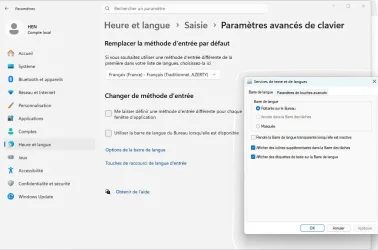
I am trying to use the classic floating Language Bar. When I enable “Use the desktop language bar when it’s available”, the Language Bar appears correctly on the desktop.
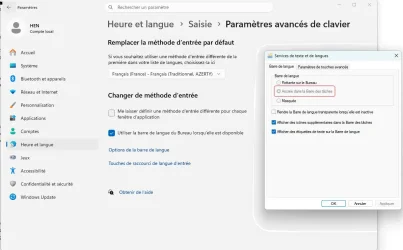
However, in Text Services and Input Languages → Language Bar, the “Docked in the taskbar” option is greyed out and cannot be selected. (see attached iages)
I would like to have the language indicator (e.g. FRA/ENG) displayed in the taskbar instead of having a floating Language Bar.
I'll appreciate yr help
I am running Windows 11 25H2 (OS Build 26200.9445).
I am trying to use the classic floating Language Bar. When I enable “Use the desktop language bar when it’s available”, the Language Bar appears correctly on the desktop.
However, in Text Services and Input Languages → Language Bar, the “Docked in the taskbar” option is greyed out and cannot be selected. (see attached iages)
I would like to have the language indicator (e.g. FRA/ENG) displayed in the taskbar instead of having a floating Language Bar.
I'll appreciate yr help
Attachments
My Computer
At a glance
Windows 11 Pro 25H2 Build 26200.8246i7 1270016GBNvida
- OS
- Windows 11 Pro 25H2 Build 26200.8246
- Computer type
- PC/Desktop
- Manufacturer/Model
- HP Worksatation Z1G9
- CPU
- i7 12700
- Motherboard
- HP
- Memory
- 16GB
- Graphics Card(s)
- Nvida
- Hard Drives
- SSD 2T
- Browser
- Firefox
- Antivirus
- SEP (Symantec Endpoint Protction)