Windows 11 and network connectivity problem


scott784

Well-known member
Local time
4:40 AM
Posts
33
OS
Windows 11 Pro
I have a 5 year old home PC desktop running Windows 11. Just within this past week, I am having connectivity problems where I will attempt to open a web site and I will receive error messages indicating the inability to reach a site. This is not affecting my separate work PC nor any other devices on my home network. It is only my home PC and it comes and goes. In other words, I can sometimes boot up the PC and web pages will load without a problem for 10 or 15 minutes. Then the error messages start all over again with references to the DNS server errors. This happens regardless of whether I am on Wi-Fi or hard wired with ethernet.

After speaking with the Geek Squad today at Best Buy and explaining the problem and the fact that I've already tried altering settings in Windows Network, the individual I spoke to agreed it may be a bad network card or a circuitry problem on the motherboard. He recommended me purchasing an external tp-link wireless USB adapter. I did so Saturday afternoon - with the hopes that this would resolve my connectivity problem on the home PC. Initially, it seemed to work.

But once again, after being online for a short amount of time, the error messages returned with a reference to the DNS server not functioning in order to load web pages. Does anyone have any idea as to what may be causing this problem? In the 5 years of owning this PC, I've never experienced such issues. Can anyone provide any clues as to what may be going on?

I could drop the PC off at a computer shop for them to run diagnostics. But I really hate doing that since I've got very personal things on the computer to include tax returns, banking information and all other kinds of personal info. I just want it fixed. Otherwise, I may have to replace the home PC. Thanks for any replies in advance.
 

My Computer My Computer

At a glance

Windows 11 ProIntel Core i7-9700 @ 3.00GHz16 GBNvidia GeForce GTX 1660
OS
Windows 11 Pro
Computer type
PC/Desktop
CPU
Intel Core i7-9700 @ 3.00GHz
Motherboard
Gigabyte Technology Z390 Gaming X-CF
Memory
16 GB
Graphics Card(s)
Nvidia GeForce GTX 1660
Sound Card
Realtek High Definition Audio
Monitor(s) Displays
ASUS
Hard Drives
Samsung SSD 980 Pro 1TB
WDC SSD 500GB
Antivirus
Norton 360
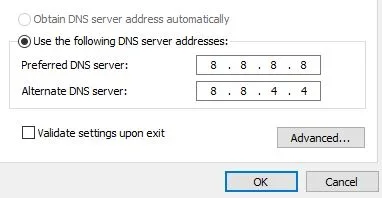
Try this in your Internet Protocol Version 4 (TCP/IPv4) Properties

Preferred DNS server 8.8.8.8
Alternate DNS server 8.8.4.4
 

Attachments

  • Network.webp
    Network.webp
    8.5 KB · Views: 2

My Computer My Computer

At a glance

Windows 11 ProIntel Core i9 12900KFCorsair 64GB DDR5 Vengeance C40 5200MhzASUS GeForce RTX 3090 ROG Strix OC 24GB
OS
Windows 11 Pro
Computer type
PC/Desktop
Manufacturer/Model
Custom Build
CPU
Intel Core i9 12900KF
Motherboard
ASUS ROG Maximus Z690 Hero
Memory
Corsair 64GB DDR5 Vengeance C40 5200Mhz
Graphics Card(s)
ASUS GeForce RTX 3090 ROG Strix OC 24GB
Sound Card
OnBoard
Monitor(s) Displays
Acer Predator XB323UGP 32" QHD G-SYNC-C 144Hz 1MS IPS LED
Screen Resolution
2560 x 1440
Hard Drives
1x Samsung 980 Pro Series Gen4 250GB M.2 NVMe
1x Samsung 980 Pro Series Gen4 500GB M.2 NVMe
2x Samsung 980 Pro Series Gen4 2TB M.2 NVMe
PSU
Corsair AX1200i 1200W 80PLUS Titanium Modular
Case
Corsair 4000D Black Case w/ Tempered Glass Side Panel
Cooling
Noctua NH-U12A Chromax Black CPU Cooler, 4x Noctua 120mm Fans
Keyboard
Logitech MK545
Mouse
Logitech MX Master 3
Internet Speed
Fixed Wireless 150mbps/75mbps
Browser
Firefox
Antivirus
Kaspersky
Other Info
Thrustmaster TS-PC RACER
Fanatec CSL Elite Pedals with the Load Cell Kit
Yamaha Amp with Bose Speakers
Yes, I went to my settings for Wi-Fi properties. I noted that Automatic (DHCP) under both IP assignment and DNS server assignment were already set that way. But I am not sure how to change those numeric values you listed.
 

My Computer My Computer

At a glance

Windows 11 ProIntel Core i7-9700 @ 3.00GHz16 GBNvidia GeForce GTX 1660
OS
Windows 11 Pro
Computer type
PC/Desktop
CPU
Intel Core i7-9700 @ 3.00GHz
Motherboard
Gigabyte Technology Z390 Gaming X-CF
Memory
16 GB
Graphics Card(s)
Nvidia GeForce GTX 1660
Sound Card
Realtek High Definition Audio
Monitor(s) Displays
ASUS
Hard Drives
Samsung SSD 980 Pro 1TB
WDC SSD 500GB
Antivirus
Norton 360

My Computer My Computer

At a glance

Microsoft Windows 11 HomeIntel Core i5-13490F2 x 16 Patriot Memory (PDP Systems) PSD516G56...GIGABYTE GeForce RTX 4070 WINDFORCE OC 12G (G...
OS
Microsoft Windows 11 Home
Computer type
PC/Desktop
Manufacturer/Model
MSI MS-7D98
CPU
Intel Core i5-13490F
Motherboard
MSI B760 GAMING PLUS WIFI
Memory
2 x 16 Patriot Memory (PDP Systems) PSD516G560081 6400MT (32-37-37-74); 1.35V)
Graphics Card(s)
GIGABYTE GeForce RTX 4070 WINDFORCE OC 12G (GV-N4070WF3OC-12GD)
Sound Card
Bluetooth Аудио
Monitor(s) Displays
INNOCN 15K1F
Screen Resolution
1920 x 1080
Hard Drives
WD_BLACK SN770 250GB
KINGSTON SNV2S1000G (ELFK0S.6)
PSU
Thermaltake Toughpower GF3 1000W
Case
CG560 - DeepCool
Cooling
ID-COOLING SE-224-XTS / 2 x 140Mm Fan - rear and top; 3 x 120Mm - front
Keyboard
Corsair K70 RGB TKL
Mouse
Corsair KATAR PRO XT
Internet Speed
100 Mbps
Browser
Firefox
Antivirus
Microsoft Defender Antivirus
Other Info
https://www.userbenchmark.com/UserRun/66553205
Yes, I went to my settings for Wi-Fi properties. I noted that Automatic (DHCP) under both IP assignment and DNS server assignment were already set that way. But I am not sure how to change those numeric values you listed.
Leave the dot in (Obtain an IP address automatically)

Just click on (Use the following DNS server addresses) then type in the numbers
 

My Computer My Computer

At a glance

Windows 11 ProIntel Core i9 12900KFCorsair 64GB DDR5 Vengeance C40 5200MhzASUS GeForce RTX 3090 ROG Strix OC 24GB
OS
Windows 11 Pro
Computer type
PC/Desktop
Manufacturer/Model
Custom Build
CPU
Intel Core i9 12900KF
Motherboard
ASUS ROG Maximus Z690 Hero
Memory
Corsair 64GB DDR5 Vengeance C40 5200Mhz
Graphics Card(s)
ASUS GeForce RTX 3090 ROG Strix OC 24GB
Sound Card
OnBoard
Monitor(s) Displays
Acer Predator XB323UGP 32" QHD G-SYNC-C 144Hz 1MS IPS LED
Screen Resolution
2560 x 1440
Hard Drives
1x Samsung 980 Pro Series Gen4 250GB M.2 NVMe
1x Samsung 980 Pro Series Gen4 500GB M.2 NVMe
2x Samsung 980 Pro Series Gen4 2TB M.2 NVMe
PSU
Corsair AX1200i 1200W 80PLUS Titanium Modular
Case
Corsair 4000D Black Case w/ Tempered Glass Side Panel
Cooling
Noctua NH-U12A Chromax Black CPU Cooler, 4x Noctua 120mm Fans
Keyboard
Logitech MK545
Mouse
Logitech MX Master 3
Internet Speed
Fixed Wireless 150mbps/75mbps
Browser
Firefox
Antivirus
Kaspersky
Other Info
Thrustmaster TS-PC RACER
Fanatec CSL Elite Pedals with the Load Cell Kit
Yamaha Amp with Bose Speakers
Thanks for the replies here. Since late yesterday, my internet connection on the home PC has been working fine with the tp-link external USB drive. I've used the home PC for several hours on Sunday and not a bit of problem. So I am going to consider it resolved for now - at least as far as connectivity using the external USB tp-link and wireless. In the event, it reoccurs, I'll fiddle with the IP settings. Again, feedback is appreciated.
 

My Computer My Computer

At a glance

Windows 11 ProIntel Core i7-9700 @ 3.00GHz16 GBNvidia GeForce GTX 1660
OS
Windows 11 Pro
Computer type
PC/Desktop
CPU
Intel Core i7-9700 @ 3.00GHz
Motherboard
Gigabyte Technology Z390 Gaming X-CF
Memory
16 GB
Graphics Card(s)
Nvidia GeForce GTX 1660
Sound Card
Realtek High Definition Audio
Monitor(s) Displays
ASUS
Hard Drives
Samsung SSD 980 Pro 1TB
WDC SSD 500GB
Antivirus
Norton 360
Back
Top Bottom