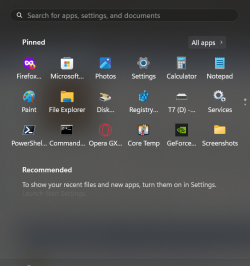
Windows 11 Best Debloater


My question would be, why?

In my opinion; If you’re looking to save a little space,

My gripe is not with the drive space recovered but with a bloated Start menu convoluted with icons for apps I don't want and/or will never use, half of which are not even installed programs but simply links to installations and/or web sites. A proper dog's breakfast.

Uninstalling unwanted apps has the added benefit of presenting a much less cluttered Start menu.

@OldNavy I much prefer to make my own selection at what stays and what goes, so rather than use generic debloaters, I use RevoUninstaller (and sometimes GeekUninstaller)

To use Revo
- install > Options > Uninstaller > untick Make a Systems Restore Point before uninstall, tick Checkmark all leftovers by default > OK
- Windows Apps tab
- select a program to be removed > double click
- uninstall, DO NOT RESTART EVEN IF PROMPTED
- select the Advanced option button
- run and indiscriminately remove ALL leftovers presented; do NOT pick and choose
- do this for both files, folders and registry entries
- when complete, now reboot (if previously prompted)
- app gone, clean as a whistle
- repeat for each app

PITA but much more effective than perfunctory command line option of Get-AppxPackage etc
 

My Computers My Computers

  • At a glance

    Windows 11 2xH2 (latest update ... forever anal)Intel i5-124008GBNVIDIA GeForce GT730
    OS
    Windows 11 2xH2 (latest update ... forever anal)
    Computer type
    PC/Desktop
    Manufacturer/Model
    HP Slim S01
    CPU
    Intel i5-12400
    Memory
    8GB
    Graphics Card(s)
    NVIDIA GeForce GT730
    Sound Card
    OOBE
    Monitor(s) Displays
    Acer 32"
    Screen Resolution
    1920x1080
    Hard Drives
    512GB KIOXIA NVMe
    1TB SATA SSD
    PSU
    OOBE
    Case
    OOBE
    Cooling
    OOBE
    Keyboard
    BT
    Mouse
    BT
    Browser
    Brave FFox Chrome Opera
    Antivirus
    KIS
  • At a glance

    Windows 11 Pro 2xH2 (latest update ... 4ever ...i7-1165G7 @ 2.80GHzIntel Iris Xe Graphics
    Operating System
    Windows 11 Pro 2xH2 (latest update ... 4ever anal)
    Computer type
    Laptop
    Manufacturer/Model
    HP Pavillion 15
    CPU
    i7-1165G7 @ 2.80GHz
    Graphics card(s)
    Intel Iris Xe Graphics
    Hard Drives
    Samsung NVMe 512GB
    + numerous/multiple SSD Type C USB enclosures
    Internet Speed
    NBN FTTN 50
    Browser
    Brave
    Antivirus
    KIS
My gripe is not with the drive space recovered but with a bloated Start menu convoluted with icons for apps I don't want and/or will never use, half of which are not even installed programs but simply links to installations and/or web sites. A proper dog's breakfast.

Uninstalling unwanted apps has the added benefit of presenting a much less cluttered Start menu.

@OldNavy I much prefer to make my own selection at what stays and what goes, so rather than use generic debloaters, I use RevoUninstaller (and sometimes GeekUninstaller)

To use Revo
- install > Options > Uninstaller > untick Make a Systems Restore Point before uninstall, tick Checkmark all leftovers by default > OK
- Windows Apps tab
- select a program to be removed > double click
- uninstall, DO NOT RESTART EVEN IF PROMPTED
- select the Advanced option button
- run and indiscriminately remove ALL leftovers presented; do NOT pick and choose
- do this for both files, folders and registry entries
- when complete, now reboot (if previously prompted)
- app gone, clean as a whistle
- repeat for each app

PITA but much more effective than perfunctory command line option of Get-AppxPackage etc


I agree, as I mentioned, REVO would be my process (y) 🙏
 

My Computers My Computers

  • At a glance

    Windows 11 Pro 25H2 Build 26200.8655Intel(R) Core(TM) i7-4770K CPU @ 3.50GHz32.0 GB of I forget and the box is in storage.Gigabyte nVidia GeForce GTX 1660 Super OC 6GB
    OS
    Windows 11 Pro 25H2 Build 26200.8655
    Computer type
    PC/Desktop
    Manufacturer/Model
    Sin-built 2013
    CPU
    Intel(R) Core(TM) i7-4770K CPU @ 3.50GHz
    Motherboard
    ASUS ROG Maximus VI Formula
    Memory
    32.0 GB of I forget and the box is in storage.
    Graphics Card(s)
    Gigabyte nVidia GeForce GTX 1660 Super OC 6GB
    Sound Card
    ROG SupremeFX Formula 8-Channel High Definition Audio
    Monitor(s) Displays
    5 x LG 25MS500-B - 1 x 24MK430H-B - 1 x Wacom Pro 22" Touch Screen Tablet
    Screen Resolution
    All over the place
    Hard Drives
    Too many to list. OS on Samsung 1TB 870 QVO SATA
    PSU
    Silverstone 1500
    Case
    NZXT Phantom 820 Full-Tower Case
    Cooling
    Noctua NH-D15 Elite Class Dual Tower CPU Cooler / 6 x EziDIY 120mm / 2 x Corsair 140mm somethings / 1 x 140mm Thermaltake something / 2 x 200mm Corsair.
    Keyboard
    Corsair K95 / Logitech diNovo Edge Wireless
    Mouse
    Logitech: G402 / G502 / Mx Masters / Mx Air Cordless
    Internet Speed
    2000/500Mbps
    Browser
    All sorts
    Antivirus
    Kaspersky Premium
    Other Info
    ㅤㅤㅤㅤㅤㅤㅤㅤㅤㅤㅤㅤㅤㅤㅤㅤㅤㅤㅤㅤㅤㅤㅤㅤㅤㅤㅤㅤㅤㅤㅤㅤㅤㅤㅤㅤㅤㅤㅤㅤ⠀⠀⠀⠀⠀⠀⠀⠀⠀⠀
    TP-Link BE9300 WiFi 7 Bluetooth 5.4 (Archer TBE550E)
    TP-Link TX201 V1 2.5GB Lan

    Grandstream HT812 - VoIP
    ASUS DSL-AX82U - Mesh
    ASUS RT-AC68U - Mesh
    ASUS RT-BE88U Router

    Brother MFC-L2880DW Printer

    I’m on a horse.
  • At a glance

    Windows 11 Pro 25H2 Build 26200.8655 (Wifes)13th Generation Intel® Core™ i5-1340P Process...16GB LPDDR5-52001x Intel® Iris® Xe Graphics
    Operating System
    Windows 11 Pro 25H2 Build 26200.8655 (Wifes)
    Computer type
    Laptop
    Manufacturer/Model
    LENOVO Yoga 7 14IRL8 - Type 82YL
    CPU
    13th Generation Intel® Core™ i5-1340P Processor(Core™ i5-1340P)
    Memory
    16GB LPDDR5-5200
    Graphics card(s)
    1x Intel® Iris® Xe Graphics
    Sound Card
    Optimized with Dolby Atmos®
    Screen Resolution
    QHD 2880 x 1800 OLED
    Hard Drives
    M.2 512 GB SSD PCIe
    Mouse
    Logiteck MX Master 3S
    Internet Speed
    2000/500
    Antivirus
    Defender / Malwarebytes
    Other Info
    …still on a horse.


    Wireless Network: Wi-Fi 6E 2x2 AX; Bluetooth® 5.1 or above
    Ports: 1x 1 Novo button; 2 in 1 Audio Combo jack; Micro SD Card Reader; HDMI 1.4b; 2 x USB Type-C (TBT4)
    USB 3.2 Gen 2 DP 1.4a
    PD 3.0); 1 x USB 3.2 Gen1 Type A
    Camera
    1x 1080P FHD IR/RGB Hybrid with Privacy Shutter and Dual Array Microphone
    Graphics
    1x Intel® Iris® Xe Graphics
    Monitor
    14" WUXGA
    Form Factor
    Convertible Notebook
  • Windows 11 Pro 25H2 Build 26200.8655 (Wifes)

    Yoga 7 2-in-1 14IML9 - Type 83DJ

    Processor: Intel® Core™ Ultra 7 155H Processor(Core™ Ultra 7 155H)

    Memory: 32GB LPD5X-7467

    Hard Drive: 1 TB SSD PCIe

    Wireless Network: 1x Wi-Fi 6E 2x2 AX; Bluetooth® 5.1 or above

    Ports: 1 x HDMI 2.1 TMDS; 1 x Novo Button; 1 x Combo Audio Jack
    2 x USB-C (USB 4.0)
    1 x USB-A 3.2 Gen 1

    Camera: 1080P FHD IR Hybrid with Dual Microphone

    Graphics: Intel® Arc™ Graphics

    Monitor: 14" 2.8K

    ...Where's my horse?
but with a bloated Start menu
Yeah but, we all know how easy it is to get a clean Start menu. This shouldn't be a thing.

1713751377322.png
 

My Computers My Computers

  • At a glance

    windows 11 22631.5039Core i9 12th gen 12900HK 2.9 MHz (overcloked:...32 Gigs DDR5-4800nVidia RTX 3070 Ti / 8 Gigs DDR6
    OS
    windows 11 22631.5039
    Computer type
    Laptop
    Manufacturer/Model
    MSI Raider GE76
    CPU
    Core i9 12th gen 12900HK 2.9 MHz (overcloked: 3890.48)
    Motherboard
    MSI
    Memory
    32 Gigs DDR5-4800
    Graphics Card(s)
    nVidia RTX 3070 Ti / 8 Gigs DDR6
    Sound Card
    DYNAUDIO - Steelsries Arena 7- Sound Effects by Nahimic 3
    Monitor(s) Displays
    17.3" 1920 x 1080 360 Hz 3 ms, IPS / Connected to MSI 32 inch curved @ 165 Hz
    Screen Resolution
    1920 x 1080 / Both
    Hard Drives
    Samsung 990 Pro 2TB (OS) - Solidigm P41 2TB (Storage)
    PSU
    280 watts
    Case
    MSI GE series
    Cooling
    internal
    Keyboard
    Steelseries
    Mouse
    G903 Lightspeed
    Internet Speed
    1000 Mbps
    Browser
    Firefox / Opera GX- Do not like Edge
    Antivirus
    Malwarebytes'
    Other Info
    just ask.
  • At a glance

    Windows 10 22H2Intel Core i7 7820HK 2.9 Ghz16 Gigs DDR4 2400 MhznVidia 1070 8GB RAM
    Operating System
    Windows 10 22H2
    Computer type
    Laptop
    Manufacturer/Model
    MSI GT73 7RE VR Titan
    CPU
    Intel Core i7 7820HK 2.9 Ghz
    Motherboard
    MSI
    Memory
    16 Gigs DDR4 2400 Mhz
    Graphics card(s)
    nVidia 1070 8GB RAM
    Sound Card
    DYNAUDIO / Nahimic 2
    Monitor(s) Displays
    IPS / 120HZ
    Screen Resolution
    1920x1080P
    Hard Drives
    Samsung NVME EVO 970 1TB / Samsung SSD (SATA) 1TB
    PSU
    240 watts
    Case
    MSI
    Cooling
    Internal
    Keyboard
    Steelseries
    Mouse
    Logitech G903 Lightspeed
    Internet Speed
    1 Gb/s
    Browser
    Firefox / Vivaldi
    Antivirus
    MalwareBytes'
    Other Info
    none.
Yeah but, we all know how easy it is to get a clean Start menu. This shouldn't be a thing.
To me that's the Start window (above image), as distinct from the Start Menu
 

My Computers My Computers

  • At a glance

    Windows 11 2xH2 (latest update ... forever anal)Intel i5-124008GBNVIDIA GeForce GT730
    OS
    Windows 11 2xH2 (latest update ... forever anal)
    Computer type
    PC/Desktop
    Manufacturer/Model
    HP Slim S01
    CPU
    Intel i5-12400
    Memory
    8GB
    Graphics Card(s)
    NVIDIA GeForce GT730
    Sound Card
    OOBE
    Monitor(s) Displays
    Acer 32"
    Screen Resolution
    1920x1080
    Hard Drives
    512GB KIOXIA NVMe
    1TB SATA SSD
    PSU
    OOBE
    Case
    OOBE
    Cooling
    OOBE
    Keyboard
    BT
    Mouse
    BT
    Browser
    Brave FFox Chrome Opera
    Antivirus
    KIS
  • At a glance

    Windows 11 Pro 2xH2 (latest update ... 4ever ...i7-1165G7 @ 2.80GHzIntel Iris Xe Graphics
    Operating System
    Windows 11 Pro 2xH2 (latest update ... 4ever anal)
    Computer type
    Laptop
    Manufacturer/Model
    HP Pavillion 15
    CPU
    i7-1165G7 @ 2.80GHz
    Graphics card(s)
    Intel Iris Xe Graphics
    Hard Drives
    Samsung NVMe 512GB
    + numerous/multiple SSD Type C USB enclosures
    Internet Speed
    NBN FTTN 50
    Browser
    Brave
    Antivirus
    KIS
@siliconbeaver

... repair-install using latest Windows 11 version (23H2/24H2? ). this will make Windows 11 updated, while staying stripped except Edge

Yes, that's one way of updating the Win11 Lite(s) while staying stripped of useless bloat.

For myself, I tried KB5027397 (enabling msu for 22H2 to 23H2) after Win11 Lite installation and updates. Worked fine without Edge or other unwanteds. Just really simple to do.

This clean install Lite sequence, followed by updating, on older PC's is quite workable if one remains careful. Caveat emptor, but it worked without problems on an older laptop and without all unwanted Windows bloat. Even tried it on a mate's very old Sony laptop with only 2Gb RAM and a 300Mb HDD - Win11 Lite did install and boot but with only 2Gb of RAM it was too sluggish to be useful.
 

My Computer My Computer

At a glance

Windows 11Intel i5 10210U16GbIntel UHD
OS
Windows 11
Computer type
Laptop
Manufacturer/Model
HP 15s_du1xxx
CPU
Intel i5 10210U
Motherboard
85F1
Memory
16Gb
Graphics Card(s)
Intel UHD
Sound Card
Realtek
Screen Resolution
1920 x 1080
Use a debloater script to remove all unnecessary programs in Windows 10 and 11.

Can this method works if i want to add other user/profile?
 

My Computer My Computer

At a glance

Windows 11
OS
Windows 11
Computer type
Laptop
Can this method works if i want to add other user/profile?
Tell you the true, not sure i don't remember but i think it only works for current user.
 

My Computer My Computer

At a glance

Windows 11AMD Ryzen 7 5700GMicron Technology DDR4-3200 16GBNVIDIA GeForce RTX 3060
OS
Windows 11
Computer type
PC/Desktop
Manufacturer/Model
HP Pavilion
CPU
AMD Ryzen 7 5700G
Motherboard
Erica6
Memory
Micron Technology DDR4-3200 16GB
Graphics Card(s)
NVIDIA GeForce RTX 3060
Sound Card
Realtek ALC671
Monitor(s) Displays
Samsung SyncMaster U28E590
Screen Resolution
3840 x 2160
Hard Drives
SAMSUNG MZVLQ1T0HALB-000H1
Edge can easily be removed with Revo uninstaller. You may need to repeat every weel or so but it's quick.
 

My Computers My Computers

  • At a glance

    Windows 11 Pro 25H2 26200.8655AMD Ryzen 7 5825U with Radeon Graphics16GB
    OS
    Windows 11 Pro 25H2 26200.8655
    Computer type
    Laptop
    Manufacturer/Model
    Acemagic LX15PRO
    CPU
    AMD Ryzen 7 5825U with Radeon Graphics
    Memory
    16GB
    Screen Resolution
    1920 x 1080
    Hard Drives
    SSD 2TB
    Internet Speed
    30 Mbps
    Browser
    Brave
    Antivirus
    Webroot Secure Anywhere
    Other Info
    System 3

    Acer Swift SF114-34 laptop
    OS Windows 11 Pro 26200.8524
    CPU Pentium Silver N6000
    RAM 4GB
    SSD Samsung 970 EVO Plus SSD 2TB (an upgrade)
  • At a glance

    Windows 11 Pro 23H2 22631.2506Atom N450 1.66GHz2GB
    Operating System
    Windows 11 Pro 23H2 22631.2506
    Computer type
    Laptop
    Manufacturer/Model
    HP Mini 210-1090NR PC (bought in late 2009!)
    CPU
    Atom N450 1.66GHz
    Memory
    2GB
    Browser
    Brave
    Antivirus
    Webroot
Microsoft has made it very difficult to uninstall Edge browser, but using an open-source tool you can still manage to uninstall Edge browser from your system.


My Computer My Computer

At a glance

Windows 11AMD Ryzen 7 5700GMicron Technology DDR4-3200 16GBNVIDIA GeForce RTX 3060
OS
Windows 11
Computer type
PC/Desktop
Manufacturer/Model
HP Pavilion
CPU
AMD Ryzen 7 5700G
Motherboard
Erica6
Memory
Micron Technology DDR4-3200 16GB
Graphics Card(s)
NVIDIA GeForce RTX 3060
Sound Card
Realtek ALC671
Monitor(s) Displays
Samsung SyncMaster U28E590
Screen Resolution
3840 x 2160
Hard Drives
SAMSUNG MZVLQ1T0HALB-000H1
Edge can easily be removed with an uninstaller. You may need to repeat every week or so but it's quick.
Weekly ! Why bother, a second Browser is useful. To a degree Edge is baked in to Windows so messing is not a good idea for most consumers, just making for work and potential problems.
 

My Computer My Computer

At a glance

Windows 11
OS
Windows 11
Or, you can just download a version of Win-11 that does not include any Bloatware, including Edge. Install the browser you want.

Both Micro and Lite versions of Windows (or should we call it Winders?) are available for download to anyone wanting a plain and simple OS without a lot of added Crap.
I'm running 24H2 that has been totally decrapified, and it's the fastest OS I've ever installed. And, I didn't have to spend hours, uninstalling bloatware. I did run the Revo Uninstaller to remove some unwanted apps.

Need more info? Drop me a PM.

TM :cool:
 
Or, you can just download a version of Win-11 that does not include any Bloatware, including Edge. Install the browser you want.

Both Micro and Lite versions of Windows (or should we call it Winders?) are available for download to anyone wanting a plain and simple OS without a lot of added Crap.
I'm running 24H2 that has been totally decrapified, and it's the fastest OS I've ever installed. And, I didn't have to spend hours, uninstalling bloatware. I did run the Revo Uninstaller to remove some unwanted apps.

Need more info? Drop me a PM.

TM :cool:
Please recommend one or two downloads and gie a few tips; I can see you getting dozens of PMs otherwise. Which is your favourite mini-winny?
 

My Computers My Computers

  • At a glance

    Windows 11 Pro 25H2 26200.8655AMD Ryzen 7 5825U with Radeon Graphics16GB
    OS
    Windows 11 Pro 25H2 26200.8655
    Computer type
    Laptop
    Manufacturer/Model
    Acemagic LX15PRO
    CPU
    AMD Ryzen 7 5825U with Radeon Graphics
    Memory
    16GB
    Screen Resolution
    1920 x 1080
    Hard Drives
    SSD 2TB
    Internet Speed
    30 Mbps
    Browser
    Brave
    Antivirus
    Webroot Secure Anywhere
    Other Info
    System 3

    Acer Swift SF114-34 laptop
    OS Windows 11 Pro 26200.8524
    CPU Pentium Silver N6000
    RAM 4GB
    SSD Samsung 970 EVO Plus SSD 2TB (an upgrade)
  • At a glance

    Windows 11 Pro 23H2 22631.2506Atom N450 1.66GHz2GB
    Operating System
    Windows 11 Pro 23H2 22631.2506
    Computer type
    Laptop
    Manufacturer/Model
    HP Mini 210-1090NR PC (bought in late 2009!)
    CPU
    Atom N450 1.66GHz
    Memory
    2GB
    Browser
    Brave
    Antivirus
    Webroot
Sir, I'm sure you know that there are certain things that I'm not allowed to post on the open forum, at the risk of being banned.
A PM will suffice.
 
Debloaters do nothing for performance and can create issues if you later decide you need them.
 

My Computer My Computer

At a glance

Windows 11 Pro + Win11 Canary VM.I9 13th gen i9-13900H 2.60 GHZ16 GB solderedIntegrated Intel Iris XE
OS
Windows 11 Pro + Win11 Canary VM.
Computer type
Laptop
Manufacturer/Model
ASUS Zenbook 14
CPU
I9 13th gen i9-13900H 2.60 GHZ
Motherboard
Yep, Laptop has one.
Memory
16 GB soldered
Graphics Card(s)
Integrated Intel Iris XE
Sound Card
Realtek built in
Monitor(s) Displays
laptop OLED screen
Screen Resolution
2880x1800 touchscreen
Hard Drives
1 TB NVME SSD (only weakness is only one slot)
PSU
Internal + 65W thunderbolt USB4 charger
Case
Yep, got one
Cooling
Stella Artois (UK pint cans - 568 ml) - extra cost.
Keyboard
Built in UK keybd
Mouse
Bluetooth , wireless dongled, wired
Internet Speed
900 mbs (ethernet), wifi 6 typical 350-450 mb/s both up and down
Browser
Edge
Antivirus
Defender
Other Info
TPM 2.0, 2xUSB4 thunderbolt, 1xUsb3 (usb a), 1xUsb-c, hdmi out, 3.5 mm audio out/in combo, ASUS backlit trackpad (inc. switchable number pad)

Macrium Reflect Home V8
Office 365 Family (6 users each 1TB onedrive space)
Hyper-V (a vm runs almost as fast as my older laptop)
First off, I highly recommend you do NOT download any of the "lite" or "tiny" versions of Windows. Yes they are extremely slimmed down versions of windows, almost too slimmed down. There are components that are removed that can interfere with normal windows operations if you play games or print items -- this is not only based on videos from Chris Titus Tech and BriTech but personal experience installing clean copies on my system and then finding myself unable to use my computer as I want to.

Also, can you completely trust the people/organizations that are doing the reduction that they only remove the things that you don't want? Honestly, on my system, the only person that I trust to remove things is me.

Windows Defender is usually on the chopping block for a lot of those tiny installs. While for some that can be a good thing, Defender has improved somewhat and it's always better to have some protection as opposed to none at all. If you have your own anti-virus/anti-malware that you trust, then you're more than likely ok with removing Defender, though just installing it on a clean system will disable Defender, and for some that is more than enough.

As for removing apps, I recommend you look at Bulk Crap Uninstaller. It allows for multiple apps to be removed at one time (Revo free does not - haven't used paid so can't speak on it) and it does check for leftovers and removes them as well. I use it on a clean install to remove all the things that Windows installs - even when installing using "English (World)" to reduce the amount of stuff that gets installed.
 

My Computer My Computer

At a glance

Windows 11 Pro 25H2 (26200.8457)AMD Ryzen 7 7800X3D32gb Team Group (T-Force) DDR5-6000Zotac nVidia GeForce RTX 4070 SUPER - 12gb
OS
Windows 11 Pro 25H2 (26200.8457)
Computer type
PC/Desktop
Manufacturer/Model
Pre-built
CPU
AMD Ryzen 7 7800X3D
Motherboard
MSI Pro B650-VC WiFi
Memory
32gb Team Group (T-Force) DDR5-6000
Graphics Card(s)
Zotac nVidia GeForce RTX 4070 SUPER - 12gb
Sound Card
Sound BlasterX G6
Monitor(s) Displays
Koorui G2421V and ViewSonic VX2453
Screen Resolution
P:2560x1440 S:1920x1080
Hard Drives
WD Blue SN5000 - 500gb NVME
WD Blue SN580 - 2TB NVME
Seagate 4TB HDD - ST4000VN008-2DR166
Keyboard
Mountain Everest
Mouse
Logitech G502 Hero
Internet Speed
T-Mobile Home Internet
Browser
Firefox
Other Info
QNAP TS-469 Pro NAS
TP-Link W7200 (2 unit mesh network)
Elgato Streamdeck
I'm using X-lite after a suggestion from TechnoMage2021.
It's far faster than standard and it has everything I need. I added Brave browser. Added drivers for the fingerprint sensor and touchpad and it just works brilliantly. Total install is now 11GB. The printer and scanner work and I will rely on Windows Defender.
 

My Computers My Computers

  • At a glance

    Windows 11 Pro 25H2 26200.8655AMD Ryzen 7 5825U with Radeon Graphics16GB
    OS
    Windows 11 Pro 25H2 26200.8655
    Computer type
    Laptop
    Manufacturer/Model
    Acemagic LX15PRO
    CPU
    AMD Ryzen 7 5825U with Radeon Graphics
    Memory
    16GB
    Screen Resolution
    1920 x 1080
    Hard Drives
    SSD 2TB
    Internet Speed
    30 Mbps
    Browser
    Brave
    Antivirus
    Webroot Secure Anywhere
    Other Info
    System 3

    Acer Swift SF114-34 laptop
    OS Windows 11 Pro 26200.8524
    CPU Pentium Silver N6000
    RAM 4GB
    SSD Samsung 970 EVO Plus SSD 2TB (an upgrade)
  • At a glance

    Windows 11 Pro 23H2 22631.2506Atom N450 1.66GHz2GB
    Operating System
    Windows 11 Pro 23H2 22631.2506
    Computer type
    Laptop
    Manufacturer/Model
    HP Mini 210-1090NR PC (bought in late 2009!)
    CPU
    Atom N450 1.66GHz
    Memory
    2GB
    Browser
    Brave
    Antivirus
    Webroot
I use WindowsXLite's Windows versions. Its the lightest OSs' of windows I have found yet.
 

My Computers My Computers

  • At a glance

    Windows 11 25H2Apple CPU8gbNvidia GeForce Driver
    OS
    Windows 11 25H2
    Computer type
    PC/Desktop
    Manufacturer/Model
    Apple Intel iMac Mid 2013
    CPU
    Apple CPU
    Motherboard
    Macintosh
    Memory
    8gb
    Graphics Card(s)
    Nvidia GeForce Driver
    Sound Card
    Nvidia Audio Driver
    Screen Resolution
    15.6"
    Hard Drives
    256GB M.2 SSD
    Mouse
    Custom Wireless Mouse
    Internet Speed
    256 mbps DL 8-10 mbps UL
    Browser
    Mozilla Firefox
    Antivirus
    Avira AntiVirus
  • At a glance

    Fedora Cinnamon 43Nvidia GeForce RTX16GB DDR4 RamNvidia GeForce RTX
    Operating System
    Fedora Cinnamon 43
    Computer type
    Laptop
    Manufacturer/Model
    Acer Nitro V15-52
    CPU
    Nvidia GeForce RTX
    Motherboard
    Nvidia
    Memory
    16GB DDR4 Ram
    Graphics card(s)
    Nvidia GeForce RTX
    Sound Card
    Realtek HD Audio
    Screen Resolution
    15"
    Hard Drives
    512GB M2
    Internet Speed
    400mbps
    Browser
    Firefox
    Antivirus
    None

My Computers My Computers

  • At a glance

    Windows 11 EducationRyzen 5 57009X64GBGTX 1660 Super
    OS
    Windows 11 Education
    Computer type
    PC/Desktop
    CPU
    Ryzen 5 57009X
    Motherboard
    Asus X570-Plus
    Memory
    64GB
    Graphics Card(s)
    GTX 1660 Super
    Browser
    Mozilla Firefox
  • At a glance

    Windows 11 EducationRyzen 5 7040U16GBAMD Ryzen Integrated Graphics
    Operating System
    Windows 11 Education
    Computer type
    Laptop
    Manufacturer/Model
    HP Pavillion Plus
    CPU
    Ryzen 5 7040U
    Memory
    16GB
    Graphics card(s)
    AMD Ryzen Integrated Graphics
    Browser
    Mozilla Firefox

My Computers My Computers

  • At a glance

    Windows 11 EducationRyzen 5 57009X64GBGTX 1660 Super
    OS
    Windows 11 Education
    Computer type
    PC/Desktop
    CPU
    Ryzen 5 57009X
    Motherboard
    Asus X570-Plus
    Memory
    64GB
    Graphics Card(s)
    GTX 1660 Super
    Browser
    Mozilla Firefox
  • At a glance

    Windows 11 EducationRyzen 5 7040U16GBAMD Ryzen Integrated Graphics
    Operating System
    Windows 11 Education
    Computer type
    Laptop
    Manufacturer/Model
    HP Pavillion Plus
    CPU
    Ryzen 5 7040U
    Memory
    16GB
    Graphics card(s)
    AMD Ryzen Integrated Graphics
    Browser
    Mozilla Firefox
Back
Top Bottom