Solved Windows 11 Boot with Inaccessible boot device blue screen error


Additionally I created boot file by going into command prompt which was successfully done and it gave me an option to "Automatic repair" which I have seen after ages when rebooted.. although nothing worked out :D
@Topgundcp
 

My Computer

System One

  • OS
    Windows 11 24H2
    Computer type
    PC/Desktop
    CPU
    Intel i5 @2.90 GHz Coffee Lake 14nm Technology
    Motherboard
    Gigabyte H320 M S2 2.0
    Memory
    16 GB Dual Channel DDR4
    Graphics Card(s)
    HP M22f FHD 2047MB NVIDIA GeForce GT 710
    Sound Card
    Realtek High Definition Audio
    Monitor(s) Displays
    1
    Screen Resolution
    1920 x 1080
    Hard Drives
    1 TB Crucial SSD (Bootable Win 11)
    1 500 GB WD HDD
    1 1TB Toshiba HDD
    PSU
    N/a
    Case
    N/a
    Cooling
    N/a
    Keyboard
    Logitech
    Mouse
    Intex
    Internet Speed
    100 Mbps
    Antivirus
    360 Security

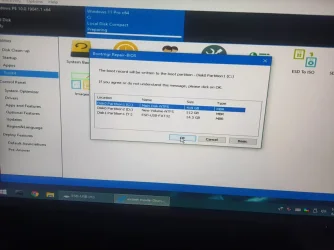
Hmm, The screen shown winload.efi which is required to boot Windows from GPT disk.
For MBR disk, it should be winload.exe
Did you boot WINXPE with USB without UEFI Prefix ???

- Boot into WINXPE Again
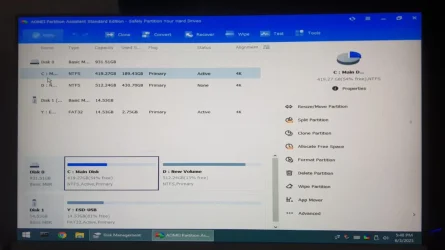
- From Start Menu->All Programs->Administrative Tools then run: Disk Management. Take a screenshot
- Run AOMEI Partition, click on C: to get focus, take a screenshot
Post both screenshots for me.
 
Last edited:

My Computers

System One System Two

  • OS
    Windows 11 Pro 25H2, Linux Mint 21.3
    Computer type
    PC/Desktop
    Manufacturer/Model
    Self Build Feb.2024
    CPU
    Intel Core i9-14900K @5.8GHZ
    Motherboard
    MSI MAG Z790 Tomahawk Max WiFi 7
    Memory
    64GB (2XG Skill F5-6400J3239G32G) @6800
    Graphics Card(s)
    Radeon (TM) RX 480 Graphics (8 GB)
    Sound Card
    Intergrated Realtek
    Monitor(s) Displays
    Samsung
    Screen Resolution
    3840x2160
    Hard Drives
    1 - Crucial 705 1TB GEN5
    1 - Crucial 705 2TB GEN5
    2 - Crucial T500 2TB Gen4
    PSU
    750W EVGA-G3
    Case
    Antec NX410
    Cooling
    H2O Thermalright
    Keyboard
    Logitech K800
    Mouse
    Logitech Master 2S
    Internet Speed
    600 Mbps
    Browser
    Chrome
    Antivirus
    WD
  • Operating System
    Windows 11 Pro & Linux Mint X64
    Computer type
    PC/Desktop
    Manufacturer/Model
    MSI Z77 MPower (MS-7751)
    CPU
    Intel(R) Core(TM) i7-3770K CPU @ 4.20 GHz
    Motherboard
    Z77 MPower (MS-7751)
    Memory
    32.0GB Dual-Channel CMY16GX3M2A1600C9
    Graphics card(s)
    NVIDIA GeForce GT 740
    Monitor(s) Displays
    40" Samsung
    Screen Resolution
    1920X1080
    Hard Drives
    WIN10 - 111GB Samsung SSD 840 Series
    WIN11 - 223GB Crucial CT240BX500SSD
    2X931GB Crucial CT1000BX500SSD1
    PSU
    Antec 850W
    Case
    Antec 900
    Cooling
    H20
    Keyboard
    Logitech K800 Wireless
    Mouse
    Logitech MX Master 2S
    Internet Speed
    100 Mbps
    Browser
    Chrome
    Antivirus
    Windows Defender
Hmm, The screen shown winload.efi which is required to boot Windows from GPT disk.
For MBR disk, it should be winload.exe
Did you boot WINXPE with USB without UEFI Prefix ???

- Boot into WINXPE Again
- From Start Menu->All Programs->Administrative Tools then run: Disk Management. Take a screenshot
- Run AOMEI Partition, click on C: to get focus, take a screenshot
Post both screenshots for me.
Yes I boot into WinXPE with USB WITHOUT THE UEFI Prefix.. Will post screenshots in 10 mins @Topgundcp
 

My Computer

System One

  • OS
    Windows 11 24H2
    Computer type
    PC/Desktop
    CPU
    Intel i5 @2.90 GHz Coffee Lake 14nm Technology
    Motherboard
    Gigabyte H320 M S2 2.0
    Memory
    16 GB Dual Channel DDR4
    Graphics Card(s)
    HP M22f FHD 2047MB NVIDIA GeForce GT 710
    Sound Card
    Realtek High Definition Audio
    Monitor(s) Displays
    1
    Screen Resolution
    1920 x 1080
    Hard Drives
    1 TB Crucial SSD (Bootable Win 11)
    1 500 GB WD HDD
    1 1TB Toshiba HDD
    PSU
    N/a
    Case
    N/a
    Cooling
    N/a
    Keyboard
    Logitech
    Mouse
    Intex
    Internet Speed
    100 Mbps
    Antivirus
    360 Security

@Topgundcp

diskmgmt.webp
Disk management pic

amoeipartition.webp

AOMEI partition pic
 

My Computer

System One

  • OS
    Windows 11 24H2
    Computer type
    PC/Desktop
    CPU
    Intel i5 @2.90 GHz Coffee Lake 14nm Technology
    Motherboard
    Gigabyte H320 M S2 2.0
    Memory
    16 GB Dual Channel DDR4
    Graphics Card(s)
    HP M22f FHD 2047MB NVIDIA GeForce GT 710
    Sound Card
    Realtek High Definition Audio
    Monitor(s) Displays
    1
    Screen Resolution
    1920 x 1080
    Hard Drives
    1 TB Crucial SSD (Bootable Win 11)
    1 500 GB WD HDD
    1 1TB Toshiba HDD
    PSU
    N/a
    Case
    N/a
    Cooling
    N/a
    Keyboard
    Logitech
    Mouse
    Intex
    Internet Speed
    100 Mbps
    Antivirus
    360 Security

Everything looks good.
One nore place to check: Boot to BIOS and double check if you have CSM enable
 

My Computers

System One System Two

  • OS
    Windows 11 Pro 25H2, Linux Mint 21.3
    Computer type
    PC/Desktop
    Manufacturer/Model
    Self Build Feb.2024
    CPU
    Intel Core i9-14900K @5.8GHZ
    Motherboard
    MSI MAG Z790 Tomahawk Max WiFi 7
    Memory
    64GB (2XG Skill F5-6400J3239G32G) @6800
    Graphics Card(s)
    Radeon (TM) RX 480 Graphics (8 GB)
    Sound Card
    Intergrated Realtek
    Monitor(s) Displays
    Samsung
    Screen Resolution
    3840x2160
    Hard Drives
    1 - Crucial 705 1TB GEN5
    1 - Crucial 705 2TB GEN5
    2 - Crucial T500 2TB Gen4
    PSU
    750W EVGA-G3
    Case
    Antec NX410
    Cooling
    H2O Thermalright
    Keyboard
    Logitech K800
    Mouse
    Logitech Master 2S
    Internet Speed
    600 Mbps
    Browser
    Chrome
    Antivirus
    WD
  • Operating System
    Windows 11 Pro & Linux Mint X64
    Computer type
    PC/Desktop
    Manufacturer/Model
    MSI Z77 MPower (MS-7751)
    CPU
    Intel(R) Core(TM) i7-3770K CPU @ 4.20 GHz
    Motherboard
    Z77 MPower (MS-7751)
    Memory
    32.0GB Dual-Channel CMY16GX3M2A1600C9
    Graphics card(s)
    NVIDIA GeForce GT 740
    Monitor(s) Displays
    40" Samsung
    Screen Resolution
    1920X1080
    Hard Drives
    WIN10 - 111GB Samsung SSD 840 Series
    WIN11 - 223GB Crucial CT240BX500SSD
    2X931GB Crucial CT1000BX500SSD1
    PSU
    Antec 850W
    Case
    Antec 900
    Cooling
    H20
    Keyboard
    Logitech K800 Wireless
    Mouse
    Logitech MX Master 2S
    Internet Speed
    100 Mbps
    Browser
    Chrome
    Antivirus
    Windows Defender
Last edited:

My Computer

System One

  • OS
    Windows 11 24H2
    Computer type
    PC/Desktop
    CPU
    Intel i5 @2.90 GHz Coffee Lake 14nm Technology
    Motherboard
    Gigabyte H320 M S2 2.0
    Memory
    16 GB Dual Channel DDR4
    Graphics Card(s)
    HP M22f FHD 2047MB NVIDIA GeForce GT 710
    Sound Card
    Realtek High Definition Audio
    Monitor(s) Displays
    1
    Screen Resolution
    1920 x 1080
    Hard Drives
    1 TB Crucial SSD (Bootable Win 11)
    1 500 GB WD HDD
    1 1TB Toshiba HDD
    PSU
    N/a
    Case
    N/a
    Cooling
    N/a
    Keyboard
    Logitech
    Mouse
    Intex
    Internet Speed
    100 Mbps
    Antivirus
    360 Security
From your BIOS. You have 2 entries from your Crucial SSD:
P2-CT1000BX...
Windows Boot Manager P2-CT1000BX...
Boot your PC to Boot Menu, select P2-CT1000... To boot from
 

My Computers

System One System Two

  • OS
    Windows 11 Pro 25H2, Linux Mint 21.3
    Computer type
    PC/Desktop
    Manufacturer/Model
    Self Build Feb.2024
    CPU
    Intel Core i9-14900K @5.8GHZ
    Motherboard
    MSI MAG Z790 Tomahawk Max WiFi 7
    Memory
    64GB (2XG Skill F5-6400J3239G32G) @6800
    Graphics Card(s)
    Radeon (TM) RX 480 Graphics (8 GB)
    Sound Card
    Intergrated Realtek
    Monitor(s) Displays
    Samsung
    Screen Resolution
    3840x2160
    Hard Drives
    1 - Crucial 705 1TB GEN5
    1 - Crucial 705 2TB GEN5
    2 - Crucial T500 2TB Gen4
    PSU
    750W EVGA-G3
    Case
    Antec NX410
    Cooling
    H2O Thermalright
    Keyboard
    Logitech K800
    Mouse
    Logitech Master 2S
    Internet Speed
    600 Mbps
    Browser
    Chrome
    Antivirus
    WD
  • Operating System
    Windows 11 Pro & Linux Mint X64
    Computer type
    PC/Desktop
    Manufacturer/Model
    MSI Z77 MPower (MS-7751)
    CPU
    Intel(R) Core(TM) i7-3770K CPU @ 4.20 GHz
    Motherboard
    Z77 MPower (MS-7751)
    Memory
    32.0GB Dual-Channel CMY16GX3M2A1600C9
    Graphics card(s)
    NVIDIA GeForce GT 740
    Monitor(s) Displays
    40" Samsung
    Screen Resolution
    1920X1080
    Hard Drives
    WIN10 - 111GB Samsung SSD 840 Series
    WIN11 - 223GB Crucial CT240BX500SSD
    2X931GB Crucial CT1000BX500SSD1
    PSU
    Antec 850W
    Case
    Antec 900
    Cooling
    H20
    Keyboard
    Logitech K800 Wireless
    Mouse
    Logitech MX Master 2S
    Internet Speed
    100 Mbps
    Browser
    Chrome
    Antivirus
    Windows Defender
From your BIOS. You have 2 entries from your Crucial SSD:
P2-CT1000BX...
Windows Boot Manager P2-CT1000BX...
Boot your PC to Boot Menu, select P2-CT1000... To boot from
Yes did that got error of "Start up repair".. shows 2 options - "Restart" & Advanced options. Restart won't fix anything and "advanced options" will show same 5 to 6 options.. so we are back to same where we started

@Topgundcp
 

My Computer

System One

  • OS
    Windows 11 24H2
    Computer type
    PC/Desktop
    CPU
    Intel i5 @2.90 GHz Coffee Lake 14nm Technology
    Motherboard
    Gigabyte H320 M S2 2.0
    Memory
    16 GB Dual Channel DDR4
    Graphics Card(s)
    HP M22f FHD 2047MB NVIDIA GeForce GT 710
    Sound Card
    Realtek High Definition Audio
    Monitor(s) Displays
    1
    Screen Resolution
    1920 x 1080
    Hard Drives
    1 TB Crucial SSD (Bootable Win 11)
    1 500 GB WD HDD
    1 1TB Toshiba HDD
    PSU
    N/a
    Case
    N/a
    Cooling
    N/a
    Keyboard
    Logitech
    Mouse
    Intex
    Internet Speed
    100 Mbps
    Antivirus
    360 Security
Last edited:

My Computers

System One System Two

  • OS
    Windows 11 Pro 25H2, Linux Mint 21.3
    Computer type
    PC/Desktop
    Manufacturer/Model
    Self Build Feb.2024
    CPU
    Intel Core i9-14900K @5.8GHZ
    Motherboard
    MSI MAG Z790 Tomahawk Max WiFi 7
    Memory
    64GB (2XG Skill F5-6400J3239G32G) @6800
    Graphics Card(s)
    Radeon (TM) RX 480 Graphics (8 GB)
    Sound Card
    Intergrated Realtek
    Monitor(s) Displays
    Samsung
    Screen Resolution
    3840x2160
    Hard Drives
    1 - Crucial 705 1TB GEN5
    1 - Crucial 705 2TB GEN5
    2 - Crucial T500 2TB Gen4
    PSU
    750W EVGA-G3
    Case
    Antec NX410
    Cooling
    H2O Thermalright
    Keyboard
    Logitech K800
    Mouse
    Logitech Master 2S
    Internet Speed
    600 Mbps
    Browser
    Chrome
    Antivirus
    WD
  • Operating System
    Windows 11 Pro & Linux Mint X64
    Computer type
    PC/Desktop
    Manufacturer/Model
    MSI Z77 MPower (MS-7751)
    CPU
    Intel(R) Core(TM) i7-3770K CPU @ 4.20 GHz
    Motherboard
    Z77 MPower (MS-7751)
    Memory
    32.0GB Dual-Channel CMY16GX3M2A1600C9
    Graphics card(s)
    NVIDIA GeForce GT 740
    Monitor(s) Displays
    40" Samsung
    Screen Resolution
    1920X1080
    Hard Drives
    WIN10 - 111GB Samsung SSD 840 Series
    WIN11 - 223GB Crucial CT240BX500SSD
    2X931GB Crucial CT1000BX500SSD1
    PSU
    Antec 850W
    Case
    Antec 900
    Cooling
    H20
    Keyboard
    Logitech K800 Wireless
    Mouse
    Logitech MX Master 2S
    Internet Speed
    100 Mbps
    Browser
    Chrome
    Antivirus
    Windows Defender

My Computer

System One

  • OS
    Windows 11 24H2
    Computer type
    PC/Desktop
    CPU
    Intel i5 @2.90 GHz Coffee Lake 14nm Technology
    Motherboard
    Gigabyte H320 M S2 2.0
    Memory
    16 GB Dual Channel DDR4
    Graphics Card(s)
    HP M22f FHD 2047MB NVIDIA GeForce GT 710
    Sound Card
    Realtek High Definition Audio
    Monitor(s) Displays
    1
    Screen Resolution
    1920 x 1080
    Hard Drives
    1 TB Crucial SSD (Bootable Win 11)
    1 500 GB WD HDD
    1 1TB Toshiba HDD
    PSU
    N/a
    Case
    N/a
    Cooling
    N/a
    Keyboard
    Logitech
    Mouse
    Intex
    Internet Speed
    100 Mbps
    Antivirus
    360 Security

My Computers

System One System Two

  • OS
    Windows 11 Pro 25H2, Linux Mint 21.3
    Computer type
    PC/Desktop
    Manufacturer/Model
    Self Build Feb.2024
    CPU
    Intel Core i9-14900K @5.8GHZ
    Motherboard
    MSI MAG Z790 Tomahawk Max WiFi 7
    Memory
    64GB (2XG Skill F5-6400J3239G32G) @6800
    Graphics Card(s)
    Radeon (TM) RX 480 Graphics (8 GB)
    Sound Card
    Intergrated Realtek
    Monitor(s) Displays
    Samsung
    Screen Resolution
    3840x2160
    Hard Drives
    1 - Crucial 705 1TB GEN5
    1 - Crucial 705 2TB GEN5
    2 - Crucial T500 2TB Gen4
    PSU
    750W EVGA-G3
    Case
    Antec NX410
    Cooling
    H2O Thermalright
    Keyboard
    Logitech K800
    Mouse
    Logitech Master 2S
    Internet Speed
    600 Mbps
    Browser
    Chrome
    Antivirus
    WD
  • Operating System
    Windows 11 Pro & Linux Mint X64
    Computer type
    PC/Desktop
    Manufacturer/Model
    MSI Z77 MPower (MS-7751)
    CPU
    Intel(R) Core(TM) i7-3770K CPU @ 4.20 GHz
    Motherboard
    Z77 MPower (MS-7751)
    Memory
    32.0GB Dual-Channel CMY16GX3M2A1600C9
    Graphics card(s)
    NVIDIA GeForce GT 740
    Monitor(s) Displays
    40" Samsung
    Screen Resolution
    1920X1080
    Hard Drives
    WIN10 - 111GB Samsung SSD 840 Series
    WIN11 - 223GB Crucial CT240BX500SSD
    2X931GB Crucial CT1000BX500SSD1
    PSU
    Antec 850W
    Case
    Antec 900
    Cooling
    H20
    Keyboard
    Logitech K800 Wireless
    Mouse
    Logitech MX Master 2S
    Internet Speed
    100 Mbps
    Browser
    Chrome
    Antivirus
    Windows Defender
@Topgundcp

Below are the steps followed

WhatsApp Image 2025-06-04 at 02.20.03.webp

WhatsApp Image 2025-06-04 at 02.20.02 (1).webp

Boot repair process
WhatsApp Image 2025-06-04 at 02.20.02 (2).webp

Boot repair message:
WhatsApp Image 2025-06-04 at 02.20.02.webp

Scan health result:

WhatsApp Image 2025-06-04 at 02.20.01 (1).webp

Error during restore health seen below

WhatsApp Image 2025-06-04 at 02.20.01.webp
 

My Computer

System One

  • OS
    Windows 11 24H2
    Computer type
    PC/Desktop
    CPU
    Intel i5 @2.90 GHz Coffee Lake 14nm Technology
    Motherboard
    Gigabyte H320 M S2 2.0
    Memory
    16 GB Dual Channel DDR4
    Graphics Card(s)
    HP M22f FHD 2047MB NVIDIA GeForce GT 710
    Sound Card
    Realtek High Definition Audio
    Monitor(s) Displays
    1
    Screen Resolution
    1920 x 1080
    Hard Drives
    1 TB Crucial SSD (Bootable Win 11)
    1 500 GB WD HDD
    1 1TB Toshiba HDD
    PSU
    N/a
    Case
    N/a
    Cooling
    N/a
    Keyboard
    Logitech
    Mouse
    Intex
    Internet Speed
    100 Mbps
    Antivirus
    360 Security
So It's not the boot problem. Your Windows system component is broken.
Do you have Windows 11 Installation Disk ?. If not you will need to download from:
Unzip to another USB drive, plug in and try: restore health again.
 

My Computers

System One System Two

  • OS
    Windows 11 Pro 25H2, Linux Mint 21.3
    Computer type
    PC/Desktop
    Manufacturer/Model
    Self Build Feb.2024
    CPU
    Intel Core i9-14900K @5.8GHZ
    Motherboard
    MSI MAG Z790 Tomahawk Max WiFi 7
    Memory
    64GB (2XG Skill F5-6400J3239G32G) @6800
    Graphics Card(s)
    Radeon (TM) RX 480 Graphics (8 GB)
    Sound Card
    Intergrated Realtek
    Monitor(s) Displays
    Samsung
    Screen Resolution
    3840x2160
    Hard Drives
    1 - Crucial 705 1TB GEN5
    1 - Crucial 705 2TB GEN5
    2 - Crucial T500 2TB Gen4
    PSU
    750W EVGA-G3
    Case
    Antec NX410
    Cooling
    H2O Thermalright
    Keyboard
    Logitech K800
    Mouse
    Logitech Master 2S
    Internet Speed
    600 Mbps
    Browser
    Chrome
    Antivirus
    WD
  • Operating System
    Windows 11 Pro & Linux Mint X64
    Computer type
    PC/Desktop
    Manufacturer/Model
    MSI Z77 MPower (MS-7751)
    CPU
    Intel(R) Core(TM) i7-3770K CPU @ 4.20 GHz
    Motherboard
    Z77 MPower (MS-7751)
    Memory
    32.0GB Dual-Channel CMY16GX3M2A1600C9
    Graphics card(s)
    NVIDIA GeForce GT 740
    Monitor(s) Displays
    40" Samsung
    Screen Resolution
    1920X1080
    Hard Drives
    WIN10 - 111GB Samsung SSD 840 Series
    WIN11 - 223GB Crucial CT240BX500SSD
    2X931GB Crucial CT1000BX500SSD1
    PSU
    Antec 850W
    Case
    Antec 900
    Cooling
    H20
    Keyboard
    Logitech K800 Wireless
    Mouse
    Logitech MX Master 2S
    Internet Speed
    100 Mbps
    Browser
    Chrome
    Antivirus
    Windows Defender
So It's not the boot problem. Your Windows system component is broken.
Do you have Windows 11 Installation Disk ?. If not you will need to download from:
Unzip to another USB drive, plug in and try: restore health again.
Will do it tomorrow
 

My Computer

System One

  • OS
    Windows 11 24H2
    Computer type
    PC/Desktop
    CPU
    Intel i5 @2.90 GHz Coffee Lake 14nm Technology
    Motherboard
    Gigabyte H320 M S2 2.0
    Memory
    16 GB Dual Channel DDR4
    Graphics Card(s)
    HP M22f FHD 2047MB NVIDIA GeForce GT 710
    Sound Card
    Realtek High Definition Audio
    Monitor(s) Displays
    1
    Screen Resolution
    1920 x 1080
    Hard Drives
    1 TB Crucial SSD (Bootable Win 11)
    1 500 GB WD HDD
    1 1TB Toshiba HDD
    PSU
    N/a
    Case
    N/a
    Cooling
    N/a
    Keyboard
    Logitech
    Mouse
    Intex
    Internet Speed
    100 Mbps
    Antivirus
    360 Security
Running a Start UP Repair from the Windows Installer should fix the problem.
Make sure Windows Boot Manager is the First Boot Device in the Bios.
 
Last edited:

My Computer

System One

  • OS
    Windows 11 Pro Insider 64 bit 25H2 26200.5742
    Computer type
    PC/Desktop
    Manufacturer/Model
    Gigabyte Z390 UD
    CPU
    Intel Core i7 9700K 3.60
    Motherboard
    Gigabyte Z390 UD
    Memory
    16 GB
    Graphics Card(s)
    nVidia GEForce RTX 2060 Super
    Sound Card
    onboard
    Monitor(s) Displays
    Two 27" Dell 4K monitors
    Screen Resolution
    3840 x 2160
    Hard Drives
    M.2 NVME SSD, 500 GB; Two 2TB Mechanical HDD's
    PSU
    850w PSU
    Case
    Cyberpower PC
    Cooling
    Water cooled
    Keyboard
    Backlit Cyberpower gaming keyboard
    Mouse
    Backlit Cyberpower gaming mouse
    Internet Speed
    1 GB mbps
    Browser
    Brave
    Antivirus
    Windows Security
Running a Start UP Repair from the Windows Installer should fix the problem.
Make sure Windows Boot Manager is the First Boot Device in the Bios.
Already tried that.. didn't worked.
 

My Computer

System One

  • OS
    Windows 11 24H2
    Computer type
    PC/Desktop
    CPU
    Intel i5 @2.90 GHz Coffee Lake 14nm Technology
    Motherboard
    Gigabyte H320 M S2 2.0
    Memory
    16 GB Dual Channel DDR4
    Graphics Card(s)
    HP M22f FHD 2047MB NVIDIA GeForce GT 710
    Sound Card
    Realtek High Definition Audio
    Monitor(s) Displays
    1
    Screen Resolution
    1920 x 1080
    Hard Drives
    1 TB Crucial SSD (Bootable Win 11)
    1 500 GB WD HDD
    1 1TB Toshiba HDD
    PSU
    N/a
    Case
    N/a
    Cooling
    N/a
    Keyboard
    Logitech
    Mouse
    Intex
    Internet Speed
    100 Mbps
    Antivirus
    360 Security
So It's not the boot problem. Your Windows system component is broken.
Do you have Windows 11 Installation Disk ?. If not you will need to download from:
Unzip to another USB drive, plug in and try: restore health again.
@Topgundcp

This is what I did
  1. Downloaded Windows 11 in a different usb as a ISO.
  2. Boot from Win XPE iso and apply image as ISO. Path was D:\ for image (not C) and target path was C:
  3. Note that D drive is parition of windows ssd and C : drive here contains windows
  4. Once I did step 2 and did restore health - it said the repair was done successfully.
  5. Upon reboot from SSD didn't find same error :love:
  6. Now windows is going through fresh installation
I am wondering it should have repair existing installation why it is asking for fresh set up. 🤔
 

My Computer

System One

  • OS
    Windows 11 24H2
    Computer type
    PC/Desktop
    CPU
    Intel i5 @2.90 GHz Coffee Lake 14nm Technology
    Motherboard
    Gigabyte H320 M S2 2.0
    Memory
    16 GB Dual Channel DDR4
    Graphics Card(s)
    HP M22f FHD 2047MB NVIDIA GeForce GT 710
    Sound Card
    Realtek High Definition Audio
    Monitor(s) Displays
    1
    Screen Resolution
    1920 x 1080
    Hard Drives
    1 TB Crucial SSD (Bootable Win 11)
    1 500 GB WD HDD
    1 1TB Toshiba HDD
    PSU
    N/a
    Case
    N/a
    Cooling
    N/a
    Keyboard
    Logitech
    Mouse
    Intex
    Internet Speed
    100 Mbps
    Antivirus
    360 Security
You did not do correctly.
1. After download the ISO, you have to mount it then copy the content to the USB
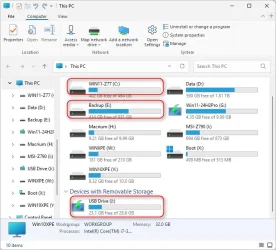
2. Boot into WinXPE. Double click on This PC to identify which drive your Windows was installed, and which drive is your Windows Installation USB
3. Next, open the command prompt and type:
dism /image:C:\ /cleanup-image /restorehealth /source:J:\sources\install.wim:6 /ScratchDir:E: /limitaccess
This will fix corrupted Windows Components. The command above based on what I have in my PC.
- C: is my Windows
- J: is the USB containing Windows Installation
- E: is used for the Scratch Dir. This can be any drive in your PC, provide enough space for dism to work on.
- Index 6 is for Windows 11 Pro
Here's an example to run dism in WINXPE:
ScreenShot00001.webp
ScreenShot00002.webp
 
Last edited:

My Computers

System One System Two

  • OS
    Windows 11 Pro 25H2, Linux Mint 21.3
    Computer type
    PC/Desktop
    Manufacturer/Model
    Self Build Feb.2024
    CPU
    Intel Core i9-14900K @5.8GHZ
    Motherboard
    MSI MAG Z790 Tomahawk Max WiFi 7
    Memory
    64GB (2XG Skill F5-6400J3239G32G) @6800
    Graphics Card(s)
    Radeon (TM) RX 480 Graphics (8 GB)
    Sound Card
    Intergrated Realtek
    Monitor(s) Displays
    Samsung
    Screen Resolution
    3840x2160
    Hard Drives
    1 - Crucial 705 1TB GEN5
    1 - Crucial 705 2TB GEN5
    2 - Crucial T500 2TB Gen4
    PSU
    750W EVGA-G3
    Case
    Antec NX410
    Cooling
    H2O Thermalright
    Keyboard
    Logitech K800
    Mouse
    Logitech Master 2S
    Internet Speed
    600 Mbps
    Browser
    Chrome
    Antivirus
    WD
  • Operating System
    Windows 11 Pro & Linux Mint X64
    Computer type
    PC/Desktop
    Manufacturer/Model
    MSI Z77 MPower (MS-7751)
    CPU
    Intel(R) Core(TM) i7-3770K CPU @ 4.20 GHz
    Motherboard
    Z77 MPower (MS-7751)
    Memory
    32.0GB Dual-Channel CMY16GX3M2A1600C9
    Graphics card(s)
    NVIDIA GeForce GT 740
    Monitor(s) Displays
    40" Samsung
    Screen Resolution
    1920X1080
    Hard Drives
    WIN10 - 111GB Samsung SSD 840 Series
    WIN11 - 223GB Crucial CT240BX500SSD
    2X931GB Crucial CT1000BX500SSD1
    PSU
    Antec 850W
    Case
    Antec 900
    Cooling
    H20
    Keyboard
    Logitech K800 Wireless
    Mouse
    Logitech MX Master 2S
    Internet Speed
    100 Mbps
    Browser
    Chrome
    Antivirus
    Windows Defender
Thanks @Topgundcp for the help! Thanks for the awesome tools that you have shared here that have helped me in debugging my PC faster.
 

My Computer

System One

  • OS
    Windows 11 24H2
    Computer type
    PC/Desktop
    CPU
    Intel i5 @2.90 GHz Coffee Lake 14nm Technology
    Motherboard
    Gigabyte H320 M S2 2.0
    Memory
    16 GB Dual Channel DDR4
    Graphics Card(s)
    HP M22f FHD 2047MB NVIDIA GeForce GT 710
    Sound Card
    Realtek High Definition Audio
    Monitor(s) Displays
    1
    Screen Resolution
    1920 x 1080
    Hard Drives
    1 TB Crucial SSD (Bootable Win 11)
    1 500 GB WD HDD
    1 1TB Toshiba HDD
    PSU
    N/a
    Case
    N/a
    Cooling
    N/a
    Keyboard
    Logitech
    Mouse
    Intex
    Internet Speed
    100 Mbps
    Antivirus
    360 Security
Hi,

I am getting the same error message about the inaccessible boot drive and the same other boot error screenshots.
I have so far tried every suggestion in this thread, I tried a Windows repair but cant seem to find such a thing
In winre non of the uninstall updates work, the system recover can find a recovery point but does not do anything
I'm up to trying to the last dism command.
My hardware seems fine, all my files seem to exist. chkdsk doesn't reveal any errors. Tried all the bcd/boot/efi commands
I have winxpe installed on a USB disk, I tried the macrium reflect thing
I ordered another USB and will install the win11 iso image onto that when it arrives later today
 

My Computers

System One System Two

  • OS
    Win11Pro 25H2 26200.6899
    Computer type
    PC/Desktop
    Manufacturer/Model
    Custom build
    CPU
    AMD 5950
    Motherboard
    ASRock B550
    Memory
    128GB
    Graphics Card(s)
    RTX6900XT
    Sound Card
    built-in
    Monitor(s) Displays
    2
    Screen Resolution
    2 x 4k
    Hard Drives
    M2 1TB, 500GB
    HDD 4TB, 3x2TB as storage
    PSU
    850W
    Case
    Large case
    Cooling
    air
    Keyboard
    G915
    Mouse
    G502
    Internet Speed
    1000/100 Mbit/s
    Browser
    Chrome
    Antivirus
    Windows builtin
    Other Info
    PC is contains parts upto 4 years old
    Backuped to iDrive
  • Operating System
    win11
    Computer type
    PC/Desktop
    Manufacturer/Model
    unknown
    CPU
    AMD
    Memory
    16GB
    Graphics card(s)
    Nvidia 1060
    Monitor(s) Displays
    TV
    Hard Drives
    128GB
    Case
    mini
    Cooling
    water
    Keyboard
    remote
    Mouse
    remote
    Internet Speed
    fast
    Browser
    Edge
    Other Info
    I additionally have a laptop and some tiny brick PC both running win11
    Non windows I have 2 x chromeOS, RPI system and a remote server
Back
Top Bottom