WIndows 11 cannot maintain stable internet connections


zlloyd

New member
Local time
9:40 AM
Posts
1
OS
Windows 11
I have a Dell laptop that runs Windows 11 22H2. and it cannot seem to handle a reliable WiFi connection to the internet....
While checking the Network icon on the toolbar WiFiFailure1.png seems to show a strong WiFi Network connection, and even claims it is Secured, and can connect to the internet, which I am doing now, the vast majority of websites, as well as applications that require internet connectivity to function, cannot connect. WiFiFailure2.png
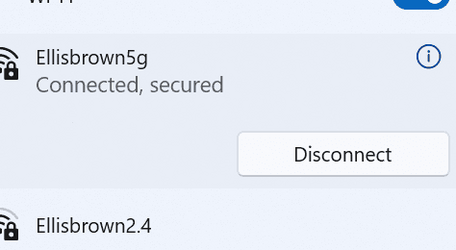

I cannot understand how I can have a solid, very fast internet connection, WiFiFailure3.png but not be allowed to visit websites, nor use apps that need internet to work.
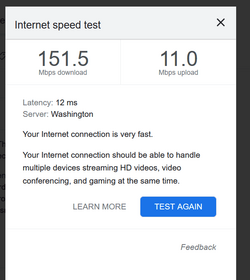
However, I am very familiar with how terrible Windows 11 is at using WiFi internet, much the same I have been told as Windows 10 was. I simply cannot understand how they have managed to somehow program selective internet failure into their operating systems. Yet they seem to have managed to virus their systems to have some limited internet connectivity, while not allowing the surfing of the web, or any connectivity for applications.
How is this the world's top computer company, when they cannot even figure out how to handle WiFi internet??
 

My Computer

System One

  • OS
    Windows 11
You can be connected to your WiFi but that doesn't mean you have an internet connection from there. I have many networks at home but only some of them can route out to the internet. There can be many reasons why you can't from routing, firewalls, Antivirus software.
I have found Win10 and 11 to connect perfectly 100% of the time to the internet.

More details need
 

My Computer

System One

  • OS
    Windows 11
    Computer type
    PC/Desktop
    Manufacturer/Model
    ASUS ROG MAXIMUS Z890
    CPU
    Intel Core Ultra 9 285K CPU
    Motherboard
    ASUS ROG MAXIMUS Z890 HERO ATX Motherboard
    Memory
    G.SKILL Ripjaws M5 RGB for Intel XMP 64GB 6400Mhz DDR5
    Graphics Card(s)
    ASUS ROG ASTRAL NVIDIA GeForce RTX 5090 OC GAMING 32GB GDDR7
    Sound Card
    N/A
    Monitor(s) Displays
    BENQ 36"
    Screen Resolution
    3840x2160
    Hard Drives
    Crucial P510 2TB NVMe M.2 Gen5
    Samsung 990 Pro 4TB M.2 NVMe Internal SSD
    PSU
    ASUS ROG THOR 1200W Platinum III ATX 3.1
    Case
    ASUS ROG Strix Helios Gaming Case with Tempered Glass
    Cooling
    ASUS ROG RYUO IV 360 ARGB Black All in one Water Cooling
    Keyboard
    G510S
    Mouse
    Dell Standard
    Internet Speed
    1Gb
    Browser
    Google Chrome
    Antivirus
    None
  • Like
Reactions: OAT
Welcome to the forum. Try these suggestions

1. Remove power from both router and internet modem. Wait 20 seconds. Power on modem. Power on router.

2.. Run network troubleshooter settings-system-troubleshoot-other troubleshooters-internet connections-run

3.. Reset your network adapters Reset Network Adapters in Windows 11 Tutorial

4. reset network components using attached @FreeBooter batch file. Run it as administrator. Restart.

5. Delete wireless profile, restart laptop, and then re-establish new wireless profile. How to Delete Wireless Network Profiles in Windows 11 / 10 / 8 / 7 | Password Recovery
 

Attachments

Last edited:

My Computers

System One System Two

  • OS
    Windows 11 Pro 25H2 26200.8655
    Computer type
    PC/Desktop
    Manufacturer/Model
    Dell Optiplex 7080
    CPU
    i9-10900 10 core 20 threads
    Motherboard
    DELL 0J37VM
    Memory
    32 gb
    Graphics Card(s)
    none-Intel UHD Graphics 630
    Sound Card
    Integrated Realtek
    Monitor(s) Displays
    Benq 27
    Screen Resolution
    2560x1440
    Hard Drives
    2x1tb Solidigm m.2 nvme /External drives 512gb Samsung m.2 sata+2tb Kingston m2.nvme
    PSU
    500w
    Case
    MT
    Cooling
    Dell Premium
    Keyboard
    Logitech wired
    Mouse
    Logitech wireless
    Internet Speed
    so slow I'm too embarrassed to tell
    Browser
    #1 Edge #2 Firefox
    Antivirus
    Defender+MWB Premium
  • Operating System
    Windows 11 Pro 24H2 26200.8457
    Computer type
    PC/Desktop
    Manufacturer/Model
    Beelink Mini PC SER5
    CPU
    AMD Ryzen 7 6800U
    Memory
    32 gb
    Graphics card(s)
    integrated
    Sound Card
    integrated
    Monitor(s) Displays
    Benq 27
    Screen Resolution
    2560x1440
    Hard Drives
    1TB Crucial nvme
    Keyboard
    Logitech wired
    Mouse
    Logitech wireless
    Internet Speed
    still too embarrassed to tell
    Browser
    Firefox
    Antivirus
    Defender
    Other Info
    System 3 is non compliant Dell 9020 i7-4770/24gb ram Win11 PRO 26200.8457
Let's have some more info
Where are you located?
Who is your internet service provider?
What is the make and model of your router and or modem?
 

My Computers

System One System Two

  • OS
    Windows 11 Pro 25H2 26200.8655
    Computer type
    Laptop
    Manufacturer/Model
    Acemagic LX15PRO
    CPU
    AMD Ryzen 7 5825U with Radeon Graphics
    Memory
    16GB
    Screen Resolution
    1920 x 1080
    Hard Drives
    SSD 2TB
    Internet Speed
    30 Mbps
    Browser
    Brave
    Antivirus
    Webroot Secure Anywhere
    Other Info
    System 3

    Acer Swift SF114-34 laptop
    OS Windows 11 Pro 26200.8524
    CPU Pentium Silver N6000
    RAM 4GB
    SSD Samsung 970 EVO Plus SSD 2TB (an upgrade)
  • Operating System
    Windows 11 Pro 23H2 22631.2506
    Computer type
    Laptop
    Manufacturer/Model
    HP Mini 210-1090NR PC (bought in late 2009!)
    CPU
    Atom N450 1.66GHz
    Memory
    2GB
    Browser
    Brave
    Antivirus
    Webroot
don't forget WiFi Driver updates too.
if we only knew which DELL laptop you have I could get the download page links..
but DELL laptops come with a DELL update app.
 

My Computers

System One System Two

  • OS
    Windows 11 Pro (x64)(v25H2)(26200.8655)
    Computer type
    PC/Desktop
    Manufacturer/Model
    [Self-built](custom-build)(June 2020)
    CPU
    AMD Ryzen 9 3900X 12-Core/24-threads
    Motherboard
    Asus PRIME X570-PRO (BIOS_r5044 [01/04/2026])
    Memory
    64GB, 2x G.Skill 32GB (PC3200)(DDR4-2137)
    Graphics Card(s)
    ASUS PRIME GeForce RTX 5070 12GB OC Edition, GPU by NVIDIA.
    Sound Card
    Realtek® ALC1220A 8-Channel High Definition Audio CODEC
    Monitor(s) Displays
    24" DELL Gaming Monitor - G2422HS - DisplayPort used
    Screen Resolution
    1920x1080p at 165Hz (16:9 Aspect Ratio)
    Hard Drives
    2TB Samsung 980 Pro (NVMe)(SSD)
    4TB Samsung 990 Pro (NVMe)(SSD)
    2TB Samsung 870 EVO (SSD)

    NVMe 2TB
    -- OS(Win11 Pro x64),
    -- programs,
    -- programming(MS Visual Studios 2022 Community Ed.),
    -- music

    NVMe 4TB
    video game installs.

    #3 FILE Server!
    PSU
    Thermaltake TOUGHPOWER DPS G RGB Titanium Certified 1250Watt
    Case
    Corsair Graphite Series 780T Full Tower PC Case
    Cooling
    AMD Wraith cooler (stock) & 3x Corsair case fans
    Keyboard
    Redragon K580 VATA RGB LED Backlit Mechanical Gaming Keyboard (brown switches).
    Mouse
    Redragon M602 RGB Wired USB Gaming mouse
    Internet Speed
    2,100Mbps Download, 300Mbps Upload
    Browser
    Firefox & Google Chrome
    Antivirus
    n/a aka "ABOVE TOP SECRET!" lol ;)
    Other Info
    My System is the ULTIMATE GAMING RIG ^_^
    TP-Link BE9300 Tri-Band Wi-Fi 7 Wireless 2.5Gigabit Router
    Model Archer BE550 (v1.0)
    Arris S34 Cable Modem

    printer/scanner/copier: Brother DCP-7065DN

    Nvidia GFX Drivers: (v610.52hf)
    Realtek UAD Drivers: (v6.0.9995.1)
    Realtek LAN Drivers:(v1125.29.50.202)(2026-04-19)
    Intel LAN Drivers: (v14.01.24.00)(2025-10-03)
  • Operating System
    Windows 11 Pro x64
    Computer type
    Laptop
    Manufacturer/Model
    DELL G15 Ryzen edition, model 5515
    CPU
    AMD Ryzen 7 5800H
    Motherboard
    DELL G15 Ryzen edition
    Memory
    32GB GSkill DDR4 2x 16GB sticks
    Graphics card(s)
    Ryzen 7 5800H integrated AMD Radeon Graphics and Nvidia GeForce 3060 6GB
    Sound Card
    Realtek ALC3254 with Nahimic 3D Audio for Gamers
    Monitor(s) Displays
    built-in
    Screen Resolution
    1920x1080
    Hard Drives
    512GB NVMe SSD, 1TB Samsung 970 EVO NVMe SSD
    PSU
    unknown
    Case
    laptop
    Keyboard
    built-in
    Mouse
    Logitech B100 USB
    Internet Speed
    2,100Mbps download, 300Mbps upload
    Browser
    Firefox & Google Chrome

Latest Support Threads

Back
Top Bottom